Auto sl tp manual trades

Auto SL & TP for Manual Trades – MT5

Application Overview

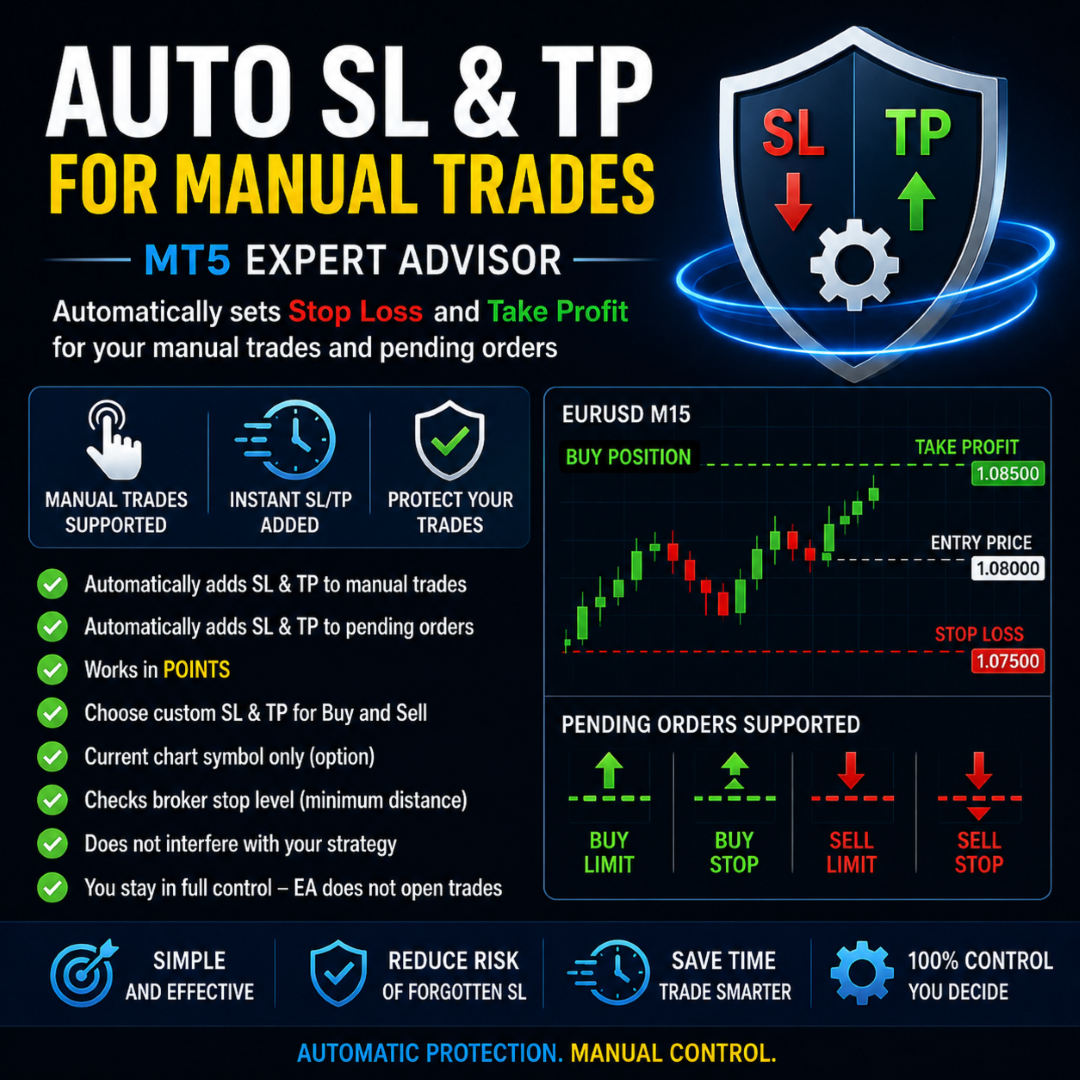
Auto SL & TP for Manual Trades is a simple and practical Expert Advisor for the MetaTrader 5 platform that automatically applies Stop Loss and Take Profit levels to manually opened trades as well as pending orders.

The EA is designed primarily for traders who execute trades manually but want the assurance that every position is immediately protected with predefined Stop Loss and Take Profit levels.

The Expert Advisor works in points and can be configured to operate only on the current chart symbol.

What the Application Does

Once attached to a chart, the Expert Advisor continuously monitors all open positions and pending orders.

If it detects a trade without a Stop Loss or Take Profit, it automatically applies the predefined values according to the user's settings.

For BUY positions, it sets:

  • Stop Loss below the entry price
  • Take Profit above the entry price

For SELL positions, it sets:

  • Stop Loss above the entry price
  • Take Profit below the entry price

The same logic is applied to pending orders, including:

  • Buy Limit
  • Buy Stop
  • Sell Limit
  • Sell Stop
How the Application Works
  1. Attach the Expert Advisor to a MetaTrader 5 chart.
  2. Configure the desired Stop Loss and Take Profit values in points.
  3. Open a manual trade or place a pending order.
  4. The EA automatically checks the position or order.
  5. If no Stop Loss or Take Profit is assigned, the EA immediately applies them.
  6. If the trade already has both SL and TP, the EA leaves it unchanged.

The Expert Advisor does not open trades automatically. Its only purpose is to manage protective Stop Loss and Take Profit levels.

Key Features
  • Automatic Stop Loss for BUY trades
  • Automatic Take Profit for BUY trades
  • Automatic Stop Loss for SELL trades
  • Automatic Take Profit for SELL trades
  • Supports manually opened trades
  • Supports pending orders
  • Configurable values in points
  • Option to manage only the current chart symbol
  • Automatically checks the broker's minimum Stop Level requirements
  • Detailed status messages in the MetaTrader log
Advantages

✅ Easy to use

✅ Perfect for manual traders

✅ Automatically protects trades with Stop Loss and Take Profit

✅ Reduces the risk of forgotten Stop Loss orders

✅ Supports both market and pending orders

✅ Works in points, fully compatible with MetaTrader 5

✅ Does not interfere with your trading strategy

✅ Does not open trades automatically

✅ You remain in full control of every trade

✅ Can operate on a single symbol only

Disadvantages

❌ Does not generate trading signals

❌ Does not open trades automatically

❌ No trailing stop functionality

❌ No percentage-based money management

❌ If the broker's minimum stop distance is too large, SL and TP may not be applied

❌ Works only while MetaTrader 5 and the Expert Advisor are running

Who Is It Suitable For?

This Expert Advisor is ideal for:

  • Manual traders
  • Scalpers
  • Intraday traders
  • MetaTrader 5 beginners
  • Traders who frequently forget to set Stop Loss or Take Profit
  • Users looking for simple trade protection
  • Forex, Gold (XAUUSD), Index, and CFD traders
Who Is It Not Suitable For?

This application is not intended for traders looking for a fully automated trading robot.

It does not include an entry strategy, technical indicators, or automatic trade execution.

Instead, it serves as a reliable trade management tool for manually opened positions.

Technical Information

Platform: MetaTrader 5

Programming Language: MQL5

Application Type: Expert Advisor

Trading Method: Manual trade management (SL & TP)

Calculation Method: Points

Supported Orders: Market positions and pending orders

Supported Symbols: Current chart symbol or all symbols (depending on settings)

Automatic Trade Entries: No

Sales Summary

Auto SL & TP for Manual Trades is a practical MetaTrader 5 Expert Advisor designed to protect manually opened trades by automatically applying predefined Stop Loss and Take Profit levels. It helps reduce trading mistakes, improves risk management, and saves valuable time.

This EA is the perfect solution for traders who prefer manual trading but want every position to be protected immediately after execution. Thanks to its simple setup and full support for pending orders, it is suitable for everyday trading on Forex, Gold (XAUUSD), Indices, and other CFD instruments.


추천 제품
Risk Calculator Veqrix
Jose Luis Heredia Padilla
Risk Calculator Veqrix  Risk Calculator Veqrix is a risk calculation, visual trade planning, and manual order execution tool for MetaTrader 5. The EA automatically calculates the trade volume using the configured risk, entry price, and distance to the Stop Loss. It also displays the planned trade directly on the chart and distributes the total volume across up to three Take Profit targets. This tool does not generate trading signals . The user selects the direction, configures the levels, and
FREE
Prop Firm Challenge Tracker Prop Firm Challenge Tracker 는 프로프 펌(Prop Firm)의 평가 규칙을 사용자의 MetaTrader 5 계좌에 적용하는 유틸리티 도구입니다. 이 도구는 수익 목표, 일일 손실 제한(Daily Drawdown), 최대 손실 제한(Maximum Drawdown)을 실시간으로 추적하고 현재 평가 상태를 차트에 직접 표시합니다. 이 도구는 실제 펀딩 계좌 평가(Challenge)에 비용을 지불하기 전에, 평가 통과에 필요한 거래 규율과 리스크 관리 능력을 연습하고 싶은 트레이더를 위해 설계되었습니다. 이 도구는 자체적으로 주문을 생성하거나, 거래를 수정하거나, 새로운 거래를 실행하지 않습니다. 단순히 계좌에서 이미 발생하고 있는 거래 활동(수동 거래 또는 다른 Expert Advisor가 실행한 거래)을 감시하고 사용자가 설정한 규칙을 적용합니다. 또한 현재 연결된 차트의 종목뿐만 아니라 계좌에서 거래되는 모든 심
Take your trading to the next level with Professional Trade Management , a comprehensive tool for managing your trades on MetaTrader 5. Designed for traders who want precise control, enhanced safety, and intelligent automation of daily trading tasks. Key Features: Smart Trailing Stop: Automatically protects profits when targets are reached. Auto Breakeven: Adjusts stop-loss to secure profits once a threshold is hit. Partial Close: Close portions of your trades at predefined profit levels. News
All the rules of your prop firm challenge in one EA: daily loss limit, max drawdown (static or trailing), profit target, max trades per day, max lot, max open positions, stop loss required, trading hours and Friday close. When a trade breaks a rule, it is closed automatically. Most challenges are not lost because of bad strategy. They are lost because of one rule break: a daily loss a few dollars over the limit, one trade too big, a position left open over the weekend. Prop Firm Rules Guard watc
EasyTrade Pro - MT5 수동 트레이딩 패널 EasyTrade Pro와 함께 더 빠르고, 더 간편하며, 더 효율적으로 거래하세요. EasyTrade Pro는 빠른 주문 실행과 중요한 시장 정보를 차트에서 바로 확인하고자 하는 트레이더를 위해 설계된 가볍고 직관적인 수동 트레이딩 패널입니다. 복잡한 설정이 필요 없습니다. 불필요한 지표도 없습니다. 매일 실제로 필요한 기능만 제공합니다. 주요 기능 원클릭 BUY / SELL 주문 모든 포지션 일괄 청산 Stop Loss 및 Take Profit 설정 Break Even 기능 Trailing Stop 기능 빠른 로트 크기 프리셋 실시간 Open P/L 표시 일일 수익 추적 승률(Win Rate) 통계 Profit Factor 통계 실시간 스프레드 모니터링 시장 세션 표시 현재 캔들 카운트다운 타이머 깔끔하고 컴팩트한 인터페이스 추천 대상 스캘퍼 데이 트레이더 수동 트레이더 XA
FREE
Boleta RTrader
Rubens Pergentino Da Silva
Boleta RTrader - A Boleta Mais Completa para MetaTrader 5 A ferramenta definitiva para traders que buscam precisão, agilidade e controle total sobre suas operações no MetaTrader 5. **IMPORTANTE**: É aconselhável desabilitar no gráfico do MT5 o histórico de negociações somente quando for usar saídas parcias e precisar movimentar a ordem parcial para evitar delay. --- PRINCIPAIS FUNCIONALIDADES: EXECUÇÃO DE ORDENS **Compra e Venda Instantâneas**: Execute ordens a mercado com um único clique **
Amazing Edge Maker
Satendra Kumar Gupta
Amazing XAU Edge Maker Overview Amazing XAU Edge Maker is an Expert Advisor for MetaTrader 5 designed to automate trading using configurable entry methods, position management, and risk management tools. It is optimized for XAU/USD (Gold) but can also be configured for other symbols supported by your broker. The EA combines signal-based trading with flexible trade management, allowing traders to customize its behavior according to their trading strategy. Main Features Trading Modes Signal Tradin
RRtoolBox
David Ruiz Moreno
RRtoolbox - Professional Tools: Risk:Reward Trading Tool (SL/TP Horizontals + Pending orders + Diagonals), Alerts set on trend lines (for alerts on diagonal levels), SelfManagement (BE, partials...), close/cancelling by time, Statistics, Info and trading on chart. One-Click Trading with Visual Risk:Reward Management RRtoolbox is a comprehensive trading panel that combines one-click order execution,  statistics and  powerful visual Risk:Reward tools, alerts set with trendlines, on chart butt
QuickBar Pro MT5
Sergio Marquez Uroz
QuickBar Pro는 MetaTrader 5용 트레이드 매니저이자 원클릭 트레이딩 패널입니다. 설정한 위험에서 랏을 계산하고, 손절·익절 선을 차트에서 직접 끌어 옮길 수 있으며, 본전 이동과 부분 청산, 트레일링 스탑까지 차트를 가리지 않는 한 줄에 담았습니다. 단계별 사용 가이드: QuickBar Pro — MetaTrader 5 및 4용 트레이드 매니저: 사용 가이드 빠르게 판단해야 하고 한눈팔 여유가 없는 스캘퍼와 데이트레이더를 위해 만들었습니다. 떠다니는 창도, 화면 절반을 차지하는 패널도 없습니다. 차트 상단의 작은 막대 하나에 주문과 관리에 필요한 것이 모두 들어 있습니다. 설정한 위험에 맞는 랏 위험은 잔고의 비율로도, 고정 금액으로도 입력할 수 있습니다. 패널은 사용 중인 브로커의 계약 명세로 랏을 계산하므로, 실제로 걸리는 금액이 곧 지정한 금액입니다. 외환은 물론 금, 지수, 암호화폐에서도 마찬가지입니다. 설정한 위험이 최소 랏에도 못 미치면, 선택하지 않은
ZF Equity Protector Premium v2.0 The Ultimate Daily Loss Breaker for Smart Traders & Prop Firm Hunters Have you ever blown a Prop Firm account just because of "one bad day"? Or has emotional revenge trading destroyed weeks of hard-earned profits in a matter of hours? Put an end to account destruction right now. ZF Equity Protector Premium v2.0 is an advanced automated safety system (EA) specifically engineered to be your capital's ultimate line of defense. This EA acts as a cold, calculated circ
Professional risk management utility. Auto lot-size calculator + live risk panel. Works alongside any other EA — does not open trades independently. - **Auto lot size**: calculated from % risk per trade + SL distance in pips + balance - **Live dashboard**: Balance | Equity | Drawdown % | Suggested Lot | R:R ratio - **Daily drawdown alert**: notification when daily DD exceeds threshold - **Auto-close option**: closes all positions on daily DD breach (configurable) - Zero trade opening — purely a
Smart Round Levels
Sebastian Omar Saralegui
Smart Round Levels 는 심리적 레벨이라고도 불리는 라운드 넘버 레벨을 차트에 자동으로 그려줍니다. 외환 통화쌍, 금속, 지수, 암호화폐 등 모든 종목에서 작동합니다. 차트에 추가하기만 하면 해당 종목에 맞는 간격으로 레벨이 나타나며, 따로 설정할 필요가 없습니다. 도움이 되셨다면 리뷰 탭에 별점과 짧은 댓글을 남겨 주세요. 이 도구를 계속 개선하는 데 큰 도움이 됩니다. 감사합니다. 단계를 정하는 방법 단계는 두 주요 레벨 사이의 거리이며 차트 가격으로 측정합니다. 자동 모드에서는 최근 20일의 평균 일일 변동폭을 측정하고 그에 가까운 깔끔한 숫자(1, 2 또는 5에 10의 거듭제곱을 곱한 값)를 고릅니다. 예를 들어 EURUSD는 보통 0.0100, USDJPY는 1.00, 금은 100을 선택합니다. 주봉과 월봉에서는 단계가 다음 라운드 넘버로 올라가므로 레벨이 사라지거나 차트가 복잡해지지 않습니다. 모든 타임프레임에서 선을 고정하고 싶다면 이 기능을 끌 수
FREE
Horus Auto SL TP Scalping manages existing MT5 positions with independent Auto SL, Auto TP and Profit Lock switches. It does not open trades. By default it manages manual positions on the chart symbol. Initial SL uses closed M1 ATR(14), a 1.2 multiplier, spread clearance and broker distance constraints. Existing stops are never widened. Profit Lock activates when executable price gain strictly exceeds the current spread. It trails a configurable share of price gain (default 70%), subject to
UTrailingMinMT5
Viktor Shpakovskiy
The EA for manual trading to manage open positions.The built-in trailing stop has five modes and seven instruments. There is a virtual stop loss and a virtual take profit, which can be freely moved around the chart. With the help of the built-in trading simulator, you can check how the EA works in the strategy tester. Guide to UTrailingMinMT5 can be found in the "Comments" section. In the MT5 strategy tester, manual movement of virtual SL and TP lines according to the schedule does not work! Ben
Golden Gestion TP SL No Limit MT5
Matthias Hubert Patrick Snidaro
Auto SL/TP Manager EA – Gestion Automatique Intelligente Auto SL/TP Manager EA est un Expert Advisor conçu pour automatiser la gestion des commandes avec une efficacité maximale et une grande discrétion. Il gère automatiquement : Le Stop Loss (SL) et le Take Profit (TP) Le Profit Lock (verrouillage progressif des bénéfices) Le Trailing Stop avec plusieurs méthodes avancées L' affichage masqué du SL et du TP pour plus de discrétion (non visible par le courtisan) C'est l'outil idéal pour les
Auto Fib Retracements
Ross Adam Langlands Nelson
4.2 (5)
Automatic Fibonacci Retracement Line Indicator. This indicator takes the current trend and if possible draws Fibonacci retracement lines from the swing until the current price. The Fibonacci levels used are: 0%, 23.6%, 38.2%, 50%, 61.8%, 76.4%, 100%. This indicator works for all charts over all timeframes. The Fibonacci levels are also recorded in buffers for use by other trading bots. Any comments, concerns or additional feature requirements are welcome and will be addressed promptly. 
FREE
Ultra Charts
Tinashe Ndarimani
Ultra Charts - Advanced Custom Chart Types for MT5 Get Manual Here! Get The Free Ultra Charts Trader Here! Ultra Charts is a comprehensive charting solution that brings professional-grade alternative chart types to MetaTrader 5. This Expert Advisor provides traders with multiple custom chart formats beyond standard time-based candlesticks, enabling enhanced technical analysis and pattern recognition. Chart Types Included The product includes six distinct chart types, each designed to filter mark
FREE
TCT COMPLETE BUNDLE - All 7 Panels COMPLETE COMBO WITH ALL INDICATORS Get all 7 TCT panels at a special price and have every trend analysis tool right at your fingertips! PACKAGE INCLUDES TCT ADX PANEL (Direction & Strength) TCT RSI PANEL (Overbought/Oversold) TCT CCI PANEL (Channels & Breakouts) TCT MACD PANEL (Momentum) TCT MA PANEL (Moving Average) TCT SAR PANEL (Parabolic Stop) TC
LKLK Smart Panel
Karel Salotti Bastos
LKLK Smart Panel — The Professional One-Click Trading Panel for Manual Scalpers Take full control of your discretionary trading with a fast, elegant, and fully customizable control panel built directly on your chart. LKLK Smart Panel was designed for traders who execute manually and need speed, clarity, and real-time performance feedback — without ever leaving the chart. WHY LKLK SMART PANEL? Manual scalping and discretionary trading demand split-second execution. Switching between menus, ty
FREE
Automatically plots the 'Golden Fibonacci Ratio’ between the High and Low of the previous day... ...Highs and Lows are great Support and Resistance zones. Breakouts of Fibonacci levels are key points for entry and exit of trades. Pink lines indicate that the previous day's Candle closed lower. Blue colored lines indicate that the previous day's Candle closed higher.
ATR Stop Loss Manager— Smarter Risk Awareness for Forex Traders Confident trading begins with clear risk management. The ATR Stop Loss Expert is a powerful utility tool that automatically adjusts your stop-loss levels using ATR (Average True Range) — a proven volatility measure — so your trades are protected by logic, not guesswork. What This Tool Does This EA monitors your open trades and sets a stop-loss based on recent market volatility, calculated from the ATR indicator. It doesn’t place t
FREE
VM Auto SLTP Pro
Van Minh Nguyen
5 (2)
VM Auto SLTP Pro - Advanced Order and Risk Management EA VM Auto SLTP Pro는 MetaTrader 5를 위한 전문적인 거래 관리 및 리스크 관리 Expert Advisor입니다. 수동으로 또는 다른 Expert Advisor에 의해 열린 포지션에 대해 Stop Loss, Take Profit, Trailing Stop, Breakeven 및 Partial Close를 자동으로 설정하고 관리합니다. 또한 자동 랏 계산, Recovery 모드, Prop Firm 필터, 뉴스 및 세션 필터, 예약 주문 도구와 Smart Money Concepts (SMC) 기능을 제공하며, 모든 기능은 깔끔한 차트상의 패널을 통해 제어할 수 있습니다. 전체 문서는 제품 블로그에서 확인할 수 있습니다: [User Guide] EA는 ATR, 고정 포인트, 고정 가격, USD 금액, 잔고 대비 비율 및 리스크 기반 포지션 크기 계산을 포함한 다양한 방법
PropPilot – Prop Firm Risk & Trade Manager PropPilot is a professional risk management and manual trading utility for MetaTrader 5, designed for Prop Firm Challenges, Funded Accounts and Personal Accounts. It helps you calculate risk, execute manual trades, monitor Daily and Maximum Drawdown, manage open positions and keep your account rules visible from one clean dashboard. PropPilot does not automatically choose trade entries. You remain in control of BUY and SELL decisions while PropPilot
Prop Firm Guard Pro
Shanawaz Mohammed Nabi Rasool Pinjori
Prop Firm Guard Pro protects a prop firm challenge or funded account from breaking its risk rules. It watches the whole account every second and, when a rule is broken, closes the positions, deletes pending orders and blocks new trades for as long as the rule requires. It works with manual trading and with any other Expert Advisor on the same account. It never opens trades on a live chart. Rules it enforces Daily loss limit - measured from the balance, the equity or the higher of the two at the
ArcTracer
Syed Oarasul Islam
This Indicator draws Fibonacci Arc levels in two different ways. You can select whether to draw Fibonacci Arc levels based on your favourite ZigZag settings or you can let the indicator to draw Arc levels based on given number of bars or candles.  You can also set Mobile and Email notification for your favourite Arc levels individually. With this indicator you will not have to feel lonely as the it can generate Voice alerts, which will keep you focused on your trading and remove boredom.  Produc
General Description Auto SL/TP Manager is a professional utility for MetaTrader 5 designed to automate the management of Stop Loss and Take Profit levels on open positions. The levels are calculated based on monetary risk values defined by the user, rather than fixed pip distances. This tool helps maintain consistent risk discipline without manual intervention. Main Functionality The EA continuously monitors all open positions and automatically applies Stop Loss and Take Profit levels when they
Fvg Edge
Ahmad Meftah Abdulsalam Alawwami
5 (3)
FVG Smart Zones – 무료 버전 MetaTrader 5 (MT5)용 공정 가치 갭(FVG) 탐지 지표 단순한 지표가 아닌 실제 트레이딩 도구 를 찾고 계신가요? FVG Smart Zones – 무료 버전 은 **공정 가치 갭(FVG)**을 자동으로 감지하고 차트에 고확률 거래 구역 을 표시하여 전문적인 시장 통찰력을 제공합니다. 다음을 따르는 트레이더를 위해 설계됨: 스마트 머니 컨셉(SMC) ICT 트레이딩 컨셉 가격 행동(Price Action) 수요와 공급 분석 기관 트레이딩 전략 이 지표는 가격이 반응할 가능성이 높은 구역 에 집중할 수 있도록 도와줍니다. 주요 기능: 스마트 존 감지 상승 및 하락 FVG 자동 감지 깔끔하고 전문적인 시각적 구역 약하거나 관련 없는 갭 제거를 위한 지능형 필터링 고급 확인 기능 상위 시간대(HTF) 컨플루언스 확인 가격이 채워지면 유효하지 않은 구역 자동 제거 활성 구역과 채워
FREE
Product Name: Anchor auto TP and SL Trade Manager Pro MT5 The ultimate manual assistant. Turns trades into auto-grids with Hedging, Zero-Loss Breakeven & Spread Detection. Your manual trade will be managed automatically. Anchor Auto TP and SL Trade Manager MT5 Pro is the advanced edition of our popular trade assistant. It transforms simple manual trades into sophisticated, professional-grade recovery grids. Unlike the free version, this PRO edition fully supports Hedging (simultaneous Buy & Sell
Price Ray
Keni Chetankumar Gajanan -
5 (7)
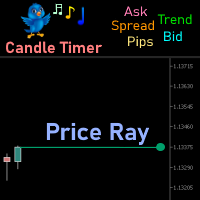
Price Ray indicator is a utility that will improve the way you trade. Primarily, it shows the Bid, Ask or Last price as a line ray which beams till the current candle, last visible chart candle or extended to all candle bars. The enhanced features in this indicator provide information in an area where you focus most, right next to the current candle. You can select text to be shown above or below the Price ray. The indicator is fully customizable, allowing it to fit any strategy requirements. Th

FREE
" Blow It Up!" - The Trading Indicator That Questions Your Life Choices Tired of boring indicators? Meet your new market companion that delivers: "YOLO BUY!" arrows when you should probably panic Explosive rectangle confetti (because why not?) 200+ soul-crushing quotes like "Your stop loss is imaginary" and "This is n't trading, it's donating to whales" Random alerts that roast your strategy This Indicator is lik e Therapy - Because daytrading shouldn't fe el like watching paint dry! Highlights
이 제품의 구매자들이 또한 구매함
Trade Assistant MT5
Evgeniy Kravchenko
4.43 (216)
거래당 위험 계산, 라인을 사용한 손쉬운 신규 주문, 부분 청산 기능을 통한 주문 관리, 7가지 유형의 트레일링 스탑 및 기타 유용한 기능을 제공합니다. 추가 자료 및 지침 설치 지침   -   애플리케이션 지침   라인 기능       - 차트에 개시선, 손절매, 차익실현을 표시합니다. 이 기능을 사용하면 새로운 주문을 쉽게 하고 개봉 전에 추가 특성을 볼 수 있습니다. 위기 관리       -       위험 계산 기능은 설정된 위험과 손절매 주문의 크기를 고려하여 새 주문의 볼륨을 계산합니다. 이를 통해 손절매 크기를 설정하고 동시에 설정된 위험을 존중할 수 있습니다. 로트 계산 버튼 - 위험 계산을 활성화/비활성화합니다. 필요한 위험 값은 위험 필드에 0에서 100 사이의 백분율 또는 예금 통화로 설정됩니다. 설정 탭에서 위험 계산 옵션을 선택합니다. $ 통화, % 잔액, % 지분, % 자유 마진, % 사용자 정의, % AB 이전 일, % AB 이전 주, % AB 이전
Farmed Hedge Yield Farming | All Markets (Manual - Hybrid - Semi/Automated EA) VERIFIED TRADING RESULTS - Farmed Hedge Yield Axi Copy:  https://www.mql5.com/en/signals/2356376 - Farmed Hedge Yield Exn Copy:   https://www.mql5.com/en/signals/2356404 - Farmed Hedge Yield V Copy:  https://www.mql5.com/en/signals/2357156 IMPORTANT NOTICE: FarmedHedge is a MANUAL-FOCUSED TRADING UTILITY ,not a fully automated EA. Results shown on this Signal include manual trades and overall strategic management.
Trade Manager EA에 오신 것을 환영합니다. 이 도구는 거래를 보다 직관적이고 정확하며 효율적으로 만들기 위해 설계된 궁극적인 리스크 관리 도구 입니다. 단순한 주문 실행 도구가 아닌, 원활한 거래 계획, 포지션 관리 및 리스크 제어를 위한 종합 솔루션입니다. 초보자부터 고급 트레이더, 빠른 실행이 필요한 스캘퍼에 이르기까지 Trade Manager EA는 외환, 지수, 상품, 암호화폐 등 다양한 시장에서 유연성을 제공합니다. Trade Manager EA를 사용하면 복잡한 계산은 이제 과거의 일이 됩니다. 시장을 분석하고 진입, 손절 및 익절 수준을 차트의 수평선으로 표시한 후 리스크를 설정하면, Trade Manager가 이상적인 포지션 크기를 즉시 계산하고 SL 및 TP 값을 실시간으로 표시합니다. 모든 거래가 간편하게 관리됩니다. 주요 기능: 포지션 크기 계산기 : 정의된 리스크에 따라 거래 크기를 즉시 결정합니다. 간단한 거래 계획 : 진입, 손절, 익절을 위한
Telegram to MT5 Multi-Channel Copier   는 Telegram 및 Discord 채널의 트레이딩 시그널을 MetaTrader 5로 자동 복사합니다. 봇도, 브라우저 확장도, 수동 복사도 필요 없습니다. Telegram이나 Discord에 시그널이 도착하면 EA가 몇 초 안에 터미널에서 주문을 실행합니다. 그리고 채널을 복사하기 전에, 내장 백테스터가 그 채널이 내 계좌에서 어떤 결과를 냈을지 보여줍니다. 제품은 두 가지 구성 요소로 이루어집니다: Telegram 채널을 수신하는 Windows 애플리케이션과, MT5 터미널에서 시그널을 실행하는 본 EA입니다. MT4 버전도 제공됩니다   여기 . 구매 전에 사용해 보세요:   애플리케이션은 무료로 다운로드할 수 있습니다. 본인의 채널을 연결하고 각 시그널이 어떻게 읽히는지 확인하세요. Backtest 탭과 실제 거래에는 구매하거나 임대한 EA가 필요합니다. 이 페이지의 무료 데모는 전략 테스터에서만 실행되며
EA Overfitter
Stephen J Martret
5 (4)
That backtest looks great. But will it still be making money tomorrow, next week, next month? EA Overfitter re-runs your EA on 100 price histories it has never seen. One score tells you if the edge is real. A backtest tells you what an EA did on one price history — the one that happened to occur. What you cannot tell from it is how much of that result was the strategy and how much was the particular path. EA Overfitter answers that. It builds up to 100 synthetic price histories your EA has n
TradePanel MT5
Alfiya Fazylova
4.89 (174)
Trade Panel은 다기능 거래 도우미입니다. 이 애플리케이션에는 50개 이상의 수동 거래 기능이 포함되어 있으며 대부분의 거래 작업을 자동화할 수 있습니다. 앱 사용 설명서: https://www.mql5.com/en/blogs/post/756482 데모 계정용 앱 체험판: https://www.mql5.com/en/blogs/post/750865 앱 설치 방법: https://www.mql5.com/en/blogs/post/756239 시각 모드에서 앱 테스트 방법: https://www.mql5.com/en/blogs/post/770277 VPS MetaTrader에 앱 설치 방법: https://www.mql5.com/en/blogs/post/770190 거래. 한 번의 클릭으로 거래를 수행할 수 있습니다: 리스크 자동 계산과 함께 예약 주문 및 포지션 열기. 한 번의 클릭으로 여러 주문 및 포지션 열기. 주문 그리드 열기. 예약 주문 및 포지션을 그룹별로 닫기. 포지션
News Trade EA MT5
Konstantin Kulikov
4.55 (11)
제가 몇 년 동안 사용하고 있는 유용한 로봇을 소개드립니다. 반자동뿐만 아니라 자동 모드로도 사용할 수 있습니다. >>> Chat <<< 본 프로그램에는 경제 캘린더의 뉴스별로 유연한 거래 설정이 포함되어 있습니다. 전략 테스터에서 확인할 수 없습니다. 진짜 작업뿐입니다. 최신 설정 아카이브 다운로드: https://www.mql5.com/en/blogs/post/747929 신호 모니터링: https://www.mql5.com/en/signals/author/test-standart 이 전문가를 위해 고유 설정 세트를 만들 때 블로그의 모든 매개변수에 대한 설명을 참조하십시오: https://www.mql5.com/en/blogs/post/748545 . 기본 설정 설명 작업은 한 차트에서 GBP(GBPUSD, EURGBP, GBPJPY, GBPCAD, GBPAUD, GBPCHF)와 쌍으로 이루어집니다. GBP는 가장 변동성이 큰 통화로서 거래 수행 시 거래를 성공적으로
내 거래 규칙에 맞춰 Telegram 신호 복사 Telegram to MT5 Signal Trader 는 공개 및 비공개 Telegram 채널과 그룹의 텍스트 기반 거래 신호를 MetaTrader 5로 자동 복사합니다. 하나의 데스크톱 앱에서 여러 신호 제공자와 MT5 계좌를 관리하고, 제공자마다 위험 관리 및 거래 설정을 개별적으로 지정 할 수 있습니다. 신호 복사에는 Telegram 봇이나 API 설정이 필요하지 않습니다. 전화번호 또는 QR 코드로 본인의 Telegram 계정에 로그인한 후, 이미 가입한 채널이나 그룹을 선택하면 됩니다. 봇을 만들거나 Telegram API 토큰, API ID 또는 API 해시를 입력할 필요가 없습니다. 포지션 크기를 선택하고, 여러 익절 목표에 청산 물량을 배분하며, 손익분기점 이동과 트레일링 스톱을 자동화하세요. 제공자의 신호를 따르면서도 실제 거래 방식은 직접 설정할 수 있습니다. 이 제품은 MT5 Expert Advisor와 필수 Win
================================================================================ POC BREAKOUT - V20.72. Full Professional Grade Toolkit ================================================================================ POC Breakout is a full MetaTrader 5 trading dashboard for discretionary traders who want breakout signals, Point of Control (POC) context, volume profiles, order flow, market structure, news, alerts, and advanced trade planning in one professional workspace. Attached directly to you
The product will copy all telegram signal to MT5 ( which you are member) , also it can work as remote copier.  Easy to set up, copy order instant, can work with almost signal formats, image signal,  s upport to translate other language to English Work with all type of channel or group, even channel have "Restrict Saving Content", work with  multi channel, multi MT5 Work as remote copier: with signal have ticket number, it will copy exactly via ticket number. Support to backtest signal. How to s
다음 업데이트 — 버전 2.52 곧 출시! [신규] 시장 분석 및 트레이딩 워크플로를 향상시키기 위해 설계된 4가지 주요 신규 기능을 기대해 주세요. 트레이딩 요구 사항을 충족하도록 설계된 4가지 새로운 기능으로 시장 분석을 한 단계 더 발전시킵니다. 다음 기능을 소개합니다: 1. TRADE OVERVIEW DASHBOARD 2. CONFLUENCE AT ZONE 3. STRONG & WEAK HIGH/LOW 4. OTE 1. TRADE OVERVIEW DASHBOARD 시장 전체 상황을 더 쉽게 파악할 수 있도록 도와주는 대시보드입니다. 트레이딩 의사결정을 지원하는 가이드를 제공하며, 하나의 화면에서 시장을 분석하고 체계적으로 트레이딩을 계획할 수 있도록 도와줍니다. 멀티 타임프레임 시장 개요 (Multi-Timeframe Market Overview) 시장 방향과 가격 구조를 더욱 명확하게 파악 시장 상황을 빠르게 확인 체계적인 시장 분석 및 진입 계획을 위한 가이드 2. CO
EA Auditor
Stephen J Martret
5 (7)
EA Auditor is an independent analysis tool for traders evaluating Expert Advisors and trading signals on MetaTrader 5. It audits backtest reports, reviews posted developer signals, and cross-verifies the two against each other to help traders assess strategies before committing capital. The MQL5 market offers a wide range of Expert Advisors from many developers, with varying approaches, quality, and transparency. EA Auditor provides a consistent, data-driven framework for reviewing them, answer
EA Portfolio Control & Cloud Monitoring for MetaTrader 5 Your EAs manage trades. KONTROL_01 manages your EAs. A control system for traders running multiple Expert Advisors on the same account. Coordinate EA activity, manage trading risks and monitor your setup remotely. A detailed User Manual is available via DM after purchase. IN PRACTICE Multiple EAs. No coordination. Your EAs trade independently, unaware of each other's activity. KONTROL_01 coordinates them, limits simultaneous activity a
News Filter EA
Rashed Samir
5 (2)
News Filter EA: Advanced Algo Trading Assistant News Filter EA is an advanced algo trading assistant designed to enhance your trading experience. By using the News Filter EA , you can integrate a Forex economic news filter into your existing expert advisor, even if you do not have access to its source code. In addition to the news filter, you can also specify trading days and hours for your expert. The News Filter EA also includes risk management  and equity protection features. MT4 Version Ma
MT5 to Telegram Signal Provider 는 사용하기 쉽고 완전히 커스터마이즈 가능한 유틸리티로, 특정 신호를 Telegram의 채팅, 채널 또는 그룹으로 전송하고, 귀하의 계정을 신호 제공자 로 만듭니다. 경쟁 제품과 달리 DLL 임포트를 사용하지 않습니다. [ 데모 ] [ 매뉴얼 ] [ MT4 버전 ] [ 디스코드 버전 ] [ 텔레그램 채널 ]  New: [ Telegram To MT5 ] 설정 단계별 사용자 가이드 가 제공됩니다. 텔레그램 API에 대한 지식은 필요하지 않습니다; 개발자가 제공하는 모든 것이 필요합니다. 주요 특징 구독자에게 보낸 주문 상세 정보를 커스터마이즈할 수 있습니다. 예를 들어, 브론즈, 실버, 골드와 같은 계층 구독 모델을 만들 수 있습니다. 골드 구독에서는 모든 신호를 받습니다. id, 심볼, 또는 코멘트로 주문을 필터링할 수 있습니다. 주문이 실행된 차트의 스크린샷이 포함됩니다 보낸 스크린샷에 닫힌 주문을 그려 추가 검증을 합니다
Trader Evolution
Siarhei Vashchylka
5 (7)
" Trader Evolution " - A utility designed for traders who use wave and technical analysis in their work. One tab of the utility is capable of money management and opening orders, and the other can help in making Elliott wave and technical analysis. Manual (Be sure to read before purchasing) | Version for MT4 Advantages 1. Trading in a few clicks. Immediate and pending orders are available in the panel 2. Money management. The program automatically selects the appropriate lot size 3. Simplifies
VirtualTradePad PRO SE MT5 — MetaTrader 5용 전문 트레이딩 컨트롤 센터 VirtualTradePad PRO SE 는 MetaTrader 5 용 프리미엄 차트 기반 트레이딩 패널이자 거래 관리 워크스페이스입니다. 더 빠른 주문 실행, 더 명확한 포지션 관리, 구조화된 거래 관리, 시각적인 레벨 계획, 그리고 차트에서 직접 작업하는 전문적인 워크플로를 원하는 트레이더를 위해 설계되었습니다. 이 제품은 단순한 BUY / SELL 패널이 아닙니다. PRO SE는 수동 트레이딩, 예약 주문, 포지션 관리, 부분 청산, 바스켓 손익 관리, 평균가 레벨, ATM 규칙, 신호 모니터링, 실시간 시장 정보, 전략 테스터 (Strategy Tester) 워크플로, VPS 중심 운용을 하나의 연결된 인터페이스로 통합합니다. MT4 버전 | 전체 설명 및 스크린샷 | 구입 방법 | 설치 방법 | 로그 파일을 얻는 방법 | 테스트 및 최적화 방법 | Expforex의 모든
AW Trade Manager
AW Trading Software Limited
AW Trade Manager는 차트에 손익비(리스크/리워드) 도구를 갖춘 MetaTrader 5용 거래 패널입니다. 거래는 마우스로 끌어 놓는 Entry, Stop Loss, Take Profit 선으로 계획합니다: 라벨에는 가격, 거리, 금액이 표시되고, 구역은 수익과 손실을 보여 주며, 거래량은 리스크를 기준으로 계산됩니다. 주문을 보내기 전에 확인 창에서 리스크, 증거금, 포지션 규칙을 포함한 거래 전체를 보여 줍니다. 매뉴얼과 사용 설명 -> 여기 / 무료 LIVE 데모 -> 여기 진입 후 포지션 관리를 위해 패널에는 손익분기 이동, 트레일링, 부분 청산, 시간 기준 청산, 숨김 레벨 기능이 있습니다. 이 기능들은 Rules 탭에서 모든 신규 거래에 켜거나, 포지션 창에서 개별 포지션에만 켤 수 있습니다. 개별 거래보다 상위 수준에서는 계좌 리스크 한도, 바스켓, 예약 작업, 알림, MT5 경제 캘린더가 작동합니다. 장점: 차트 위의 거래 계획: 라벨, 구역, R:R이 표시
Local Trade Copier EA 는 외부 소스에서 거래 신호를 실행해야 하거나 MAM 또는 PAMM 계정 없이 동시에 여러 계정을 관리해야 하는 개인 거래자 또는 계정 관리자를 위한 솔루션입니다. 최대 8개의 마스터 계정에서 무제한 슬레이브 계정으로 복사합니다. [ 설치 가이드 | 업데이트 가이드 | 문제 해결 | 자주하는 질문 | 모든 제품 ] 100% 자체 호스팅 설치 및 사용이 간편함 설치 프로그램, 구성 파일, 서버, 메모리 파이프 또는 DLL이 사용되지 않음 EA를 영원히 사용하기 위한 1000번의 활성화 로컬 실행, 네트워크 대기 시간 없음 필요한 모든 기능을 구현합니다. 최대 8개의 마스터 계정 및 무제한 슬레이브 계정 모든 브로커 및 DD/NDD/ECN/STP 실행과 함께 작동 다른 계정 통화를 사용하는 계정에서 작동 라이브 계정과 데모 계정 간에 구분 없이 작동 마스터 및 슬레이브 계정에서 기호 이름의 접미사 지원 매직 넘버 및 주문 댓글로 필터링 다른 거래
RETAILBERG FOOTPRINT CHART PRO — Order-Flow Workspace for MetaTrader 5 Version 7.00  |  Professional System  |  31 tools  |  One chart A full 150-page illustrated User Manual is included. Please read the full manual to understand this feature packed footprint chart elements and ui. https://www.mql5.com/en/blogs/post/777982 DEMO / STRATEGY TESTER — PLEASE READ FIRST
Power Candles Strategy Scanner: 스스로 최적화하는 멀티 심볼 셋업 파인더 작은 움직임마다 울리는 스캐너는 결국 무시하게 됩니다. 분주한 캔들 마감 한 번에 알림이 연달아 쏟아지고, 정작 실제로 거래하는 단 하나의 셋업은 소음에 묻혀 버립니다. Power Candles Strategy Scanner 는 스스로 최적화하는 Power Candles 엔진을 Market Watch의 모든 심볼에서 실행하고, 당신이 직접 정한 필터를 통과한 것만 알려줍니다. 기준은 마지막 확정 캔들의 강도, 셋업의 손익비, 실시간 스프레드, 그리고 당신이 거래하는 자산군입니다. 심볼이 리스트에 들어오면 스캐너가 당신을 부릅니다. 필터로 걸러낸 것은 모두 조용히 남아 있고, 같은 캔들 마감에서 나온 모든 신호는 하나의 메시지로 도착합니다. 구매 전에 패널과 모든 필터를 확인하세요. 스크린샷, 전체 기능 투어, Power Candles와 함께 쓰는 워크플로: stein.investment
AW Shepherd Safety MT5
AW Trading Software Limited
5 (5)
AW Shepherd Safety EA는 열린 포지션을 관리하는 EA입니다. 첫 주문은 트레이더가 패널에서 열고, 이후에는 EA가 바스켓을 직접 관리합니다: 추세 필터를 거쳐 복구 주문을 추가하고, TakeProfit, 트레일링 또는 손절로 해당 측을 청산하며, 청산 수준을 차트에 표시합니다. 매수와 매도는 따로 관리되며 양 측을 동시에 열어 둘 수 있습니다. 복구 주문은 가격 간격만으로 열리지 않고, Parabolic SAR, 두 개의 MA 또는 캔들 색상 기준으로 포지션 방향으로의 반전이 확인된 뒤에 열립니다. Orders Magic number가 일치하면 수동으로 또는 다른 EA가 연 포지션도 EA가 넘겨받아 관리합니다. EA가 포지션을 관리하는 방식: 1 트레이더가 Open Buy 또는 Open Sell 버튼으로 Order Size 필드의 거래량만큼 첫 주문을 엽니다. 2 가격이 포지션에 불리한 방향으로 Minimal step between recovery orders만큼 움
Dealer's Panel No signal decides anything here — a hand does. One click, and the panel calculates what's underneath: lot size from risk, target from a 30-step balance ladder that remembers exactly how far an account has climbed. Toggle between market and pending without touching an input field. Set a stop, and the take-profit can write itself — a fixed share of the balance, translated into price with no arithmetic left for the trader to get wrong. One trade live at a time; it won't let a seco
Close by percentage MT5
Konstantin Kulikov
5 (1)
Hello friends. I wrote this utility specifically for use in my profile with a large number of Expert Advisors and sets ("Joint_profiles_from_grid_sets"   https://www.mql5.com/en/blogs/post/747929 ). Now, in order to limit losses on the account, there is no need to change the "Close_positions_at_percentage_of_loss" parameter on each chart. Just open   one   additional chart, attach this utility and set the desired percentage for closing all trades on the account. The utility has the following fu
Astro Trade MT5
Indra Maulana
5 (8)
25% discount on the release of the tool: only for the next 3 buyers Send a message to receive a demo version. AstroTrade Trading Assistant AstroTrade is a comprehensive multi-functional trading utility developed for the MetaTrader 5 platform. It integrates essential tools for trade execution, risk management, and technical monitoring into a single unified interface. The application is designed to assist traders in managing their daily operations through a visual and structured environment. Vi
Bneu Prop Firm Pass System
Marvinson Salavia Caballero
5 (1)
BNEU PROP FIRM PASS SYSTEM v2.37 PRODUCT OVERVIEW Bneu Prop Firm Pass System is a professional risk management and account protection utility for MetaTrader 5. Attach to any chart and configure your account rules. The system monitors daily loss, maximum drawdown, profit target, trading days, open risk, margin usage, news events, pending orders, weekend restrictions, and rollover restrictions from one dashboard. It includes a 5-tab premium dashboard, prop firm presets, custom rules, Risk Sentine
Anchor Trade Manager
Kalinskie Gilliam
5 (8)
Your EAs cannot see each other, but Anchor can. Anchor gives you one place to coordinate your EAs, manage risk, and decide when trading is allowed. It works alongside the trading bots you already use without any changes to them. The Problem One EA opens a trade. Then another starts trading. The next thing you know, you wake up to multiple grids built across your account. Each EA may be doing exactly what it was designed to do, but together they can place far more risk on your account than you in
REVDEN AI Desk: REVDEN의 시장 컨텍스트 위에서, 당신만의 AI와 나누는 하나의 대화로 트레이딩을 운영하세요 하나의 대화로 트레이딩을 운영한다고 상상해 보세요. REVDEN AI Desk 는 이를 MetaTrader 5로 가져옵니다. 당신만의 AI에게 시장을 어떻게 읽는지 물으면, AI는 당신이 거래하는 종목에 대한 REVDEN의 전체 컨텍스트, 즉 각 종목의 상태와 리스크 현황, 예정된 발표를 바탕으로 답합니다. AI의 제안은 진입, 스톱, 타겟, 리스크를 갖추고 도착하며, 맞는 제안을 당신이 승인합니다. 규칙도 같은 방식으로 바뀝니다. 무엇을 바꿀지 적으면 AI가 새 룰북의 초안을 작성하고, 받아들일지 버릴지는 당신이 정합니다. 대화를 둘러싸고 시장 전체가 하나의 화면에 펼쳐집니다. 데스크와 설정 가이드를 확인하세요. 모든 화면, 모든 설정, 그리고 당신만의 AI와 함께하는 첫 단계: stein.investments/products/revden-ai-desk 당신
오늘 손실 한도까지 얼마나 남았을까요? 차트 하나에 RiskGuard를 설치하면 오늘의 손실, 설정한 한도, 남은 금액을 볼 수 있습니다. 직접 연 거래와 다른 EA가 연 거래를 함께 감시합니다. 처음 실행하면 모니터링만 합니다. 데모 계좌에서 처음 시작하기 차트 하나에 RiskGuard를 추가하세요. 처음에는 포지션을 청산하지 않고 계좌만 감시합니다. 일일 손실 한도를 정한 뒤 Preview protection에서 대상 포지션과 대기 주문 수를 확인하세요. 대상이 맞으면 MT5와 EA에서 알고리즘 거래를 허용하고 Start protection을 누르세요. Pause protection을 누르면 새 청산 요청이 중단됩니다. 하루 손실 한도 정하기 하루 시작 잔액이 10,000이고 한도를 2%로 정하면 계좌 통화 기준 한도는 200입니다. 현재 손실이 120이면 80이 남습니다. 청산한 거래의 손익과 보유 중인 포지션의 평가손익을 함께 계산합니다. 전날부터 보유한 포지션도 포함하며 입
AW Equity Protection MT5
AW Trading Software Limited
3.5 (2)
유틸리티의 작업은 예금의 감소를 방지하기 위해 모든 상품에 대한 다른 조언자의 작업을 분석하는 것입니다. 지정된 매개변수를 초과하는 경우 "자본 보호"는 포지션을 잠그고 닫고 이에 대한 알림을 보낼 수 있습니다.   "주식 보호   "는   현재 기호 또는 모든 기호에 대해 작동할 수 있습니다. 내장된 기능을 사용하면 보류 중인 위치를 제거하고 귀하의 계정에서 작업하는 다른 조언자를 닫을 수도 있습니다. 기회: 계정에서 작업이 시작되면 모든 유형의 알림을 보냅니다. 계정의 모든 상품을 작업하려면 하나의 차트에 업로드하는 것으로 충분합니다. 선택한 매직 넘버 또는 전체, 현재 기호 또는 모든 기호에 대해 작업합니다. 손실을 차단, 종료하거나 손실에 대해 알려줄 수 있습니다. 필요한 경우 모든 기호 또는 현재 기호에서 다른 조언자를 비활성화합니다. StopLoss 및 TakeProfit뿐만 아니라 보류 주문도 삭제할 수 있습니다. 패널에서 수동으로 작업을 수행할 수 있는 기능을 갖춘
제작자의 제품 더 보기
BB Stochastic Dots Indicator V.1 What the Indicator Does This indicator displays the following directly on the chart: Bollinger Bands Upper Band Middle Band Lower Band Stochastic Signal Dots Red Dot = Potential SELL signal Green Dot = Potential BUY signal The indicator does not open trades automatically . It is designed solely to display visual trading signals on the chart. How It Works The indicator continuously monitors the Stochastic Oscillator . When the Stochastic value rises above the con
필터:
리뷰 없음
리뷰 답변