Trade Assistant EA

More about ATR: www.atr-trading.com


Introducing the Trade Assistant EA, a comprehensive tool designed for traders seeking advanced control. With this manager, you can effortlessly set stop loss and take profit at preferred distances in Points or ATR (Average True Range), and conveniently determine Breakeven and Trailing sizes. Enjoy the flexibility of trailing on candle close or in real-time, utilizing trailing distances based on points or ATR. Adjust Preview SL and TP lines based on % or lot size before position entry, and secure positions with the automated breakeven or manual breakeven button. The Trade Assistant EA also functions as a Position Manager, seamlessly integrating with various indicators and timeframes, catering to both manual and automated trading, while allowing personalized trading hours and no-trade zones for a tailored approach.


The EA is recommended for experienced traders who use it in combination with technical analysis.


HOW THE EA WORKS
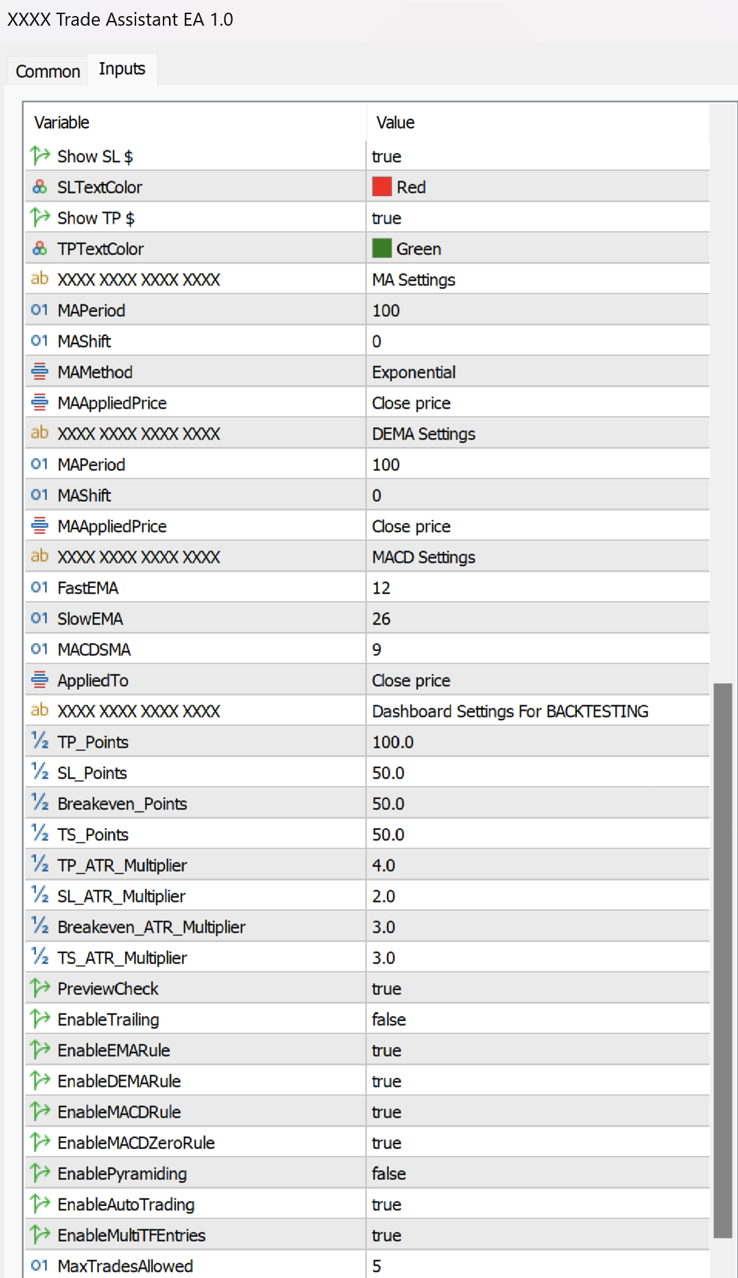
  • The EA uses a combination of technical indicators, such as ATR (Average True Range), Moving Averages (MA), DEMA (Double Exponential Moving Average), and MACD (Moving Average Convergence Divergence), to identify potential trading opportunities. The user can set specific input values for each of these indicators to suit their trading style and preferences.
  • Stop Loss, Take Profit, Breakeven, and Trailing can be used based on point distances, as well as ATR measurement, which can be set up in the inputs menu.

  • All trade entries are meticulously calculated based on Points or the ATR (Average True Range) indicator, which helps manage the risk and reward of each trade.

  • Once the user sets their preferred input values, the EA waits for specific market conditions to be met before opening a trade. These conditions include the price being above or below the Moving Average (MA), a DEMA crossover, a MACD crossover, and the MACD being above or below the zero line. If all of the conditions are met, the EA will wait for the next candle to trigger the entry in the desired direction.

  • The EA can also be used fully manually, allowing traders to enter trades with buy and sell buttons.

HOW TO USE THE EA
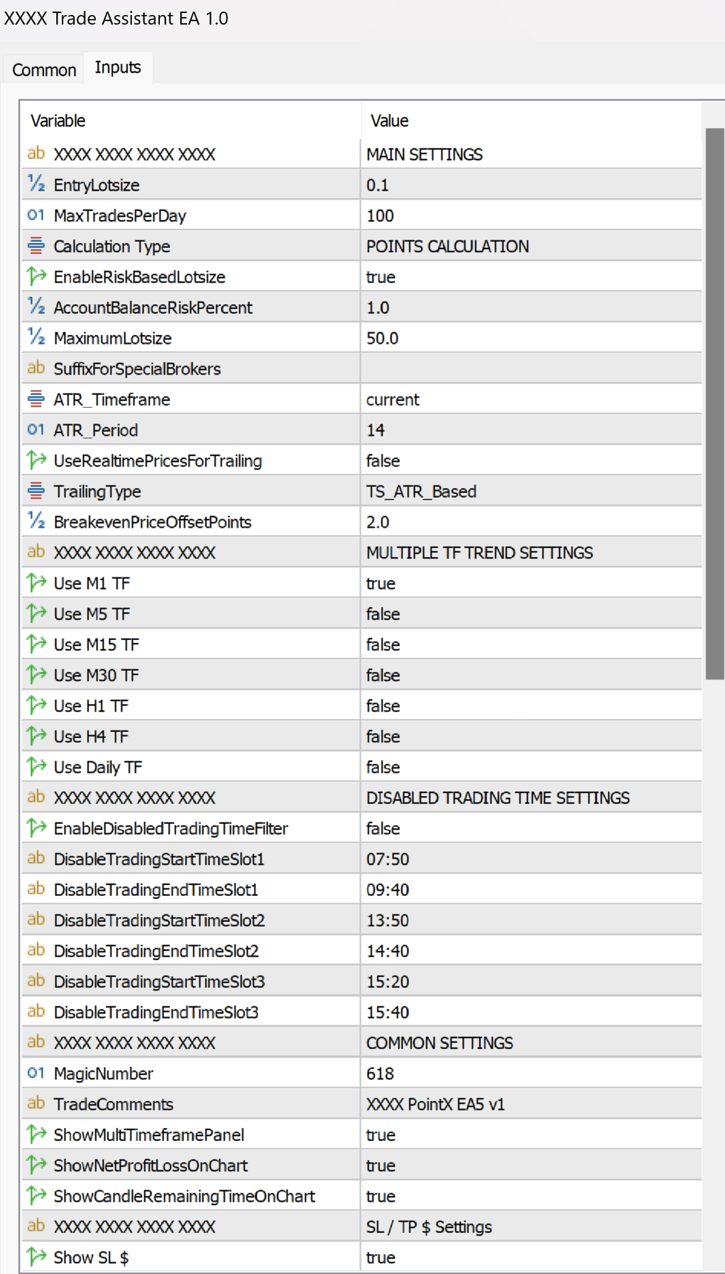
  • First, select Points or ATR Calculation in the inputs menu under Calculation Type. By default, it's Points Calculation, but it can be switched to ATR Calculation.

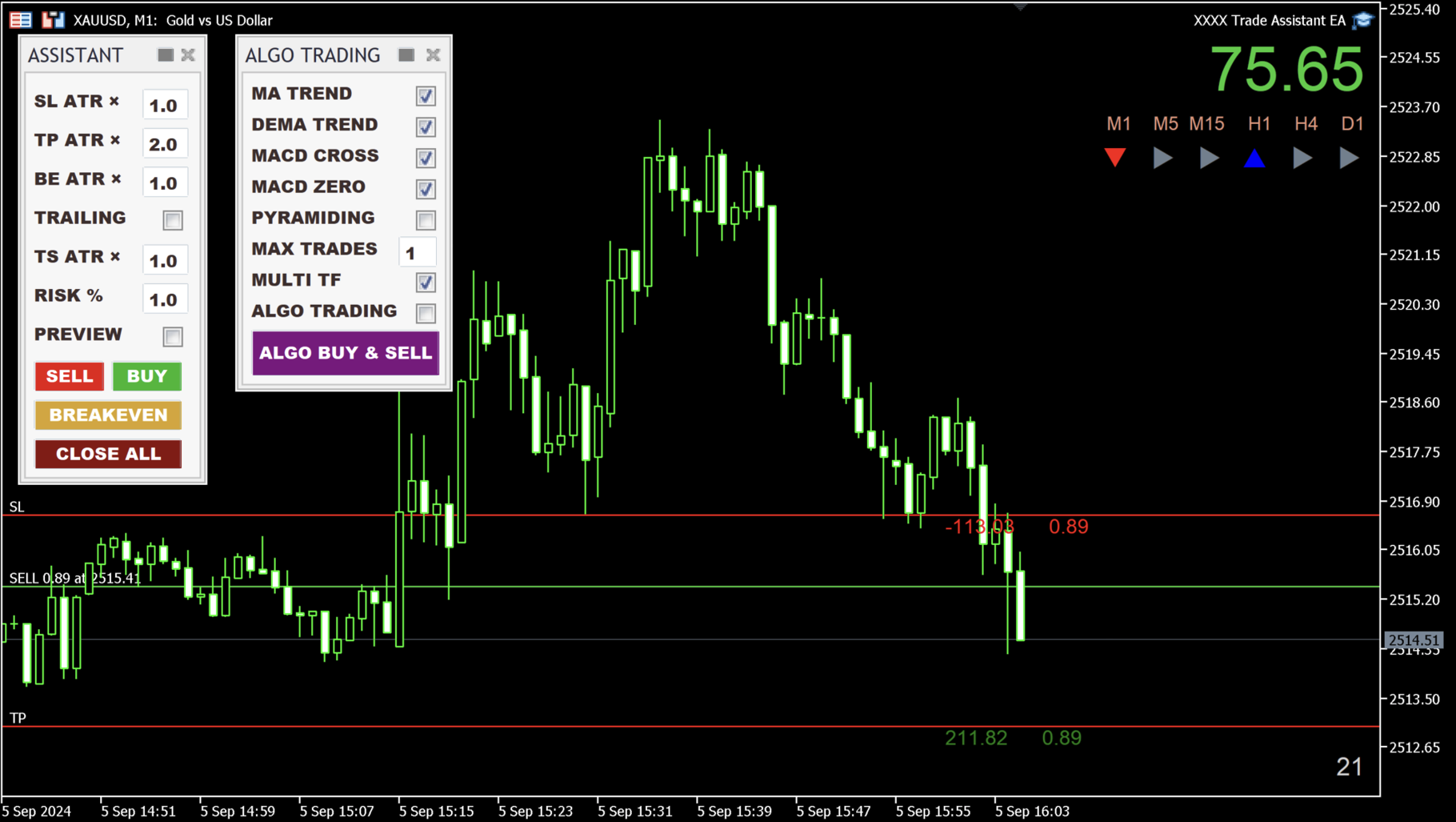
  • SL and TP: Set the size in Points or ATR for the stop loss and take profit.

  • BE: The breakeven size can be determined. You can set the BreakevenPriceOffsetPoints in settings. If you don't want to use Breakeven, set the BE value higher than TP.

  • ATR (RMA) period's default value is 14, but it can be modified in settings under ATR_Period.

  • TRAILING (Checkbox): Trailing only works if it's checked.

  • Trailing: You can choose between trailing on candle close or in real-time, which can be set up in settings by changing UseRealtimePricesForTrailing from "false" to "true."

  • The start of the trailing can be determined in the "inputs" settings under TrailingType, which can begin immediately or be based on Points or ATR.

  • TS: The trailing stop size can be determined by how far it should follow the price based on Points or ATR.
  • Modify any of the ASSISTANT panel's values even after entering a trade. You can delete TP in MetaTrader, and the EA will re-add the modified TP. This is also true for SL, BE, and TRAILING.

  • RISK %: The risk % of the balance can be determined in the text box (also all the panel's values in the inputs menu, preferred way).

  • Position sizes can be determined as a percentage of the account equity or in lot size. By default, the EA is set to use %. If you wish to change it to a regular lot size, go to settings and change EnableRiskBasedLotSize to "false."

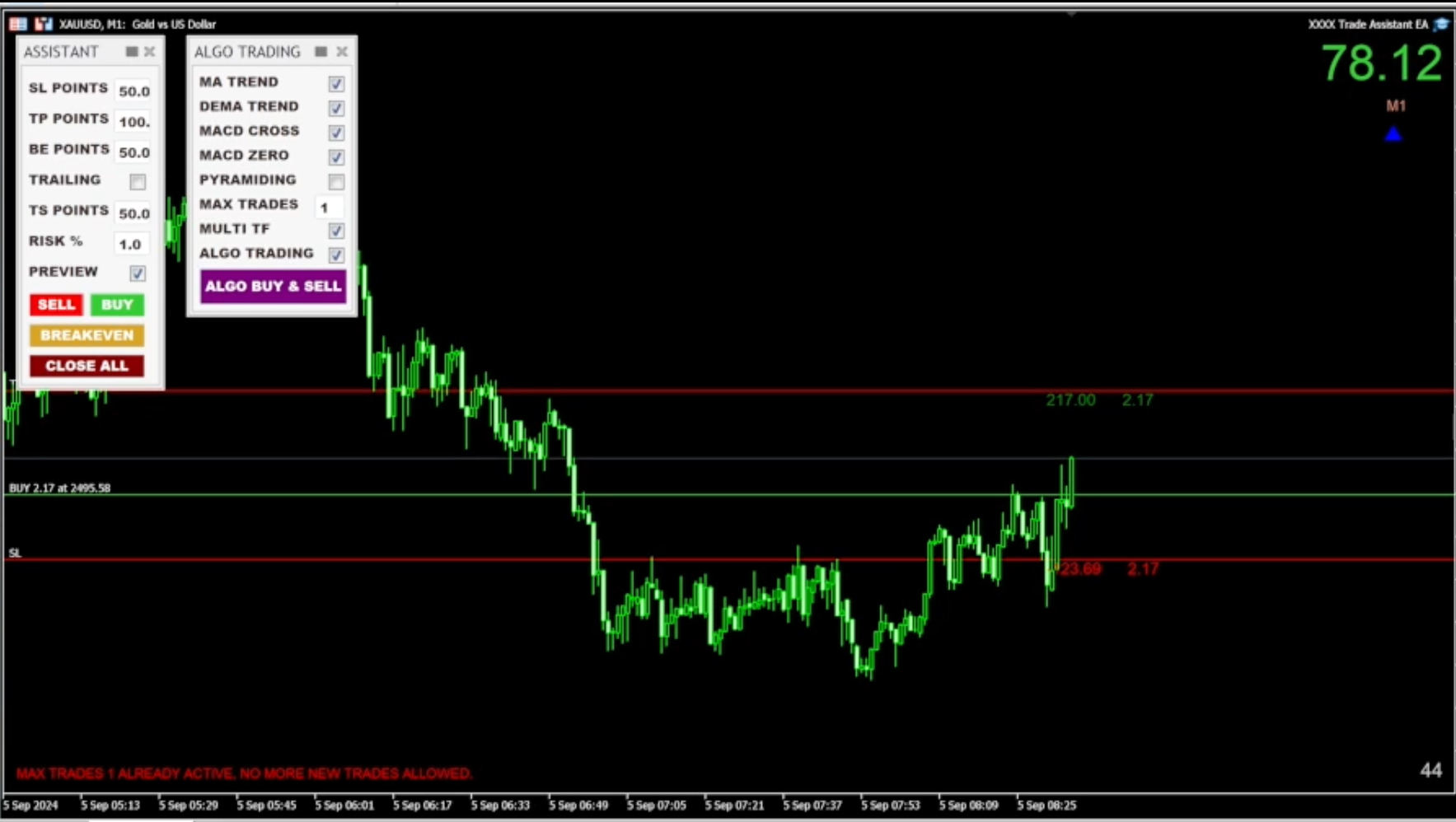
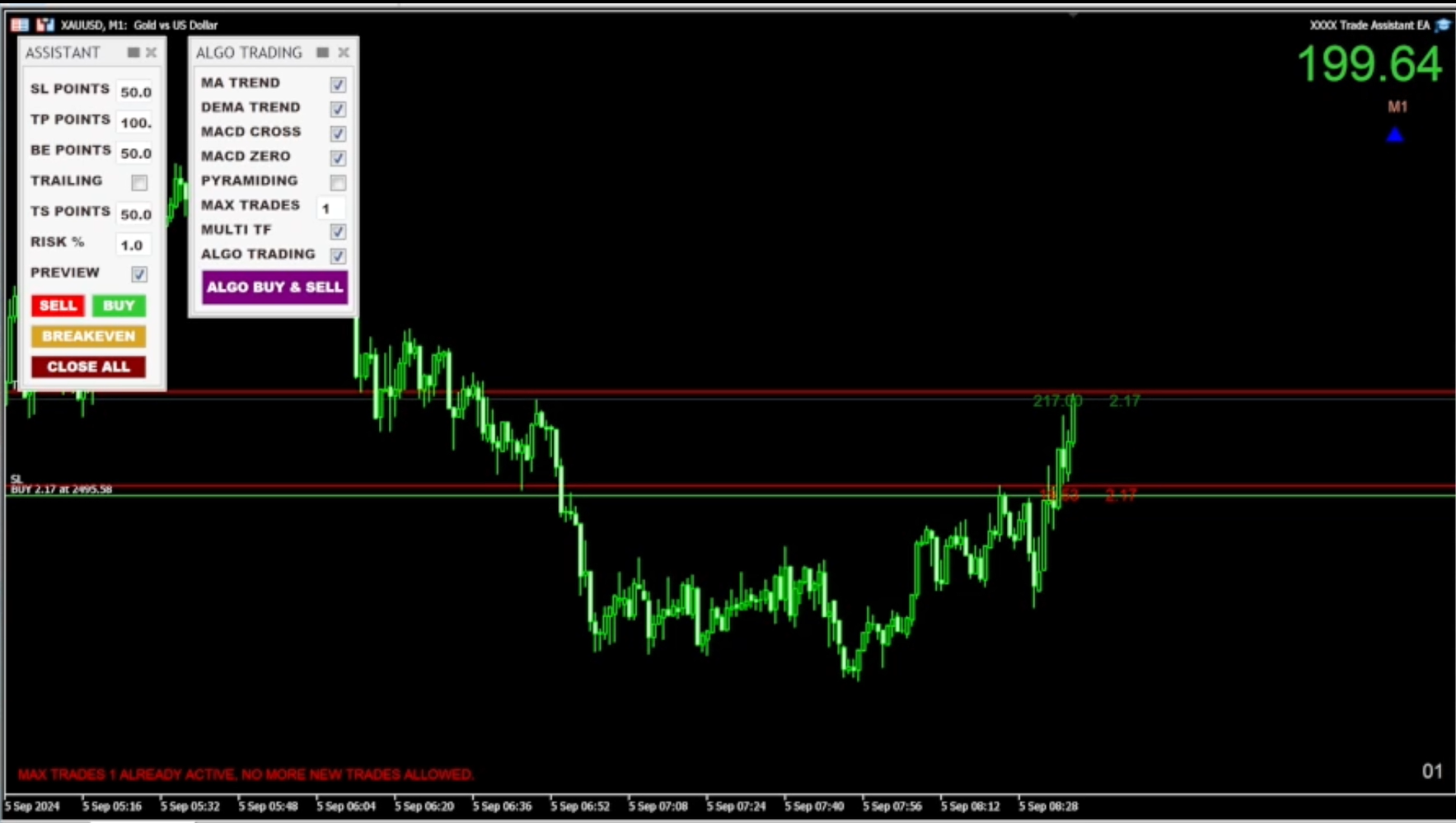
  • Preview function: Preview SL and TP lines by clicking the checkbox and hitting the Sell or Buy buttons.

  • Advanced preview lines with drag-and-drop position adjustment, based on percentage or lot size (for manual trading): When the Preview checkbox is selected and the Sell or Buy buttons are clicked, an estimated position is displayed on the chart using the previously specified Points or ATR sizes. The preview lines can now be dragged anywhere on the chart while maintaining the same percentage or lot sizes that were initially given. Once the position is adjusted accordingly, clicking the Sell or Buy buttons again will open the position.

  • Breakeven button: Sets profitable positions to breakeven on the current chart.

  • Close All button: Closes all positions on the current chart.

  • Total profit display in the top right corner.

  • Algo Trading Panel: EMA, DEMA, MACD, PYRAMIDING, and AUTO TRADING rules can be switched on or off. These rules can also be set up in the inputs settings (preferred way).

  • ALGO BUY & SELL button: Places trades in both directions. If you click it, it turns to the ALGO BUY button, which only takes long positions. If you click once more, it turns to the ALGO SELL button, which only opens short positions (using a selected direction takes away the stress of manual position entries, as the EA enters trades for you).

  • Multi Timeframe Entries: In Algo Trading, positions can be opened based on the selected timeframes specified in the inputs settings. You can choose timeframes ranging from M1 to D1, and you also have the option to deselect any timeframes that you don't want to be considered. On the Trade Panel, the selected indicators will be applied to all shown timeframes.

  • Multiple instances of Trade Assistant EA can be added to up to 3 pairs at once (recommended maximum).

  • Compatible with all symbols, pairs, brokers (suffix added), and timeframes.

  • Suitable for both manual and automated trading. The EA can automatically manage positions opened by other EAs.

  • Time countdown on the current timeframe is displayed in the bottom right corner.

  • Tool panels can be hidden with a single click at the top.

  • Panels are movable and can be repositioned anywhere on the chart.

  • The EA can be removed from the chart by clicking the X on the panels.

  • Set up to 3 no-trade zones per day.

  • Max trades per MACD crossover (determined by the user).

  • Set a maximum number of trades per day in the inputs menu to avoid overtrading.

  • Additionally, the user can customize the EA's trading hours to avoid market opening and closing times or news events based on their preferences.

  • (Issue with panel resolution? Check Terminal64 Properties' Compatibility menu setup.)


STRATEGY TESTER

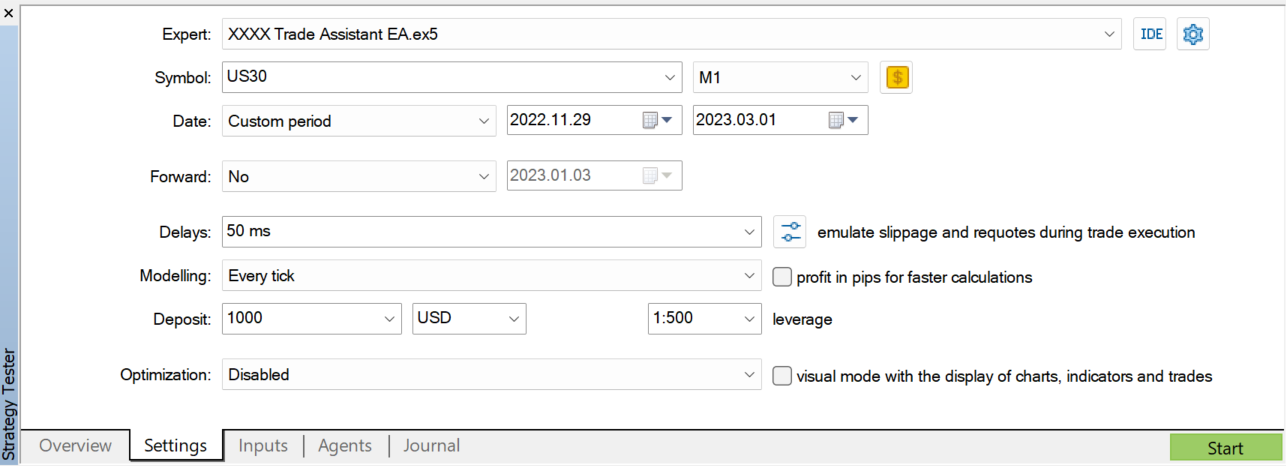
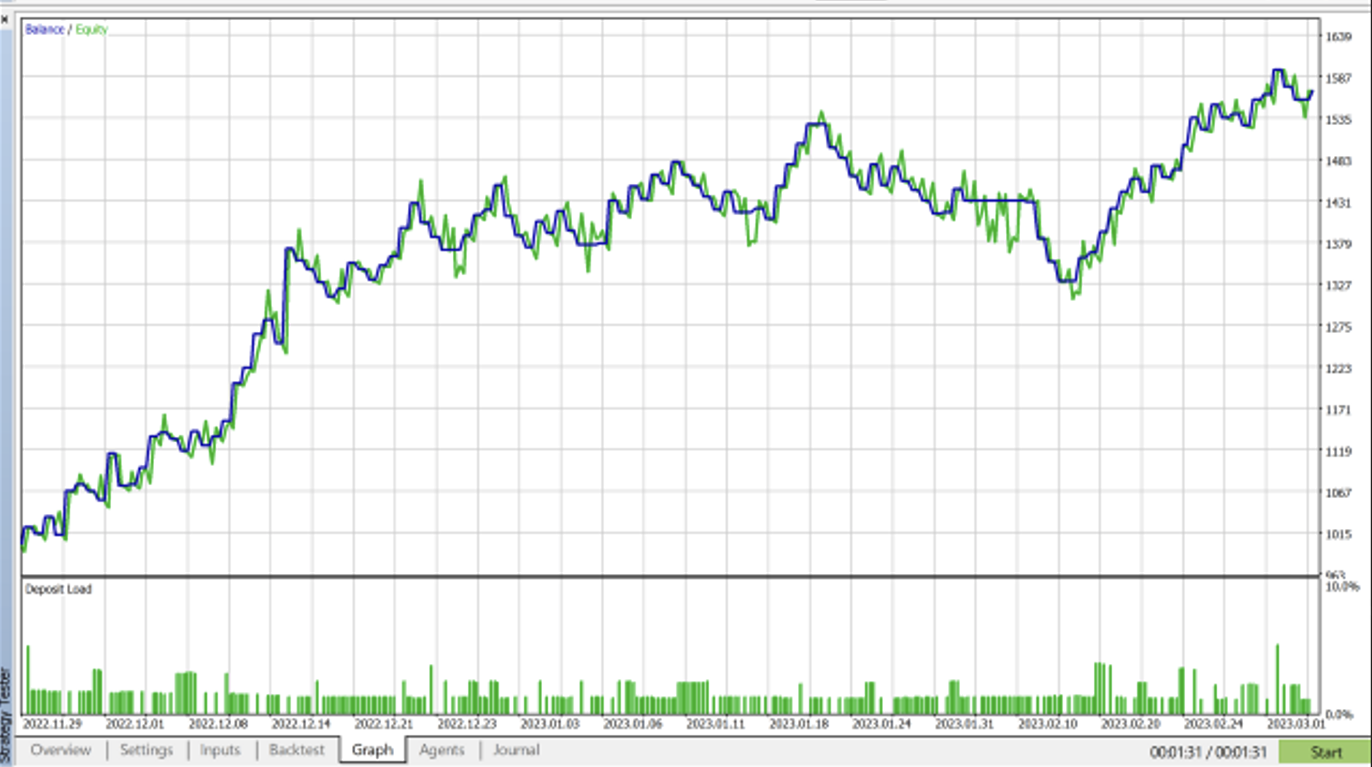
Please feel free to download the demo version and use it in the strategy tester, but keep in mind that this EA is not intended to generate consistent profits through excessive use. However, there are specific combinations of instruments, timeframes, no-trade zones, and Points or ATR values that, when precisely set up, can result in gains instead of losses. It's important to note that the default setup alone won't be enough to generate profits—you'll need to customize the settings to fit your trading strategy.
The EA is recommended for semi-automated use, combining a trader’s technical analysis with the EA, and only letting “Auto Trading” run when the trend direction matches a specific trade setup.


If you happen to experience any glitch with the EA, please let me know and will fix it asap. 

Please drop me a message if you have any questions. 

If you purchase the EA, please contact me for advice on the settings.
Thank you, 
András Bessenyei
Prodotti consigliati
Somewhere over the rainbow It is a system that tries to operate the market from the exhaustion of the trend with a correction algorithm that tries to cut losses at the cost of increasing the margin This system makes all the adjustments automatically, analyzing the pair and the market to decide which is the most efficient step to reach your destination. Somewhere over the rainbow is a multiple trade and multi lot system(The maximum batch can be up to 5 times the initial batch distributed in mult
Account Risk Hedge Bot                                                                                  ...hedge your trades with confidence. Safeguard Your Investments with Account Risk Hedge Bot, stay ahead of market volatility with our cutting-edge risk management solution. Account Risk Hedge Bot is designed to safeguard your investments with automated precision, helping you navigate market uncertainty, ensuring you minimize losses and maximize returns. Note: Account Risk Hedge Bot does
SuperScalp Pro Trader EA Automated trading EA for the indicator — dual-source Fibonacci TP, per-ticket management, and advanced trailing stop. Quick start: Apply the indicator to your chart first, then attach this EA.  How to use Open your chart and select your preferred symbol and timeframe. Insert the indicator onto the chart. Attach SuperScalp Pro Trader EA to the same chart. Leave IndicatorName blank — the EA automatically detects the chart indicator instance (Mode B). To load the indicat
Ultra Charts
Tinashe Ndarimani
Ultra Charts - Advanced Custom Chart Types for MT5 Get Manual Here! Get The Free Ultra Charts Trader Here! Ultra Charts is a comprehensive charting solution that brings professional-grade alternative chart types to MetaTrader 5. This Expert Advisor provides traders with multiple custom chart formats beyond standard time-based candlesticks, enabling enhanced technical analysis and pattern recognition. Chart Types Included The product includes six distinct chart types, each designed to filter mark
FREE
RRtoolBox
David Ruiz Moreno
RRtoolbox - Professional Tools: Risk:Reward Trading Tool (SL/TP Horizontals + Pending orders + Diagonals), Alerts set on trend lines (for alerts on diagonal levels), SelfManagement (BE, partials...), close/cancelling by time, Statistics, Info and trading on chart. One-Click Trading with Visual Risk:Reward Management RRtoolbox is a comprehensive trading panel that combines one-click order execution,  statistics and  powerful visual Risk:Reward tools, alerts set with trendlines, on chart butt
Volume Trade Levels
Mahmoud Sabry Mohamed Youssef
The idea behind this indicator is very simple , First it contains 2 mechanisms to place your trades: 1- Enter the Pips you want to duplicate to price levels. 2- Automatically let the indicator specify the largest Buy / Sell Volume Candle and place duplicated levels based on the candle itself. How it works: 1- Enter the Pips you want to duplicate to price levels:    1- once the indicator is loaded you will need first to Specify the number of pips in the indicator Configuration window ,you can g
Protect your capital and turn winning trades into risk-free positions instantly. Auto Break-Even is an automated trade management utility that shifts your Stop Loss to your entry price (plus a customizable offset) the moment your trade reaches a defined profit target. Take the emotion out of trade management. By automating your break-even process, you prevent winning trades from turning into losers, allowing you to confidently hold positions for larger targets. [   Get the MT4 Version For FREE  
FX Auto Risk Management TP SL and Out Stop v3.10 Strengths of the Script 1. Comprehensive Risk Management Automated Take Profit and Stop Loss   with customizable percentage-based settings Trailing Stop   with two adjustable modes (Normal and Aggressive) Stop Out   based on floating loss/profit percentage 2. Advanced Features Multi-mode trailing stop   with different parameters for each mode Slippage control   for more realistic order execution API request limit   to prevent server overload 3.
Introduction Our system is more than just a tool—it’s your personal guide in the dynamic trading landscape. Expertly developed and optimized using advanced strategies, this groundbreaking predictor gives traders a powerful edge. It’s not just about the features; it’s about a trading journey that stands out from the crowd. Get ready for an enhanced trading experience like never before! What It Does Next Candle Prediction: Imagine gaining insights into the market’s next move before it happens. Our
Candle EA MT5
Mansour Babasafary
4.14 (22)
This expert is based on patterns The main patterns of this specialist are candlestick patterns Detects trends with candlestick patterns It has a profit limit and a loss limit, so it has a low risk The best time frame to use this expert is M30 time frame The best currency pairs to use with this expert is the EURUSD, GBPUSD, AUDUSD, USDCAD currency pairs Attributes: Can be used in the EURUSD, GBPUSD, AUDUSD, USDCAD  currency pairs Can be used in M30, H1, H4 time frames Has profit limit and loss
PredatorEA
Dragan Drenjanin
5 (1)
Introduzione a Predator EA Predator è un Expert Advisor (EA) all'avanguardia per la piattaforma MetaTrader 5 (MT5), progettato per semplificare e migliorare il trading sul forex. Questo EA è pre-ottimizzato per diverse coppie di valute e intervalli temporali, rendendolo adatto ai trader che cercano una soluzione affidabile e automatizzata. Specifiche Piattaforma   : MT5 Tipo di conto   : per prestazioni ottimali si consigliano i conti hedge. I test sono fondamentali per sbloccare il potenziale
Boleta RTrader
Rubens Pergentino Da Silva
Boleta RTrader - A Boleta Mais Completa para MetaTrader 5 A ferramenta definitiva para traders que buscam precisão, agilidade e controle total sobre suas operações no MetaTrader 5. **IMPORTANTE**: É aconselhável desabilitar no gráfico do MT5 o histórico de negociações somente quando for usar saídas parcias e precisar movimentar a ordem parcial para evitar delay. --- PRINCIPAIS FUNCIONALIDADES: EXECUÇÃO DE ORDENS **Compra e Venda Instantâneas**: Execute ordens a mercado com um único clique **
SMC Pro Indicator v16
Moch Wahyu Febriyanto
SMC Pro Ultimate is a comprehensive professional indicator designed for traders using Smart Money Concepts (SMC) and Inner Circle Trader (ICT) methodologies. This tool eliminates the need for manual chart mapping by automatically detecting high-probability market structures and liquidity zones. Unlike basic indicators, SMC Pro v16 includes a Smart Filter Engine that only alerts you when higher timeframe trends align, ensuring you trade with the flow of the smart money. Key Features 1. Advance
News Telegram MT5 is a smart MetaTrader 5 utility that sends economic calendar news alerts directly to your Telegram in a clear, fast, and organized format. This product is designed for traders who want to stay informed about important market events without watching the terminal all day. It helps you monitor upcoming releases, receive pre-news alerts before scheduled events, and get automatic updates when actual values become available in the MetaTrader 5 Economic Calendar. To improve readabilit
UTrailingMinMT5
Viktor Shpakovskiy
The EA for manual trading to manage open positions.The built-in trailing stop has five modes and seven instruments. There is a virtual stop loss and a virtual take profit, which can be freely moved around the chart. With the help of the built-in trading simulator, you can check how the EA works in the strategy tester. Guide to UTrailingMinMT5 can be found in the "Comments" section. In the MT5 strategy tester, manual movement of virtual SL and TP lines according to the schedule does not work! Ben
Chart Patterns Builder Premium
Florea E. Sorin-Mihai Persoana Fizica Autorizata
The Chart Patterns Builder Premium expert advisor is an extension of the freely available Chart Patterns Builder Basic :         it provides 1 new chart pattern: the rectangle breakout (besides the double top & bottom pattern already provided in the basic edition);         in most configurations, backtesting usually shows more than double (2x) average yearly return rate;         the account growth curve is also smoother, due to approximately double number of trades,  compared to the free version
GOLD TRADING EA - OPTIMIZED SOLUTION FOR XAU/USD BUY STRATEGIES Usage Conditions: Feature Details Exclusive to XAU/USD Operates   only with Gold/USD , leveraging gold's unique volatility patterns. Unidirectional Buy Strategy Enters   BUY orders exclusively   when technical criteria converge, ensuring trend-aligned execution. Peak Performance in Uptrends Maximizes profitability during   strong bullish gold markets . KEY ADVANTAGES Benefit Description Simple & User-Friendly Minimal setup.
Auto SLTP Risk Assistant è uno strumento di trading automatico per MetaTrader 5 progettato per aiutare i trader a impostare Stop Loss (SL) e Take Profit (TP) in modo preciso, basandosi su un rischio fisso per operazione. Con un’interfaccia semplice e interattiva, basta trascinare la linea SL sul grafico e l’EA calcolerà automaticamente la dimensione del lotto e il TP in base al rapporto Rischio:Profitto selezionato, quindi eseguirà immediatamente un ordine BUY o SELL. ️ Funzionalità principali
Voenix Chart Pattern Scanner MT5
Lorentzos Roussos
4.83 (6)
Modelli armonici EA se preferisci vederlo su un grafico in tempo reale invece di leggere la descrizione,   puoi scaricare immediatamente una demo gratuita qui. Modelli inclusi: Modello ABCD Modello Gartley Modello pipistrello Modello cifrato 3Modello di guida Motivo cigno nero Motivo cigno bianco Motivo Quasimodo o Motivo Over Under Modello alternativo del pipistrello Motivo a farfalla Modello di granchio profondo Modello di granchio Modello di squalo Modello FiveO Modello testa e spalle Model
Risk Management Buttons
Kriengsak Peitaisong
This is a common, simple and easy to use but effective tool to manage trading risks for all traders. It also help trader places stop loss and take profit levels at the same time the order is filled. How to set the expert advisor's parameters to support your trading style? Lots size. Fixed lots size - For traders who prefered to trade with fixed lots size, they can input the lots size in 'User lots' menu in the expert advisor's properties. The input value should be from the 'Minimum Volume' to th
Discord Notify
Aleh Piatrenka
5 (2)
I nvia automaticamente notifiche in tempo reale su apertura, chiusura, chiusura parziale e modifica delle operazioni MT5 su Discord. L’utilità supporta 16 lingue : inglese, francese, tedesco, hindi, indonesiano, italiano, kazako, coreano, olandese, polacco, portoghese, russo, spagnolo, turco, ucraino e vietnamita. È inoltre possibile utilizzare qualsiasi altra lingua personalizzando il testo delle notifiche. Il prodotto è progettato per i trader che desiderano ricevere notifiche Discord senza m
FREE
Slack Notify
Aleh Piatrenka
I nvia automaticamente notifiche in tempo reale su apertura, chiusura, chiusura parziale e modifica delle operazioni MT5 su Slack. L’utilità supporta 16 lingue : English, French, German, Indian (Hindi), Indonesian, Italian, Kazakh, Korean, Dutch, Polish, Portuguese, Russian, Spanish, Turkish, Ukrainian e Vietnamese. È inoltre possibile utilizzare qualsiasi altra lingua personalizzando il testo delle notifiche. È pensata per i trader che desiderano ricevere notifiche su Slack senza dover monitor
FREE
Historical Pivot Zones - Fibonacci Indicator MT5 Automatically draws Fibonacci retracement and projection zones based on historical price pivots. This MT5 indicator intelligently selects pivot points from different timeframes (weekly, monthly, or 6-month ranges) and creates visual Fibonacci zones around key levels. Features include: Smart Mode Selection - Auto-adjusts based on your chart timeframe Clean Visual Zones - Highlighted areas instead of just lines Essential Fib Levels - 9 retrace
Ogni trader sa che non dovrebbe mai rischiare più del 5% (o 7%) per operazione.  Questa è una legge sulla gestione del denaro e un LotSize utilizzabile dovrebbe essere calcolato ogni volta perché un trader deve utilizzare un valore StopLoss diverso per diversi livelli di trading.  Questo indicatore calcolerà un LotSize appropriato per il momento in cui lo metterai sul grafico e ogni volta trascinerai la "Stop Loss Line" in qualsiasi direzione. OFFERTA A TEMPO LIMITATO: Tutti i nostri indicato
Vi presentiamo il "Cherry Picker" EA: Rendi il tuo trading ancora più dolce! Proprio come scegliere le ciliegie più mature su una torta, il Cherry Picker EA seleziona solo le migliori opportunità di trading sul mercato MT5. Questo EA innovativo identifica con precisione i punti di ingresso ad alta probabilità, anche in condizioni di mercato complesse, massimizzando così i tuoi profitti. A differenza degli EA "scatola nera" che utilizzano reti neurali o ChatGPT, dove non è chiaro come vengono ott
The automated trading system executes only buy orders on the synthetic index Boom 300.  Minimal account deposit is 2500$. The parameters are optimized for 1 HOUR time frame. The entire history test is in screenshots section. Inputs: Account leverage `Leverage (1:N)`, Stop loss in percentage (values greater then zero), Take profit in percentage  (values greater then zero),  Evaluation frame length, Activation level in percentage for evaluation frame,  Close the order after N candles, Close the
=== RISK ANALYZER MT5 === Professional position sizing and margin calculator for serious traders. MAIN FEATURES: • LOT SIZE CALCULATOR - Calculate optimal position size based on your risk • MARGIN CALCULATOR - See required margin, free margin, and margin level BEFORE trade • TRADING STATISTICS - Win rate, profit factor, expected payoff analysis • DRAWDOWN MONITORING - Track absolute and maximal drawdown • REAL-TIME RISK ANALYSIS - All metrics update automatically CALCULATE BEFORE YOU TRADE:
MTM Pro Manual Trading Panel
Choawana Malaikitsanachalee
MTM Manual Trade Manager is a professional trading dashboard designed for manual traders who want better control over risk and trade management. This Expert Advisor does NOT open trades automatically. All trading decisions and order executions are fully controlled by the trader. Main Features: - Manual Buy and Sell execution from the dashboard - Visual Stop Loss and Take Profit using drag & drop lines - Fixed Lot and Risk Percentage position sizing - Automatic Break Even management - Multiple
FREE
Tired of inconsistent manual trading? Goldtrive PRO   is a powerful   automated trading EA designed specifically for US30 (Dow Jones Index) , built to capture market momentum with precision while maintaining controlled risk. Engineered for high volatility conditions, this EA focuses on   consistency, stability, and smart risk management   — not reckless overtrading. Why Choose Goldtrive PRO? Optimized exclusively for   US30 (Index Trading) Advanced   scalping + momentum strategy   Low
Free automatic Fibonacci is an indicator that automatically plots a Fibonacci retracement based on the number of bars you select on the BarsToScan setting in the indicator. The Fibonacci is automatically updated in real time as new highest and lowest values appears amongst the selected bars. You can select which level values to be displayed in the indicator settings. You can also select the color of the levels thus enabling the trader to be able to attach the indicator several times with differe

FREE
Gli utenti di questo prodotto hanno anche acquistato
Trade Assistant MT5
Evgeniy Kravchenko
4.43 (211)
It helps to calculate the risk per trade, the easy installation of a new order, order management with partial closing functions, trailing stop of 7 types and other useful functions. Additional materials and instructions Installation instructions - Application instructions - Trial version of the application for a demo account Line function -   shows on the chart the Opening line, Stop Loss, Take Profit. With this function it is easy to set a new order and see its additional characteristics bef
Forex Trade Manager MT5
InvestSoft
4.98 (651)
Benvenuto a Trade Manager EA, lo strumento definitivo per la gestione del rischio , progettato per rendere il trading più intuitivo, preciso ed efficiente. Non è solo uno strumento per l'esecuzione degli ordini, ma una soluzione completa per la pianificazione delle operazioni, la gestione delle posizioni e il controllo del rischio. Che tu sia un principiante, un trader avanzato o uno scalper che necessita di esecuzioni rapide, Trade Manager EA si adatta alle tue esigenze, offrendo flessibilità s
TradePanel MT5
Alfiya Fazylova
4.87 (154)
Trade Panel è un assistente commerciale multifunzionale. L'applicazione contiene più di 50 funzioni di trading per il trading manuale e permette di automatizzare la maggior parte delle attività commerciali. Prima dell'acquisto, è possibile testare la versione dimostrativa su un conto demo. Scaricare la versione di prova dell'applicazione per un account dimostrativo: https://www.mql5.com/it/blogs/post/762419 . Istruzioni complete qui . Commercio. Consente di effettuare operazioni di trading con u
FarmedHedge Pair Trading Dashboard
Tanapisit Tepawarapruek
5 (3)
Farmed Hedge Yield Farming | All Markets (Manual - Hybrid - Semi/Automated EA) MULTI-ASSET SUPPORT Trade any asset available on your broker - Forex: Major, Minor, Exotic pairs - Crypto: BTC, ETH, XRP, SOL, BNB - Stocks: Apple, Tesla, Amazon, Google, etc. - Commodities: Gold, Silver, Oil, Gas - Indices: US30, NAS100, SPX500, DAX40 - Any CFD your broker offers VERIFIED TRADING RESULTS - Farmed Hedge Yield Axi Copy:  https://www.mql5.com/en/signals/2356376 - Farmed Hedge Yield Exn Copy:   https:/
Versione Beta Telegram to MT5 Signal Trader è quasi pronto per il rilascio ufficiale in versione alpha. Alcune funzionalità sono ancora in fase di sviluppo e potresti riscontrare piccoli bug. Se riscontri problemi, ti preghiamo di segnalarli, il tuo feedback aiuta a migliorare il software per tutti. Telegram to MT5 Signal Trader è uno strumento potente che copia automaticamente segnali di trading da canali o gruppi Telegram al tuo account MetaTrader 5 . Supporta canali pubblici e privati e cons
Power Candles Strategy Scanner - Strumento di ricerca configurazioni multi-simbolo con ottimizzazione automatica Power Candles Strategy Scanner utilizza lo stesso motore di auto-ottimizzazione che alimenta l'indicatore Power Candles, applicandolo a tutti i simboli presenti nel tuo Market Watch, uno accanto all'altro. Un unico pannello ti indica quali simboli sono statisticamente negoziabili in questo momento, quale strategia è vincente su ciascuno di essi, la coppia ottimale di Stop Loss / Take
Exp COPYLOT CLIENT for MT5
Vladislav Andruschenko
3.91 (33)
Copiatore professionale di trade per MetaTrader 5 Un copiatore di trade veloce, professionale e affidabile per MetaTrader . COPYLOT consente di copiare operazioni Forex tra terminali MT4 e MT5 con supporto per conti Hedge e Netting . La versione MT5 di COPYLOT supporta: - MT5 Hedge → MT5 Hedge - MT5 Hedge → MT5 Netting - MT5 Netting → MT5 Hedge - MT5 Netting → MT5 Netting - MT4 → MT5 Hedge - MT4 → MT5 Netting Versione MT4 Descrizione completa + DEMO + PDF Come acquistare Come installare Come ot
Copy Cat More Trade Copier MT5 (Gatto Copiatore MT5) è un copiatore di trade locale e un framework completo di gestione del rischio ed esecuzione progettato per le sfide di trading odierne. Dalle sfide delle prop firm alla gestione di portafogli personali, si adatta a ogni situazione con una combinazione di esecuzione robusta, protezione del capitale, configurazione flessibile e gestione avanzata dei trade. Il copiatore funziona sia in modalità Master (mittente) che Slave (ricevente), con sincro
AntiOverfit PRO MT5
Enrique Enguix
5 (4)
Prima di comprare un EA, verifica se regge davvero oppure se in backtest è sembrato forte solo per fortuna. La maggior parte dei robot viene venduta con un backtest bello da vedere. Curva in crescita. Buon profit factor. Pochi dubbi. Eppure molti di questi EA crollano non appena il mercato smette di muoversi come in quello storico. Perché? Perché un backtest dimostra una cosa sola: che quella strategia ha funzionato su un percorso di prezzo ben preciso. Non dimostra che reggerà su percorsi diver
The product will copy all telegram signal to MT5 ( which you are member) , also it can work as remote copier.  Easy to set up, copy order instant, can work with almost signal formats, image signal,  s upport to translate other language to English Work with all type of channel or group, even channel have "Restrict Saving Content", work with  multi channel, multi MT5 Work as remote copier: with signal have ticket number, it will copy exactly via ticket number. Support to backtest signal. How to s
Telegram to MT5 Coppy
Sergey Batudayev
5 (9)
Da Telegram a MT5:   la soluzione definitiva per la copia del segnale Semplifica il tuo trading con Telegram su MT5, il moderno strumento che copia i segnali di trading direttamente dai canali e dalle chat di Telegram sulla tua piattaforma MetaTrader 5, senza bisogno di DLL. Questa potente soluzione garantisce un'esecuzione precisa dei segnali, ampie opzioni di personalizzazione, fa risparmiare tempo e aumenta la tua efficienza. [ Instructions and DEMO ] Caratteristiche principali Integrazione d
Footprint Chart Pro — Professional OrderFlow EA for MetaTrader 5 Version 6.34 | Professional tool for real traders | Institutional-Grade Visualization DEMO USERS - PLEASE SELECT EVERY TICK / REAL TICK WHEN TESTING AND YOU HAVE DOWNLOADED HISTORICAL DATA. IF YOU SEE A WAITING SCREEN AND IT IS NOT DOWNLOADING, IT MEANS YOU HAVE LOW HISTORICAL DATA. TRY 1 MIN AND 5 MIN FIRST ON 1 DAY DATA. ONE DAY DATA SHOULD BE THE NEWEST AND MOST CURRENT DATE. PLEASE WAIT UNTIL THE MARKET HAS ROLLED OVER PERIOD.
Anchor Trade Manager
Kalinskie Gilliam
5 (2)
Anchor: The EA Manager Run your full EA portfolio without conflicts, without stacked risk, and without watching every chart yourself. Anchor coordinates up to 64 Expert Advisors on a single account so only one trades at a time. Attach Anchor to any chart. Type your EA names and magic numbers in one line. Anchor handles the rest. Built for portfolios. Built for discipline. Built for prop firms. The Problem Running multiple EAs on the same account creates risk. Two gold EAs can open opposite posit
DrawDown Limiter
Haidar Lionel Haj Ali
5 (20)
Drawdown Limiter EA You are in the right place if you were searching for Drawdown control, Drawdown limiter, Balance protection, Equity Protection or Daily Drawdown Limit related to Prop Firm, FTMO, or Funded account trading, or if you want to protect your trading account. Have you suffered from controlling your drawdown when trading funded accounts? This EA is meant for you. Prop firms usually set a rule called “Trader Daily Drawdown”, and if it is not respected, you are disqualified.  I am an
Timeless Charts
Samuel Manoel De Souza
5 (5)
Timeless Charts è una soluzione di grafici avanzata, progettata per i trader professionisti che necessitano di grafici personalizzati / timeframe personalizzati – inclusi grafici a secondi / timeframe a secondi, grafici Renko / barre Renko, grafici a cluster / footprint e strumenti avanzati simili a quelli disponibili nelle piattaforme più popolari. A differenza dei tradizionali grafici offline o dei semplici indicatori personalizzati, questa soluzione crea barre completamente personalizzate con
HINN Lazy Trader
ALGOFLOW OÜ
5 (2)
The core idea: using the user interface, you configure the parameters the chart must meet before entering a position (or positions), choose which entry models to use, and set the rules for when trading and planning should end. Lazy Trader  handles the rest: it  takes over all the routine chart watching and execution! full description  :: 3 key videos [1] ->  [2]   ->  [3] What can it do? - Understands Larry Williams market structure - Understands swing market structure by Michael Huddleston
AXR Prop Guard
Stoyan Kirilov Karlov
AXR Prop Guard AXR Prop Guard è una utility di protezione del rischio a livello di conto per MetaTrader 5. È pensata per trader di prop firm, funded-account challenges e per una protezione seria dei conti privati. Fa parte della linea di strumenti AXR. Per aggiornamenti e opzioni di contatto, usa le pagine ufficiali MQL5: AXR MQL5 Channel: aggiornamenti del prodotto, note di rilascio e nuovi strumenti AXR Telegram: aprire il profilo del venditore ; il contatto Telegram è indicato nella descrizio
Risk Manager for MT5
Sergey Batudayev
4.31 (16)
Expert Advisor Risk Manager per MT5 è un programma molto importante e secondo me necessario per ogni trader. Con questo Expert Advisor sarai in grado di controllare il rischio nel tuo conto di trading. Il controllo del rischio e del profitto può essere effettuato sia in termini monetari che in termini percentuali. Affinché l'Expert Advisor funzioni, è sufficiente allegarlo al grafico della coppia di valute e impostare i valori di rischio accettabili nella valuta del deposito o in % del saldo
Bots Builder Pro MT5
Andrey Barinov
4.17 (6)
This is exactly what the name says. Visual strategy builder . One of a kind. Turn your trading strategies and ideas into Expert Advisors without writing single line of code. Generate mql source code files with a few clicks and get your fully functional Expert Advisors, which are ready for live execution, strategy tester and cloud optimization. There are very few options for those who have no programming skills and can not create their trading solutions in the MQL language. Now, with Bots Builde
Trade Manager DaneTrades
Levi Dane Benjamin
4.28 (29)
Trade Manager per aiutarti a entrare e uscire rapidamente dalle operazioni calcolando automaticamente il tuo rischio. Incluse funzionalità che ti aiutano a prevenire l'eccessivo trading, il vendetta trading e il trading emotivo. Le operazioni possono essere gestite automaticamente e i parametri di performance del conto possono essere visualizzati in un grafico. Queste caratteristiche rendono questo pannello ideale per tutti i trader manuali e aiuta a migliorare la piattaforma MetaTrader 5. Suppo
Il Local Trade Copier EA è una soluzione per i singoli trader o account manager che devono eseguire segnali commerciali da fonti esterne o che devono gestire più account contemporaneamente, senza la necessità di un account MAM o PAMM. Copia da un massimo di 8 account master su account slave illimitati [ Guida all'installazione | Guida all'aggiornamento | Risoluzione dei problemi | Domande frequenti | Tutti i prodotti ] 100% self-hosted Facile da installare e utilizzare Nessun programma di insta
MT5 to Telegram Signal Provider è un'utilità facile da usare e completamente personalizzabile che consente l'invio di segnali specificati a una chat, canale o gruppo Telegram, rendendo il tuo account un fornitore di segnali. A differenza della maggior parte dei prodotti concorrenti, non utilizza importazioni DLL. [ Dimostrativo ] [ Manuale ] [ Versione MT4 ] [ Versione Discord ] [ Canale Telegram ]  New: [ Telegram To MT5 ] Configurazione Una guida utente passo-passo è disponibile. Nessuna cono
EasyTradePad for MT5
Sergey Batudayev
5 (5)
EasyTradePad – Pannello di trading per MetaTrader 5 EasyTradePad   è uno strumento per il trading manuale e semi-automatico. Il pannello consente una rapida gestione di ordini e posizioni, nonché calcoli di gestione del rischio con un solo clic. Caratteristiche del pannello: Apri e chiudi le negoziazioni con rischio predefinito (% o valuta di deposito) Imposta SL e TP in punti, percentuali o valori monetari Calcola automaticamente il rapporto rischio/rendimento Sposta lo stop loss al pareggio C
Grid Manual MT5
Alfiya Fazylova
4.9 (21)
Grid Manual è un pannello di trading per lavorare con una griglia di ordini. L'utilità è universale, ha impostazioni flessibili e un'interfaccia intuitiva. Funziona con una griglia di ordini non solo nella direzione delle perdite, ma anche nella direzione dell'aumento dei profitti. Il trader non ha bisogno di creare e mantenere una griglia di ordini, lo farà l'utilità. È sufficiente aprire un ordine e il manuale di Grid creerà automaticamente una griglia di ordini per esso e lo accompagnerà fino
Trade Manager DashPlus
Henry Lyubomir Wallace
5 (13)
DashPlus è uno strumento avanzato di gestione delle operazioni progettato per migliorare l'efficienza e l'efficacia del trading sulla piattaforma MetaTrader 5. Offre una suite completa di funzionalità, tra cui calcolo del rischio, gestione degli ordini, sistemi di griglia avanzati, strumenti basati su grafici e analisi delle prestazioni. Caratteristiche Principali 1. Griglia di Recupero Implementa un sistema di griglia flessibile e di media per gestire le operazioni in condizioni di mercato avve
YuClusters
Yury Kulikov
4.93 (43)
Attention: You can view the program operation in the free version  YuClusters DEMO .  YuClusters is a professional market analysis system. The trader has unique opportunities to analyze the flow of orders, trade volumes, price movements using various charts, profiles, indicators, and graphical objects. YuClusters operates on data based on Time&Sales or ticks information, depending on what is available in the quotes of a financial instrument. YuClusters allows you to build graphs by combining da
Ultimate Trailing Stop EA MT5
BLAKE STEVEN RODGER
4.13 (8)
This EA Utility allows you to manage (with advanced filtering) unlimited open orders (manual or EA) with 16 trailing stop methods: fixed, percent, ATR Exit, Chandelier Exit, Moving Average, Candle High Low Exit, Bollinger Bands, Parabolic, Envelope, Fractal, Ichimoku Kijun-Sen, Alligator, Exit After X Minutes or Bars, RSI and Stochastic. The trailing stop can be either real or virtual, and you can exit fully or with a partial close percent on touch or bar close.  Moreover, you can add (override
The News Filter MT5
Leolouiski Gan
4.77 (22)
Questo prodotto filtra tutti gli esperti consulenti e i grafici manuali durante il periodo delle notizie, così non dovrai preoccuparti di improvvisi picchi di prezzo che potrebbero distruggere le tue impostazioni di trading manuali o le negoziazioni effettuate da altri esperti consulenti. Questo prodotto viene fornito anche con un sistema completo di gestione degli ordini che può gestire le tue posizioni aperte e gli ordini in sospeso prima della pubblicazione di qualsiasi notizia. Una volta che
Take a Break MT5
Eric Emmrich
4.75 (24)
News filter, equity guard & session control for all your EAs — one tool, full protection Take a Break has evolved from a basic news filter into a comprehensive account protection solution . It pauses your other Expert Advisors during news events or based on custom filters. When trading resumes, it automatically restores your entire chart setup , including all EA settings. Why traders choose Take a Break One news filter for all your EAs — no more relying on individual built-in filters that may o
Telegram to mt5 pro
Janet Abu Khalil
3.67 (3)
Telegram to MT5 Pro — Advanced Telegram Signal Copier with Auto-Fix, Multi-TP, Risk Control and Full Trade Management Telegram to MT5 Pro — Copiatore di segnali Telegram professionale Telegram to MT5 Pro è un copiatore di trading ad alte prestazioni che esegue automaticamente i segnali da Telegram direttamente nel tuo account MetaTrader 5, con pieno controllo su rischio, esecuzione e gestione del trading. Il sistema è composto da due componenti: • L’Expert Advisor (EA) che gira all’interno di M

Altri dall’autore
XXXX ATR (Average True Range) Position Manager: ATR StopLoss, ATR Target, ATR Breakeven, ATR Trailing StopLoss, with Risk % Calculation / Position. More about ATR:   www.atr-trading.com Key takeaways   One click does it all: SELL and BUY button automatically places ATR stoploss, ATR target, ATR breakeven, ATR trailing stop and Risk % calculation of equity Entire position is calculated based on ATR No more manual position calculations = No more wasted time =  No more late entries Position siz
XXXX ATR (Average True Range) Position Manager: ATR StopLoss, ATR Target, ATR Breakeven, ATR Trailing StopLoss, with Risk % Calculation / Position. More about ATR: www.atr-trading.com Key takeaways   One click does it all: SELL and BUY button automatically places ATR stoploss, ATR target, ATR breakeven, ATR trailing stop and Risk % calculation of equity Entire position is calculated based on ATR No more manual position calculations = No more wasted time =  No more late entries Position sizes c
Filtro:
Nessuna recensione
Rispondi alla recensione