PropFirmGuard
- 유틸리티
- 버전: 2.1
- 업데이트됨: 8 9월 2026

PropFirmGuard – Your Automatic Prop Firm Safety Net
Are you trading a prop firm challenge or a funded account and worried about accidentally breaking the rules? PropFirmGuard watches your account for you, around the clock, and automatically closes your trades before you breach your daily loss limit, your maximum drawdown limit, or once you've hit your profit target. No more manually checking your equity every five minutes — let the EA do the worrying for you.
WHAT DOES IT DO?
PropFirmGuard is not a trading robot — it does not open any trades for you. Instead, it sits quietly on your chart and constantly checks three things:
1. Have you reached your profit target? If yes, it closes all open positions so your gains are locked in.
2. Are you getting close to your maximum overall drawdown limit? It warns you early, and if the limit is reached, it closes everything and stops you from opening new trades for the rest of the challenge.
3. Are you getting close to your daily loss limit? It warns you early, and if the limit is reached, it closes everything and blocks new trades until the next trading day.
All of this happens automatically, so you can trade with confidence knowing you will never blow a challenge just because you got distracted or emotional.
WHY DO I NEED THIS?
Every prop firm (FTMO, MyForexFunds, The5ers, and many others) has strict rules about how much you're allowed to lose in a single day and overall. Breaking these rules — even by a tiny amount — usually means an instant, automatic failure of your challenge, no matter how good your trading was. PropFirmGuard is built to be your last line of defense so a moment of bad luck or a missed alert never costs you your account.
KEY FEATURES
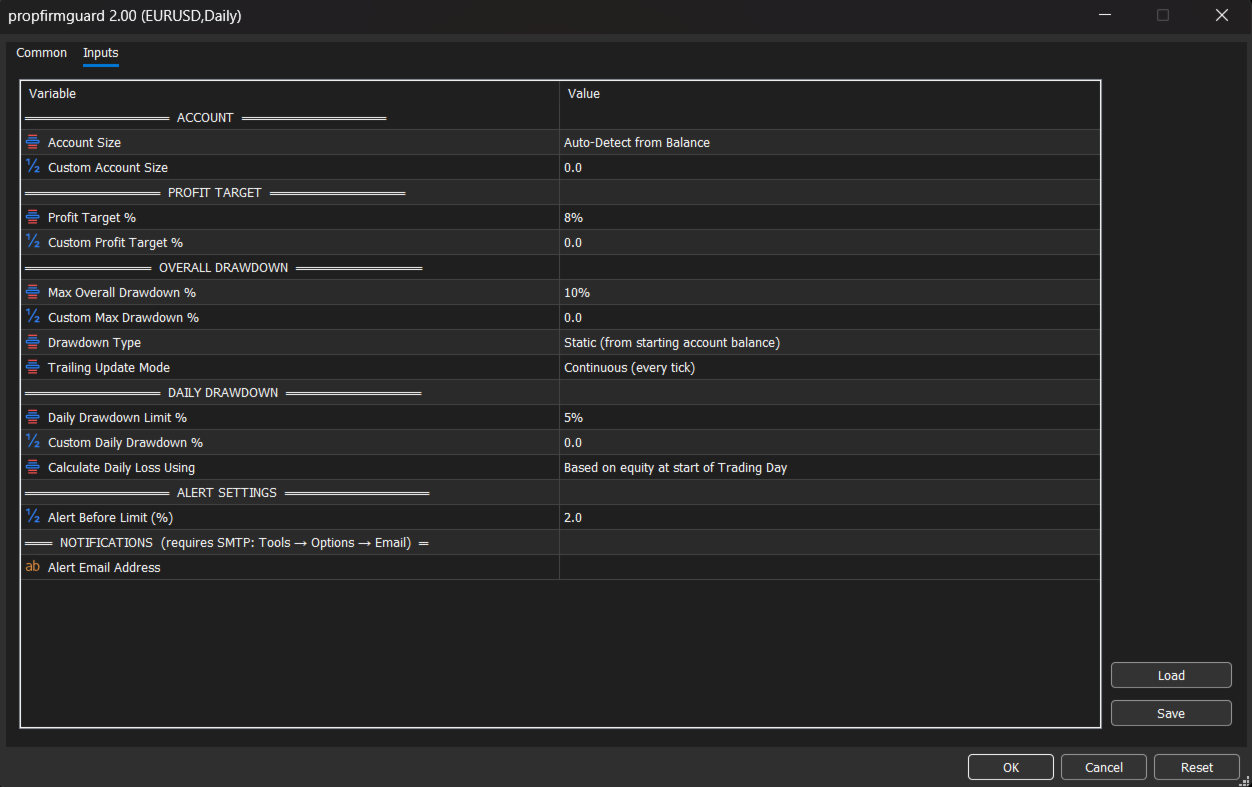
• Works with any prop firm — just enter your own rules (account size, profit target %, max drawdown %, daily drawdown %) and PropFirmGuard adapts to them.
• Automatic account size detection — starts monitoring immediately using your current balance, or you can set a custom size.
• Choose Static or Trailing drawdown — matches whichever rule type your prop firm uses. Trailing drawdown can update in real time or only at the end of the day, exactly like the real prop firm calculation.
• Daily drawdown can be measured from your equity or your balance at the start of the day — match it to your firm's exact rule.
• Early warning alerts — get notified before you reach the limit, not just when it's too late, so you still have time to react.
• Automatic protective close-out — when a limit is hit, PropFirmGuard closes every open position instantly, with no need for you to be at your computer.
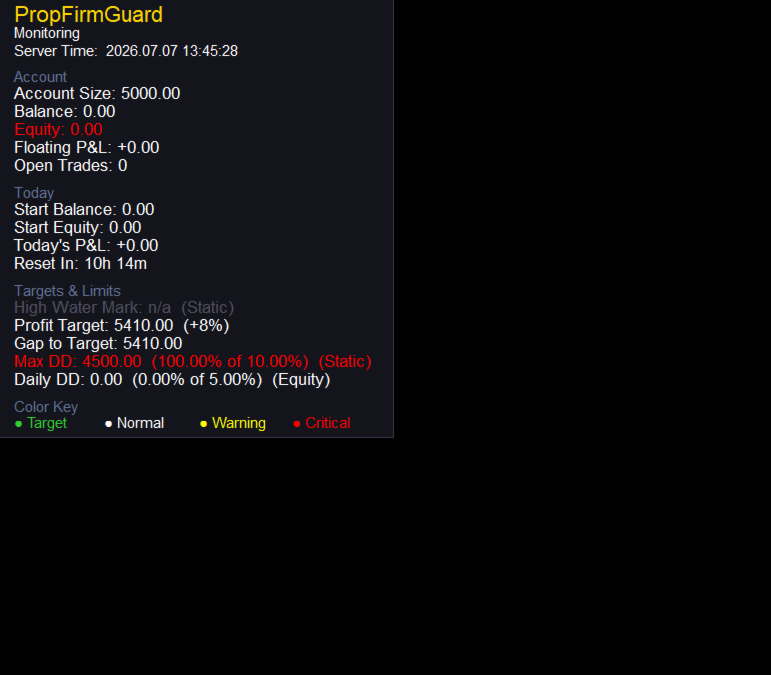
• On-chart dashboard — a simple, color-coded panel shows your balance, equity, floating profit/loss, today's profit/loss, distance to your profit target, and how much of your drawdown allowance you've used. Green means safe, yellow means caution, red means a limit has been hit.
• Alerts sent 3 ways — pop-up alert on your screen, push notification to your phone (via the MetaTrader app), and email — so you find out no matter where you are.
• Simple, beginner-friendly settings — every input is a plain dropdown list (like "8%" or "10%") so you don't need to calculate anything yourself. A "Custom" option is available everywhere if your firm uses a different number.
HOW TO SET IT UP (STEP BY STEP)
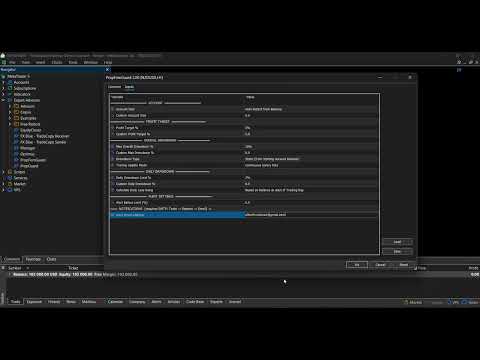
1. Attach PropFirmGuard to any chart (any symbol, any timeframe — it monitors your whole account, not just one chart).
2. In the settings window, choose your account size (or leave it on "Auto-Detect").
3. Choose your profit target percentage — this is written in your prop firm's rulebook (for example, "8% profit target").
4. Choose your maximum overall drawdown percentage and whether it is Static or Trailing (also in your rulebook).
5. Choose your daily drawdown percentage and whether it's measured from equity or balance.
6. (Optional) Enter your email address if you want email alerts. To receive them, first go to Tools → Options → Email in MetaTrader and enter your email provider's SMTP details, then press "Test" to confirm it works.
7. Click OK. PropFirmGuard is now protecting your account. Leave the chart open and let it run in the background while you trade.
That's it — no complicated configuration, no coding knowledge required. Just tell it your prop firm's rules once, and it takes care of the rest.
WHO IS THIS FOR?
• Prop firm challenge traders who want peace of mind that a moment's distraction won't fail their challenge.
• Funded traders who need to stay within strict daily and overall loss limits to keep their funded account.
• Anyone who trades manually or with another EA and wants an independent safety layer watching their account.
IMPORTANT NOTES
• PropFirmGuard does not place any trades itself — it only monitors your account and closes existing positions when a limit is reached.
• Make sure "Allow Algo Trading" is enabled in MetaTrader so the EA can close positions automatically when needed.
• Always double check your prop firm's exact rules and enter the matching percentages — PropFirmGuard follows the numbers you give it.
• Push notifications require the MetaTrader mobile app to be linked to your account (Tools → Options → Notifications).
• Email alerts require your SMTP settings to be configured in MetaTrader beforehand.
Trade with confidence. Let PropFirmGuard watch the rules, so you can focus on your trading.