 MetaTrader 5
 Experts
 지표
지표
 라이브러리
라이브러리
 유틸리티
유틸리티
 위젯
위젯
 규칙
규칙
MetaTrader 5용 무료 트레이딩 유틸리티 - 12
 다음은 MetaTrader 5의 거래를 단순화하는 거래 프로그램입니다. 유틸리티의 설명과 목적을 읽으려면 유틸리티 위에 마우스를 놓으십시오.
Faster execution, clearer order control, and better trading discipline. OCT Panel — Professional MT5 Trading Control Panel OCT Panel is built for traders who want faster execution, clearer order control, and better trading discipline. OCT Panel is a professional trading assistant panel designed for MetaTrader 5 .
It helps traders manage orders, positions, Stop Loss, Take Profit, pending orders, and trade execution more efficiently during manual trading. OCT is not a signal system and does not g
FREE

즉시 Discord 알림. 차트에서 직접 가격 레벨을 설정하고 가격이 이를 돌파하면 메시지를 받으세요. 레벨 추가는 한 번의 클릭으로 가능합니다. 마우스로 라인을 드래그하여 원하는 가격 레벨을 정확하게 설정할 수 있습니다. 편리한 제어 패널: 모든 활성 알림이 목록에 표시됩니다
라인을 드래그하여 레벨을 수정할 수 있습니다
불필요한 알림은 한 번의 클릭으로 삭제하거나 "Clear All Alerts"를 사용해 모두 한 번에 제거할 수 있습니다
알림은 트리거된 후 자동으로 제거됩니다
차트에서 알림 라인을 숨기는 옵션
사용자 지정 알림 텍스트 지원 (예: crossed, reached, touched)
Dark/Light 모드 지원 작동 방식: Add Alert를 클릭
차트에 가격 레벨 라인이 표시됩니다
원하는 가격 레벨로 이동합니다
가격이 해당 레벨을 돌파하면 - Discord에서 메시지를 받게 됩니다 간편한 설정: Discord에서 텍스트 채널을 생성하고 Webhook URL을 복사하
FREE

The EA supports closing orders based on the preset amount. It can close all orders on all pairs, or it can close orders based on Magic ID. Button "Close All" manual Input - Magic Number: Magic Number = 0: Close All pairs Magic Number diffrent 0: Close All with Magic - Money TP: Profitable in money. the EA will close all orders - Money SL: Loss in money. the EA will close all orders Contact: t.me/nguyenvanbo128
FREE

UTS Zig_Zag Alert — Catch the Swings Before They Happen UTS Zig_Zag Alert is a professional-grade, dual-timeframe swing indicator designed to identify market reversals and continuations with pinpoint accuracy. Unlike standard ZigZag indicators that only show you where the price has been , the UTS Zig_Zag Alert uses a proprietary Fast and Slow period combination to highlight high-probability turning points in real time—and it will alert you the moment they happen. Whether you are trading Fore
FREE

Live Risk Dashboard MT5 EA Monitor your account risk clearly and trade within your limits Live Risk Dashboard MT5 EA is a practical account-monitoring utility for MetaTrader 5. It displays your most important trading and risk information directly on the chart, helping remove the "math anxiety" of managing open positions. Instead of repeatedly checking different MT5 windows or manually calculating floating profit, drawdown usage, and remaining limits, you can view everything in one clean, compact
FREE

중요한 가격대, 수익 목표, 리스크 한계선을 다시는 놓치지 마세요. 목표에 도달하면 수익을 확정하고 거래를 일시 중지하고 싶으신가요? Price and Target Alerts는 모든 포지션을 자동으로 청산하고, 알림을 보내며, 이후 거래를 중단할 수 있어 자신 있게 수익을 지킬 수 있습니다. Price and Target Alerts는 시장 가격과 트레이딩 계좌를 지속적으로 모니터링하여, 계좌 수준의 조건이 충족되면 자동으로 알림을 보내거나 미리 설정된 보호 조치를 실행하는 MetaTrader 5용 고급 유틸리티 EA입니다. 주요 기능 다중 가격 알림 모든 심볼에 대해 여러 개의 가격 알림을 생성할 수 있습니다. 입력 탭에서 설정하거나 차트에서 직접 추가할 수 있습니다. 각 알림의 동작 방식을 선택하세요: Once (기본값) – 가격이 설정한 레벨에 처음 도달했을 때만 한 번 실행됩니다. Every Cross – 가격이 해당 레벨을 통과할 때마다 매번 실행됩니다. 다음과 같은 경우
FREE

OVERVIEW Currently available free of charge for a limited time.
Rapid Trade Manager Fast is a semi-automatic utility for MetaTrader 5. It combines order execution, position management, automatic grid trading, operational protections, and a Currency Portfolio in two on-chart panels. The user decides how to configure and enable each feature and remains responsible for risk. This product is not a signal service: automatic entries occur only when the relevant features are enabled. Both panels can
FREE

Free. Know where your account stands before you take the next trade. TrueRisk Account Dashboard shows, on the chart, what you made or lost today, this week and this month, in money and in %, and how many trades you won. It adds up what your open trades leave you with if every stop loss is hit, warns you about trades that have no stop at all, and shows how much room is left before your own daily loss limit. It only reads the account: it never opens, changes or closes a trade. MT4 version (free) |
FREE

Lot Size Script answers one question before a trade: how many lots can I open so that hitting my stop loss costs exactly the risk I chose? Drop it on a chart, fill in two numbers and read the answer.
How it works - Risk is a percent of balance, a percent of equity, or a fixed amount in the account currency. - The stop loss is a distance in points or a stop-loss price. A price on the wrong side of the entry is rejected with a clear message. - The entry is the current ask (buy) or bid (sell) of t
FREE

LocalTimePlus — MT5 Local Time Correction × Custom Scale Extension Tool LocalTimePlus replaces MT5’s default time and price scales with a fully custom system featuring automatic local‑time correction , high‑precision crosshair display , intuitive zoom controls , and a transparent canvas rendering engine . It completely solves the “time‑offset problem” for scalpers, short‑term traders, and users trading on overseas servers. Overview LocalTimePlus overlays a transparent canvas on the MT5 cha
FREE

Run one strategy across every account you trade. Revanche Miroir Local Copier is a free local trade copier that mirrors trades between MetaTrader 5 accounts on the same computer, in real time. One program plays both parts: set it as the Master on the account you trade, and as a Slave on each account that should follow. A complete copier, free. It copies on any symbol, in any account currency, and between different brokers. If the master falls silent, open trades are held rather than closed, and
FREE

VolPulse Telegram Bridge forwards the alerts of the free VolPulse Volume Profile indicator to Telegram: market-state changes, touches of key levels (POC, VAH, VAL, naked POC) and new entry signals with stop and target. It does not trade. It does not read your positions, balance or account number. Setup (about 2 minutes) Install the free indicator "VolPulse Volume Profile" and attach it to your charts:
https://www.mql5.com/en/market/product/200141 Tools → Options → Expert Advisors → tick "Allow W
FREE
Script to load history of a symbol on determined timeframe (default M1).
It is extracted from the MQL5 documentation:
https://www.mql5.com/en/docs/series/timeseries_access
Adapted by Renato Fiche Junior #melhoresferramentas #renato #larissasihle #aguiatraders
Parâmetros de Entrada
- Start datetime : the initial datetime from the history will be loaded - Timeframe to be loaded: period that will be loaded
FREE

Professional Manual Trading Assistant for MT5 BRIAN BREYLI VANA – Professional Trade Manager Dashboard & Market Intelligence EA for MetaTrader 5 Professional Manual Trading Assistant with Hybrid Position Management BRIAN BREYLI VANA is a professional manual trading assistant for MetaTrader 5 that combines one-click execution, intelligent position management, Market Intelligence, and Hybrid Position Management into a single trading dashboard.
Unlike conventional Expert Advisors, it never opens p
FREE

This indicator builds a live correlation matrix from the symbols currently selected in Market Watch . It calculates Pearson correlation on simple returns over a user-defined lookback and displays the results in a clean, auto-sized grid. Positive correlations appear in green, negative in red, and near-zero values stay neutral. An optional automatic timeframe scanner cycles through only the timeframes you enable (M1, M5, M15, M30, H1, H4, D1, W1, MN1), updating the entire matrix at a set interval.
FREE

Multi currency and multi timeframe scanner. Scans all instruments in "market watch" and gives either pc-alert or push-notification to the phone on a breakout. A breakout is by default defined as when a candle becomes longer than three ATR with a period of 300.
If you have the need for a custom buildt scanner, to scan for your particular setup. Please add a personal jobb under the Freelance section.
Functionality
Has spread filter , to not open stupid mega spread crypto currency charts. Has lo
FREE

Why use it See at a glance how much room is left before your own daily loss and max loss limits. Know the equity level that would reach each loss limit, before it happens. Get an on-screen note when a limit reaches the warning levels you choose. It is an indicator with no trading functions: it never opens, modifies or closes a position. What it shows Balance, equity and today's result (closed trades since the day reset plus open positions). For the account history: number of trades, win rate, pr
FREE

Arixis Grid Risk Calculator — Understand Grid Exposure Before Trading
Arixis Grid Risk Calculator is a professional mathematical analysis tool for traders who use grid, recovery or progressive position-sizing systems. Configure the initial lot size, distance between entries, maximum number of levels and position-sizing progression to visualize how exposure evolves as additional positions are added. The calculator generates a detailed level-by-level representation including individual lot size,
FREE

Symbol Cost Monitor 는 여러 거래 종목의 거래 비용을 동시에 빠르게 모니터링할 수 있도록 설계된 MetaTrader 5용 전문 분석 유틸리티입니다. 스프레드와 스왑은 최종 거래 결과에 직접적인 영향을 미칩니다. 이는 스캘핑, 활발한 데이 트레이딩, 며칠 동안 포지션을 보유하는 거래, 여러 종목을 동시에 거래하는 경우에 특히 중요합니다. MetaTrader 5의 기본 인터페이스에서는 이러한 모든 항목을 하나의 창에서 편리하게 비교하기 어렵기 때문에, 일반적으로 각 종목의 세부 정보를 개별적으로 열어 수동으로 확인해야 합니다. Symbol Cost Monitor는 선택한 종목의 핵심 데이터를 수집하여 차트 위의 간결한 패널에 표시합니다. 이를 통해 스프레드가 확대된 종목을 빠르게 확인하고, 스왑을 비교하며, 거래 조건의 변화를 모니터링하고, 포지션을 열기 전에 예상 비용을 평가할 수 있습니다. 패널은 데이터를 실시간으로 업데이트하며, Market Watch에 표시된 모든
FREE

G Spikes Trade Assistant G Spikes Trade Assistant is a MetaTrader 5 utility panel designed to help users manage manual trading actions more efficiently. It provides quick access to order execution, stop-loss settings, target-price settings, and position-management controls from the chart. Main features Buy and Sell market order buttons. Pending order options. Stop-loss and target-price management. Close All and selected close options. Customizable display settings and trade comments. Interface t
FREE

Level Assistant is an expert assistant for manually setting support and resistance levels.
Traders often form their own levels. If there are many charts of different periods, the level will be multiplied by all charts.
When placing a horizontal line on a chart, the Assistant suggests converting this line into a level. At the same time, he himself will determine the color and thickness of the line, depending on the period of the instrument and where it is relative to the price. Mark the level
FREE

This tool allows you to export MetaTrader indicator data (buffers) for any financial instrument available in your MetaTrader 5. You can export multiple Symbols and Timeframes into a single CSV file. You can also schedule the export frequency (every 1 minute, 5 minutes, 60 minutes, etc.). There is no need to open multiple charts to retrieve recent data—the tool downloads the data directly. The CSV file will be saved in the folder: \MQL5\Files .
How it works Report Tab Select the indicators and o
FREE

Daily P/L Risk Management is a MetaTrader 5 utility that watches your account's daily profit and loss and acts automatically when a limit is hit. It tracks both realized and unrealized P/L and can close positions, disable trading or alert you. It is a practical safety net for prop-firm challenges and disciplined day trading. Features Daily loss and profit limits, set by money amount or percent of balance/equity. Combined P/L tracking: counts both closed-trade (realized) and open-position (unreal
FREE

Overview Sessions Duck is a highly optimised, resource-efficient MetaTrader 5 indicator designed to automatically visualise the core global trading sessions (Asian, London, and New York) and display live, synchronised timezone data directly on your chart. Built specifically for performance, zero lag, and clean chart aesthetics, Sessions Duck provides day traders, scalpers, and session breakout traders with immediate market liquidity context without compromising terminal responsiveness—even when
FREE

TapTrade is a MetaTrader 5 chart trading assistant (Expert Advisor). It provides an on-chart control panel and draggable lines for Entry, Stop Loss, Take Profit, and Break-Even so you can place market and pending orders with clear risk control. Semi-manual: you decide when to click Place. No trading signals and no guaranteed profit. What it does Attach TapTrade to any chart. Choose order type (Buy/Sell Market, Limit, Stop), set risk mode and value, drag the chart lines to your levels, select TP
FREE

Professional Trade Management for Manual Traders Featuring Structure-Based SL, Symbol-Adaptive Trailing, and Dollar-Level Profit Protection
This EA takes care of your open trades so you can focus on entries. It never opens Buy or Sell positions - you decide when and where to enter. The EA handles the rest: stop loss placement, breakeven, trailing, dollar-level profit lock, and pending order protection, all automatically, all in the background.
Built by an active live trader who codes his own t
FREE
Emergency Exit is an MT5 expert advisor I developed to solve a specific problem: monitoring and managing overall account risk across multiple positions. Unlike traditional EAs that focus on entry signals or complex trading algorithms, Emergency Exit has one job - to watch your total floating P/L and take action when your predefined thresholds are hit.
The main functionality revolves around two simple conditions:
Close when P/L >: Triggers when profit exceeds a value (take profit) OR when loss
FREE

시장이 급변하는 상황에서 여러 개의 미결제 포지션에 대해 손절매를 수동으로 손익분기점으로 이동시키는 작업은 시간이 많이 소요될 뿐만 아니라, 실수로 여전히 손실을 보고 있는 포지션에 적용하기 쉽습니다.
‘피닉스 손익분기점 버튼’은 단 한 번의 클릭으로 수익이 나는 모든 미결제 포지션의 손절매를 손익분기점으로 이동시키며, 여전히 손실을 보고 있는 포지션은 자동으로 건너뜁니다.
수익을 보호하는 방식
- 한 번의 클릭으로 계좌 내 모든 미결제 포지션에 손익분기점 보호를 적용합니다. - 현재 손실을 보고 있는 포지션을 자동으로 감지하여 건너뜁니다. - 손익분기점은 스탑을 정확한 진입 가격으로 설정합니다. 해당 가격에 도달할 경우 스프레드는 여전히 부과되며, 패널은 무료 보호를 암시하지 않고 이를 명확하게 안내합니다. - 성공 또는 실패 시 소리 알림이 제공되며, 수정된 항목, 건너뛴 항목, 이미 보호된 항목에 대한 상세한 로그가 기록됩니다.
사용자 지정
패널의 위치 및 오프셋 조
FREE

MT5 Trade Watch is an analytical tool designed for monitoring MetaTrader 5 trading accounts directly through the Telegram interface in real time. The project aims to provide traders with quick access to their account status without having to constantly log in to the trading terminal.
Key project features: Real-time monitoring:
The system updates balance, equity, current profit, and margin data every second. Users have access to interactive charts showing balance and equity changes over various
FREE
Expert Advisor that tracks assets listed in the Market Watch window by checking which assets are needled (crossing the 3, 8, and 20 moving averages) or are close to crossing. It does not track when there is no crossing of the averages. The EA allows you to choose the timeframe for analyzing the crossings. There is no maximum limit for assets or EAs running simultaneously, but a very large number can lead to system slowdown and freezing. Users should be mindful of their device's capabilities. Th
FREE

Trend direction of up to 10 timeframes of your choice, in one panel — non-repainting, with configurable sync alerts. 100% free. TrendSync MTF Dashboard shows you the trend direction of up to 10 timeframes of your choice — from M1 to MN1 — in a single clean panel on your chart, so you always know whether the timeframes agree before you take a trade. Trading against the higher timeframe is one of the most common (and most expensive) mistakes in manual trading. This dashboard makes multi-timeframe
FREE

Time-Based Trade Closer EA - Risk-Free Overnight? Yes! Time-Based Trade Closer Does It for You. Love it? Hate it? Let me know in a review! Feature requests and ideas for new tools are highly appreciated. :) Try "The AUDCAD Trader":
https://www.mql5.com/en/market/product/151841 ️ ALWAYS TEST THIS EA ON A DEMO ACCOUNT BEFORE USING IT LIVE! Overview The Time-Based Trade Closer EA is a powerful MetaTrader 5 Expert Advisor designed to automatically close all open positions and pending orders at
FREE

FREE

Layering — Build Profit in Measured Steps
Layering helps you grow and protect a position by placing additional trades at equal, defined distances as the market moves. It's a structured layering approach designed to secure the account and bank profit as each take-profit is reached.
What it does for you Measured layering: trades are added at equal distances you define — no guesswork. Account protection built in: the layering logic is designed to secure your account as it works. Profit-locking: a
FREE

Position Limiter EA: Control Your Risk, Maximize Your Strategy Are you tired of manually managing your trades across multiple symbols? Do you want to ensure you never exceed your risk limits? Introducing the Position Limiter EA for MetaTrader 5! This powerful Expert Advisor automatically monitors all your open positions and pending orders for each symbol on your account. You set the maximum number of trades allowed per symbol, and the EA takes care of the rest. If the number of trades exceeds yo
FREE

Free Global Stop Loss and Take Profit Setter with Break Even
Free one click Stop Loss and Take Profit tool for manual trading. Apply a fixed SL and TP to every open position on the symbol, or move them all to break even, with a single button. It only modifies Stop Loss and Take Profit levels — it never opens or closes a trade. Set your SL and TP distance in points, click once, and every position on the current symbol is protected. The break even button moves stops to entry (or a configurable num
FREE

Kalman Forecast Helper is an advanced MQL5 Expert Advisor component designed to generate adaptive market forecasts, trend predictions, and trading signals for FX and other financial time series. Powered by a proprietary Kalman filtering engine, the helper continuously analyzes incoming market data and delivers actionable forecast information that can be integrated directly into Expert Advisors, indicators, or quantitative trading systems. After each update, the helper provides: Multi-horizon for
FREE

SI Ruler A clean, one-click price ruler that shows points and exact dollar cost between any two levels on your chart. Every trader needs to quickly measure the distance between two price levels and know what it costs in real money. Most platforms make this harder than it should be. SI Ruler puts a single icon in the corner of your chart — click it, click your entry level, and drag to your stop or target. The label tells you instantly how many points that distance is and exactly what it costs in
FREE

동일한 계좌에서 두 개 이상의 EA를 실행하면, 어떤 전략이 실제로 자산 가치에 기여하고 있는지, 아니면 손실을 초래하고 있는지 한눈에 파악하기 어렵습니다.
Phoenix Magic Number Dashboard는 매직 넘버별로 미결제 및 청산된 거래를 자동으로 그룹화하므로, 각 EA의 실시간 및 청산된 실적을 계좌 전체 합계와 함께 나란히 확인할 수 있습니다.
다중 EA 계정을 명확하게 관리하는 방법
- 활성 매직 넘버를 자동으로 탐지하거나 수동 목록을 추적
- EA별 미결제 포지션, 미실현 이익, 청산된 거래 및 실현 이익
- 각 EA가 거래하는 상품 수를 보여주는 선택적 상품 수 열
- 집계 총계 및 마지막 업데이트 시간을 포함한 계정 전체 요약 행
- 색상으로 구분된 손익 임계값
알림
EA의 실적이 사용자가 설정한 손익 임계값을 넘을 때 소리 및 푸시 알림을 제공합니다.
Phoenix Magic Number 대시보드를 사용하여 다음을
FREE

Risk Basket Planner Risk Basket Planner 는 MetaTrader 5용 수동 바스켓 리스크 계획 도구입니다. 여러 진입 레벨과 기술적 손절가를 설정하고, 수동 주문 전에 각 레이어의 로트 크기와 실제 리스크를 계산할 수 있습니다. 주요 기능 1~5개의 진입 레이어 지원. BUY 또는 SELL 방향 선택. 계좌 Equity 의 비율로 리스크 설정. L1-L5 가격을 직접 입력하거나 차트에서 드래그 가능. 모든 레이어에 공통으로 적용되는 Technical Stop Loss . Auto SL 80%, 100%, 120% 프리셋. 정확한 가격을 지정하는 Manual SL 모드. 진입가, SL, 리스크 %, 방향, 레이어 수 변경 후 자동 재계산. 활성 레이어에 균등 리스크 배분을 시도하고 브로커 로트 반올림 후 실제 리스크 를 표시. 레이어별 로트, 리스크 %, 리스크 금액, 총 로트, 목표 리스크, 실제 바스켓 리스크 표시. 현재 스프레드와 가장 가까운 SL까
FREE

Risk Calculator Panel is a free on-chart utility that calculates the correct position size for every trade based on the risk you choose. Type your Stop Loss and Take Profit, pick your risk, and the panel instantly shows the exact lot size to use. One click on BUY or SELL opens the trade with the calculated lot, Stop Loss and Take Profit already set. It is a pure manual-trading assistant - it does not generate trading signals and has no restrictions.
Features: - Two risk modes: risk a percentag
FREE

ONLY DEMO ACCOUNT Live Version Here : https://www.mql5.com/en/market/product/170601 The fastest on the entire platform, try it with 50 open trades or more
This Expert Advisor provides a fast and intuitive way to manage and close open trading positions directly from the chart using a clean button-based interface. With a single click, traders can instantly close positions based on different conditions, improving execution speed and overall trade management efficiency.
Key Features Close all open
FREE

U sing keyboard shortcuts to draw Fibonacci levels and rectangles quickly and efficiently.
Press F to create a Fibonacci retracement. Click with mouse (2x): -once on the chart to set the starting point and - again to set the ending point. The Fibonacci levels are drawn automatically using the configured ratios, colors, and styles.
Press T to instantly draw a pre defined rectangle at the closest highest or lowest price (based on trend).
All levels, colors, sizes, and styles ca
FREE

Xauiq ATR Trade Manager is a position management utility designed for manually opened XAUUSD trades. It does not generate entry signals and does not decide whether to buy or sell. After a manual position is detected, the utility manages risk, partial profit taking and the remaining position according to the confirmed settings. Main Features Manual Position Management The utility manages eligible manually opened positions and detects the actual Buy or Sell direction before calculating any level.
FREE

Stop revenge trading, overtrading and blown accounts. Fomo Killswitch EA is a discipline assistant that automatically enforces your daily risk limits, blocks impulsive entries and protects your account during prop firm challenges – without relying on willpower. --- ## How it works Fomo Killswitch runs alongside your existing trading setup and acts as a safety gate for your account: - One click locks new entries for a chosen period (FOMO Lock) - After a significant loss, the EA automatically app
FREE

지난 석 달 동안 거래에 얼마가 들었는지 아십니까? 얼마를 벌었거나 잃었는지가 아니라, 포지션을 하나하나 열고 닫는 데 얼마가 들었는지 말입니다. 이 도구는 계좌에 이미 있는 청산 내역을 읽고 그것을 돈으로 알려 줍니다. 각 체결 순간에 제시된 스프레드, 진입과 청산의 슬리피지, 수수료, 스왑. 미리 설치해 둔 것이 없어도 됩니다. 읽기만 할 뿐, 주문은 절대 보내지 않습니다.
보이지 않는 돈
거래 한 번마다 네 가지가 청구됩니다. 둘은 거래 내역서에 나옵니다. 나머지 둘은 손익 안에 숨어 있고, 그래서 거의 아무도 더해 보지 않습니다.
- 스프레드. 그 순간의 가격보다 조금 비싸게 사고 조금 싸게 팝니다. 언제나. 손익에서 이미 빠져나갔기 때문에 비용으로 드러나는 일이 없습니다. - 슬리피지. 어떤 가격을 요청했는데 다른 가격에 체결됩니다. 특히 손절이 걸릴 때나 시장이 빠르게 움직일 때 일어납니다. - 수수료. 브로커가 거래에 대해 받는 몫. 대부분이 유일하게 계산에 넣
FREE

차트를 얼마나 움직이든 상관없이 선택한 시간 포인트로 즉시 포커스를 이동할 수 있으며, 원하는 시점을 손쉽게 확인할 수 있습니다. Focus Time Line Player는 조작이 간단하여 필요한 시간에 빠르게 집중할 수 있습니다.
마음에 드셨다면 "Focus Time Line"도 고려해 보세요: https://www.mql5.com/ko/market/product/154363 본 기능과 더불어 여러 차트에서 MTF 동일 시간 동기화가 가능하여 멀티 타임프레임 분석이 훨씬 수월해집니다.
【기능】 ・Focus Mode: SingleLine (기본 표시) ・Crt FocusLine: 원하는 시간에 포커스 라인 1개 생성 ・Position: 표시 위치 전환 ・Focus: 생성한 포커스 라인으로 차트 화면 이동 ・X 버튼: 프로그램 종료
【조작 방법】 ・Focus Mode는 기본 SingleLine으로 사용 ・Crt FocusLine 버튼을 눌러 FocusTimeLine 1개 생성
FREE

Capital SL Defender is a free position manager for MetaTrader 5. It does not open trades. You open them, and Capital SL Defender protects them: it gives every trade a stop loss and take profit, moves the stop to break-even once the trade is in profit, locks in part of the profit as the trade grows, limits how many trades you can open in a day, and shows it all on a black and orange panel on the chart. It runs on its own, with no outside service. For profit locks by % of TP, the TP runner, trail
FREE

Recovery Booster 드디어 – 많은 EA 소유자 분들이 찾던 바로 그 솔루션입니다. 귀하의 EA 는 훌륭하게 작동합니다. 하지만 손실 거래가 발생한 후, 당신은 종종 "지금 바로 약간만 더 큰 롯(Lot) 으로 거래할 수 있다면 완벽할 텐데"라고 생각하곤 합니다 — 왜냐하면 다음 거래가 수익으로 이어지는 경우가 매우 많기 때문입니다.
"까다로운" EA와의 실전(Live) 성과: 많은 EA들이 백테스트에서는 완벽해 보이지만 실제 드로우다운(Drawdown) 에서는 어려움을 겪습니다. Recovery Booster는 현재 이러한 인기 전략 중 하나가 깊은 낙폭 을 관리하고 회복할 수 있도록 돕고 있습니다. 여기에서 결과를 확인하세요: Recovery Booster가 포함된 실전 시그널 Recovery Booster 는 귀하의 우수한 로봇이 손실로부터 더 빨리 회복하도록 도와주는 MetaTrader 5 용 트레이딩 유틸리티입니다. 메인 EA 를 모니터링하여 드로우다운 기간 동안
FREE

Account Turbo Flip: The Ultimate Manual Trading & Management Assistant Trading successfully isn't just about finding the perfect entry—it is about how you manage the trade once you are in the market. Account Turbo Flip is a streamlined utility Expert Advisor designed to take the emotion and hesitation out of trade management. Built for traders who prefer to maintain control over their own entries, it acts as your dedicated tactical assistant. You pull the trigger based on your own analysis, an
FREE

Read-only trade export tool for MT5 investor accounts NTS Investor Reader is a lightweight companion EA for NTS Local Copier . It runs on an read-only / investor login and writes your open positions to the shared file in the same format used by the NTS Local Copier Master. No trade execution. No OrderSend. No copying logic. It simply reads open positions and outputs them for the Slave EA to follow. What it does Reads all open MT5 positions safely from an investor account. Writes them to the shar
FREE

Unified Scroll – Effortless Multi-Timeframe Chart Synchronization (MQL5)
Tired of manually scrolling through multiple charts? Unified Scroll is the ultimate MQL5 utility that instantly syncs scrolling and panning across all charts of the same symbol—regardless of timeframe. No more misaligned charts, no more wasted time. Just smooth, synchronized analysis at your fingertips.
Seamless Scrolling & Panning – Move one chart, and all others follow in real time .
Works with Any Sym
FREE

RSI Zeus — Indicator for MetaTrader 5 RSI Zeus is an indicator based on the standard RSI that incorporates volume data as an additional factor in its calculation, with the aim of reflecting not only price movement but also the trading activity behind that movement. What this indicator does It calculates a modified RSI value that weights price with the volume traded on each bar. The result is a line that behaves similarly to the traditional RSI but reacts differently in situations where price mov
FREE

High-impact news is where spreads blow out, stops get hit on spikes, and orders fill nowhere near where you expected. News Sentinel puts a live countdown and a shaded volatility window right on your chart, and tells you how many pips each release has actually moved the currency so you know the volatility to expect. A free on-chart news panel for anyone who trades a chart, whether you run Expert Advisors that get stopped on news spikes, or you trade by hand and need to know when the market is abo
FREE

Overview
This Expert Advisor (EA) for MetaTrader 5 is a robust tool designed to optimize money and risk management. It allows users to calculate position sizes based on account balance, desired risk percentage, and trade parameters like stop loss and entry points. Additionally, it offers a clear view of reward-to-risk ratios and allows for the inclusion of broker commission, recalculating data accordingly.
Key Features
1. Risk-Based Position Sizing
The EA calculates position sizes by taking
FREE

使用此EA可以通过币安交易所的API连接到MT5交易端,利用MT5强大的量化功能实现交易策略的回测。 操作方法: 1、首先 必须 把( http://api2.0.mt5.vip 、 https://fapi.binance.com )这两个 地址 填写到:mt5——工具——选项——EA交易下的WebRequest列表中,否则所有数据无法同步。 2、在导航栏找到EA,双击之后添加币安的API KEY ,保存后KEY自动保存; 3、KEY保存后会出现交易面板,通过MT5下的订单可以实时展现在面板,同事也可以监控币安交易所是否有同样的订单; 4、交易面板只展示订单的总持仓,请仔细核对,以防止漏单; 5、API KEY会自动保存在本地,第二次打开后无需重复输入; 6、目前只能支持BTCUSDT、ETHUSDT、LTCUSDT合约产品 7、最小交易量以币安的最小交易量为准; 8、币安KEY是存储在本地,不会上传到任何第三方,请放心使用; 9、如果想更换KEY ,请直接在EA内修改即可。
FREE

EA Performance Monitor is a MetaTrader 5 indicator that presents the performance of running Expert Advisors in a single table. The indicator automatically detects the magic numbers present in trade history and open positions, and shows for each one the EA name (read from order comments), symbol, number of trades, P/L and win rate.
Features
Automatic detection of magic numbers from deal history and open positions. The indicator groups operations by magic and shows one row per EA.
Text identif
FREE

Features The Expert Advisor (EA) is a semi-automated trading system that blends user-initiated entries with algorithmic trend management. Trade entries are triggered manually, while scaling, trailing stops, and risk control are handled automatically by the EA. Functional Specifications 1. Trading Modes Manual Execution Mode Trades initiated via on-chart control panel User selects Buy or Sell direction EA applies predefined Stop Loss and Take Profit values Trend management logic activates after
FREE

Arixis Trade Replay — Reconstruct and Understand Your Historical Campaigns
Arixis Trade Replay transforms historical MetaTrader 5 trading activity into an interactive visual reconstruction directly on the chart. Instead of examining hundreds of isolated deals in the account history, the application reconstructs observable trading campaigns and allows the trader to review the sequence in which positions were opened, expanded and eventually closed. During replay, entry and exit events can be disp
FREE

Introducing a powerful MetaTrader 5 Expert Advisor designed to enhance your trading strategy – the Auto Breakeven EA! This feature-rich EA is tailored to bring your stop-loss to breakeven, ensuring a risk-free trade once the market moves in your favor up to a specified price.
Explore the full potential of the Auto Breakeven EA. Download it for free now, and find the download link at the bottom of our page. Elevate your trading experience and take control of your risk management strategy. Happy
FREE

Утилита Горячие Клавиши. Работает только на неттинговых типах счетов. Позволяет совершать торговые операции без мыши. Удобно использовать для акций, фьючерсов, валютных пар, криптовалют. В совокупности со стаканом получается полноценный скальперский привод.
Реализованные команды : · покупка по рынку; · продажа по рынку; · выставление лимитного ордера на покупку с заданным отступом (может быть отрицательным) от цены Бид; · выставление лимитного ордера на прода
FREE

Assets can behave based on repetitive patterns on specific times of the day, for example at the opens and closes of the sessions. Daily Vertical Lines helps us draw vertical lines at any given time of the day as many days as required, as simple as sliding a vertical line. This free version only draws vertical lines, while the paid version (to be published) collects and presents technical and statistical information regarding the price behavior at that time of the day.
FREE

MultiTimeframe Info Feed (MIF) Indicator Description: MultiTimeframe Info Feed (MIF) is a smart MQL5 indicator that displays a dynamic, real-time info panel directly on your chart, offering powerful insight into current market conditions. Key features include: Real-time display of Open, High, Low, Close, and live Tick price Tick Rate (ticks per second) for assessing market activity Auto-calculated Entry Price on new candle formation Signal direction detection (BUY / SELL) Price action pattern re
FREE

MQL CS Trade Assistance is not an automated strategy Expert Advisor designed to trade on its own. This utility is built specifically for manual traders who want a professional trade assistance panel with advanced trade management tools directly on the chart. The panel allows traders to execute and manage trades faster while assisting with stop loss management, take profit management, breakeven handling, trailing stop logic, pending orders, and adaptive trade protection.The goal of this product
FREE

Manage All Trades for MT5 Manage All Trades is a free MT5 utility that gives you fast and convenient control over open positions directly from the chart. Close all trades, BUY trades, SELL trades, profitable trades, losing trades, or positions on the current symbol with one click. Built for traders who want speed, simplicity, and better trade management in live market conditions. Manage All Trades is a lightweight and practical trade management utility for MetaTrader 5 that helps you close open
FREE
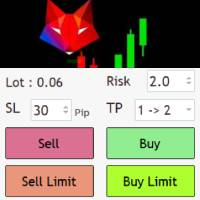
Risk management settings Automatic lot size calculation based on risk Open Buy and Sell positions with one click based on settings Open positions graphically (Buy Limit – Buy Stop – Sell Limit – Sell Stop) Real-time display of open positions' profit/loss and daily profit/loss Completely free You are welcome to explore and purchase from our other products as well. Please feel free to take a look and let us know if you have any questions.
FREE

The utility is a checklist where you can write all the rules of your trading system and keep it on the chart in front of your eyes. As a rule is executed, mark it with a tick. To the right of each rule, you can write the "strength" (percentage) of the rule. And if there is a tick next to the rule, then all "forces" are summed up in the "Total" line.
For the convenience of visual perception, you can set the color for displaying the “Total” value.
Panel options: Title - The title of the panel N
FREE

Manual Trade and Risk Manager Pro MT5 is an MT5 manual Trade Manager and Prop Firm Risk Manager for discretionary traders who need disciplined account risk control. Use it as an MT5 risk management tool and manual trading panel MT5 when you trade your own strategy, a prop firm challenge, an evaluation account, or a funded account. It combines MT5 position size calculation, drawdown protection MT5 monitors, and a trade execution panel MT5 so you can size, check limits, then execute manually. This
FREE

Quote Cost Parity is a MetaTrader 5 chart panel for forex majors and minors that share a quote currency. Pairs with the same quote have the same pip cost for a given lot. The indicator uses that correspondence directly: it calculates the cost once for the group, then shows that cost for three lot sizes. It acknowledges only these quote groups. JPY: USDJPY, EURJPY, GBPJPY, AUDJPY, NZDJPY, CADJPY, CHFJPY. Source : USDJPY. CHF: USDCHF, EURCHF, GBPCHF, AUDCHF, NZDCHF, CADCHF. Source : USDCHF. CAD:
FREE

What this tool does Daily and Max Loss Protector is a protective account monitor for traders on prop firm challenge or funded accounts (built with common prop firm evaluation rule methodology in mind, and adjustable to match similar rules from other firms). It continuously tracks your account against: Daily loss limit — measured from your account BALANCE at the start of each trading day (matching how many prop firms calculate this, rather than a simplified equity-only approximation) Maximum ove
FREE
MetaTrader 마켓은 과거 데이터를 이용한 테스트 및 최적화를 위해 무료 데모 거래 로봇을 다운로드할 수 있는 유일한 스토어입니다.
어플리케이션의 개요와 다른 고객의 리뷰를 읽어보시고 터미널에 바로 다운로드하신 다음 구매 전 트레이딩 로봇을 테스트해보시기 바랍니다. 오직 MetaTrader 마켓에서만 무료로 애플리케이션을 테스트할 수 있습니다.
