Ultimate Order Manager


Pending orders, positions, risk and schedules in one free MT5 workspace.

Trading with UBS (Ultimate Breakout System), running several EAs, or managing manual trades alongside them? Ultimate Order Manager helps you find the right orders, see where risk is concentrated, and review exactly which tickets you are about to manage. 


A complete toolkit, shared free

I built UOM to bring the controls I wanted for my own trading into one practical workspace. I am sharing the complete toolkit free so other MT5 traders can use the same approach: clear account visibility, deliberate order management and results they can review.

Pending management, full hedging-position closure, SL-risk comparison, exposure and margin, daily monitoring, schedules and CSV exports are all included.

Try searching the entire MQL5 Market for free tools like this—you likely won’t find any.

It’s great if you just want to step in manually without messing up your EA, that’s how I use it myself. 

Keep your existing EA settings unchanged while scheduling position closures and pending order cancellations at your preferred time. Choose specific manual trades or target orders by symbol, Magic Number, or comment.


For more details, please refer to the PDF guide.

Find the right trades in a busy account

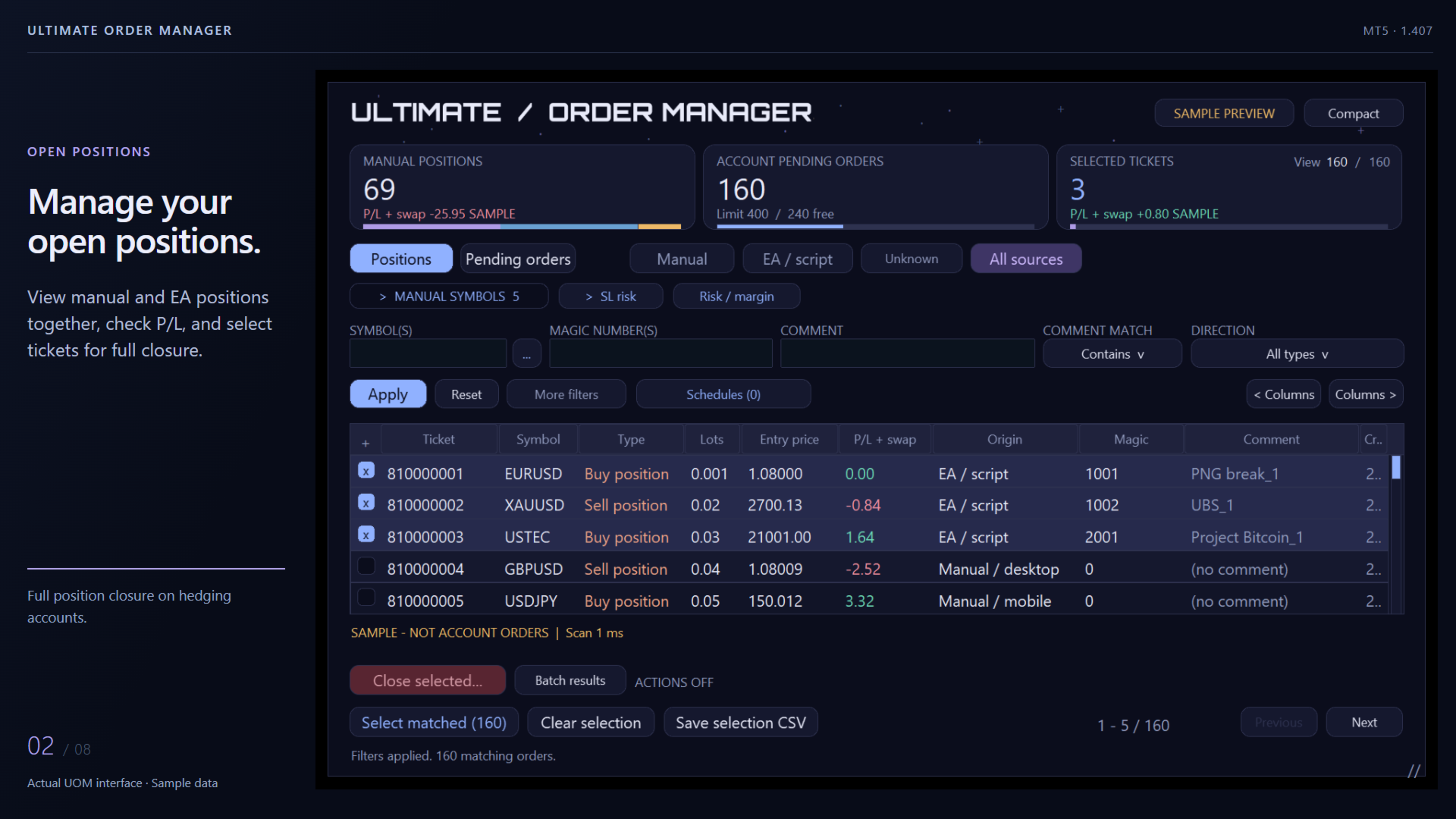
Combine Symbol, Magic Number and Comment filters to find one EA, several strategies or a specific set of manual trades. Choose Contains, Exact match or Excludes for comments, then save frequently used filters.

  • Separate Manual, EA / script and Unknown origins.
  • View all six supported pending-order types in an expandable table.
  • See account pending count, the broker-reported limit and remaining capacity.
  • Compare symbol-level order counts and pending lots, then select individual tickets or all filter matches.

    Start with the largest SL loss

    Sort pending orders from the largest to the smallest estimated SL loss, or reverse the order. Review the money at risk in account currency to spot outsized tickets and possible contract-size mismatches.

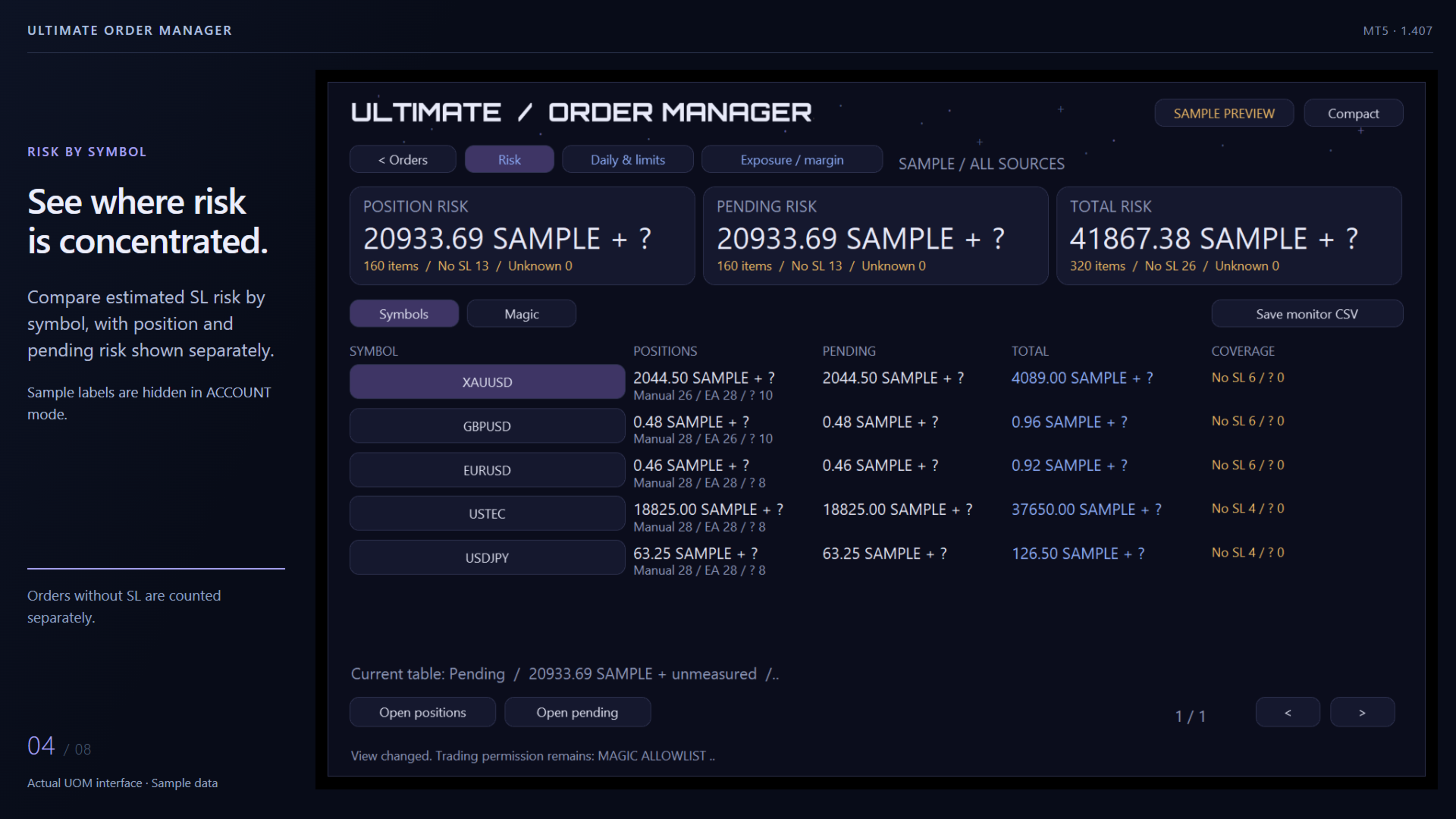
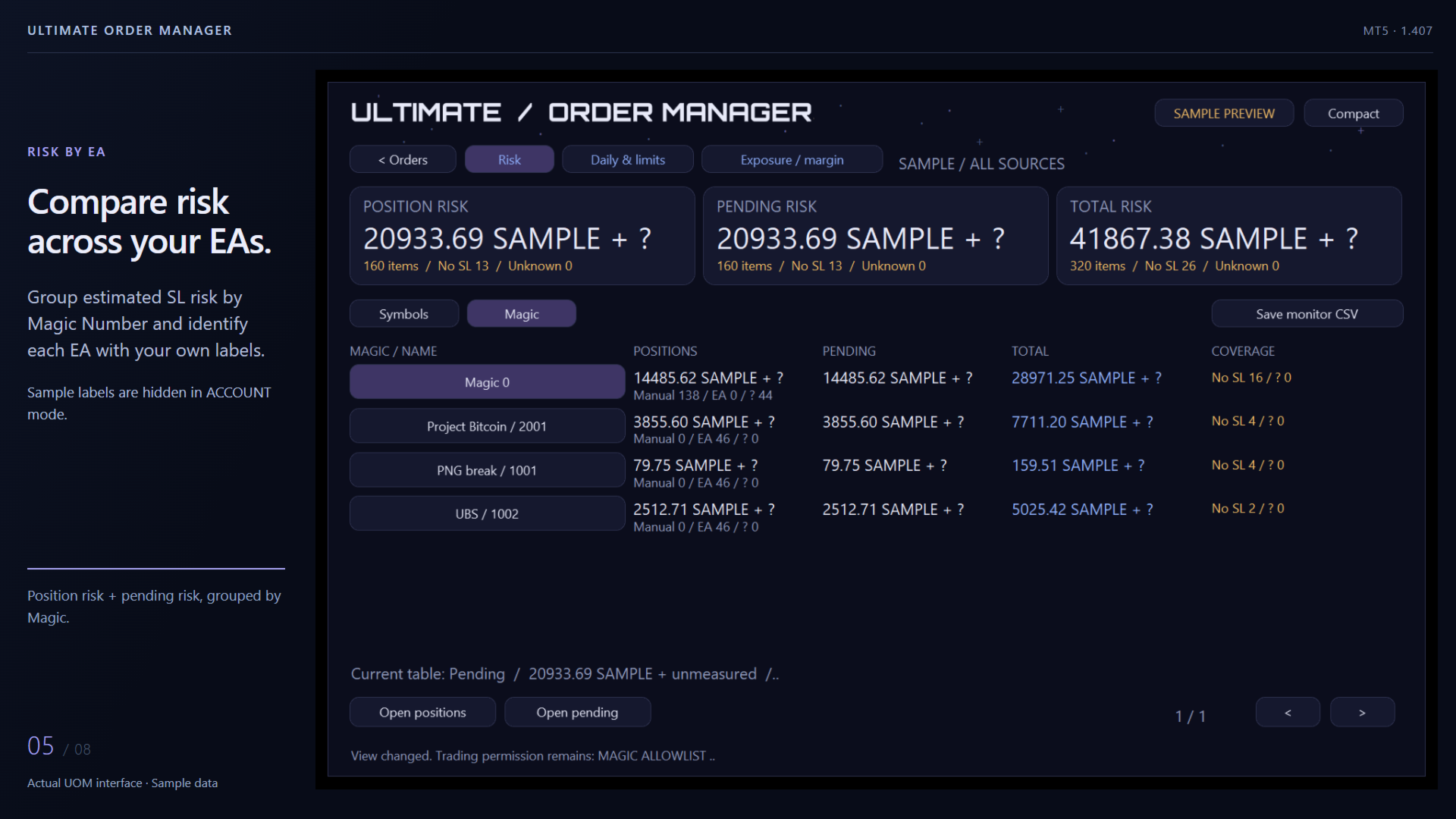
    Compare total account risk by symbol and Magic, including open positions and pending orders. No SL and unavailable calculations remain clearly marked alongside the measured totals.


    An institutional-grade mindset, made accessible.

    Defined permissions, exact-ticket review and traceable results guide the way UOM handles order actions. These principles put deliberate control at the center of the workflow.

    • Permissions before actions. Choose a management scope, allow the intended Magics and protect exceptions. Protected Magics take priority in every scope.
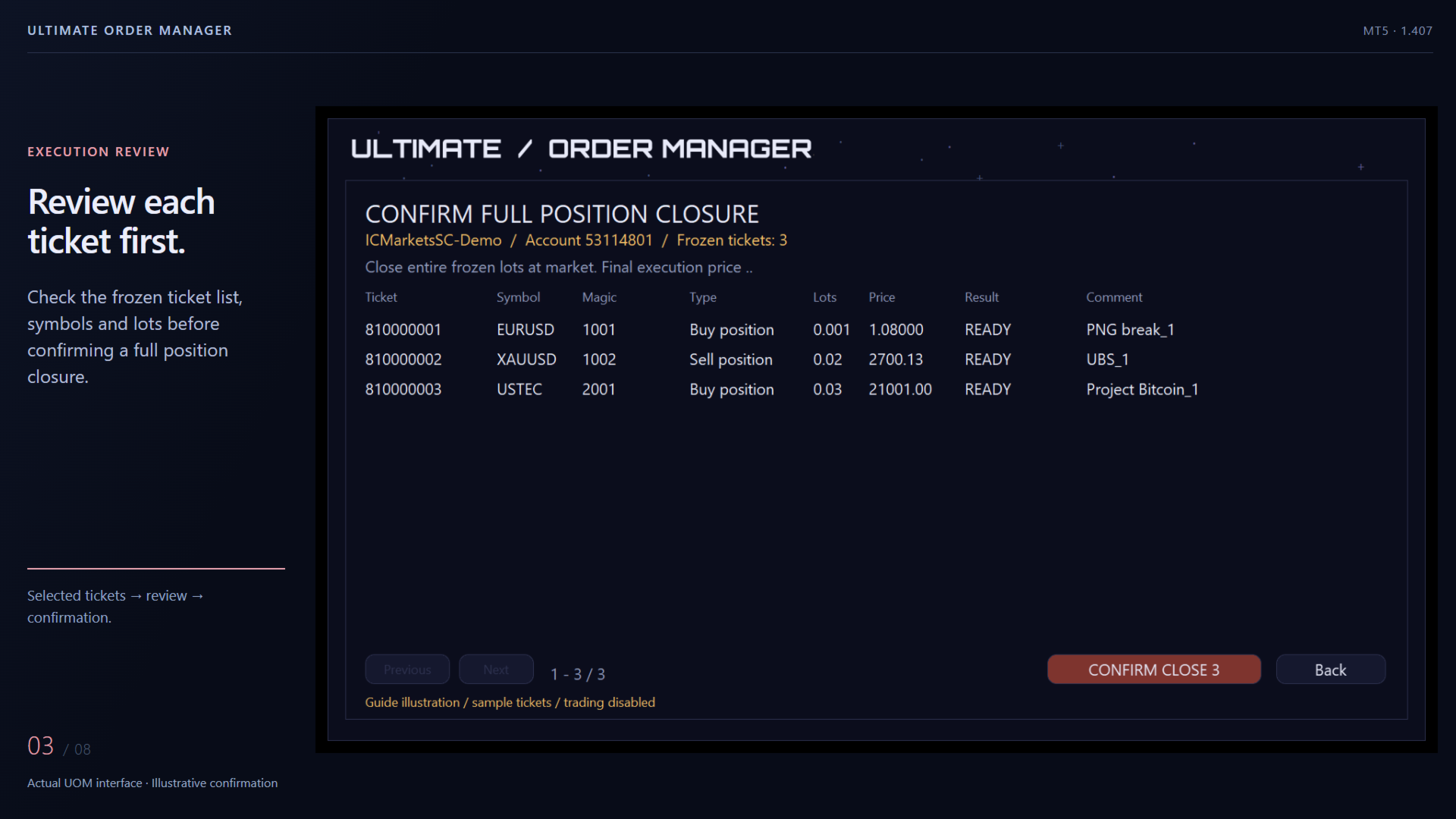
    • Review before execution. Inspect the frozen ticket list before confirming cancellation or full closure. Targets are rechecked before requests are sent; changed or missing tickets are reflected in the results.
    • A history check for uncertain results. Check status compares uncertain outcomes with broker order/deal history and updates the result CSV, without resending requests.
    • Missed-time handling. Schedules outside their execution window are recorded as MISSED instead of silently catching up late after a timer interruption.
    • A record after processing. Read ticket-level batch results and keep structured local audit records and CSV files for later review.

    FIND > SELECT > REVIEW > EXECUTE


    Plan the cleanup you want

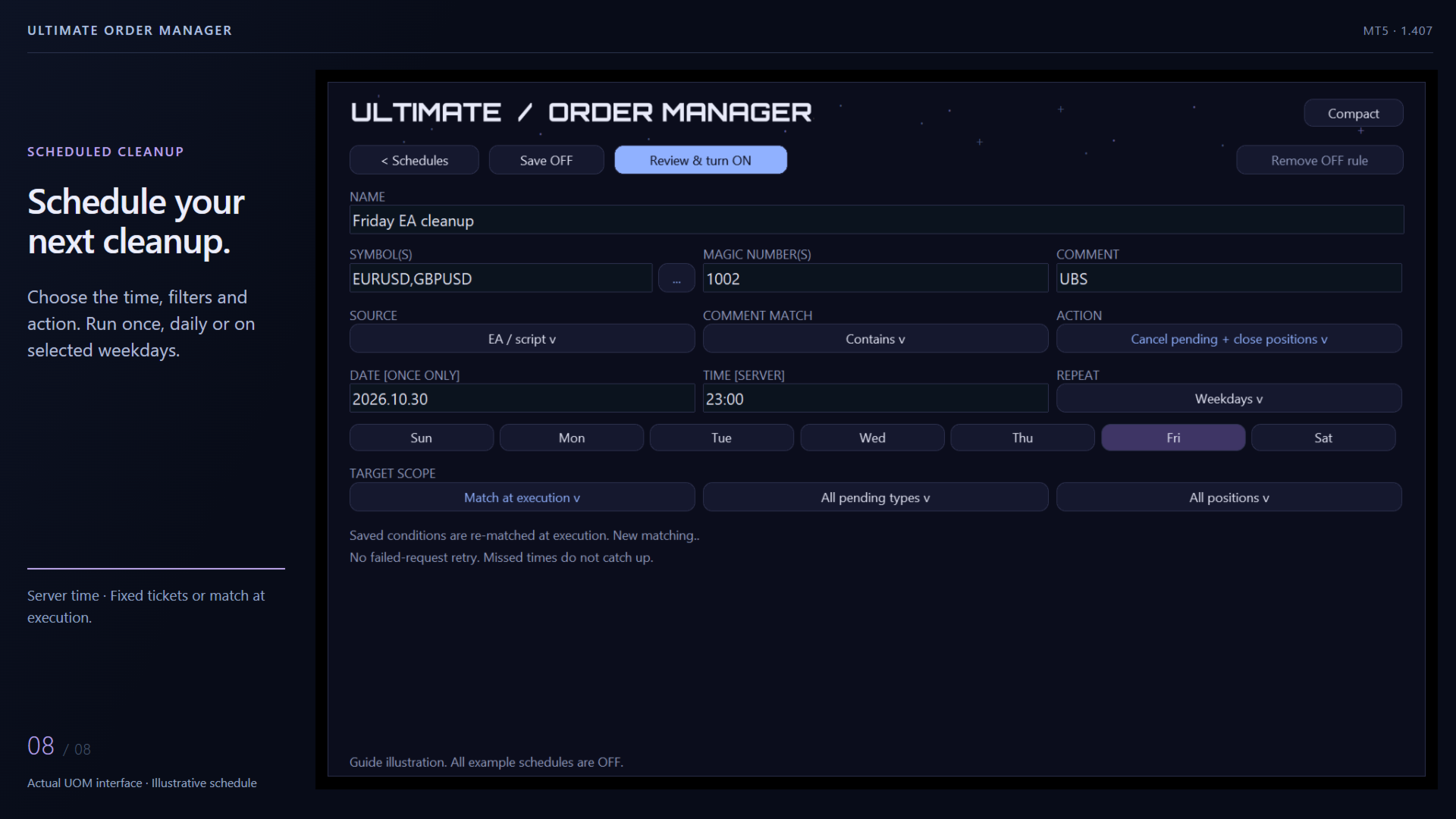
    Create a schedule from your current filters. Choose once, daily or selected weekdays using broker-server time. Target the tickets selected now, or let the rule find matching orders when it runs. Saved rules keep their own conditions as you change the table filters.

    For combined cleanup, UOM cancels pending orders first, then rereads and fully closes matching positions. Save the rule OFF, review it and explicitly turn it ON. Completed one-time rules remain OFF with their results visible.


    See exposure, margin and the trading day

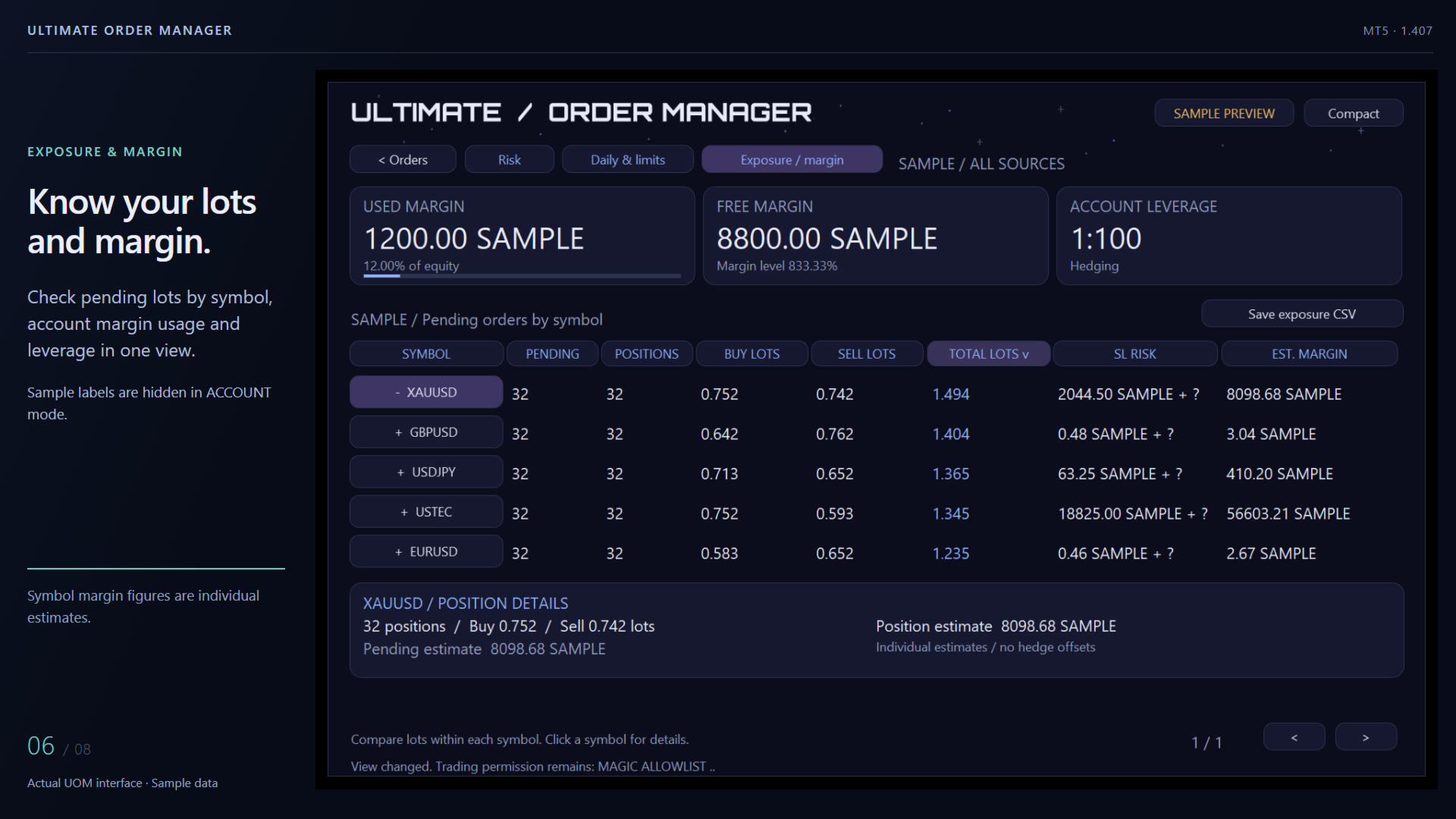
    Compare symbol-level pending Buy, Sell and Total lots, position counts and individual margin estimates. The account cards show actual used margin, free margin, usage and leverage.

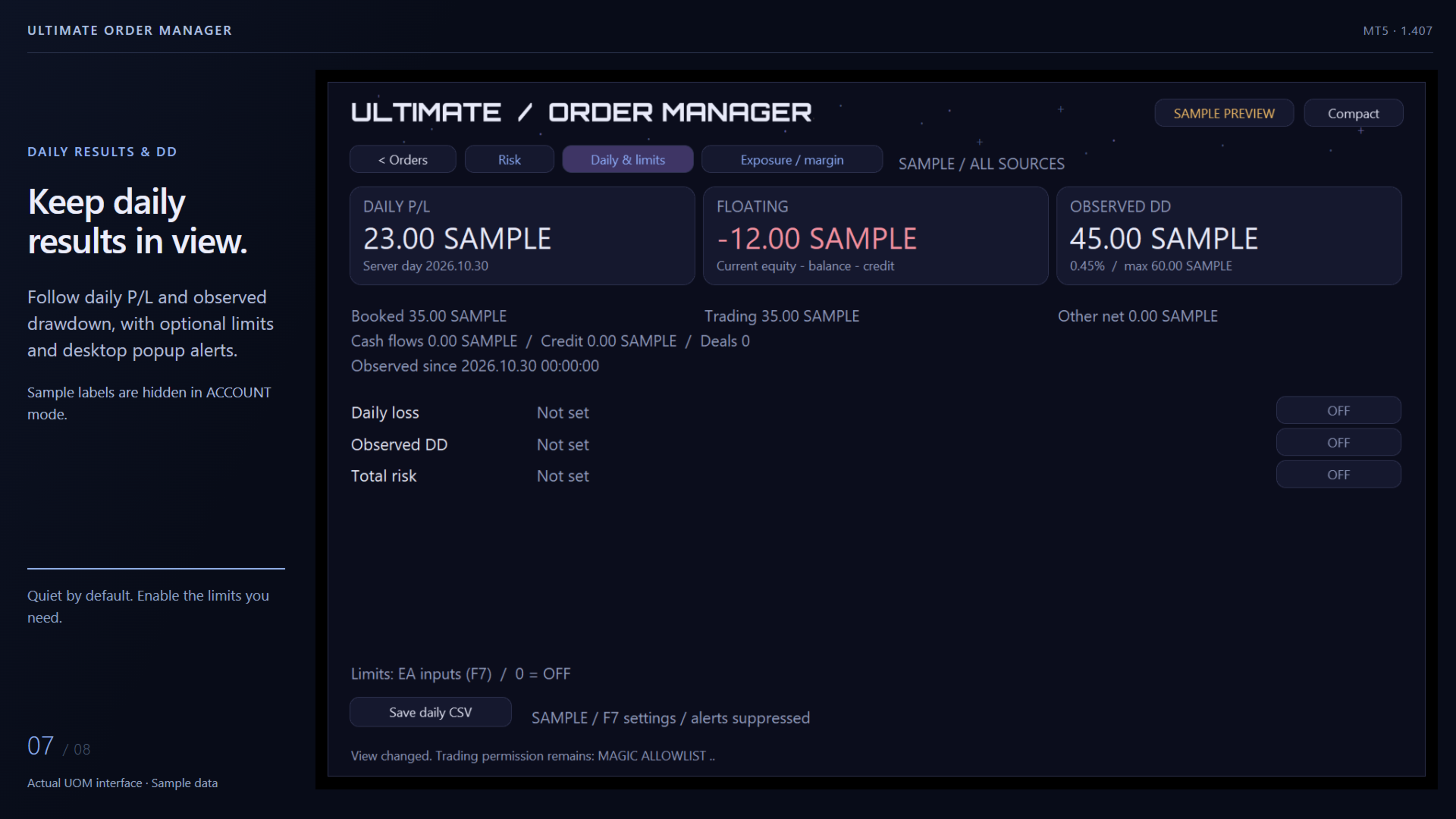
    Daily & limits adds daily P/L and cash-adjusted observed drawdown. Limits start at 0 and Popup alerts starts false. Keep the dashboard quiet, or enable optional local warnings when a configured metric enters a limit state.


    Review execution results and export risk data

    Export selections, risk comparisons, exposure and margin, daily status and schedules to CSV. Batch results provides ticket-level outcomes; diagnostic files record the tool's own errors. Use Check status when a stopped batch contains uncertain results.


    Quick start: viewing

    1. Install UOM through the MT5 terminal and attach it to a dedicated chart. Start with UI scale (%) = 100.
    2. Use ACCOUNT for account data, or SAMPLE PREVIEW to explore the built-in examples.
    3. Keep Enable close / cancel = false while viewing, filtering and exporting CSV.

      Enable cancellation and full closure

      1. Press F7 and set Enable close / cancel = true.
      2. Turn on MT5 Algo Trading and allow trading for this EA in the Common tab.
      3. Choose Manage scope: PS_MANUAL for recognized manual trades, or PS_ALLOWLIST with Allowed Magics for selected EAs. Add Protected Magics for exceptions.
      4. In ACCOUNT, apply filters, select tickets, review the frozen list and confirm. Read Batch results afterward.
      5. For schedules, also complete Review & turn ON for each rule.

        The 14 inputs

        Start with the defaults. Set the action permissions when ready; Magic settings and risk alerts are optional.

        No. Input Default Use
        1 Sample preview false Choose the startup view. false opens ACCOUNT; true opens sample data. The top button switches the current view later.
        2 UI scale (%) 100 Adjust panel scale from 80 to 150. Start at 100.
        3 Enable close / cancel false Enable reviewed cancellation/full closure and scheduled actions. MT5 and EA trading permissions must also be enabled.
        4 Manage scope PS_MANUAL Manual trades, an allowed Magic list, or all sources. Choose PS_ALLOWLIST to manage selected EAs; protection takes priority.
        5 Max tickets per batch 50 Accept 1-1000 tickets per batch/run. An oversized set is blocked as a whole; narrow it or deliberately raise the limit.
        6 Allowed Magics blank Comma-separated action permissions for PS_ALLOWLIST, for example 1001,1002. Separate from the table Magic filter.
        7 Protected Magics blank Magics excluded from every close/cancel action scope. Blank adds no extra Magic exclusions.
        8 Allow Magic 0 outside Manual false Extra permission for Magic 0 in PS_ALLOWLIST or PS_ALL. In allowlist mode, include 0 in Allowed Magics too.
        9 Manual execution-panel Magics blank Nonzero Magics used by your own manual panels, so their orders join the Manual classification.
        10 Magic labels (123=EA name) blank Readable group names, for example 1001=PNG break;1002=UBS;2001=Project Bitcoin.
        11 Daily loss limit 0 Optional daily-loss threshold in account currency. 0 keeps it OFF.
        12 Drawdown limit 0 Optional cash-adjusted observed-DD threshold in account currency. 0 keeps it OFF.
        13 SL risk limit 0 Optional known position-plus-pending SL-risk threshold. 0 keeps it OFF; read missing/unknown coverage too.
        14 Popup alerts false Local desktop popups on configured NEAR/LIMIT transitions, with a 60-second cooldown per metric. An unchanged state causes no repeat popup.


        FAQ

        Is the complete tool free?
        Yes. All features described here are included: pending management, full hedging-position closure, risk and margin views, daily monitoring, schedules and CSV.

        Can I use it with Algo Trading off?
        Viewing, filters, risk/margin analysis and CSV work with actions off. Sending close/cancel requests requires the F7 action switch, MT5 Algo Trading and the EA trading permission.

        What does total risk include?
        Known estimated SL losses across open positions and pending orders. Pending uses entry to SL; positions use the current close quote to SL. No SL and unavailable values remain separate. Actual outcomes can differ because of fills, gaps and costs.

        Will limit warnings close trades or keep sending alerts?
        Limits provide visual status and optional desktop popups. Close/cancel actions follow reviewed batches or enabled schedules. An unchanged warning state causes no repeated popup; there is a 60-second cooldown per metric.

        Can I use schedules on my local PC?
        Yes. Keep the PC, MT5 and UOM running, connected and authorized to trade at the chosen server time. Check the result after sleep, disconnection or market closure. Missed windows are recorded for review.

        Which account type supports position closure?
        Full ticket-level position closure uses an MT5 hedging account. Pending-order management also supports netting accounts.

        Action scope

        UOM focuses on pending cancellation and full hedging-position closure. Keep entries, partial closes and SL/TP adjustments in your execution tools. Broker permissions and session availability apply.

        Download Ultimate Order Manager through MT5 Market and start with the quiet viewing defaults.
        おすすめのプロダクト
        この無料ツールが気に入っていただけましたら、ぜひ5つ星の評価をお願いします!本当にありがとうございます :) 「リスク管理アシスタント」エキスパートアドバイザーコレクションは、様々な市場環境においてリスクを効果的に管理することで、取引戦略を強化するために設計された包括的なツールスイートです。このコレクションは、平均化、スイッチング、ヘッジの3つの主要コンポーネントで構成されており、それぞれが異なる取引シナリオに合わせて独自のメリットを提供します。 このEAは、市場で標準的なリスク管理戦略を発展させたものです。 https://www.mql5.com/en/blogs/post/756961 1. 「平均化アシスタント」EA: MT4: https://www.mql5.com/en/market/product/115468 MT5: https://www.mql5.com/en/market/product/115469 2. 「スイッチングアシスタント」EA: MT4: https://www.mql5.com/en/market/product/115478 MT5:
        FREE
        Do you trade with UBS (Ultimate Breakout System), other pending-order EAs or place pending orders manually? Then bring your pending orders into one clear workspace with Pending Manager Pro , a free MT5 utility built for everyday order management. See how many pending orders are on your account, check the broker-reported limit and remaining capacity, and find exactly the orders you want among dozens or hundreds of tickets. Filter by symbol, Magic number or comment, select your group, and review
        FREE
        Tiger Lite recreate the history of entry and exit orders. The goal is that you can grasp their strategy how to play. CSV format support for WEB, MT4 and MT5 platforms. The sequence of steps is described in the photo. Note: Please choose the existing date and symbol on the CSV file. For MT4/5, export historical data and copy the records to excel, save it with the extension CSV. For MT4/MT5/WEB, save the name with format mt4.csv/mt5.csv/web.csv If you get the history from another source and your
        FREE
        Opening EA - Start Edition Is a tool to trade the OpeningStrategy! The Opening EA is a semi-automated EA for MetaTrader 5! This means that the trader must actively start the EA using the Start button and stop it using the Stop button. This EA pursues an opening strategy which, at the start of trading, e.g. on the DAX or Nasdaq, etc., opens a trading channel with predefined TP's (TakeProfit). Two pending orders with the same lot size are set at the beginning. As soon as one of the pending order
        FREE
        This script calculates the SQN (System Quality Number) value of your account within a time interval that you will set. Keep in mind that trades with no initial stoploss value won't be calculated because of the nature of the system! The calculations will be made on your current account. What is SQN? Van K. Tharp proposed a formula for System Quality Number (SQN) that measured strategy performance and could be used as a custom objective for optimizing strategy parameters. The formula was present
        FREE
        "Manage multiple positions as a single unit with hidden targets." The Virtual Basket TP SL Manager is a professional MetaTrader 5 utility designed to automate the closing of positions based on the total profit or loss of a group of orders (a "basket"). By utilizing Virtual Levels , all Take Profit (TP) and Stop Loss (SL) targets are stored locally within the EA's memory and are not sent to the broker's server, keeping your strategy safe from stop-hunting and price manipulation. Key Features Virt
        FREE
        # MiniBull Guard v1.30 ## Never trade without a stop again. **You open the trade. MiniBull Guard sets the stop, shows the risk and keeps your head clear.** - **No more naked positions.** Every new trade gets a stop loss within moments, even when you forget, hesitate or trade from your phone. - **A stop the market can breathe around.** Sized from real volatility (ATR) by default, or from a distance you choose. - **Know your loss before it happens.** In money and in percent of your equity, not
        FREE
        Why do retail traders lose money buying pairs that look great technically? Because they are trading directly against macroeconomic monetary policy. In the global foreign exchange market, trillions of dollars in institutional capital flow based on central bank interest rate differentials, inflation trajectories, and economic surprise cycles . Moving averages and RSI indicators cannot see these fundamental forces. The Macro-to-Trade Engine MT5 is a quantitative macroeconomic analytics system built
        CopyTrader Pro FAST MT5 — FREE Real-Time Trade Copier | MT4 ↔ MT5 Cross-Platform | 20ms Latency CopyTrader Pro FAST is a professional trade copier Expert Advisor that copies trades between MetaTrader terminals in real time using a high-speed file-based communication system. No VPS, no network setup, no DLL — just attach and copy. FREE VERSION : Copies up to 1 trade at a time. Upgrade to the full version, Copy Trader Pro FAST MT5 , for unlimited copying. Key Features 20ms refresh rate — in
        FREE
        AlgoTrade Loss Streak Guard helps you take a break after losing trades. It monitors your closed trades and pauses trading according to your rules. A trade opened during a pause is closed immediately or only reported, depending on your settings. The rules A wait after every losing trade (5 minutes by default). A longer pause after a specified number of losing trades in a row (3 losses and 1 hour by default). Each subsequent loss restarts the pause until a winning trade occurs. An optional stop fo
        FREE
        Pro Trader Assistant 1.1 - The Ultimate Trading Companion NB: DOES NOT WORK ON STRATEGY TESTER. FOR TESTING, DM ME   Trade Simple, Smarter, Safer, and More Efficiently Are you ready to transform your trading with institutional-grade risk management? Pro Trader Assistant 1.1  is your complete solution for mastering trading psychology, risk control, and execution efficiency. Built for both prop firm challenges and retail trading. Why Choose Pro Trader Assistant 1.1 Perfect for retail trading
        Equity Tracker MT5 Equity Tracker MT5 は、MetaTrader 5 用のモニタリング型エキスパートアドバイザーで、取引活動、口座状況、および技術的な状態を通知メッセージとして報告します。 このエキスパートアドバイザーは取引ロジックとは独立して動作し、注文の執行や取引管理には一切影響しません。 本製品は取引の新規発注、変更、決済を行いません。 監視および通知機能のみを提供します。 目的 Equity Tracker MT5 は、取引ターミナルを常に監視することなく、取引口座の状況を把握したいトレーダー向けに設計されています。あらゆる取引戦略や他のエキスパートアドバイザーと併用できます。 口座レベルのモニタリング 取引活動の通知 技術的状態の把握 口座およびリスク状況のモニタリング エキスパートアドバイザーは口座パラメータを継続的に評価し、事前に定義された条件が満たされた場合に変更を通知します。 有効証拠金(Equity)およびドローダウン水準の通知 証拠金維持率のモニタリング ユーザー定義のアラート閾値 ハートビート機能とターミナルの状態 ハートビー
        FullMargin RiskGuard - Advanced Risk Management for New Traders Unlock the power of full margin trading with confidence using FullMargin RiskGuard , a cutting-edge Expert Advisor (EA) designed specifically for beginner traders on the MetaTrader 5 platform. Inspired by the renowned trading style of Papip Celebes, this EA empowers users to execute full trade strategies while safeguarding their capital with advanced risk management features. Key Features: MaxFloatingLoss Protection: Set your maxim
        FREE
        Ritz Klik Trading Panel In today’s fast-paced financial markets—ranging from highly volatile cryptocurrencies like BTCUSD to traditional forex pairs—execution speed, bulletproof risk management, and real-time capital awareness are the ultimate deciders of a trader's profitability. Ritz Klik Trading Panel is an institutional-grade, ultra-responsive One-Click Trading Dashboard designed exclusively for MetaTrader 5 (MT5). Built for scalpers, day traders, and aggressive layerers, this Expert Adviso
        FREE
        Discover the power of automated trading with **SimpleTradeGioeste**, an Expert Advisor (EA) designed to optimize your trading operations in the Forex market. This innovative EA combines advanced trading strategies with proven technical indicators, offering an unparalleled trading experience. video backtest :  https://youtu.be/OPqqIbu8d3k?si=xkMX6vwOdfmfsE-A ****Strengths**** - **Multi-Indicator Strategy**: SimpleTradeGioeste employs an integrated approach that combines four main technical ind
        FREE
        これは、ほぼ10年前に初めて公開された私の有名なスキャルパー、ゴールドフィンチEAの最新版です。短期間で起こる急激なボラティリティの拡大で市場をスキャルピングします。突然の価格上昇の後、価格変動の慣性を利用しようとします。この新しいバージョンは、トレーダーがテスターの最適化機能を簡単に使用して最適な取引パラメーターを見つけられるように簡素化されています。 [ インストールガイド | 更新ガイド | トラブルシューティング | よくある質問 | すべての製品 ] 最適化を容易にするシンプルな入力パラメーター カスタマイズ可能な取引管理設定 取引セッションの選択 平日の選択 資金管理 注意してください... 多くの要因が見返りを台無しにする可能性があるため、ダニのダフ屋は危険です。変動スプレッドとスリッページは、取引の数学的期待値を低下させ、ブローカーからの低いティック密度は幻の取引を引き起こす可能性があり、ストップレベルは利益を確保する能力を損ない、ネットワークラグはリクオートを意味します。注意が必要です。 バックテスト Expert Advisorはティックデータのみを使用します
        FREE
        KEFREN NEMESIS MT5 – ゴールド XAUUSD ブレイクアウト EA Kefren Nemesis は MetaTrader 5 用の完全自動ゴールド EA(XAUUSD)で、ブレイクアウト取引に特化しています。相場構造の重要な水準に待機注文を置き、価格が実際にブレイクした時のみエントリーします。すべての取引にストップロスとテイクプロフィットを設定。マーチンゲールなし、グリッドなし、ナンピンなし。 開発は Kefren Bot Gold の開発元である Kefren Systems。当社の実運用 XAUUSD ポートフォリオと同じエンジンを使用しています。 Kefren Nemesis についてご質問はありますか? 動作、設定、ストラテジーテスターでのテストについてご不明な点があれば、MQL5 プロフィールから 直接お問い合わせください 。 マルチストラテジーのゴールド EA をお探しですか? Kefren Corvus をご覧ください。 Kefren ボーナス: マーケットにレビューを投稿し、プライベートメッセージをお送りいただくと、 当社の有料インジケーターを1
        FREE
        ---คำเตือน EA ตัวนี้เหมาะสำหรับโบรคเกอร์ที่ Slippage ต่ำ--- EA ตัวนี้ถูกสร้างมาด้วยหลักการ Long Straddle ของ Option ที่จะวาง Position ดักทางทั้ง 2 หน้า หากราคาไปทางใดทางนึงจนเกินระดับราคา Break Event จะกำไรไม่จำกัด เเต่ถ้าราคาผิดทางจะขาดทุนแค่ค่าพรีเมี่ยม ดังนั้นเมื่อข่าวออกการที่กราฟฉีกตัวไปทางใดทางนั้นบน Option สามารถสร้างกำไรได้ทันที   แต่เนื่องจากการเทรด XAUUSD Spot CFDs ไม่ได้มีหลักการขาดทุนเเค่ค่าพรีเมี่ยม การ ฺ Buy Sell สามารถกำไร/ขาดทุนได้ไม่จำกัด ดังนั้นการเทรดข่าวด้วยเครื่องมือ EA News
        FREE
        Risk Manager Optimum
        Freedom Uzochukwu Nnadi
        5 (1)
        RiskManagerOptimum for MetaTrader 5 – Your Ultimate Trading Safety Net! RiskManagerOptimum is the most advanced and professional trade and account risk management Expert Advisor for MetaTrader 5. It does not open trades. It monitors and manages existing positions in real time to control risk, drawdown, and exposure across all symbols. The EA is designed for manual traders, algorithmic traders, and portfolio traders who require strict and automated risk control across Forex, metals, crypto, indi
        Fx Trade Monitor – Professional Strategy Tracker & Risk Manager A powerful, free utility to monitor open/closed trades, visualize history, and manage risk with advanced Drawdown Alerts. Includes Excel-ready CSV export. Fx Trade Monitor  is an essential dashboard tool designed for both manual traders and EA users. It provides a crystal-clear overview of your trading performance directly on the chart, filtering by Magic Number or Comment. Unlike simple info panels, this tool focuses heavily on  Ri
        FREE
        CommunityPower MT5
        Andrey Khatimlianskii
        4.69 (90)
        CommunityPower EA   — is the Expert Advisor for MetaTrader 4/5, created by community and for community. It is free, versatile and very powerful, and allows to trade a wide range of strategies. The idea is simple Your suggestions + my code = a win-win for everyone! Is it a ready-to-use money-making machine? No, it is definitely not. It is a tool, which allows you to create and run your own trading strategy, and it is up to you to find profitable settings and take the responsibility for your tra
        FREE
        TRADE PANEL MASTER — Know Your Risk Before You Click Open your chart. See your panel. Trade with confidence. Before you click Buy or Sell, Trade Panel Master shows you  exactly what you risk, what you gain, and your R:R ratio —  in real time. No mental math. No surprises. FEATURES - Lot sizing with real-time margin display - SL & TP in 3 modes: Points / Money / Price - Au
        FREE
        Trade Anomalo BTC Multi Grid EA   Trade Anomalo  BTC Multi Grid  is an advanced, fully automated Multi-Grid Expert Advisor meticulously designed to navigate the volatility of BTC and other major pairs. Introduces highly requested features, including Multi-Window Time Management and an interactive, upgraded on-chart dashboard. Unlike traditional grids that get trapped in one direction,   Parallel Pro   utilizes a dual-engine architecture (Grid A and an optional inverted mirror Grid B) to simultan
        FREE
        Position Manager Pro v1.0 (MT5) Dual Magic Number Independent Group Manager with Live P&L Dashboard Overview Position Manager Pro   is a powerful trade management Expert Advisor for MetaTrader 5 that operates as an   overlay manager   — it does not open positions itself, but instead manages and monitors positions opened by other EAs or manually by the trader. The core concept is   two fully independent groups , each identified by a unique   Magic Number . Each group has its own Take Profit, Stop
        FREE
        Pocket Desk Metatrader 5
        Emmanuel Lovski Ijeawele Maduagwuna
        Trade Remote: Pocket Desk - Your MetaTrader Account, Now in Your Pocket FEATURES Trade Remote: Pocket Desk turns your phone, tablet, or any web browser into a live trading remote control for your MetaTrader terminal. No app to install on your phone — just a 4-character code and any browser. Connects to your MT4 terminal in under 30 seconds using a unique, auto-generated 4-character CONNECT code. One-click BUY and SELL on any symbol in your Market Watch, with live bid/ask and spread shown befor
        FREE
        Trade Panel Manager — Master all trades in one dashboard Stop calculating volume manually, stop worrying about forgetting to set SL/TP. TTrade Panel Manager transforms MetaTrader 5 into a professional trading command center — drag and drop a few lines on the chart, the EA automatically calculates lot sizes according to your desired risk level, displaying SL/TP in pips and currency in real time, right before you press the button. Why download now? Accurate lot size calculation based on risk pe
        FREE
        GoldDragon Safe — XAUUSD Multi-Strategy Expert Advisor Conservative Grade (5x) · Full engine set · Recommended $1,000 · Works from $300 No grid · No martingale · No loss averaging Fixed stop loss on every trade Full GoldDragon engine set (11 engines) — trending, ranging and choppy markets Backtest Jan 2025 – Oct 2026: 2,681 trades · Profit Factor 2.25 · Max equity DD 14.08% (Auto Lot, $1,000) ️ Plug and play — one XAUUSD M5 chart, only the lot mode to choose LAUNCH TESTER PRIC
        Elevate your trading with this Metatrader 5 expert – the Position Volume Calculator. This tool takes the guesswork out of risk management and profit optimization. Simply input your desired stop-loss points with dragging the stop-loss line, and let the expert advisor compute the optimal position volume for your trade. Plus, with customizable reward ratios, it's easier than ever to set your take-profit points for maximum gains. Trade with confidence and precision. Try the Position Volume Calculat
        FREE
        Order Manage MT5 is an Expert Advisor for pending order management and open position management in MetaTrader 5. It monitors specified levels, cancels pending orders when their conditions are met, and can partially close positions while moving Stop Loss to the entry price. The EA performs the following actions: Cancels Buy Limit and Sell Limit orders if price reaches Take Profit before execution starts. Cancels Buy Stop and Sell Stop orders if price reaches Stop Loss before execution starts. Clo
        EN DESARROLLO, TESTING PERIOD. PRISM KellyEngine aplica disciplina de riesgo profesional directamente en tu flujo MT5. Te ayuda a: definir lotaje de forma consistente, limitar sobrecarga de riesgo, proteger cuenta en escenarios de volatilidad. Ideal para traders que quieren dejar atras el lotaje por intuicion. Parametros principales  Riesgo base por operacion (%) Limite maximo de lotaje Umbral de confianza Multiplicadores de seguridad Incluye Motor de sizing adaptable Controles de limites de ri
        このプロダクトを購入した人は以下も購入しています
        Trade Assistant MT5
        Evgeniy Kravchenko
        4.43 (216)
        取引 ごとのリスクの 計算、新規注文 の 簡単 な 設置、部分的 な 決済機能 を 持 つ 注文管理、 7 種類 のトレーリングストップなど 、便利 な 機能 を 備 えています 。 追加の資料と説明書 インストール手順   -   アプリケーションの手順   ライン機能 チャート上にオープニングライン、ストップロス、テイクプロフィットを表示します。この機能により、新規注文を簡単に設定することができ、注文を出す前にその特徴を確認することができます。   リスク計算 リスク計算機能は、設定されたリスクとストップロス注文のサイズを考慮して、新規注文のボリュームを計算します。ストップロスの大きさを自由に設定できると同時に、設定したリスクを守ることができます。 Lot calc ボタン - リスク 計算 を 有効 / 無効 にします 。 Risk フィールドでは 、必要 なリスクの 値 を 0 から 100 までのパーセンテージまたは 預金通貨 で 設定 します 。 設定」 タブで 、 リスク 計算 の 種類 を 選択 します :「 $ 通貨」、「 % 残高」、「 % エクイティ 」、「
        Trade Manager EAへようこそ。これは、取引をより直感的、正確、そして効率的にするために設計された究極の リスク管理ツール です。これは単なるオーダー実行ツールではなく、包括的な取引計画、ポジション管理、リスク管理のためのソリューションです。初心者から上級者、迅速な実行を必要とするスキャルパーまで、Trade Manager EAはあらゆるニーズに対応し、為替、指数、商品、暗号通貨などさまざまな市場で柔軟に対応します。 Trade Manager EAを使用すると、複雑な計算が過去のものになります。市場を分析し、エントリーポイント、ストップロス、テイクプロフィットのレベルをチャート上のラインでマークし、リスクを設定するだけで、Trade Managerが最適なポジションサイズを即座に計算し、SLとTPをピップ、ポイント、口座通貨でリアルタイムに表示します。すべての取引が簡単かつ効果的に管理されます。 主な機能: ポジションサイズ計算機 :定義されたリスクに基づいて取引サイズを瞬時に決定します。 簡単な取引計画 :エントリー、ストップロス、テイクプロフィットを設定するためのド
        Farmed Hedge Yield Farming | All Markets (Manual - Hybrid - Semi/Automated EA) VERIFIED TRADING RESULTS - Farmed Hedge Yield Axi Copy:  https://www.mql5.com/en/signals/2356376 - Farmed Hedge Yield Exn Copy:   https://www.mql5.com/en/signals/2356404 - Farmed Hedge Yield V Copy:  https://www.mql5.com/en/signals/2357156 IMPORTANT NOTICE: FarmedHedge is a MANUAL-FOCUSED TRADING UTILITY ,not a fully automated EA. Results shown on this Signal include manual trades and overall strategic management.
        Telegram to MT5 Multi-Channel Copier   は、 Telegram と Discord チャンネルのトレードシグナルを MetaTrader 5 へ自動コピーします。ボット不要、ブラウザ拡張不要、手動コピー不要。Telegram や Discord にシグナルが届くと、EA が数秒であなたのターミナルに注文を出します。 さらに、チャンネルをコピーする前に、内蔵バックテスターでそのチャンネルがあなたの口座でどう動いたかを確認できます。 製品は 2 つのコンポーネントで構成されます:Telegram チャンネルを監視する Windows アプリと、MT5 ターミナルでシグナルを執行する本 EA です。MT4 版もあります   こちら . セットアップガイドとアプリのダウンロード:   https://www.mql5.com/en/blogs/post/768988 Telegramのシグナルチャンネルをバックテストする方法 をご覧ください。 現在の価格は今後値上げされます。 仕組み アプリはあなた自身の Telegram アカウントで接続するため、フォロ
        Local Trade Copier EA MT5
        Juvenille Emperor Limited
        4.94 (149)
        Local Trade Copier EA MT5 は、同一の Windows PC または Windows VPS 上で稼働する複数の MetaTrader 5 口座間で、取引をコピーおよび管理するための高速で柔軟なトレードコピーツールです。 ローカルでの取引同期に加え、Receiver 側でロットサイズ、リスク管理、取引フィルター、シンボルマッピング、取引管理、口座保護を個別に設定できます。 Transmitter と Receiver のターミナルは約 1分 で設定でき、同一ブローカーまたは異なるブローカーの口座間で、手動取引や EA による取引をコピーできます。適切な条件下では、ローカルの MetaTrader ターミナル間で取引情報を 0.5秒未満 で同期できます。実際の約定速度は、ブローカーのレイテンシー、ネットワーク状況、PC/VPS の性能、ターミナルの負荷によって異なります。 ご購入前に無料デモをお試しください Local Trade Copier EA MT5 の完全機能版無料デモ を、MT5 デモ口座で 1回につき4時間 テストできます。 Local Trad
        Strategy Ledger Pro
        Abdullah Uygar Tuna
        5 (14)
        日本語に対応しました。 Strategy Ledger Pro は、MetaTrader 5 用の読み取り専用の口座分析パネルです。口座の成績をエキスパートアドバイザー(EA)、戦略、銘柄、マジックナンバーごとに分け、それぞれが実際にどれだけ貢献しているかを明らかにします。 パネルは 11 言語に対応しています:English、Français、Deutsch、Español、Italiano、Português、Русский、Türkçe、中文、日本語、한국어。 デモをダウンロードする前に。 Market では、有料製品のデモはストラテジーテスター内でのみ実行されます。このパネルはご自身の口座の取引を分析しますが、ストラテジーテスターには読み取る口座履歴がないため、デモは空のパネルで起動し、その旨を表示します。これはデモの仕組みによるもので、製品の制限ではありません。 この説明内の動画では、実口座でのパネルの動作をご覧いただけます。 すべての機能を解説した詳しい マニュアル (英語)と、情報交換やお知らせのための AureusAI Trading Suite グループをご用意し
        自分の取引ルールで Telegram のシグナルをコピー Telegram to MT5 Signal Trader は、Telegram の公開・非公開チャンネルやグループから、テキスト形式の取引シグナルを MetaTrader 5 へ自動でコピーします。1つのデスクトップアプリで複数の配信者と MT5 口座を管理し、 配信者ごとにリスクと取引設定を個別に指定 できます。 シグナルのコピーに Telegram ボットや API 設定は必要ありません。 電話番号または QR コードでご自身の Telegram アカウントにログインし、すでに参加しているチャンネルやグループを選ぶだけです。ボットの作成や、Telegram API トークン、API ID、API hash の入力は不要です。 ポジションサイズを選び、複数の利確水準に分けて決済し、建値へのストップ移動やトレーリングストップを自動化できます。配信者のシグナルを受け取りながら、実際の取引方法は自分で管理できます。 本製品は、この MT5 エキスパートアドバイザ(EA)と、必須の Windows 連携アプリで構成されます。 インス
        TradePanel MT5
        Alfiya Fazylova
        4.88 (170)
        Trade Panelは多機能なトレーディングアシスタントです。アプリには手動取引用の50以上のトレーディング機能が搭載されており、ほとんどの取引作業を自動化することができます。 アプリの説明書: https://www.mql5.com/en/blogs/post/756482 デモ口座用アプリの試用版: https://www.mql5.com/en/blogs/post/750865 アプリのインストール方法: https://www.mql5.com/en/blogs/post/756239 アプリをビジュアルモードでテストする方法: https://www.mql5.com/en/blogs/post/770277 VPSのMetaTraderにアプリをインストールする方法: https://www.mql5.com/en/blogs/post/770190 取引。 ワンクリックで取引操作を行うことができます: リスクを自動計算して指値注文やポジションを開く。 複数の注文やポジションをワンクリックで開く。 注文のグリッドを開く。 保留中の注文やポジションをグループごとに閉じる
        ================================================================================ POC BREAKOUT - V20.72. Full Professional Grade Toolkit ================================================================================ POC Breakout is a full MetaTrader 5 trading dashboard for discretionary traders who want breakout signals, Point of Control (POC) context, volume profiles, order flow, market structure, news, alerts, and advanced trade planning in one professional workspace. Attached directly to you
        MT5 to Telegram Signal Provider は、Telegramのチャット、チャンネル、またはグループに 指定された シグナルを送信することができる、完全にカスタマイズ可能な簡単なユーティリティです。これにより、あなたのアカウントは シグナルプロバイダー になります。 競合する製品とは異なり、DLLのインポートは使用していません。 [ デモ ] [ マニュアル ] [ MT4版 ] [ Discord版 ] [ Telegramチャンネル ]  New: [ Telegram To MT5 ] セットアップ ステップバイステップの ユーザーガイド が利用可能です。 Telegram APIの知識は必要ありません。必要な全ては開発者から提供されます。 主な特長 購読者に送信する注文の詳細をカスタマイズする機能 例えば、Bronze、Silver、Goldといった階層型のサブスクリプションモデルを作成できます。Goldサブスクリプションでは、すべてのシグナルが提供されます。 id、シンボル、またはコメントによって注文をフィルターできます 注文が実行されたチャート
        VirtualTradePad PRO SE MT5 — MetaTrader 5向けプロフェッショナル取引コントロールセンター VirtualTradePad PRO SE は、 MetaTrader 5 向けのプレミアムなチャートベースの取引パネルであり、トレード管理ワークスペースです。より速い執行、明確なポジション管理、構造化されたトレード管理、視覚的なレベル計画、そしてチャート上で完結するプロフェッショナルなワークフローを求めるトレーダー向けに設計されています。 これは単なる BUY / SELL パネルではありません。PRO SE は、手動取引、予約注文、ポジション管理、部分決済、バスケット損益管理、平均化レベル、ATMルール、シグナル監視、リアルタイム市場情報、ストラテジーテスター (Strategy Tester) ワークフロー、VPS向け運用を、1つの連携されたインターフェースに統合します。 MT4版 | 完全な説明とスクリーンショット | 購入方法 | インストール方法 | ログファイルの取得方法 | テストと最適化の方法 | Expforex のすべての製品 PRO
        REVDEN AI Desk:あなた自身の AI との一つの会話で、REVDEN のマーケットコンテキストをもとにトレードを運営する トレードのすべてを一つの会話で運営する姿を想像してみてください。 REVDEN AI Desk はそれを MetaTrader 5 にもたらします。あなた自身の AI に相場をどう読んでいるかを尋ねると、AI はあなたが取引する銘柄について REVDEN の完全なコンテキストをもとに答えます。銘柄の状態、リスク像、今後の指標発表まで含めてです。AI の提案はエントリー、ストップ、ターゲット、リスクとともに届き、合うものをあなたが承認します。ルールの変更も同じ方法です。変えたい点を書けば、AI が新しいルールブックの草案を作り、採用するかどうかはあなたが決めます。会話の周りには、マーケット全体が一つの画面にまとまっています。 デスクとセットアップガイドをご覧ください。 すべての画面、すべての設定、そしてあなた自身の AI との最初のステップ: stein.investments/products/revden-ai-desk AI との一つの会話、マーケッ
        Trade copier MT5
        Alfiya Fazylova
        4.61 (57)
        Trade Copierは、取引口座間の取引をコピーして同期するように設計された専門的なユーティリティです。 コピーは、同じコンピューターまたはvps にインストールされている、サプライヤーのアカウント/端末から受信者のアカウント/端末に行われます。 購入する前に、デモ アカウントでデモ バージョンをテストできます。 デモ版 こちら 。 詳細な説明は こちら 。 主な機能と利点: MT5ネッティングアカウントを含む、MT5> MT5、MT4> MT5、MT5> MT4のコピーをサポートします。 高いコピー速度(0.5秒未満)。 ベンダーモードと受信者モードは同じ製品内に実装されています。 チャートから直接リアルタイムでコピーを制御できる、簡単で直感的なインターフェイス。 接続が切断されたり、端末が再起動されたりしても、設定と位置が失われることはありません。 コピーするシンボルを選択できます。また、受信者のシンボルを置き換えることもできます(例:EURUSD> USDJPY)。 各シンボルごとにコピーの個別設定を行うことができます。 バックコピーをサポートします。 特定の注文のみのコピー
        News Trade EA MT5
        Konstantin Kulikov
        4.55 (11)
        僕自身が数年間使っている便利なロボットをご紹介します。半自動モードでも完全自動モードでもお使いいただけます。 >>> Chat <<< 当プログラムは経済指標カレンダーで発表されるニュースをもとにした取引の柔軟な設定が可能です。戦略テスターでは確認不可です。実際の取引のみです。 最新の設定アーカイブをダウンロードしてください: https://www.mql5.com/en/blogs/post/747929 シグナルモニタリング: https://www.mql5.com/en/signals/author/test-standart 当該エキスパート・アドバイザーのためのカスタマイズ設定セットを作る場合は、ブログの全パラメータの説明を参照してください :   https://www.mql5.com/en/blogs/post/748545 。 基本的なデフォルト設定について 一つのチャートからGBPとの通貨ペア(GBPUSD、EURGBP、GBPJPY、GBPCAD、GBPAUD、GBPCHF)で取引をします。GBPは最もボラティリティの高い通貨のため、取引が成功するチ
        Exp COPYLOT CLIENT for MT5
        Vladislav Andruschenko
        3.97 (35)
        MetaTrader 5 用のプロフェッショナル取引コピー機 MetaTrader 向けの高速・高性能・信頼性の高い 取引コピー機 です。 COPYLOT は、MT4 と MT5 のターミナル間で Forex 取引をコピーでき、 Hedge 口座と Netting 口座の両方に対応しています。 COPYLOT MT5 版の対応構成: - MT5 Hedge → MT5 Hedge - MT5 Hedge → MT5 Netting - MT5 Netting → MT5 Hedge - MT5 Netting → MT5 Netting - MT4 → MT5 Hedge - MT4 → MT5 Netting MT4 版 完全な説明 + DEMO + PDF 購入方法 インストール方法 ログファイルの取得方法 テストと最適化の方法 Expforex のすべての製品 MT4 ターミナルへのコピーも可能です(MT4 → MT4、MT5 → MT4): COPYLOT CLIENT for MT4 COPYLOT は、2台、3台、さらには10台のターミナル間で同時に動作できる、プロフェッ
        RETAILBERG FOOTPRINT CHART PRO — Order-Flow Workspace for MetaTrader 5 Version 7.00  |  Professional System  |  31 tools  |  One chart A full 150-page illustrated User Manual is included. Please read the full manual to understand this feature packed footprint chart elements and ui. https://www.mql5.com/en/blogs/post/777982 DEMO / STRATEGY TESTER — PLEASE READ FIRST
        The Patch It never opens a trade. It walks behind the ones that did. Every open position, every pending order — checked twice a second for the one thing that's easy to forget: a stop, a target. Found bare, it doesn't ask. It writes the missing number in, measured in points from wherever the position began, and moves on to the next. No strategy, no opinion on direction. Just the quiet assumption that nothing should ever sit on the market unprotected — not because someone decided it shouldn't,
        Telegram To MT5 — シグナルコピア Telegram チャンネルのトレードコールを、実際の MT5 注文に変換します — 自動で、好きなだけの口座に対応し、リスクとルールは完全にあなたの管理下に置けます。 Telegram To MT5 は、あなたが Telegram で既にフォローしている VIP / シグナルチャンネルを MetaTrader 5 端末に接続します。無料の付属デスクトップアプリがメッセージを読み取り(ボットを禁止しているチャンネルでも可能)、この EA があなたの口座でそれらを執行します — あなた自身のリスク設定、シンボルマッピング、テイクプロフィット処理、セッションおよびニュースフィルターを適用します。 これはシグナルコピアであり、ブラックボックス戦略ではありません。どのチャンネルを信頼するか、各トレードのロットと管理方法をあなたが決めます。 ステップバイステップの設定と付属アプリのインストールガイド 仕組み [あなたの Telegram チャンネル] -> [付属デスクトップアプリ] -> [MT5 + この EA] -> 注文 付属デスクトッ
        次回アップデート — バージョン 2.52 近日公開!【新機能】 市場分析とトレードワークフローを強化する、4つの主要な新機能にご期待ください 皆様のトレードニーズに応える4つの新機能により、市場分析を次のレベルへと引き上げます。新機能をご紹介します: 1. TRADE OVERVIEW DASHBOARD 2. CONFLUENCE AT ZONE 3. STRONG & WEAK HIGH/LOW 4. OTE 1. TRADE OVERVIEW DASHBOARD 市場全体の状況をより簡単に把握できるダッシュボードです。トレード判断をサポートするガイダンスを提供し、市場分析とトレード計画を体系的に行えるよう支援します。すべてを1つの画面で確認できます。 マルチタイムフレーム市場概要(Multi-Timeframe Market Overview) 市場の方向性と価格構造をより明確に把握 市場状況をすばやく確認 体系的な市場分析とエントリー計画のためのガイダンス 2. CONFLUENCE AT ZONE 価格が重要なゾーンに入るとき…いくつのサポート要因が一致しているかを確認で
        Grid Manual MT5
        Alfiya Fazylova
        4.73 (22)
        「Grid Manual」は、注文のグリッドを操作するための取引パネルです。 ユーティリティはユニバーサルで、柔軟な設定と直感的なインターフェイスを備えています。 それは、損失を平均化する方向だけでなく、利益を増やす方向でも注文のグリッドで機能します。 トレーダーは注文のグリッドを作成して維持する必要はありません。 すべてが「Grid Manual」によって行われます。 注文を開くだけで十分であり、「Grid Manual」は注文のグリッドを自動的に作成し、非常に閉じるまでそれに付随します。 完全な説明とデモバージョン ここ。 ユーティリティの主な機能と機能 ユーティリティは、モバイル端末から開かれた注文を含め、あらゆる方法で開かれた注文を処理します。 「制限」と「停止」の2種類のグリッドで機能します。 グリッド間隔の計算には、固定と動的(ATRインジケーターに基づく)の2つの方法で機能します。 オープンオーダーグリッドの設定を変更できます。 チャート上の各注文グリッドの損益分岐点を表示します。 各注文グリッドの利益率を表示します。 ワンクリックでグリッドから収益性の高い注文を閉じるこ
        HINN MAGIC ENTRY – the ultimate tool for entry and position management! SIMPLE. FASTEST. INTUITIVE. MAX AUTOMATED. Place orders by selecting a level directly on the chart! full description   ::  demo-version  :: 60-sec-video-description Key features: - Market, limit, and pending orders - Automatic lot size calculation - Automatic spread and commission accounting - Unlimited partitial take-profits  - Breakeven and trailing stop-loss and take-profit  functions - Invalidation leves - Intuitive, a
        Your EAs cannot see each other, but Anchor can. Anchor gives you one place to coordinate your EAs, manage risk, and decide when trading is allowed. It works alongside the trading bots you already use without any changes to them. The Problem One EA opens a trade. Then another starts trading. The next thing you know, you wake up to multiple grids built across your account. Each EA may be doing exactly what it was designed to do, but together they can place far more risk on your account than you in
        EA Portfolio Control & Cloud Monitoring for MetaTrader 5 Your EAs manage trades. KONTROL_01 manages your EAs. A control system for traders running multiple Expert Advisors on the same account. Coordinate EA activity, manage trading risks and monitor your setup remotely. A detailed User Manual is available via DM after purchase. IN PRACTICE Multiple EAs. No coordination. Your EAs trade independently, unaware of each other's activity. KONTROL_01 coordinates them, limits simultaneous activity a
        The product will copy all telegram signal to MT5 ( which you are member) , also it can work as remote copier.  Easy to set up, copy order instant, can work with almost signal formats, image signal,  s upport to translate other language to English Work with all type of channel or group, even channel have "Restrict Saving Content", work with  multi channel, multi MT5 Work as remote copier: with signal have ticket number, it will copy exactly via ticket number. Support to backtest signal. How to s
        25% discount on the release of the tool: only for the next 3 buyers Send a message to receive a demo version. AstroTrade Trading Assistant AstroTrade is a comprehensive multi-functional trading utility developed for the MetaTrader 5 platform. It integrates essential tools for trade execution, risk management, and technical monitoring into a single unified interface. The application is designed to assist traders in managing their daily operations through a visual and structured environment. Vi
        Timeless Charts
        Samuel Manoel De Souza
        5 (9)
        Timeless Charts is an all-in-one trading utility for professional traders. It combines custom chart types such as Seconds Charts and Renko with advanced order flow analysis using Footprints , Clusters , Volume Profiles , VWAP studies, and anchored analysis tools for deeper market insight. Trading and position management are handled directly from the chart through an integrated trade management panel , while Market Replay and Virtual Accounts provide environments for practicing trading skills and
        Floor Watch
        Syed Tauqeer Hussain Shah
        Floor Watch One number, watched every thirty seconds: how far equity has fallen since the day began — or since its highest point, if it's told to trail the peak instead of the open. Cross the line and it doesn't argue. Every open position closes, every pending order vanishes, and anything that slips through afterward gets shut the moment it appears. Not asked. Removed. The floor holds until the clock turns 5 AM Pakistan time — then, and only then, does the day start over. One rule. No except
        RS Trade Copier - 超高速 で動作するローカルトレードコピー機。 真の グラフィカルインターフェース搭載。口座番号の手動入力はもう終わりです。200項目を超える長大なパラメータリストとも、これでおさらばです。 複数のMT5とMT4ターミナル間で取引操作をコピーするための、信頼性が高く柔軟なツールです。経験豊富なトレーダーやシグナルサービス、個人投資家に適しています。1つまたは複数のシグナルソース(Provider)から1つまたは複数のレシーバー(Client)へ、高い精度と最小限の遅延で 取引を同期 します。シンプルな自動設定と高度な手動設定の両方をサポートしています。手動または他のEAで開かれた注文に干渉しません。すべての処理は MT5内でローカルに 行われ、サードパーティサーバーを使用しません。 RS Trade Copierと他のソリューションの比較 RS Trade Copier 他のソリューション 設定 ビジュアルステップバイステップウィザード。 設定時間は約1分。 200以上の分かりにくい入力パラメータ。 設定時間は約20分。 速度 非同期トレード操作。 5
        Seconds Chart - MetaTrader 5で秒足チャートを作成するユニークなツールです。 Seconds Chart を使用すると、秒単位のタイムフレームでチャートを構築でき、標準的な分足や時間足チャートでは得られない柔軟性と分析精度を実現します。例えば、 S15 は15秒足を表します。カスタムシンボルをサポートしているインジケーターやEAをすべて使用できます。標準的なチャートと同様に便利に操作できます。 標準的なツールとは異なり、 Seconds Chart は超短期のタイムフレームでも高い精度と遅延なく作業できるように設計されています。 Free Demo: Seconds Chart v2.29 Demo.ex5 無料デモをダウンロードしてご自身でお確かめください: 完全機能版 - すべての機能が利用可能 24時間テスト - 精度と利便性を評価するのに十分な時間 デモ口座のみ - ほとんどのブローカーで簡単に開設可能 GBPCADチャートのみ - ほとんどの端末で利用可能 これらの制限はデモ版のみに適用されます。製品版は、あらゆる口座タイプ(リアル、デモ、コンテス
        Power Candles Strategy Scanner - 自動最適化型マルチシンボル設定ファインダー パワーキャンドル・ストラテジー・スキャナーは 、パワーキャンドル・インジケーターを駆動するのと全く同じ自己最適化エンジンを、マーケットウォッチに登録されているすべての銘柄に対して並行して実行します。1つのパネルで、現在統計的に取引可能な銘柄、各銘柄で勝率の高い戦略、最適なストップロス/テイクプロフィットの組み合わせが表示され、新たなシグナルが発生した瞬間に通知が届きます。 このツールは、Stein Investmentsのエコシステムの一部です。  18種類以上のツールをすべて閲覧し、AIを活用したセットアップの推奨を受け取り、  https://stein.investments でコミュニティに参加しましょう 市場動向を網羅。銘柄ごとに3,000件以上の自動最適化。2種類のアラート。ワンクリックでチャートを切り替えて即座にアクション。 なぜこれが必要なのか 多くのマルチ銘柄スキャナーは、 価格の動き (ボラティリティ、変動率、銘柄ごとのRSI)を表示するだけです。それ
        作者のその他のプロダクト
        Bands Signal Trader is MT5 Expert Advisor built around Basic and Dark band mode. It was created to keep automated trading straightforward , with clear entry rules, selectable SL/TP levels and simple position sizing. It trades one position at a time with server-side stop loss and take profit. Option1 :  Basic mode Basic is the default mode and works without the external indicator. It uses EMA 20/50 crossovers and ATR(14). Choose SL1, SL2 or SL3 and TP1, TP2 or TP3 independently: Level 1 = 1 ATR,
        FREE
        Do you trade with UBS (Ultimate Breakout System), other pending-order EAs or place pending orders manually? Then bring your pending orders into one clear workspace with Pending Manager Pro , a free MT5 utility built for everyday order management. See how many pending orders are on your account, check the broker-reported limit and remaining capacity, and find exactly the orders you want among dozens or hundreds of tickets. Filter by symbol, Magic number or comment, select your group, and review
        FREE
        Multiple markets  / One management framework Project No Gold (PNG) is a multi-market Expert Advisor for MetaTrader 5. It combines built-in strategies for USDJPY, silver, and US, Japanese, and German stock indices. Select your markets, adjust trading size by market, and manage the portfolio from a single chart. PNG combines strategy execution, position sizing, protection, and monitoring in one framework, designed to explore opportunities beyond gold.  What is Project No Gold? Account Monitoring
        Still losing money with other BTC EAs? It remained profitable despite the steep commissions charged by prop firms (screenshot). Many BTC EAs look impressive in backtests but fail in live trading, often relying on basic support/resistance breakouts or overoptimized results. Even on ECN accounts, trading costs can quickly erase their profits. Project Bitcoin is an automated BTCUSD CFD trading system for MetaTrader 5. It combines BOS(breakouts) and Trading Volume(volatility)with ADR in nine-strate

        フィルタ:
        レビューなし
        レビューに返信