Ultimate Order Manager


Pending orders, positions, risk and schedules in one free MT5 workspace.

Trading with UBS (Ultimate Breakout System), running several EAs, or managing manual trades alongside them? Ultimate Order Manager helps you find the right orders, see where risk is concentrated, and review exactly which tickets you are about to manage. 


A complete toolkit, shared free

I built UOM to bring the controls I wanted for my own trading into one practical workspace. I am sharing the complete toolkit free so other MT5 traders can use the same approach: clear account visibility, deliberate order management and results they can review.

Pending management, full hedging-position closure, SL-risk comparison, exposure and margin, daily monitoring, schedules and CSV exports are all included.

Try searching the entire MQL5 Market for free tools like this—you likely won’t find any.

It’s great if you just want to step in manually without messing up your EA, that’s how I use it myself. 

Keep your existing EA settings unchanged while scheduling position closures and pending order cancellations at your preferred time. Choose specific manual trades or target orders by symbol, Magic Number, or comment.


For more details, please refer to the PDF guide.

Find the right trades in a busy account

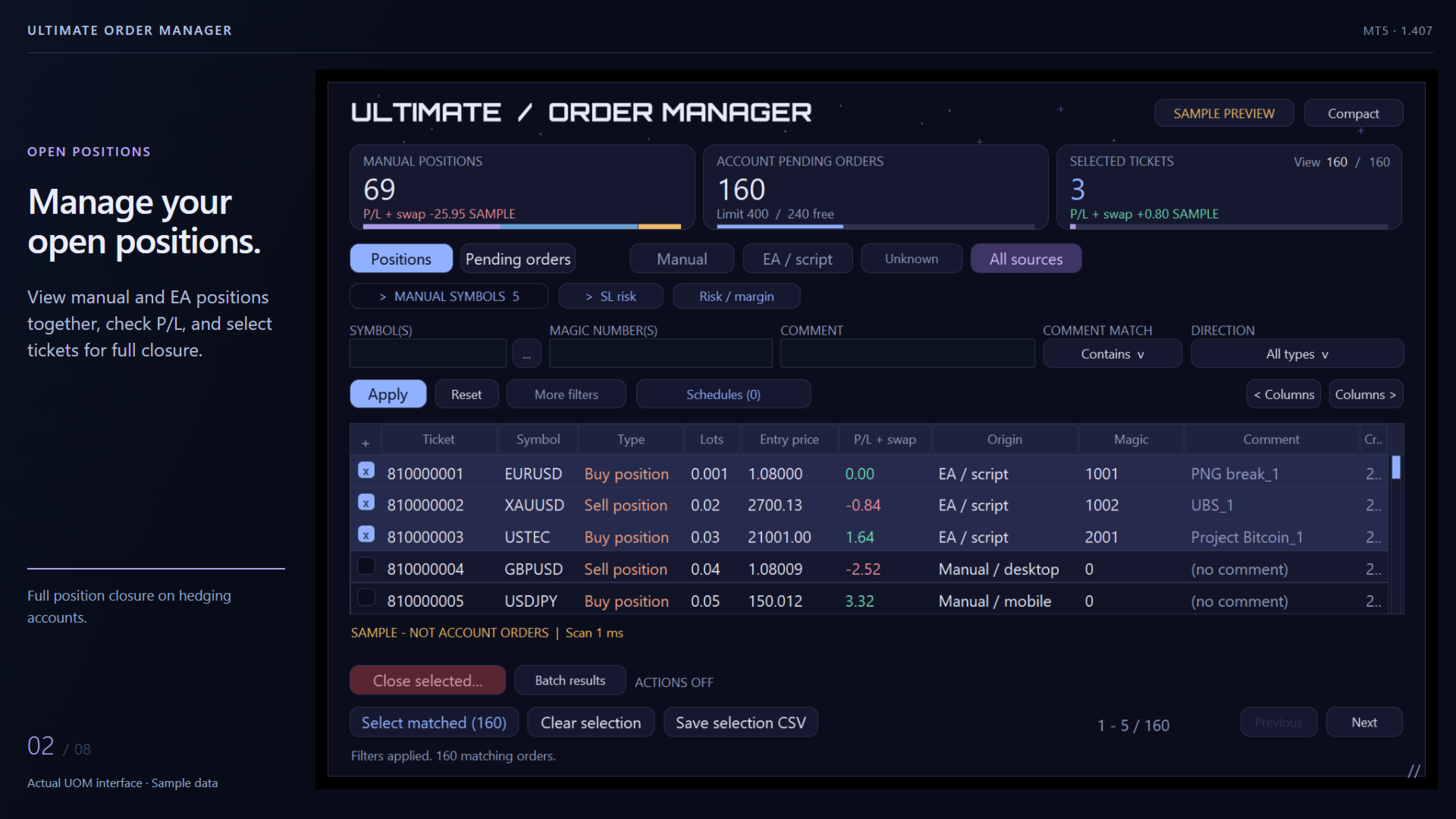
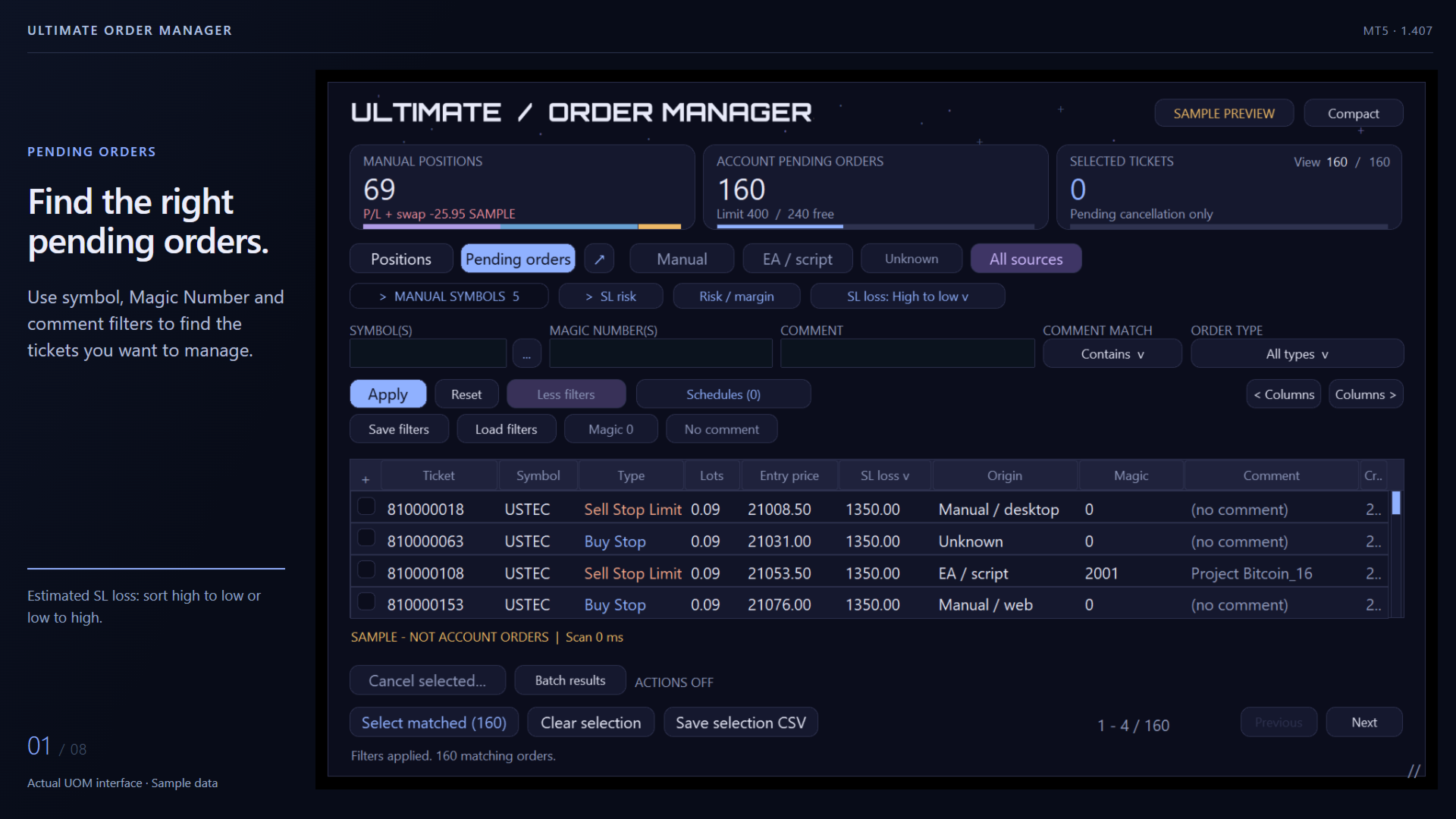
Combine Symbol, Magic Number and Comment filters to find one EA, several strategies or a specific set of manual trades. Choose Contains, Exact match or Excludes for comments, then save frequently used filters.

  • Separate Manual, EA / script and Unknown origins.
  • View all six supported pending-order types in an expandable table.
  • See account pending count, the broker-reported limit and remaining capacity.
  • Compare symbol-level order counts and pending lots, then select individual tickets or all filter matches.

    Start with the largest SL loss

    Sort pending orders from the largest to the smallest estimated SL loss, or reverse the order. Review the money at risk in account currency to spot outsized tickets and possible contract-size mismatches.

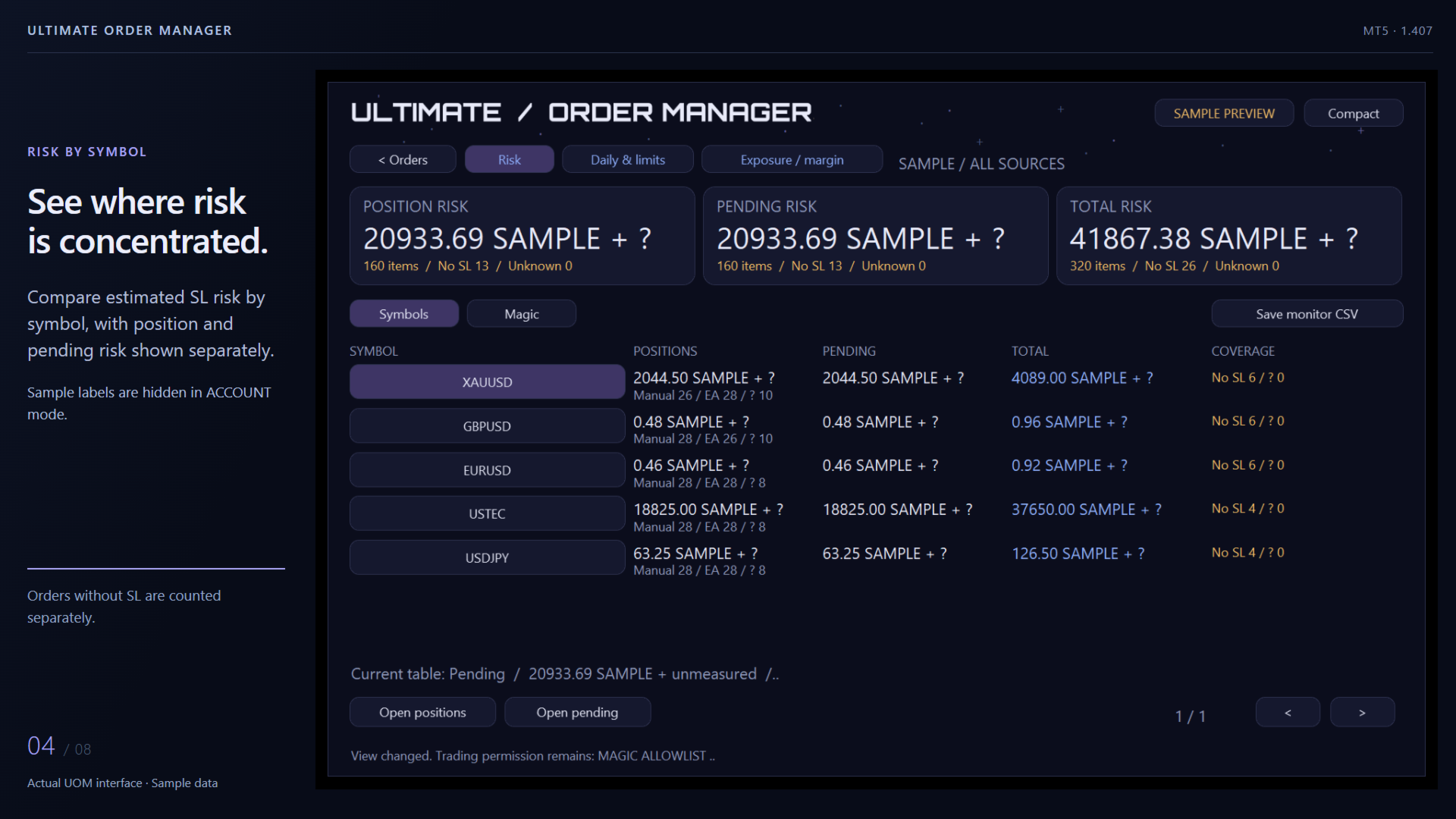
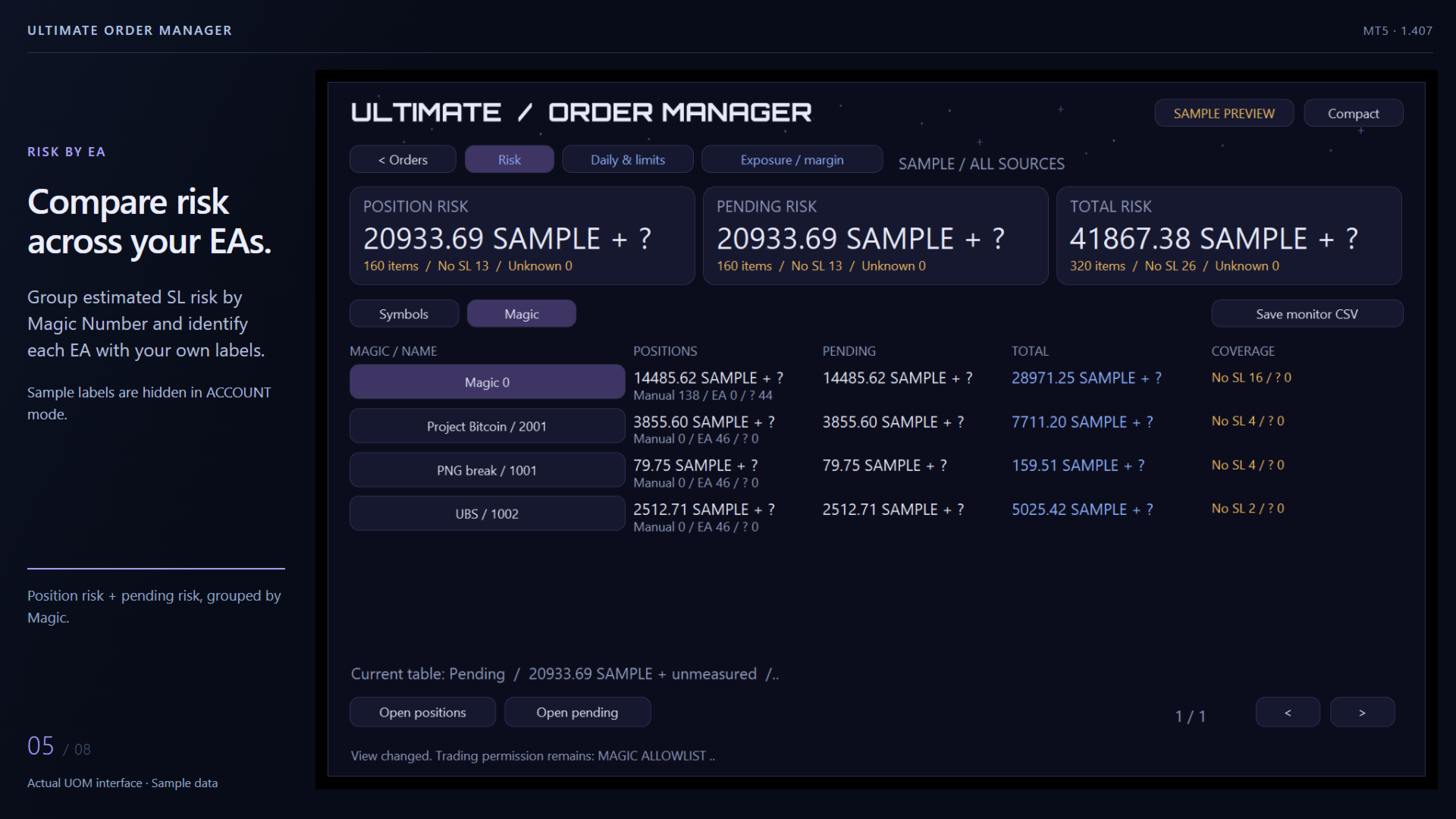
    Compare total account risk by symbol and Magic, including open positions and pending orders. No SL and unavailable calculations remain clearly marked alongside the measured totals.


    An institutional-grade mindset, made accessible.

    Defined permissions, exact-ticket review and traceable results guide the way UOM handles order actions. These principles put deliberate control at the center of the workflow.

    • Permissions before actions. Choose a management scope, allow the intended Magics and protect exceptions. Protected Magics take priority in every scope.
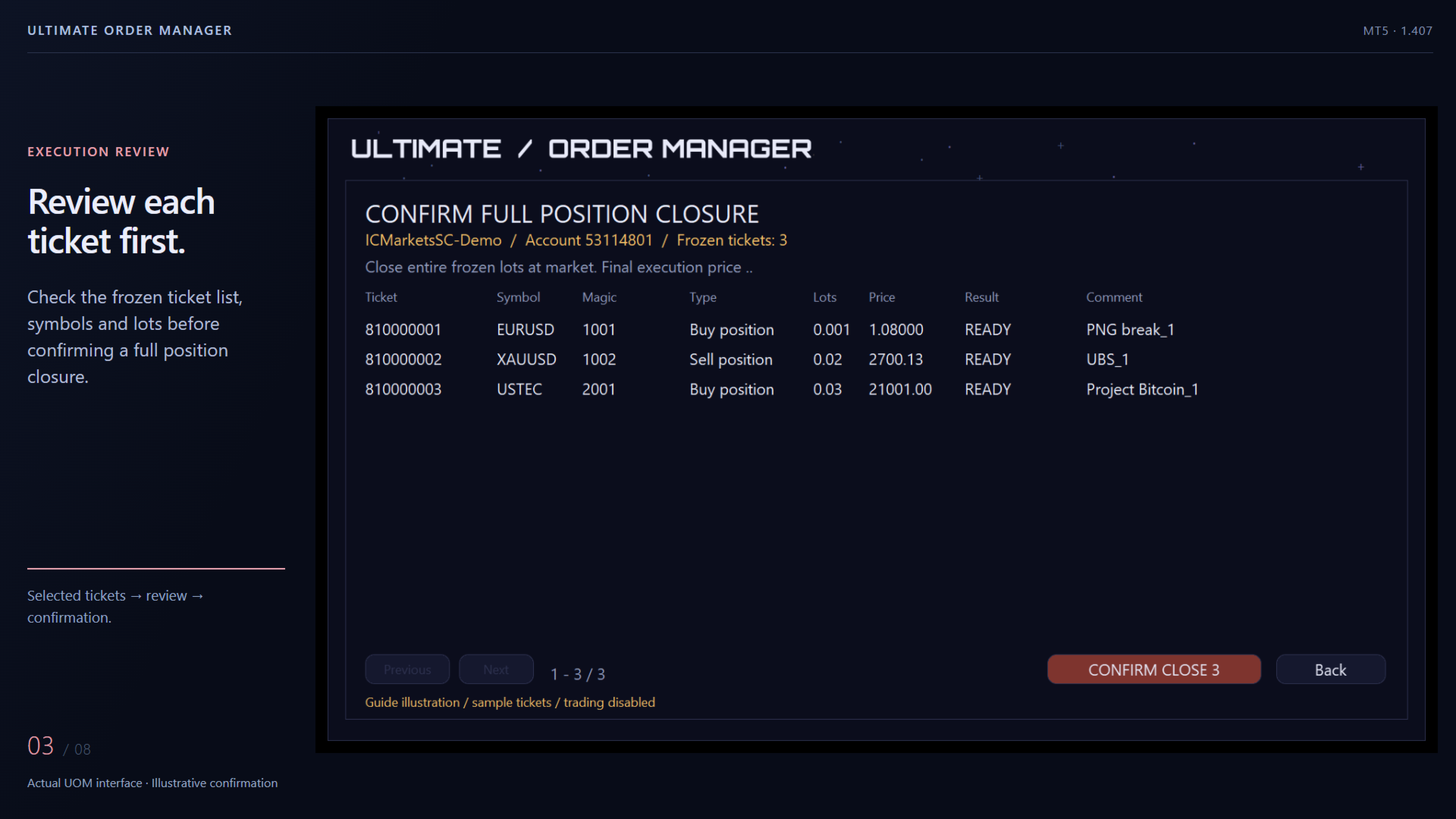
    • Review before execution. Inspect the frozen ticket list before confirming cancellation or full closure. Targets are rechecked before requests are sent; changed or missing tickets are reflected in the results.
    • A history check for uncertain results. Check status compares uncertain outcomes with broker order/deal history and updates the result CSV, without resending requests.
    • Missed-time handling. Schedules outside their execution window are recorded as MISSED instead of silently catching up late after a timer interruption.
    • A record after processing. Read ticket-level batch results and keep structured local audit records and CSV files for later review.

    FIND > SELECT > REVIEW > EXECUTE


    Plan the cleanup you want

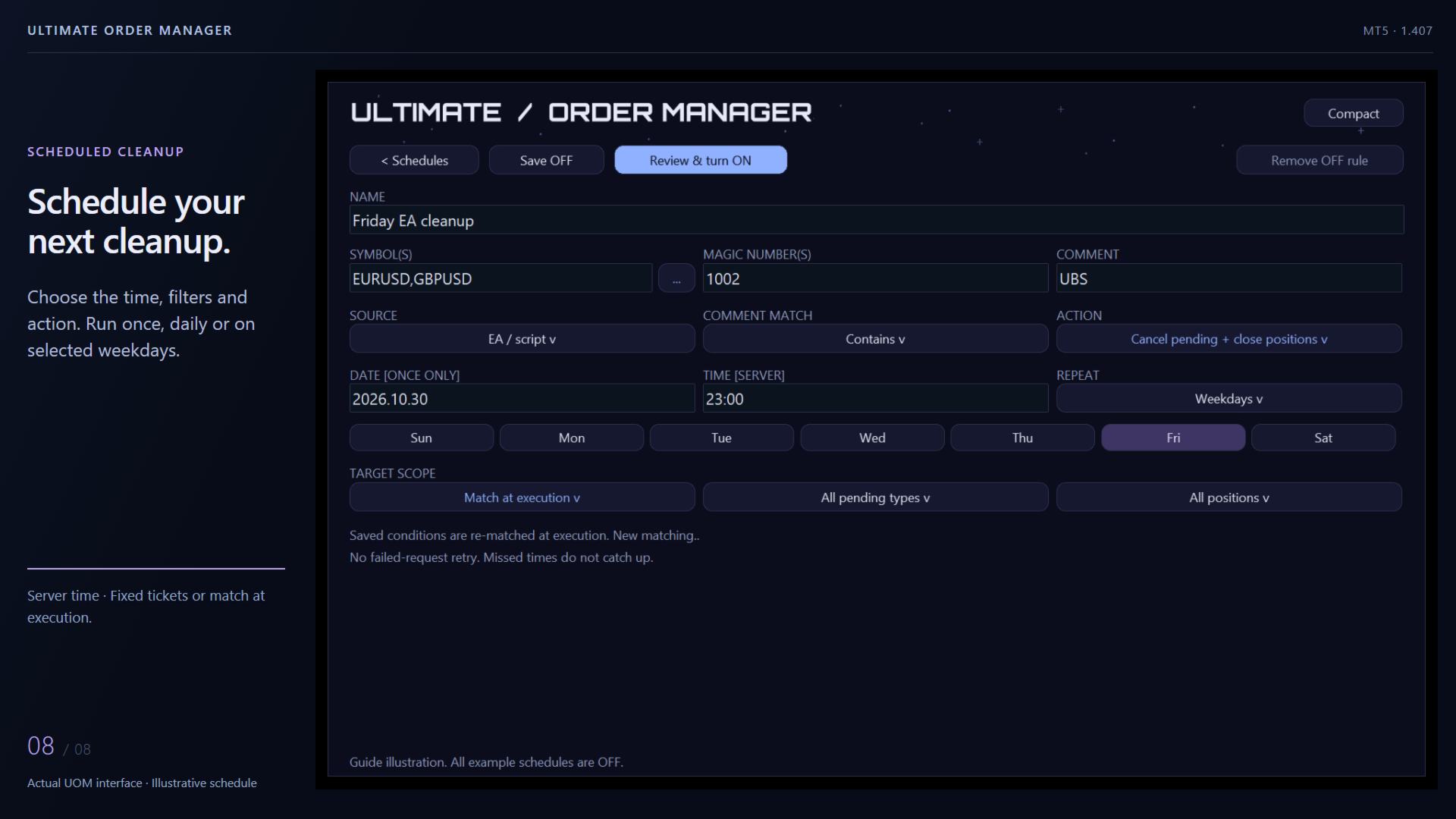
    Create a schedule from your current filters. Choose once, daily or selected weekdays using broker-server time. Target the tickets selected now, or let the rule find matching orders when it runs. Saved rules keep their own conditions as you change the table filters.

    For combined cleanup, UOM cancels pending orders first, then rereads and fully closes matching positions. Save the rule OFF, review it and explicitly turn it ON. Completed one-time rules remain OFF with their results visible.


    See exposure, margin and the trading day

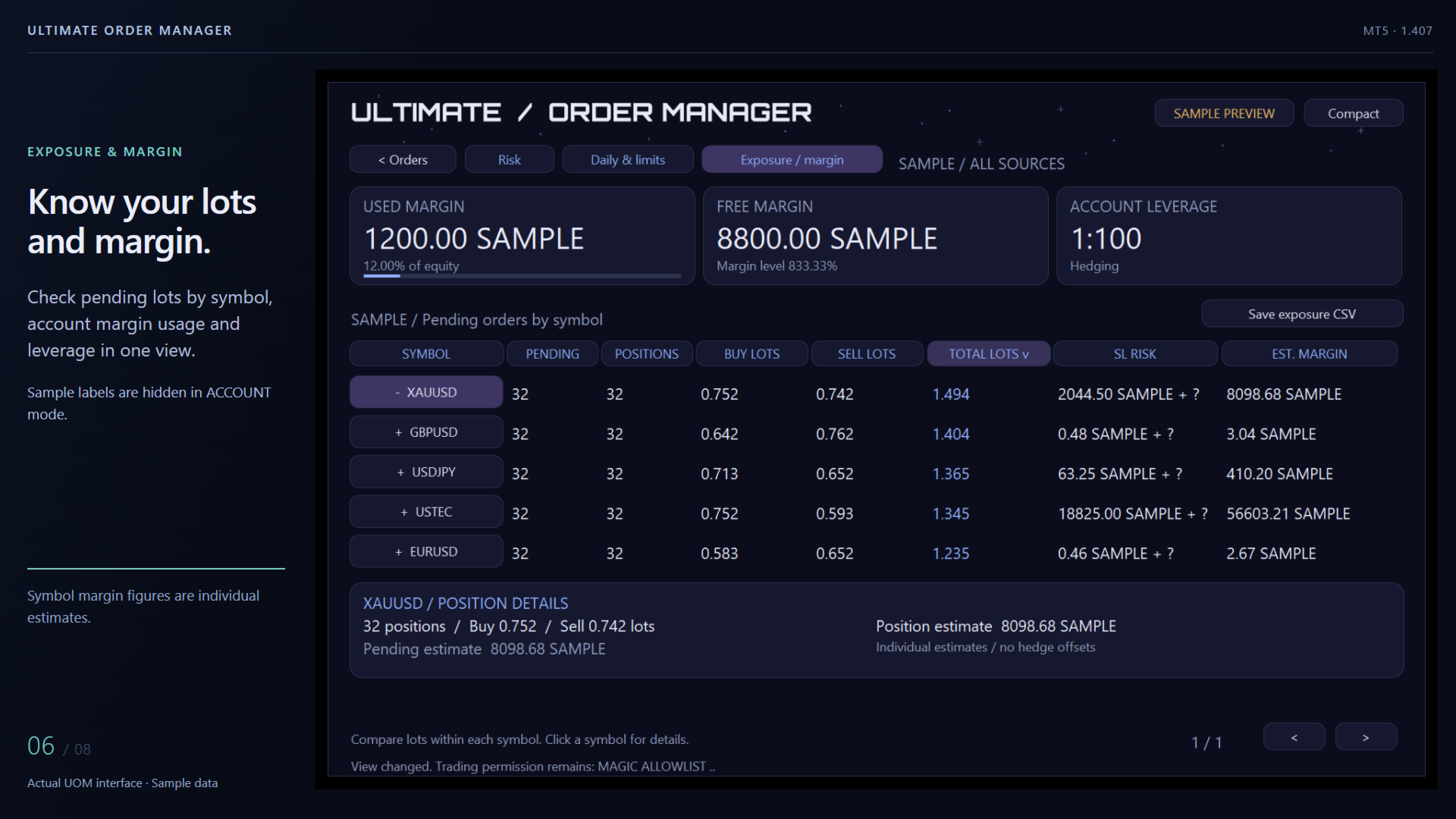
    Compare symbol-level pending Buy, Sell and Total lots, position counts and individual margin estimates. The account cards show actual used margin, free margin, usage and leverage.

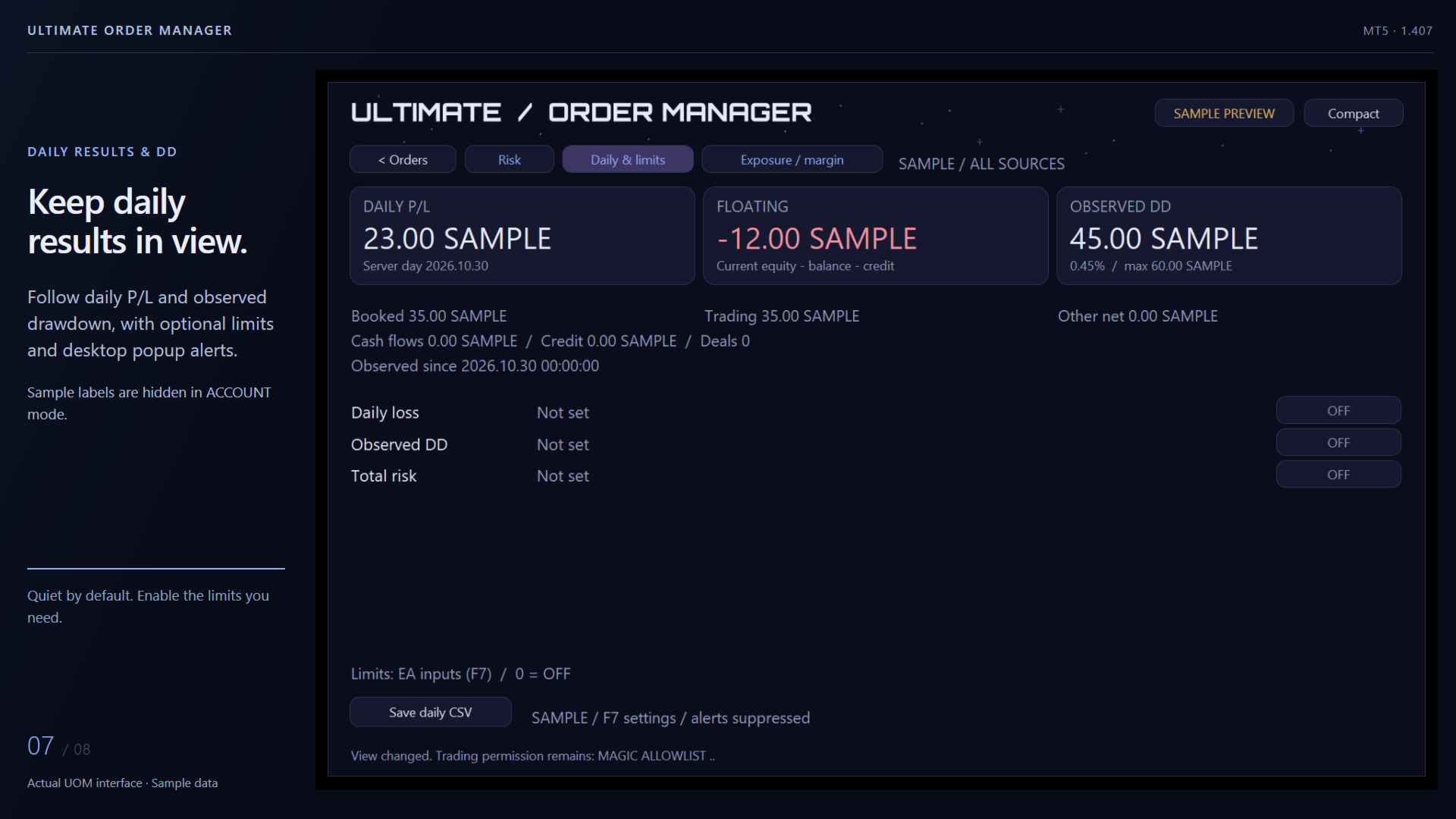
    Daily & limits adds daily P/L and cash-adjusted observed drawdown. Limits start at 0 and Popup alerts starts false. Keep the dashboard quiet, or enable optional local warnings when a configured metric enters a limit state.


    Review execution results and export risk data

    Export selections, risk comparisons, exposure and margin, daily status and schedules to CSV. Batch results provides ticket-level outcomes; diagnostic files record the tool's own errors. Use Check status when a stopped batch contains uncertain results.


    Quick start: viewing

    1. Install UOM through the MT5 terminal and attach it to a dedicated chart. Start with UI scale (%) = 100.
    2. Use ACCOUNT for account data, or SAMPLE PREVIEW to explore the built-in examples.
    3. Keep Enable close / cancel = false while viewing, filtering and exporting CSV.

      Enable cancellation and full closure

      1. Press F7 and set Enable close / cancel = true.
      2. Turn on MT5 Algo Trading and allow trading for this EA in the Common tab.
      3. Choose Manage scope: PS_MANUAL for recognized manual trades, or PS_ALLOWLIST with Allowed Magics for selected EAs. Add Protected Magics for exceptions.
      4. In ACCOUNT, apply filters, select tickets, review the frozen list and confirm. Read Batch results afterward.
      5. For schedules, also complete Review & turn ON for each rule.

        The 14 inputs

        Start with the defaults. Set the action permissions when ready; Magic settings and risk alerts are optional.

        No. Input Default Use
        1 Sample preview false Choose the startup view. false opens ACCOUNT; true opens sample data. The top button switches the current view later.
        2 UI scale (%) 100 Adjust panel scale from 80 to 150. Start at 100.
        3 Enable close / cancel false Enable reviewed cancellation/full closure and scheduled actions. MT5 and EA trading permissions must also be enabled.
        4 Manage scope PS_MANUAL Manual trades, an allowed Magic list, or all sources. Choose PS_ALLOWLIST to manage selected EAs; protection takes priority.
        5 Max tickets per batch 50 Accept 1-1000 tickets per batch/run. An oversized set is blocked as a whole; narrow it or deliberately raise the limit.
        6 Allowed Magics blank Comma-separated action permissions for PS_ALLOWLIST, for example 1001,1002. Separate from the table Magic filter.
        7 Protected Magics blank Magics excluded from every close/cancel action scope. Blank adds no extra Magic exclusions.
        8 Allow Magic 0 outside Manual false Extra permission for Magic 0 in PS_ALLOWLIST or PS_ALL. In allowlist mode, include 0 in Allowed Magics too.
        9 Manual execution-panel Magics blank Nonzero Magics used by your own manual panels, so their orders join the Manual classification.
        10 Magic labels (123=EA name) blank Readable group names, for example 1001=PNG break;1002=UBS;2001=Project Bitcoin.
        11 Daily loss limit 0 Optional daily-loss threshold in account currency. 0 keeps it OFF.
        12 Drawdown limit 0 Optional cash-adjusted observed-DD threshold in account currency. 0 keeps it OFF.
        13 SL risk limit 0 Optional known position-plus-pending SL-risk threshold. 0 keeps it OFF; read missing/unknown coverage too.
        14 Popup alerts false Local desktop popups on configured NEAR/LIMIT transitions, with a 60-second cooldown per metric. An unchanged state causes no repeat popup.


        FAQ

        Is the complete tool free?
        Yes. All features described here are included: pending management, full hedging-position closure, risk and margin views, daily monitoring, schedules and CSV.

        Can I use it with Algo Trading off?
        Viewing, filters, risk/margin analysis and CSV work with actions off. Sending close/cancel requests requires the F7 action switch, MT5 Algo Trading and the EA trading permission.

        What does total risk include?
        Known estimated SL losses across open positions and pending orders. Pending uses entry to SL; positions use the current close quote to SL. No SL and unavailable values remain separate. Actual outcomes can differ because of fills, gaps and costs.

        Will limit warnings close trades or keep sending alerts?
        Limits provide visual status and optional desktop popups. Close/cancel actions follow reviewed batches or enabled schedules. An unchanged warning state causes no repeated popup; there is a 60-second cooldown per metric.

        Can I use schedules on my local PC?
        Yes. Keep the PC, MT5 and UOM running, connected and authorized to trade at the chosen server time. Check the result after sleep, disconnection or market closure. Missed windows are recorded for review.

        Which account type supports position closure?
        Full ticket-level position closure uses an MT5 hedging account. Pending-order management also supports netting accounts.

        Action scope

        UOM focuses on pending cancellation and full hedging-position closure. Keep entries, partial closes and SL/TP adjustments in your execution tools. Broker permissions and session availability apply.

        Download Ultimate Order Manager through MT5 Market and start with the quiet viewing defaults.
        Produits recommandés
        Merci de noter 5 étoiles si vous appréciez cet outil gratuit ! Merci beaucoup :) La collection « Assistant Gestion des Risques » est une suite complète d'outils conçus pour améliorer les stratégies de trading en gérant efficacement les risques dans différentes conditions de marché. Elle comprend trois éléments clés : les conseillers experts en gestion de moyenne, en commutation et en couverture, chacun offrant des avantages distincts adaptés à différents scénarios de trading. Cet EA est une év
        FREE
        Do you trade with UBS (Ultimate Breakout System), other pending-order EAs or place pending orders manually? Then bring your pending orders into one clear workspace with Pending Manager Pro , a free MT5 utility built for everyday order management. See how many pending orders are on your account, check the broker-reported limit and remaining capacity, and find exactly the orders you want among dozens or hundreds of tickets. Filter by symbol, Magic number or comment, select your group, and review
        FREE
        Tiger Lite
        Dang Cong Duong
        Tiger Lite recreate the history of entry and exit orders. The goal is that you can grasp their strategy how to play. CSV format support for WEB, MT4 and MT5 platforms. The sequence of steps is described in the photo. Note: Please choose the existing date and symbol on the CSV file. For MT4/5, export historical data and copy the records to excel, save it with the extension CSV. For MT4/MT5/WEB, save the name with format mt4.csv/mt5.csv/web.csv If you get the history from another source and your
        FREE
        Opening EA - Start Edition Is a tool to trade the OpeningStrategy! The Opening EA is a semi-automated EA for MetaTrader 5! This means that the trader must actively start the EA using the Start button and stop it using the Stop button. This EA pursues an opening strategy which, at the start of trading, e.g. on the DAX or Nasdaq, etc., opens a trading channel with predefined TP's (TakeProfit). Two pending orders with the same lot size are set at the beginning. As soon as one of the pending order
        FREE
        This script calculates the SQN (System Quality Number) value of your account within a time interval that you will set. Keep in mind that trades with no initial stoploss value won't be calculated because of the nature of the system! The calculations will be made on your current account. What is SQN? Van K. Tharp proposed a formula for System Quality Number (SQN) that measured strategy performance and could be used as a custom objective for optimizing strategy parameters. The formula was present
        FREE
        "Manage multiple positions as a single unit with hidden targets." The Virtual Basket TP SL Manager is a professional MetaTrader 5 utility designed to automate the closing of positions based on the total profit or loss of a group of orders (a "basket"). By utilizing Virtual Levels , all Take Profit (TP) and Stop Loss (SL) targets are stored locally within the EA's memory and are not sent to the broker's server, keeping your strategy safe from stop-hunting and price manipulation. Key Features Virt
        FREE
        # MiniBull Guard v1.30 ## Never trade without a stop again. **You open the trade. MiniBull Guard sets the stop, shows the risk and keeps your head clear.** - **No more naked positions.** Every new trade gets a stop loss within moments, even when you forget, hesitate or trade from your phone. - **A stop the market can breathe around.** Sized from real volatility (ATR) by default, or from a distance you choose. - **Know your loss before it happens.** In money and in percent of your equity, not
        FREE
        Why do retail traders lose money buying pairs that look great technically? Because they are trading directly against macroeconomic monetary policy. In the global foreign exchange market, trillions of dollars in institutional capital flow based on central bank interest rate differentials, inflation trajectories, and economic surprise cycles . Moving averages and RSI indicators cannot see these fundamental forces. The Macro-to-Trade Engine MT5 is a quantitative macroeconomic analytics system built
        CopyTrader Pro FAST MT5 — FREE Real-Time Trade Copier | MT4 ↔ MT5 Cross-Platform | 20ms Latency CopyTrader Pro FAST is a professional trade copier Expert Advisor that copies trades between MetaTrader terminals in real time using a high-speed file-based communication system. No VPS, no network setup, no DLL — just attach and copy. FREE VERSION : Copies up to 1 trade at a time. Upgrade to the full version, Copy Trader Pro FAST MT5 , for unlimited copying. Key Features 20ms refresh rate — in
        FREE
        AlgoTrade Loss Streak Guard helps you take a break after losing trades. It monitors your closed trades and pauses trading according to your rules. A trade opened during a pause is closed immediately or only reported, depending on your settings. The rules A wait after every losing trade (5 minutes by default). A longer pause after a specified number of losing trades in a row (3 losses and 1 hour by default). Each subsequent loss restarts the pause until a winning trade occurs. An optional stop fo
        FREE
        Pro Trader Assistant 1.1 - The Ultimate Trading Companion NB: DOES NOT WORK ON STRATEGY TESTER. FOR TESTING, DM ME   Trade Simple, Smarter, Safer, and More Efficiently Are you ready to transform your trading with institutional-grade risk management? Pro Trader Assistant 1.1  is your complete solution for mastering trading psychology, risk control, and execution efficiency. Built for both prop firm challenges and retail trading. Why Choose Pro Trader Assistant 1.1 Perfect for retail trading
        Equity Tracker MT5 Equity Tracker MT5 est un Expert Advisor de surveillance pour MetaTrader 5 qui rapporte l’activité de trading, l’état du compte et les conditions techniques via des messages de notification. L’Expert Advisor fonctionne indépendamment de la logique de trading et n’influence ni l’exécution des ordres ni la gestion des positions. Le produit n’ouvre, ne modifie et ne ferme aucune position. Il effectue uniquement des tâches d’observation et de notification. Objectif Equity Tracker
        FullMarginRiskGuard
        Seti Gautama Adi Nugroho
        FullMargin RiskGuard - Advanced Risk Management for New Traders Unlock the power of full margin trading with confidence using FullMargin RiskGuard , a cutting-edge Expert Advisor (EA) designed specifically for beginner traders on the MetaTrader 5 platform. Inspired by the renowned trading style of Papip Celebes, this EA empowers users to execute full trade strategies while safeguarding their capital with advanced risk management features. Key Features: MaxFloatingLoss Protection: Set your maxim
        FREE
        One Click Custom
        Syamsurizal Dimjati
        Ritz Klik Trading Panel In today’s fast-paced financial markets—ranging from highly volatile cryptocurrencies like BTCUSD to traditional forex pairs—execution speed, bulletproof risk management, and real-time capital awareness are the ultimate deciders of a trader's profitability. Ritz Klik Trading Panel is an institutional-grade, ultra-responsive One-Click Trading Dashboard designed exclusively for MetaTrader 5 (MT5). Built for scalpers, day traders, and aggressive layerers, this Expert Adviso
        FREE
        SimpleTrade by Gioeste
        Giovanni Scelzi
        4 (3)
        Discover the power of automated trading with **SimpleTradeGioeste**, an Expert Advisor (EA) designed to optimize your trading operations in the Forex market. This innovative EA combines advanced trading strategies with proven technical indicators, offering an unparalleled trading experience. video backtest :  https://youtu.be/OPqqIbu8d3k?si=xkMX6vwOdfmfsE-A ****Strengths**** - **Multi-Indicator Strategy**: SimpleTradeGioeste employs an integrated approach that combines four main technical ind
        FREE
        PZ Goldfinch Scalper EA MT5
        PZ TRADING SLU
        3.33 (57)
        This is the latest iteration of my famous scalper, Goldfinch EA, published for the first time almost a decade ago. It scalps the market on sudden volatility expansions that take place in short periods of time: it assumes and tries to capitalize of inertia in price movement after a sudden price acceleration. This new version has been simplified to allow the trader use the optimization feature of the tester easily to find the best trading parameters. [ Installation Guide | Update Guide | Troublesh
        FREE
        Kefren Nemesis
        Sergio Villar Leon
        KEFREN NEMESIS MT5 – EA de Breakout sur l'Or XAUUSD Kefren Nemesis est un EA pour l'Or (XAUUSD) entièrement automatique pour MetaTrader 5, spécialisé dans le trading de breakout. Il place des ordres en attente sur les niveaux clés de la structure du marché et n'entre que lorsque le prix les casse, avec Stop Loss et Take Profit sur chaque trade. Sans martingale, sans grid, sans moyenne à la baisse. Développé par Kefren Systems, créateurs de Kefren Bot Gold, sur le même moteur que celui utilisé da
        FREE
        ---คำเตือน EA ตัวนี้เหมาะสำหรับโบรคเกอร์ที่ Slippage ต่ำ--- EA ตัวนี้ถูกสร้างมาด้วยหลักการ Long Straddle ของ Option ที่จะวาง Position ดักทางทั้ง 2 หน้า หากราคาไปทางใดทางนึงจนเกินระดับราคา Break Event จะกำไรไม่จำกัด เเต่ถ้าราคาผิดทางจะขาดทุนแค่ค่าพรีเมี่ยม ดังนั้นเมื่อข่าวออกการที่กราฟฉีกตัวไปทางใดทางนั้นบน Option สามารถสร้างกำไรได้ทันที   แต่เนื่องจากการเทรด XAUUSD Spot CFDs ไม่ได้มีหลักการขาดทุนเเค่ค่าพรีเมี่ยม การ ฺ Buy Sell สามารถกำไร/ขาดทุนได้ไม่จำกัด ดังนั้นการเทรดข่าวด้วยเครื่องมือ EA News
        FREE
        Risk Manager Optimum
        Freedom Uzochukwu Nnadi
        5 (1)
        RiskManagerOptimum for MetaTrader 5 – Your Ultimate Trading Safety Net! RiskManagerOptimum is the most advanced and professional trade and account risk management Expert Advisor for MetaTrader 5. It does not open trades. It monitors and manages existing positions in real time to control risk, drawdown, and exposure across all symbols. The EA is designed for manual traders, algorithmic traders, and portfolio traders who require strict and automated risk control across Forex, metals, crypto, indi
        Fx Trade Monitor – Professional Strategy Tracker & Risk Manager A powerful, free utility to monitor open/closed trades, visualize history, and manage risk with advanced Drawdown Alerts. Includes Excel-ready CSV export. Fx Trade Monitor  is an essential dashboard tool designed for both manual traders and EA users. It provides a crystal-clear overview of your trading performance directly on the chart, filtering by Magic Number or Comment. Unlike simple info panels, this tool focuses heavily on  Ri
        FREE
        CommunityPower MT5
        Andrey Khatimlianskii
        4.69 (90)
        CommunityPower EA   — is the Expert Advisor for MetaTrader 4/5, created by community and for community. It is free, versatile and very powerful, and allows to trade a wide range of strategies. The idea is simple Your suggestions + my code = a win-win for everyone! Is it a ready-to-use money-making machine? No, it is definitely not. It is a tool, which allows you to create and run your own trading strategy, and it is up to you to find profitable settings and take the responsibility for your tra
        FREE
        TRADE PANEL MASTER — Know Your Risk Before You Click Open your chart. See your panel. Trade with confidence. Before you click Buy or Sell, Trade Panel Master shows you  exactly what you risk, what you gain, and your R:R ratio —  in real time. No mental math. No surprises. FEATURES - Lot sizing with real-time margin display - SL & TP in 3 modes: Points / Money / Price - Au
        FREE
        Trade Anomalo BTC Multi Grid
        Alessandro Virgilio
        4.25 (4)
        Trade Anomalo BTC Multi Grid EA   Trade Anomalo  BTC Multi Grid  is an advanced, fully automated Multi-Grid Expert Advisor meticulously designed to navigate the volatility of BTC and other major pairs. Introduces highly requested features, including Multi-Window Time Management and an interactive, upgraded on-chart dashboard. Unlike traditional grids that get trapped in one direction,   Parallel Pro   utilizes a dual-engine architecture (Grid A and an optional inverted mirror Grid B) to simultan
        FREE
        Position Manager Pro v1.0 (MT5) Dual Magic Number Independent Group Manager with Live P&L Dashboard Overview Position Manager Pro   is a powerful trade management Expert Advisor for MetaTrader 5 that operates as an   overlay manager   — it does not open positions itself, but instead manages and monitors positions opened by other EAs or manually by the trader. The core concept is   two fully independent groups , each identified by a unique   Magic Number . Each group has its own Take Profit, Stop
        FREE
        Pocket Desk Metatrader 5
        Emmanuel Lovski Ijeawele Maduagwuna
        Trade Remote: Pocket Desk - Your MetaTrader Account, Now in Your Pocket FEATURES Trade Remote: Pocket Desk turns your phone, tablet, or any web browser into a live trading remote control for your MetaTrader terminal. No app to install on your phone — just a 4-character code and any browser. Connects to your MT4 terminal in under 30 seconds using a unique, auto-generated 4-character CONNECT code. One-click BUY and SELL on any symbol in your Market Watch, with live bid/ask and spread shown befor
        FREE
        Trade Panel Manager — Master all trades in one dashboard Stop calculating volume manually, stop worrying about forgetting to set SL/TP. TTrade Panel Manager transforms MetaTrader 5 into a professional trading command center — drag and drop a few lines on the chart, the EA automatically calculates lot sizes according to your desired risk level, displaying SL/TP in pips and currency in real time, right before you press the button. Why download now? Accurate lot size calculation based on risk pe
        FREE
        GoldDragon Safe — XAUUSD Multi-Strategy Expert Advisor Conservative Grade (5x) · Full engine set · Recommended $1,000 · Works from $300 No grid · No martingale · No loss averaging Fixed stop loss on every trade Full GoldDragon engine set (11 engines) — trending, ranging and choppy markets Backtest Jan 2025 – Oct 2026: 2,681 trades · Profit Factor 2.25 · Max equity DD 14.08% (Auto Lot, $1,000) ️ Plug and play — one XAUUSD M5 chart, only the lot mode to choose LAUNCH TESTER PRIC
        Elevate your trading with this Metatrader 5 expert – the Position Volume Calculator. This tool takes the guesswork out of risk management and profit optimization. Simply input your desired stop-loss points with dragging the stop-loss line, and let the expert advisor compute the optimal position volume for your trade. Plus, with customizable reward ratios, it's easier than ever to set your take-profit points for maximum gains. Trade with confidence and precision. Try the Position Volume Calculat
        FREE
        Order Manage MT5 is an Expert Advisor for pending order management and open position management in MetaTrader 5. It monitors specified levels, cancels pending orders when their conditions are met, and can partially close positions while moving Stop Loss to the entry price. The EA performs the following actions: Cancels Buy Limit and Sell Limit orders if price reaches Take Profit before execution starts. Cancels Buy Stop and Sell Stop orders if price reaches Stop Loss before execution starts. Clo
        EN DESARROLLO, TESTING PERIOD. PRISM KellyEngine aplica disciplina de riesgo profesional directamente en tu flujo MT5. Te ayuda a: definir lotaje de forma consistente, limitar sobrecarga de riesgo, proteger cuenta en escenarios de volatilidad. Ideal para traders que quieren dejar atras el lotaje por intuicion. Parametros principales  Riesgo base por operacion (%) Limite maximo de lotaje Umbral de confianza Multiplicadores de seguridad Incluye Motor de sizing adaptable Controles de limites de ri
        Les acheteurs de ce produit ont également acheté
        Trade Assistant MT5
        Evgeniy Kravchenko
        4.43 (216)
        It helps to calculate the risk per trade, the easy installation of a new order, order management with partial closing functions, trailing stop of 7 types and other useful functions. Additional materials and instructions Installation instructions - Application instructions Line function -   shows on the chart the Opening line, Stop Loss, Take Profit. With this function it is easy to set a new order and see its additional characteristics before opening.   Risk management  - The risk calculation
        Bienvenue sur Trade Manager EA, l’outil ultime de gestion des risques conçu pour rendre le trading plus intuitif, précis et efficace. Ce n’est pas seulement un outil d’exécution d’ordres ; c’est une solution complète pour la planification des trades, la gestion des positions et le contrôle des risques. Que vous soyez débutant, trader expérimenté ou scalpeur ayant besoin d’une exécution rapide, Trade Manager EA s’adapte à vos besoins, offrant une flexibilité sur tous les marchés, des devises et i
        Telegram to MT5 Multi-Channel Copier   copie automatiquement les signaux de trading de vos canaux Telegram et Discord directement vers MetaTrader 5. Pas de bots, pas d'extensions de navigateur, pas de copie manuelle. Un signal arrive sur Telegram ou Discord et l'EA ouvre le trade dans votre terminal en quelques secondes. Et avant de copier un canal, le backtester intégré vous montre ce que ce canal aurait fait sur votre compte. Le produit comprend deux composants : une application Windows qui éc
        Local Trade Copier EA MT5
        Juvenille Emperor Limited
        4.94 (149)
        Local Trade Copier EA MT5 est un copieur de trades rapide et flexible permettant de copier et de gérer des trades entre plusieurs comptes MetaTrader 5 sur le même ordinateur Windows ou Windows VPS. Il combine la synchronisation locale des trades avec des contrôles côté Receiver pour la taille des lots, la gestion du risque, le filtrage des trades, le mappage des symboles, la gestion des trades et la protection du compte. Configurez vos terminaux Transmitter et Receiver en environ 1 minute et co
        Farmed Hedge Yield Farming | All Markets (Manual - Hybrid - Semi/Automated EA) VERIFIED TRADING RESULTS - Farmed Hedge Yield Axi Copy:  https://www.mql5.com/en/signals/2356376 - Farmed Hedge Yield Exn Copy:   https://www.mql5.com/en/signals/2356404 - Farmed Hedge Yield V Copy:  https://www.mql5.com/en/signals/2357156 IMPORTANT NOTICE: FarmedHedge is a MANUAL-FOCUSED TRADING UTILITY ,not a fully automated EA. Results shown on this Signal include manual trades and overall strategic management.
        Copiez les signaux Telegram avec vos propres règles de trading Telegram to MT5 Signal Trader copie automatiquement les signaux de trading au format texte provenant de canaux et de groupes Telegram publics et privés vers MetaTrader 5. Gérez plusieurs fournisseurs et comptes MT5 depuis une seule application de bureau, avec des paramètres de risque et de trading propres à chaque fournisseur . Aucun bot Telegram ni configuration d'API n'est nécessaire pour copier les signaux. Connectez-vous simpleme
        Strategy Ledger Pro
        Abdullah Uygar Tuna
        5 (14)
        Désormais disponible en français. Strategy Ledger Pro est un panneau d'analyse de compte en lecture seule pour MetaTrader 5. Il sépare les résultats du compte par Expert Advisor, stratégie, symbole et numéro magic, pour que vous voyiez ce que chacun apporte réellement. Le panneau est disponible en 11 langues : English, Français, Deutsch, Español, Italiano, Português, Русский, Türkçe, 中文, 日本語 et 한국어. Avant de télécharger la démo. Le Market exécute la démo de tout produit payant uniquement dans l
        TradePanel MT5
        Alfiya Fazylova
        4.88 (170)
        Trade Panel est un assistant commercial multifonction. L'application contient plus de 50 fonctions de trading pour le trading manuel et permet d'automatiser la plupart des tâches commerciales. Instructions d'utilisation : https://www.mql5.com/fr/blogs/post/762589 Version d'essai de l'application pour un compte démo : https://www.mql5.com/fr/blogs/post/762644 Comment installer l'application : https://www.mql5.com/fr/blogs/post/762645 Comment tester l'application en mode visuel : https://www.mql5.
        ================================================================================ POC BREAKOUT - V20.72. Full Professional Grade Toolkit ================================================================================ POC Breakout is a full MetaTrader 5 trading dashboard for discretionary traders who want breakout signals, Point of Control (POC) context, volume profiles, order flow, market structure, news, alerts, and advanced trade planning in one professional workspace. Attached directly to you
        MT5 to Telegram Signal Provider est un utilitaire facile à utiliser et entièrement personnalisable qui permet l'envoi de signaux spécifiés vers un chat, un canal ou un groupe Telegram, transformant ainsi votre compte en fournisseur de signaux. Contrairement à la plupart des produits concurrents, il n'utilise pas d'importations DLL. [ Démonstration ] [ Manuel ] [ Version MT4 ] [ Version Discord ] [ Canal Telegram ]  New: [ Telegram To MT5 ] Configuration Un guide utilisateur étape par étape est
        VirtualTradePad PRO SE MT5 — centre de contrôle de trading professionnel pour MetaTrader 5 VirtualTradePad PRO SE est un panneau de trading premium basé sur le graphique et un espace de gestion des trades pour MetaTrader 5 . Il est conçu pour les traders qui souhaitent une exécution plus rapide, un contrôle plus clair des positions, une gestion structurée des trades, une planification visuelle des niveaux et un flux de travail professionnel directement depuis le graphique. Ce n’est pas seulement
        Trade copier MT5
        Alfiya Fazylova
        4.61 (57)
        Trade Copier est un utilitaire professionnel conçu pour copier et synchroniser les commandesentre les comptes de trading. Les commandes sont copiées du compte/terminal du fournisseur vers le compte/terminal du destinataire, qui sont installés sur le même ordinateur ou vps. Avant d'acheter, vous pouvez tester la version démo sur un compte démo. Version démo ici . Instructions complètes ici . Principales fonctionnalités et avantages: Prend en charge la copie des commandes MT5> MT5, MT4> MT5, MT5>
        Exp COPYLOT CLIENT for MT5
        Vladislav Andruschenko
        3.97 (35)
        Copieur professionnel de trades pour MetaTrader 5 Un copieur de trades rapide, professionnel et fiable pour MetaTrader . COPYLOT permet de copier des trades Forex entre les terminaux MT4 et MT5 avec prise en charge des comptes Hedge et Netting . La version MT5 de COPYLOT prend en charge : - MT5 Hedge → MT5 Hedge - MT5 Hedge → MT5 Netting - MT5 Netting → MT5 Hedge - MT5 Netting → MT5 Netting - MT4 → MT5 Hedge - MT4 → MT5 Netting Version MT4 Description complète + DEMO + PDF Comment acheter Comme
        News Trade EA MT5
        Konstantin Kulikov
        4.55 (11)
        Je voudrais vous présenter un robot efficace que j'utilise depuis plusieurs années. Il peut être utilisé en mode semi-automatique, comme en mode totalement automatique. >>> Chat <<< Le programme comporte des paramètres souples pour le commerce sur les nouvelles du calendrier économique. Il est impossible de le vérifier dans le testeur des stratégies. Ce qu’il faut, c’est le travail réel. Il faut ajouter à la liste des URL autorisées, dans les paramètres du terminal, un site d'actualités. Cliqu
        The Patch
        Mian Rameez Ali
        The Patch It never opens a trade. It walks behind the ones that did. Every open position, every pending order — checked twice a second for the one thing that's easy to forget: a stop, a target. Found bare, it doesn't ask. It writes the missing number in, measured in points from wherever the position began, and moves on to the next. No strategy, no opinion on direction. Just the quiet assumption that nothing should ever sit on the market unprotected — not because someone decided it shouldn't,
        Telegram To MT5 Ultra
        Mirel Daniel Gheonu
        5 (5)
        Telegram To MT5 — Copieur de signaux Transformez les appels de trading de vos canaux Telegram en véritables ordres MT5 — automatiquement, sur autant de comptes que vous le souhaitez, avec le risque et les règles entièrement sous votre contrôle. Telegram To MT5 relie les canaux VIP / de signaux que vous suivez déjà sur Telegram à votre terminal MetaTrader 5. Une application de bureau compagnon gratuite lit les messages (même des canaux qui bloquent les bots), et cet Expert Advisor les exécute sur
        Prochaine mise à jour — Version 2.52 bientôt disponible ! [NOUVEAU] Préparez-vous à découvrir 4 nouvelles fonctionnalités majeures conçues pour améliorer votre analyse du marché et votre flux de travail de trading Nous faisons passer l’analyse du marché au niveau supérieur avec 4 nouvelles fonctionnalités conçues pour répondre à vos besoins en trading. Découvrez : 1. TRADE OVERVIEW DASHBOARD 2. CONFLUENCE AT ZONE 3. STRONG & WEAK HIGH/LOW 4. OTE 1. TRADE OVERVIEW DASHBOARD Un tableau de bord qu
        Anchor Trade Manager
        Kalinskie Gilliam
        5 (8)
        Your EAs cannot see each other, but Anchor can. Anchor gives you one place to coordinate your EAs, manage risk, and decide when trading is allowed. It works alongside the trading bots you already use without any changes to them. The Problem One EA opens a trade. Then another starts trading. The next thing you know, you wake up to multiple grids built across your account. Each EA may be doing exactly what it was designed to do, but together they can place far more risk on your account than you in
        Trader Evolution
        Siarhei Vashchylka
        5 (7)
        " Trader Evolution " - A utility designed for traders who use wave and technical analysis in their work. One tab of the utility is capable of money management and opening orders, and the other can help in making Elliott wave and technical analysis. Manual (Be sure to read before purchasing) | Version for MT4 Advantages 1. Trading in a few clicks. Immediate and pending orders are available in the panel 2. Money management. The program automatically selects the appropriate lot size 3. Simplifies
        Grid Manual MT5
        Alfiya Fazylova
        4.73 (22)
        Grid Manual est un panneau de trading permettant de travailler avec une grille d'ordres. L'utilitaire est universel, possède des paramètres flexibles et une interface intuitive. Il fonctionne avec une grille d'ordres non seulement dans le sens des pertes, mais aussi dans le sens de l'augmentation des profits. Le commerçant n'a pas besoin de créer et de maintenir une grille d'ordres, l'utilitaire le fera. Il suffit d'ouvrir une ordre et "Grid Manual" créera automatiquement une grille de ordres po
        HINN MagicEntry Extra
        ALGOFLOW OÜ
        4.74 (19)
        HINN MAGIC ENTRY – the ultimate tool for entry and position management! SIMPLE. FASTEST. INTUITIVE. MAX AUTOMATED. Place orders by selecting a level directly on the chart! full description   ::  demo-version  :: 60-sec-video-description Key features: - Market, limit, and pending orders - Automatic lot size calculation - Automatic spread and commission accounting - Unlimited partitial take-profits  - Breakeven and trailing stop-loss and take-profit  functions - Invalidation leves - Intuitive, a
        The product will copy all telegram signal to MT5 ( which you are member) , also it can work as remote copier.  Easy to set up, copy order instant, can work with almost signal formats, image signal,  s upport to translate other language to English Work with all type of channel or group, even channel have "Restrict Saving Content", work with  multi channel, multi MT5 Work as remote copier: with signal have ticket number, it will copy exactly via ticket number. Support to backtest signal. How to s
        RETAILBERG FOOTPRINT CHART PRO — Order-Flow Workspace for MetaTrader 5 Version 7.00  |  Professional System  |  31 tools  |  One chart A full 150-page illustrated User Manual is included. Please read the full manual to understand this feature packed footprint chart elements and ui. https://www.mql5.com/en/blogs/post/777982 DEMO / STRATEGY TESTER — PLEASE READ FIRST
        Timeless Charts
        Samuel Manoel De Souza
        5 (9)
        Timeless Charts est un utilitaire de trading tout-en-un destiné aux traders professionnels. Il combine des types de graphiques personnalisés tels que les graphiques en secondes et Renko avec une analyse avancée du flux d’ordre s utilisant Footprints , Clusters , Profils de Volume , études VWAP et outils d’analyse ancrés pour une compréhension plus approfondie du marché. Le trading et la gestion des positions sont effectués directement depuis le graphique via un panneau intégré de gestion des ord
        Floor Watch
        Syed Tauqeer Hussain Shah
        Floor Watch One number, watched every thirty seconds: how far equity has fallen since the day began — or since its highest point, if it's told to trail the peak instead of the open. Cross the line and it doesn't argue. Every open position closes, every pending order vanishes, and anything that slips through afterward gets shut the moment it appears. Not asked. Removed. The floor holds until the clock turns 5 AM Pakistan time — then, and only then, does the day start over. One rule. No except
        RS Trade Copier - le copieur de trades local ultra-rapide avec une véritable interface graphique. Arrêtez de saisir les numéros de compte manuellement. Fini les listes interminables de 200+ paramètres dans l'onglet Inputs. Un outil fiable et flexible pour copier les opérations de trading entre plusieurs terminaux MT5 et MT4. Il convient aux traders expérimentés, aux services de signaux ainsi qu'aux investisseurs privés. Il permet la synchronisation du trading d'un ou plusieurs Providers vers un
        Seconds Chart MT5
        Boris Sedov
        4.61 (18)
        Seconds Chart - un outil unique pour créer des graphiques en secondes dans MetaTrader 5 . Grâce à Seconds Chart , vous pouvez créer un graphique avec une période définie en secondes, offrant une flexibilité et une précision idéales pour l'analyse, indisponibles sur les graphiques standards en minutes ou en heures. Par exemple, la période S15 indique un graphique avec des bougies d'une durée de 15 secondes. Vous pouvez utiliser n'importe quels indicateurs et experts advisors compatibles avec les
        Power Candles Strategy Scanner - Outil de recherche de configurations multi-symboles à optimisation automatique Le Power Candles Strategy Scanner utilise le même moteur d'auto-optimisation que celui qui alimente l'indicateur Power Candles, pour chaque symbole de votre Market Watch, en parallèle. Un panneau vous indique quels symboles sont statistiquement négociables à l'instant, quelle stratégie est la plus performante pour chacun, la paire Stop Loss / Take Profit optimale, et vous alerte dès qu
        EA Auditor
        Stephen J Martret
        5 (6)
        EA Auditor is an independent analysis tool for traders evaluating Expert Advisors and trading signals on MetaTrader 5. It audits backtest reports, reviews posted developer signals, and cross-verifies the two against each other to help traders assess strategies before committing capital. The MQL5 market offers a wide range of Expert Advisors from many developers, with varying approaches, quality, and transparency. EA Auditor provides a consistent, data-driven framework for reviewing them, answer
        Astro Trade MT5
        Indra Maulana
        5 (8)
        25% discount on the release of the tool: only for the next 3 buyers Send a message to receive a demo version. AstroTrade Trading Assistant AstroTrade is a comprehensive multi-functional trading utility developed for the MetaTrader 5 platform. It integrates essential tools for trade execution, risk management, and technical monitoring into a single unified interface. The application is designed to assist traders in managing their daily operations through a visual and structured environment. Vi
        Plus de l'auteur
        Bands Signal Trader is MT5 Expert Advisor built around Basic and Dark band mode. It was created to keep automated trading straightforward , with clear entry rules, selectable SL/TP levels and simple position sizing. It trades one position at a time with server-side stop loss and take profit. Option1 :  Basic mode Basic is the default mode and works without the external indicator. It uses EMA 20/50 crossovers and ATR(14). Choose SL1, SL2 or SL3 and TP1, TP2 or TP3 independently: Level 1 = 1 ATR,
        FREE
        Do you trade with UBS (Ultimate Breakout System), other pending-order EAs or place pending orders manually? Then bring your pending orders into one clear workspace with Pending Manager Pro , a free MT5 utility built for everyday order management. See how many pending orders are on your account, check the broker-reported limit and remaining capacity, and find exactly the orders you want among dozens or hundreds of tickets. Filter by symbol, Magic number or comment, select your group, and review
        FREE
        Multiple markets  / One management framework Project No Gold (PNG) is a multi-market Expert Advisor for MetaTrader 5. It combines built-in strategies for USDJPY, silver, and US, Japanese, and German stock indices. Select your markets, adjust trading size by market, and manage the portfolio from a single chart. PNG combines strategy execution, position sizing, protection, and monitoring in one framework, designed to explore opportunities beyond gold.  What is Project No Gold? Account Monitoring
        Still losing money with other BTC EAs? It remained profitable despite the steep commissions charged by prop firms (screenshot). Many BTC EAs look impressive in backtests but fail in live trading, often relying on basic support/resistance breakouts or overoptimized results. Even on ECN accounts, trading costs can quickly erase their profits. Project Bitcoin is an automated BTCUSD CFD trading system for MetaTrader 5. It combines BOS(breakouts) and Trading Volume(volatility)with ADR in nine-strate

        Filtrer:
        Aucun avis
        Répondre à l'avis