Prop Rule Engine


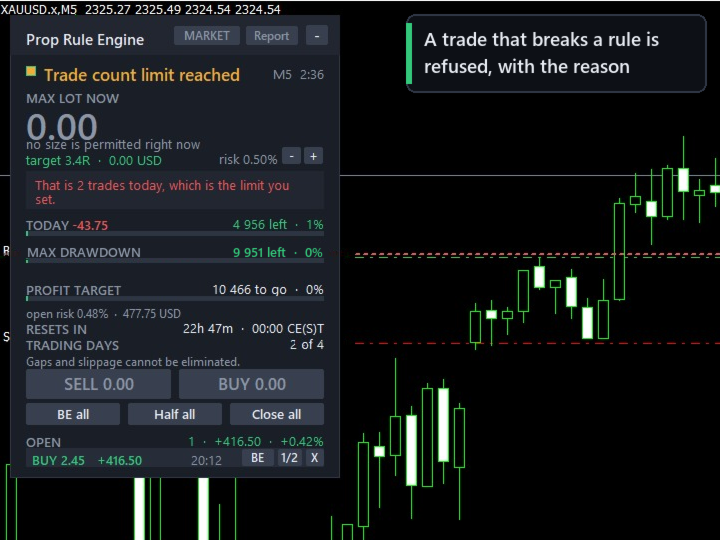
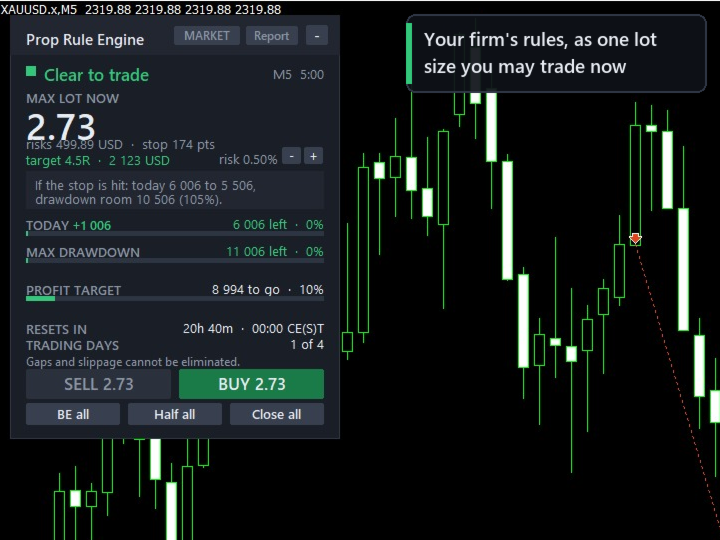
A trading panel for prop firm accounts that turns your firm's daily and maximum loss rules into the lot size you may trade right now, refuses entries that would break a rule, stops trading through the panel once a limit is reached, and keeps optional discipline rules - pauses after losing streaks, cooldowns and trade limits - for you.

WHAT IT DOES

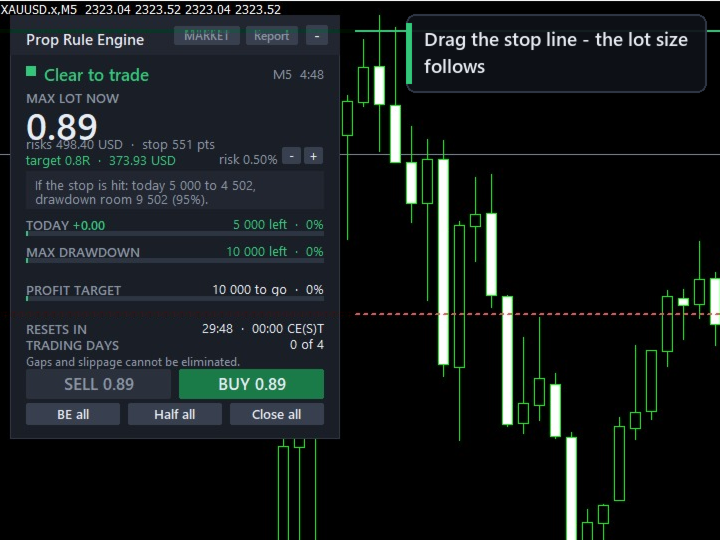
Prop Rule Engine keeps a live risk budget from your firm's rules and converts it into a lot size for the stop you are looking at. One number, in large type, updated as you drag the stop line on the chart.

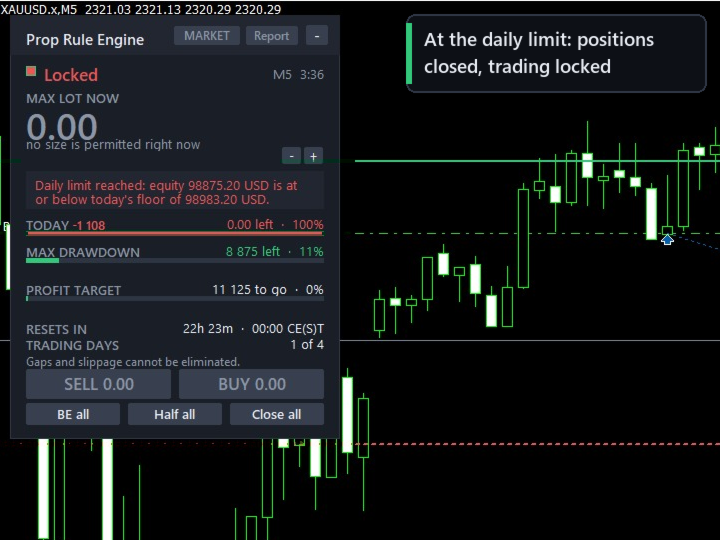
When a limit is reached it closes the positions it is allowed to manage, cancels its pending orders, and refuses new entries through the panel until the next daily reset. The lock is kept on disk, so a terminal restart or re-attaching the expert does not clear it.

THE DRAWDOWN MODELS

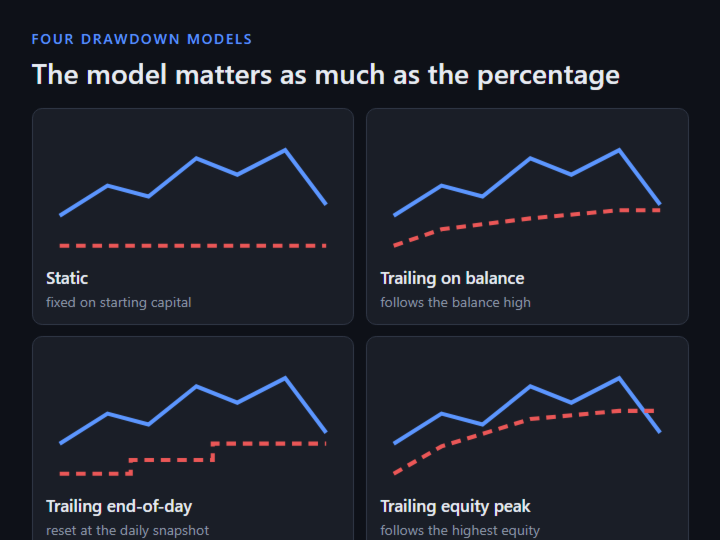
The type of drawdown calculation matters as much as its percentage. A 6% trailing rule on the equity peak is stricter than a 10% static rule on the same trades. Four models are implemented and selectable:

  • Static - fixed floor on your starting capital
  • Trailing on balance - follows the closed-balance high-water mark
  • Trailing end-of-day - recalculated at the daily snapshot
  • Trailing equity peak - follows the highest equity reached

The panel shows the figure your floor is anchored to, not only the distance to it.

DAILY LOSS AS FIRMS DEFINE IT

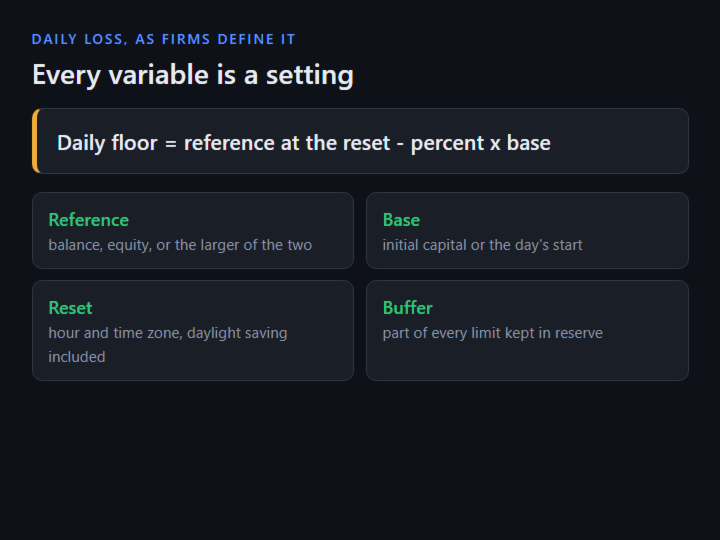
Daily floor = reference at the reset - (percent x base)

Four things vary between firms and all four are settings: the reference (balance, equity, or the larger of the two), the base (initial capital or the day's starting balance), the reset hour and time zone with daylight saving, and whether floating P/L counts.

The reset clock is anchored to UTC. The broker offset is measured live, and daylight-saving dates come from calendar rules, so a backtest rolls the day on the same dates as live trading.

SAFETY BUFFER

A fixed share of each limit is held back and never traded into (20% by default: with a 5,000 daily limit, new entries stop once 4,000 of it is used). The open positions' remaining risk to their stops is subtracted before a new trade is sized.

CONSISTENCY RULE

Best day % = best single-day net profit / total net profit x 100

Tracked live, with how much more may be earned today without pushing the best day over the cap, and - when the best day is already too large - how much more total profit over how many days is needed. Either denominator is supported: total net profit, or profitable days only. Enforcement is optional.

LOT SIZING

Sizing uses OrderCalcProfit, the broker's own profit calculation, so contract size, tick value and currency conversion come from the broker on metals, indices, JPY pairs and crypto CFDs, in any account currency. Commission is part of the sizing equation, and the commission actually charged on your recent trades is measured and used when it is higher than the setting.

In order: risk budget less buffer and open risk; lots from the broker's calculation; reject a stop inside the broker's minimum distance; floor to the volume step (never round up); reject below the symbol minimum (never clamp up); margin cap; margin-level floor; exposure netted per currency; spread guard; your discipline rules; your firm's rules.

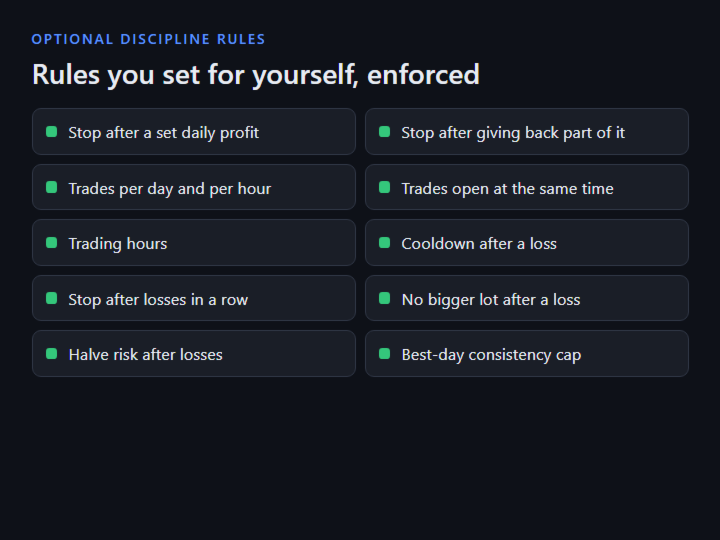
DISCIPLINE RULES (optional; all off by default except the large-lot confirmation)

  • Daily profit lock - stop for the day after a set gain
  • Giveback lock - stop after handing back part of the day's peak
  • Trades per day / per hour
  • Trades open at once
  • Trading hours - e.g. 08-17 server time
  • Cooldown after a loss
  • Stop after N losses in a row (cleared at the daily reset)
  • Block a bigger lot right after a loss
  • Halve risk after N losses
  • Confirm an unusually large lot with a second press
  • Put back a stop moved further from the entry

TRADE PANEL

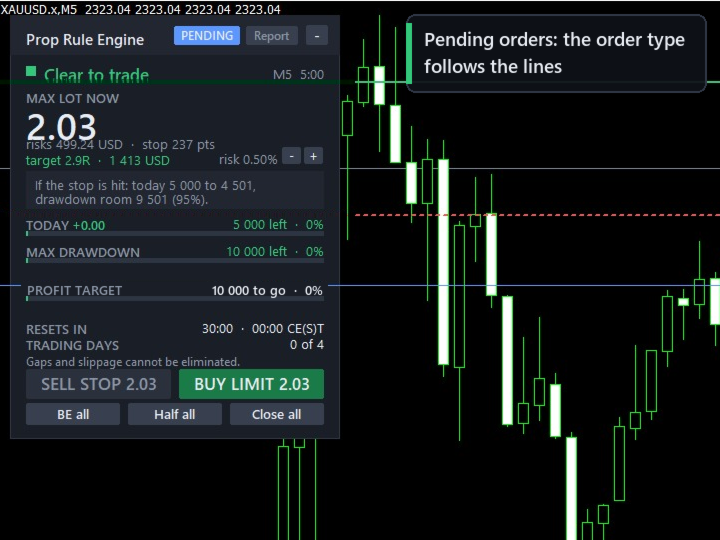
  • Market and pending orders; the order type follows the lines (limit or stop, buy or sell)
  • Double-click the stop line to enter; optional Shift+B / Shift+S / Shift+C keyboard shortcuts
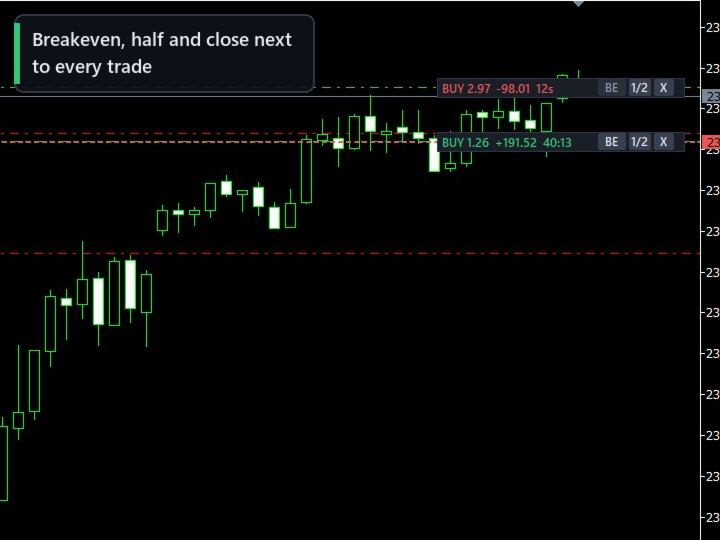
  • Per-trade BE, 1/2 and close, on the panel or next to each trade on the chart; candle countdown and trade age timers
  • Minimum hold time respected by every close button
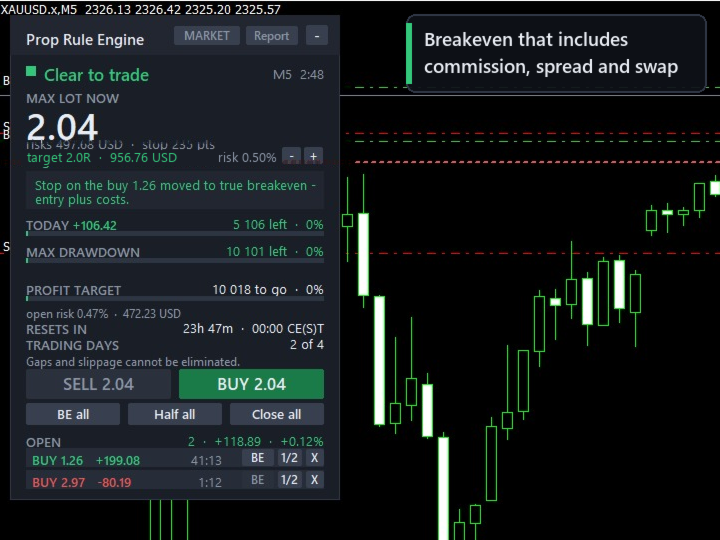
  • Breakeven that includes commission, spread and swap
  • Trailing stops: points, ATR, moving average, fractal, Parabolic SAR, previous candle, R multiple - stops only ever move forward
  • Partial-close ladder on R multiples of the original stop distance
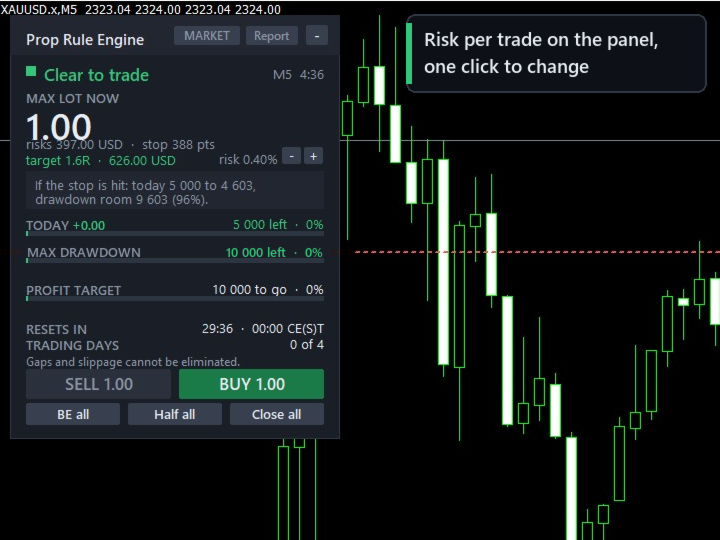
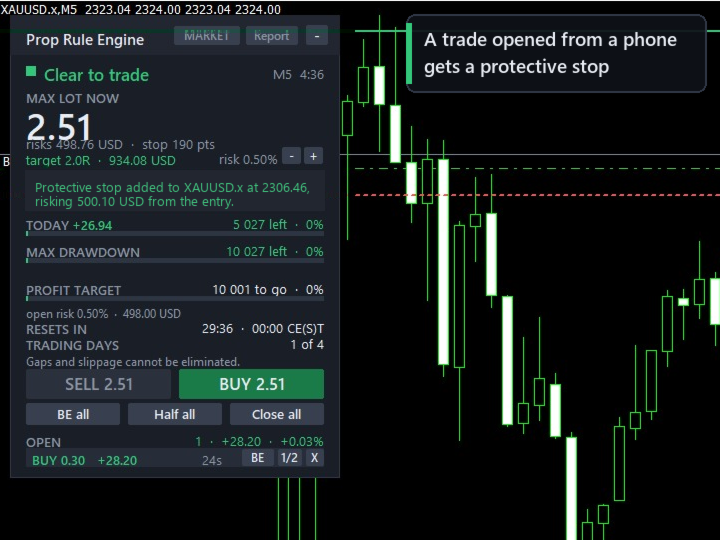
  • Protective stop for trades opened elsewhere (phone, one-click), sized from the entry to your per-trade risk (with fixed-lot sizing, the risk per trade shown on the panel)
  • News pause around high-impact events from MetaTrader's calendar
  • Pop-up and phone notifications, and a warning before a limit is near
  • CSV audit trail, a daily record and an HTML report
  • Global variables your own experts can read before entering

BUNDLED PRESETS

  • Two-Step Phase 1: 10% target, 5/10 static, 4 days
  • Two-Step Phase 2: 5% target, 5/10 static, 4 days
  • One-Step: 3% daily, 10% EOD trailing, best day 50%
  • Four generic shapes: static; end-of-day trailing; equity-peak trailing; daily limit on the higher of balance or equity

The first three follow the trading objectives FTMO publishes for its 2-Step and 1-Step accounts, as checked on 29 September 2026. Prop Rule Engine is not affiliated with, endorsed by or sponsored by FTMO; the name is used only to say whose published rules these presets follow.

WHAT IT CANNOT DO

  • MetaTrader offers no way to veto an order before it is sent. Trades placed from the terminal, a phone or another expert can only be reacted to - by closing, reducing, or adding a protective stop. Entries through this panel are the only ones checked beforehand.
  • Slippage, gaps and slow broker responses cannot be removed by any software. A limit can still be crossed by the size of a gap.
  • Bundled presets are guidance values with the date they were checked, shown every time the expert starts; after six months it asks you to re-check. Firms change their terms without notice; your firm's own rules are authoritative, every value can be changed in the inputs, and presets are re-checked with each product update.
  • Check that your firm allows expert advisors on your account type. Some firms do not allow them on larger accounts, including tools that only set stops or lot size.
  • In the Strategy Tester a built-in demo presses the buttons in a random direction to show the rules working; the demo is not a strategy. In visual mode you can press them yourself as well, on MetaTrader builds that pass clicks to experts in the tester.

INPUT PARAMETERS (grouped as in the properties dialog)

  • 1. Your prop firm - rule preset, or a rule file; starting capital; broker UTC offset (detected automatically by default)
  • 1b. Override the preset - daily loss, maximum drawdown, profit target, reset hour, minimum trading days, minimum hold time, most risk open at once, consistency cap and its enforcement, news pause
  • 2. Safety - buffer before each limit, close all on a breach, lock until the reset, reaction to trades opened elsewhere, protective stop for trades without one, one-time lock release
  • 3. Risk per trade - percent of capital, fixed money, share of what is left today, or fixed lot; commission per lot; margin limits
  • 4. Stop and target - take profit on or off, target in R, default stop distance from points, ATR or the last swing
  • 5. Discipline - the optional rules listed above
  • 6. Position management - breakeven with or without costs, trailing method, two-step partial-close ladder
  • 7. Other experts - this panel's magic number, magic numbers it may manage, magic numbers it only counts
  • 8. Entry by mouse and keyboard - double-click entry, line grab distance, pending order expiry, hotkeys, dragging open trades' levels
  • 9. Display - panel on or off, position and corner, where the candle timer and each trade's controls appear, CSV record on or off
  • 10. Alerts - pop-up, phone notifications, warning level
  • 11. Strategy Tester demo - on or off

SETTING IT UP

  1. Attach to one chart. It supervises the whole account.
  2. Pick your firm's preset.
  3. Check the reset time on the panel; set the broker UTC offset once if it is not detected.
  4. Drag the stop line. The lot size follows it.

FOR DEVELOPERS

if(GlobalVariableGet("PRE_TRADING_ALLOWED") < 0.5) return;
double budget = GlobalVariableGet("PRE_RISK_LEFT_MONEY");
double maxLot = GlobalVariableGet("PRE_MAX_LOT_HINT");

Also published: PRE_MAX_DAILY_PROFIT_LEFT, PRE_LOCK_UNTIL, PRE_DAILY_REMAINING, PRE_MAXDD_REMAINING, PRE_SECONDS_TO_RESET and PRE_HEARTBEAT.

No DLL imports and no web requests. Works on netting and hedging accounts and in the Strategy Tester.

DISCLAIMER

Prop Rule Engine is a risk-management tool. It does not give trading advice or signals, and it does not guarantee profits or that a challenge will be passed. Trading carries a substantial risk of loss; gaps, slippage and broker execution can cause a limit to be exceeded. You are responsible for your own trading decisions and settings. Test the product in the Strategy Tester and on a demo account before using it on a live or funded account.
おすすめのプロダクト
MT5からTelegramに完全にカスタマイズ可能なシグナルを送信して、シグナルプロバイダーになりましょう!この製品は、使いやすく視覚的に魅力的なグラフィカルインターフェースで提供されています。設定をカスタマイズして、数分で製品を使用開始できます! ユーザーガイド + デモ  | MT4バージョン  | Discordバージョン デモを試したい場合は、ユーザーガイドをご覧ください。 MT5からTelegramへの送信者は、ストラテジーテスターでは動作しません。 MT5からTelegramへの機能 多数のオプションを使用して、シグナルを完全にカスタマイズします シグナルの前後に独自のカスタムメッセージを追加します。これには、タグ、リンク、チャンネルなどが含まれます シグナル内の絵文字を追加、削除、カスタマイズします。また、すべて削除することもできます。 シンボルまたはマジックナンバーで送信する取引をフィルタリングします 特定のシンボルの送信を除外します 特定のマジックナンバーの送信を除外します シグナルと一緒に送信する取引の詳細をカスタマイズします シグナルと一緒にスクリーンショット
INTRODUCTORY LAUNCH OFFER: $139 • Exclusive introductory price for the first 10 copies only. • Price will be permanently adjusted to $279 after the first 10 activations. • Next price step: $199 -> Final price: $279. Fortress Risk Manager is an institutional-grade, all-in-one Capital Protection and Risk Management Cockpit built natively for MetaTrader 5. Engineered specifically for prop firm challenge accounts, funded trader programs, and discipl
Order Block Model — ICT Order Blocks, Breakers & Auto Trade Setups (MT5) Order Block Model finds genuine institutional order blocks using strict closure-based logic, tracks each one through its full lifecycle — tap, breach, breaker conversion — and builds a complete trade setup the instant price touches it: entry, stop, target, risk, and live outcome. Built for ICT / Smart Money traders who trade order blocks and breaker blocks, it removes the guesswork of hand-marking zones and keeps a running
Talents ATR Scalper Utility (MT5) The Talents ATR Scalper Utility is a professional-grade trade execution and management tool built for MetaTrader 5. Inspired by the Biblical Parable of the Talents , this utility is designed to help traders multiply their potential with precision risk control, one-click simplicity, and advanced automation. Whether you’re scalping forex, gold, or indices, this tool delivers speed, consistency, and confidence. Key Features One-Click Trade Preview Click below price
RRtoolbox - Professional Tools: Risk:Reward Trading Tool (SL/TP Horizontals + Pending orders + Diagonals), Alerts set on trend lines (for alerts on diagonal levels), SelfManagement (BE, partials...), close/cancelling by time, Statistics, Info and trading on chart. One-Click Trading with Visual Risk:Reward Management RRtoolbox is a comprehensive trading panel that combines one-click order execution,  statistics and  powerful visual Risk:Reward tools, alerts set with trendlines, on chart butt
ProTrade EA
Jim Ariel Camarce Ignao
Key Features   Automated Candle Pattern Recognition 10 Professional Patterns : Detects Bullish/Bearish Engulfing, Hammer/Shooting Star, Morning/Evening Star, Piercing/Dark Cloud, and 6 additional professional candlestick patterns Smart Filtering : Combine multiple patterns with configurable confirmation logic Volume Confirmation : Optional volume filter to validate pattern strength Multi-Timeframe Analysis : Separate execution and bias timeframes for better timing   Trading Dashboard Int
Open Risk Budget Cap enforces a total open stop-loss risk budget across your account. It does not choose direction and does not open discretionary trades on a live chart. Attach it to one chart; the symbol and timeframe do not matter. What it measures Every open position and every pending order is priced to its stop-loss in account currency using OrderCalcProfit. Positions or orders without a stop-loss are counted and shown on the panel as "without stop-loss". They are excluded from the budget

Experience a new level of precision and control with the SL Limiter Pro , an enhanced version of the SL Limiter, now available on MetaTrader 5. Built for serious traders, SL Limiter Pro offers sophisticated features that allow you to manage your trades more effectively and with greater flexibility. Take your trading strategy to the next level with this powerful risk management tool! Whether manual trading, EA trading, or using Trade Signals, SL Limiter Pro will help you minimize your risk! Anoth
Recovery Assistant Pro for MT5 Manual Recovery Trading Assistant Recovery Assistant Pro is a Manual Trading Assistant EA for Recovery trade calculations and management. Helps calculate the appropriate Lot Size. Designed to calculate Recovery trade parameters based on floating loss and the selected Target USD. Simplifies Recovery calculations that would otherwise require manual calculation. The trading panel provides direct access to the main Recovery functions from the chart. Includes a Recov
Exclusive Imperium MT5 — 自動売買システム Exclusive Imperium MT5 は MetaTrader 5 用のエキスパートアドバイザー(EA)で、市場分析アルゴリズムとリスク管理に基づいています。EAは完全自動で稼働し、トレーダーの介入は最小限で済みます。 注意!購入後すぐにご連絡ください 。設定手順をお渡しします! 重要: すべての例、スクリーンショット、テストはデモ目的のみです。あるブローカーで特定の通貨ペアが良好な結果を示しても、他のブローカーでも同様になるとは限りません。各ブローカーには独自のレート、スプレッド、取引条件があります。したがって、 各通貨ペアはユーザー自身が個別に最適化する必要があります 。実際の口座では 単一通貨モードのみ で稼働させてください。マルチ通貨モードのスクリーンショットは参考例にすぎません。市場環境は変化するため、最適化は少なくとも 年に1回 繰り返すことを推奨します。 重要情報: EAのデモ版は評価目的のみです。最適化なしのテスト結果はアルゴリズムの実際の動作を反映しません。完全な利用には、ブローカー、資金、選
Bober Real MT5
Arnold Bobrinskii
4.88 (16)
Bober Real MT5 is a fully automatic Forex trading Expert Advisor. This robot was made in 2014 year and did a lot of profitbale trades during this period. So far over 7000% growth on my personal account. There was many updates but 2019 update is the best one. The robot can run on any instrument, but the results are better with EURGBP, GBPUSD, on the M5 timeframe. Robot doesn't show good results in tester or live account if you run incorrect sets. Set files for Live accounts availible only for cu
金市場を支配するために作られた。 公式情報 出品者プロフィール 公式チャンネル ユーザーガイド 期間限定価格 — $599 Aura Gold Pro Edition は10月末まで $599 でご利用いただけます。 11月1日より価格は $999 に値上げされます — 値上げ前にぜひご購入ください。 ライブ取引シグナル  Roboforex   https://www.mql5.com/en/signals/2366593 FPMarkets   https://www.mql5.com/en/signals/2358523 ICTrading   https://www.mql5.com/en/signals/2380859 説明 Aura Gold PRO Editionは、金市場向けに綿密に設計された信頼性の高い取引アルゴリズムです。長期的な安定性と資本保護に重点を置き、不当なリスクを回避するシステムを構築しました。EAのライブシグナルは優れた結果と着実な成長を示しており、その基盤となるロジックの有効性を証明しています。このシステムの最大の強みの一つは、高い回復力です。これによ
Extensiver
Syed Oarasul Islam
Extensiver is designed to trade any markets (Stocks, Forex, Commodities, Futures, Cryptos). The strategies are developed based on various Price Actions that will be observed on different Fibonacci Extension Levels. Product Home Page:  https://www.mql5.com/en/market/product/51242 ADVANTAGES: Works on any market and time frames Multiple Strategies in 4 categories:  Extension, Breakout, Trend Follow, Reversal Trades simultaneously on any number of markets under the same account  Display Fibonacci
Forex Diamond EA MT5
Lachezar Krastev
4.67 (3)
FOREX MEGA SALE! 50% OFF! Buy Forex Diamond EA with a huge –50% discount ! Promo Price: $267 (Regular Price: $547 — You Save $280! ) Act now before this deal ends! Live Results:   https://www.mql5.com/en/signals/2379493 Forex Diamond EA – Reliable Automated Trading Powered by Smart Algorithms Forex Diamond EA is a proven expert advisor designed to deliver consistent results using a combination of trend and counter-trend strategies. Trusted by thousands of traders since its launch, Forex Diamo
Golden Shield – Account Protection Utility Golden Shield   is a professional risk management utility that automatically closes   ALL open positions   when your account equity falls below a critical level. It works as a "circuit breaker" for your trading account.   Key Features Feature Description Equity Protection Closes all positions when Equity ≤ STOP level Instant Monitoring Checks equity every 50 milliseconds – immediate reaction Interactive Panel Gainsboro panel with Teal ON / Red

Grid Trading EA is a semi-automated one-click trading EA for both Normal Trading and Grid/Martingale Trading . Normal Trading Simply click Buy or Sell directly from the chart. The EA will automatically manage trades by: Setting Stop Loss and Take Profit Managing Trailing Stop Grid / Martingale Trading (For Hedging Account Type Only) When Grid Trading mode is enabled, the EA will automatically open additional grid orders at specified distances while increasing the lot size based on your settings.
XAUUSD スマート・ストラテジーEA MetaTrader 5向け 高度なマルチタイムフレーム・ゴールド自動売買システム XAUUSD Smart Strategy EA は、ゴールド(XAUUSD)の市場構造、トレンド、モメンタム、ボラティリティ、マルチタイムフレーム分析を組み合わせて、取引判断を自動化するために設計されたMetaTrader 5用の高度なExpert Advisorです。 単純なインジケーターのクロスだけに依存するのではなく、複数の市場条件を組み合わせてエントリーを評価し、リスク管理とポジション管理まで自動的に行います。 主な特徴 1. マルチタイムフレーム分析 上位時間足の市場方向を確認しながら、エントリー時間足で具体的なエントリー条件を検証します。 EAは以下のような複数の時間軸情報を組み合わせて市場環境を評価します。 上位時間足のトレンド エントリー時間足の方向性 移動平均線によるトレンド確認 MA180による主要トレンドフィルター ADXによるトレンド強度 DI+ / DI- による方向性 ATRによるボラティリティ FVG(Fair Value Gap
Exclusive EA for FOREX HEDGE account The EA (FuzzyLogicTrendEA) is based on fuzzy logic strategies based on the analysis of a set of 5 indicators and filters. Each indicator and filter has a weight in the calculation and, when the fuzzy logic result reaches the value defined in the EA parameter, a negotiation is opened seeking a pre-defined gain. As additional functions it is possible to define maximum spread, stop loss and so on . Recommended Symbol: EURUSD, AUDUSD, GBPUSD, NZDUSD, USDCAD, AUD
Headline ShikaaTraders Gold Grid Pro is a high-performance trade management utility designed specifically for XAUUSD (Gold) and high-volatility pairs. It allows traders to execute complex grid-layering strategies with a single click, ensuring you never miss an entry during fast market moves. Why Choose Gold Grid Pro? Manual trading on Gold requires speed. Manually calculating distances and opening multiple positions takes too much time. This utility automates the "Scaling-In" process, allowing y
Exclusive Black Pro Max MT5 — 自動売買システム Exclusive Black Pro Max MT5 は、MetaTrader 5 用のエキスパートアドバイザーであり、高度な市場分析アルゴリズムとリスク管理戦略に基づいています。EAは完全自動で稼働し、トレーダーの介入は最小限で済みます。 注意!購入後はすぐにご連絡ください 。設定手順をお渡しします! 重要: すべての例、スクリーンショット、テストはデモ目的のみです。あるブローカーで特定の通貨ペアが良好な結果を示しても、他のブローカーでも同様になるとは限りません。各ブローカーには独自のレート、スプレッド、取引条件があるため、 各通貨ペアはユーザー自身が最適化 し、リアル口座では 単一通貨モードのみ で稼働させる必要があります。マルチ通貨モードのスクリーンショットは例示のみです。 重要情報: EAのデモ版は評価目的のみです。最適化なしのテスト結果はアルゴリズムの実際の性能を反映しません。完全な利用には、ブローカー、証拠金、選択した銘柄に合わせた個別の最適化が必要です。最適化は必ずユーザー自身で行い、少なくと
HMA Scalper Pro EA
Vladimir Shumikhin
5 (2)
HMA Scalper Pro EA — Hull Moving Average (HMA) インジケーターに基づく MetaTrader 5 用自動売買アドバイザー 概要 HMA Scalper Pro EA は、Hull Moving Average (HMA) の方向にトレードする MetaTrader 5 用のプロフェッショナルなトレーディングロボット(Expert Advisor)です。HMA インジケーターは現在のトレンド方向を判定し、アドバイザーはその方向にトレードを執行し、Smart Risk キャピタルマネジメント、アダプティブグリッドトレーディング、トレイリングストップ、ブレイクイーブン、タイムフィルターでエントリーを補完します。 このアドバイザーは Netting アカウントと Hedging アカウントの両方をサポートし、金(XAU/USD)、外国為替通貨ペア、原油、指数、暗号資産の取引に適しています。 HMA SCALPER PRO EA を選ぶ理由 - Hull Moving Average シグナル — HMA の方向に基づくエントリー。HMA
TradePilotmt5
Hossein Khalil Alishir
TradePilot Expert Advisor (EA) for MetaTrader 5 TradePilot is a professional and user-friendly Expert Advisor (EA) for MetaTrader 5 (MT5) . It simplifies automated trading , risk management , and trade execution with a smart trading panel . Perfect for beginners and experienced traders looking for a reliable trade manager EA with automated lot size calculation and smart position management. Key Advantages User-Friendly Trading Panel: Customizable panel with buttons and hotkeys for fast ex
King ElChart Manual Trade Panel
Mohammed Maher Al-sayed Mohammed Ahmed Saleh
King ElChart Manual Trade Panel v5 - スピーディーに取引し、正確にリスク管理。 MetaTrader 5向けの本格的な裁量トレードパネルです。ストップから各トレードのロット数を自動計算し、市場のノイズの外にスマートストップを配置し、スマートフォンから開いたポジションも保護します。許容できるリスク%を入力し、チャート上でストップとターゲットを確認して、ワンクリックで正確なロット数のポジションを開けます。 スマートストップ(ATR + スイング) パネル上で直接切り替えられる2つのストップモード: Smart ATR または Fixed pips 。 Smart ATRは、価格からATR×乗数だけ離れた位置と、直近のスイング高値/安値+セーフティバッファーを超えた位置のうち、より遠い方にストップを配置します。 最大幅(ATR×上限)により、値動きの速い相場でもストップが妥当な範囲に収まります。 ATRの時間足は設定で固定されているため、チャートの時間足を変えてもストップは変わりません。 ワンクリックでリスク%ロット注文 BUY RISK と SELL R
Key Features: 200+ Fully Implemented Patterns   across all categories Advanced Market Structure Analysis Smart Money Integration   (Wyckoff, Order Blocks, Liquidity) Professional Risk Management Multi-Timeframe Analysis AI-Powered Confidence Scoring Advanced Visualization Real-time Alerts Pattern Categories: Single Candle Patterns (Hammer, Doji, Marubozu, etc.) Multi-Candle Patterns (Engulfing, Stars, Harami, etc.) Chart Patterns (Head & Shoulders, Cup & Handle, Triangles, etc.) Harmonic Pattern
FREE
Hamster Scalping mt5
Ramil Minniakhmetov
4.72 (244)
Hamster Scalpingは、マーチンゲールを使用しない完全に自動化された取引アドバイザーです。夜のスキャルピング戦略。 RSIインジケーターとATRフィルターが入力として使用されます。アドバイザには、ヘッジ口座タイプが必要です。 実際の作業の監視、およびその他の開発については、https:// www.mql5.com/en/users/mechanic/sellerを参照してください 。 一般的な推奨事項 最小デポジット$ 100、最小スプレッドのECNアカウントを使用し、eurusd M5 gmt +3のデフォルト設定。 入力パラメータ EAは、4桁と5桁の両方の引用符で機能します。入力パラメータでは、5文字の値をポイントで示し、すべてを4文字で自動的に再計算します。 NewCycle-モードがオンの場合、アドバイザーは停止せずに動作します。モードがオフの場合、一連の取引の完了後、アドバイザーは新しい注文を開きません。 期間インジケーター1-最初のインジケーターの期間。 アップレベル-アドバイザーが売りを開始する最初のインジケーターの上位レベル。 ダウンレベル
Investopedia FIVE
Joseph Anthony Aya-ay Yutig
Investopedia FIVEEAはこの記事に基づいています: https://www.investopedia.com/articles/forex/08/five-minute-momo.asp 取引条件 -X期間のEMAとMACDの下で取引されている通貨ペアがマイナスの領域にあることを確認します。 -価格がX期間のEMAを超えるのを待ってから、MACDがネガティブからポジティブにクロスする過程にあるか、5バー以内でポジティブな領域にクロスしたことを確認します。 -X期間EMAの上に長いXピップを移動します。 -エントリー時のポジションのXとリスク額を売ります。後半のストップを損益分岐点に移動します。 -トレーリングストップを使用 -リスク警告 -ADX PROを購入する前に、関連するリスクに注意してください。 -過去のパフォーマンスは将来の収益性を保証するものではありません(EAも損失を出す可能性があります)。 -示されているバックテスト(スクリーンショットなど)は、最適なパラメーターを見つけるために高度に最適化されていますが、結果をライブ取引に転送すること
Trade Manager Simple
Juan Andres Montoya Robledo
Trade Manager Simple NQ and XAUUSD — Manual Trading Panel and Local Replicator Open the trade once. Your other MT5 terminals open it on their own, each with the lot size that fits that account. TMS is two tools in one: a panel for trading by hand with your risk under control, and a replicator that copies your entries to every other MetaTrader 5 terminal running on the same computer. No VPS, no signal service, no connection between brokers. The terminals talk through MetaTrader's shared folder,
EMA256 Fourier Cycle Trader EMA256 Fourier Cycle Trader is an advanced MetaTrader 5 Expert Advisor combining a long-term EMA or TEMA trend model, causal Fourier cycle analysis, configurable averaging and a unified basket take-profit system. The Expert Advisor is designed primarily for CENT accounts and for traders who understand basket recovery strategies, geometric lot progression and the risks associated with trading without a mandatory Stop Loss. RECOMMENDED STARTING CONFIGURATION Recommended
The Ultimate All-In-One Trade Manager & Prop Firm Guardian for MT5. Nexus Pro Trade Manager is the most advanced, all-in-one trading assistant designed for both manual traders and Prop Firm challengers. Featuring a stunning, lag-free UI (Dark/Light mode), it completely transforms your MT5 into a professional trading terminal. Whether you are trading a personal account or trying to pass evaluations for FTMO, FundedNext, or other prop firms, Nexus Pro protects your capital, automates your risk cal
このプロダクトを購入した人は以下も購入しています
Trade Assistant MT5
Evgeniy Kravchenko
4.43 (216)
取引 ごとのリスクの 計算、新規注文 の 簡単 な 設置、部分的 な 決済機能 を 持 つ 注文管理、 7 種類 のトレーリングストップなど 、便利 な 機能 を 備 えています 。 追加の資料と説明書 インストール手順   -   アプリケーションの手順   -   デモアカウント用アプリケーションの試用版 ライン機能 チャート上にオープニングライン、ストップロス、テイクプロフィットを表示します。この機能により、新規注文を簡単に設定することができ、注文を出す前にその特徴を確認することができます。   リスク計算 リスク計算機能は、設定されたリスクとストップロス注文のサイズを考慮して、新規注文のボリュームを計算します。ストップロスの大きさを自由に設定できると同時に、設定したリスクを守ることができます。 Lot calc ボタン - リスク 計算 を 有効 / 無効 にします 。 Risk フィールドでは 、必要 なリスクの 値 を 0 から 100 までのパーセンテージまたは 預金通貨 で 設定 します 。 設定」 タブで 、 リスク 計算 の 種類 を 選択 します :「 $ 通
Trade Manager EAへようこそ。これは、取引をより直感的、正確、そして効率的にするために設計された究極の リスク管理ツール です。これは単なるオーダー実行ツールではなく、包括的な取引計画、ポジション管理、リスク管理のためのソリューションです。初心者から上級者、迅速な実行を必要とするスキャルパーまで、Trade Manager EAはあらゆるニーズに対応し、為替、指数、商品、暗号通貨などさまざまな市場で柔軟に対応します。 Trade Manager EAを使用すると、複雑な計算が過去のものになります。市場を分析し、エントリーポイント、ストップロス、テイクプロフィットのレベルをチャート上のラインでマークし、リスクを設定するだけで、Trade Managerが最適なポジションサイズを即座に計算し、SLとTPをピップ、ポイント、口座通貨でリアルタイムに表示します。すべての取引が簡単かつ効果的に管理されます。 主な機能: ポジションサイズ計算機 :定義されたリスクに基づいて取引サイズを瞬時に決定します。 簡単な取引計画 :エントリー、ストップロス、テイクプロフィットを設定するためのド
================================================================================ POC BREAKOUT - V20.72. Full Professional Grade Toolkit ================================================================================ POC Breakout is a full MetaTrader 5 trading dashboard for discretionary traders who want breakout signals, Point of Control (POC) context, volume profiles, order flow, market structure, news, alerts, and advanced trade planning in one professional workspace. Attached directly to you
Telegram to MT5 Multi-Channel Copier   は、 Telegram と Discord チャンネルのトレードシグナルを MetaTrader 5 へ自動コピーします。ボット不要、ブラウザ拡張不要、手動コピー不要。Telegram や Discord にシグナルが届くと、EA が数秒であなたのターミナルに注文を出します。 さらに、チャンネルをコピーする前に、内蔵バックテスターでそのチャンネルがあなたの口座でどう動いたかを確認できます。 製品は 2 つのコンポーネントで構成されます:Telegram チャンネルを監視する Windows アプリと、MT5 ターミナルでシグナルを執行する本 EA です。MT4 版もあります   こちら . セットアップガイドとアプリのダウンロード:   https://www.mql5.com/en/blogs/post/768988 Telegramのシグナルチャンネルをバックテストする方法 をご覧ください。 現在の価格は今後値上げされます。 仕組み アプリはあなた自身の Telegram アカウントで接続するため、フォロ
自分の取引ルールで Telegram のシグナルをコピー Telegram to MT5 Signal Trader は、Telegram の公開・非公開チャンネルやグループから、テキスト形式の取引シグナルを MetaTrader 5 へ自動でコピーします。1つのデスクトップアプリで複数の配信者と MT5 口座を管理し、 配信者ごとにリスクと取引設定を個別に指定 できます。 シグナルのコピーに Telegram ボットや API 設定は必要ありません。 電話番号または QR コードでご自身の Telegram アカウントにログインし、すでに参加しているチャンネルやグループを選ぶだけです。ボットの作成や、Telegram API トークン、API ID、API hash の入力は不要です。 ポジションサイズを選び、複数の利確水準に分けて決済し、建値へのストップ移動やトレーリングストップを自動化できます。配信者のシグナルを受け取りながら、実際の取引方法は自分で管理できます。 本製品は、この MT5 エキスパートアドバイザ(EA)と、必須の Windows 連携アプリで構成されます。 インス
TradePanel MT5
Alfiya Fazylova
4.88 (170)
Trade Panelは多機能なトレーディングアシスタントです。アプリには手動取引用の50以上のトレーディング機能が搭載されており、ほとんどの取引作業を自動化することができます。 アプリの説明書: https://www.mql5.com/en/blogs/post/756482 デモ口座用アプリの試用版: https://www.mql5.com/en/blogs/post/750865 アプリのインストール方法: https://www.mql5.com/en/blogs/post/756239 アプリをビジュアルモードでテストする方法: https://www.mql5.com/en/blogs/post/770277 VPSのMetaTraderにアプリをインストールする方法: https://www.mql5.com/en/blogs/post/770190 取引。 ワンクリックで取引操作を行うことができます: リスクを自動計算して指値注文やポジションを開く。 複数の注文やポジションをワンクリックで開く。 注文のグリッドを開く。 保留中の注文やポジションをグループごとに閉じる
Farmed Hedge Yield Farming | All Markets (Manual - Hybrid - Semi/Automated EA) VERIFIED TRADING RESULTS - Farmed Hedge Yield Axi Copy:  https://www.mql5.com/en/signals/2356376 - Farmed Hedge Yield Exn Copy:   https://www.mql5.com/en/signals/2356404 - Farmed Hedge Yield V Copy:  https://www.mql5.com/en/signals/2357156 IMPORTANT NOTICE: FarmedHedge is a MANUAL-FOCUSED TRADING UTILITY ,not a fully automated EA. Results shown on this Signal include manual trades and overall strategic management.
Power Candles Strategy Scanner - 自動最適化型マルチシンボル設定ファインダー パワーキャンドル・ストラテジー・スキャナーは 、パワーキャンドル・インジケーターを駆動するのと全く同じ自己最適化エンジンを、マーケットウォッチに登録されているすべての銘柄に対して並行して実行します。1つのパネルで、現在統計的に取引可能な銘柄、各銘柄で勝率の高い戦略、最適なストップロス/テイクプロフィットの組み合わせが表示され、新たなシグナルが発生した瞬間に通知が届きます。 このツールは、Stein Investmentsのエコシステムの一部です。  18種類以上のツールをすべて閲覧し、AIを活用したセットアップの推奨を受け取り、  https://stein.investments でコミュニティに参加しましょう 市場動向を網羅。銘柄ごとに3,000件以上の自動最適化。2種類のアラート。ワンクリックでチャートを切り替えて即座にアクション。 なぜこれが必要なのか 多くのマルチ銘柄スキャナーは、 価格の動き (ボラティリティ、変動率、銘柄ごとのRSI)を表示するだけです。それ
Master Your Trading Discipline   Stop losing your hard-earned gains to overtrading and emotional decisions. The Discipline Tool is your ultimate trading assistant, ensuring strict risk management in real-time. Key Protection Features: Advanced Drawdown Defense : Automatically halts trading if your daily drawdown exceeds a preset threshold (percentage or dollar amount). Real-Time Equity Lock : Safeguard profits by referencing peak equity, ensuring drawdown stays within control. Hard Profit Target
The product will copy all telegram signal to MT5 ( which you are member) , also it can work as remote copier.  Easy to set up, copy order instant, can work with almost signal formats, image signal,  s upport to translate other language to English Work with all type of channel or group, even channel have "Restrict Saving Content", work with  multi channel, multi MT5 Work as remote copier: with signal have ticket number, it will copy exactly via ticket number. Support to backtest signal. How to s
Quant AI Agents are independent trading Expert Advisors. Instead of trading using a fixed strategy like other conventional EAs, Quant AI Agents   is a   multi-agent AI trading framework   that turns natural-language strategy prompts into live.  WANT THE SAME RESULTS AS MY LIVE SIGNAL?   Use the exact same brokers I do:   IC MARKETS , IC TRADING   .  Unlike the centralized stock market, Forex has no single, unified price feed.  Every broker sources liquidity from different providers, creating un
Exp COPYLOT CLIENT for MT5
Vladislav Andruschenko
3.97 (35)
MetaTrader 5 用のプロフェッショナル取引コピー機 MetaTrader 向けの高速・高性能・信頼性の高い 取引コピー機 です。 COPYLOT は、MT4 と MT5 のターミナル間で Forex 取引をコピーでき、 Hedge 口座と Netting 口座の両方に対応しています。 COPYLOT MT5 版の対応構成: - MT5 Hedge → MT5 Hedge - MT5 Hedge → MT5 Netting - MT5 Netting → MT5 Hedge - MT5 Netting → MT5 Netting - MT4 → MT5 Hedge - MT4 → MT5 Netting MT4 版 完全な説明 + DEMO + PDF 購入方法 インストール方法 ログファイルの取得方法 テストと最適化の方法 Expforex のすべての製品 MT4 ターミナルへのコピーも可能です(MT4 → MT4、MT5 → MT4): COPYLOT CLIENT for MT4 COPYLOT は、2台、3台、さらには10台のターミナル間で同時に動作できる、プロフェッ
Grid Manual MT5
Alfiya Fazylova
4.73 (22)
「Grid Manual」は、注文のグリッドを操作するための取引パネルです。 ユーティリティはユニバーサルで、柔軟な設定と直感的なインターフェイスを備えています。 それは、損失を平均化する方向だけでなく、利益を増やす方向でも注文のグリッドで機能します。 トレーダーは注文のグリッドを作成して維持する必要はありません。 すべてが「Grid Manual」によって行われます。 注文を開くだけで十分であり、「Grid Manual」は注文のグリッドを自動的に作成し、非常に閉じるまでそれに付随します。 完全な説明とデモバージョン ここ。 ユーティリティの主な機能と機能 ユーティリティは、モバイル端末から開かれた注文を含め、あらゆる方法で開かれた注文を処理します。 「制限」と「停止」の2種類のグリッドで機能します。 グリッド間隔の計算には、固定と動的(ATRインジケーターに基づく)の2つの方法で機能します。 オープンオーダーグリッドの設定を変更できます。 チャート上の各注文グリッドの損益分岐点を表示します。 各注文グリッドの利益率を表示します。 ワンクリックでグリッドから収益性の高い注文を閉じるこ
Trade Indicator Assistant   is a powerful MT5 utility designed to turn indicators into automated trading systems. Its main feature is the ability to automatically detect an indicator’s   BUY and SELL signal buffers , without requiring you to know the buffer numbers, search through indicator settings, or modify the indicator source code. Bonus Indicator:   After purchasing Trade Indicator Assistant, contact me to receive   Trade Signal Pro   completely free as a bonus indicator. [Download Demo V
Signal TradingView to MT5 Pro Automator TradingViewとMetaTrader 5間の即時プロフェッショナル実行 TradingViewのシグナル(アラート)とMT5での実際の約定を繋ぐ、最も強固なコミュニケーションブリッジで、取引戦略を自動化します。スピード、柔軟性、そして完璧なリスク管理を求めるトレーダー向けに設計されたこのExpert Advisorは、あらゆるアラートメッセージを正確な成行または指値注文に変換します。 強みと利点 ユニバーサルパーシングエンジン(独自技術): あらゆるアラート形式からデータを自動的に認識し、抽出できる高度なテクノロジー。単一の固定フォーマットに制限されることはありません。システムはシンボル(銘柄)、アクション、価格、SL(ストップロス)、TP(テイクプロフィット)を自動的に理解します。 リアルタイム実行: レイテンシ(遅延)を最小限に抑えるよう最適化された、1秒未満の超高速ポーリング技術。シグナルを受信してから数ミリ秒以内に注文が実行されます。 機関投資家レベルのリスク管理: 以下に基づく自動かつ正確
The Patch It never opens a trade. It walks behind the ones that did. Every open position, every pending order — checked twice a second for the one thing that's easy to forget: a stop, a target. Found bare, it doesn't ask. It writes the missing number in, measured in points from wherever the position began, and moves on to the next. No strategy, no opinion on direction. Just the quiet assumption that nothing should ever sit on the market unprotected — not because someone decided it shouldn't,
EA Overfitter
Stephen J Martret
5 (1)
That backtest looks great. But will it still be making money tomorrow, next week, next month? EA Overfitter re-runs your EA on 100 price histories it has never seen. One score tells you if the edge is real. A backtest tells you what an EA did on one price history — the one that happened to occur. What you cannot tell from it is how much of that result was the strategy and how much was the particular path. EA Overfitter answers that. It builds up to 100 synthetic price histories your EA has n
Your EAs cannot see each other, but Anchor can. Anchor gives you one place to coordinate your EAs, manage risk, and decide when trading is allowed. It works alongside the trading bots you already use without any changes to them. The Problem One EA opens a trade. Then another starts trading. The next thing you know, you wake up to multiple grids built across your account. Each EA may be doing exactly what it was designed to do, but together they can place far more risk on your account than you in

MetaTrader 5 用トレーディングパネル — チャートとキーボードから行うプロフェッショナルなワンクリック取引 アクティブトレーダーのために設計された高機能 Trading Panel。標準の MetaTrader 操作よりも、はるかに速く、直感的に、そして効率的に取引を実行できます。 本パネルは、ポジション管理、未決注文管理、利益コントロール、執行スピードをひとつのプロフェッショナルなワークスペースに集約した実践的なソリューションです。 これは単なる補助ツールではありません。MetaTrader 5 のための本格的な trading cockpit です。チャートから直接操作し、キーボードで素早くコマンドを実行し、自動計算や視覚的なガイドを活用することで、手動トレードをより速く、より明確に、より快適にします。 このパネルを使えば、チャート上からワンクリックで注文を実行でき、標準の MetaTrader コントロールと比べて最大 30 倍速く取引操作を行うことができます。 新しいプレミアム版が利用可能です: VirtualTradePad PRO SE で取引ワークフローを強
この製品は、ニュースタイム中にすべてのエキスパートアドバイザーと手動チャートをフィルタリングするため、急激な価格変動によるマニュアルトレードのセットアップの破壊や他のエキスパートアドバイザーによって入力された取引について心配する必要はありません。この製品には、ニュースのリリース前にオープンポジションとペンディングオーダーを処理できる完全な注文管理システムも付属しています。 The News Filter  を購入すると、将来のエキスパートアドバイザーのためにビルトインのニュースフィルターに頼る必要はなく、今後はすべてのエキスパートアドバイザーをここからフィルタリングできます。 ニュース選択 ニュースソースは、Forex Factoryの経済カレンダーから取得されます。 USD、EUR、GBP、JPY、AUD、CAD、CHF、NZD、CNYなど、任意の通貨数に基づいて選択できます。 Non-Farm(NFP)、FOMC、CPIなどのキーワード識別に基づいて選択することもできます。 影響レベルによってフィルタリングするニュースを選択することができ、低、中、高の影響範囲から選択できます。
Floor Watch
Syed Tauqeer Hussain Shah
Floor Watch One number, watched every thirty seconds: how far equity has fallen since the day began — or since its highest point, if it's told to trail the peak instead of the open. Cross the line and it doesn't argue. Every open position closes, every pending order vanishes, and anything that slips through afterward gets shut the moment it appears. Not asked. Removed. The floor holds until the clock turns 5 AM Pakistan time — then, and only then, does the day start over. One rule. No except
MT5 to Telegram Signal Provider は、Telegramのチャット、チャンネル、またはグループに 指定された シグナルを送信することができる、完全にカスタマイズ可能な簡単なユーティリティです。これにより、あなたのアカウントは シグナルプロバイダー になります。 競合する製品とは異なり、DLLのインポートは使用していません。 [ デモ ] [ マニュアル ] [ MT4版 ] [ Discord版 ] [ Telegramチャンネル ]  New: [ Telegram To MT5 ] セットアップ ステップバイステップの ユーザーガイド が利用可能です。 Telegram APIの知識は必要ありません。必要な全ては開発者から提供されます。 主な特長 購読者に送信する注文の詳細をカスタマイズする機能 例えば、Bronze、Silver、Goldといった階層型のサブスクリプションモデルを作成できます。Goldサブスクリプションでは、すべてのシグナルが提供されます。 id、シンボル、またはコメントによって注文をフィルターできます 注文が実行されたチャート
RETAILBERG FOOTPRINT CHART PRO — Order-Flow Workspace for MetaTrader 5 Version 7.00  |  Professional System  |  31 tools  |  One chart A full 150-page illustrated User Manual is included. Please read the full manual to understand this feature packed footprint chart elements and ui. https://www.mql5.com/en/blogs/post/777982 DEMO / STRATEGY TESTER — PLEASE READ FIRST
Ultimate Extractor - Professional Trading Analytics for MT5 *****this is the local HTML version of Ultimate Extractor. !!!!!it is not compatible with Cloud!!!! For the online version please reach out to me directly****** Ultimate EA manager also now available when you use cloud pro and above for free!! Ultimate Extractor transforms your MetaTrader 5 trading history into actionable insights with comprehensive analytics, interactive charts, and real-time performance tracking. What It Does Automa
Advanced Daily Trading Limiter PRO Professional Risk Management. Uncompromising Trading Discipline. One undisciplined trading session can erase weeks of consistent profits. Whether it's overtrading, revenge trading, or exceeding a prop firm's daily risk limits, emotional decisions often become a trader's biggest obstacle—not the market itself. Advanced Daily Trading Limiter PRO is a comprehensive risk management and discipline enforcement utility for MetaTrader 5, designed to help traders stay

MT5 to Discord Signal Provider は、Discord へ直接トレーディングシグナルを送信するために設計された、使いやすく完全にカスタマイズ可能なユーティリティです。このツールは、あなたのトレーディングアカウントを効率的なシグナルプロバイダーに変えます。 スタイルに合わせてメッセージフォーマットをカスタマイズ!利便性を考え、事前にデザインされたテンプレートから選択し、メッセージのどの要素を含めるか除外するかを選択できます。 [ デモ ] [ マニュアル ] [ MT4 バージョン ] [ Telegram バージョン ]  New: [ Telegram To MT5 ] セットアップ 簡単なセットアップのために、私たちの詳細な ユーザーガイド に従ってください。 Discord API の事前知識は必要ありません。必要なツールはすべて提供されます。 主な特徴 購読者の更新のための注文詳細をカスタマイズ。 ブロンズ、シルバー、ゴールドなど、各レベルで異なるシグナルアクセスを提供する階層的サブスクリプションモデルを実装。 注文が実行されたチャートのスクリーン
一度の購入で、現在提供中および今後リリースする私のすべての MT4・MT5 インジケーターを追加料金なしで受け取れます。 購入後、受け取り方法について私にお問い合わせください。 10 件の購入ごとに 50$ ずつ、最大 999$ まで値上げする予定です。購入手続き時に Market に表示される価格が適用されます。 信頼するインジケーターをそのままに。周辺の取引作業を自動化。 あなたのシグナル。あなたのルール。あなたの取引執行。 信頼する MT5 インジケーターはあるのに、チャートの監視、シグナル待ち、ロット計算、発注、各ポジションの管理を手作業で行っていませんか? Stratiora Signal Engine MT5 は、これらの作業をつなぎます。対応する買い・売りバッファのシグナルを、エントリー、取引量計算、Stop Loss、Take Profit、フィルター、ポジション管理、口座保護までの自動処理に変換できます。 インジケーターや取引アイデアを変えるたびに別の EA を依頼する代わりに、柔軟な一つのエンジンで各シグナルの取引方法を決められます。 あなたのシグナル。あなたのル
AI Trading Assistant | Discord/Telegram → MetaTrader 5 Automation An advanced automation framework that enables natural language trade instructions sent from Discord or Telegram to be executed automatically on MetaTrader 5 using n8n workflows and a custom Expert Advisor. This solution integrates modern workflow automation with MetaTrader 5, allowing users to send trade instructions such as: “buy EURUSD 1% risk 30 pip SL 3R TP” “sell GBPUSD now 2% 20 SL 60 TP” “buy limit EURUSD at 1.0850 with 1%
25% discount on the release of the tool: only for the next 3 buyers Send a message to receive a demo version. AstroTrade Trading Assistant AstroTrade is a comprehensive multi-functional trading utility developed for the MetaTrader 5 platform. It integrates essential tools for trade execution, risk management, and technical monitoring into a single unified interface. The application is designed to assist traders in managing their daily operations through a visual and structured environment. Vi

作者のその他のプロダクト
Pro Seconds Chart brings seconds charts to MetaTrader 5. It builds custom candles from real tick data directly on your current chart, so you can follow price action below the 1-minute timeframe or on any custom interval from 1 second up to 24 hours, such as 7s, 45m or 90m. There is no offline chart or custom symbol to manage. Attach the indicator to an M1 chart, choose an interval from the on-chart dashboard and keep working on the same chart. It is intended for traders who want a closer view of

フィルタ:
レビューなし
レビューに返信