Prop Rule Engine
- Utilità
- Versione: 1.0
- Attivazioni: 10

A trading panel for prop firm accounts that turns your firm's daily and maximum loss rules into the lot size you may trade right now, refuses entries that would break a rule, stops trading through the panel once a limit is reached, and keeps optional discipline rules - pauses after losing streaks, cooldowns and trade limits - for you.
WHAT IT DOES
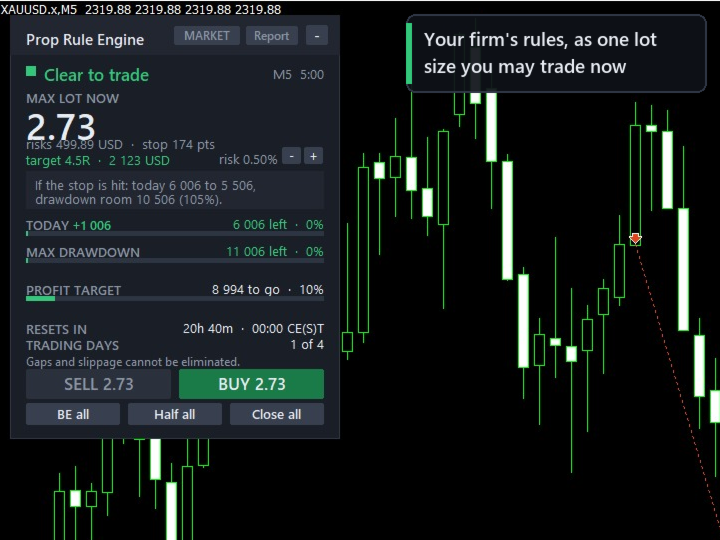
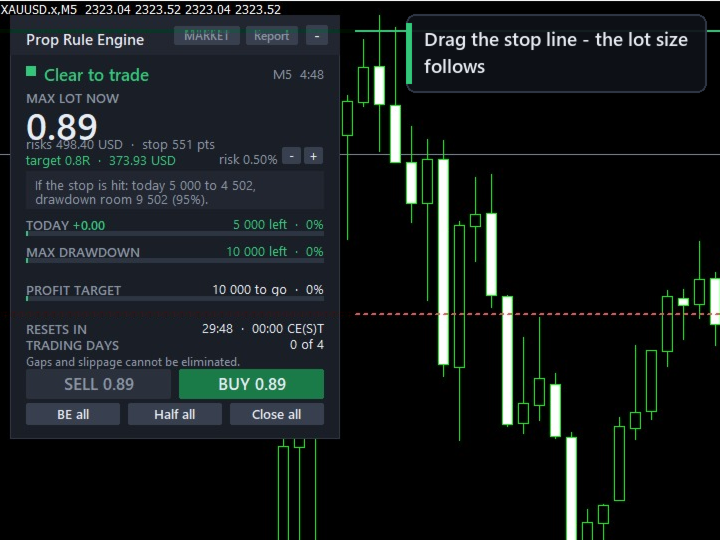
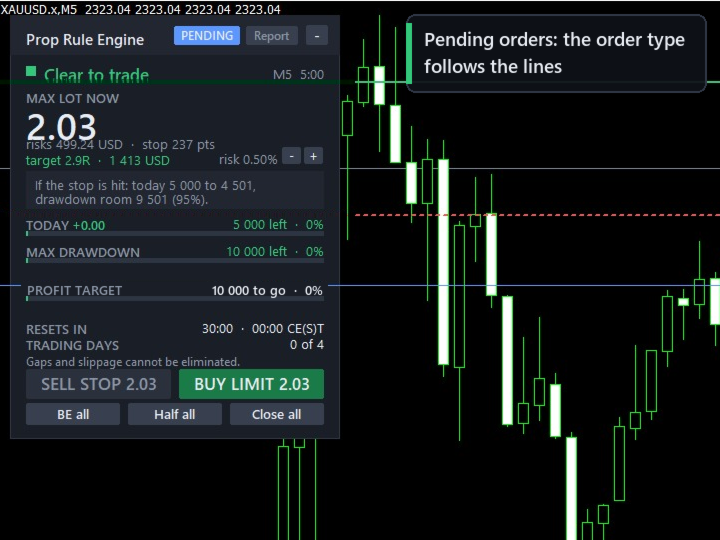
Prop Rule Engine keeps a live risk budget from your firm's rules and converts it into a lot size for the stop you are looking at. One number, in large type, updated as you drag the stop line on the chart.
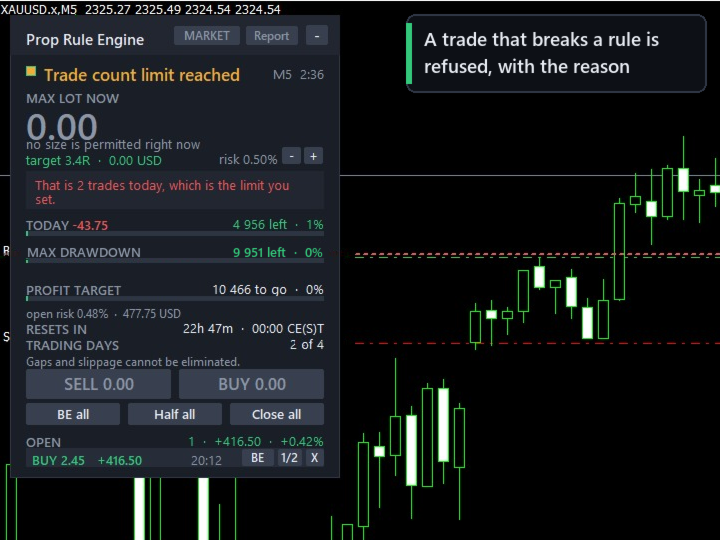
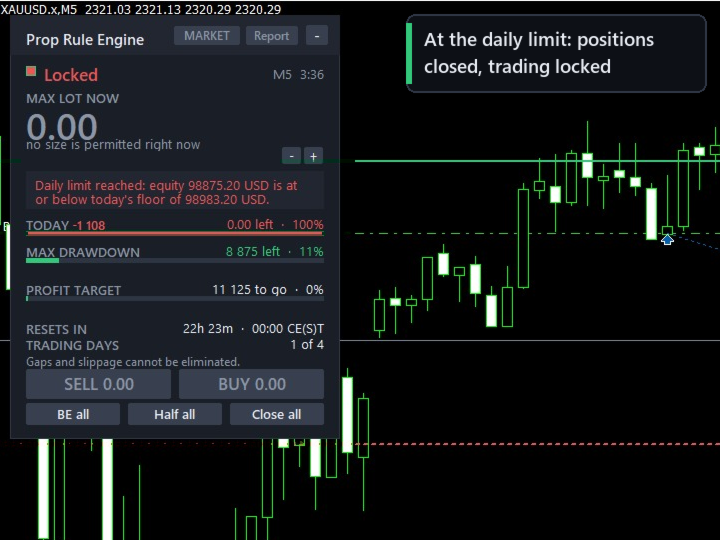
When a limit is reached it closes the positions it is allowed to manage, cancels its pending orders, and refuses new entries through the panel until the next daily reset. The lock is kept on disk, so a terminal restart or re-attaching the expert does not clear it.
THE DRAWDOWN MODELS
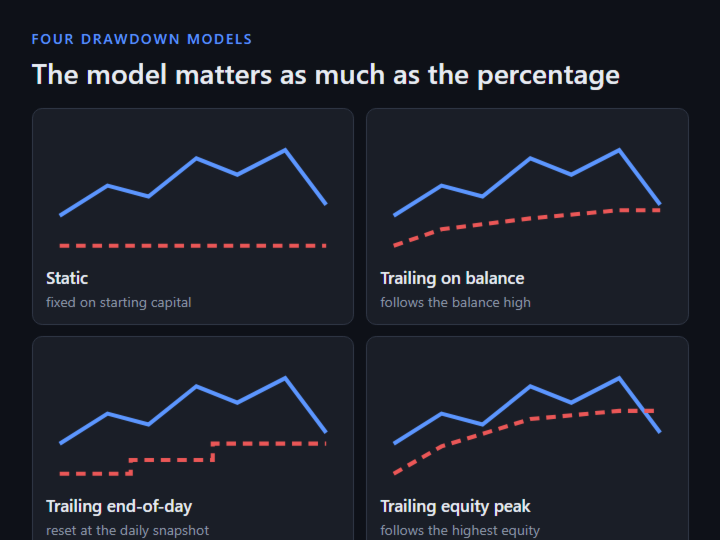
The type of drawdown calculation matters as much as its percentage. A 6% trailing rule on the equity peak is stricter than a 10% static rule on the same trades. Four models are implemented and selectable:
- Static - fixed floor on your starting capital
- Trailing on balance - follows the closed-balance high-water mark
- Trailing end-of-day - recalculated at the daily snapshot
- Trailing equity peak - follows the highest equity reached
The panel shows the figure your floor is anchored to, not only the distance to it.
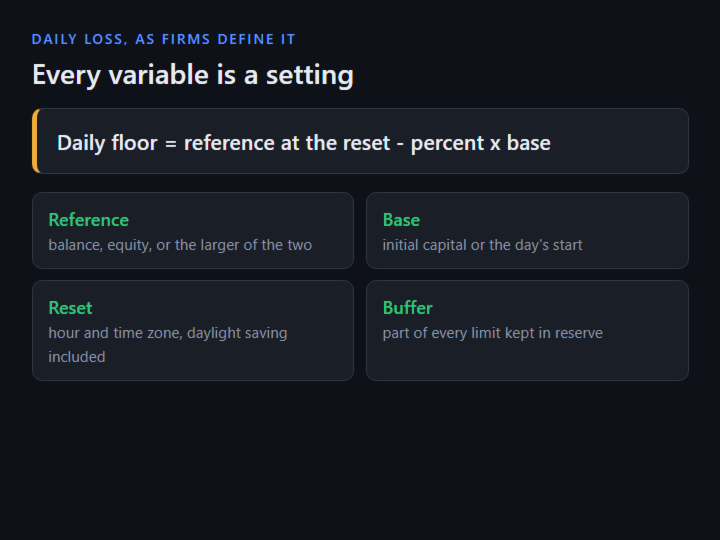
DAILY LOSS AS FIRMS DEFINE IT
Daily floor = reference at the reset - (percent x base)
Four things vary between firms and all four are settings: the reference (balance, equity, or the larger of the two), the base (initial capital or the day's starting balance), the reset hour and time zone with daylight saving, and whether floating P/L counts.
The reset clock is anchored to UTC. The broker offset is measured live, and daylight-saving dates come from calendar rules, so a backtest rolls the day on the same dates as live trading.
SAFETY BUFFER
A fixed share of each limit is held back and never traded into (20% by default: with a 5,000 daily limit, new entries stop once 4,000 of it is used). The open positions' remaining risk to their stops is subtracted before a new trade is sized.
CONSISTENCY RULE
Best day % = best single-day net profit / total net profit x 100
Tracked live, with how much more may be earned today without pushing the best day over the cap, and - when the best day is already too large - how much more total profit over how many days is needed. Either denominator is supported: total net profit, or profitable days only. Enforcement is optional.
LOT SIZING
Sizing uses OrderCalcProfit, the broker's own profit calculation, so contract size, tick value and currency conversion come from the broker on metals, indices, JPY pairs and crypto CFDs, in any account currency. Commission is part of the sizing equation, and the commission actually charged on your recent trades is measured and used when it is higher than the setting.
In order: risk budget less buffer and open risk; lots from the broker's calculation; reject a stop inside the broker's minimum distance; floor to the volume step (never round up); reject below the symbol minimum (never clamp up); margin cap; margin-level floor; exposure netted per currency; spread guard; your discipline rules; your firm's rules.
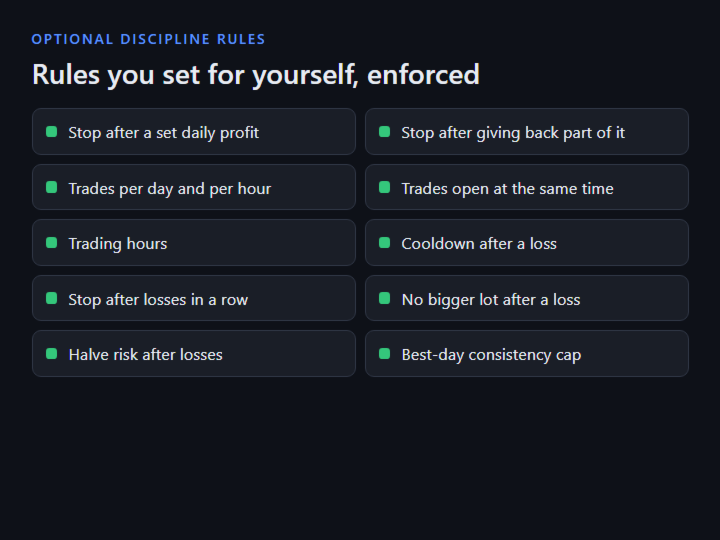
DISCIPLINE RULES (optional; all off by default except the large-lot confirmation)
- Daily profit lock - stop for the day after a set gain
- Giveback lock - stop after handing back part of the day's peak
- Trades per day / per hour
- Trades open at once
- Trading hours - e.g. 08-17 server time
- Cooldown after a loss
- Stop after N losses in a row (cleared at the daily reset)
- Block a bigger lot right after a loss
- Halve risk after N losses
- Confirm an unusually large lot with a second press
- Put back a stop moved further from the entry
TRADE PANEL
- Market and pending orders; the order type follows the lines (limit or stop, buy or sell)
- Double-click the stop line to enter; optional Shift+B / Shift+S / Shift+C keyboard shortcuts
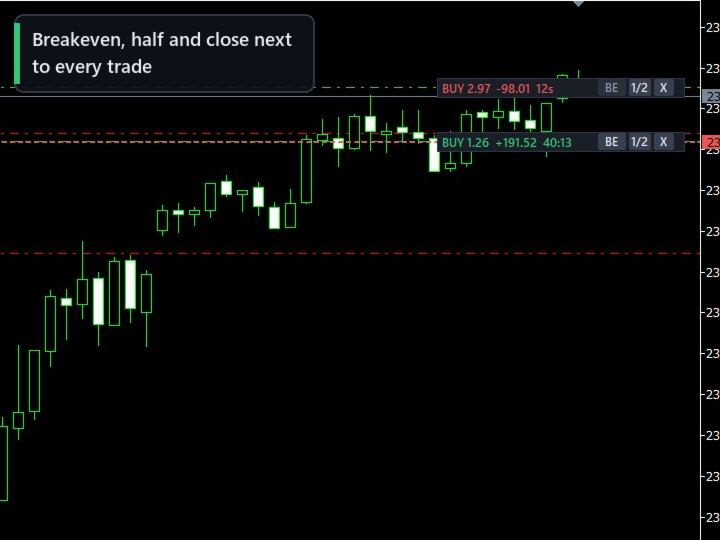
- Per-trade BE, 1/2 and close, on the panel or next to each trade on the chart; candle countdown and trade age timers
- Minimum hold time respected by every close button
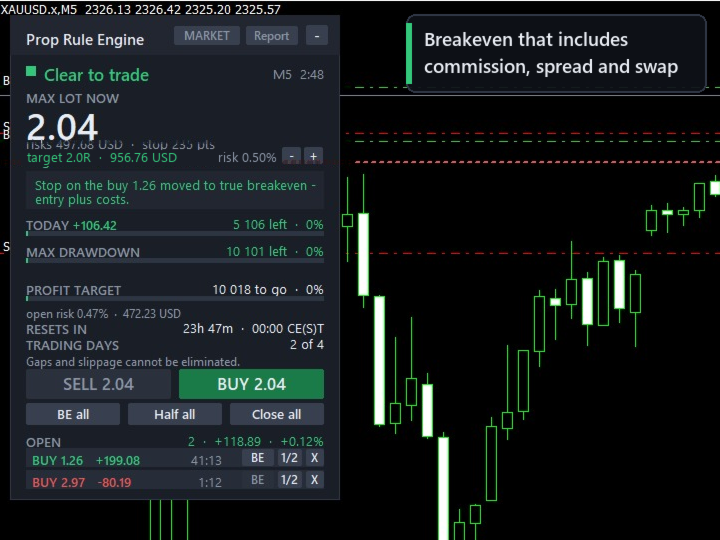
- Breakeven that includes commission, spread and swap
- Trailing stops: points, ATR, moving average, fractal, Parabolic SAR, previous candle, R multiple - stops only ever move forward
- Partial-close ladder on R multiples of the original stop distance
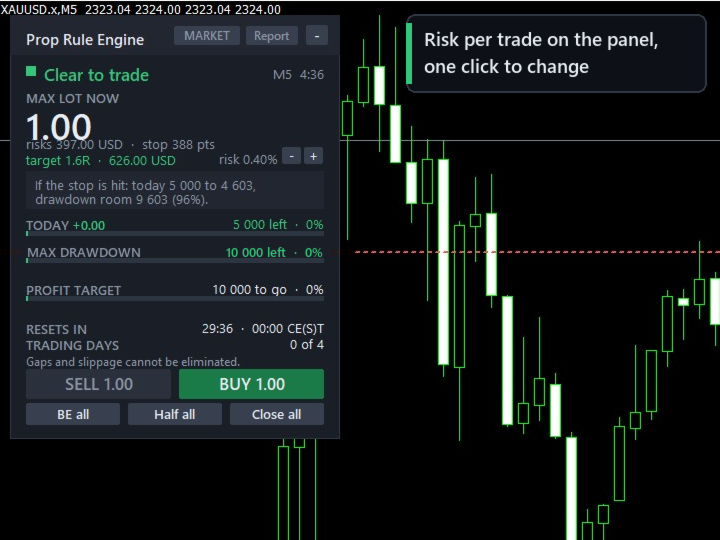
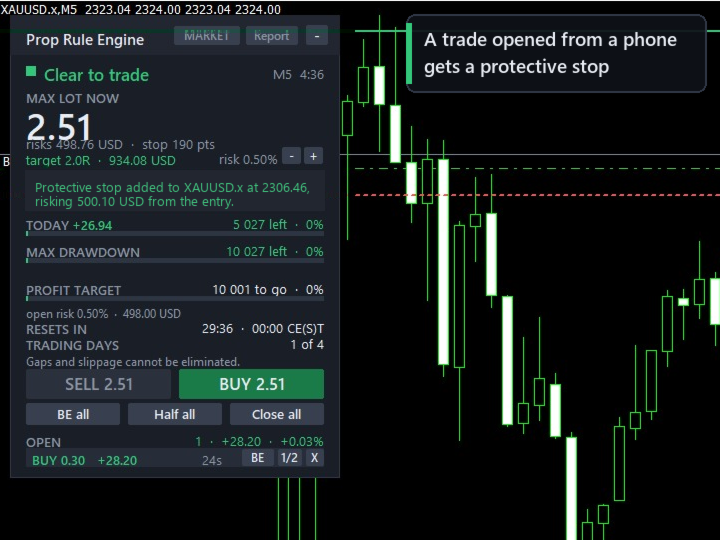
- Protective stop for trades opened elsewhere (phone, one-click), sized from the entry to your per-trade risk (with fixed-lot sizing, the risk per trade shown on the panel)
- News pause around high-impact events from MetaTrader's calendar
- Pop-up and phone notifications, and a warning before a limit is near
- CSV audit trail, a daily record and an HTML report
- Global variables your own experts can read before entering
BUNDLED PRESETS
- Two-Step Phase 1: 10% target, 5/10 static, 4 days
- Two-Step Phase 2: 5% target, 5/10 static, 4 days
- One-Step: 3% daily, 10% EOD trailing, best day 50%
- Four generic shapes: static; end-of-day trailing; equity-peak trailing; daily limit on the higher of balance or equity
The first three follow the trading objectives FTMO publishes for its 2-Step and 1-Step accounts, as checked on 29 September 2026. Prop Rule Engine is not affiliated with, endorsed by or sponsored by FTMO; the name is used only to say whose published rules these presets follow.
WHAT IT CANNOT DO
- MetaTrader offers no way to veto an order before it is sent. Trades placed from the terminal, a phone or another expert can only be reacted to - by closing, reducing, or adding a protective stop. Entries through this panel are the only ones checked beforehand.
- Slippage, gaps and slow broker responses cannot be removed by any software. A limit can still be crossed by the size of a gap.
- Bundled presets are guidance values with the date they were checked, shown every time the expert starts; after six months it asks you to re-check. Firms change their terms without notice; your firm's own rules are authoritative, every value can be changed in the inputs, and presets are re-checked with each product update.
- Check that your firm allows expert advisors on your account type. Some firms do not allow them on larger accounts, including tools that only set stops or lot size.
- In the Strategy Tester a built-in demo presses the buttons in a random direction to show the rules working; the demo is not a strategy. In visual mode you can press them yourself as well, on MetaTrader builds that pass clicks to experts in the tester.
INPUT PARAMETERS (grouped as in the properties dialog)
- 1. Your prop firm - rule preset, or a rule file; starting capital; broker UTC offset (detected automatically by default)
- 1b. Override the preset - daily loss, maximum drawdown, profit target, reset hour, minimum trading days, minimum hold time, most risk open at once, consistency cap and its enforcement, news pause
- 2. Safety - buffer before each limit, close all on a breach, lock until the reset, reaction to trades opened elsewhere, protective stop for trades without one, one-time lock release
- 3. Risk per trade - percent of capital, fixed money, share of what is left today, or fixed lot; commission per lot; margin limits
- 4. Stop and target - take profit on or off, target in R, default stop distance from points, ATR or the last swing
- 5. Discipline - the optional rules listed above
- 6. Position management - breakeven with or without costs, trailing method, two-step partial-close ladder
- 7. Other experts - this panel's magic number, magic numbers it may manage, magic numbers it only counts
- 8. Entry by mouse and keyboard - double-click entry, line grab distance, pending order expiry, hotkeys, dragging open trades' levels
- 9. Display - panel on or off, position and corner, where the candle timer and each trade's controls appear, CSV record on or off
- 10. Alerts - pop-up, phone notifications, warning level
- 11. Strategy Tester demo - on or off
SETTING IT UP
- Attach to one chart. It supervises the whole account.
- Pick your firm's preset.
- Check the reset time on the panel; set the broker UTC offset once if it is not detected.
- Drag the stop line. The lot size follows it.
FOR DEVELOPERS
if(GlobalVariableGet("PRE_TRADING_ALLOWED") < 0.5) return;
double budget = GlobalVariableGet("PRE_RISK_LEFT_MONEY");
double maxLot = GlobalVariableGet("PRE_MAX_LOT_HINT");
Also published: PRE_MAX_DAILY_PROFIT_LEFT, PRE_LOCK_UNTIL, PRE_DAILY_REMAINING, PRE_MAXDD_REMAINING, PRE_SECONDS_TO_RESET and PRE_HEARTBEAT.
No DLL imports and no web requests. Works on netting and hedging accounts and in the Strategy Tester.
DISCLAIMER
Prop Rule Engine is a risk-management tool. It does not give trading advice or signals, and it does not guarantee profits or that a challenge will be passed. Trading carries a substantial risk of loss; gaps, slippage and broker execution can cause a limit to be exceeded. You are responsible for your own trading decisions and settings. Test the product in the Strategy Tester and on a demo account before using it on a live or funded account.