OneClick Risk Manager

OneClick Risk Manager — Manual Trading Assistant

OneClick Risk Manager is a manual trading panel for MetaTrader 5. It does not trade on its own — you stay in control and open, close and manage every position with one click. Its job is to do the math for you: position size, risk, partial take-profits, break-even and trailing, so you can trade fast and precisely without manual calculations.

Works on any symbol — XAUUSD (gold), US100/NAS100, US30/DJ30, FX pairs and more. The panel is fully scalable and movable, so it fits small laptops and 4K monitors alike.

Key features

Position sizing — two modes, one toggle

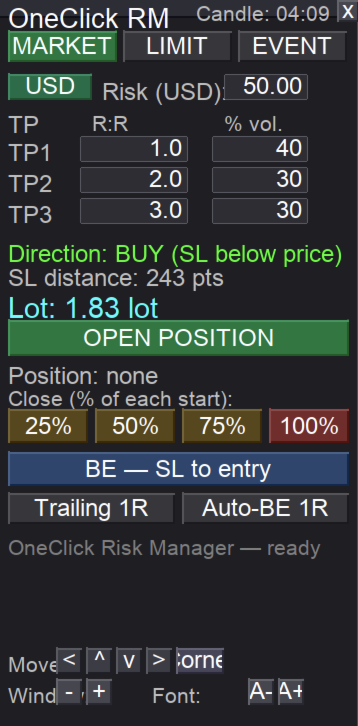
  • USD risk mode: type the amount you want to risk; the lot is calculated automatically from your Stop Loss distance so a stop-out equals exactly that amount.
  • Fixed lot mode: type the lot directly and trade with a constant size.
  • Switch between the two with a single button on the panel.

MARKET tab — instant entry from a line

  • Drag the horizontal SL line to where you want your stop.
  • Direction (BUY/SELL) is detected automatically from the line position.
  • One click opens the position with the calculated lot and the stop already in place.

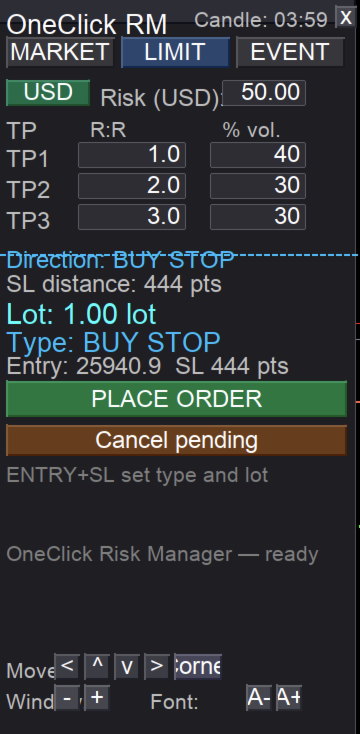
LIMIT tab — pending orders from two lines

  • Use an ENTRY line and an SL line.
  • The order type is detected automatically from the line layout: BUY LIMIT, BUY STOP, SELL LIMIT or SELL STOP.
  • The lot is sized to your risk (or fixed), with an optional expiry.

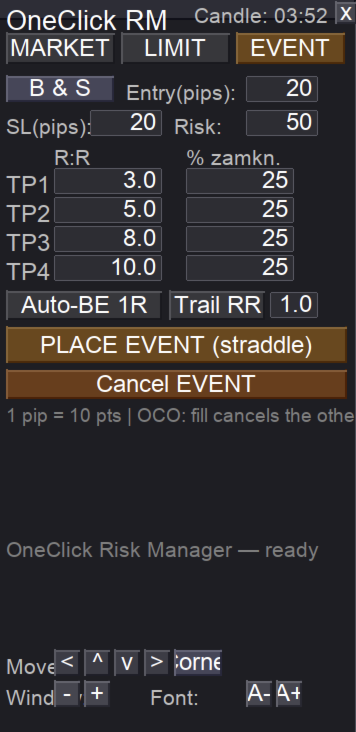
EVENT tab — OCO straddle for news and volatility

  • Places a BUY stop and SELL stop at a set distance from price.
  • OCO: when one side is triggered, the other is cancelled automatically.
  • Choose BOTH / BUY only / SELL only.
  • Four take-profit levels (R:R) with a percentage of the position closed at each.
  • Built-in auto break-even and trailing for the active position.

Trade management (one click each)

  • Partial close buttons 25% / 50% / 75% / 100% — always measured from the original lot of each position, so "50%" means half of the start size even after earlier partials.
  • Break-even button — moves the stop of all positions to entry (+ a small buffer).
  • Auto break-even at 1R — moves the stop to entry once price reaches 1R.
  • Trailing by R — steps the stop up as price advances (1R, 2R, 3R...).
  • Multiple take-profits (R:R) with partial closes at each level.

Panel and usability

  • Live candle countdown — time left until the current candle closes.
  • Scalable panel — separate window scale and font scale (great for 4K).
  • Movable panel — drag by the title bar, or use on-panel arrow buttons and a "snap to corner" button (useful on macOS where dragging can be awkward).
  • Panel position, scale and font are remembered per symbol after restart.
  • Controls can be hidden once the panel is placed, for a clean workspace.

How to use

  1. Attach the EA to a chart and enable Allow Algo Trading.
  2. Pick the tab you need: MARKET, LIMIT or EVENT.
  3. Set your risk (USD) or a fixed lot, your SL line, and your TP levels.
  4. Click to open. Manage the trade with the partial-close, break-even and trailing buttons.

Important notes

  • This is a manual assistant. It never opens or closes positions by itself — every action is a button click by you.
  • Always test on a demo account first to confirm lot sizing matches your broker's contract specifications (tick value can differ between brokers, especially on gold and indices).
  • Trading involves risk. You trade and use this tool at your own risk. Past performance and backtests do not guarantee future results.

Requirements

  • MetaTrader 5
  • Any broker / any symbol
  • "Allow Algo Trading" enabled

Author / contact

Questions, feedback or support? Reach the author on Telegram: @MatKus92

Tip: for best results, keep the panel on the chart you actively trade and use the window/font scale buttons to size it comfortably for your screen.
おすすめのプロダクト
TradeHam Manager is a trade panel for manual traders. You decide when and where to trade. The panel takes care of the lot size, the order and the clean-up. It does not open trades on its own. It has no entry logic and does not promise any profit. Main features Risk-based lot size. Set the risk as a percent of balance, a fixed amount of money or a fixed lot. Drag the stop-loss line on the chart and the lot is recalculated. One-click orders. BUY / SELL buttons place the order with stop loss and ta
このツールを使用すると、「すべて閉じる」をクリックするだけで、開いている注文をすべてワンクリックで閉じることができます。 収益性の高い注文のみをクローズしたい場合は、「収益性の高い注文をクローズする」ボタンをクリックすると、すべての変動注文がクローズされます。 変動損失のある注文のみを決済したい場合は、「損失可能注文を決済する」ボタンをクリックすると、変動損失のあるすべての注文が決済されます。 このツールは1年間テストされています. ワンクリックポジションクローズ機能は非常に完成しています. ポジションクローズはタイムリーであり、遅延範囲は小さいです. もちろん、遅延はあなたの地域やネットワーク環境にも関係します.ご注意ください。 履歴データのバックテスト プロセス中、このツールのパフォーマンスはさらに完璧になり、100 件の注文すべてを閉じるのに最長 0.495 秒しかかかりませんでした。 実際の取引プロセス中、私のポジション注文の最大数はわずか 26 で、すべてのポジションが決済されるまでにかかった時間は 1.28 秒でした。
T Manager, the ultimate trade management solution designed by traders for traders. If you are searching for a simple and efficient trade panel, trade manager, or trade assistant, you are at the right place.   The market contains a diverse number of those tools , but this one is designed by traders for traders . I designed this tool, and I am using it daily. Take my advice and stop buying tools blended with un-useful features that you will never use,   T Manager provides you with the essential y
Manager Trader
Muhammad Firdaus Bin Zainun
Manual Trade Manager for MT5 This is not auto trade ea. It Manage your manually opened trades from one simple chart panel. Monitor your positions in real time and act on multiple layers with a single click. Features CLOSE ALL: Sends fast asynchronous close requests for managed manual positions. BE ALL: Checks each layer individually and sets its stop loss only when that layer has reached your chosen profit threshold. BE SET: Applies your current BE step setting to eligible layers. Optional Avera
One Click Trader  is a tool designed for MetaTrader 4 platform, which enables you to take your trading to the next level. It enables you to open, manage and close your trades in simple an efficient way by just one click of your mouse button. "-"   ,  "+"  change OCT window size  Up arrow minimizes the OCT panel Down arrow maximizes the OCT panel Right arrow displays the next panel with additional features Left arrow hides the panel with additional features Red  SELL  button enables you to open s
Global Stop Loss and Take Profit Manager Drag Lines Auto Apply Already using my free Global Stop Loss and Take Profit Setter? This is the always on version. Instead of setting levels once, you drag two lines on the chart and every manual position on that symbol — plus every new one you open — instantly inherits the Stop Loss and Take Profit. No clicking into each order. No forgetting a stop. Global Stop Loss and Target Manager is a drag-and-drop risk tool for manual traders on MetaTrader 5. Pu
All In One Trade Manager is a trade manager and one-click trading panel for manual traders on MetaTrader 5. It works as a trading assistant, risk manager and position size calculator in one dashboard. It brings together everything below in one panel: order entry with risk sizing automatic trade management advanced order types account protection statistics Its entry checks run in the background and tell you, before you click BUY or SELL, when something speaks against the trade. Also available
This utility provides the ability to use hot keys in manual trading instantly responding to the current market situation. You can assign hot keys to open/close positions by their type, open/close all positions on the current chart and remove all orders on the current chart. You can also assign hot keys for five predefined trade volumes and switch between them if necessary with no need to change the volume manually from time to time. It is also possible to set the auto calculation of a trade volu
The indicator is intended for determining the spread and swap size, the distance for setting stop orders and stop losses from the current price allowed and the risk per 1 point in the deposit currency. The indicator informs a trader about possible additional expenses and profits connected with transferring a position to the next trade session of the financial instrument. It also informs about the spread size and the distance of pending orders, stop loss and trailing from the current price. In ad
お使いの会社の1日の損失上限とドローダウン上限を一度入力するだけです。Multi-Account Risk Sync Panel は一日中、これらの上限に照らして口座を確認し、上限に達した瞬間に、保有中のポジションを決済し、待機注文を削除し、自らを停止します。プロップファームのチャレンジ、ファンデッドアカウント、そして厳格な損失上限のあるあらゆる口座向けに作られています。 取引は開かず、取引のコピーも行わず、他の口座には一切触れません。このページのスクリーンショットはすべて、ライブのデモチャートからのものです。 主な機能 1日の損失上限を、割合または固定金額で設定。基準は残高、有効証拠金、またはその高い方 全体のドローダウン。固定型またはトレーリング型で、日中ピークまたは日末ピークを選択可能 チャート上のキルスイッチボタン。上限違反のたびに同じ動作を実行:ポジションを決済し、その後に待機注文を削除(専用のオン/オフ設定あり) ポジションが残っている間は停止しません。拒否されたリクエストはログに記録され、再試行されます お使いの会社のタイムゾーンでのリセット時刻(夏時間対応) 同じPCま
This Expert Advisor monitors all open positions across all symbols in MetaTrader 5. Whenever a Stop Loss (SL) or Take Profit (TP) is manually set or adjusted on any position, the EA automatically applies that value to all other open positions , regardless of symbol or order type (Buy/Sell). This ensures consistent and synchronized SL and TP levels across your account. Perfect for mobile trading via tablet or smartphone!
FREE
Instructions for Using Reverse Copier EA Attach EA to Charts Open MetaTrader and attach the EA to any chart on both accounts (master & slave). Make sure AutoTrading is enabled. Master Account (Signal Sender) Set Mode = Master in EA settings. This account will send trade signals. Slave Account (Signal Receiver) Set Mode = Slave in EA settings. This account will receive trades in reverse (opposite direction). Lot Multiplier In Slave EA settings, set Multiplier to control lot size. Example: 1.0
テイクプロフィット、ストップロス、トレーリングストップのレベルをブローカーに見えないようにします! 主なオプション:   ステルスモード バーチャルトレーリングストップ バーチャルテイクプロフィット バーチャルブレイクイーブン 仮想ストップロス 仮想注文の有効期間 警告:   エキスパートアドバイザーは、それ自体では注文を行いません。 自分で注文を開くか(エキスパートパネルを介して含む)、同じ通貨ペアの別のチャートでサードパーティのエキスパートを使用する必要があります。 エキスパートがこれらの注文を処理するには、エキスパート設定でマジックナンバー「-1」を指定してください。 テストにはビジュアルモードを使用してください!!! 作業アルゴリズム あなた(または別のエキスパートアドバイザー)が買い/売り注文を開くか、保留中の注文がトリガーされるか、チャートにすでに開いているポジション/注文がある場合、エキスパートはコントロールパネルをインストールしてv-StopLossの追跡を開始します。 v-BreakEven、v-TakeProfitパラメーター。 注意:     「-1」以外のマジ
This utility sends notification to trader’s MT5 (for MT4 version, checkout this link ) mobile app, to remind traders about their open positions. Super useful for part time traders to keep track and not forget any positions. To turn on notification, please visit   this link   (https://www.metatrader4.com/en/trading-platform/help/setup/settings_notifications) Features Keep track on open orders (pending orders, running orders) Customize time to send notification Customize notification interval (se
Trade HotKeys は、キーボードのホットキーを使ってトレード操作を瞬時に実行できる手動トレード用ユーティリティです。 MetaTrader 5 のインターフェースボタンを使わず、素早い注文操作を必要とする裁量トレーダーやスキャルパー向けに設計されています。 チャート上のボタンをクリックしたりメニューを開いたりする代わりに、キーボードから直接トレード操作を実行できます。 できること ホットキーで BUY / SELL を即時実行 BUY または SELL ポジションのみ個別決済 1キーですべてのポジションを決済 ポジション反転(方向を即時切り替え) 誤操作防止のためのトレード一時停止 BUY/SELL ボリュームと含み損益をチャート上に表示 トレーダーが使用する理由 判断から執行までの遅延を削減 手動トレードのための筋肉記憶を構築 スキャルピングや高速相場に最適 トレード中のターミナルUI操作を最小化 あらゆるブローカー・口座タイプに対応(netting / hedging) 軽量かつ安定動作(重い計算なし) インターフェース UI位置を4コーナーに自由配置可能 フォントサイ
FREE
Position Prime
Mariana Cordeiro Neves Fernandes
今すぐ無料デモ版をダウンロードして、購入前にストラテジーテスターのすべてのリスク管理機能をテストしてください! Position Prime は、MetaTrader 5 (MT5) 向けの機関投資家レベルの視覚的実行アシスタントおよびリスクマネージャーです。スピードと精度を求めるトレーダーのために開発され、手動でのロット計算の手間を省き、チャートを真のトレーディングデスクに変えます。ほんの数秒で取引の計画、実行、そして資金の保護が可能です。 ️ リスク管理と自動ロット計算 動的計算 (Dynamic Calculation): リスクを金額($)または口座残高のパーセンテージ(%)で設定します。チャート上でストップロス(SL)のラインをドラッグすると、パネルが正確なロットサイズを自動的に計算します。 リアルタイム予測: 注文を開く前に、リスクリワード(RR)、予想利益、潜在的な損失を画面上で直接視覚化します。 1日の損失ロック (Daily Loss): 1日の最大損失額の制限を設定します。この制限に達すると、パネルが新規取引をブロックし、オーバートレードや感情的なミスから
Trade Plan Desk MT5 は、注文を実行する前にトレード計画を整理し、確認するためのトレード管理ダッシュボードです。 方向、エントリー、Stop Loss、Take Profit、リスクを設定すると、ブローカー条件に基づいて適切なロット数、予定リスクリワード比を計算し、取引前チェックを実行します。 主な機能: • Entry / Stop Loss / Take Profit の計画 • パーセントまたは金額によるリスク設定 • ブローカー条件に基づく自動ロット計算 • PASS / WARNING / FAIL の事前チェック • スプレッド、証拠金、最小距離、ブローカールールの確認 • Market / Stop / Limit 注文 • Netting / Hedging 対応 • SL/TP変更、部分決済、ポジション量変更の監視 • Planned vs Actual 比較 • R、P&L、MFE、MAE、giveback、capture efficiency • 履歴保存と再起動後の状態復元 • Compact / Details を備えたサイズ変更可能な
Forget about enabling templates when you launch the window. Auto Template Master Service  is a professional utility tool that runs as a system service in MetaTrader 5, and it will do it for you. Unlike traditional indicators or expert advisors (EAs), the program runs in the background of the entire terminal and doesn't require you to add it to each window individually. As soon as you open a new chart of any instrument (Forex, Stocks, Crypto), the service immediately detects the new window and a
TradeDesk EA — Semi-Automatic Trading and Account Discipline Panel for MT5 English Description Faster execution with rules that remain in force TradeDesk EA is a bilingual semi-automatic trading assistant for MetaTrader 5. It combines order execution, position sizing, trade management, conditional tasks, account statistics, and optional discipline controls in one compact panel. It can be used with Forex, metals, indices, energy products, stocks, and other CFD instruments made available by th
ApexForge Economic Calendar Safety Dashboard MT5 経済カレンダー | Forex 経済カレンダー | News Filter | 重要経済指標アラート | 経済イベントカウントダウン | 緊急決済 | Close All | 市場休場日アラート | 早期取引終了リマインダー | KTimer | ローソク足カウントダウン | モバイルPush通知 | 12言語 + Auto ApexForge Economic Calendar Safety Dashboard は、 MT5 Economic Calendar 経済カレンダー、Forex News Filter、重要経済指標アラート、経済イベントのカウントダウン、緊急決済、市場休場日アラート、早期取引終了リマインダー、KTimer / ローソク足カウントダウン、モバイルPush通知、12言語 + Auto言語自動検出 を統合したMetaTrader 5用の総合トレーディング情報ダッシュボードです。 Forex、XAUUSD / Gold、株価指数、スキャルピング、デイトレード、裁量トレー
RealCost Auditor MT5 is an execution-cost monitor for MetaTrader 5. It does not open, close, or modify trades. It watches the chart symbol, samples live spread, records executed deals, estimates signed slippage when the terminal exposes the requested price, and saves a local CSV audit file. Many backtests use spread, slippage, commission, and swap assumptions that are cleaner than real trading conditions. This utility gives you broker and account data from your own terminal before you trust a s
Risk Control Utility MT5 designed for manual trading. It helps to calculate and control your risks, transfer transactions to breakeven and accompany positions with trailing stop. Easy to set up and use. It can be used for calculating a trading lot, calculating stop loss and take profit levels. Works with currency pairs, CFDs, stocks, indices, futures, cryptocurrencies Displays   volume,   potential loss and profit before   placing an order Ability to set the expiration time of a pending order Tr
# Universal Smart Manual Trade Manager MT5 v1.00 ## What the EA does Universal Smart Manual Trade Manager MT5 is a protective and management Expert Advisor for manually opened trades. It does not open new entries by itself. It only adopts already open positions that pass the selected filters, and can add missing SL/TP, manage break-even, profit lock, ATR trailing, send Telegram notifications, and display status information on the chart. The default setup is intentionally safe: the EA manages
Every panel tells you how much you're risking. This one tells you how much you have left. You didn't lose the challenge because your strategy failed. You lost it because one more trade pushed you past the daily limit while you were chasing the target. PropDesk is the desk that helps stop that from happening. 1. Size against your ROOM, not your equity. Every order shows "risk $X = Y% of your daily room left". You always know if the next trade fits inside what the firm allows today - before you
Trade Control Panel Function Normal One Click Function Close All Close All Profit Close All Loss Close All Pending Order Close All Sell Close All Buy Advance One Click Function 1.  Close Partial Lot Sell by Percent It will help you partial close for all open position by desire percent you wanted. No longer partial close one by one for every open position Manual input for desire percent 2. Close Partial Lot Buy by Percent It will help you partial close for all open position by desire percent
GS trade report
Aleksander Gladkov
5 (1)
3 in 1 : Report + monitoring + sending messages (Telegram, ...) to optimize trading and use of advisors. Monitoring: Panel on the chart Sending messages to Telegram Sending messages to Email Sending Notifications Sending pop-up messages Sound notifications when the established Profit/Loss levels are exceeded Monitoring is activated by pressing the Start button. Profit for the period by currency pairs, hours and Magic number for the current account. Forms four tables: by symbols, by magic number
Prop Risk Guard は、口座のリスク管理ルールを自動的に適用します。1つのチャートに追加するだけで、口座内のすべてのポジションを監視します。設定した上限に達すると、ポジションを決済し、指値・逆指値などの保留中注文を削除して取引をロックします。これにより、1回の大きな損失や制御不能になったEAによって、評価口座や資金提供口座のルールに違反することを防ぎます。 1日の損失上限 パーセンテージ、固定金額、またはその両方で設定できます(より厳しい上限が適用されます)。 1日の開始時点の残高、1日の開始時点の有効証拠金(Equity)、またはその2つのうち高い方を基準に計算します。 毎日のリセット時刻は、サーバー時間に基づいて自由に設定できます。 ロックは次のリセットまで維持され、リセット後は取引が自動的に再開されます。 入金および出金は、1日の損失として計上されません。 最大ドローダウン 固定式: 初期残高を基準に計算します。 トレーリング式: 有効証拠金(Equity)の最高到達点を基準に計算します。 初期残高までのトレーリング: 有効証拠金の上昇に合わせて上限が引き上げられ、初
Trade Panel HotKey – MT5 Scalping Utility Fast Trade Panel HotKey is a lightweight MT5 trading utility designed for traders who need to open, manage, and close positions as quickly as possible . The main purpose of this tool is to reduce the time between a trading decision and execution. Instead of moving the mouse, opening order windows, or manually modifying multiple positions, most important actions can be performed instantly through customizable keyboard hotkeys or directly from the compact
Launch price: $39 - increases to $49 once the first 10 copies sell. Message me after purchase and I'll help you set it up for your exact symbol/broker. Drag a line. Watch every chart update. Never break your risk plan by accident. Most risk panels stop at "drag SL, see lot size." This one goes further: move your Stop Loss and Take Profit follows automatically to hold your exact R:R — move your Entry and SL/TP travel with it, so your risk never silently drifts. And every level you plan appears
Telegram to mt5 signal copier
Chukwuemeka Kingsley Anyanwu
5 (2)
**あらゆるTelegramチャンネルからシグナルをコピーし、管理者権限なしでMT5上で即座にトレードを実行!** Telegramでトレードシグナルを受信し、それをMetaTrader 5で即座に実行できたらと思いませんか? **Telegram to MT5 Signal Copier** は、TelegramのシグナルチャンネルとMetaTrader 5を強力に連携するブリッジです。指定されたTelegramチャンネルのメッセージを監視し、トレードシグナル(銘柄、売買方向、エントリー価格、ストップロス、テイクプロフィットを含む)を自動的に抽出し、即座に実行します。 プレミアムシグナルプロバイダーをフォローしている方でも、ご自身のTelegramアラートを自動化したい方でも、このツールはトレードワークフローを効率化し、手作業を減らし、機会損失を防ぐお手伝いをします。 ️ **主な機能:** Telegramチャンネルに直接接続 主要なトレード指示(買い/売りまたは指値注文、銘柄、エントリー価格、SL、TP)を解析 MQL5からアクセス可能なシグナルを保存
このプロダクトを購入した人は以下も購入しています
Trade Assistant MT5
Evgeniy Kravchenko
4.43 (216)
取引 ごとのリスクの 計算、新規注文 の 簡単 な 設置、部分的 な 決済機能 を 持 つ 注文管理、 7 種類 のトレーリングストップなど 、便利 な 機能 を 備 えています 。 追加の資料と説明書 インストール手順   -   アプリケーションの手順   ライン機能 チャート上にオープニングライン、ストップロス、テイクプロフィットを表示します。この機能により、新規注文を簡単に設定することができ、注文を出す前にその特徴を確認することができます。   リスク計算 リスク計算機能は、設定されたリスクとストップロス注文のサイズを考慮して、新規注文のボリュームを計算します。ストップロスの大きさを自由に設定できると同時に、設定したリスクを守ることができます。 Lot calc ボタン - リスク 計算 を 有効 / 無効 にします 。 Risk フィールドでは 、必要 なリスクの 値 を 0 から 100 までのパーセンテージまたは 預金通貨 で 設定 します 。 設定」 タブで 、 リスク 計算 の 種類 を 選択 します :「 $ 通貨」、「 % 残高」、「 % エクイティ 」、「
Trade Manager EAへようこそ。これは、取引をより直感的、正確、そして効率的にするために設計された究極の リスク管理ツール です。これは単なるオーダー実行ツールではなく、包括的な取引計画、ポジション管理、リスク管理のためのソリューションです。初心者から上級者、迅速な実行を必要とするスキャルパーまで、Trade Manager EAはあらゆるニーズに対応し、為替、指数、商品、暗号通貨などさまざまな市場で柔軟に対応します。 Trade Manager EAを使用すると、複雑な計算が過去のものになります。市場を分析し、エントリーポイント、ストップロス、テイクプロフィットのレベルをチャート上のラインでマークし、リスクを設定するだけで、Trade Managerが最適なポジションサイズを即座に計算し、SLとTPをピップ、ポイント、口座通貨でリアルタイムに表示します。すべての取引が簡単かつ効果的に管理されます。 主な機能: ポジションサイズ計算機 :定義されたリスクに基づいて取引サイズを瞬時に決定します。 簡単な取引計画 :エントリー、ストップロス、テイクプロフィットを設定するためのド
Farmed Hedge Yield Farming | All Markets (Manual - Hybrid - Semi/Automated EA) VERIFIED TRADING RESULTS - Farmed Hedge Yield Axi Copy:  https://www.mql5.com/en/signals/2356376 - Farmed Hedge Yield Exn Copy:   https://www.mql5.com/en/signals/2356404 - Farmed Hedge Yield V Copy:  https://www.mql5.com/en/signals/2357156 IMPORTANT NOTICE: FarmedHedge is a MANUAL-FOCUSED TRADING UTILITY ,not a fully automated EA. Results shown on this Signal include manual trades and overall strategic management.
Telegram to MT5 Multi-Channel Copier   は、 Telegram と Discord チャンネルのトレードシグナルを MetaTrader 5 へ自動コピーします。ボット不要、ブラウザ拡張不要、手動コピー不要。Telegram や Discord にシグナルが届くと、EA が数秒であなたのターミナルに注文を出します。 さらに、チャンネルをコピーする前に、内蔵バックテスターでそのチャンネルがあなたの口座でどう動いたかを確認できます。 製品は 2 つのコンポーネントで構成されます:Telegram チャンネルを監視する Windows アプリと、MT5 ターミナルでシグナルを執行する本 EA です。MT4 版もあります   こちら . 購入前にお試しください:   アプリは無料でダウンロードできます。ご自身のチャンネルを接続し、各シグナルがどのように読み取られるかをご確認ください。Backtest タブと実際の取引には、購入またはレンタルした EA が必要です。このページの無料デモはストラテジーテスターでのみ動作し、テスターでは Telegram と D
TradePanel MT5
Alfiya Fazylova
4.88 (172)
Trade Panelは多機能なトレーディングアシスタントです。アプリには手動取引用の50以上のトレーディング機能が搭載されており、ほとんどの取引作業を自動化することができます。 アプリの説明書: https://www.mql5.com/en/blogs/post/756482 デモ口座用アプリの試用版: https://www.mql5.com/en/blogs/post/750865 アプリのインストール方法: https://www.mql5.com/en/blogs/post/756239 アプリをビジュアルモードでテストする方法: https://www.mql5.com/en/blogs/post/770277 VPSのMetaTraderにアプリをインストールする方法: https://www.mql5.com/en/blogs/post/770190 取引。 ワンクリックで取引操作を行うことができます: リスクを自動計算して指値注文やポジションを開く。 複数の注文やポジションをワンクリックで開く。 注文のグリッドを開く。 保留中の注文やポジションをグループごとに閉じる
News Trade EA MT5
Konstantin Kulikov
4.55 (11)
僕自身が数年間使っている便利なロボットをご紹介します。半自動モードでも完全自動モードでもお使いいただけます。 >>> Chat <<< 当プログラムは経済指標カレンダーで発表されるニュースをもとにした取引の柔軟な設定が可能です。戦略テスターでは確認不可です。実際の取引のみです。 最新の設定アーカイブをダウンロードしてください: https://www.mql5.com/en/blogs/post/747929 シグナルモニタリング: https://www.mql5.com/en/signals/author/test-standart 当該エキスパート・アドバイザーのためのカスタマイズ設定セットを作る場合は、ブログの全パラメータの説明を参照してください :   https://www.mql5.com/en/blogs/post/748545 。 基本的なデフォルト設定について 一つのチャートからGBPとの通貨ペア(GBPUSD、EURGBP、GBPJPY、GBPCAD、GBPAUD、GBPCHF)で取引をします。GBPは最もボラティリティの高い通貨のため、取引が成功するチ
自分の取引ルールで Telegram のシグナルをコピー Telegram to MT5 Signal Trader は、Telegram の公開・非公開チャンネルやグループから、テキスト形式の取引シグナルを MetaTrader 5 へ自動でコピーします。1つのデスクトップアプリで複数の配信者と MT5 口座を管理し、 配信者ごとにリスクと取引設定を個別に指定 できます。 シグナルのコピーに Telegram ボットや API 設定は必要ありません。 電話番号または QR コードでご自身の Telegram アカウントにログインし、すでに参加しているチャンネルやグループを選ぶだけです。ボットの作成や、Telegram API トークン、API ID、API hash の入力は不要です。 ポジションサイズを選び、複数の利確水準に分けて決済し、建値へのストップ移動やトレーリングストップを自動化できます。配信者のシグナルを受け取りながら、実際の取引方法は自分で管理できます。 本製品は、この MT5 エキスパートアドバイザ(EA)と、必須の Windows 連携アプリで構成されます。 インス
================================================================================ POC BREAKOUT - V20.72. Full Professional Grade Toolkit ================================================================================ POC Breakout is a full MetaTrader 5 trading dashboard for discretionary traders who want breakout signals, Point of Control (POC) context, volume profiles, order flow, market structure, news, alerts, and advanced trade planning in one professional workspace. Attached directly to you
The product will copy all telegram signal to MT5 ( which you are member) , also it can work as remote copier.  Easy to set up, copy order instant, can work with almost signal formats, image signal,  s upport to translate other language to English Work with all type of channel or group, even channel have "Restrict Saving Content", work with  multi channel, multi MT5 Work as remote copier: with signal have ticket number, it will copy exactly via ticket number. Support to backtest signal. How to s
EA Overfitter
Stephen J Martret
5 (3)
That backtest looks great. But will it still be making money tomorrow, next week, next month? EA Overfitter re-runs your EA on 100 price histories it has never seen. One score tells you if the edge is real. A backtest tells you what an EA did on one price history — the one that happened to occur. What you cannot tell from it is how much of that result was the strategy and how much was the particular path. EA Overfitter answers that. It builds up to 100 synthetic price histories your EA has n
Power Candles Strategy Scanner - 自動最適化型マルチシンボル設定ファインダー パワーキャンドル・ストラテジー・スキャナーは 、パワーキャンドル・インジケーターを駆動するのと全く同じ自己最適化エンジンを、マーケットウォッチに登録されているすべての銘柄に対して並行して実行します。1つのパネルで、現在統計的に取引可能な銘柄、各銘柄で勝率の高い戦略、最適なストップロス/テイクプロフィットの組み合わせが表示され、新たなシグナルが発生した瞬間に通知が届きます。 このツールは、Stein Investmentsのエコシステムの一部です。  18種類以上のツールをすべて閲覧し、AIを活用したセットアップの推奨を受け取り、  https://stein.investments でコミュニティに参加しましょう 市場動向を網羅。銘柄ごとに3,000件以上の自動最適化。2種類のアラート。ワンクリックでチャートを切り替えて即座にアクション。 なぜこれが必要なのか 多くのマルチ銘柄スキャナーは、 価格の動き (ボラティリティ、変動率、銘柄ごとのRSI)を表示するだけです。それ
Your EAs cannot see each other, but Anchor can. Anchor gives you one place to coordinate your EAs, manage risk, and decide when trading is allowed. It works alongside the trading bots you already use without any changes to them. The Problem One EA opens a trade. Then another starts trading. The next thing you know, you wake up to multiple grids built across your account. Each EA may be doing exactly what it was designed to do, but together they can place far more risk on your account than you in

VirtualTradePad PRO SE MT5 — MetaTrader 5向けプロフェッショナル取引コントロールセンター VirtualTradePad PRO SE は、 MetaTrader 5 向けのプレミアムなチャートベースの取引パネルであり、トレード管理ワークスペースです。より速い執行、明確なポジション管理、構造化されたトレード管理、視覚的なレベル計画、そしてチャート上で完結するプロフェッショナルなワークフローを求めるトレーダー向けに設計されています。 これは単なる BUY / SELL パネルではありません。PRO SE は、手動取引、予約注文、ポジション管理、部分決済、バスケット損益管理、平均化レベル、ATMルール、シグナル監視、リアルタイム市場情報、ストラテジーテスター (Strategy Tester) ワークフロー、VPS向け運用を、1つの連携されたインターフェースに統合します。 MT4版 | 完全な説明とスクリーンショット | 購入方法 | インストール方法 | ログファイルの取得方法 | テストと最適化の方法 | Expforex のすべての製品 PRO
Trade Indicator Assistant   is a powerful MT5 utility designed to turn indicators into automated trading systems. Its main feature is the ability to automatically detect an indicator’s   BUY and SELL signal buffers , without requiring you to know the buffer numbers, search through indicator settings, or modify the indicator source code. Bonus Indicator:   After purchasing Trade Indicator Assistant, contact me to receive   Trade Signal Pro   completely free as a bonus indicator. [Download Demo V
Trade Manager は、リスクを自動的に計算しながら、取引を迅速に開始および終了するのに役立ちます。 過剰取引、復讐取引、感情的な取引を防止する機能が含まれています。 取引は自動的に管理され、アカウントのパフォーマンス指標はグラフで視覚化できます。 これらの機能により、このパネルはすべてのマニュアル トレーダーにとって理想的なものとなり、MetaTrader 5 プラットフォームの強化に役立ちます。多言語サポート。 MT4バージョン  |  ユーザーガイド + デモ Trade Manager はストラテジー テスターでは機能しません。 デモについてはユーザーガイドをご覧ください。 危機管理 % または $ に基づくリスクの自動調整 固定ロットサイズを使用するか、ボリュームとピップに基づいた自動ロットサイズ計算を使用するオプション RR、Pips、または価格を使用した損益分岐点ストップロス設定トレーリングストップロス設定 目標に達したときにすべての取引を自動的に終了するための 1 日あたりの最大損失 (%)。 過度のドローダウンからアカウントを保護し、オーバートレードを防ぎます
次回アップデート — バージョン 2.52 近日公開!【新機能】 市場分析とトレードワークフローを強化する、4つの主要な新機能にご期待ください 皆様のトレードニーズに応える4つの新機能により、市場分析を次のレベルへと引き上げます。新機能をご紹介します: 1. TRADE OVERVIEW DASHBOARD 2. CONFLUENCE AT ZONE 3. STRONG & WEAK HIGH/LOW 4. OTE 1. TRADE OVERVIEW DASHBOARD 市場全体の状況をより簡単に把握できるダッシュボードです。トレード判断をサポートするガイダンスを提供し、市場分析とトレード計画を体系的に行えるよう支援します。すべてを1つの画面で確認できます。 マルチタイムフレーム市場概要(Multi-Timeframe Market Overview) 市場の方向性と価格構造をより明確に把握 市場状況をすばやく確認 体系的な市場分析とエントリー計画のためのガイダンス 2. CONFLUENCE AT ZONE 価格が重要なゾーンに入るとき…いくつのサポート要因が一致しているかを確認で
MT5 to Telegram Signal Provider は、Telegramのチャット、チャンネル、またはグループに 指定された シグナルを送信することができる、完全にカスタマイズ可能な簡単なユーティリティです。これにより、あなたのアカウントは シグナルプロバイダー になります。 競合する製品とは異なり、DLLのインポートは使用していません。 [ デモ ] [ マニュアル ] [ MT4版 ] [ Discord版 ] [ Telegramチャンネル ]  New: [ Telegram To MT5 ] セットアップ ステップバイステップの ユーザーガイド が利用可能です。 Telegram APIの知識は必要ありません。必要な全ては開発者から提供されます。 主な特長 購読者に送信する注文の詳細をカスタマイズする機能 例えば、Bronze、Silver、Goldといった階層型のサブスクリプションモデルを作成できます。Goldサブスクリプションでは、すべてのシグナルが提供されます。 id、シンボル、またはコメントによって注文をフィルターできます 注文が実行されたチャート
DrawDown Limiter
Haidar Lionel Haj Ali
5 (23)
DrawDown Limiter v5.0 — 高度な口座保護コントローラー DrawDown Limiter v5.0 は、取引口座を監視し、設定されたリスク、利益、ニュース、スケジュール、ロールオーバー、またはポジション数の制限に達した際に自動的に対応する、クライアント側で動作する口座保護コントローラーです。 1つの専用チャートから、 手動取引、自動売買戦略、複数のExpert Advisor、指値・逆指値注文、保有ポジション を監視できます。口座全体を保護することも、Magic Numberを使用して特定のEAまたは複数のEAのみを監視することもできます。 DrawDown Limiter の目的は、単にドローダウンを表示することではありません。 設定した取引ルールを積極的に適用し 、保護条件が有効である限り、そのルールを継続的に実行することを目的としています。 DrawDown Limiter v5.0 は、損失額だけを監視するのではなく、戦略がいつ取引を継続できるのか、どのエクスポージャーを維持できるのか、いつ取引を停止すべきか、そして自動売買環境をいつ安全に再開できるのかま
RETAILBERG FOOTPRINT CHART PRO — Order-Flow Workspace for MetaTrader 5 Version 7.00  |  Professional System  |  31 tools  |  One chart A full 150-page illustrated User Manual is included. Please read the full manual to understand this feature packed footprint chart elements and ui. https://www.mql5.com/en/blogs/post/777982 DEMO / STRATEGY TESTER — PLEASE READ FIRST
チャート型トレードアシスタント&リスク管理パネル マルチモードSL&TP(ATR、リスクリワード比R:R、ポイント、口座通貨)、リアルタイム分析、経済指標カレンダーを搭載した多機能チャート上ツール Ergotick Trade Manager は、裁量トレーダー、プロップファーム挑戦中のトレーダー、およびスキャルパー向けに設計された、オールインワンのプロフェッショナルなトレード用パネルです。ロット数の自動・瞬時計算、マルチモードでのストップロス(SL)やテイクプロフィット(TP)の設定、高度な一括決済(Basket)管理、口座のリアルタイム統計、そしてチャート上に経済指標を表示するニュースカレンダー機能を、MetaTrader 5の洗練された1つのユーザーインターフェースに統合しました。 ポジションサイズの計算に手動で時間を取られるのはもう終わりにしましょう。ミリ秒単位でロットサイズを自動計算し、適切にリスク管理された注文を瞬時に執行するとともに、内蔵された「日次損失制限保護」機能で大切な資金を保護します。 主な特徴 1. インタラクティブなビジュアルツール&自動ロット数計算機能 チャ
Master Your Trading Discipline   Stop losing your hard-earned gains to overtrading and emotional decisions. The Discipline Tool is your ultimate trading assistant, ensuring strict risk management in real-time. Key Protection Features: Advanced Drawdown Defense : Automatically halts trading if your daily drawdown exceeds a preset threshold (percentage or dollar amount). Real-Time Equity Lock : Safeguard profits by referencing peak equity, ensuring drawdown stays within control. Hard Profit Target
PROFESSIONAL MULTI-ACCOUNT TRADE COPYING FOR METATRADER 5 Sentinel Master is a trade-publishing Expert Advisor designed to work together with Sentinel Follower , providing a reliable and configurable solution for copying trades between MetaTrader 5 accounts. The system is designed for traders who manage multiple accounts and want to replicate their trading activity without manually opening and closing positions on every account. Sentinel Master continuously monitors the source account and publis
Dealer's Panel No signal decides anything here — a hand does. One click, and the panel calculates what's underneath: lot size from risk, target from a 30-step balance ladder that remembers exactly how far an account has climbed. Toggle between market and pending without touching an input field. Set a stop, and the take-profit can write itself — a fixed share of the balance, translated into price with no arithmetic left for the trader to get wrong. One trade live at a time; it won't let a seco
25% discount on the release of the tool: only for the next 3 buyers Send a message to receive a demo version. AstroTrade Trading Assistant AstroTrade is a comprehensive multi-functional trading utility developed for the MetaTrader 5 platform. It integrates essential tools for trade execution, risk management, and technical monitoring into a single unified interface. The application is designed to assist traders in managing their daily operations through a visual and structured environment. Vi
My Chart Generator
Trade The Volume Waves Single Member P.C.
5 (1)
What if your chart adapted to the market instead of the clock?   THE PROBLEM IT SOLVES   Instead of trying to find the best indicator that fits your timeframe chart, build a chart and find the most appropriate indicator.   My Chart Generator is a MetaTrader 5 background service that builds  live, fully historical three types of custom charts :1. Range/Volume Balanced chart, 2.  Range/Volume Absorption chart and 3. Constant Volume chart from any symbol — Forex pairs, crypto, indices, commodities,
Auto DCA EA
Truong Giang Hoang
5 (1)
All new interface and function Add telegram notify (you have to get Telegram bot API and chat ID). With this ea, you can earn 10-40% even more profit/month! 1. This EA is used to automatically take profit or DCA your orders on MT5 according to the parameters you set. You can enter first order on your phone or MT5 terminal on your computer and it automatically take profit or DCA your orders. 2. Enter buy/sell limit-stop price * Buy limit price/ Sell limit price/ Buy stop price/ Sell stop price:
AlgoRadar
Stephen J Martret
5 (4)
AlgoRadar is an on-chart analytics dashboard for MT5 that aggregates Expert Advisor performance across multiple accounts, brokers, and platforms, including both MT4 and MT5 data, into a single live view on your MT5 chart. All analysis runs from the chart interface, with no external applications or manual report processing required. EA Analysis and Ranking For traders running multiple Expert Advisors, AlgoRadar provides a consolidated view of each EA's performance across accounts. Active EAs a
REVDEN AI Desk:あなた自身の AI との一つの会話で、REVDEN のマーケットコンテキストをもとにトレードを運営する トレードのすべてを一つの会話で運営する姿を想像してみてください。 REVDEN AI Desk はそれを MetaTrader 5 にもたらします。あなた自身の AI に相場をどう読んでいるかを尋ねると、AI はあなたが取引する銘柄について REVDEN の完全なコンテキストをもとに答えます。銘柄の状態、リスク像、今後の指標発表まで含めてです。AI の提案はエントリー、ストップ、ターゲット、リスクとともに届き、合うものをあなたが承認します。ルールの変更も同じ方法です。変えたい点を書けば、AI が新しいルールブックの草案を作り、採用するかどうかはあなたが決めます。会話の周りには、マーケット全体が一つの画面にまとまっています。 デスクとセットアップガイドをご覧ください。 すべての画面、すべての設定、そしてあなた自身の AI との最初のステップ: stein.investments/products/revden-ai-desk AI との一つの会話、マーケッ
MULTI-ACCOUNT TRADE COPYING WITH ADVANCED RISK MANAGEMENT Sentinel Follower is an automated trade-copying Expert Advisor for MetaTrader 5, designed to receive and execute trading positions published by Sentinel Master . The system allows traders to replicate trading activity across multiple accounts while maintaining independent control over position sizing, risk exposure, basket management, and trade execution. Unlike traditional trade copiers, Sentinel Follower includes additional risk-managem
Signal TradingView to MT5 Pro Automator TradingViewとMetaTrader 5間の即時プロフェッショナル実行 TradingViewのシグナル(アラート)とMT5での実際の約定を繋ぐ、最も強固なコミュニケーションブリッジで、取引戦略を自動化します。スピード、柔軟性、そして完璧なリスク管理を求めるトレーダー向けに設計されたこのExpert Advisorは、あらゆるアラートメッセージを正確な成行または指値注文に変換します。 強みと利点 ユニバーサルパーシングエンジン(独自技術): あらゆるアラート形式からデータを自動的に認識し、抽出できる高度なテクノロジー。単一の固定フォーマットに制限されることはありません。システムはシンボル(銘柄)、アクション、価格、SL(ストップロス)、TP(テイクプロフィット)を自動的に理解します。 リアルタイム実行: レイテンシ(遅延)を最小限に抑えるよう最適化された、1秒未満の超高速ポーリング技術。シグナルを受信してから数ミリ秒以内に注文が実行されます。 機関投資家レベルのリスク管理: 以下に基づく自動かつ正確
フィルタ:
レビューなし
レビューに返信