Layer Guardian EA MT4
- ユーティリティ
- バージョン: 1.1
- アップデート済み: 12 8月 2026
- アクティベーション: 20

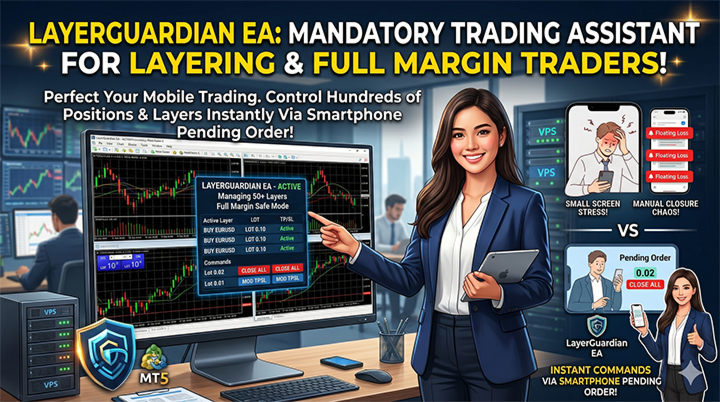
Layer Guardian EA:MT4モバイルトレーダーに必須の「リモートコントロール」
外出先でのトレード管理に苦労していませんか?
レイヤリング戦略(ナンピン・ピラミッティング)やフルマージンエントリーを活用するトレーダーであれば、MetaTrader 4のモバイル版におけるフラストレーションをご存知のはずです。注文自体は瞬時に実行できますが、ストップロス(SL)やテイクプロフィット(TP)の変更、あるいは数十に及ぶレイヤーの同時決済など、ポジション管理の場面になるとモバイルアプリでは対応しきれません。
ボラティリティの高い相場の中で、スマートフォンから複数のオープンポジションを管理するのは遅く、ストレスが溜まり、チャンスの逸失や不要な損失につながりがちです。
LayerGuardian EAは、あなたのMT4モバイル体験に欠けていた「ピース」を埋めるツールです。
LayerGuardian EAとは?
LayerGuardian EAは、(VPS上で稼働している)MT4ターミナルを強力なリモートコントロール管理システムへと変貌させます。特定の保留注文のボリューム(ロット)を「秘密のコマンド」として利用することで、MT4のスマホまたはタブレットアプリから直接、アカウント全体をコントロールできるようになります。
これはトレーディングデスクのための究極の「リモートコントロール」であり、PCにログインすることなく、ワンタッチで複雑なポジション管理タスクを実行できます。
主な機能
- モバイルファースト設計: MT4モバイル版とPC版の機能ギャップを埋めるために特別に構築されています。
- 一括ポジション制御: すべてのポジション(または買い/売りなどの特定タイプ)を即座に決済します。
- 動的なSL/TP変更: 保留注文を配置するだけで、すべてのレイヤーのSLとTPを同時に設定・変更できます。
- 自動ブレークイーブン(Auto Break Even): 外出先でも資金を保護します。目標利益に達した際、EAが自動的にストップロスをエントリー価格に移動させます。
- グローバル実行: 複数の通貨ペアを開いていますか?「トータル」コマンドを使用すれば、すべてのシンボルにわたるアカウント全体のアクションを1秒で完了できます。
- VPS最適化: 極めて軽量かつ安定しており、高負荷なフルマージン戦略を実行するトレーダーに最適です。
なぜLayerGuardian EAが必要なのか?
フルマージンやレイヤリング戦略において、スピードはすべてです。相場が不利な方向に動いたときや利益目標に達したとき、小さなスマートフォンの画面で「決済」ボタンを50回もクリックしている時間的余裕はありません。
LayerGuardian EAがこれを解決します。特定のロットサイズで保留注文を配置するだけで、EAが面倒な処理をすべて代行してくれます。より安全で、より速く、外出先でもデスクトップターミナル並みの正確さでトレードを行うことができます。
インストールと設定
- VPSへのデプロイ: MetaTrader 4をVPSにインストールし、LayerGuardian EAをいずれか1つのチャートにアタッチします(アカウント上のすべてのシンボルとポジションを監視します)。
- モバイルからのトレード: MT4のスマホ/タブレットアプリを開きます。
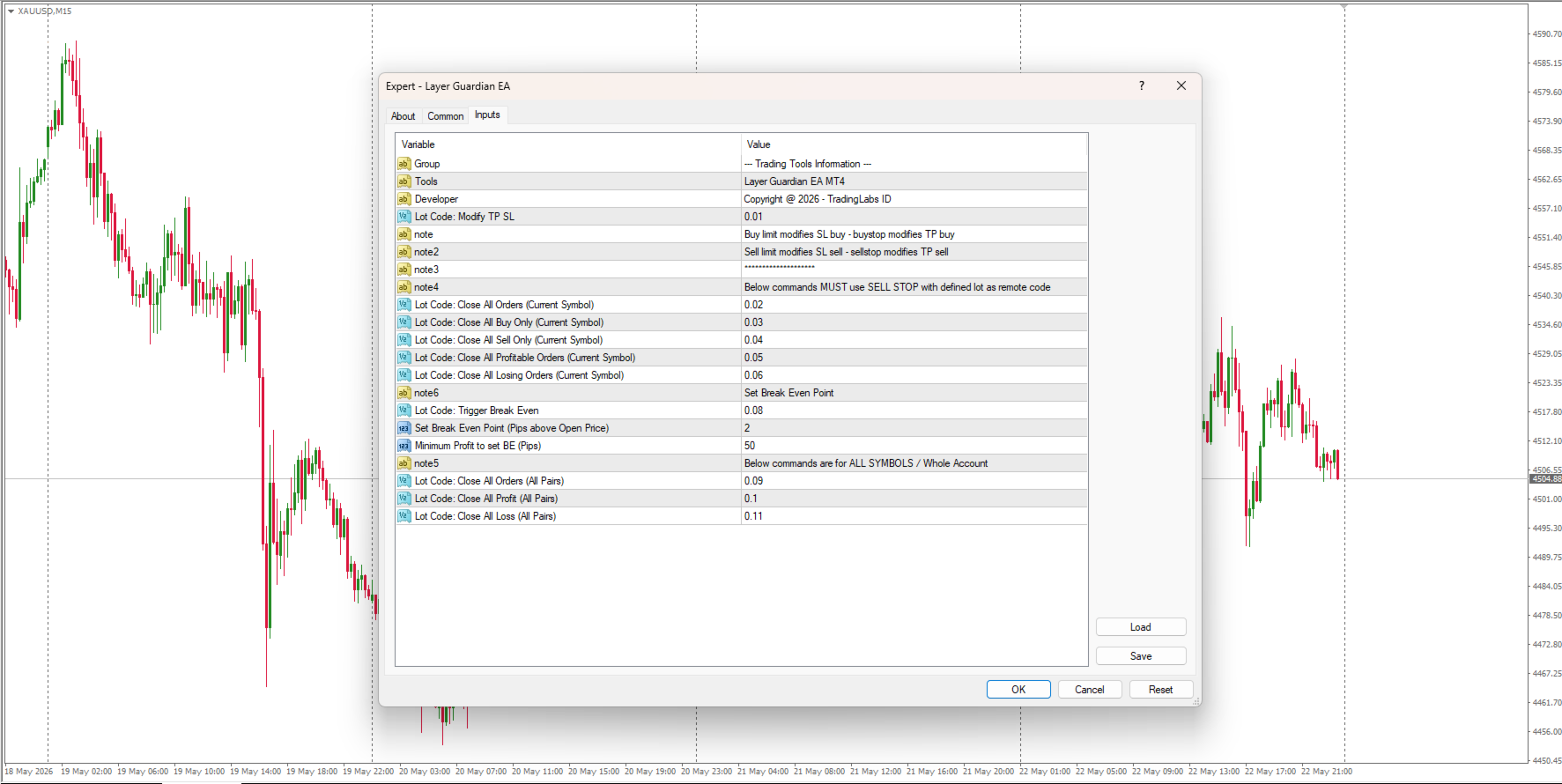
- 保留注文によるコマンド送信: EAの設定で定義された特定のロットサイズを使用して、保留注文(Buy Limit、Buy Stop、Sell Limit、Sell Stopのいずれか)を配置します。
- 即時実行: EAが保留注文を検出し、コマンドを即座に実行した後、その保留注文を自動的に削除します。
コマンドガイド
| ロット (Lot) | コマンドアクション (Command Action) |
|---|---|
| 0.01 | 全ポジションの SL / TP を変更 |
| 0.02 | すべてのポジションを決済(現在のシンボル) |
| 0.03 | すべての買いポジションを決済(現在のシンボル) |
| 0.04 | すべての売りポジションを決済(現在のシンボル) |
| 0.05 | 含み益のあるポジションをすべて決済 |
| 0.06 | 含み損のあるポジションをすべて決済 |
| 0.08 | ブレークイーブンの設定(自動SL) |
| 0.09 | すべてのポジションを決済(すべてのシンボル) |
| 0.10 | すべての利益を決済(すべてのシンボル) |
| 0.11 | すべての損失ポジションを決済(すべてのシンボル) |
モバイルトレードに欠けていた機能
スマホからのトレードにおける限られたコントロールに妥協するのはもう終わりです。プロのスキャルパーであれ、レイヤリング愛好家であれ、フルマージンハンターであれ、LayerGuardian EAはあなたに主導権を取り戻すツールです。
それは、MetaTrader 4が本来備えておくべきだった機能です。今すぐLayerGuardian EAを手に入れ、モバイルトレードをプロフェッショナルなレベルへと引き上げましょう。
--- MT4 Version is Here ---
https://www.mql5.com/en/market/product/178314
サポート&レビュー
あなたの成功が私の最優先事項です。この製品を気に入っていただけましたら、5つ星のレビューをいただけると大変ありがたいです!設定に関するサポートが必要な場合や機能のリクエストがある場合は、フィードバックを残す前にダイレクトメッセージをお送りください。いつでもお手伝いいたします。
- 私のプレミアムトレードツールをすべてチェックする: https://www.mql5.com/en/users/suhendrawan/seller
- 迅速なサポートのための連絡先: https://www.mql5.com/en/users/suhendrawan