Technical Ratings Indicator MT5
- インディケータ
- Hieronymos Junior Starch
- バージョン: 8.32
- アクティベーション: 5
Technical Ratings for MT5
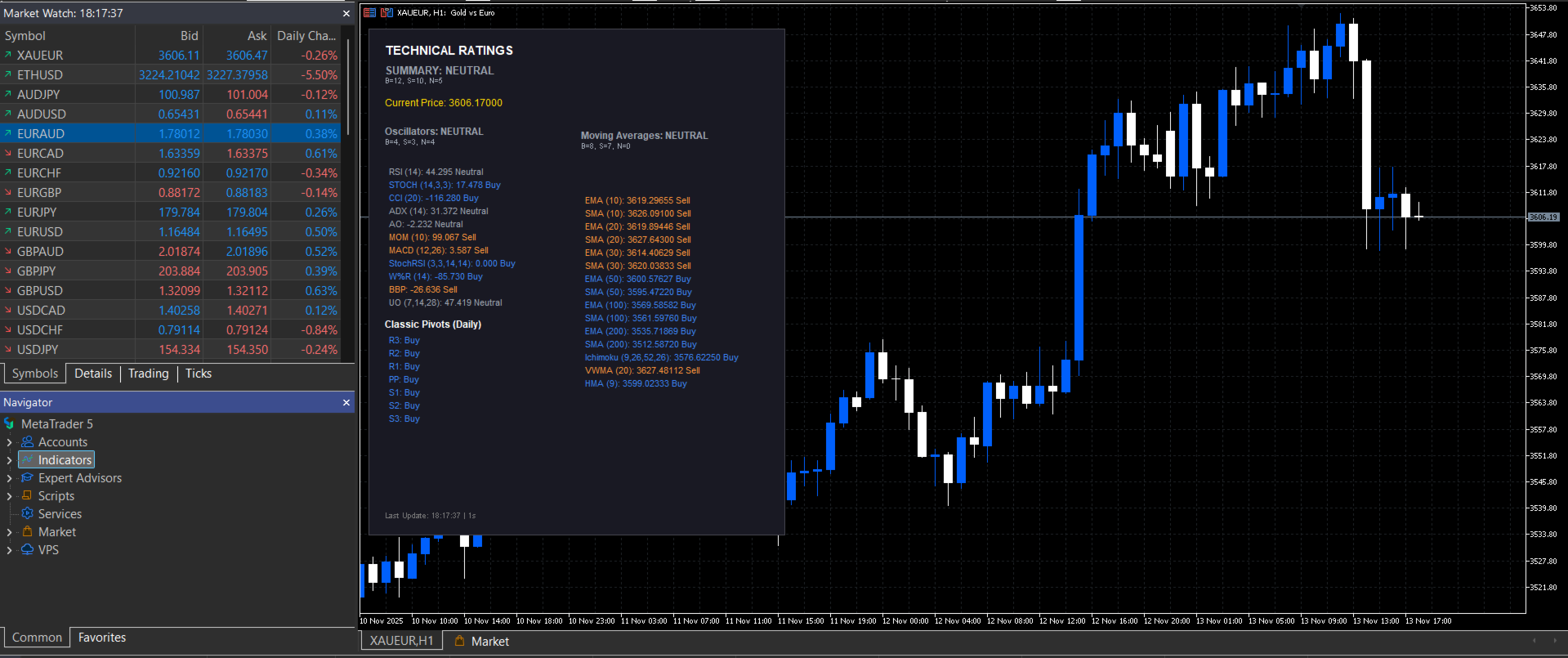
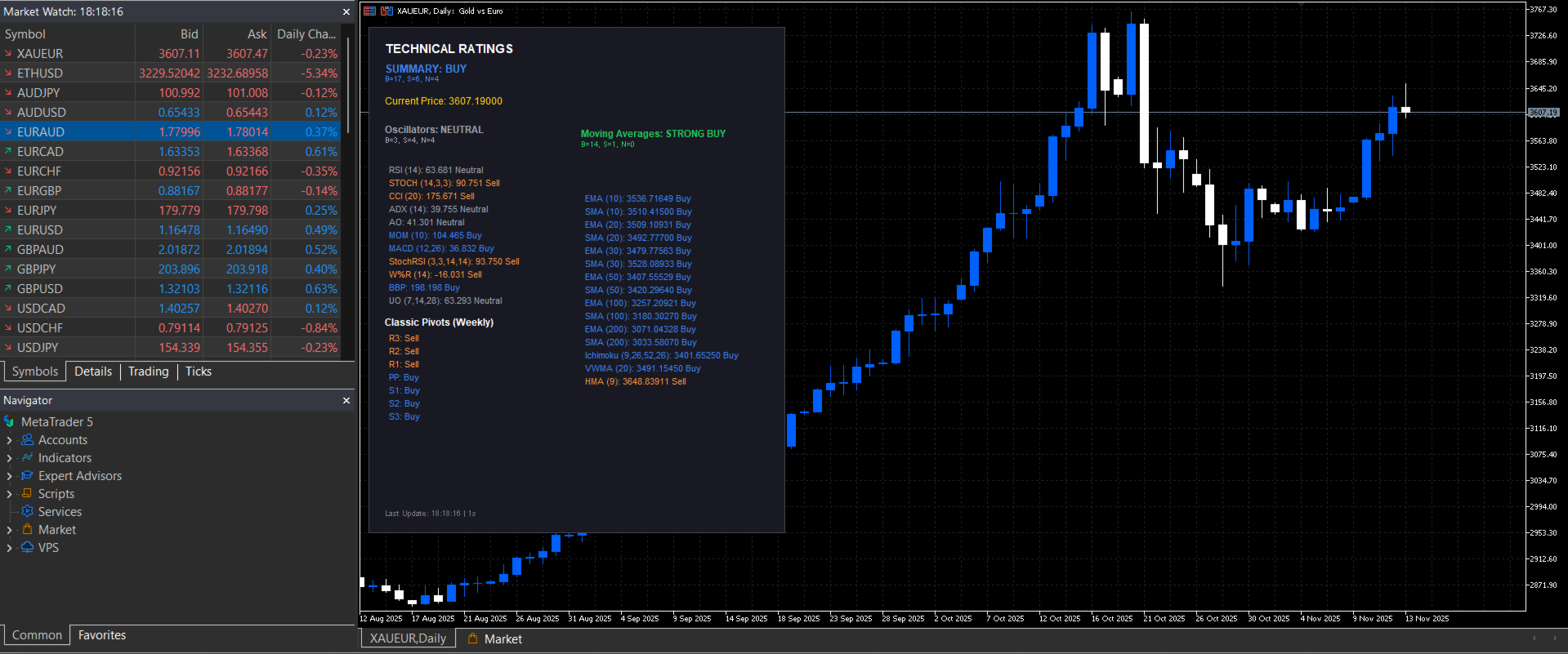
A multi-indicator analysis dashboard that displays aggregated technical signals directly on your MetaTrader 5 charts. This indicator calculates buy, sell, and neutral signals from 11 oscillators, 15 moving averages, and classic pivot points, presenting them in a single organized panel.
What It Does
Technical Ratings analyzes multiple technical indicators simultaneously and presents their consensus as clear trading signals. Instead of opening dozens of indicator windows, you get an instant overview showing what percentage of indicators are bullish, bearish, or neutral at any given moment.
The indicator evaluates three categories of technical tools: oscillators that measure momentum conditions, moving averages that identify trend direction, and pivot points that mark potential support and resistance levels. Each category generates individual signals that combine into an overall market summary.
Signal Classification
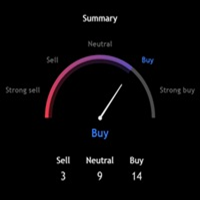
The indicator categorizes market conditions into five levels based on the percentage of bullish indicators. When 70% or more indicators show buy signals, the rating displays Strong Buy. Between 55-70% bullish signals results in a Buy rating. Balanced or mixed signals appear as Neutral. Sell ratings appear when 55-70% of indicators are bearish, and Strong Sell when 70% or more show bearish signals.
This percentage-based approach provides a quantitative measure of technical consensus rather than relying on subjective interpretation of individual indicators.
Oscillator Analysis
The dashboard tracks 11 oscillators including RSI, Stochastic, CCI, ADX, Awesome Oscillator, Momentum, MACD, Stochastic RSI, Williams %R, Bull Bear Power, and Ultimate Oscillator. Each oscillator is evaluated using standard overbought and oversold thresholds.
RSI generates sell signals above 70 and buy signals below 30. Stochastic uses 80 and 20 as thresholds. CCI marks overbought above 100 and oversold below -100. Williams %R signals overbought above -20 and oversold below -80. The Stochastic RSI and Ultimate Oscillator follow similar threshold logic.
MACD signals derive from main line and signal line crossovers. Momentum compares current values to 100, generating buy signals when above and sell signals when below. The Awesome Oscillator evaluates directional changes, while Bull Bear Power measures market strength relative to a 13-period EMA.
Moving Average Analysis
The indicator evaluates 15 moving averages including exponential and simple moving averages at standard periods of 10, 20, 30, 50, 100, and 200 bars. It also incorporates Ichimoku, VWMA, and HMA calculations.
Each moving average uses a straightforward comparison: when current price trades above the moving average, a buy signal is generated; when price trades below, a sell signal appears. This simple rule applies consistently across all 15 moving averages, creating a clear trend consensus.
When the majority of moving averages show the same signal, trend direction is typically well-established. When signals are mixed, the market may be consolidating or transitioning between trends.
Pivot Points System
The pivot points feature calculates classic pivot levels using high, low, and close data from previous periods. The system identifies seven key levels: three resistance levels (R1, R2, R3), a central pivot point, and three support levels (S1, S2, S3).
Current price location relative to these levels generates signals. Trading above resistance levels suggests potential sell zones, while trading below support levels indicates potential buy zones. The pivot point itself serves as a reference for overall trend direction.
Pivot timeframe selection can operate in automatic mode, which selects daily pivots for intraday charts, weekly pivots for daily charts, and monthly pivots for weekly and higher timeframes. Manual override allows you to specify daily, weekly, or monthly calculations regardless of chart timeframe.
Display Features
The indicator presents information through a panel that can be positioned anywhere on your chart. The panel shows real-time values for each technical indicator alongside its current signal classification. Color coding makes signals immediately recognizable: green for buy, blue for neutral buy, gray for neutral, orange for sell, and red for strong sell.
The panel displays summary statistics showing the exact count of buy, sell, and neutral signals across all indicators. Current price is shown prominently at the top of the panel. The display updates at intervals you specify, from 1 to 60 seconds.
All visual elements are customizable including panel position, size, colors, and font size. You can adjust the panel width and height, choose your own color scheme for backgrounds, borders, text and signals, and select font sizes from 6 to 12 points for optimal readability on different screen sizes.
Practical Applications
Multi-chart scanning becomes efficient when you attach the indicator to multiple instruments. The color-coded summary lets you quickly identify which markets show the strongest technical alignment without analyzing each chart individually.
Trend confirmation improves when you observe moving average consensus. When 10 or more moving averages align in the same direction, the trend typically has strong technical support. Mixed moving average signals often indicate consolidation or trend transitions worth monitoring.
Reversal detection benefits from oscillator monitoring. When multiple oscillators simultaneously reach extreme levels, price corrections or reversals may develop. The aggregated oscillator count helps you identify these conditions systematically.
Multi-timeframe alignment becomes clearer when you apply the indicator across different chart periods. Trading in the direction where multiple timeframes show consensus can improve trade selection. Conflicting signals across timeframes may suggest waiting for better alignment.
The indicator serves as a confluence tool within larger trading systems. It does not generate standalone trading signals but rather provides technical context for your existing strategy. Use it to confirm setups identified through your primary analysis methods or to filter out trades with poor technical alignment.
Expert Advisor Integration
The indicator can be integrated into automated trading systems. All signal data is accessible programmatically through indicator buffers, allowing Expert Advisors to read the technical consensus and incorporate it into trading logic.
Developers can use the aggregated buy/sell/neutral counts as filter conditions, read individual indicator signals for specific logic requirements, or combine the overall rating with other EA decision criteria. The indicator handles all calculations internally, providing clean data output for automated systems.
Technical Specifications
The indicator runs efficiently on all MetaTrader 5 platforms regardless of system specifications. Calculations occur only at specified update intervals rather than on every tick, conserving CPU resources. The panel appears immediately upon indicator attachment with no loading delays.
All signals are based on confirmed data and do not repaint. Once a signal appears, it reflects the actual technical condition at that moment and does not change retroactively. This stability is essential for both manual analysis and automated trading applications.
The indicator works on all forex pairs, indices, commodities, stocks, and cryptocurrencies. All timeframes from M1 through MN1 are supported. The minimum recommended MetaTrader 5 build is 3950, though the indicator may function on earlier builds.
Customization Options
Update frequency can be set from 1 to 60 seconds based on your monitoring preferences. Shorter intervals provide more responsive updates while longer intervals reduce computational load.
Pivot point analysis can be toggled on or off. When enabled, you can select automatic timeframe detection or manually specify daily, weekly, or monthly pivot calculations. This flexibility allows you to match your preferred pivot analysis style.
Panel positioning is adjustable through X and Y distance parameters. You can place the panel in any screen location that suits your chart layout. Panel size is customizable through width and height parameters, defaulting to 510 pixels wide and 620 pixels tall.
The complete color scheme is under your control. Background color, border color, text color, and all five signal colors can be customized to match your preferred visual style or adapt to different chart themes.
Understanding the Tool
This indicator is an analysis dashboard, not a trading system. It aggregates technical indicator data and presents it in organized format, but does not make trading decisions. You remain responsible for trade selection, entry timing, position sizing, and risk management.
The indicator displays what technical indicators are currently showing. It does not predict future price movement or guarantee that technical signals will lead to profitable outcomes. Market conditions change constantly, and technical indicators can generate false signals.
Use this tool as part of a complete trading approach that includes fundamental analysis, risk management, and your own market experience. The technical consensus it displays is one input among many factors you should consider before entering or exiting trades.
No indicator can replace proper trading education, strategy development, and disciplined execution. This tool aims to save time by consolidating technical analysis, but the trading decisions remain yours.
Platform: MetaTrader 5 (build 3950 or higher recommended) Compatibility: All symbols and timeframes Type: Chart Indicator Category: Technical Analysis
This product is an informational tool for technical analysis. It does not place trades automatically and requires user interpretation and decision-making. All trading involves risk of loss.