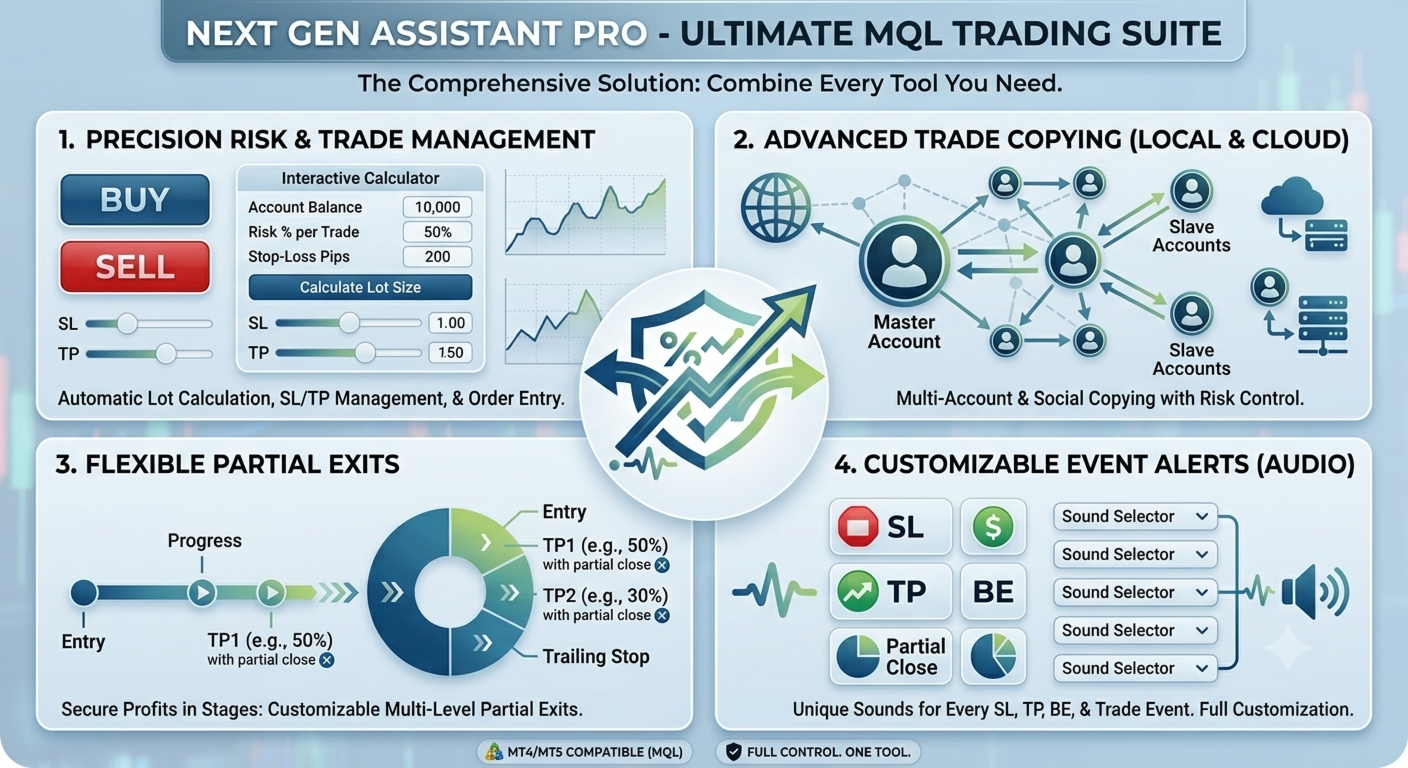
Unlock the full power of MT5 with NGA Pro Next Gen Assistant Pro — the most advanced trading assistant designed to give you full control over your trades… even from your phone! 📱🔥.
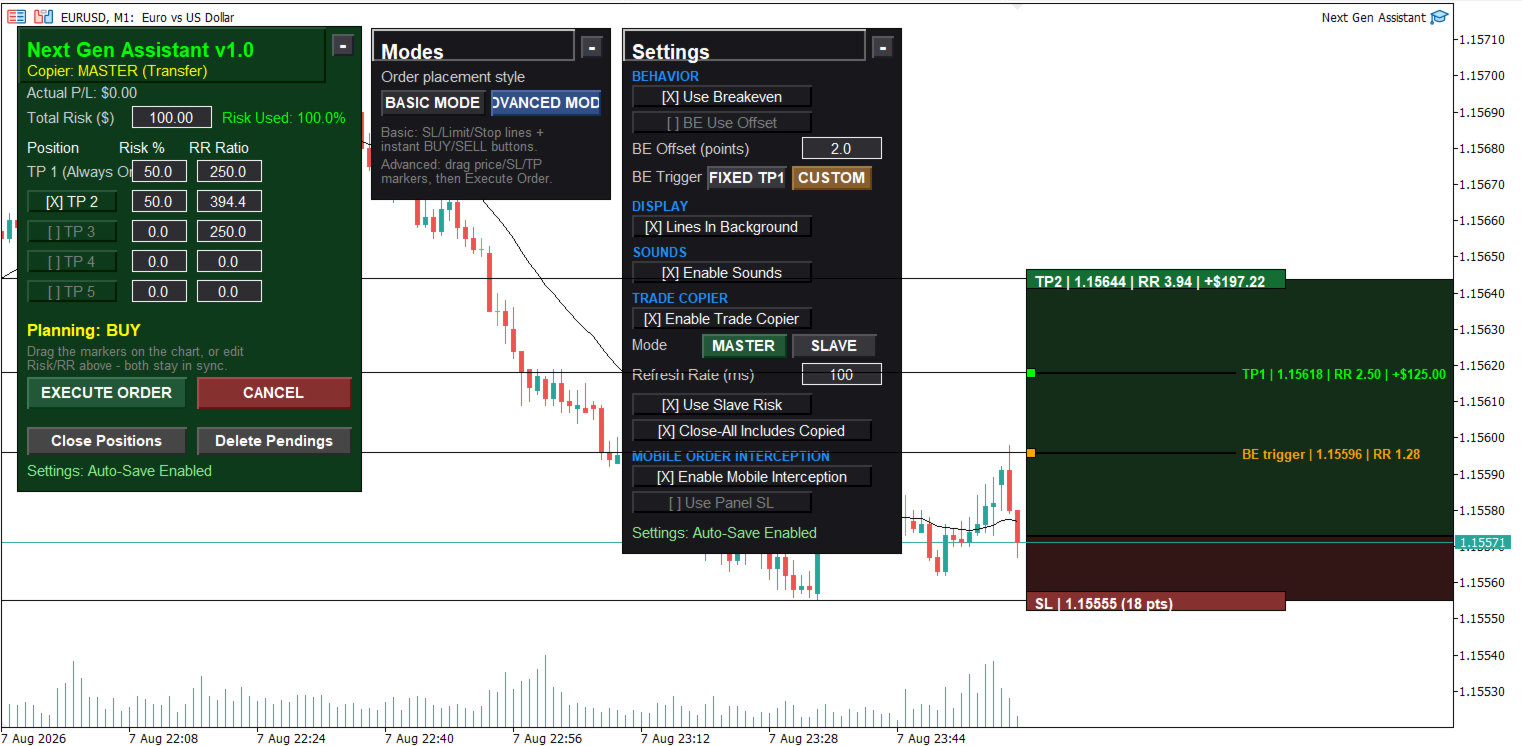
-Risk calculation, dollars stop loss based: by using NGA you can set the exact amount you willing to lose each time, without having to deal with manual pips calculation,justdrag the visual Stop loss line to your SL place and execute the trade, the NGA will automatically figure out the right lot size it needsto risk the chosen amount in that trade.
-Take partials, multiple take profits: NGA can split your chosen total risk on multiple positions as a one trade and each position has its own TP based on RR that can bemanaged later, you can set up to 5 partials using NGA.
-Trade management, auto breakeven:when placing a multiple position trade based, the NGA can move all the remaining positions's SLs to break even after the TP1 got hit (first partial), also allows an offset base on points so you can totally risk free on you trade as soon as the TP1 got hit,
or place the Breakeven trigger anywhere in the chart.
-Customizable sound effect, sound event based system: using NGA you can set your own special sound for each event like when TP1; TP2; TP3; SL; Breakeven got hit. in order to use this option you need to add your sounds to "C:\Program Files\MetaTrader 5\Sounds" this is the default MT5 path. the files must be in .WAV format and each file name must much the name in the EA settings in the sound section.
-Trade copier, copy your trades: you can copy your trades from your main account to other accounts, set your main account to MASTER, and your other accounts to SLAVE and set the total risk for each slave based on their balance, then what ever you execute in the master will be executed instantly in the slaves using their pre set local risk, you can still manage all the slaves existing trades by moving TP or SL or close the trade, the copy trading system supports the multiple positions (taking partials) the slaves uses their local risk but the Master's distribution. in case you had issues settings the NGA Pro on multiple Terminals or perhaps you run out of activations, this Slave stand alone version will let you still using the trading system without having to install NGA Pro on all terminals, since this product is for Free: the stand alone slave is not available in the market anymore, Contact the seller to get access
-Using the NGA from meta trade on Mobile: by enabling the mobile interception in the EA, NGA will detect every Stop or limit order being placed on you phone and it will replace it with the proper position, proper risk, TP take partials settings, all based on the pre set settings on the EA on MT5 pc also will send the commands to the slaves if copy trading was on,DISCLAIMERthe NGA is not modifying the trade from mobile before it placed, but it deletes it instantly and replace it with a proper one in a very fast way 200 milliseconds, that is why the market executions won't work.
if you had any issues or trouble setting up the tool, contact me.

Hello friends. I wrote this utility specifically for use in my profile with a large number of Expert Advisors and sets ("Joint_profiles_from_grid_sets" https://www.mql5.com/en/blogs/post/747929 ). Now, in order to limit losses on the account, there is no need to change the "Close_positions_at_percentage_of_loss" parameter on each chart. Just open one additional chart, attach this utility and set the desired percentage for closing all trades on the account. The utility has the following fu
The Price Action Builder Premium expert advisor is an extension of the freely available Price Action Builder Basic :
it provides 2 new candlestick patterns besides the pinbar (already available in the basic edition); in most configurations, backtesting usually shows an average yearly return rate increased by approximately 50%; the account growth curve is also smoother, due to larger number of trades, almost double (2x) compared to the free version.
While aimed primarily at obtaining
OB FVG Trade Copier: Unified Master & Slave EA Version: 2.00 Type: Trade Copier / Risk Management Utility Compatibility: MetaTrader 4 & MetaTrader 5 (Cross-compatible codebase)
Overview The OB FVG Trade Copier is a professional-grade, unified trade copying system designed to mirror trades between Master and Slave accounts seamlessly. Built with a unified architecture, a single EA file serves as both the sender (Master) and receiver (Slave) simply by toggling the EA Mode in the settings. It uti
Here our more valuable tools
SMC Trend Trading , Easy SMC Trading , Institutional SMC Architect Volume Analysis Tools , Volume flow Profile , Market volume profile , FVG with Volume , Liquidity Heatmap Profile , Volume Spread Analysis You Give an Instruction: When you run the script, a window pops up with a dropdown menu. You choose exactly what you want it to do from the list (e.g., "Close Profit Only" or "Delete Pending Orders"). It Scans Your Positions: The script then reads
Gold Trade Manager PRO MT5 is a manual trade management utility for MetaTrader 5. It is designed for traders who want to open, protect and manage positions directly from the chart without switching between multiple terminal windows. Current price: $59 - increases by $10 after every 20 purchases until reaching the final price of $119 . Next price: $69 . Complete Buyer Kit: 40 Professional Resources included at no additional cost. MT5 Presets, PDF Guides, Checklists, Mindmaps, Reference Cards, and
MT5 history exporter for accurate trade analysis and CSV export. Export trades to Excel from MetaTrader 5 with full performance metrics. Advanced MT5 trade analyzer with MAE, trade duration, and reconstruction.
Usually platforms hide critical information about how your trades actually behave. History Downloader and Trade Analyzer solves this. It rebuilds your trades from raw deal history and exports a clean, structured dataset with accurate metrics MT5 does not provide. What You Get A fully s
PNL MANAGER PRO — Automatic Exit Manager with Smart Risk Control
Set your entry, walk away. PNL Manager Pro sets your stop loss and take-profits automatically, locks in profit in stages, moves you to breakeven, and trails the rest — all while keeping your risk inside the limit you set.
Try Before You Buy: You can download and test the Pnl MANAGER free demo version on a demo acc
Talents ATR Scalper Utility (MT5) The Talents ATR Scalper Utility is a professional-grade trade execution and management tool built for MetaTrader 5. Inspired by the Biblical Parable of the Talents , this utility is designed to help traders multiply their potential with precision risk control, one-click simplicity, and advanced automation. Whether you’re scalping forex, gold, or indices, this tool delivers speed, consistency, and confidence. Key Features One-Click Trade Preview Click below price
TradeGuard Capital Protection Professional Risk, Exposure & Trade Manager for MetaTrader 5 This utility acts as a professional insurance system for your trading account. TradeGuard Capital Protection is a professional-grade risk & money management utility designed to protect your trading account from excessive losses, emotional trading, and uncontrolled exposure. This tool does NOT open trades .
It strictly manages risk, drawdown, exposure, and safety protections . Perfect for manual traders, EA
Here our more valuable tools
SMC Trend Trading , Easy SMC Trading , Institutional SMC Architect Volume Analysis Tools , Volume flow Profile , Market volume profile , FVG with Volume , Liquidity Heatmap Profile , Volume Spread Analysis Key Features 1. Total Immersion UI (The "Blackout") Chart Masking: Upon loading, the tool turns the background, grid, and candles pitch black. This hides the noise of the market ticks, allowing you to focus purely on your performance data withou
Pattern Recognition EA - From Learn to Earn.
The market repeats itself. This EA finds every past repeat of the current candle sequence - and lets history vote the direction.
ONE SHAPE. EVERY REPEAT IN HISTORY VOTES.
The last N candles on your signal timeframe form a shape. The EA scans the history you choose - a fixed number of bars or everything your broker provides - for the SAME shape, and checks what happened next, every single time. Only when enough repeats exist AND a clear majority of t
Capital Management EA – Smart Risk Management & Profit Optimization for MT5 Take control of your trading capital with smart, automated strategies — fully optimized for MetaTrader 5 (MT5). Looking to protect your capital and maximize profits through automated money management strategies ?
Capital Management EA is the all-in-one Expert Advisor for MetaTrader 5 (MT5) that helps you trade smarter, not harder. Core Features: 5-in-1 Capital Management Strategies – Built-in versatility
Gr
Manual Grid Pro v1.00 – Advanced Manual Trading Panel with Intelligent Multi-Level Grid
Manual Grid Pro is a premium, beautifully designed trading dashboard for MetaTrader 5 that combines powerful manual entry with fully automated grid management. It gives traders complete control: you decide when and in which direction to enter the market, and the EA instantly builds a professional multi-level grid of pending orders behind your position — with progressive lot sizing, basket-level risk manageme
Auto SL TPは、手動で建てたポジションと保留注文にStop LossとTake Profitを自動で設定します。希望するSLとTPの距離を一度設定すれば、対象となる注文を検出したときにツールが自動で適用します。 1つのチャートから現在の銘柄またはすべての銘柄を管理し、ポジション、保留注文、またはその両方を選択できます。必要に応じて、設定可能なトレーリングストップも使用できます。 1つの銘柄または口座全体を管理 Current Symbol では、ツールをセットしたチャートの銘柄だけを管理します。チャートごとに異なる保護距離を使いたい場合に適しています。 All Symbols では、1つのチャートから口座全体の対象注文を管理できます。複数銘柄に同じSL、TP、トレーリング設定を適用したい場合に便利です。 管理する注文を選択 保有ポジション、保留注文、またはその両方を管理できます。Positionsは、すでに約定している成行ポジションだけにルールを適用します。Pending Ordersは、約定前のLimit注文とStop注文を対象にします。Bothを選ぶと、両方のグループを1つ
Local Copy Trader Utility - Professional Copy Trading System Overview Local Copy Trader Utility is the complete solution for mirroring trades between MetaTrader 5 accounts. With both Master and Slave functionality in one powerful Expert Advisor, it delivers reliable, lightning-fast trade copying with zero external dependencies. Perfect for managing multiple accounts, following trading signals, or transferring trades between brokers, this system ensures your positions stay perfectly synchronized
The utility allows you to build different types of graphs: Seconds chart from 1 second to 86400 seconds Tick chart from 1 tick and above The volume chart Delta chart Renko chart Range chart Product demo https://www.mql5.com/ru/channels/clustersecondforex Built-in indicators for volumetric analysis: daily market profile and market profile of the selected timeframe, Cluster Search Imbalance VWAP Dynamic POC, VAH, VAL the profile depth of the market vertical volume with various display options, del
Orphira Gold is an automated trading system developed specifically for gold trading in MetaTrader 5. It combines adaptive trade management, equity-based position sizing and several layers of portfolio protection in one straightforward Expert Advisor. The system continuously evaluates market conditions and opens trades only when its internal requirements are met. When a position moves against the expected direction, Orphira Gold may use carefully spaced recovery positions. Every additional order
Expert TP SL v04 - Professional Trading Assistant with AI Motivation System Advanced manual trading tool with automatic risk management, overtrading protection, and intelligent psychological support for disciplined trading. PRODUCT OVERVIEW Expert TP SL v04 is a comprehensive trading assistant designed for manual traders who want to maintain emotional discipline while automating risk calculations. This isn't just another order placement tool - it's a complete trading psychology system that pr
The EA allows you to extract the tick data history from the Mt5 terminal of your broker for any symbol.
Extraction is done on the common folder. Open the data folder from your Mt5 terminal, go back one tree and then look for the common folder.
Parameters fields (default values can change and all fields are imputable): 1. Symbol: leave blank if extraction is for the current chart symbol 2.Date 3. Time 4. Seconds before the time stamp under field 2, the tick data extraction to start 5. Second
CYGNIX RISK GLADIATOR — Professional Trade Manager & Risk Guardian for MT5
Guard every position. Manage every trade. Sleep at night.
Cygnix Risk Gladiator is a professional-grade position management Expert Advisor that watches every open trade on your account and automatically applies institutional-level risk controls in real time. It does not generate signals — it protects, manages, and exits trades opened by you, your strategies, or any other EA.
Built for IC Markets and fully compatible w
NOTE: FOR SETTINGS AND TECHNICAL SUPPORT HERE IS OUR SMART MONEY TELEGRAM LINK: https://t.me/ +g51Apb2W5Ck0ZGFk
WHAT IS SMART MONEY EA? Smart Money EA is not just another trading robot. It's a high precision trend following EA that leverages the Smart Money concept, price action, and market momentum to enter trades with exceptional accuracy." It's your all-in-one solution for trading EURUSD, Crude Oil, Nasdaq 100, Germany 40, and even volatility indices, including Step index . STAY INFORMED AN
RRtoolbox - Professional Tools: Risk:Reward Trading Tool (SL/TP Horizontals + Pending orders + Diagonals), Alerts set on trend lines (for alerts on diagonal levels), SelfManagement (BE, partials...), close/cancelling by time, Statistics, Info and trading on chart.
One-Click Trading with Visual Risk:Reward Management
RRtoolbox is a comprehensive trading panel that combines one-click order execution, statistics and powerful visual Risk:Reward tools, alerts set with trendlines, on chart butt
Equity Lock Manager is an equity and high-water-mark protection utility.
Key functions: - Initial-equity and peak-equity reference modes - Configurable arming thresholds - Clear lock and breach states - Scoped pending-order cancellation - Optional full or partial position close - Persisted recovery state - Confirmed baseline reset controls
The utility enforces protection settings configured by the user. It does not provide entry signals, predict market direction or guarantee trading results. T
================================================================================ POC BREAKOUT - V20.72. Full Professional Grade Toolkit ================================================================================ POC Breakout is a full MetaTrader 5 trading dashboard for discretionary traders who want breakout signals, Point of Control (POC) context, volume profiles, order flow, market structure, news, alerts, and advanced trade planning in one professional workspace. Attached directly to you
One button. One trade. MT5 Trading Deck is a hotkey trading panel for MetaTrader 5 that turns the platform into a keyboard-driven execution cockpit. Stop loss, take profit and lot size are pre-calculated for every key; the moment you press, a market order is live on the broker. A complete technical user manual is attached in the product Comments section. It documents every input parameter, the full hotkey map, the recommended Stream Deck XL layout, and the advanced workflows for Pre-Limit orders
Your backtest filled every order at the price it asked for. Your account does not. EA Slipstream measures what execution costs your EA, using your own fills, slippages and spreads to show you the true performance of your EA.
A backtest prices every trade at the level the EA named. In live trading a pending order fills at whatever price is available when it triggers, a stop closes wherever the market is when it is hit, and the spread at that moment is whatever the account was quoting. The differ
That backtest looks great. But will it still be making money tomorrow, next week, next month?
EA Overfitter re-runs your EA on 100 price histories it has never seen. One score tells you if the edge is real.
A backtest tells you what an EA did on one price history — the one that happened to occur. What you cannot tell from it is how much of that result was the strategy and how much was the particular path.
EA Overfitter answers that. It builds up to 100 synthetic price histories your EA has n
The product will copy all telegram signal to MT5 ( which you are member) , also it can work as remote copier. Easy to set up, copy order instant, can work with almost signal formats, image signal, s upport to translate other language to English Work with all type of channel or group, even channel have "Restrict Saving Content", work with multi channel, multi MT5 Work as remote copier: with signal have ticket number, it will copy exactly via ticket number. Support to backtest signal. How to s
Your EAs cannot see each other, but Anchor can. Anchor gives you one place to coordinate your EAs, manage risk, and decide when trading is allowed. It works alongside the trading bots you already use without any changes to them. The Problem One EA opens a trade. Then another starts trading. The next thing you know, you wake up to multiple grids built across your account. Each EA may be doing exactly what it was designed to do, but together they can place far more risk on your account than you in
Footprint Chart Pro — Professional OrderFlow EA for MetaTrader 5
Version 6.34 | Professional tool for real traders | Institutional-Grade Visualization DEMO USERS - PLEASE SELECT EVERY TICK / REAL TICK WHEN TESTING AND YOU HAVE DOWNLOADED HISTORICAL DATA. IF YOU SEE A WAITING SCREEN AND IT IS NOT DOWNLOADING, IT MEANS YOU HAVE LOW HISTORICAL DATA. TRY 1 MIN AND 5 MIN FIRST ON 1 DAY DATA. ONE DAY DATA SHOULD BE THE NEWEST AND MOST CURRENT DATE. PLEASE WAIT UNTIL THE MARKET HAS ROLLED OVER PERIOD.
Attention: You can view the program operation in the free version YuClusters DEMO . YuClusters is a professional market analysis system. The trader has unique opportunities to analyze the flow of orders, trade volumes, price movements using various charts, profiles, indicators, and graphical objects. YuClusters operates on data based on Time&Sales or ticks information, depending on what is available in the quotes of a financial instrument. YuClusters allows you to build graphs by combining da
FUTURES ORDERFLOW FOOTPRINT CHART Professional OrderFlow EA for MetaTrader 5
Version 1.01| Professional tool for real traders | Institutional-Grade Visualization
STRATEGY TESTER USERS - PLEASE SELECT EVERY REAL TICK WHEN TESTING AND YOU HAVE DOWNLOADED HISTORICAL DATA. IF YOU SEE A WAITING SCREEN AND IT IS NOT DOWNLOADING, IT MEANS YOU HAVE LOW HISTORICAL DATA. TRY 1 MIN AND 5 MIN FIRST ON 1 DAY DATA. ONE DAY DATA SHOULD BE THE NEWEST AND MOST CURRENT DATE. PLEASE WAIT UNTIL THE MARKET HAS ROL
Timeless Charts is an all-in-one trading utility for professional traders. It combines custom chart types such as Seconds Charts and Renko with advanced order flow analysis using Footprints , Clusters , Volume Profiles , VWAP studies, and anchored analysis tools for deeper market insight. Trading and position management are handled directly from the chart through an integrated trade management panel , while Market Replay and Virtual Accounts provide environments for practicing trading skills and
Trade Copier Ultimate - Telegram to MT5 Signal Copier Trade Copier Ultimate automatically copies Telegram trading signals into MetaTrader 5. The EA can read signal messages, detect the symbol, order type, entry price, Stop Loss, Take Profit levels and selected update commands, then execute or manage the trade in MT5 using your lot and risk settings. It is more than a basic Telegram to MT5 copier. TCU also supports Bot API and user-account Bridge workflows, Discord signal routing, local MT5 to MT
The Expert Advisor will help you forward all alert from MetaTrader 5 to Telegram channel/ group. All alert must save to folder <Data folder>MQL5\Files\Alerts\ , text file with format *.txt and screenshot with format *.gif or *.png.
Parameters: - Telegram Bot Token: - create bot on Telegram and get token. - Telegram Chat ID: - input your Telegram user ID, group / channel ID - Forward Alert: - default true, to forward alert. - Send message as caption of Screenshot: - default false, set true t
The product is used to trade base on any Alert signal in MT5 Easy to setup, simple format with custom keyword All option to management orders as trailing stop, breakeen, partial close, time filter, news filter ... Option to auto open grid orders How to setup and guide: Let read all details about setup and download indicator for auto get Alert Signal here Do not buy if you even can not install demo EA to your VPS ( some VPS block download EA from mql5 market)
We always bring customers high q
Unlock the full power of MT5 with NGA Next Gen Assistant — the most advanced trading assistant designed to give you full control over your trades… even from your phone! .
-Risk calculation, dollars stop loss based:
by using NGA you can set the exact amount you willing to lose each time, without having to deal with manual pips calculation, just drag the visual Stop loss line to your SL place and execute the trade, the NGA will automatically figure out the right lot size it needs to