 MetaTrader 5
 エキスパート
 インディケータ
 ライブラリ
ライブラリ
 ユーティリティ
 ウィジェット
 ルール
ルール
YouTubeにあるマーケットチュートリアルビデオをご覧ください
ロボットや指標を購入する
仮想ホスティングで
EAを実行
EAを実行
ロボットや指標を購入前にテストする
マーケットで収入を得る
販売のためにプロダクトをプレゼンテーションする方法
MetaTrader 5用取引ユーティリティ - 25
 以下はMetaTrader5での取引を簡素化する取引プログラムです。ユーティリティにカーソルを合わせると、その説明と目的が表示されます。
使用此EA可以通过币安交易所的API连接到MT5交易端,利用MT5强大的量化功能实现交易策略的回测。 操作方法: 1、首先 必须 把( http://api2.0.mt5.vip 、 https://fapi.binance.com )这两个 地址 填写到:mt5——工具——选项——EA交易下的WebRequest列表中,否则所有数据无法同步。 2、在导航栏找到EA,双击之后添加币安的API KEY ,保存后KEY自动保存; 3、KEY保存后会出现交易面板,通过MT5下的订单可以实时展现在面板,同事也可以监控币安交易所是否有同样的订单; 4、交易面板只展示订单的总持仓,请仔细核对,以防止漏单; 5、API KEY会自动保存在本地,第二次打开后无需重复输入; 6、目前只能支持BTCUSDT、ETHUSDT、LTCUSDT合约产品 7、最小交易量以币安的最小交易量为准; 8、币安KEY是存储在本地,不会上传到任何第三方,请放心使用; 9、如果想更换KEY ,请直接在EA内修改即可。
FREE

VYXAXIS Dispatcher is a free companion utility for Vyxaxis Tick. It processes WebRequest and supported Push notifications independently from the main Vyxaxis Tick chart workflow. Requires Vyxaxis Tick. VYXAXIS Dispatcher does not generate trading signals, execute trades, or provide a trading strategy. It is designed to separate notification delivery from the main tick-chart processing workflow, helping reduce the possibility of network-related delays affecting Vyxaxis Tick during periods of high
FREE

BS Trade Panel: Revolutionize Your Trading Approach Introducing the BS Trade Panel , the ultimate solution for traders seeking efficiency, speed, and accuracy in their market operations. Crafted with cutting-edge technology, our panel is designed to simplify your trading, making it more intuitive, swift, and effective. Innovative Features: Quick Orders with Shortcut Keys: Execute market orders or pending orders swiftly using configurable shortcut keys. Perfect for traders who need speed when ent
FREE

Close Trade A simple, fast, and practical tool for managing and closing trades in MetaTrader
In the trading world, there are countless methods and strategies for opening and closing positions. Sometimes, due to volatile market conditions or multiple open trades, you need a tool that allows you to close all or specific trades instantly and efficiently. Close Trade is designed precisely for that, a lightweight, reliable, and easy-to-use tool for complete trade and order management in MetaTrader.
FREE

After downloading, message me via MQL5 inbox to receive your FREE User Kit - setup guide, practical checklist, and workflow resources built specifically for XAUUSD traders. After years of trading Gold, one thing becomes clear fast: the P/L number alone does not tell you whether your position structure is clean or quietly building pressure. You can have a positive float while simultaneously carrying too many layered positions, a one-sided exposure that is not hedged, a margin level that is slowl
FREE

ProTrader Command Professional Trading Analytics & Risk Management System Transform your MetaTrader 5 into a professional trading platform with real-time analytics, automated risk management, and performance tracking. Core Features Real-Time Trading Dashboard Professional MT5 Interface Enhancement Live account metrics displayed directly on your chart Performance indicators with color-coded status alerts Position overview showing all trades at a glance Risk status monitoring with visual warnings
FREE

Exaado Capital care If you've been searching for ways to manage Drawdown control, Drawdown Control, Balance protection, or Daily Drawdown Limit related to trading with Prop Firms, FTMO, My Forex Fund, or Funded accounts, then you've come to the right place. Additionally, if you're looking to safeguard your trading account, we can help. Do you struggle with managing your drawdown while trading funded accounts? Our EA is designed specifically for those in your position. Many prop firms have a "Tra
FREE

The utility draws reversal levels using the formulas for each of the selected number of candles:
Pivot = (high + close + low) / 3 R1 = ( 2 * Pivot) - low S1 = ( 2 * Pivot) - high R2 = Pivot + (R1 -S1) R3 = high + ( 2 * (Pivot - low)) S2 = Pivot - (R1 - S1) S3 = low - ( 2 * (high - Pivot)) H = high L = low U = if the candle is bullish, then close. Otherwise - open D = if the candle is bullish, then open. Otherwise - close
On any timeframe.
After a new candle closes on the calculated timeframe
FREE

A fast, clean on-chart trading panel for manual traders. Open market or pending grid orders directly from your chart, manage SL/TP, lot size, trailing, spread and margin — without using the order window. Technical Features One-click BUY / SELL Live Bid / Ask inside buttons SL / TP input (Pips & Points) + quick +/- adjustment Trailing Stop control Pending Grid (Buy/Sell Limit & Stop) Step distance (Pips/Points) Order count Lot multiplier Real-time margin estimate (uses account currency) Live spre
FREE

Position Closer is advisor used to close all orders when the profit will cross specified value either above or below. You can close all orders with one button click.
On panel on chart you have options: Deactivate after close - If Deactivate after close is checked the advisor will disable Close above profit and Close below profit options after orders are closed either on crossing the profit or on hitting the CLOSE ALL button. Close above profit - If Close above profit is checked, the advisor wil
FREE
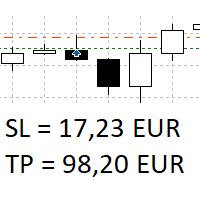
The panel shows all positions and all orders in a small movable window in the chart. Stop loss and take profit are converted into account currency. With the tool you can immediately see the maximum loss in the case of stop loss and the profit in the case of take profit. If there are several positions, a sum is formed. The panel shows either all positions/orders of the current symbol or all existing ones. The data is recalculated for each tick, and moving Stop Loss or Take Profit is immediately v
FREE

日本語
説明 このリスク管理ツールは、口座残高の割合(%)および成行注文(buy market と sell market)のみで動作します。指値注文では動作しません。 口座残高の任意の%を使用できます。設定アイコンをクリックして、%の値を入力してください。 使用方法 ストップを設定したい価格をマウスの左ボタンでクリックしてください。黄色いラインが表示されます。この黄色いラインがあなたのストップです。その後、''BUY MARKET'' または ''SELL MARKET'' ボタンをクリックしてください。 チャート上に黄色いラインを作成したくない場合は、''DELETE STOP'' ボタンをクリックし、その後 ''LOCK STOP'' ボタンをクリックしてください。この操作を元に戻すには、''UNLOCK STOP'' ボタンをクリックしてください(このボタンは ''LOCK STOP'' をクリックした後にのみ表示されます)。 非常に重要な注意(必ずお読みください) 「証拠金不足」により注文が拒否される可能性が非常に高いです。これは、リスク割合が高すぎるか、ストップ
FREE

The "Takeandstop" script is a powerful tool designed to streamline your trading workflow by automatically setting Take Profit (TP) and Stop Loss (SL) levels on your MetaTrader 5 chart. This script is particularly useful for traders who want to efficiently manage their risk and reward without the hassle of manually calculating and entering these levels. Key Features: Effortless TP and SL Placement: With a few clicks, the script allows you to set predefined Take Profit and Stop Loss levels for you
FREE

Your limits, enforced — not just displayed. Most funded accounts are not lost to a bad strategy. They are lost to one bad session. A bad hour, after a bad morning, when the daily limit was already half gone and nobody was counting. This counts. It sits on your chart, watches the two limits that end most evaluations, and refuses to send an order that would break one. In 30 seconds It is free, and it is not a trial. No expiry, no account limit, no countdown, no pop-up, nothing that switches off a
FREE
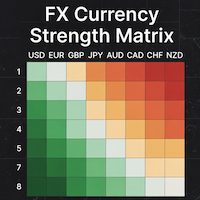
### MQL5 Marketplace Product Description FX Currency Strength Matrix – Professional MT5 Indicator
#### Overview The FX Currency Strength Matrix is a powerful, real-time visual tool that instantly reveals the true strength and weakness of all 8 major currencies in a clean, color-coded matrix format. No more guessing which currency is driving the pair – see the complete strength hierarchy at a glance and trade with institutional-level clarity.
#### Key Features - True 8×8 Currency
FREE

ProTrade Panel – Speed, Precision, Professionalism Master the markets with the ultimate MT5 assistant. Are you tired of the slow, clumsy default execution in MT5?
Do you struggle to manage multiple orders during high volatility?
ProTrade Panel is designed for serious manual traders. It combines One-Click Execution, Breakout Pending Orders, Bulk Closing, and Visual Risk Management into one sleek, floating interface. Key Features Smart Drag & Drop : Long-press the header to move th
FREE
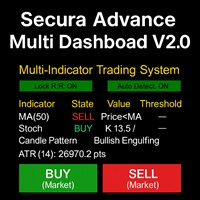
# Secura Multi Dashboard - Advanced Trading Assistant ## **Professional Multi-Indicator Analysis Platform** Secura Multi Dashboard is a comprehensive trading assistant designed for traders who demand clarity, precision, and efficiency. This powerful EA integrates multiple technical analysis tools into a single, intuitive interface, helping you make informed trading decisions without overwhelming complexity.
### ** Key Features:**
** Multi-Indicator Consensus System** - Simultaneous anal
FREE

The utility opens copies of open trades. It is very convenient if you use the Signals service and want to increase the volume of transactions.
Settings: Symbols: all symbols only current symbol Orders: Buy Sell Magic Any Magic Input Magic Lot size Original - lot size from original order; Fix Lot - fix lot size (input); Lot X Mult - lot size X koef; Stop Loss From sender - Stop Loss from original; Without - without Stop Loss; Plus Fix - Stop Loss from original order + fix points; Fix Point -
FREE

MTM Manual Trade Manager is a professional trading dashboard designed for manual traders who want better control over risk and trade management.
This Expert Advisor does NOT open trades automatically. All trading decisions and order executions are fully controlled by the trader.
Main Features: - Manual Buy and Sell execution from the dashboard - Visual Stop Loss and Take Profit using drag & drop lines - Fixed Lot and Risk Percentage position sizing - Automatic Break Even management - Multiple
FREE

OnBoard stats is a panel that show in a single view a lot of usefull information about working orders and trading account. It has 4 different sub-panels (from left to right): Symbols order statistics : it can be found symbols for which there are orders (market or pendings). Symbol with pendings are colored with "Pendings color". Clicking on a specific symbol row, chart will be changed to that symbol. Current symbol statistics : informations about the "current" symbol, the one which is opened in
FREE

G2 DASHBOARD PRO by Ida Bagus Putu Mahardika PROFESSIONAL TRADE EXECUTION & MANAGEMENT DASHBOARD G2 Dashboard Pro is a comprehensive trading management tool that revolutionizes how you place and manage orders. No more manual calculations or switching between windows – everything you need is in one interactive, draggable dashboard directly on your chart. KEY ADVANTAGES 1. CHART-BASED PENDING ORDER PLACEMENT Click on the chart to set your entry price visually Support for all order types: Bu
FREE

Visualize your floating profits and losses in real-time directly above your open order line. Order PnL is a minimalist indicator that calculates and renders the current floating (Profit + Swap) right above the entry price, allowing you to maintain 100% focus on the chart.
Key Points: Dynamic Positioning: The text follows the entry price when scrolling or zooming. Zero Lag Visual: Optimized using a millisecond timer; it does not freeze the interface or overload tick processing. Clean Design: Au
FREE

Bid Ask Spread Display - Real-Time Price Monitor Instantly visualize crucial market pricing information directly on your chart with this lightweight, efficient script. Perfect for all trading styles, this tool provides: Key Features: Real-Time ASK Price (Red) Real-Time BID Price (Green) Spread Display in Points (Blue) ️ Fully Customizable : Position, fonts, colors High Performance : Updates 10x/second Clean Layout : Professional three-line display Self-Cleaning : Automatically
FREE

Red Hot Volume By ZeeAM Khan Contact for Set files or see the Screen Shots
WhatsApp: Text only +447716409196
Best for XAUUSD on All Brokers
Minimum and Safest Balance is 1100$ at medium Risk Advanced Volume Spread Analysis (VSA) Trading Indicator Red Hot Volume By ZeeAM Khan is a professional Volume Spread Analysis (VSA) indicator designed to identify institutional activity, potential market reversals, stopping volume, climactic volume, and high-probability trading opportunities through advance
FREE

AlgoForex Smart Trade Panel Title: AlgoForex Smart Trade Panel - Visual Risk Management & Trading Category: Experts / Trading Utilities Price: Free Overview Take full control of your trading with the AlgoForex Smart Trade Panel — a lightweight, professional, and visually interactive trading assistant designed for both beginners and advanced traders. Tired of manually calculating lot sizes or struggling to place precise Stop Loss and Take Profit levels? This utility empowers you to
FREE

SmartRescuer is an advanced institutional-grade trading co-pilot designed to rescue stuck manual positions, manage floating drawdown, and lock basket profits automatically.
Key Features: - Anti-Whipsaw Breakout Engine: Uses Donchian Channels & ATR pullback retests to avoid false breakouts. - Smart Recovery Strategies: Supports Zone Hedging, Pullback Averaging, and Smart Hybrid execution. - Partial Loss Scraping: Gradually unwinds the worst losing orders using floating recovery profits. - Compl
FREE

SIMPLE AND QUICK CHART CLEANUP SCRIPT - FREE FOR ALL - EASY TO DRAG AND DROP ONTO THE CHART - A MUST HAVE IN MY EYES
Everybody loves to draw on a chart! But cleaning is nobodies favor. Most of the time it will be faster to dump all and redraw the important part. Repetition makes you good! ALWAYS think about that! KEEP IT GROWING, ;-) I wish you a good day, Traders!
If you need something, send me a message. Best wishes to you from Vienna!
FREE

Relentless Trade Journal — Free Trade Statistics for MetaTrader 5
Most trade journals flatter you. They add up your closing profits and skip the commission you paid on entry, so they show a rosier number than the truth. You think you are breaking even when you are actually losing to costs.
Relentless Trade Journal shows you the honest picture, right on your chart.
It is free. If it shows you one cost you were missing, an honest review helps other traders find it.
It is a non-trading utility.
FREE

Try turning dust to gold with Reverse copier! Unprofitable EA or strategy can become profitable with reversing the direction of it's trades. As of now only MT5 → MT4 bridge is available, new functions will be added accordingly. EA's that work best with Reverse trade system is single-shot or scalping EA's.
How it works:
When a trade is executed on Master account, Reverse copier sends special log to the common txt file with a command to "open/close, buy/sell, symbol, volume...etc". Reverse slave
FREE
The AllClosedMT5 utility in the form of an expert. The utility is designed for closing all open positions simultaneously based on the total profit (in the deposit currency) of all open positions. The utility can be attached to any chart with any trading instrument.
Parameters Profit - the total positive profit in the deposit currency, at which all open positions are closed (profit). Stop - the total negative profit in the deposit currency, at which all open positions are closed (loss). The valu
FREE
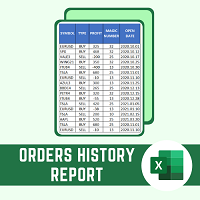
This script will create a report with all history orders in CSV format. The report is useful for those who run multiple EA's with different magic numbers in the same account. You can define some filters to generate your orders history report: 1) Initial date for assets in orders history. 2) Final date for assets in orders history. 3) Asset name. 4) Orders magic number. 5) Add balance/costs.
QUESTIONS ABOUT THE INSTALLATION OF PRODUCTS AT META TRADER You can also find some instructions on how
FREE

Short description :
TheTrendHunterMax is a LIMITED VERSION tool that can be used either as a trading robot for automated trading or just a signal provider for manual trading.
As an EA, it uses the techniques we usually employ in trading like determining the highs and lows on the trading chart. With this, it determines the trend convergence and divergence in the chart. Combined with the volatility, price movements, it analyzes the possible order type that can be most profitable. By default,
FREE

手動ヘルパーTP (Manual Helper TP) このツールは、利益を保護し、リスクを低減するために設計されています。 取引のストップロスを設定し、トレーリングストップを管理します。 使用方法 取引するシンボルのチャートにアタッチ(適用)すると、あなたのルールに従ってポジションを処理します。 すべての設定はポイント単位です。お使いのシンボルと戦略に合わせて調整することが重要です。デフォルト設定はXAUUSDで動作します。スキャルピングの場合は、より小さなSL、BE、TPを使用することをお勧めします。 このエキスパートアドバイザー(EA)は、決して自動で新規取引を開始しません。 その唯一の仕事は、あなたの個人的な設定に基づいて既存の取引のストップロスを管理することです。手動取引や他のEAによって開かれた取引を管理するための強力なアシスタントです。 主な機能 初期ストップロス: ストップロスなしで取引が開始された場合、このユーティリティは設定に基づいて自動的にストップロスを追加します。 ブレークイーブン保護: 取引が有利な方向に動くと、自動的にストップロスを移動させて少額の利益を確定
FREE

OB FVG Trade Copier: Unified Master & Slave EA Version: 2.00 Type: Trade Copier / Risk Management Utility Compatibility: MetaTrader 4 & MetaTrader 5 (Cross-compatible codebase)
Overview The OB FVG Trade Copier is a professional-grade, unified trade copying system designed to mirror trades between Master and Slave accounts seamlessly. Built with a unified architecture, a single EA file serves as both the sender (Master) and receiver (Slave) simply by toggling the EA Mode in the settings. It uti
FREE

MT5 Tick History Sync – Real Tick Downloader, History Verification & Data Export Download. Synchronize. Verify. Export. Make Every Backtest Count. Are you confident that your MetaTrader 5 backtests are using complete real tick history? Missing historical ticks can compromise the reliability of your backtesting results, especially when testing scalping strategies, high-frequency trading systems, and Expert Advisors that depend on precise price movements. MT5 Tick History Sync by Zistilo is a prof
FREE

JVH Trading Information Panel – Professional Account Dashboard (MT5) The JVH Trading Information Panel is a clean, accurate, and professional account monitoring dashboard for MetaTrader 5.
It gives traders full control and insight into account performance, risk, drawdown, and trading statistics — all in real time , directly on the chart. Designed for manual traders, funded traders, scalpers, and algorithmic traders , this panel focuses on clarity, correctness, and stability . What This Indic
FREE

Overview Sessions Duck is a highly optimised, resource-efficient MetaTrader 5 indicator designed to automatically visualise the core global trading sessions (Asian, London, and New York) and display live, synchronised timezone data directly on your chart. Built specifically for performance, zero lag, and clean chart aesthetics, Sessions Duck provides day traders, scalpers, and session breakout traders with immediate market liquidity context without compromising terminal responsiveness—even when
FREE

Strangely enough, everyone seems to have their own idea of how you should measure support and resistance. Not every support and resistance zone is strong. The strongest support or resistance levels will more often than not be with trend . What this means is, if we are in a bull trend, pullback levels to support will more often than not be ‘stronger‘ than resistance levels above. These expert advisors use several mathematical models and statistical models to determine the strongest support and r
FREE

Pulse Trade Dashboard is an interactive trade management panel for MetaTrader 5, built for traders who want full control of their account without leaving the chart. Attach it to any chart and get a real-time overview of your balance, equity, open positions, and floating P&L — all updating live. Place market orders instantly with the one-click BUY and SELL buttons, adjusting your lot size, stop loss, and take profit directly on the dashboard without opening a single settings menu. What's included
FREE

Setting a chart up exactly the way you like it takes a few minutes. Doing it twenty times takes an afternoon. Chart Cloner opens exact copies of the chart you drop it on. Symbol, timeframe, colours, scale and chart mode always carry across, because that is what makes a copy a copy. You decide whether the attached Expert Advisor, the indicators and the drawn objects come with them. Point it at your Market Watch instead of a copy count and it opens one chart per symbol, every pair wearing the same
FREE

Account Sentinel MT5 FREE – Simple Account Monitor Monitor your MT5 account basics in real-time right on your chart! See Balance, Equity, Free Margin, and Margin Level at a glance. Perfect for beginners checking risk without hassle. Key FREE Features: Clean dashboard updates every second Color alerts: Green for safe (Margin Level >80%), Yellow warning, Red danger Basic stats: Balance & Equity difference shown clearly Upgrade for More Power: FULL Version ($49): Add Used Margin, Drawdown %, Multi
FREE

The VR Object Delete All script solves the problem of garbage on the chart. it is often necessary to completely clear the chart of everything that is put on it, comments, lines, objects. The script completely deletes everything, even those objects that are not visible. When working, VR Object Delete All writes everything it does in the terminal log, as well as the names of objects to delete. Displays the number of deleted objects as a separate line. in case of any errors, it will display an erro
FREE

Lot Dashboard is a trade execution and position-management panel for MetaTrader 5. It is designed for traders who want faster entries, clearer exposure visibility, and more flexible manual exit planning directly on the chart. The dashboard combines one-click market entries, quick management tools, live open-position metrics, and scenario-based exit lines in one compact panel. It is suitable for traders who scale in, manage multiple open positions, and want more control over how exits are planne
FREE

Forex17 BreakEven Price は、MetaTrader 5 用の金融リファレンス指標で、取引または当日の financial break-even 価格をチャート上に直接表示します。
本インジケーターは注文の実行、ポジション管理、シグナル生成、意思決定の自動化を行いません。口座の財務結果に基づいた客観的な参照を提供する、手動取引支援のための視覚的ツールです。 インジケーターが表示する内容
インジケーターは、balance、equity、および現在の純エクスポージャーの関係に基づいて算出された financial break-even を示す水平ラインをチャート上に 1 本表示します。
表示される参照価格は、現在オープンしているポジションのみを考慮した場合に、取引または当日の総合的な財務結果が概ねゼロとなる価格水準を示します。
一度に表示される計算モードは 1 つのみで、モードが同時に表示されることはありません。 動作モード Operation Financial Break-even (from first entry balance)
このモードでは、取引開始時
FREE

NINJA MT5 DOCTOR 概要 NINJA MT5 Doctorは、ターミナル、口座、開いているチャート、選択時間足の履歴、Doctorを装着した現在チャートの銘柄を一度に確認する、無料・非売買のMT5環境診断ユーティリティーです。MT5上ではExpert Advisor形式ですが、売買EAではなく、インジケーターでもありません。パネルとInputs名は英語です。 確認内容 ブローカーサーバー接続、ターミナルと口座の取引許可、Doctor自身の許可、Trade modeと公開セッション、tickの新しさ、Spread、選択時間足の同期と本数、Volume規則、Reference marginとFree Marginの比較、ブローカー公開の銘柄仕様を確認します。CHARTSは開いている各チャートと取得できる装着EA名を表示します。他EAの非公開ロジックは確認できません。 ダッシュボードと状態 OVERVIEWは主要確認項目、HISTORYは同期と取得本数、CHARTSは開いているチャート、SPECSは現在チャート銘柄の仕様を表示します。READYは、完成したスナップショットの実装
FREE

複数の注文を簡単に管理するためのアシスタント
1. 「ワンクリックで複数注文管理をマスター – リスクベースのロットサイジング、部分クローズ。 電力会社の主な強みである自動化された量/リスク制御、複数注文の監視を強調します。
2. 「難しい取引ではなく、より賢い取引 – 同時取引管理のための完全なダッシュボード」 EA をオールインワンのコントロール パネルとして構成し、複数の取引にわたって効率を拡張します
3. 「すべての注文を決定する 1 つのパネル – 部分決済、半決済、利益決済、すべて決済
複数のポジションを同時に扱うトレーダーにとって魅力的なコア機能をリストします。
4. 「楽な複数ポジション制御 – MetaTrader5 の SL/TP ラインと平均価格ライン」 リスク管理、グラフィカルな取引インターフェースを重視し、
5. 複数の注文をドラッグしてクリックするだけで、SL と TP を簡単に変更できます
これらが機能する理由 マルチ注文制御: 複数注文の EA 取引支援ツールでユーザーが検索する内容に正確に対応します。
視覚的なダッシ
FREE

Propfirm Buddy - Your Ultimate Equity Protector [ TG group Propfirm experience sharing]
Are you tired of losing funded accounts or failing evaluations due to sudden market spikes or emotional revenge trading? Propfirm Buddy is an advanced, lightweight utility Expert Advisor designed to be your personal risk manager. Whether you are trading a prop firm challenge or protecting a live funded account, Propfirm Buddy runs quietly in the background, monitoring your equity 24/5. The moment a critica
FREE

Telegram Notification Worker (v5.31) Telegram Notification Worker is a high-performance, professional utility designed to bridge the gap between your MetaTrader 5 terminal and Telegram. It acts as a dedicated background worker that forwards custom alerts, trade events, and system status messages from any of your Expert Advisors (EAs) directly to your Telegram chat or channel. Key Technical Features: Asynchronous Messaging Engine: Unlike standard notification scripts, this worker uses an asynchr
FREE

Account Info ASは、MetaTrader 5用の強力な情報スクリプトです。チャート上に取引口座に関する詳細情報を直接表示します。このスクリプトは、口座分析、リスク管理、そして取引判断に必要なすべてのデータを提供します。
主な機能 完全な財務情報 口座の種類(デモ/リアル/コンテスト)
残高、エクイティ、マージン
現金およびパーセンテージでのフリーマージン
マージン水準
現在の損益
リスク管理 マージンコールとストップアウト水準
現在のシンボルの1ロットに対するマージン計算
一般的な取引商品のマージン
取引情報 オープンポジション(数量、方向、総利益)
種類別の未決注文
現在のシンボル情報:
ロットサイズ(最小/最大/刻み)
スプレッド(ピップス)
スワップサイズ
テクニカルデータ 現在のサーバー時刻
会社名とサーバー名
口座番号と顧客情報
設定 このスクリプトには3つのシンプルなパラメータがあります:
Line_spacing - データ間に空白行を追加して、読みやすさを向上させます
ShowAllSymbolsInfo - 一般
FREE

エントリー前に確認できるチェックリストを作成しました。 以下のコードを参照してMT5用に作成しました。
Strategy Checklist - indicator for MetaTrader 4 https://www.mql5.com/en/code/18877
機能: チェックリスト20個まで入力できます。 表示位置 (左上 、 右上 、 左下 、 右下) の 指定 が可能 になります。 フォントサイズ の 変更が可能 になります。 チェックリストの幅を変更できます。 ドラッグ&ドロップでチェックリストを移動できます。
インストール方法: ファイル->データフォルダーを開く->MQL5フォルダー->Indicatorsフォルダー 配下にex5ファイルを置いてMT5を再起動してください。 チェックリストはマニュアルで入力が必要になります。入力後 保存しておいてください。 テンプレートで保存しておくと容易にチャートに適用できます。
FREE

Excellent dashboard for market analytics. The panel helps to analyze the values of the RSI indicator and its signals.
With this panel you can: watch the current signal from RSI on all timeframes; watch the current signal from RSI by different symbols; watch the current RSI value; several types of signals for analytics.
Values in a table cell: RIS value.
Signal type: RSI crosses level buy out/level sell out (outside); RSI crosses level buy out/level sell out (inside);
RSI is upper

Stop Guardian の紹介:トレーリングストップと利益確定でリスク管理を向上。 Stop Guardian は、トレーリングストップと利益に基づく自動ポジションクローズシステムを組み合わせ、あなたの取引戦略におけるリスク管理を最適化するために設計されたエキスパートアドバイザー (EA) です。 主な機能
自動リスク管理 :トレーリングストップを使用して、オープンポジションを自動的に調整し、利益を保護し損失を最小限に抑えます。
カスタマイズ可能な設定 :トレーリングストップのパラメーター (Trailing Start と Trailing Step) を戦略に応じて調整することができます。
自動ポジションクローズ :*Profit To Close All Positions* というパラメーターにより、アカウントの総利益が指定された値に達したときに、EAがすべてのオープンポジションを自動的にクローズします。この機能により、利益が確実に保護されます。
取引の識別 :特定のトレードのみを管理し、調整するためにマジックナンバー (Magic) を使用します。
カスタマイ
FREE

MT5 Execution Optimizer : Test Befor You Trade "Stop guessing why your trades fail. Measure your environment, diagnose the bottleneck, and verify your improvements." Most traders blame their strategy when they lose money to slippage, requotes, or delayed fills. But often, the real culprit is a poor execution environment (bad VPS, slow broker, or high jitter). MT5 Execution Optimizer is a professional diagnostic utility that transforms your MT5 terminal into a car-style diagnostic tool for your
FREE

Know the broker symbol before you evaluate the EA. D7 Symbol Inspector is a free, read-only MetaTrader 5 chart utility. It brings the symbol fields that often decide whether an EA can size, place or protect an order into one panel — without sending or modifying a trade. Who it is for Use it before testing an Expert Advisor on a broker symbol, especially when the symbol has a suffix, unusual contract size, nonstandard volume steps or a spread that changes through the session. What it reads Last a
FREE

ClickDesk Trader is a fast, manual trade-management desk for MetaTrader 5. Open, close and protect your trades in one click — or with keyboard hotkeys — while a clean HUD keeps your P&L, risk and market pressure in view. It does not decide for you; you stay in full control.
One-click desk & hotkeys - Buy / Sell, Close All, Close Buys, Close Sells — buttons and hotkeys (B, S, C, Q, W). - Lot stepping on the fly (L / K) with a hard lot cap.
Glowing toggle tools (press again to undo) - SL/T
FREE

This is a simple tool to display the maximum lot size permitted for any asset based on the size of your account (or more accurately the free margin), and the leverage. It will display the max lot size allowed, and then the script will naturally exit after 3 seconds which gives you enough time to see the information. When you have an active position, it will calculate the maximum number of lots that are left while a position of a certain lot size is already running. Before the script terminates
FREE

TA Ideas is a smart assistant for traders who rely on technical analysis. It automatically identifies potential support and resistance zones, marks key extremum points, and considers trading volumes on each bar. This tool helps you spot meaningful structures on the chart faster and with greater precision. Its clear, minimalist visualization makes analysis more intuitive, while flexible customization options allow adaptation to your individual strategy.
FREE

Arixis Grid Risk Calculator — Understand Grid Exposure Before Trading
Arixis Grid Risk Calculator is a professional mathematical analysis tool for traders who use grid, recovery or progressive position-sizing systems. Configure the initial lot size, distance between entries, maximum number of levels and position-sizing progression to visualize how exposure evolves as additional positions are added. The calculator generates a detailed level-by-level representation including individual lot size,
FREE

This indicator get all events/countries/values from metatrader terminal calendar and print veritical lines at chart, you can configure anything with inputs (string to filter names/url/code/countries/currencies), select period to filter, nws interval before and after current time (every information about time is seconds based), you can filter importance, type, sector, unit, multiplier, impact, timemode, frequency, forecast/previous % increase/decrease interval, actual/previous % increase/decrease
FREE

Record your MetaTrader 5 trading to your SureInsight journal automatically, including the stop loss you actually set.
SureInsight Journal Sync is the official MetaTrader 5 companion for SureInsight. It watches your account and sends each closed trade to your journal, so your record is built from platform data rather than from memory.
Important
This is not a trading robot, signal provider, copy-trading service or automated strategy.
It does not open, close, modify or manage trades.
Its onl
FREE

Close Positions Panel is a scalper’s best friend; specifically, those with an aggressive trading style, opening multiple positions in both buy and sell directions. This tool provides the possibility of closing positions with different combinations:
Close All:Closing all buy/ sell/ in profit/ and in loss positions
Close Buy: Closing all buy positions
Close Sell: Closing all sell positions
Close Profit: closing all po
FREE

Slave Link >> https://www.mql5.com/en/market/product/160092
CopyTrade Server is a lightweight, reliable local trade copier for MetaTrader 5 that mirrors positions from a Master account to one or more Slave accounts using a fast shared-file mechanism. It is designed for signal providers, account managers, and traders who need precise synchronization of trades with flexible delay and lot control.
Main concept Role: Works as the Slave side of a local copy trading setup and receives trades fro
FREE

PropBlaster Daily Loss Guard - Daily Loss Limit Guard Free risk-management utility that stops you from breaking your daily loss limit. It closes rule-breaking trades, can close everything at the limit, caps trades per day and makes a stop loss mandatory.
It never opens a trade. 100 % native MQL5 - no DLLs, no web requests. PropBlaster Daily Loss Guard watches one MT5 account and enforces the most important prop-firm rule: the daily loss limit. It never opens trades on your account.
What it do
FREE

CauCa Client is a smart execution engine built for the Fishing Strategy, a method designed to patiently cast entries, scale positions in layers, and react quickly when market conditions become favorable. It focuses on precision order handling, dynamic layer management, and stable behavior in fast-moving sessions. This Client EA is ideal for traders who want disciplined, rule-based execution without manual stress. It helps maintain consistency in grid expansion, order structure, and timing, while
FREE

Trading is not easy, but you can make it easier with the pips-focused AP Pips. Money is the root of many emotional behaviors that plague traders, AP Pips take that away by offering you real-time analysis of your performance in pips so you can forget the $ behind it. Included in this free version : Live Pips Counter for your open trades Real-time data on your performance (Net Pips & Win Rate) for the current session, day & week. Adjusted every time a position is closed.
FREE

Most traders lose not because of bad strategy — but because they never review their trades. Aurex Trade Journal fixes that automatically. Drop this EA on any chart and it silently logs every closed trade to a structured CSV file. Open it in Excel or Google Sheets and your edge becomes visible within minutes. What it logs Entry & exit price, direction, lot size Stop loss & take profit levels Trade duration (minutes) Profit in $ and % of account balance R:R ratio (calculated automatically) Win / l
FREE

Stop switching to the calendar tab every few minutes. TlgNews monitors the economic calendar for you and sends a clear summary straight to your Telegram before the event happens, so you never miss what's coming while you stay focused on your charts. How it works You choose which events matter to you (High, Medium, or Low importance) and how many seconds in advance you want to be notified. When an event matching your filter is about to be released, you receive a message in your Telegram chat with
FREE

Reflex Panel - 半自動売買の革命! MT5の使いにくい標準インターフェースにうんざりしていませんか?ウィンドウの切り替えや複雑な計算はもう忘れましょう! Chart Revolution EA は、あなたのチャートをトレーダーの本格的なコマンドセンターに変える、次世代のプロフェッショナル取引パネルです! CHART REVOLUTIONが選ばれる理由 すべてを1画面で - 余分なウィンドウはもう不要
即時実行 - ワンクリックで取引を開始
スマートなリスク計算 - 証拠金に対する割合(%)でロットを自動計算
視覚的な管理 - すべてのポジションレベルをチャート上に直接表示
4つのスタイリッシュなテーマ - サイバーパンクからマトリックスまで 主な機能 取引パネル: ワンクリックでBUY/SELLポジションを発注 ロット、SL、TPの迅速な設定 クイック選択ボタン (0.01 - 1.00 ロット) プリセットSL/TPレベル (25, 50, 100, 200 ポイント) 全ポジション決済 / 利益のあるポジションのみ決済 省スペ
FREE

TeleSnap Telegram Broadcaster is an ultra-fast, lightweight MetaTrader 5 trade notification and chart broadcasting utility. It bridges your MT5 terminal directly to your Telegram channels, groups, and personal chats with zero latency. Whether you trade manually or execute trades through algorithmic Expert Advisors, TeleSnap monitors your open charts, captures HD screenshots with entry, stop loss, and take profit markers, and delivers them straight to your mobile device in under 300 milliseconds.
FREE
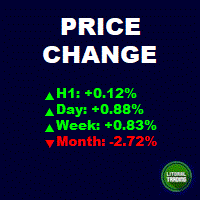
This is an informant indicator, very simple. It shows how much the price has chanded in percentage in certain period (month, week, day and actual period). It is discreet and small, does not visually posslute the chart. If your MT is not on portuguese idiom the indicator will automatically change to english. Check out our most complete tool for the market, the Trade Panel: https://www.mql5.com/en/market/product/42658 If you have any suggestion or find any bug, please, contact us. Enjoy!
This is
FREE
MetaTraderマーケットはトレーダーのための自動売買ロボットやテクニカル指標を備えており、 ターミナルから直接利用することができます。
MQL5.community支払いシステムはMetaTraderサービス上のトランザクションのためにMQL5.comサイトに登録したすべてのユーザーに利用可能です。WebMoney、PayPal または銀行カードを使っての入金や出金が可能です。

取引の機会を逃しています。
- 無料取引アプリ
- 8千を超えるシグナルをコピー
- 金融ニュースで金融マーケットを探索