 MetaTrader 5
 Experts
 Indicatori
 librerie
 Utilità
 Widget
 Regole
Guarda i video tutorial del Market su YouTube
Come acquistare un Robot di Trading o un indicatore
Esegui il tuo EA
hosting virtuale
hosting virtuale
Prova un indicatore/robot di trading prima di acquistarlo
Vuoi guadagnare nel Market?
Come presentare un prodotto per venderlo con successo
Utilità di trading per MetaTrader 5 - 25
 Di seguito sono riportati i programmi di trading che semplificano il trading in MetaTrader 5. Passa il mouse su un'utilità per leggerne la descrizione e la sua funzione.
This indicator monitors the vital constants of your trading account to keep it healthy and away from excessive risks. It monitors all trades, absolute exposure, account floating point and leverage currently in use, using different color codes for your interpretation. [ Installation Guide | Update Guide | Troubleshooting | FAQ | All Products | Get Help ] Amazingly easy to understand The indicator is clean and simple It calculates exposure by pairs and currencies Keep your used leverage cont
FREE

Pannello professionale per pianificazione della posizione e controllo del volume in MetaTrader 5 Position Control Suite è un pannello visivo professionale per MetaTrader 5. È progettato per i trader che vogliono preparare ordini direttamente sul grafico, definire con precisione il livello di Stop Loss e calcolare automaticamente il volume della posizione partendo da un importo di rischio nella valuta del conto. Il concetto principale è semplice: imposta quanto vuoi rischiare, definisci la distan
FREE

Great dashboard for market analytics. Help you to analyze the values of the Moving Average indicator and prices.
Using this dashboard you can: find signals from the Moving Average from all timeframes; find signals from the Moving Average from all symbols; check - how far the Moving Average is from the price; check - the Moving Average value has changed; 2 types of signal.
Modes of operation (switched by a button on the graph): current value of Moving Average; the difference between the curr
FREE

The tool is intended to help traders who cannot look at the chart all the time, or who use several charts, the trader can mark regions of interest as supports and resistances and as soon as the price approaches these regions an audible warning and on the screen will be presented for the trader to take some action, in addition the tool can automatically mark the highs and lows of the day and time.
FREE

Simply deletes all objects from a chart, at once.
Q: Shouldn't I remove the indicator(s) from the chart instead, if I want to get rid of those objects? A: Absolutely. There are rare cases though, when you might end up with residual objects that don't programatically get removed from your chart, due to bugs or some other reason.
Q: Why use this script, when I can press Ctrl+B, list all objects, then manually select and delete each one? A: To save time, really. Maybe you have too many unwanted o
FREE

Обычная трейдец-сетка, но не имеет явного диапазона. Вместо диапазона, в настройках устанавливаются стоп-лоссы. Закрытие происходит по тейк-профиту, так же устанавливаются в настройках. Робот может торговать в любом направлении, как вверх или вниз, так и в обоих направлениях. Робот не проверяет баланс счета, а потому имеет очень высокий риск. По умолчанию стоят настройки для EURUSD пары (не самые лучшие). Рекомендуемый минимальный депозит $200. Имеется вторая версия в которой добавлены дополните
FREE

SmartGuard Trading Journal helps MetaTrader 5 traders build an automatic local trading journal without manual input, external servers or trading actions.
The utility records account snapshots, risk metrics, open positions, pending orders, deal history and real-time trade transactions into local CSV files. These records help traders review equity changes, margin pressure, floating exposure, broker costs and real trading behavior over time.
SmartGuard Trading Journal does not open, close or modi
FREE

Noetrix Lens
Read-only portfolio and performance analytics for MetaTrader 5.
Noetrix Lens turns native MT5 account history into clear portfolio intelligence from a single chart. It is designed for traders who want to understand where results come from without giving an analytics tool control over their trading.
Lens never places, modifies or closes trades. Algo Trading is not required.
## Main features
- Portfolio overview with net P/L, return, trade count, Profit Factor, win rate, average
FREE
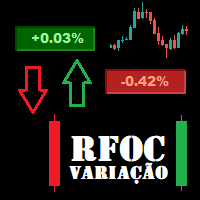
O Produto RFOC Variação Diária apresenta a função de indicar no gráfico a variação, em porcentagem, do preço em relação ao preço de fechamento do dia anterior.
O indicador permite configurar 100% da coloração para variações de alta, baixa e neutra (0.00%).
O painel com a apresentação da variação diária do preço fica fixada na parte superior do gráfico, e se ajusta automaticamente no centro da janela.
FREE
M ulti Cross Alert! on your smartphone. Use multiple indicators to get a crossover signal on chart as well as on MetaTrader app. You can use all crossovers at the same time but it is not recommended cause your chart will look messy. Instead use combination of two indicators which will be better. IMP NOTE:- More indicators will be added in future updates. Any suggestions regarding indicators are welcome! Indicators List: 1. MA (Cross) 2. RSI (OB/OS) 3. MACD Lines (Main Line & Signal Line Cross)
FREE

使用此EA可以通过币安交易所的API连接到MT5交易端,利用MT5强大的量化功能实现交易策略的回测。 操作方法: 1、首先 必须 把( http://api2.0.mt5.vip 、 https://fapi.binance.com )这两个 地址 填写到:mt5——工具——选项——EA交易下的WebRequest列表中,否则所有数据无法同步。 2、在导航栏找到EA,双击之后添加币安的API KEY ,保存后KEY自动保存; 3、KEY保存后会出现交易面板,通过MT5下的订单可以实时展现在面板,同事也可以监控币安交易所是否有同样的订单; 4、交易面板只展示订单的总持仓,请仔细核对,以防止漏单; 5、API KEY会自动保存在本地,第二次打开后无需重复输入; 6、目前只能支持BTCUSDT、ETHUSDT、LTCUSDT合约产品 7、最小交易量以币安的最小交易量为准; 8、币安KEY是存储在本地,不会上传到任何第三方,请放心使用; 9、如果想更换KEY ,请直接在EA内修改即可。
FREE

VYXAXIS Dispatcher is a free companion utility for Vyxaxis Tick. It processes WebRequest and supported Push notifications independently from the main Vyxaxis Tick chart workflow. Requires Vyxaxis Tick. VYXAXIS Dispatcher does not generate trading signals, execute trades, or provide a trading strategy. It is designed to separate notification delivery from the main tick-chart processing workflow, helping reduce the possibility of network-related delays affecting Vyxaxis Tick during periods of high
FREE

BS Trade Panel: Revolutionize Your Trading Approach Introducing the BS Trade Panel , the ultimate solution for traders seeking efficiency, speed, and accuracy in their market operations. Crafted with cutting-edge technology, our panel is designed to simplify your trading, making it more intuitive, swift, and effective. Innovative Features: Quick Orders with Shortcut Keys: Execute market orders or pending orders swiftly using configurable shortcut keys. Perfect for traders who need speed when ent
FREE

Close Trade A simple, fast, and practical tool for managing and closing trades in MetaTrader
In the trading world, there are countless methods and strategies for opening and closing positions. Sometimes, due to volatile market conditions or multiple open trades, you need a tool that allows you to close all or specific trades instantly and efficiently. Close Trade is designed precisely for that, a lightweight, reliable, and easy-to-use tool for complete trade and order management in MetaTrader.
FREE

TRADE PANEL MASTER — Know Your Risk Before You Click
Open your chart. See your panel. Trade with confidence.
Before you click Buy or Sell, Trade Panel Master shows you exactly what you risk, what you gain, and your R:R ratio — in real time. No mental math. No surprises.
FEATURES
- Lot sizing with real-time margin display - SL & TP in 3 modes: Points / Money / Price - Au
FREE
ProTrader Command Professional Trading Analytics & Risk Management System Transform your MetaTrader 5 into a professional trading platform with real-time analytics, automated risk management, and performance tracking. Core Features Real-Time Trading Dashboard Professional MT5 Interface Enhancement Live account metrics displayed directly on your chart Performance indicators with color-coded status alerts Position overview showing all trades at a glance Risk status monitoring with visual warnings
FREE

Sharing-Is-Caring Trade Copier
Features Local & Remote copy One tool can act as provider or receiver of trades Co-exist with other positions opened manually or from other expert advisors Can be stopped and restarted at any time without any issues such as deals getting closed mysteriously Copy same lot or adjust according to your balance and leverage Partial close/open Manage max funds to use One provider can copy to unlimited number of receivers One receiver can copy from unlimited number of p
FREE

Exaado Capital care If you've been searching for ways to manage Drawdown control, Drawdown Control, Balance protection, or Daily Drawdown Limit related to trading with Prop Firms, FTMO, My Forex Fund, or Funded accounts, then you've come to the right place. Additionally, if you're looking to safeguard your trading account, we can help. Do you struggle with managing your drawdown while trading funded accounts? Our EA is designed specifically for those in your position. Many prop firms have a "Tra
FREE

The utility draws reversal levels using the formulas for each of the selected number of candles:
Pivot = (high + close + low) / 3 R1 = ( 2 * Pivot) - low S1 = ( 2 * Pivot) - high R2 = Pivot + (R1 -S1) R3 = high + ( 2 * (Pivot - low)) S2 = Pivot - (R1 - S1) S3 = low - ( 2 * (high - Pivot)) H = high L = low U = if the candle is bullish, then close. Otherwise - open D = if the candle is bullish, then open. Otherwise - close
On any timeframe.
After a new candle closes on the calculated timeframe
FREE

A fast, clean on-chart trading panel for manual traders. Open market or pending grid orders directly from your chart, manage SL/TP, lot size, trailing, spread and margin — without using the order window. Technical Features One-click BUY / SELL Live Bid / Ask inside buttons SL / TP input (Pips & Points) + quick +/- adjustment Trailing Stop control Pending Grid (Buy/Sell Limit & Stop) Step distance (Pips/Points) Order count Lot multiplier Real-time margin estimate (uses account currency) Live spre
FREE

Position Closer is advisor used to close all orders when the profit will cross specified value either above or below. You can close all orders with one button click.
On panel on chart you have options: Deactivate after close - If Deactivate after close is checked the advisor will disable Close above profit and Close below profit options after orders are closed either on crossing the profit or on hitting the CLOSE ALL button. Close above profit - If Close above profit is checked, the advisor wil
FREE
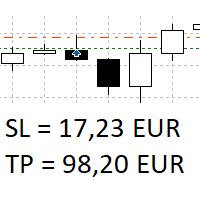
The panel shows all positions and all orders in a small movable window in the chart. Stop loss and take profit are converted into account currency. With the tool you can immediately see the maximum loss in the case of stop loss and the profit in the case of take profit. If there are several positions, a sum is formed. The panel shows either all positions/orders of the current symbol or all existing ones. The data is recalculated for each tick, and moving Stop Loss or Take Profit is immediately v
FREE

The "Takeandstop" script is a powerful tool designed to streamline your trading workflow by automatically setting Take Profit (TP) and Stop Loss (SL) levels on your MetaTrader 5 chart. This script is particularly useful for traders who want to efficiently manage their risk and reward without the hassle of manually calculating and entering these levels. Key Features: Effortless TP and SL Placement: With a few clicks, the script allows you to set predefined Take Profit and Stop Loss levels for you
FREE

Your limits, enforced — not just displayed. Most funded accounts are not lost to a bad strategy. They are lost to one bad session. A bad hour, after a bad morning, when the daily limit was already half gone and nobody was counting. This counts. It sits on your chart, watches the two limits that end most evaluations, and refuses to send an order that would break one. In 30 seconds It is free, and it is not a trial. No expiry, no account limit, no countdown, no pop-up, nothing that switches off a
FREE

Daily Stop & Profit Daily Stop & Profit is a professional risk management Expert Advisor designed to automatically control your daily profit and loss limits , helping traders protect capital and lock in gains with discipline. This EA works independently of the trading strategy and can be used on any symbol and timeframe . Key Features Set Daily Take Profit and Daily Stop Loss
Limits can be defined in percentage (%) or currency (USD / EUR)
Automatic monitoring of daily results in real tim
FREE

ProTrade Panel – Speed, Precision, Professionalism Master the markets with the ultimate MT5 assistant. Are you tired of the slow, clumsy default execution in MT5?
Do you struggle to manage multiple orders during high volatility?
ProTrade Panel is designed for serious manual traders. It combines One-Click Execution, Breakout Pending Orders, Bulk Closing, and Visual Risk Management into one sleek, floating interface. Key Features Smart Drag & Drop : Long-press the header to move th
FREE
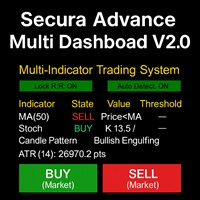
# Secura Multi Dashboard - Advanced Trading Assistant ## **Professional Multi-Indicator Analysis Platform** Secura Multi Dashboard is a comprehensive trading assistant designed for traders who demand clarity, precision, and efficiency. This powerful EA integrates multiple technical analysis tools into a single, intuitive interface, helping you make informed trading decisions without overwhelming complexity.
### ** Key Features:**
** Multi-Indicator Consensus System** - Simultaneous anal
FREE

The utility opens copies of open trades. It is very convenient if you use the Signals service and want to increase the volume of transactions.
Settings: Symbols: all symbols only current symbol Orders: Buy Sell Magic Any Magic Input Magic Lot size Original - lot size from original order; Fix Lot - fix lot size (input); Lot X Mult - lot size X koef; Stop Loss From sender - Stop Loss from original; Without - without Stop Loss; Plus Fix - Stop Loss from original order + fix points; Fix Point -
FREE

ApexForge Quote Paused Notification is a lightweight monitoring utility designed for MetaTrader 5 that detects when market quotes stop updating and immediately alerts you when abnormal quote interruptions occur. Whether caused by server issues, network disconnections, market closures, or temporary liquidity interruptions, the tool helps traders recognize quote freezes before they lead to missed opportunities or unexpected trading behavior. A notification is also generated once normal price upda
FREE

RoundNum Readme (Traders Club)
特徴: このツールはDOWやNIKKEIなど500や1000ポイントがラウンドナンバーの 指数を取引する際に表示するように開発しました。 もちろんメジャー通貨でも表示はされます。
更新頻度を制限しているのでチャート表示が遅くなるということは ありません。
XMでDOWを取引される場合、Main Levelsを10000 Sub Levelsを5000にしてください。
各パラメータの説明: Number to display lines:表示するライン数を設定します。 Main Levels:メインレベルをポイントで指定します。 Main Line Color:メインラインの色を設定します。 Main Line Style:メインラインで使用されるラインを設定します。 Show Sub Lines:サブラインを表示するか設定します。 Sub Levels:サブレベルをポイントで指定します。 Sub Line Color:サブラインの色を設定します。 Sub Line Style:サブラインで使用され
FREE

OnBoard stats is a panel that show in a single view a lot of usefull information about working orders and trading account. It has 4 different sub-panels (from left to right): Symbols order statistics : it can be found symbols for which there are orders (market or pendings). Symbol with pendings are colored with "Pendings color". Clicking on a specific symbol row, chart will be changed to that symbol. Current symbol statistics : informations about the "current" symbol, the one which is opened in
FREE

TradePanel — All-in-One Trading Panel for MT5 TradePanel is a compact, draggable on-chart control panel for fast manual trading. Open and close positions, read live price and P&L, and switch symbols — all without leaving the chart or opening an order ticket. Built on CTrade with retry logic on every close, size-step/min/max-aware lot handling, and per-chart position memory, it is designed to be a safe, reliable daily driver — not just a demo panel. Full step-by-step guide (every button explai
FREE

G2 DASHBOARD PRO by Ida Bagus Putu Mahardika PROFESSIONAL TRADE EXECUTION & MANAGEMENT DASHBOARD G2 Dashboard Pro is a comprehensive trading management tool that revolutionizes how you place and manage orders. No more manual calculations or switching between windows – everything you need is in one interactive, draggable dashboard directly on your chart. KEY ADVANTAGES 1. CHART-BASED PENDING ORDER PLACEMENT Click on the chart to set your entry price visually Support for all order types: Bu
FREE

With this indicator you have displayed on the chart the optimal lot size for the forex pair. No need for manual calculations or losing time on websites where you have to input the values to get the optimal lot size. The indicator values are preset for maximum percentage risk is 2% and for maximum pips loss is 50. For a customizable version you can buy using the this LINK . ATTENTION: This only works with forex pairs and it doesn't work on account deposits in YENS!!!!!!
FREE

Visualize your floating profits and losses in real-time directly above your open order line. Order PnL is a minimalist indicator that calculates and renders the current floating (Profit + Swap) right above the entry price, allowing you to maintain 100% focus on the chart.
Key Points: Dynamic Positioning: The text follows the entry price when scrolling or zooming. Zero Lag Visual: Optimized using a millisecond timer; it does not freeze the interface or overload tick processing. Clean Design: Au
FREE

Bid Ask Spread Display - Real-Time Price Monitor Instantly visualize crucial market pricing information directly on your chart with this lightweight, efficient script. Perfect for all trading styles, this tool provides: Key Features: Real-Time ASK Price (Red) Real-Time BID Price (Green) Spread Display in Points (Blue) ️ Fully Customizable : Position, fonts, colors High Performance : Updates 10x/second Clean Layout : Professional three-line display Self-Cleaning : Automatically
FREE

AlgoForex Smart Trade Panel Title: AlgoForex Smart Trade Panel - Visual Risk Management & Trading Category: Experts / Trading Utilities Price: Free Overview Take full control of your trading with the AlgoForex Smart Trade Panel — a lightweight, professional, and visually interactive trading assistant designed for both beginners and advanced traders. Tired of manually calculating lot sizes or struggling to place precise Stop Loss and Take Profit levels? This utility empowers you to
FREE

SmartRescuer is an advanced institutional-grade trading co-pilot designed to rescue stuck manual positions, manage floating drawdown, and lock basket profits automatically.
Key Features: - Anti-Whipsaw Breakout Engine: Uses Donchian Channels & ATR pullback retests to avoid false breakouts. - Smart Recovery Strategies: Supports Zone Hedging, Pullback Averaging, and Smart Hybrid execution. - Partial Loss Scraping: Gradually unwinds the worst losing orders using floating recovery profits. - Compl
FREE

Why You Need VLine Alarm
Stop Missing Trade Setups.
News events, session opens, key timeframes - they all happen whether you're watching or not. VLine Alarm keeps you on point.
Set It Once. Forget It.
Drag a line. Walk away. Get alerted. No babysitting charts. No missing opportunities because you switched timeframes or stepped away.
The Problem It Solves:
You know that moment when you realize the news already hit 5 minutes ago? Or you miss the London open because you were analyzing the daily cha
FREE

Relentless Trade Journal — Free Trade Statistics for MetaTrader 5
Most trade journals flatter you. They add up your closing profits and skip the commission you paid on entry, so they show a rosier number than the truth. You think you are breaking even when you are actually losing to costs.
Relentless Trade Journal shows you the honest picture, right on your chart.
It is free. If it shows you one cost you were missing, an honest review helps other traders find it.
It is a non-trading utility.
FREE

Try turning dust to gold with Reverse copier! Unprofitable EA or strategy can become profitable with reversing the direction of it's trades. As of now only MT5 → MT4 bridge is available, new functions will be added accordingly. EA's that work best with Reverse trade system is single-shot or scalping EA's.
How it works:
When a trade is executed on Master account, Reverse copier sends special log to the common txt file with a command to "open/close, buy/sell, symbol, volume...etc". Reverse slave
FREE
The AllClosedMT5 utility in the form of an expert. The utility is designed for closing all open positions simultaneously based on the total profit (in the deposit currency) of all open positions. The utility can be attached to any chart with any trading instrument.
Parameters Profit - the total positive profit in the deposit currency, at which all open positions are closed (profit). Stop - the total negative profit in the deposit currency, at which all open positions are closed (loss). The valu
FREE
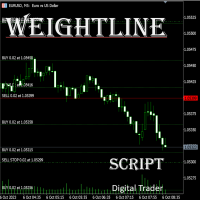
In multi-asset, multi-position trading environments—such as those involving forex, stocks, gold, and other instruments—traders often face a critical pain point: when holding multiple positions in the same instrument, it’s difficult to quickly and intuitively assess the current market price relative to all long and short positions. This makes it challenging to accurately determine the overall average entry cost, leading to delayed stop-loss and take-profit decisions. The problem worsens with mixe
FREE

Detailed Trade Statistics EA (Multi-Symbol + Magic Number Analyzer) Professional Trade Monitoring Tool for MT5 Traders Take full control of your trading performance with this powerful utility EA that provides real-time, detailed trade statistics directly on your chart. This EA is specially designed for traders running multiple EAs, strategies, or manual trades , helping you track everything in one clean dashboard. What This EA Does The Detailed Trade Statistics EA automatically scans yo
FREE

Panel Trade Basic: Speed and Total Control
It is the ultimate tool for high-speed manual trading. Trade directly from the chart with a single click or thru keyboard shortcuts, eliminating unnecessary menus.
Key Functions
Instant execution: Market and Pending Orders (Limit/Stop). Quick management: Total control of Batch, SL, and TP instantly. Pro Interface: Floating, draggable panel and real-time P&L/Margin visualization. Keyboard Shortcuts (Hotkeys)
C / V: Buy / Sell. X / Z: Close all / Cle
FREE

One Click Chart Snap captures screenshots of your chart across all selected timeframes with a single button click — or fully automatically on a timer. Perfect for traders who journal their trades, do multi-timeframe analysis, share setups with a community, or want a visual record of the market at a specific moment. How it works At tach the utility to any chart and a button appears in the top-right corner. One click cycles the chart through every timeframe you enabled (M1 to MN1), captures each
FREE

Questo prodotto è progettato per esportare tutte le coppie che hai nel tuo meta trade
se hai troppe coppie, azioni, indicatori, CFD ecc. ti basta 1 clic per esportarli tutti o in un file txt
Funziona come uno script, leggendo tutte le coppie.
Non c'è alcuna opzione per cambiare. Non c'è nessuna richiesta web. Non c'è uso di DLL.
Posizione del file: MQL5\File . con nome broker name._Symbols.txt
FREE

SIMPLE AND QUICK CHART CLEANUP SCRIPT - FREE FOR ALL - EASY TO DRAG AND DROP ONTO THE CHART - A MUST HAVE IN MY EYES
Everybody loves to draw on a chart! But cleaning is nobodies favor. Most of the time it will be faster to dump all and redraw the important part. Repetition makes you good! ALWAYS think about that! KEEP IT GROWING, ;-) I wish you a good day, Traders!
If you need something, send me a message. Best wishes to you from Vienna!
FREE

Pulse Trade Dashboard is an interactive trade management panel for MetaTrader 5, built for traders who want full control of their account without leaving the chart. Attach it to any chart and get a real-time overview of your balance, equity, open positions, and floating P&L — all updating live. Place market orders instantly with the one-click BUY and SELL buttons, adjusting your lot size, stop loss, and take profit directly on the dashboard without opening a single settings menu. What's included
FREE

Important: Do not download or install My Chart Control unless you already own My Chart Generator service. My Chart Control is not a standalone chart generator. It is designed to work together with the custom charts produced by My Chart Generator. Your Range/Volume chart, optimized for your indicator — automatically. My Chart Control is the on-chart dashboard and intelligence interface for My Chart Generator. Attach it to your My Chart custom symbol chart and it gives you complete control over
FREE

Real-time profit monitor that projects your results directly onto the current price. Designed for traders who need total focus on the chart without distractions. Dynamic Visualization: Follow the price movement (Bid) for an immediate reading. Privacy Control: Activate or deactivate visibility instantly by pressing the "P" key. Precise Calculation: Includes net profit and swap of all open positions. Clean Interface: Automatic colors (green/red) to identify the status of your account at a glance.
FREE
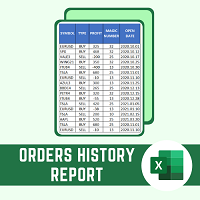
This script will create a report with all history orders in CSV format. The report is useful for those who run multiple EA's with different magic numbers in the same account. You can define some filters to generate your orders history report: 1) Initial date for assets in orders history. 2) Final date for assets in orders history. 3) Asset name. 4) Orders magic number. 5) Add balance/costs.
QUESTIONS ABOUT THE INSTALLATION OF PRODUCTS AT META TRADER You can also find some instructions on how
FREE

Setting a chart up exactly the way you like it takes a few minutes. Doing it twenty times takes an afternoon. Chart Cloner opens exact copies of the chart you drop it on. Symbol, timeframe, colours, scale and chart mode always carry across, because that is what makes a copy a copy. You decide whether the attached Expert Advisor, the indicators and the drawn objects come with them. Point it at your Market Watch instead of a copy count and it opens one chart per symbol, every pair wearing the same
FREE

Account Sentinel MT5 FREE – Simple Account Monitor Monitor your MT5 account basics in real-time right on your chart! See Balance, Equity, Free Margin, and Margin Level at a glance. Perfect for beginners checking risk without hassle. Key FREE Features: Clean dashboard updates every second Color alerts: Green for safe (Margin Level >80%), Yellow warning, Red danger Basic stats: Balance & Equity difference shown clearly Upgrade for More Power: FULL Version ($49): Add Used Margin, Drawdown %, Multi
FREE

Description TradeEcho Pro MT5 is a professional-grade utility designed to keep you instantly informed about every trading activity on your account. Whether you are at your desk or away, this tool acts as your personal trading assistant, providing real-time audio alerts and mobile push notifications for all trade events. Instead of generic terminal sounds, TradeEcho Pro MT5 gives you detailed feedback, including the event type, symbol, and net financial results for every closed position.
FREE

The VR Object Delete All script solves the problem of garbage on the chart. it is often necessary to completely clear the chart of everything that is put on it, comments, lines, objects. The script completely deletes everything, even those objects that are not visible. When working, VR Object Delete All writes everything it does in the terminal log, as well as the names of objects to delete. Displays the number of deleted objects as a separate line. in case of any errors, it will display an erro
FREE

Lot Dashboard is a trade execution and position-management panel for MetaTrader 5. It is designed for traders who want faster entries, clearer exposure visibility, and more flexible manual exit planning directly on the chart. The dashboard combines one-click market entries, quick management tools, live open-position metrics, and scenario-based exit lines in one compact panel. It is suitable for traders who scale in, manage multiple open positions, and want more control over how exits are planne
FREE

Middle Line: La chiave per gestire le posizioni con precisione! Questo script unico per MetaTrader 5 calcola automaticamente due livelli chiave di prezzo medio, aiutandoti a gestire le posizioni in modo semplice ed efficace: Prezzo medio complessivo: considera tutte le posizioni aperte e mostra il punto di equilibrio delle tue operazioni. Prezzo medio senza la posizione migliore: ti aiuta a identificare dove ottimizzare i volumi per ridurre i rischi. I livelli medi vengono visualizzati istantane
FREE

Forex17 BreakEven Price è un indicatore di riferimento finanziario per MetaTrader 5 che mostra direttamente sul grafico il prezzo di break-even finanziario dell’operazione o della giornata. L’indicatore non esegue ordini, non gestisce posizioni, non genera segnali e non automatizza decisioni. È esclusivamente uno strumento visivo di supporto al trading manuale, fornendo un riferimento oggettivo basato sui risultati finanziari del conto. Cosa mostra l’indicatore
L’indicatore disegna una singola
FREE

NINJA MT5 DOCTOR PANORAMICA NINJA MT5 Doctor è un'utility MT5 gratuita e di sola lettura che acquisisce un'istantanea diagnostica una tantum del terminale, del conto, dei grafici aperti, dello storico selezionato e del simbolo del grafico host corrente. È un'utility in formato Expert Advisor, non un EA di trading né un indicatore. I nomi del pannello e dei parametri di input sono in inglese. COSA CONTROLLA Verifica la connessione al server del broker, le autorizzazioni al trading del terminale e
FREE
Quantitative Synchronization Terminal Server MT5 is a professional MQL5 script for the MetaTrader 5 (MT5) platform, specifically designed to synchronize and load historical bar data and historical tick data from the server to the local terminal.This script helps traders ensure their local terminal has complete historical data, which is crucial for backtesting, technical analysis, and strategy development. Quantitative Trading Guide public chat: Join Us Quantitative Trading Guide public channe
FREE

LIMITED TIME OFFER to download for FREE for Unlimited use license ================================================================
QuantView Analytics Master Advanced On-Chart Portfolio Diagnostics & Equity Forensics for MetaTrader 5 Standard MT5 history reports simply show you how much money was made or lost. QuantView Analytics Master is designed to answer the "Why" and the "How." By segmenting your trading history across four distinct analytical dimensions, this institutional-grade terminal
FREE

The Close script is a simple tool that allows traders to close their trades by three methods. Just run the script and choose the close method.
Closing methods Symbol - Allows closing all open trades for a specific symbol. All_Trades - Allows closing all open trades. Magic_Number - Allows closing all open trades according to their magic number. Recommendation AutoTrading functions must be activated. If the AutoTrading function is disabled, the script will not work. EA should be stopped.
FREE

Assistente per gestire facilmente i tuoi ordini multipli
1. “Gestione principale di più ordini con un clic – Dimensionamento dei lotti basato sul rischio, chiusure parziali. Evidenzia i principali punti di forza dell'azienda: controllo automatizzato del volume/rischio e supervisione di più ordini
2. "Fai trading in modo più intelligente, non più difficile: una dashboard completa per la gestione del commercio simultaneo" Inquadra l'EA come un pannello di controllo all-in-one per scalare l'eff
FREE
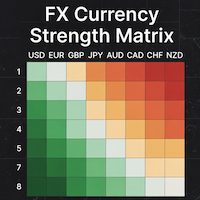
### MQL5 Marketplace Product Description FX Currency Strength Matrix – Professional MT5 Indicator
#### Overview The FX Currency Strength Matrix is a powerful, real-time visual tool that instantly reveals the true strength and weakness of all 8 major currencies in a clean, color-coded matrix format. No more guessing which currency is driving the pair – see the complete strength hierarchy at a glance and trade with institutional-level clarity.
#### Key Features - True 8×8 Currency
FREE

Telegram Notification Worker (v5.31) Telegram Notification Worker is a high-performance, professional utility designed to bridge the gap between your MetaTrader 5 terminal and Telegram. It acts as a dedicated background worker that forwards custom alerts, trade events, and system status messages from any of your Expert Advisors (EAs) directly to your Telegram chat or channel. Key Technical Features: Asynchronous Messaging Engine: Unlike standard notification scripts, this worker uses an asynchr
FREE

Most traders who fail a prop firm challenge do not fail because they did not know the rules. They fail because, at the moment it mattered, nobody was doing the arithmetic.
Prop Guard Monitor does the arithmetic. It sits on one chart, watches the whole account, and answers one question continuously: how much room is left before a rule breaks.
It never closes a position. It never deletes an order. It never locks anything. This build cannot touch a trade even if you want it to - the trading libr
FREE
エントリー前に確認できるチェックリストを作成しました。 以下のコードを参照してMT5用に作成しました。
Strategy Checklist - indicator for MetaTrader 4 https://www.mql5.com/en/code/18877
機能: チェックリスト20個まで入力できます。 表示位置 (左上 、 右上 、 左下 、 右下) の 指定 が可能 になります。 フォントサイズ の 変更が可能 になります。 チェックリストの幅を変更できます。 ドラッグ&ドロップでチェックリストを移動できます。
インストール方法: ファイル->データフォルダーを開く->MQL5フォルダー->Indicatorsフォルダー 配下にex5ファイルを置いてMT5を再起動してください。 チェックリストはマニュアルで入力が必要になります。入力後 保存しておいてください。 テンプレートで保存しておくと容易にチャートに適用できます。
FREE

Excellent dashboard for market analytics. The panel helps to analyze the values of the RSI indicator and its signals.
With this panel you can: watch the current signal from RSI on all timeframes; watch the current signal from RSI by different symbols; watch the current RSI value; several types of signals for analytics.
Values in a table cell: RIS value.
Signal type: RSI crosses level buy out/level sell out (outside); RSI crosses level buy out/level sell out (inside);
RSI is upper

Presentazione di Stop Guardian: Migliora la tua gestione del rischio con il Trailing Stop e la chiusura dei profitti. Stop Guardian è un Expert Advisor (EA) progettato per ottimizzare la gestione del rischio nelle tue strategie di trading, combinando il Trailing Stop con un sistema di chiusura automatica delle posizioni basato sui profitti. Caratteristiche principali
Gestione automatica del rischio : Regola automaticamente le posizioni aperte utilizzando il Trailing Stop per proteggere i profi
FREE
Sai perché MetaTrader Market è il posto migliore per vendere strategie di trading e indicatori tecnici? Non c'è bisogno di pubblicità o di protezione del software, nessun problema di pagamento. Tutto ciò è fornito da MetaTrader Market.

Ti stai perdendo delle opportunità di trading:
- App di trading gratuite
- Oltre 8.000 segnali per il copy trading
- Notizie economiche per esplorare i mercati finanziari
Registrazione
Accedi
Accetti la politica del sito e le condizioni d’uso
Se non hai un account, registrati