 MetaTrader 5
 エキスパート
 インディケータ
 ライブラリ
ライブラリ
 ユーティリティ
 ウィジェット
 ルール
ルール
YouTubeにあるマーケットチュートリアルビデオをご覧ください
ロボットや指標を購入する
仮想ホスティングで
EAを実行
EAを実行
ロボットや指標を購入前にテストする
マーケットで収入を得る
販売のためにプロダクトをプレゼンテーションする方法
MetaTrader 5用取引ユーティリティ - 60
 以下はMetaTrader5での取引を簡素化する取引プログラムです。ユーティリティにカーソルを合わせると、その説明と目的が表示されます。
Trades Manager Pro – Only Buy is a professional trade management tool designed to fully automate risk control and profit-taking for BUY trades only, on any symbol, pair, or instrument you apply it to . It calculates a risk-based stop loss once per position, ensuring consistent capital protection without repeated modifications. The system supports up to three customizable partial take profit levels (TP1, TP2, TP3), each closing a defined percentage of trade volume to secure profits step by step,
OVERVIEW Transform your MT5 trading account into an automated signal execution station! This Expert Advisor automatically receives and executes trading signals from Telegram channels in real-time, enabling seamless copy trading operations from master accounts.
SYSTEM NOTICE: This EA receives and executes trading signals FROM Telegram channels. To broadcast signals TO Telegram, you need the companion EA: " Telegram Signal Broadcaster MT5 " (sold separately). KEY FEATURES: Automated signal recept

Trades Manager Pro – Only Sell is a professional trade management solution built exclusively for SELL trades, giving traders full automation of risk control and profit-taking with maximum precision on any symbol, pair, or instrument you apply it to . The EA calculates a risk-based stop loss once per trade, ensuring disciplined capital protection without unnecessary modifications. It supports up to three customizable partial take profit levels (TP1, TP2, TP3) to secure profits step by step, plus

Equity Risk Manager EA is a smart tool designed to protect your trading capital by monitoring equity performance in real time. It automatically blocks new trades when your profit or loss thresholds are reached, based on your selected period — daily, weekly, or monthly. No more accidental overtrading or commission losses: once your target is hit, the EA alerts you and halts further entries. Ideal for prop trading firms traders.

基于Goodtrade/GoodX 券商推出的黄金双仓对冲套利的交易模型/策略/系统,在日常的操作遇到的问题: 1、B账户跟随A账户即刻下单。 2:A账户 下单后 B账户 自动抄写止损止盈。 3:A账户平仓B账户同时平仓。 4:B账户平仓A账户也平仓。 5:不利点差下拒绝下单。 6:增加有利点值因子。 通过解决以上问题,改变了熬夜、手工出错、长期盯盘、紧张、恐慌、担心、睡眠不足、饮食不规律、精力不足等问题 目前解决这些问题后,有效提升了工作效率和盈利比例,由原来月10%盈利率提升到月45%的最佳盈利率。 原来的一名交易员只能管理操作两组账户,通过此EA提高到操作管理高达16组交易账户,或许你可以超越我们的记录,期待你的经验交流。 此EA分为: GoodtradeGoodX Tradercropy A GoodtradeGoodX Tradercropy B 是一个组合EA,假设您购买的额 GoodtradeGoodX Tradercropy A 必须同时购买 GoodtradeGoodX Tradercropy B 两个组合使用会到最

Product Name: Magic Simulator “ Find your own 'Signature Setup ” Version: 1.0
From 'I Missed It' to 'I Took It' Transform those frustrating near misses into consistent winners. Practice each setup until your reaction becomes automatic and hesitation-free.
Full Product Description: Become a Confident, Disciplined Trader – Risk-Free Have you ever felt the sting of a bad trade and wished you could rewind time? Do you struggle with fear, greed, or hesitation? Ever spotted the perfect setup but mi
Symbol Cycler & Sync Tool - User Guide This Expert Advisor (EA) is a powerful utility designed to streamline the management of multiple charts in MetaTrader 5. It allows you to group charts together and control them simultaneously, saving you time and improving your workflow. Core Features Multi-Chart Syncing: Create "Sync Groups" by assigning the same SyncGroupID to multiple charts. All charts in a group act as one, allowing you to change their symbols and sync objects across them instantly. Cu
TradeDataLogger - Essential Data Collection Tool for Professional Trading Analytics Suite EA TradeDataLogger is a powerful MQL5 utility designed to seamlessly integrate with the Professional Trading Analytics Suite, enabling comprehensive analysis of your trading performance. This tool automatically captures and logs critical trading data from your MetaTrader 5 platform, making it ready for in-depth analysis and visualization. The logger systematically records all essential trading metrics inclu

# Scorpion 75 - Advanced Adaptive Grid Trading Robot. ## Product Overview
Scorpion 75 is a sophisticated fully automated grid trading Expert Advisor that employs adaptive algorithms to dynamically adjust trading positions based on market conditions. Unlike traditional grid systems, Scorpion 75 features intelligent repositioning, comprehensive risk management, and multiple operational modes to optimize performance across various market environments.
## Key Features
### **Adaptive Grid

# Higher-Lower Pending Bot - Advanced Multi-Pending Orders System
## Revolutionize Your Trading with Smart Pending Order Automation
Welcome to the **Higher-Lower Pending Bot** - the most sophisticated pending order management system available on MQL5. Designed for traders who want to maximize opportunities while minimizing manual effort, this EA combines intelligent order placement with comprehensive profit tracking in one powerful package.
## What Makes Our Bot Unique?
### Smart D

MT5 TradeZone Manager – Advanced Position Cluster Control EA Trade Smarter – Earn Steady Profits.
MT5 TradeZone Manager is a powerful Expert Advisor designed for traders who use high-volume or full-margin trading strategies within specific pip ranges. It automatically manages your positions inside a defined “Trade Zone,” ensuring your stop loss and take profit levels stay perfectly synchronized — saving you time and reducing risk. Key Features Zone-Based SL/TP Management
When you modi

sTrade UI is a compact, lightweight alternative for O ne-Click Trading which built-in MT5 didn't offer.
Designed for traders especially scalpers who want a clean and fast trade execution. Key features: Minimal CPU footprint Docked One-click Right Panel to Perform New Position*
One-click Close at Position's Price* Ability to Close All Position* Option to stick Position's PL info to latest candle and able to colorize it *: Tied to EA's Magic number (EA's Id), set to 0 if want Globally This is m

RiskManager is a simple yet powerful script for MetaTrader 5 that helps traders calculate the optimal lot size for every trade. By entering your desired risk amount and stop loss in pips, RiskManager instantly calculates the correct lot size using live market prices. This ensures you never risk more than you intend, making your trading safer and more consistent. Importance: Proper risk management is essential for long-term trading success. RiskManager takes the guesswork out of position sizing,
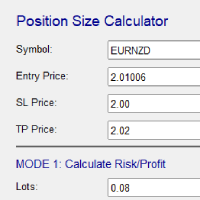
Risk and Position Size Calculator – Expert Advisor Utility A powerful and easy-to-use EA utility designed to help traders manage risk with precision. It automatically calculates the optimal position size based on your account balance, chosen risk percentage, and stop loss. In addition, it calculates potential profit and displays take profit levels directly on the chart. Fully customizable and compatible with all instruments and timeframes, it's the perfect tool for improving your risk management

TM Assistant Trade is a trading assistant tool designed for MetaTrader 5 (MT5). It helps users configure, monitor and manage trades directly on the chart through an interactive interface, minimizing manual operations and improving trading consistency. Introduction to TM Assistant Trade 1. Trading Interface
Line Function - Display on the trading screen (Entry price - Take profit - Stop loss) through icons and lines to help traders perform operations more conveniently.
Main area with screens displ

TradeMind Pro EA - Description Why TradeMind Pro EA is Essential for Your Trading Success Revolutionary LLM-Powered Trading: The world's first Expert Advisor built entirely on Large Language Model technology, bringing the power of advanced AI reasoning directly to your MetaTrader 5 platform. TradeMind Pro EA doesn't rely on traditional technical indicators or hardcoded algorithms – instead, it leverages cutting-edge Language Models (GPT-4, Claude, Gemini) to analyze market conditions with hu

Risk Panel VIP (MT5) Risk Panel VIP is a professional tool for MetaTrader 5 designed for fast, disciplined execution. It calculates position size from your balance risk and places Stop Loss / Take Profit accordingly. This is a trade management utility; it does not provide trading signals and does not guarantee any profit. Main functions Draggable Stop Line : place the stop on chart; the panel auto-calculates lot size from your configured risk % of balance (default 2%, editable). Context-aware a
MT5 → Telegram Notifier (Utility · Informers) Send trading events from MetaTrader 5 directly to Telegram. Perfect for journaling, team alerts, or remote monitoring. What it does Trade Open : posts BUY/SELL, BUY/SELL Limit, BUY/SELL Stop, lots, entry, SL/TP, local time. (Optional chart screenshot.) SL/TP Update : short message — only what changed (new SL or TP), posted as reply to the original trade message. Partial / Full Close : posts closed volume, price, Net P/L (swap + commission included),
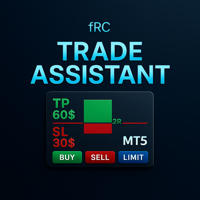
Manual trading panel — opens one test trade for validation only.
fRC Trade Assistant — Smart Manual Trading Panel fRC Trade Assistant is an intelligent trading panel designed for manual traders.
It allows you to open positions with one click, calculate lot size based on your predefined risk, and automatically place Stop Loss (SL) and Take Profit (TP) levels. For example, if your balance is $1000 and you set a 1% risk ,
the panel automatically calculates the appropriate lot size.
When the trad

PGS Trade Panel – Professional Trade Management Tool for MT5 Take full control of your trading with structured execution, real-time feedback, and customizable automation, all directly on your chart. Profit Guard System Trade Panel is an advanced on-chart trading tool designed to give you discipline, clarity, and precision in every trade. It supports manual, semi-automated, and automated workflows with multiple strategies that can be enabled, customized, or disabled at any time. Automatic Take P

Telegram Trade Notifier for MT5 is a professional notification system that sends instant messages to your Telegram group or channel every time a trade is opened or closed on your MT5 account. MAIN FEATURES Sends notifications for every trade open and close
Compatible with Telegram Groups, Channels, and Topics (threads)
️ Customizable scan frequency and filters
Persistent memory (no duplicate messages after restart)
Ignores trade history — sends only new events
️ 100% safe: no DLLs

AIX GROK FJU ASSISTANT | MetaTrader 5 AI搭載トレーディングアドバイザー AIX GROK FJU ASSISTANTでトレーディングを革新しましょう。この先進的なMetaTrader 5(MT5)エキスパートアドバイザー(EA)は、xAIが開発したGROKの最先端AI技術を活用して、リアルタイムのテクニカル分析とトレーディングインサイトを提供します。初心者から経験豊富なトレーダー向けに設計されたこのEAは、MT5チャートをGROK AIに接続し、データに基づいた感情に左右されないトレーディングシグナルを直接DiscordまたはTelegramに配信します。毎回のローソク足の終値でチャートデータを分析することで、AIX GROK FJU ASSISTANTはよりスマートで迅速な意思決定を可能にし、AIの精度で手動トレーディング戦略を強化します。 スキャルピング、スイングトレーディング、または長期ポジションの管理を行う場合でも、このEAは比類のない柔軟性とリアルタイムのサポートを提供し、変動の激しい市場で一歩先を行くお手伝いをします。AI駆動のトレー

BTC Trading Assistant EA (MT5) Manual trading assistant that helps place and manage trades with automated risk and stop management. Overview BTC Trading Assistant EA is a utility Expert Advisor for MetaTrader 5 intended for manual traders. It provides a chart interface to execute BUY/SELL/CLOSE actions and automates selected trade management functions such as position sizing, initial SL/TP placement, break-even, trailing stop and optional partial profit taking. This EA does not generate trade si

Trade History By Magic Indicator Unlock Your Trading Insights with Trade History By Magic! Enhance your MetaTrader 5 experience with this powerful indicator designed for traders who demand precision and clarity. Trade History By Magic provides a clear, real-time display of your trading history, organized by magic numbers, directly on your chart. Perfect for both automated and manual traders, this tool helps you track performance effortlessly. Key Features: Organized Trade Tracking : Displays tra

Category: Utilities → Trade Panels
Version: 1.2 (auto-sizing buttons + adjustable font size) ClickCloserExpress is a super-lightweight panel for MetaTrader 5 that lets you close positions instantly by profit/loss, symbol, side (Buy/Sell), and magic number— without opening new trades or cluttering your chart. Perfect for manual/semi-auto management, scalping, and fast portfolio clean-ups. What it does One-click closing of: All positions. Profitable only or losing only . Symbol on chart o

[Regarding Investment Issues]
Question 1:
When market opportunities arise, most investors tend to place orders frantically. However, when placing orders in such a frantic manner, you have no way of knowing whether you will be liquidated. The only reference is the margin ratio, but the margin ratio cannot accurately determine whether you will be liquidated.
If the order quantity is large or the product order quantity is even larger, you cannot calculate the loss and profit. If there is a t

Followgram EA: Advanced Automated Trading Expert for MT5 Check out our Telegram or contact us for a free trial.( https://t.me/Followgram_EA )
We continue to develop the EA further.
We focus on one pair with both buy and sell trades.
We also have a test account that anyone can follow.
(This is not about profits, but about the features.)
Type: MT5 Demo ECN Number: 67167230 Password: Followgram2025! Server: RoboForex-ECN
Overview The Followgram EA is a sophisticated Expert Advisor for MetaTr

TradeVision is a simple and elegant performance indicator for MetaTrader 5. It was designed to give traders a clear and instant overview of their results. Gone are the days of digging through your account history! TradeVision displays a comprehensive and visually intuitive dashboard directly on your trading chart. At a glance, you can assess your efficiency and make more informed decisions. The widget displays your real-time performance statistics, segmented by key periods for a detailed and re

The Trade Panel Dashboard is a powerful, user-friendly interface designed to streamline and enhance your trading experience. This centralized hub provides real-time data visualization, advanced analytics, and seamless execution tools, empowering traders to make informed decisions with precision and speed. Key Features: Real-Time Market Data
Access live price feeds, market trends for multiple assets (stocks, cryptocurrencies, forex, commodities, etc.) in one consolidated view. Order Management
ATTENTION ! Utilities do not have a good functionality on backtest mode. For Having a Demo Trial, message me from message box and receive 3 days trial.
Our Team Services: If you are want to see our products click the link: LINK If you have an idea you'd like to develop into an application, click the link: LINK
Instant on-chart stop & target levels, from 1:1 up to 1:6. Trade Ratio Lines MT5 draws an open stop line and objective lines (take-profit) at fixed R-multiples relative to your entry

SFG Grid Manager MT5 – スマートグリッド&ミラーシステム SFG Grid Manager MT5 は、既存のポジション(手動または他のEAによって開かれたもの)を追跡し、設定されたステップ(GridPips)ごとに平均化注文を自動的に発注するプロフェッショナルな自動グリッドマネージャーです。 メインポジションがクローズまたは消失すると、マネージャーによって開かれたすべてのグリッド注文は自動的にクローズされます。
Netting および Hedging アカウントの両方に対応し、手動取引や他のEAとの併用も完全に可能です。 ️ 主な特徴 メインポジション(手動または他のEA)を追跡
ステップごとに1つの注文を追加 – マーチンゲールなし、バーストなし
Forexとゴールドに対して自動的にGridPipsを調整
スプレッドおよびスリッページ保護
メインポジションがクローズされた際に全てのグリッド注文を自動クローズ
Hedging / Netting アカウントに完全対応
シンプルな設定とクリーンなジャーナルログ
すべてのブロー

これは取引の管理に役立つツールです。ターゲット1、2、3をポイントで設定し、これらのターゲットで決済したいロットサイズの割合を設定できます。例えば、ターゲット1、2、3を5ドル、10ドル、15ドルに設定し、サイズを40%、30%、30%とします。xauusdの4220で0.1ロットでエントリーすると、ターゲット5ドルで0.04ロット、ターゲット10ドルで0.03ロット、ターゲット15ドルで残り数量が決済されます。
ストップロスもポイントで設定できます。
ストップロスとターゲットは、取引を行うと自動的に設定されます。
また、トレーリングストップロス条件があり、tp1に到達した後はエントリーポイントに移動し、tp2に到達した後はtp1に移動します。この条件はオン/オフにできます。
チャートにはすべての TP と SL の詳細を表示するパネルが表示されるので、ポイントを簡単に確認できます。 Kore wa torihiki no kanri ni yakudatsu tsūrudesu. Tāgetto 1, 2, 3 o pointo de settei shi, korera

RM Pro – 高度トレードマネージャー
賢くトレードしよう、もっとシンプルに
ロットサイズ、リスク割合、ストップロスの計算に悩む必要はもうありません。 RM Pro は、あなたの頭をクリアにし、戦略とエントリータイミングに集中できるように設計されています。 単に リスク金額 と ストップロス価格 を設定し、Buy または Sell をクリックするだけで、 EA(エキスパートアドバイザー)が即座に注文を実行します。 正しいロットサイズを自動で計算し、ストップロスを設定し、 あなたが指定したリスクに基づいて取引を完全に管理します。 さらに、Buy Limit および Sell Limit の指値注文も自動で正確に配置・管理されます。
RM Pro は、複雑な計算や人的ミスから解放されたいトレーダーのために作られました。 プロップファームチャレンジ(資金提供型口座)を突破したい人、 PAMM口座を管理している人、または個人トレーダーとして取引している人に最適です。 規律・精度・自信をもって取引を行うことができます。
---
トレーダーが RM Pro を選ぶ理由
数学的な

Operative Management Pro – Advanced Trading Utility Operative Management Pro is a smart visual tool for traders who want to analyze and simulate their trades before placing them on the market. This panel displays in real-time the most important parameters of the current symbol: Current price and minimum lot size Required margin Spread cost in USD and pips Take Profit and Stop Loss value in USD Automatic risk and reward calculation With just a click on the chart, you can simulate BUY or SELL t

Overview MAVIS Trader is a powerful one-click trading panel designed for traders who value speed, clarity, and precise control.
It lets you open multiple Buy/Sell positions instantly, automatically synchronize SL/TP levels across all open trades, and close every position on the symbol with a single click.
Perfect for scalpers, grid traders, and anyone who needs consistent, mirrored risk management without manual editing Key Features One-Click Buy/Sell: Open several trades at once with your

️ EquityShield is your automated risk management guardian for MetaTrader 5. If you've ever exceeded your daily loss limit, struggled to enforce your own trading rules during volatile markets, or wanted to automatically lock in profits when you hit your targets, EquityShield is built for you. This is not a trading strategy - it's a safety system that watches your account 24/7, automatically closes positions when your risk limits are breached, and helps you maintain consistent trading discipline

K-line Terminator - a countdown tool that accurately grasps every second Core Summary: Still anxious about not knowing when the current candlestick will end? 'Candlestick Terminator' is an indispensable tool in your trading toolbox! It utilizes a clear and intuitive countdown timer to display the precise time remaining for the currently active candlestick in real-time, helping you avoid making hasty decisions during the chaotic moments of candlestick transitions, thus allowing you to enter, exit
FREE
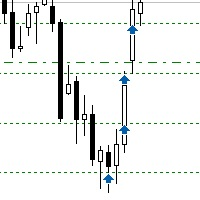
Sometimes the markets are in such a trending phase that it is impossible not to notice and it is enough to simply buy with the trend. 1) So, we scroll through the charts of different instruments, and see a good entry point, so let's specify the desired price for the first order in the Price_for_First_Order parameter and the direction in the Trend_Direction parameter, this is already enough for a good deal. (If Price_for_First_Order=0, the position will open immediately at the market price.) 2) T

Indique facilmente zonas de preço com espaçamento fixo!
O Price Steps Marker desenha linhas horizontais automáticas a cada 5 unidades. Price Steps Marker é um indicador visual simples que organiza o gráfico em zonas de preço equidistantes.
Ele marca automaticamente linhas horizontais a cada valor de 5 em 5 unidades, tanto acima quanto abaixo do preço atual — facilitando a leitura de volume.

This EA help traders close their open positions at a specific MT5 server time before news or before ending of H4 timeframe of the morning New York session to protect their profit or prevent from unexpected loss. The default setting is 19:30 (HH:MM) and you can adjust as require to fit trading strategies. It very user friendly where contain only single input parameter to specify a time that position will be closed.

Product Overview Trade with Natural Language, Let AI Execute Fully. This is a revolutionary MT5 trading program that allows you to describe trading strategies directly in natural language. AI will fully understand and automatically execute all trading operations. No programming knowledge required - simply describe your trading ideas, and the system will fully manage your trading account. It executes your strategy with creativity and optimizes trading strategies on its own! Contact me for a 15-d

Alfa for MT5: あなたのスマートトレード指揮センター 面倒な操作にさようなら。意思決定に集中しましょう。 複数のチャートウィンドウを行き来するのに疲れていませんか?注文管理の煩雑さで機会を逃したり、損失を出したことはありませんか? Alfa はそのために生まれました。これは単なるツールではなく、MT5/MT4プラットフォームに配備されたあなたの トレード指揮センター です。作業を自動化・智能化し、反復作業から解放され、市場の機会を捉えることに集中できるように設計されています。 核心機能:トレードの悩みに直撃 パノラマ的なポジション管理
"全体状況をひと目で把握。ワンクリックで効率的に決済。"
すべての注文とポジションをリアルタイムに集約し、損益状況が一目瞭然。 全決済 、 盈利注文のみ決済 、 損切注文のみ決済 をワンクリックでサポート。相場変動時の素早い対応と利益の確定を強力に支援。 詳細な損益統計
"統計だけでなく、洞察を提供。"
日次、週次、月次、年次など多次元での視覚的レポートで、資金曲線とトレード習慣を明確に表示。データに基づ

パーシャルクローズマネージャー – 取引量を自動調整する便利ツール パーシャルクローズマネージャーは、MetaTrader 5上でポジションを部分的に決済するための強力なツールです。取引中のリスク管理をより柔軟に行うことができ、利益の一部を確保しながら残りのポジションを伸ばすといった戦略を簡単に実現します。手動入力を減らし、スムーズな操作性と高い精度を両立しています。 主な機能: 部分決済機能: クリック一つで保有中のポジションの一部を決済可能。スキャルピングからスイングトレードまで幅広く対応します。 自動ボリューム計算: ツールが自動的に決済ロット数を計算し、入力ミスを防ぎつつスピーディに実行。 複数注文対応: 同一銘柄の複数ポジションに対して同時に部分決済を適用でき、時間の節約になります。 ドラッグ移動可能なテーブル: テーブルヘッダーをドラッグして、チャート上の好きな位置に自由に配置可能。 パーシャルクローズマネージャーは、資金管理やポジション制御をよりスマートに行いたいトレーダーにとって、欠かせないプロフェッショナル向けツールです。
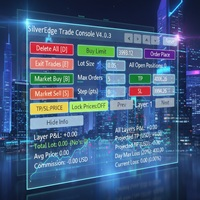
Description SilverEdge Trade Console is a fast, layer-based trading console for MT5 that lets you place, manage, and exit trades in a few keystrokes. It combines one-tap market orders, guided pending orders, per-layer TP/SL control, and a built-in break-even/trailing engine—wrapped in a clean dashboard that docks anywhere on your chart. Designed for scalpers and intraday traders who need speed, consistency, and clear logs. Features Layer-Based Workflow (1–9): Assign and work within layers to sep

EA Info Display Master Stop clicking through charts to find your EA configurations! Get a complete overview of all running Expert Advisors with their symbols and magic numbers in seconds. Managing multiple EAs across different symbols? Monitoring performance on FX Blue or other platforms? This tool instantly displays: All running EA names Their symbols and magic numbers Account details (number, broker, currency) Direct FX Blue statistics links (other provider will follow! Tell me what you need)

Apeiron Edge Alerts - Advanced Price Level Alert System Overview Apeiron Edge Alerts is a powerful and intuitive alert management tool designed for active traders who need reliable notifications when price reaches critical levels. Track unlimited price levels across multiple timeframes with customizable alert settings, visual feedback, and persistent session management. Key Features Flexible Alert Creation Draw Mode : Click anywhere on the chart to create instant horizontal line alerts Make M

Colors schemes powerful MetaTrader 5 script designed for traders who value speed and a personalized trading environment. With a single click, you can instantly transform your chart's appearance using one of several professional, pre-designed color schemes, including popular styles like ICT/SMC. How to Use: In your MetaTrader 5 terminal, open the Navigator window (Ctrl+N). Find the Colors schemes script under the "Scripts" section. Drag and drop the script onto the chart you want to customize. A
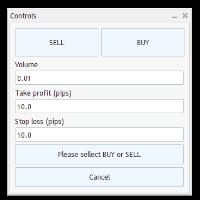
Trade Panel – Smart Order Execution Tool for MetaTrader 5 Trade Panel is a lightweight and intuitive trading assistant designed to simplify manual order execution in MetaTrader 5. It allows traders to quickly place BUY or SELL orders with custom lot size, stop loss, and take profit values — all managed through a clean, responsive interface. Key Features: Fast order placement with one-click confirmation Real-time visualization of Stop Loss and Take Profit lines Editable fields for lot size and pi

Guardian Equity PropFirm EA for MetaTrader 5 Guardian Equity PropFirm is an Expert Advisor designed to automatically enforce daily and monthly loss limits. It is especially useful for accounts subject to strict risk management rules, such as those required by proprietary trading firms. The EA continuously monitors the account and performs automated actions if predefined thresholds are exceeded. Key Features Daily loss control: Set a maximum daily loss percentage (e.g., 4%). Monthly loss c
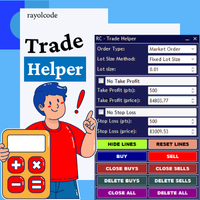
RC Trade Helperは、マニュアルトレーダー向けに設計された包括的なトレーディングアシスタントです。このアプリケーションは、チャート上で直接、迅速な注文実行、高度なリスク管理、効率的なトレード管理を行うための一連の視覚的ツールを提供します。 注意:購入前に、デモ口座でアプリケーションをテストできます。この商品はストラテジーテスターでは動作しません。 トレード操作 ワンクリックでトレードの実行と管理が可能: チャート上で視覚的なレベル確認により、成行注文と待機注文(ストップ、リミット)を発注。 すべてのポジションを決済、またはすべての待機注文を削除。 買いポジション、売りポジション、買い待機注文、売り待機注文の選択的な決済。 すべてのトレードライン(エントリー、ストップロス、テイクプロフィット)をチャート上のデフォルト位置にリセット。 チャートワークスペースを整理するため、すべてのトレードラインを非表示または表示。 トレードラインをロックして誤った移動を防止、またはトレード設定を反転。 ポジションサイジングとリスク管理 複数のトレードボリューム計算方法を提供: 固定ロットサイズ
Margin Level Monitor EA Stay ahead of margin calls with real-time alerts and visual feedback. This Expert Advisor is designed for traders who prioritize risk management. It continuously monitors your account’s margin level and triggers alerts when it drops below a customizable threshold (default: 200%). Whether you're trading manually or using other EAs, this tool keeps you informed and protected. Key Features: • Continuous Monitoring: Checks your margin level every few seconds. • Mult

General Overview This Expert Advisor (EA) is a semi-automatic trading assistant for MetaTrader 5 that provides a graphical user interface (GUI) panel directly on the chart.
It allows traders to quickly place pending orders (Buy Limit, Sell Limit, Buy Stop, Sell Stop), set Stop Loss (SL) and Take Profit (TP) levels for all positions, close all open trades, and delete pending orders. Key Features Interactive Control Panel:
Displays input boxes, buttons, and labels on the chart.
You can manu

Auto SL/TP Manager (自動SL/TPマネージャー) 手動トレードを二度と無防備な状態にしないでください! 急いでポジションを建てて、ストップロス (SL) やテイクプロフィット (TP) の設定を忘れたことはありませんか?「Auto SL/TP Manager」は、あなたにとって不可欠なセーフティネットです。 このエキスパートアドバイザー (EA) は、あなたのアカウントを24時間365日監視し、SL/TPが設定されていないオープンポジションに対して、あらかじめ定義されたリスク (SL) と利益 (TP) のレベルを自動的に適用します。 これは、 手動トレーダー 、 スキャルパー 、またはモバイルデバイスから開いたトレードであっても、 すべて のトレードが自分の戦略に従って確実に保護されるようにしたいすべての人にとって完璧なツールです。 主な特徴 完全自動化 : 未設定のオープンポジションを常時スキャンし、SL/TPを適用します。 高度な設定が可能 : ストップロスとテイクプロフィットをPips単位で簡単に定義できます (例: 5.0 = 50ポイント)。 強力なフィ

The Performance Logger is a utility for MetaTrader 5 designed to track and report account metrics. It identifies trades based on specific criteria and provides summaries of account activity. Main Functions Automated Reporting : Generates summaries of account performance and sends them to specified communication channels (Telegram or Discord) on a weekly, monthly, or yearly basis. Strategy Analysis : Organizes performance data based on the specific Expert Advisor or strategy used for each trade.

Tired of fumbling with lot size calculations and manually managing every trade? The Visual Risk Manager (VRM) is a professional-grade trading panel designed to streamline your trading and enforce discipline. This Expert Advisor is not a strategy; it's a powerful utility that allows you to manage your risk and execute trades with unparalleled speed and precision, directly from your chart. Why You Need the Visual Risk Manager Stop letting emotions and guesswork control your trading. VRM ensures t

FJUNIVERSE | MT5 ボラティリティ&最小ロットスナップショットツール ワンクリックで強力なスキャナーが、マーケットウォッチ内の全銘柄の実リスクとボラティリティを即座に明らかにします — 現在のチャート時間枠を使用。 このスクリプトは、ブローカー定義の最小ロットでのUSDリスク額を正確に計算し、読み込まれた全ローソク足に基づく完全なボラティリティプロファイルを生成します。結果はクリーンなCSVファイルに保存され、MetaTraderジャーナルにバー数付きで出力されます。 主な機能: MINPRICEを計算:価格が0まで下落した場合のリスク( 最小ロット × Ask × 契約サイズ ) SNAPを表示:現在のAsk価格(完全な桁数) MINLOTを表示:ブローカーが許可する最小取引ロット すべての利用可能なバーでボラティリティを%で計算(常に正の値): AVGD 平均日次レンジ % ( |H-L|/O ) AVGL 平均上昇幅 % ( |H-O|/O ) AVGS 平均下落幅 % ( |L-O|/O ) MINL 最小非ゼロ上昇幅 %(フラットキャンドル除外) MINS 最小

GUARDIAN EA PRO - SMART ACCOUNT PROTECTION "Don't let losses get out of control - Let Guardian protect you 24/7!" KEY FEATURES SMART ALERT SYSTEM Step-by-step alerts by profit/loss percentage (5%, 10%, 15%...) Real-time notifications via Telegram & Push Notifications Customizable intervals between alerts EMERGENCY PROTECTION Auto close all positions when reaching maximum loss threshold Drawdown protection - Prevent deep losses Trading time limits - Safe automatic

The follow-up feature allows you to automatically open layers.
You can configure it to open up to x layers with three different take profits. You can also set the take profits as percentages. For safer trading, you can enable the trailing option — either starting from the take profit or after a certain number of pips. You can use or test it for free — visit our Telegram and ask about the available options.
We stand behind our products and always strive for improvement.
Free use is also available

【先着10名限定セール】特別価格: $30 (通常: $40) 残り: 10枠 認知度向上のため、先着10名様に限り割引価格で提供します。
「見たい時間」を簡単に、一瞬で。マルチタイムフレーム分析に、究極の同期を。
上位足で注目した時間ポイントが、下位足ではどこにあるのか。
何度もスクロールして探し直す必要はもうありません。 単一チャートはもちろん、複数チャートを同期させて、狙った時間ポイントへ高精度に一斉フォーカス。
「探すストレス」をゼロにし、分析精度を極限まで高めます。
あなたのチャート分析を劇的に変える、フォーカス特化型ツールです。 製品概要 【選べる3つのフォーカス・モード】 Single Line:注目する1つの時間ポイントへ、ワンクリックでフォーカス移動 Multi Lines:複数の時間ポイントを設定し、順番にフォーカス移動 SnglSync :複数チャートを同期させ、1つの時間ポイントへ一斉フォーカス 【主な活用メリット】 瞬時の復帰:どれだけチャートを動かしても、ズームや時間足を変更しても、ワンクリックで元の注目ポイントへ迷わずフォーカス移動できます。 検証

Momentum Candle Alert — マーケットメーカーの動きを捉える マーケットメーカーの動きを見逃さないでください!
Momentum Candle Alert は、強いモメンタムキャンドルをリアルタイムで検出し、市場の重要な動きを簡単に把握できます。 使い方:
アラートをチャートに追加し、希望の時間足を選択して、通知したいポイント数またはドルの変動幅を設定します。 主な特徴: 価格変動をリアルタイムで監視。 ローソク足のサイズが設定した閾値(ポイントまたはドル)を超えたときに自動通知。 3つのモード: 買いのみ、売りのみ、または両方 。 デフォルトモードは 買いのみ で、簡単に変更可能。 軽量・高速・リソース効率が高い。 チャートを見続けなくてもモメンタムを把握可能。 シンプルで実用的なツールを求めるトレーダーに最適です。

Sniper Utility Rimani sempre aggiornato sui tuoi trade, ovunque tu sia. Sniper Utility invia notifiche immediate ogni volta che uno dei tuoi ordini raggiunge il Take Profit o lo Stop Loss .
Perfetta per trader attivi che desiderano monitorare le proprie operazioni senza dover controllare costantemente il terminale. ️ Funzionalità principali Notifica istantanea alla chiusura dell’ordine (TP o SL) Compatibile con notifiche push su dispositivi mobili Supporto per ordini manuali, EA e p

## ️ Descrizione
**Margin Alert Notifier** è una utility che monitora in tempo reale il livello di **margine** del tuo conto di trading e ti **avvisa immediatamente** quando scende sotto una soglia definita. Ti aiuta a prevenire situazioni di *margin call* o *stop-out*, mantenendo il controllo del rischio in ogni momento.
---
## Funzionalità principali
- Avviso automatico quando il **Margin Level (%)** scende sotto la soglia impostata. - Messaggio personalizzabile (puoi inseri

1. Brief Description of Gina Panel Code Functionality for End User The "Gina Panel" is a customizable trading dashboard Expert Advisor (EA) for MetaTrader 5 (MT5). It provides a graphical user interface (GUI) overlay on your chart to simplify trading and account management. Key functionalities include: Account Monitoring : Displays real-time balance, equity, profit/loss, margin levels, and net positions in a compact panel. Trade Execution : Quick buttons for buying/selling at market, setting lot

HotKey Trade: Invisible and Fast Execution It is a minimalist order executor designed for scalpers and price action traders. It eliminates cumbersome panels and operates at maximum speed using only your keyboard.
Key Points:
100% Clean Chart: No panels or buttons blocking your view of the price. Instant Execution: Fires orders to the market without menus or clicks. Dynamic Lot Management: Change your volume and view it only when you need it Quick Commands:
[ C ] – Buy (BUY) [ V ] – Sell (SELL
Trailing Stop Utility PRO – マルチモード・マルチシンボルの高度なトレーリング管理ツール バグや不具合を見つけた場合はお気軽にご連絡ください。
皆様のフィードバックはツール改善のために非常に重要です。 概要 Trailing Stop Utility PRO は、複数シンボルや複数時間足に対応した高機能なトレーリングストップ管理ツールです。
軽量で安定しており、すべての MT5 バージョンに対応します。 手動取引、EA取引のどちらにも対応し、Percent・Pips・ATR の3モードに加え、シンボル別/マジックナンバー別プロファイル、アダプティブATR、エクイティロックを備えています。 主な機能 1. 複数のトレーリングモード Percent Mode – 価格のパーセンテージで距離を設定
Pips Mode – 固定ピップス
ATR Mode – ATR に基づくボラティリティ対応トレーリング 2. シンボル・Magic Number プロファイル 各シンボル、各EA用に個別設定可能。
上書き設定やワイルドカードにも対応。 3. アダプティブ ATR 高速

King ElChart Telegram Bridge A professional bridge between MetaTrader and Telegram. It can send and receive trading signals instantly and manage trades automatically. FEATURES • Two modes: Sender and Receiver • Works on any symbol or timeframe • Fast and lightweight • Easy setup and real-time status display
NOTE After purchase, please contact me via MQL5 private messages to receive the bridge package and assistance with setup.

The difference between you and a funded trader is rarely the strategy. It is one single oversized trade. ProRiskManager makes that trade technically impossible. Most challenges are not lost to bad strategies. They are lost to one moment. One miscalculated lot size. One revenge trade after a losing streak. One news candle through your daily loss limit. Industry data shows that only a small fraction of purchased prop firm challenges ever reach a funded account, and a large share of the failures e

ROSSI CAMPOS TRAILING STOP AUTO EA - あなたの利益を守るインテリジェントガーディアン! なぜ作られたのか?
効率的なトレーリングストップがないために利益が失われることが何度もありました。既存のソリューションは複雑すぎたり、重かったり、信頼性に欠けていました。そこで、軽量で正確、そして信頼できるアシスタントを作ることにしました — 手間なく自動で利益を守ってくれるものを。 使い方は?(プログラマー以外向け) 設定項目: 初期ストップロスとテイクプロフィット — 基本的な保護として トリガー — いくつ利益が出たらトレーリングストップを開始するか ステップ — 価格に合わせてストップロスが動く幅 市場がトリガーに達すると、EA が自動的にストップロスを調整し、利益を確保しつつリスクを低減します。まるで 24 時間 365 日そばにいるプロのようです! ユニークな特徴: 軽量 & 安定 — フリーズや衝突なし 直感的な設定 — フィールドを入力するだけ! 高精度 — リアルタイムのティックに基づく計算 汎用性 — どんな資産・時間足にも対応 完全自動 —

=== Attention ===== before stating to use this project please watch the video.
this is the first step of all-in-one project which will be updated day by day. This version (1.01) will be for Trade - Entry. you can have Market and pending orders - lot size - take profit and stop loss. Take profit and stop loss have 4 different type which is point - money - percent - price and we have RR for take profit. You can calculate lot size based on points and money. you can have visual stoploss and takepr

この EA は主に XAUUSD のスキャルピング用です。
目的 トレード管理から感情を排除 ― ポジションを自動で保護し、利益を確定させ、プレッシャーの下で難しい判断をする必要をなくします。
機能 ️ 自動ストップロス 直近の高値/安値+バッファに基づいて SL を設定 手動配置のストレスなし 自動部分利益確定 2モード: 固定移動:価格が X 動いた後 50% をクローズ R 比率:1.2R の利益目標で 50% をクローズ 勝者を走らせながら利益を確保。
️ ワンクリックボタン すべてクローズ 売り/買い/利益/全て オプション:時間でフィルター(直近 60分) よくある問題を解決 早すぎる利益確定 神経質なストップ移動 感情的な判断 一貫性のないリスク管理 ️ キー設定 振り返り:20分(SL 設定用) バッファ:0.2 ピップ 追加の安全 部分 %:50%(利益確定サイズ) R 比率:1.2R(利益トリガー) 最適対象 感情的な干渉なし
MetaTraderマーケットは、開発者がトレーディングアプリを販売するシンプルで便利なサイトです。
プロダクトを投稿するのをお手伝いし、マーケットのためにプロダクト記載を準備する方法を説明します。マーケットのすべてのアプリは暗号化によって守られ、購入者のコンピュータでしか動作しません。違法なコピーは不可能です。

取引の機会を逃しています。
- 無料取引アプリ
- 8千を超えるシグナルをコピー
- 金融ニュースで金融マーケットを探索