Lot calculation based on stop loss and risk

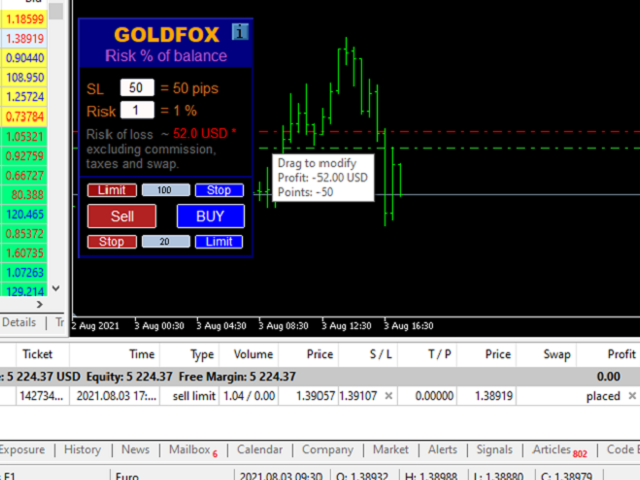
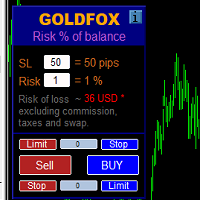
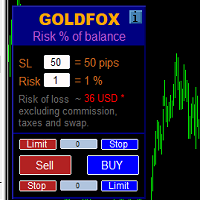
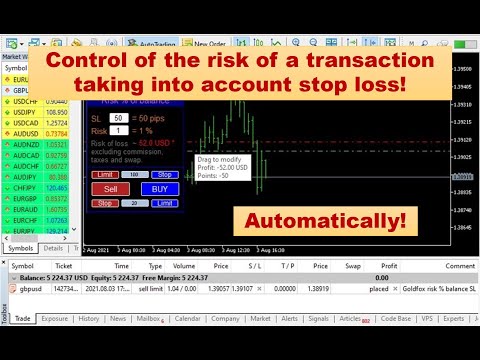
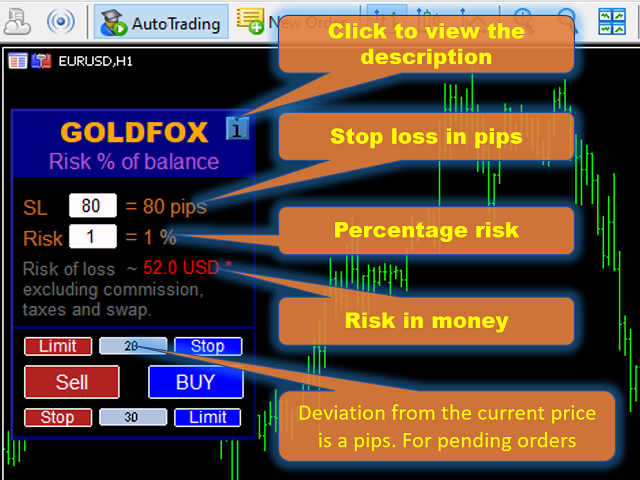
 Automatic calculation of a trading lot taking into account Stop Loss (in pips) and the percentage of risk from the account balance. The Expert Advisor panel is located on the chart at the top left. On the panel of the advisor, you can select the size of the stop loss in pips and the percentage of risk from the balance. You can set the deviation from the current price in pips for pending orders. The red color indicates the amount in the deposit currency that you can lose when the stop loss is triggered, this amount does not include commissions, swaps and taxes.

   It is advisable to use this advisor for major forex currency pairs, XAUUSD (Gold), BTCUSD, ETHUSD! For other instruments, taking into account the peculiarities of calculations, errors may occur! We recommend accounts with 5 digits after the dot for most forex instruments.

      Description

- Risk of loss. The amount of risk in the deposit currency is indicated in red on the information panel of the advisor. This value will correspond to an open order (or a pending order placed), provided that the margin for the instrument is sufficient for this risk and you have correctly specified the pips size in the SL field (the SL size must not be less than the one allowed by the broker)!

- Stop Loss (points or pips). Brokers may differ in the point value, the number of decimal places, and so on ... Therefore, in order to enter the stop loss correctly, we recommend that you first check and select the appropriate value on your broker's demo account or pending orders. For example, you must select the value 1 ..., 15, 150 or 1500, 15000 ...

- Error. An error is allowed in the calculation, since the lot step has a fixed value, there is price slippage in Mt-4, Mt-5, gaps, and so on ..!

-  Recommendations. We recommend opening positions with a risk of no more than 10%.

- If you have specified a risk that exceeds the allowable margin, the advisor will automatically calculate and open a deal with a lot to use the maximum possible margin!
Prodotti consigliati
ZyloFx Prop Guard Manager MT5
Rosa Lina Martinez Jimenez
IMPORTANT: After purchasing this product, please send me a private message to receive the installation guide, setup instructions, and direct product support. ZyloFx Prop Guard Manager MT5 is a professional account protection utility for MetaTrader 5, designed for traders who need disciplined control over daily and overall drawdown. This Expert Advisor does not open trades, does not provide entry signals, and does not use any trading strategy. Its purpose is to work as a protective layer on you
Trade Control Panel
Jerry Jilun Anak Liban
Trade Control Panel Function Normal One Click Function Close All Close All Profit Close All Loss Close All Pending Order Close All Sell Close All Buy Advance One Click Function 1.  Close Partial Lot Sell by Percent It will help you partial close for all open position by desire percent you wanted. No longer partial close one by one for every open position Manual input for desire percent 2. Close Partial Lot Buy by Percent It will help you partial close for all open position by desire percent
All Pending Orders with StopLoss opens any combination of Buy Stop, Sell Stop, Buy Limit and Sell Limit pending orders and closes all existing pending orders. If boolSL = true then this Script will calculate one common StopLoss value as the StopLoss for a first/last orders and put this value in all pending orders. Input Parameters Before placing all pending orders, the input window is opened allowing you to modify all input parameters: DeleteAllPendings : if true , then all pending orders (for
One Click Trader  is a tool designed for MetaTrader 4 platform, which enables you to take your trading to the next level. It enables you to open, manage and close your trades in simple an efficient way by just one click of your mouse button. "-"   ,  "+"  change OCT window size  Up arrow minimizes the OCT panel Down arrow maximizes the OCT panel Right arrow displays the next panel with additional features Left arrow hides the panel with additional features Red  SELL  button enables you to open s
T Manager for Price action Traders
Haidar Lionel Haj Ali
4.5 (10)
T Manager, the ultimate trade management solution designed by traders for traders. If you are searching for a simple and efficient trade panel, trade manager, or trade assistant, you are at the right place.   The market contains a diverse number of those tools , but this one is designed by traders for traders . I designed this tool, and I am using it daily. Take my advice and stop buying tools blended with un-useful features that you will never use,   T Manager provides you with the essential y
Fair Value Gap strategy. Entries are filtered with Market Profile and range by minimum value of ATR multiplied by a value from parameters. Parameters: MinATRX - ATR multiplier. If range is lower than ATR * MinATRX the signal will be skipped. MPRange - number of bars to form Market Profile. MPPips - a step of Market Profile in pips. EntryPercentage - a minimal level of profile to enter a trade. Magic - magic number. MaxBars - maximum amount of bars to look back in higher timeframe. FVGPeriod - hi
EA PERFORMANCE TERMINAL — everything on one screen. Every robot on your account, what each one is doing to your balance, and the months that got you here, drawn over your chart instead of buried in a report. A balance is an average, and averages hide things. One robot can quietly cover another's losses for months while the equity curve still looks calm. This reads your closed trades and splits that single number back apart, by Magic Number. A free edition is available, and it runs on a live char
Pending Orders Grid Complete System   opens any combination of Buy Stop, Sell Stop, Buy Limit and Sell Limit pending orders and closes all existing pending orders. Only one time of the pending order at the same time!!! You will have a possibility to put a legitimate   Open Price   for the first position in the grid. Usually it should in the area of Support/Resistance lines. You just need to drop this script on the chart of a desired currency pair. Input Parameters Before placing all pending ord
Visual Trade Manager for MT5 is an interactive trade execution and position management tool designed for traders who want fast chart-based control over risk and execution. The panel provides a visual trade box with entry, stop and target lines directly on the chart. Position size is calculated from the selected risk percentage, and the tool supports both market execution and pending order placement. Main features - BUY and SELL switching directly from chart buttons - Draggable Entry, Stop and
Nice Trade EA
Dinh Thuong Hoang
Nice Trade Bot è un sistema EA che analizza e identifica automaticamente le zone di prezzo di ingresso commerciale ad alta probabilità sul grafico e invia notifiche istantanee agli utenti al canale o al gruppo Telegram. I dati di acquisto e vendita mostrano i dettagli del prezzo di immissione dell'ordine, dello stop loss e del profitto target. Aggiornamento continuo e utilizzo di più intervalli temporali, massima efficienza per i prodotti di materie prime associati all'USD come: oro, petrolio,
GridTrailling
Chaianan Kraimud
Smart breakout grid EA with trailing pending orders, trailing stop, session/news filters, drawdown protection, and netting-safe execution for MT5. GridTrailingEA is a smart pending-order grid Expert Advisor with trailing pending orders, trailing stop, session filter, news-time filter, drawdown protection, and market-safe validation for MT5. GridTrailingEA is a MetaTrader 5 Expert Advisor designed for traders who want a clean and controlled grid-style pending order system. The EA places Buy Stop
MultiChart Pro
Pablo Filipe Soares De Almeida
MultiChart Pro – Strumento di Gestione dei Grafici per MetaTrader 5 Questo Expert Advisor (EA) consente di automatizzare l’apertura e la configurazione dei grafici in MetaTrader 5. Supporta fino a quattro grafici con specifici timeframe e template, inclusi quelli offline. Funzionalità Apertura Grafici: Apre fino a tre grafici aggiuntivi (es. D1, M1, M15) e un grafico offline (es. 10 secondi), configurando anche il grafico corrente (es. M5). Applicazione Template: Applica template definiti dall’u
Trade Panel HotKey – MT5 Scalping Utility Fast Trade Panel HotKey is a lightweight MT5 trading utility designed for traders who need to open, manage, and close positions as quickly as possible . The main purpose of this tool is to reduce the time between a trading decision and execution. Instead of moving the mouse, opening order windows, or manually modifying multiple positions, most important actions can be performed instantly through customizable keyboard hotkeys or directly from the compact
Fvg In Fvg
Claudiu-georgian Zavera
FVG In FVG EA — From Learn to Earn. The most-watched imbalance on any chart, taken where you have not seen it before: a Fair Value Gap confirmed inside a Fair Value Gap. A GAP EVERYONE WATCHES. AN EXECUTION NO ONE ELSE HAS. The EA detects the Fair Value Gap — the 3-candle imbalance — on a higher timeframe, then requires a second FVG, formed inside the first, on the timeframes you choose. Only an overlap above your threshold validates the zone: Most Powerful Overlap FVG Zones — rigorously selec
DeepTrade Basket Manager
Yasir Mohammed Sachit Sachit
DeepTrade Basket Manager treats a whole group of trades as ONE position. Instead of watching each order, you set a target for the entire basket — and the moment combined profit (or loss) hits your number, it closes everything at once. Built for grid traders and multi-pair portfolios.   KEY FEATURES - Close the entire basket at a profit target (money or % of balance) - Close the entire basket at a loss limit (money or % of balance) - Manage ALL symbols together, or filter by chart symbol / mag
Questo strumento può aiutarti a chiudere tutti gli ordini aperti con un clic, basta fare clic su "Chiudi tutto". Se desideri chiudere solo gli ordini redditizi, fai clic sul pulsante "Chiudi redditizi" Dopo aver cliccato, tutti gli ordini fluttuanti verranno chiusi; Se desideri chiudere solo gli ordini con perdite fluttuanti, fai clic sul pulsante "Chiudi perdibili" Dopo aver cliccato, tutti gli ordini con perdite fluttuanti verranno chiusi. Questo strumento è stato testato per un anno. La funzi
JustEnter The Trade
Simon Karl Jakovac
justEnter is a semi-automatic trade management utility for MetaTrader 5. You choose the entry; the utility calculates position size, places the stop loss, and manages the position through breakeven, partial closes and trailing until exit. For traders following signals If you take your entries from a signal service, a mentor, or your own alerts, the entry decision is already made by the time you open the terminal. What remains is execution: sizing the position correctly, placing the stop, moving
Live Forex Signals è progettato per il trading sui segnali del sito   https://live-forex-signals.com/en e https://foresignal.com/en . Live Forex Signal for MetaTrader 4   https://www.mql5.com/en/market/product/81445 Parametri Username   e   Password   se si dispone di un abbonamento ai siti live-forex-signals.com/foresignal.com. quindi dovresti compilare questi parametri con le tue credenziali; se non c'è abbonamento, lascia i campi vuoti; Comment   Commento sulle offerte sbloccabili Risk   ri
Kikyo
Yuta Hirae
[Target currency pair / time] [EURUSD/15M] Recommended. Variable lot MT5EA for compound interest operation! [About EA operation] After purchasing an EA, it is recommended to operate with a real account after operating with a demo account for a certain period of time. [About kikyo/logic overview] Kikyo is an EA that supports EURUSD/15M. Adopts a variable lot system that can easily realize compound interest operation according to the amount of funds (the default is a fixed lot. Please change
Overview The script displays information about the trade account and the current financial instrument. Information about the trade account: Account - account number and type (Real, Contest or Demo); Name - name of the account owner; Company - name of a company that provide the access to trading; Server - trade server name; Connection State - connection state; Trade Allowed - shows whether trading is allowed on the account at the moment; Experts Allowed - shows whether it is allowed to trade usin
RealCost Auditor MT5 is an execution-cost monitor for MetaTrader 5. It does not open, close, or modify trades. It watches the chart symbol, samples live spread, records executed deals, estimates signed slippage when the terminal exposes the requested price, and saves a local CSV audit file. Many backtests use spread, slippage, commission, and swap assumptions that are cleaner than real trading conditions. This utility gives you broker and account data from your own terminal before you trust a s
Xiao Dan Kuai Pao is a fast and clean one-click order panel for MetaTrader 5. Open and manage your trades instantly, with Stop Loss and Take Profit placed automatically — no more typing TP distances by hand. Key features: - One-click buttons: BUY, SELL, CLOSE, BREAK EVEN - Custom Stop Loss and Take Profit (in points) — set any distance you want - Flexible risk/reward — combine SL and TP freely to build any ratio, such as 1:1, 1:2, 1:3, 1:4 or 1:5 - Real-time price display (Bid) - Bar countdown t
NINJA ENTRY MANAGER MT5 Ninja Entry Manager MT5 is a visual trade-planning and market-execution utility for MetaTrader 5. The name “Ninja” reflects its discreet execution approach. Planned entries remain locally armed inside the MT5 terminal instead of being submitted immediately to the broker as pending orders. The broker receives a market-order request only when price reaches the selected trigger and the EA’s execution checks have passed. Designed for discretionary traders, the EA supports Buy
Discord Notify
Aleh Piatrenka
5 (3)
I nvia automaticamente notifiche in tempo reale su apertura, chiusura, chiusura parziale e modifica delle operazioni MT5 su Discord. L’utilità supporta 16 lingue : inglese, francese, tedesco, hindi, indonesiano, italiano, kazako, coreano, olandese, polacco, portoghese, russo, spagnolo, turco, ucraino e vietnamita. È inoltre possibile utilizzare qualsiasi altra lingua personalizzando il testo delle notifiche. Il prodotto è progettato per i trader che desiderano ricevere notifiche Discord senza m
FREE
Slack Notify
Aleh Piatrenka
I nvia automaticamente notifiche in tempo reale su apertura, chiusura, chiusura parziale e modifica delle operazioni MT5 su Slack. L’utilità supporta 16 lingue : English, French, German, Indian (Hindi), Indonesian, Italian, Kazakh, Korean, Dutch, Polish, Portuguese, Russian, Spanish, Turkish, Ukrainian e Vietnamese. È inoltre possibile utilizzare qualsiasi altra lingua personalizzando il testo delle notifiche. È pensata per i trader che desiderano ricevere notifiche su Slack senza dover monitor
FREE
TITOLO DEL PRODOTTO: Rilevatore Professionale di Pinbar EA | Rilevamento in Tempo Reale Latenza Zero | M15 M30 H1 H4 | Scanner Multi-Simbolo | Filtri di Qualità Rigorosi | MetaTrader 5 DESCRIZIONE BREVE: Rilevatore di pinbar professionale con CRITERI RIGOROSI solo per pinbar POTENTI. Rilevamento IMMEDIATO alla chiusura candela con latenza zero. Filtra segnali deboli - rileva solo rifiuti di alta qualità con rapporto stoppino/corpo 3x e dominanza stoppino 60%. Monitoraggio multi-simbolo M15/M30/
Pro Scalping Tool
Mohammad Nazmul Hassan
### **ProScalpingToolEA.mq5 Analysis & Description** **Overview:**   The `ProScalpingToolEA.mq5` script is an Expert Advisor (EA) for MetaTrader 5, designed to assist with automated trading. It includes features for placing, managing, and monitoring trades. --- ### **Key Functionalities:** 1. **Trade Execution & Management:**    - Uses the `CTrade` class from `Trade.mqh` to manage trading operations.    - Allows placing buy and sell orders with a configurable lot size.    - Trades are iden
TradeGramBot
Mario Fuentes Valenzuela
Telegram Bot EA This Expert Advisor (EA) is a powerful tool that allows traders to receive Telegram notifications, manage Drawdown alerts, set up charts, and much more, all directly from the MetaTrader 5 platform. The Expert Advisor (EA) tool, integrated with Telegram, offers extensive customizable options to enhance your trading activities. The product allows you to display the signal name in the messages for easy tracking. It further provides the feature of sending the MQL5 link, either with
EA PERFORMANCE PANEL — your trading on one screen. Which robot is carrying the account, which one is bleeding, and what the months behind them look like, drawn over your chart. A balance is an average, and averages hide things. This reads your closed trades and splits that single number back apart, by Magic Number. This is the free edition. It runs on a live chart, on your real account, not only in the Strategy Tester. THE PROBLEM MetaTrader shows you one number: account profit. Run three EAs an
FREE
Market Golden Goose
Joao Henrique Pataki Bernardes
Market Golden Goose EA MGG is an Expert Advisor designed for traders who seek consistent performance, intelligent risk management, and fully automated trading on MetaTrader 5. Built with a focus on robustness and control, the EA uses a combination of advanced logic, precise market reading, and volatility filters to deliver safe and efficient trades. EA Objective To provide high-quality entries based on a set of objective and repeatable rules, reducing emotional interference and maximizing op
Gli utenti di questo prodotto hanno anche acquistato
Trade Assistant MT5
Evgeniy Kravchenko
4.43 (215)
It helps to calculate the risk per trade, the easy installation of a new order, order management with partial closing functions, trailing stop of 7 types and other useful functions. Additional materials and instructions Installation instructions - Application instructions - Trial version of the application for a demo account Line function -   shows on the chart the Opening line, Stop Loss, Take Profit. With this function it is easy to set a new order and see its additional characteristics bef
Forex Trade Manager MT5
InvestSoft
4.98 (676)
Benvenuto a Trade Manager EA, lo strumento definitivo per la gestione del rischio , progettato per rendere il trading più intuitivo, preciso ed efficiente. Non è solo uno strumento per l'esecuzione degli ordini, ma una soluzione completa per la pianificazione delle operazioni, la gestione delle posizioni e il controllo del rischio. Che tu sia un principiante, un trader avanzato o uno scalper che necessita di esecuzioni rapide, Trade Manager EA si adatta alle tue esigenze, offrendo flessibilità s
================================================================================ POC BREAKOUT - V20.72. Full Professional Grade Toolkit ================================================================================ POC Breakout is a full MetaTrader 5 trading dashboard for discretionary traders who want breakout signals, Point of Control (POC) context, volume profiles, order flow, market structure, news, alerts, and advanced trade planning in one professional workspace. Attached directly to you
TradePanel MT5
Alfiya Fazylova
4.88 (167)
Trade Panel è un assistente commerciale multifunzionale. L'applicazione contiene più di 50 funzioni di trading per il trading manuale e permette di automatizzare la maggior parte delle attività commerciali. Istruzioni per l'applicazione + video tutorial: https://www.mql5.com/it/blogs/post/772320 Versione di prova dell'applicazione per un conto demo: https://www.mql5.com/it/blogs/post/762419 Come installare l'applicazione: https://www.mql5.com/it/blogs/post/762362 Come testare l'applicazione in m
Telegram to MT5 MultiChannel Copier
Sergio Marquez Uroz
4.46 (13)
Telegram to MT5 Multi-Channel Copier   copia automaticamente i segnali di trading dai tuoi canali Telegram direttamente su MetaTrader 5. Niente bot, niente estensioni del browser, niente copia manuale. Il segnale arriva su Telegram e l'EA apre l'operazione nel tuo terminale in pochi secondi. E prima di copiare un canale, il backtester integrato ti mostra cosa avrebbe fatto quel canale sul tuo conto. Il prodotto include due componenti: un'applicazione Windows che ascolta i tuoi canali Telegram, e
Versione Beta Telegram to MT5 Signal Trader è quasi pronto per il rilascio ufficiale in versione alpha. Alcune funzionalità sono ancora in fase di sviluppo e potresti riscontrare piccoli bug. Se riscontri problemi, ti preghiamo di segnalarli, il tuo feedback aiuta a migliorare il software per tutti. Telegram to MT5 Signal Trader è uno strumento potente che copia automaticamente segnali di trading da canali o gruppi Telegram al tuo account MetaTrader 5 . Supporta canali pubblici e privati e cons
FarmedHedge Pair Trading Dashboard
Tanapisit Tepawarapruek
5 (5)
Farmed Hedge Yield Farming | All Markets (Manual - Hybrid - Semi/Automated EA) VERIFIED TRADING RESULTS - Farmed Hedge Yield Axi Copy:  https://www.mql5.com/en/signals/2356376 - Farmed Hedge Yield Exn Copy:   https://www.mql5.com/en/signals/2356404 - Farmed Hedge Yield V Copy:  https://www.mql5.com/en/signals/2357156 IMPORTANT NOTICE: FarmedHedge is a MANUAL-FOCUSED TRADING UTILITY ,not a fully automated EA. Results shown on this Signal include manual trades and overall strategic management.
Astro Trade MT5
Indra Maulana
5 (7)
25% discount on the release of the tool: only for the next 3 buyers Send a message to receive a demo version. AstroTrade Trading Assistant AstroTrade is a comprehensive multi-functional trading utility developed for the MetaTrader 5 platform. It integrates essential tools for trade execution, risk management, and technical monitoring into a single unified interface. The application is designed to assist traders in managing their daily operations through a visual and structured environment. Vi
Premium Trade Manager - Il pannello di trading con un coach integrato Premium Trade Manager porta un coach di trading direttamente nel tuo grafico, con un motore di esecuzione completo al di sotto. Imposta il trade come fai sempre, poi lascia che Max, il tuo coach di trading IA, legga esattamente quel setup rispetto al tuo conto live e ti dia un verdetto chiaro prima che tu confermi: lo stop rispetta un approccio disciplinato, il rischio è ragionevole, c'è un evento ad alto impatto tra pochi min
EA Overfitter
Stephen J Martret
5 (1)
That backtest looks great. But will it still be making money tomorrow, next week, next month? EA Overfitter re-runs your EA on 100 price histories it has never seen. One score tells you if the edge is real. A backtest tells you what an EA did on one price history — the one that happened to occur. What you cannot tell from it is how much of that result was the strategy and how much was the particular path. EA Overfitter answers that. It builds up to 100 synthetic price histories your EA has n
Exp COPYLOT CLIENT for MT5
Vladislav Andruschenko
3.97 (35)
Copiatore professionale di trade per MetaTrader 5 Un copiatore di trade veloce, professionale e affidabile per MetaTrader . COPYLOT consente di copiare operazioni Forex tra terminali MT4 e MT5 con supporto per conti Hedge e Netting . La versione MT5 di COPYLOT supporta: - MT5 Hedge → MT5 Hedge - MT5 Hedge → MT5 Netting - MT5 Netting → MT5 Hedge - MT5 Netting → MT5 Netting - MT4 → MT5 Hedge - MT4 → MT5 Netting Versione MT4 Descrizione completa + DEMO + PDF Come acquistare Come installare Come ot
HINN MagicEntry Extra
ALGOFLOW OÜ
4.74 (19)
HINN MAGIC ENTRY – the ultimate tool for entry and position management! SIMPLE. FASTEST. INTUITIVE. MAX AUTOMATED. Place orders by selecting a level directly on the chart! full description   ::  demo-version  :: 60-sec-video-description Key features: - Market, limit, and pending orders - Automatic lot size calculation - Automatic spread and commission accounting - Unlimited partitial take-profits  - Breakeven and trailing stop-loss and take-profit  functions - Invalidation leves - Intuitive, a
Welcome to ENTRY IN THE ZONE WITH SMC MULTI TIMEFRAME Entry In The Zone and SMC Multi Timeframe is a real-time market analysis tool based on Smart Money Concepts (SMC), designed to analyze market structure, price direction, and key trading zones. It supports both Single-Timeframe Analysis and Multi-Timeframe Analysis, providing a clearer view of the overall market structure across multiple timeframes, with real-time BUY / SELL signals that do not repaint. It is designed to help filter trading op
Grid Manual MT5
Alfiya Fazylova
4.73 (22)
Grid Manual è un pannello di trading per lavorare con una griglia di ordini. L'utilità è universale, ha impostazioni flessibili e un'interfaccia intuitiva. Funziona con una griglia di ordini non solo nella direzione delle perdite, ma anche nella direzione dell'aumento dei profitti. Il trader non ha bisogno di creare e mantenere una griglia di ordini, lo farà l'utilità. È sufficiente aprire un ordine e il manuale di Grid creerà automaticamente una griglia di ordini per esso e lo accompagnerà fino
The product will copy all telegram signal to MT5 ( which you are member) , also it can work as remote copier.  Easy to set up, copy order instant, can work with almost signal formats, image signal,  s upport to translate other language to English Work with all type of channel or group, even channel have "Restrict Saving Content", work with  multi channel, multi MT5 Work as remote copier: with signal have ticket number, it will copy exactly via ticket number. Support to backtest signal. How to s
Signal Trading View to MT5 Pro
Mirel Daniel Gheonu
4.5 (2)
Signal TradingView to MT5 Pro Automator Esecuzione professionale istantanea tra TradingView e MetaTrader 5 Automatizza la tua strategia di trading con il ponte di comunicazione più robusto tra gli alert di TradingView e l'esecuzione reale in MT5. Progettato per i trader che richiedono velocità, flessibilità e una gestione del rischio impeccabile, questo Expert Advisor trasforma qualsiasi messaggio di avviso in un preciso ordine a mercato o limite. PUNTI DI FORZA E VANTAGGI Motore di Parsing Univ
Trade Dashboard MT5
Fatemeh Ameri
4.95 (132)
Trade Dashboard simplifies how you open, manage, and control your trades, with built-in lot size calculation. It allows you to execute trades, manage risk, and control positions directly on the chart, with tools such as partial close, breakeven, and trailing stop. Designed to reduce manual work and help you stay focused on your trading decisions. A demo version is available for testing. Detailed explanations of features are provided within the MQL5 platform. Installation instructions are include
FUTURES ORDERFLOW FOOTPRINT CHART Professional OrderFlow EA for MetaTrader 5 Version 1.01| Professional tool for real traders | Institutional-Grade Visualization STRATEGY TESTER USERS - PLEASE SELECT EVERY REAL TICK WHEN TESTING AND YOU HAVE DOWNLOADED HISTORICAL DATA. IF YOU SEE A WAITING SCREEN AND IT IS NOT DOWNLOADING, IT MEANS YOU HAVE LOW HISTORICAL DATA. TRY 1 MIN AND 5 MIN FIRST ON 1 DAY DATA. ONE DAY DATA SHOULD BE THE NEWEST AND MOST CURRENT DATE. PLEASE WAIT UNTIL THE MARKET HAS ROL
Footprint Chart Pro — Professional OrderFlow EA for MetaTrader 5 Version 6.34 | Professional tool for real traders | Institutional-Grade Visualization DEMO USERS - PLEASE SELECT EVERY TICK / REAL TICK WHEN TESTING AND YOU HAVE DOWNLOADED HISTORICAL DATA. IF YOU SEE A WAITING SCREEN AND IT IS NOT DOWNLOADING, IT MEANS YOU HAVE LOW HISTORICAL DATA. TRY 1 MIN AND 5 MIN FIRST ON 1 DAY DATA. ONE DAY DATA SHOULD BE THE NEWEST AND MOST CURRENT DATE. PLEASE WAIT UNTIL THE MARKET HAS ROLLED OVER PERIOD.
Trade Copier Ultimate
Janitha Sandaruwan Amaradasa Wickramasingha Arachchilage
5 (5)
Trade Copier Ultimate - Telegram to MT5 Signal Copier Trade Copier Ultimate automatically copies Telegram trading signals into MetaTrader 5. The EA can read signal messages, detect the symbol, order type, entry price, Stop Loss, Take Profit levels and selected update commands, then execute or manage the trade in MT5 using your lot and risk settings. It is more than a basic Telegram to MT5 copier. TCU also supports Bot API and user-account Bridge workflows, Discord signal routing, local MT5 to MT
Timeless Charts
Samuel Manoel De Souza
5 (8)
Timeless Charts è un'utilità di trading completa progettata per trader professionisti. Combina tipi di grafici personalizzati come Grafici a Secondi e Renko con analisi avanzata del flusso ordini tramite Footprints , Clusters , Profili di Volume , studi VWAP e strumenti di analisi ancorata per una visione più approfondita del mercato. Il trading e la gestione delle posizioni vengono eseguiti direttamente dal grafico tramite un pannello integrato di gestione delle operazioni , mentre Market Repla
MT5 to Telegram Signal Provider è un'utilità facile da usare e completamente personalizzabile che consente l'invio di segnali specificati a una chat, canale o gruppo Telegram, rendendo il tuo account un fornitore di segnali. A differenza della maggior parte dei prodotti concorrenti, non utilizza importazioni DLL. [ Dimostrativo ] [ Manuale ] [ Versione MT4 ] [ Versione Discord ] [ Canale Telegram ]  New: [ Telegram To MT5 ] Configurazione Una guida utente passo-passo è disponibile. Nessuna cono
Trade Indicator Assistant   is a powerful MT5 utility designed to turn indicators into automated trading systems. Its main feature is the ability to automatically detect an indicator’s   BUY and SELL signal buffers , without requiring you to know the buffer numbers, search through indicator settings, or modify the indicator source code. Bonus Indicator:   After purchasing Trade Indicator Assistant, contact me to receive   Trade Signal Pro   completely free as a bonus indicator. [Download Demo V
VirtualTradePad One Click Trading Panel
Vladislav Andruschenko
4.59 (74)
Pannello di trading per MetaTrader 5 — controllo professionale del trading in un clic dal grafico e dalla tastiera Un pannello di trading avanzato progettato per trader attivi, pensato per aprire, gestire e chiudere operazioni molto più velocemente rispetto all’interfaccia standard di MetaTrader. Questa soluzione è dedicata a chi desidera controllare posizioni, ordini pendenti, profitto totale ed esecuzione da un unico spazio di lavoro professionale. Non si tratta di un semplice utilitario. È u
Anchor Trade Manager
Kalinskie Gilliam
5 (9)
Your EAs cannot see each other, but Anchor can. Anchor gives you one place to coordinate your EAs, manage risk, and decide when trading is allowed. It works alongside the trading bots you already use without any changes to them. The Problem One EA opens a trade. Then another starts trading. The next thing you know, you wake up to multiple grids built across your account. Each EA may be doing exactly what it was designed to do, but together they can place far more risk on your account than you in
Trade Manager DashPlus
Henry Lyubomir Wallace
4.85 (13)
DashPlus è uno strumento avanzato di gestione delle operazioni progettato per migliorare l'efficienza e l'efficacia del trading sulla piattaforma MetaTrader 5. Offre una suite completa di funzionalità, tra cui calcolo del rischio, gestione degli ordini, sistemi di griglia avanzati, strumenti basati su grafici e analisi delle prestazioni. Caratteristiche Principali 1. Griglia di Recupero Implementa un sistema di griglia flessibile e di media per gestire le operazioni in condizioni di mercato avve
Power Candles Strategy Scanner - Strumento di ricerca configurazioni multi-simbolo con ottimizzazione automatica Power Candles Strategy Scanner utilizza lo stesso motore di auto-ottimizzazione che alimenta l'indicatore Power Candles, applicandolo a tutti i simboli presenti nel tuo Market Watch, uno accanto all'altro. Un unico pannello ti indica quali simboli sono statisticamente negoziabili in questo momento, quale strategia è vincente su ciascuno di essi, la coppia ottimale di Stop Loss / Take
Questo Expert Advisor aspetta che venga aperta una posizione (può essere aperta manualmente, tramite i pulsanti dell'EA o anche tramite mobile) e crea una Griglia di ordini pendenti in stop nella stessa direzione della prima posizione. I parametri di Input vengono usati solo per il primo uso o per l'utilizzo con il Tester Stategia , in seguito vengono salvati in un file in modo da essere mantenuti anche se si dovesse togliere l'EA dallo strumento e poi riutilizzarlo. Attenzione in modalità Teste
Risk Manager Pro MT5
Roman Zhitnik
5 (8)
Risk Manager Pro MT5 is an account protection Expert Advisor for traders who want strict risk control inside MetaTrader 5. The utility monitors your account equity, daily and weekly results, drawdown, open positions, trade count, consecutive losses, and trading hours. When a configured limit is reached, it can automatically close positions, cancel pending orders, stop other EAs, send notifications, or close the terminal. Instead of relying on discipline during a stressful trading session, you de
Trade Assistant 38 in 1
Makarii Gubaydullin
4.91 (23)
Strumento multifunzionale: Calcolatore di Lotto, Ordini Grid, Rapporto R/R, Gestore di Trade, Zone di Domanda e Offerta, Price Action e molto altro Versione Demo   |   Manuale Utente L'Assistente di Trading   non funziona nel tester di strategie : puoi scaricare la   Versione Demo QUI  per testare l' utilità . Contattami   per qualsiasi domanda  / idee di miglioramento / in caso di bug riscontrato Se hai bisogno di una versione MT4, è disponibile qui Semplifica, accelera e automatizza il tuo  
Altri dall’autore
Automatic calculation of a trading lot taking into account Stop Loss (in pips) and the percentage of risk from the account balance. The Expert Advisor panel is located on the chart at the top left. On the panel of the advisor, you can select the size of the stop loss in pips and the percentage of risk from the balance. You can set the deviation from the current price in pips for pending orders. The red color indicates the amount in the deposit currency that you can lose when the stop loss is
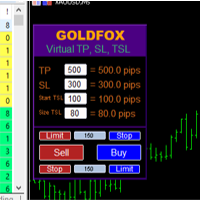
Forex Expert Advisor (utilità) "Virtual Stop Loss, Trailing Stop" consente di impostare uno stop loss virtuale (nascosto) e un trailing stop. Allo stesso tempo, senza utilizzare ordini stop loss e trailing stop standard. Pertanto, quando il consulente apre un'operazione, il tuo broker e il terminale Meta Trader non vedranno né imposteranno lo stop loss o il trailing stop, ma il consulente controllerà i parametri del TP SL TSL specificato e traccerà le linee corrispondenti sul grafico. ... Quand
Filtro:
Nessuna recensione
Rispondi alla recensione