OneClick Risk Manager
- Utilità
- Versione: 1.0
- Attivazioni: 5

OneClick Risk Manager — Manual Trading Assistant
OneClick Risk Manager is a manual trading panel for MetaTrader 5. It does not trade on its own — you stay in control and open, close and manage every position with one click. Its job is to do the math for you: position size, risk, partial take-profits, break-even and trailing, so you can trade fast and precisely without manual calculations.
Works on any symbol — XAUUSD (gold), US100/NAS100, US30/DJ30, FX pairs and more. The panel is fully scalable and movable, so it fits small laptops and 4K monitors alike.
Key features
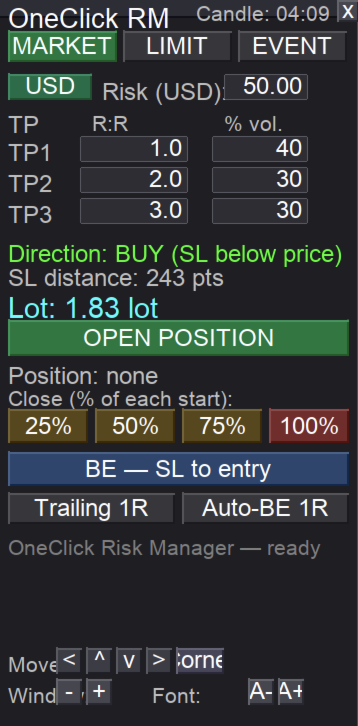
Position sizing — two modes, one toggle
- USD risk mode: type the amount you want to risk; the lot is calculated automatically from your Stop Loss distance so a stop-out equals exactly that amount.
- Fixed lot mode: type the lot directly and trade with a constant size.
- Switch between the two with a single button on the panel.
MARKET tab — instant entry from a line
- Drag the horizontal SL line to where you want your stop.
- Direction (BUY/SELL) is detected automatically from the line position.
- One click opens the position with the calculated lot and the stop already in place.
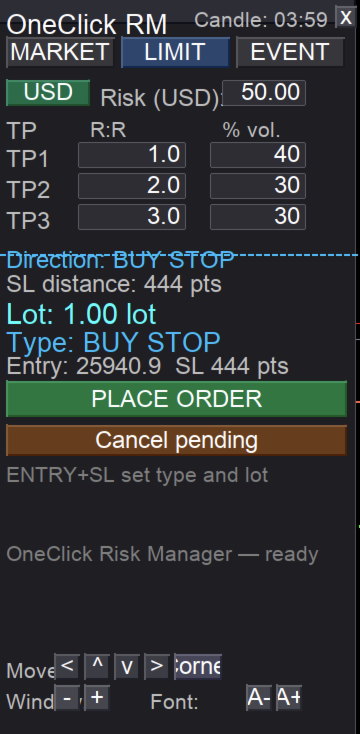
LIMIT tab — pending orders from two lines
- Use an ENTRY line and an SL line.
- The order type is detected automatically from the line layout: BUY LIMIT, BUY STOP, SELL LIMIT or SELL STOP.
- The lot is sized to your risk (or fixed), with an optional expiry.
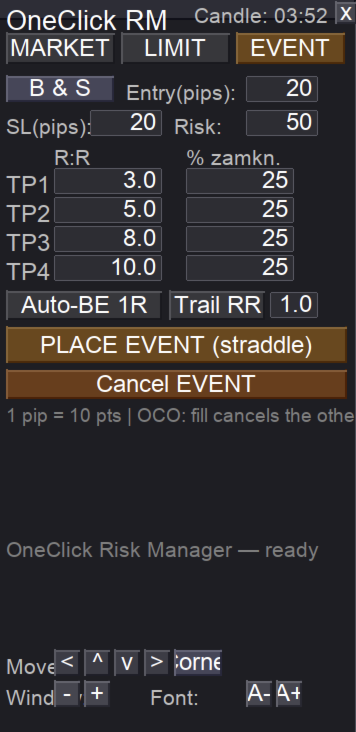
EVENT tab — OCO straddle for news and volatility
- Places a BUY stop and SELL stop at a set distance from price.
- OCO: when one side is triggered, the other is cancelled automatically.
- Choose BOTH / BUY only / SELL only.
- Four take-profit levels (R:R) with a percentage of the position closed at each.
- Built-in auto break-even and trailing for the active position.
Trade management (one click each)
- Partial close buttons 25% / 50% / 75% / 100% — always measured from the original lot of each position, so "50%" means half of the start size even after earlier partials.
- Break-even button — moves the stop of all positions to entry (+ a small buffer).
- Auto break-even at 1R — moves the stop to entry once price reaches 1R.
- Trailing by R — steps the stop up as price advances (1R, 2R, 3R...).
- Multiple take-profits (R:R) with partial closes at each level.
Panel and usability
- Live candle countdown — time left until the current candle closes.
- Scalable panel — separate window scale and font scale (great for 4K).
- Movable panel — drag by the title bar, or use on-panel arrow buttons and a "snap to corner" button (useful on macOS where dragging can be awkward).
- Panel position, scale and font are remembered per symbol after restart.
- Controls can be hidden once the panel is placed, for a clean workspace.
How to use
- Attach the EA to a chart and enable Allow Algo Trading.
- Pick the tab you need: MARKET, LIMIT or EVENT.
- Set your risk (USD) or a fixed lot, your SL line, and your TP levels.
- Click to open. Manage the trade with the partial-close, break-even and trailing buttons.
Important notes
- This is a manual assistant. It never opens or closes positions by itself — every action is a button click by you.
- Always test on a demo account first to confirm lot sizing matches your broker's contract specifications (tick value can differ between brokers, especially on gold and indices).
- Trading involves risk. You trade and use this tool at your own risk. Past performance and backtests do not guarantee future results.
Requirements
- MetaTrader 5
- Any broker / any symbol
- "Allow Algo Trading" enabled
Author / contact
Questions, feedback or support? Reach the author on Telegram: @MatKus92
Tip: for best results, keep the panel on the chart you actively trade and use the window/font scale buttons to size it comfortably for your screen.