TX Journal Sync MT4

Stop exporting CSV files by hand. TX Journal Sync keeps your TX Journal trading diary up to date automatically: it reads your account history and open positions and securely pushes them to your journal at the interval you choose.

Security first

  • 100% read-only: this utility never opens, modifies or closes trades.
  • Every upload is signed with HMAC-SHA256. Your Secret never leaves your terminal.
  • Only trade data is sent: symbol, direction, volume, prices, times, profit, commission and swap. Nothing else.

Setup in 3 steps

  1. In your TX Journal account, create an EA key and copy the Key ID and Secret.
  2. In MetaTrader go to Tools > Options > Expert Advisors, enable "Allow WebRequest for listed URL" and add the exact URL you see in the ApiUrl input of this utility.
  3. Attach the utility to any single chart, paste your Key ID and Secret, enable Algo Trading. The chart comment shows the live sync status.

Inputs

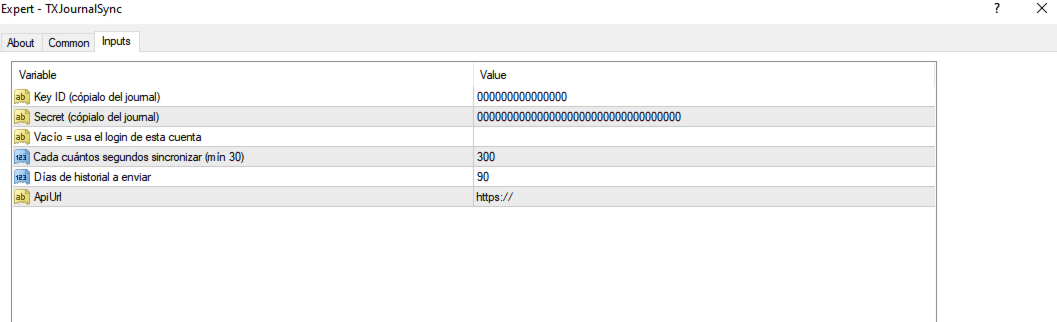
  • Key ID / Secret — your personal EA key from TX Journal.
  • AccountLogin — leave empty to use the current account login.
  • SyncSeconds — how often to sync (default 300, minimum 30).
  • HistoryDays — how many days of history to send (default 90).
  • ApiUrl — the endpoint to authorize in WebRequest settings.

Notes

  • Works with any broker, any account type (hedging and netting), any symbol. One chart is enough for the whole account.
  • Closed trades are rebuilt from the deal history so open/close pairs are accurate.
  • Does nothing in the Strategy Tester (WebRequest is not available there).
  • If the status shows a WebRequest error, the URL was not added to the allowed list (step 2).
Altri dall’autore
MQT Lot Size Calculator MT5
Josue Fernando Servellon Fuentes
MQT Lot Size Calculator calcola la dimensione esatta del lotto per il rischio che scegli — una percentuale del capitale o un importo fisso — usando tre linee trascinabili sul grafico: Ingresso, Stop Loss e Take Profit. Gratuito, leggero e solo di calcolo: non apre, modifica o chiude mai posizioni. Come funziona (riepilogo della logica): La direzione è dedotta dalla posizione dello Stop Loss (sotto l'ingresso = acquisto, sopra = vendita). Importo di rischio = capitale x percentuale di rischio (o
FREE
MQT Prop Guard DD MT4
Josue Fernando Servellon Fuentes
MQT Prop Guard DD protegge i conti prop firm dalla violazione del limite di perdita giornaliera e del drawdown totale. Monitora il tuo capitale ogni secondo e chiude tutto prima di raggiungere il limite giornaliero della tua challenge, poi blocca il trading fino al reset giornaliero successivo. Compatibile con le regole di prop firm come FTMO, The5ers o FundedNext (verifica sempre l'orario di reset e i limiti esatti della tua firma). Come funziona (riepilogo della logica): All'orario di reset co
FREE
MQT Lot Size Calculator MT4
Josue Fernando Servellon Fuentes
MQT Lot Size Calculator calcola la dimensione esatta del lotto per il rischio che scegli — una percentuale del capitale o un importo fisso — usando tre linee trascinabili sul grafico: Ingresso, Stop Loss e Take Profit. Gratuito, leggero e solo di calcolo: non apre, modifica o chiude mai posizioni. Come funziona (riepilogo della logica): La direzione è dedotta dalla posizione dello Stop Loss (sotto l'ingresso = acquisto, sopra = vendita). Importo di rischio = capitale x percentuale di rischio (o
FREE
MQT Prop Guard DD MT5
Josue Fernando Servellon Fuentes
MQT Prop Guard DD protegge i conti prop firm dalla violazione del limite di perdita giornaliera e del drawdown totale. Monitora il tuo capitale ogni secondo e chiude tutto prima di raggiungere il limite giornaliero della tua challenge, poi blocca il trading fino al reset giornaliero successivo. Compatibile con le regole di prop firm come FTMO, The5ers o FundedNext (verifica sempre l'orario di reset e i limiti esatti della tua firma). Come funziona (riepilogo della logica): All'orario di reset co
FREE
AutoClose Expert
Josue Fernando Servellon Fuentes
MQT AutoClose Expert closes your orders automatically once they reach the profit target you set — in real pips (with a separate target for gold) or in account money. Open your trades as you always do; the EA watches every position on every symbol and locks the profit in for you. It never opens trades. How it works (logic summary): Every tick and every 500 ms it scans all open market orders. Pending orders are never touched. Pips mode: profit distance is computed from prices — Bid for buys, Ask f
MQT AutoClose Expert MT5
Josue Fernando Servellon Fuentes
MQT AutoClose Expert closes your orders automatically once they reach the profit target you set — in real pips (with a separate target for gold) or in account money. Open your trades as you always do; the EA watches every position on every symbol and locks the profit in for you. It never opens trades. How it works (logic summary): Every tick and every 500 ms it scans all open market orders. Pending orders are never touched. Pips mode: profit distance is computed from prices — Bid for buys, Ask f
TX Journal Sync MT5
Josue Fernando Servellon Fuentes
Stop exporting CSV files by hand. TX Journal Sync keeps your TX Journal trading diary up to date automatically: it reads your account history and open positions and securely pushes them to your journal at the interval you choose. Security first 100% read-only: this utility never opens, modifies or closes trades. Every upload is signed with HMAC-SHA256. Your Secret never leaves your terminal. Only trade data is sent: symbol, direction, volume, prices, times, profit, commission and swap. Nothing e
FREE
Filtro:
Nessuna recensione
Rispondi alla recensione