Volumized OrderBlocks MTF
- Indicatori
-
Rizwan Akram
 I am a professional MQL4/MQL5 developer with strong experience in creating custom trading tools for Forex and Crypto traders. Over the past 9 years, I have developed indicators, Expert Advisors (EAs), scripts, and risk management dashboards for retail traders, prop firm traders, and trading
 - Versione: 1.0
Volumized OrderBlocks MTF - Multi-Timeframe Volumetric Order Block Indicator
══════════════════════════════════════════════════════════════════════════════
OVERVIEW
══════════════════════════════════════════════════════════════════════════════
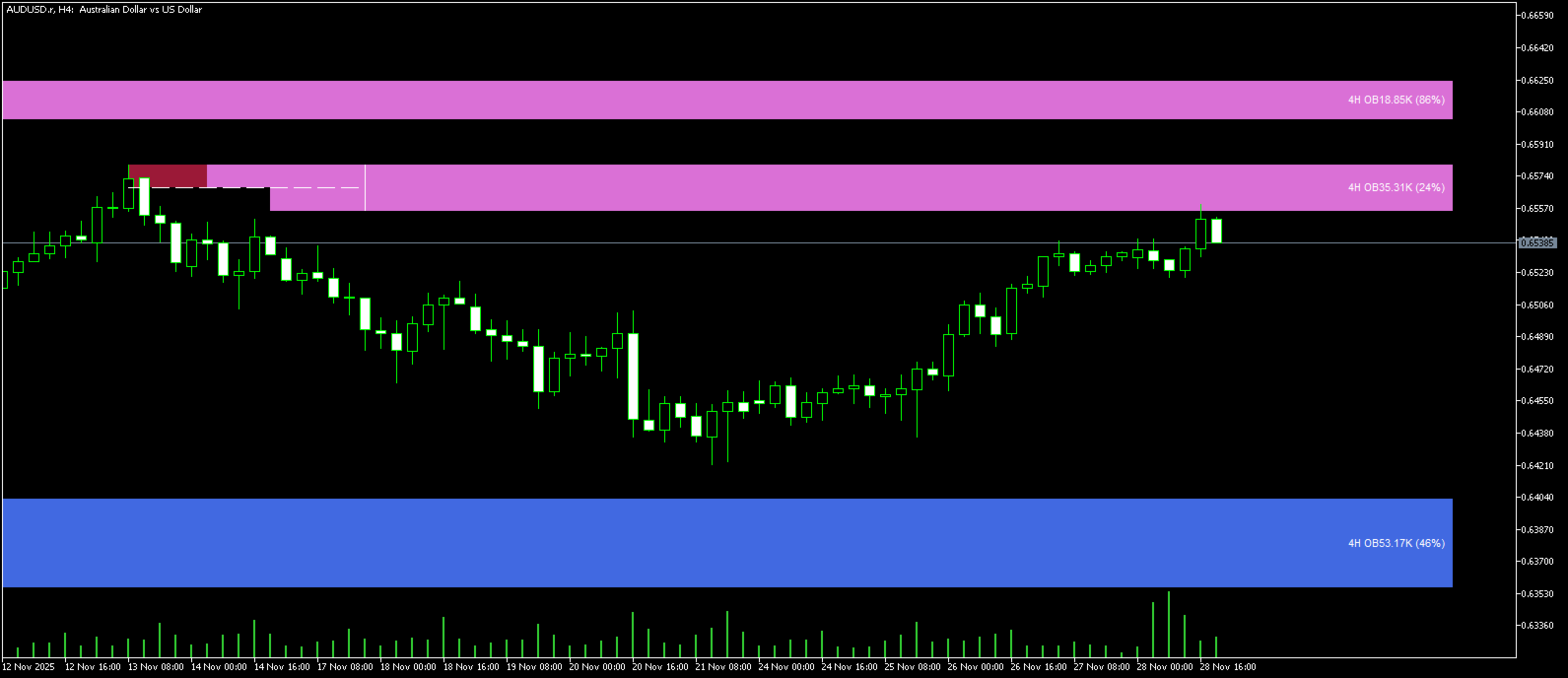
Volumized OrderBlocks MTF is an advanced Multi-Timeframe Order Block indicator that automatically detects, displays, and merges Order Blocks from up to 3 different timeframes on a single chart. Built with institutional Smart Money Concepts (SMC) methodology, this indicator helps traders identify high-probability supply and demand zones where smart money is likely to enter the market.
The unique MTF merge feature automatically combines overlapping Order Blocks from different timeframes, highlighting confluence zones where multiple timeframes agree - these are the highest probability trading areas.
KEY FEATURES
══════════════════════════════════════════════════════════════════════════════
✦ MULTI-TIMEFRAME ANALYSIS
• Display Order Blocks from 3 customizable timeframes simultaneously
• Each timeframe has individual enable/disable toggle
• Automatic detection of higher timeframe Order Blocks on lower timeframe charts
• No need to switch between charts - see the complete picture on one screen
✦ SMART MTF MERGE SYSTEM
• Automatically detects overlapping Order Blocks across timeframes
• Merges confluent zones and highlights them with special "MERGED OB" label
• Shows combined timeframe string (e.g., "1H + 4H + D") for merged zones
• Merged zones indicate high-probability reversal/continuation areas
• Same-type merging only (Bullish + Bullish, Bearish + Bearish)
✦ VOLUMETRIC ORDER BLOCKS
• Real volume analysis integrated into each Order Block
• Visual volume bars showing buy vs sell pressure ratio
• Percentage display indicating volume imbalance
• Helps identify the strength of each Order Block
• Uses real volume when available, falls back to tick volume
✦ PROFESSIONAL VISUALIZATION
• Unique color scheme for each timeframe (fully customizable)
• Special merged zone colors for easy identification
• Clean, non-cluttered chart display
• Text positioned on right side for visibility with new candles
• Dynamic zone extension that follows price action
✦ FLEXIBLE INVALIDATION OPTIONS
• Wick-based invalidation: Zone invalidates when wick penetrates
• Close-based invalidation: Zone invalidates only on candle close through level
• Automatic breaker block detection and removal
• Show/hide historical (invalidated) zones option
HOW IT WORKS
══════════════════════════════════════════════════════════════════════════════
ORDER BLOCK DETECTION:
The indicator uses swing structure analysis to identify Order Blocks:
• Bullish OB: Forms when price breaks above a swing high - the lowest candle before the breakout becomes the demand zone
• Bearish OB: Forms when price breaks below a swing low - the highest candle before the breakdown becomes the supply zone
MTF MERGE LOGIC:
When Order Blocks from different timeframes overlap in price and time:
1. Both original zones are combined into a single merged zone
2. The merged zone spans the full price range of both zones
3. Volume data is aggregated from both zones
4. Special "MERGED OB" label appears with all contributing timeframes
5. Merged zones use distinct colors for easy identification
VOLUME ANALYSIS:
Each Order Block displays:
• Total volume of the Order Block formation
• Buy/Sell pressure ratio as visual bars
• Percentage showing the volume imbalance
• Higher percentage = more balanced (potential reversal)
• Lower percentage = more imbalanced (stronger directional bias)
INPUT PARAMETERS
══════════════════════════════════════════════════════════════════════════════
MTF SETTINGS:
• Enable TF1/TF2/TF3: Toggle each timeframe on/off
• TF1/TF2/TF3 Timeframe: Select desired timeframe (M1 to Monthly)
• Default: H1, H4, D1
MTF COLORS:
• TF1 Bull/Bear Color: Colors for first timeframe Order Blocks
• TF2 Bull/Bear Color: Colors for second timeframe Order Blocks
• TF3 Bull/Bear Color: Colors for third timeframe Order Blocks
• Merged Bull/Bear Color: Special colors for merged confluence zones
GENERAL CONFIGURATION:
• Show Historic Zones: Display invalidated/broken Order Blocks
• Volumetric Info: Show volume bars and percentage data
• Zone Invalidation: Wick or Close based invalidation method
• Swing Length: Sensitivity of swing detection (default: 10)
• Zone Count: Number of zones per type (One/Low/Medium/High)
STYLE:
• Text Color: Color for all text labels
• Extend Zones: Number of bars to extend zones forward
• Dynamic Extension: Auto-extend zones until invalidation
• Transparency: Opacity level for Order Block zones
TRADING APPLICATIONS
══════════════════════════════════════════════════════════════════════════════
1. CONFLUENCE TRADING
Look for MERGED OB zones - these represent areas where multiple timeframes show the same supply/demand, increasing probability of reaction.
2. TREND CONTINUATION
In an uptrend, look for bullish Order Blocks as potential entry points for long positions. In a downtrend, use bearish Order Blocks for short entries.
3. REVERSAL TRADING
When price reaches a higher timeframe Order Block (H4 or Daily) while on a lower timeframe chart, watch for reversal patterns.
4. VOLUME CONFIRMATION
Use the volumetric data to gauge Order Block strength:
• High volume OBs with imbalanced buy/sell ratio = stronger zones
• Merged OBs with combined high volume = highest probability setups
5. RISK MANAGEMENT
• Place stops beyond the Order Block boundary
• Use the invalidation level as your risk point
• Merged zones often provide tighter stop placement opportunities
RECOMMENDED SETTINGS
══════════════════════════════════════════════════════════════════════════════
FOR SCALPING (M1-M15 charts):
• TF1: M15, TF2: H1, TF3: H4
• Swing Length: 5-8
• Zone Count: Low
FOR DAY TRADING (M15-H1 charts):
• TF1: H1, TF2: H4, TF3: D1
• Swing Length: 10
• Zone Count: Low to Medium
FOR SWING TRADING (H4-D1 charts):
• TF1: H4, TF2: D1, TF3: W1
• Swing Length: 10-15
• Zone Count: Medium
PERFORMANCE NOTES
══════════════════════════════════════════════════════════════════════════════
• Optimized merge algorithm for fast processing
• Maximum 1750 bars lookback for performance
• Maximum 20 Order Blocks stored per timeframe
• 50 iteration limit on merge cycles to prevent hanging
• Early exit optimizations in overlap detection
COMPATIBILITY
══════════════════════════════════════════════════════════════════════════════
• Platform: MetaTrader 5
• Instruments: All (Forex, Stocks, Crypto, Commodities, Indices)
• Timeframes: All (M1 to Monthly)
• Account Type: Any
INSTALLATION
══════════════════════════════════════════════════════════════════════════════
1. Download the .mq5 file
2. Open MetaTrader 5
3. Go to File → Open Data Folder
4. Navigate to MQL5 → Indicators
5. Copy the .mq5 file into this folder
6. Restart MetaTrader 5 or Refresh the Navigator panel
7. Drag the indicator onto any chart
8. Configure your preferred settings and click OK
══════════════════════════════════════════════════════════════════════════════
Developed by RizwanFxCoder
══════════════════════════════════════════════════════════════════════════════
























































One of the best indicators in the market. Thumbs up to the developer for the great job in developing this indicator.