PUGS Multi Set Template Scheduler Pro
- Utilità
- Versione: 1.1
- Aggiornato: 29 agosto 2026
- Attivazioni: 5

📖 Full Product Description
What it does
PUGS Multi-Set Template Scheduler Pro is a "master controller" Expert Advisor that you attach to one chart. From that single chart, it can manage up to five independent "Sets", each pointing at a different target chart anywhere in your MT4 terminal. Each Set runs on its own schedule and its own risk rules.
Instead of babysitting five different charts and manually swapping templates, indicators or EAs throughout the day, you let this EA do it for you — at fixed times, when profit targets are hit, or when loss limits are breached.
Why you need it
If you trade more than one strategy, you already know the pain:
- EAs need different templates / parameter sets at different hours
- You must stop trading once a daily profit target is hit
- You must cut losses before they spiral out of control
- You need templates to actually load on remote charts (the cross-chart ChartApplyTemplate call is notoriously flaky in MT4 — this EA solves that with retry logic + a delayed period-flip wakeup)
This EA handles all of the above from one place.
Key Features
✅ 5 Independent Sets – Each Set controls a different target chart with its own schedule, profit targets, loss limits and magic numbers.
✅ Two-Stage Template Scheduling (Time A → Time B) – At Time A the EA applies Template A (your "trading on" template). At Time B it switches to Template B (your "trading off / flatten" template), but only if the day's net profit has reached your MinNetProfit AND there are no open trades.
✅ Two-Tier Max-Loss Kill Switch
- Tier 1 (1× Max Loss) – armed only after Time B. If today's net loss hits MaxLossLimit , all trades for the Set's magic numbers are force-closed, pending orders cancelled, and Template B applied.
- Tier 2 (2× Max Loss) – armed 24/7 from the moment the EA starts. If today's net loss hits 2 × MaxLossLimit , the same emergency shutdown triggers immediately, regardless of time.
✅ Max-Profit Lock-In – Once today's net profit reaches MaxNetProfit and no trades are open, Template B is applied so the strategy stops trading for the day.
✅ Force-Close of Cross-Symbol Trades – When closing trades the EA uses MarketInfo() on each trade's own symbol, so it correctly closes XAUUSD trades even if the controller chart is BTCUSD (a common bug in similar tools).
✅ Delayed Cross-Chart Wakeup – After a template is applied to a remote chart, the EA flips the chart's timeframe 2 seconds later and flips it back. This forces MT4 to fully reload indicators/EAs on that chart — eliminating the "template applied but EAs didn't load" problem.
✅ Retry Logic with Smart Logging – Up to 15 retries per template apply, with readable error descriptions and reduced log spam.
✅ New-Day Reset – When the server date changes, all flags are cleared. If there are no open trades for a Set, Template B is re-applied so the next session starts cleanly.
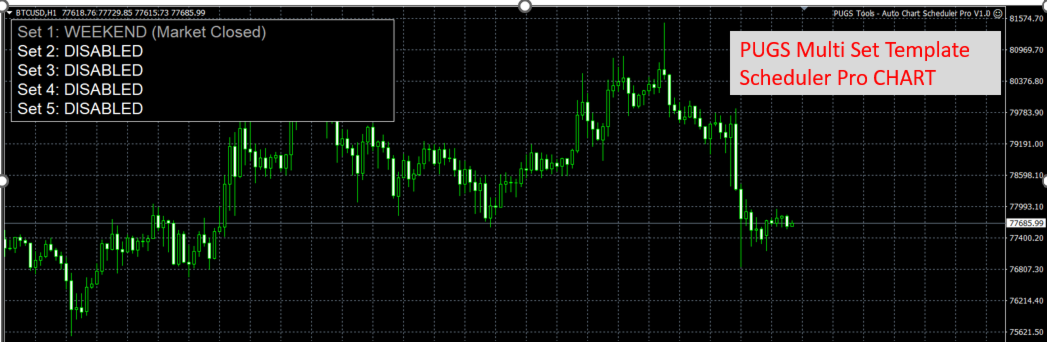
✅ Weekend Filter – The EA pauses execution on Saturdays and Sundays (configurable server time), but the dashboard keeps refreshing so you always know it is alive.
✅ Live On-Chart Dashboard – A compact panel shows, for every Set: chart ID, today's net P/L, current state (Waiting / Active / Hunting / Sleeping / Weekend / Disabled / Chart Not Found), and for Set 5 the live countdown to Template X.
✅ Magic-Number Groups – Each Set accepts a comma-separated list of magic numbers, so it can manage a whole basket of trades on the target chart.
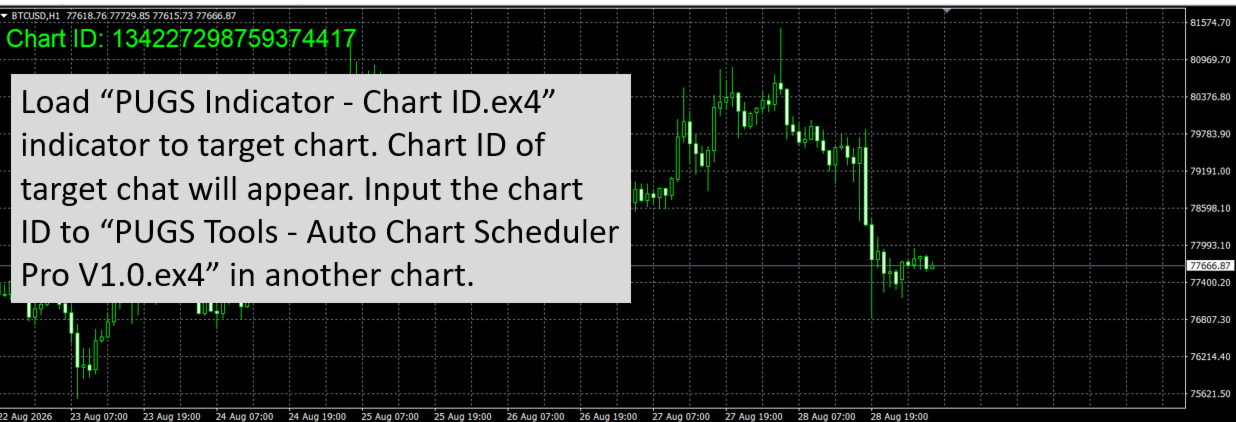
✅ Free Bonus Utility – PUGS-Chart ID – Attaching this tiny helper to any chart prints that chart's unique ID straight to the Experts log, ready to be pasted into the EA's inputs. No more guessing chart IDs.
Use Cases
- Switch from a "London breakout" template to a "range" template at 14:00.
- Switch from a day-trading EA to a swing-trading EA on the same chart at 21:00.
- Stop all trading once +$200 is hit or –$200 is breached.
⚙️ Input Parameters (Per Set)
Parameter | Description |
|---|---|
| TargetChartID | The Chart ID of the chart this Set will control. Find it with the free PUGS-Chart ID utility. |
| TemplateA | Template to apply at Time A (your "trading on" template). Must exist in MQL4/Files/Templates/ of the data folder, or the standard Templates folder. |
| TemplateB | Template to apply at Time B / on profit / on kill switch (your "trading off" template). |
| TimeA | Server time to apply Template A (format HH:MM ). |
| TimeB | Server time to apply Template B (format HH:MM ). |
| MinNetProfit | Required net profit (today, in account currency) before Template B is allowed at Time B. |
| MaxNetProfit | If reached and no open trades, Template B is applied (locks in the day). |
| UseMaxLoss | Enable the 1× post-Time-B loss limit. |
| UseDoubleMaxLoss | Enable the 2× 24/7 loss limit. |
| MaxLossLimit | The base loss amount (in account currency). |
| MagicNumbersList | Comma-separated magic numbers, e.g. 1001,1002,1003 . |
⚠️ Important Notes
- Times are evaluated against server time, not your local time.
- Net profit is calculated only from trades matching the Set's magic numbers, in the current server day.
- If a target chart is closed mid-session, the EA will report "CHART NOT FOUND" on the dashboard and resume automatically if the chart is reopened.
- All times use 24-hour format with leading zeros (e.g. 09:00 , not 9:00 ).
- Highly recommended to load this EA on BTCUSD chart as it runs 24/7.
📦 Package Contents
- PUGS-MultiSetTemplateScheduler Pro V1.0.ex4 – the main scheduler EA.
- PUGS-ChartID.ex4 – free bonus utility to identify chart IDs. (contact to receive this)