Equity Shield 2 MT4

Equity Shield 2 for MT4

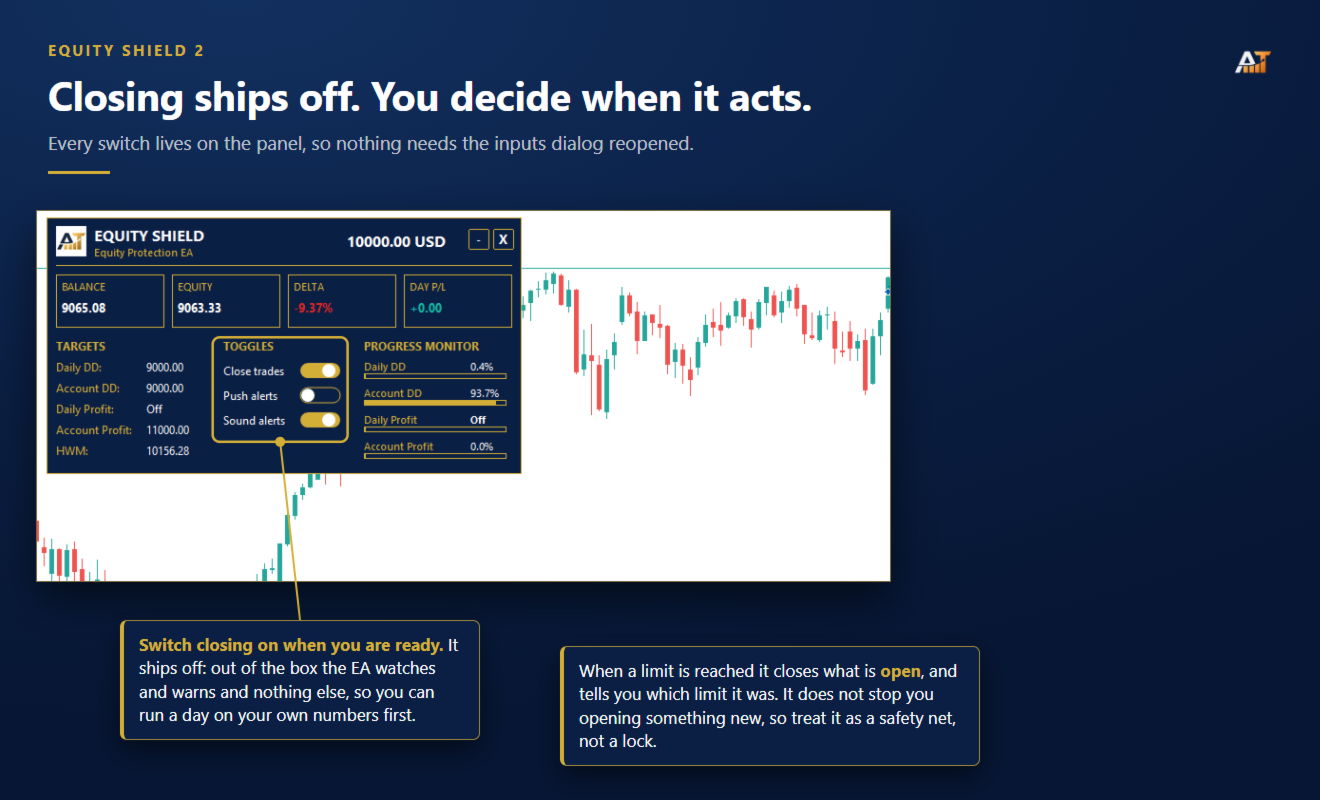
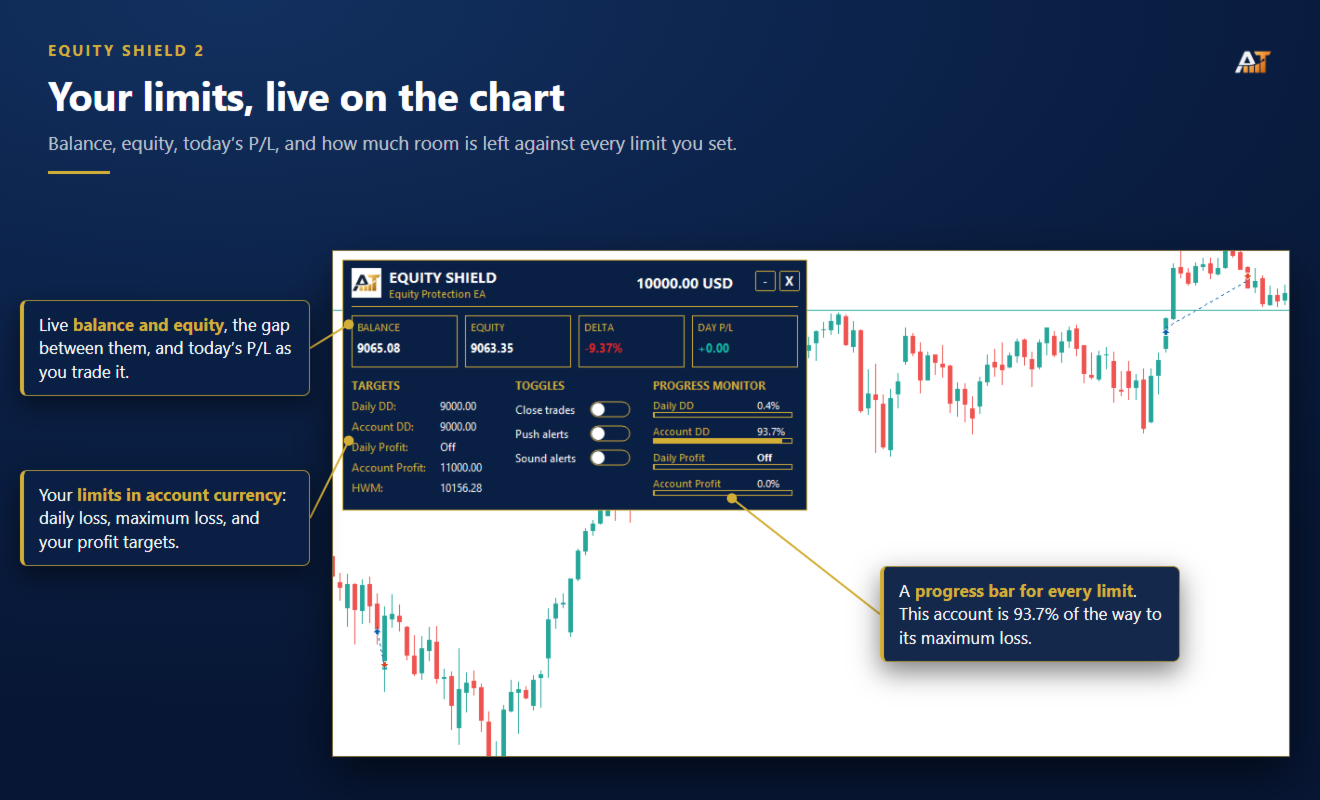
Equity Shield 2 monitors your account limits while you trade. Set daily drawdown, maximum drawdown, daily profit and account profit targets, then track your remaining room live from one on-chart panel.

When an enabled limit is reached, Equity Shield 2 can close your open positions and alert you. Built for prop firm challenges and traders who want an additional layer of account protection.

Account protection

Monitor up to four account limits:

  • Daily drawdown

  • Maximum account drawdown

  • Daily profit target

  • Account profit target

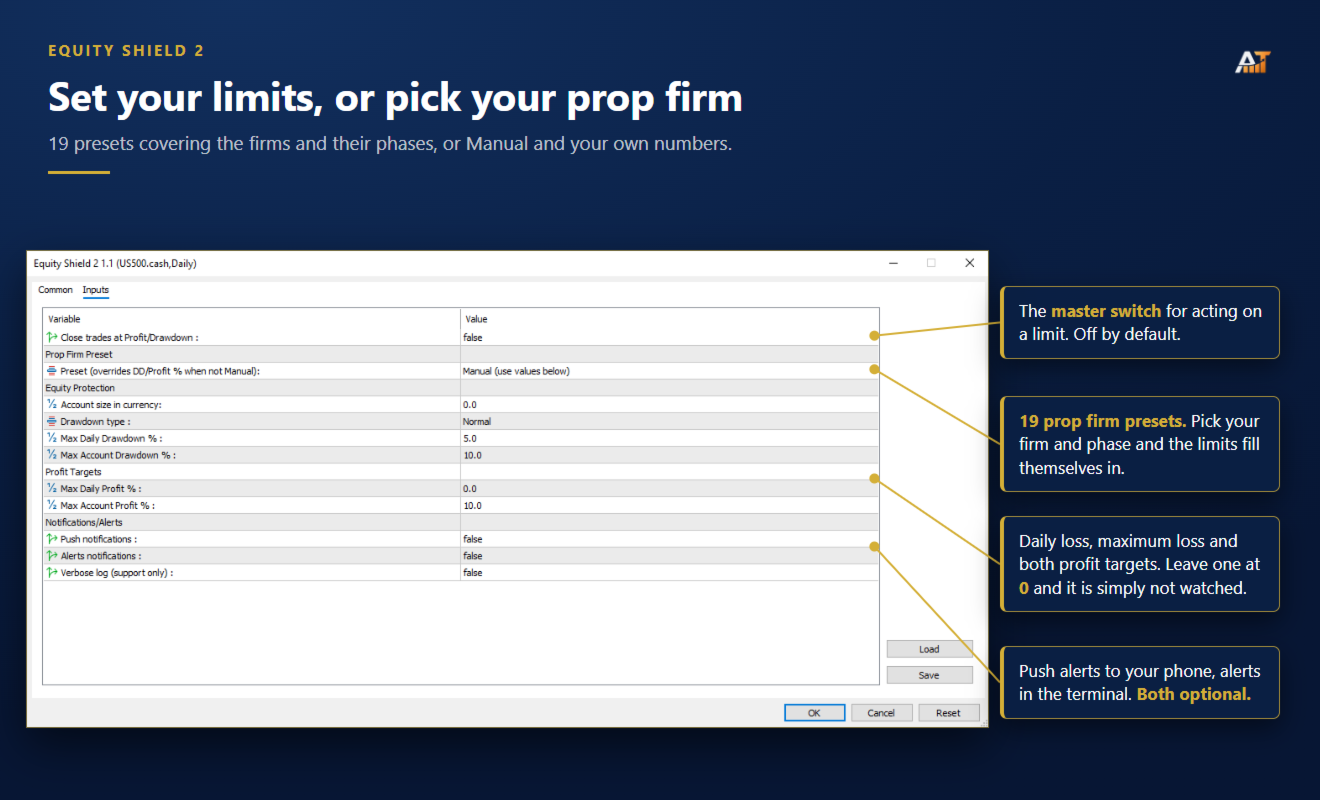
Each limit is percentage-based and shown live on the panel. Set a limit to 0 if you do not want it monitored.

Automatic protection

When a limit is reached:

  • Open positions can be closed automatically.

  • Push and terminal notifications can identify the triggered limit.

  • The panel displays the breach for easy reference.

Automatic trade closing is OFF by default. The EA can monitor your account without closing anything until you enable this feature.

Equity Shield closes existing positions when a limit is triggered. It does not prevent you from opening new trades afterward.

Prop presets

Includes 19 presets covering popular firms 

  • Phase 1 and Phase 2 presets available where applicable.

  • Automatically fills profit target, daily drawdown and maximum drawdown values.

  • Manual mode lets you enter your own limits.

Always verify your firm's current rules before trading, as conditions can change.

Live dashboard

  • Balance and equity

  • Floating profit/loss

  • Today's profit or loss

  • Progress bars for active limits

  • Remaining room before each limit

  • Draggable and minimizable panel

Drawdown modes

Choose the calculation method that matches your requirements:

  • Normal drawdown

  • Trailing drawdown

Leave Account Size at 0 to let the EA determine the starting balance automatically, or enter a fixed account size manually.

Alerts

  • MetaTrader 4 push notifications

  • Desktop terminal alerts

  • Both optional and OFF by default

Parameters

  • Close trades at Profit/Drawdown — default OFF

  • Prop Firm Preset — default Manual

  • Account Size — default 0

  • Drawdown Type — Normal or Trailing

  • Max Daily Drawdown — default 5%

  • Max Account Drawdown — default 10%

  • Max Daily Profit — default 0%

  • Max Account Profit — default 10%

  • Push Notifications — default OFF

  • Alert Notifications — default OFF

Compatibility

MetaTrader 4 · all symbols · all timeframes · no external connection required

Prodotti consigliati
Pending Grid LIMIT Manual
Nantakan Leungonnam
5 (3)
Hola Traders. Lot - lot size for pending orders. Martingale - double lot size of pending orders. *(No Martingale = 1.00) TotalGridEachSide - unit each side of pending orders. SpaceOfFirstOrder - distance for the first order in points. Take Profit - profit in points. Stop Loss - loss in points. The entire positioning uses POINTS only. (10 point = 1 pip) and you can open order BUYLIMIT, SELLLIMIT, ALLBUYANDSELL you can Close Pending, Close orders Profit and Loss and Close All ***  ideas for usin
Pending Grid STOP Manual
Nantakan Leungonnam
5 (1)
Hola Traders. Lot - lot size for pending orders. Martingale - double lot size of pending orders. *(No Martingale = 1.00) TotalGridEachSide - unit each side of pending orders. SpaceOfFirstOrder - distance for the first order in points. Take Profit - profit in points. Stop Loss - loss in points. The entire positioning uses POINTS only. (10 point = 1 pip) and you can open order BUYSTOP, SELLSTOP, ALLBUYANDSELL you can Close Pending, Close orders Profit and Loss and Close All ***  ideas for using
Watermark Symbol
Makarii Gubaydullin
Filigrana sul grafico: Simbolo + Lasso di tempo / o il proprio testo La mia utility #1:   include 66 + funzioni /   Contattami  se hai domande Nelle impostazioni dell'indicatore, è possibile configurare: Dimensione carattere; Colore testo; Nome carattere; Posizione: 1 = In alto a sinistra; 2 = In alto a destra; 3 = In basso a sinistra; 4 = In basso a destra; 5 = Centro; Mostra intervallo di tempo corrente: on / off; Il prefisso del Simbolo da rimuovere ( n_AUDCAD > > AUDCAD ); Il suffisso del s
* The product for MT5 converted using  "BRiCK TradeByArrow MT4"  is  here. BRiCK is a simple and versatile utility.   By combining Experts, Indicators and utilities like the Lego block, various trading styles can be realized. "TradeByArrow" is Utility that executes order processing when an arrow object is created on the chart. Combined with Indicator which outputs arrow object, it can be used like Expert. Parameter [ArrowName] EntryBuy: Arrow object name for buy order (partial match) EntrySel
FREE
Element 7
Vladimir Deryagin
The Expert Advisor works based on the analysis of candles (bars). The Expert Advisor settings are intuitive. You can use this Expert Advisor on any currency pair, having previously selected the settings using testing. Expert Advisor settings, description: Magic is a unique number of open trades. Volume - the trading volume of the initial transaction. A sign for increasing the lot with the selected coefficient-the choice of the action sign between the lot and the coefficient by which this
Easy mt4 to telegram
Medilane Bernard Philippe Couratier
Jarfac Mt4ToTelegram Introduction Jarfac Mt4ToTelegram   is an MT4 system designed to facilitate real-time communication between the MetaTrader 4 platform and Telegram.   This script allows traders to receive customizable instant notifications based on different trade types, ensuring optimal responsiveness without having to constantly monitor the trading platform. main Features Real-time notifications   : Receive notifications directly on Telegram as soon as an action occurs on MT4. Emoji suppor
The professional utilities "Ichimoku Waves Meter" to analyse graphs using the correct interpretation of Ichimoku kinkōhyō! Is a graphic program that allows traders to quickly and easily measure the proportions between the indicated points on the price graph. This time and price indicator is a basic tool for analysing the chart according to the Ichimoku strategy on the MT4 platform. Using this tool allows an insightful and complete analysis of time waves as well as price waves in a very short ti
The  Silver Volatility Trend Line for MT4 is an EA that helps you trade using the trendlines, drawn on your chart. It basically allows you to send and manage orders using trend lines. It automatically calculates the True Range of your asset to allow you to send orders well calibrated with the market volatility. Take Profit and Stop Loss are calculated in number of True Range. You can do that for two different orders at the same time , so that you can trade two different kind of risk / profit rat
One more Copier MT4
Oleksii Chepurnyi
5 (1)
Yet another signal copier. Nothing special. Demo version can be downloaded here . Key Features The utility copies trades between terminals: by market, pending orders (optional), as well as their stop loss and take profit levels (optional as well). You can copy from one Master account to several Slave accounts, as well as from several Master accounts to one Slave account. Volume calculation At the moment, there are two options for calculating the volume: The trade volume is taken 1 to 1 from th
Smart Trade Guard Elite PRO MT4 " The Ultimate Manual Trading & Risk Discipline Panel " Stop Trading with Emotions. TradeGuard Elite PRO is an advanced manual trading panel designed for traders who want the speed of manual execution with the discipline of a professional risk management system. Open trades in one click, calculate lot size automatically, move to break-even, partial close positions, and even block yourself from revenge trading after consecutive losses. This is not an auto tradin
Un grafico. Controllo totale. Smetti di perdere tempo a gestire oggetti, colori e impostazioni su ogni grafico separatamente. Con       Chart Sync Manager   , puoi       sincronizza, copia e controlla tutti i tuoi grafici MetaTrader       all'istante, utilizzando un solo pannello e poche scorciatoie. Disegna una volta, aggiorna ovunque. Apri e chiudi i grafici con un solo clic. Mantieni pulito il tuo spazio di lavoro con       gestione degli oggetti basata sui simboli   . E non perdere mai detta
Graphic rotator
Roger Perez Lugo
This indicator helps you control several pairs in a small workspace, therefore, it is not necessary to open several charts on the platform to do so. The indicator shows sequentially up to 6 different pairs, besides that each of these pairs has a button with which you can stop the indicator to observe the selected pair. Place the indicator on a chart to monitor several pairs and the rest of your space use it on the chart of the pair you wish to observe in detail.    MT5 version          Parameter
Trading Pal MT4
Tan Bao Shen Chen
Why choose Trading Pal EA: This is a EA utility that auto-manage your   positions ' Stop-Loss (SL) and Take-Profits (TP) dynamically. When opening a single   position , it is easy to set the SL and TP manually. But when dealing with multiple   positions , it can be very tedious or   overwhelming   to fill in so many SL and TP values consistently, especially in a short span of time, like in scalping. Over time and after many such trades, trading itself can become a chore. That is where this EA c
SMT Trade Planner e un calcolatore di rischio professionale e pannello di esecuzione ordini direttamente sul grafico MetaTrader. Calcola la dimensione del lotto, mostra linee visuali di entrata, Stop Loss e Take Profit trascinabili sul grafico, valida il trade contro regole di rischio configurabili e permette l'esecuzione con un clic.   Come funziona Allega il Trade Planner a qualsiasi grafico. Il pannello mostra le informazioni del conto e pulsanti di selezione rapida del rischio. Tre linee ori
Hidden Gap by MMD MT4
Mariusz Maciej Drozdowski
Hidden Gap by MMD Hidden Gap by MMD is a unique indicator that detects hidden gaps between three consecutive candles. This observation isn't my own, but in the MMD methodology, it has its application alongside other original indicators. You can apply this indicator to the chart multiple times and set the interval from which you want to see the hidden gaps. You can show or hide these gaps as needed. For example, you can view the chart at an M5 interval and see hidden gaps from an M15 chart, etc.
EuroPulse Ribbon Trend — EMA Ribbon + ADX Trend Following EA (Swap-Free) PRODUCT OVERVIEW EuroPulse Ribbon Trend is a premium automated trading solution designed for MetaTrader 4, specialized for the EURUSD currency pair. The EA implements a simplified yet powerful trend-following strategy: • EMA 20/50 crossover for trend direction • ADX 14 for trend strength confirmation • ATR-based stop loss and take profit • Daily loss protection • Swap-Free mode for Islamic accounts WHY EURO
Pointer synchronization
Roger Perez Lugo
4 (1)
Pointer synchronization is an indicator with which the pointer can be synchronized in all the visible charts of the terminal. It shows a crossed cursor in all the visible charts of the terminal, in position relative to the cursor of the active chart. To activate the indicator, simply press the button that appears in one of the corners of the chart once the indicator is added to the chart. To deactivate the indicator, simply press the button again. Once the indicator has been deactivated, the cr
Pending Orders Grid Complete System opens any combination of Buy Stop, Sell Stop, Buy Limit and Sell Limit pending orders and closes all existing pending orders. You will be able to Drag-and-Drop the Script on the chart and it will pick up the start price for the first position in the grid from the "Drop" point. Usually it should be in the area of Support/Resistance lines. Input Parameters Before placing all pending orders, the input window is opened allowing you to modify all input parameters:
Prendi facilmente il controllo della tua routine di trading con il rivoluzionario Trades Time Manager. Questo potente strumento automatizza l'esecuzione degli ordini in orari prestabiliti, trasformando il tuo approccio al trading. Crea elenchi di attività personalizzati per diverse azioni di trading, dall'acquisto all'impostazione degli ordini, il tutto senza intervento manuale. Trades Time Manager Guida all'installazione e agli input Se desideri ricevere notifiche sull'EA, aggiungi il nostro UR
Choose all the pairs that have positive swap in your broker Then, the EA will buy/sell before the triple swap takes place, and it will close the position after the triple swap is paid to you. It is recommended to test the EA at least 1 month in demo account so you can see the results. If you have any doubt or suggestion, don't hesitate to contact me! HOW TO USE Inputs swapDay = The day that the 3x swap is paid in your broker lots = The lot size that you want to use SL = stop loss in points (not
PercentTradePad
Sergey Batudayev
The panel has the most intuitive interface that every beginner can handle. In the SLp column  – you need to specify the SL size in pips. If the value turns gray and at the same time the Bay / Sell buttons are also inactive, then you have specified a SL value that is less than that allowed before it was set by your broker. In the TP% column   – you indicate TP in% of the account balance. In the settings, you can choose on the basis of what this indicator will be calculated, by equity, balance or
Quick Symbols
Abdulkarim Karazon
Quick Symbol è un indicatore di pannello che ha i nomi dei simboli come pulsanti clicchabili e ha anche i timeframe come pulsanti cliccabili; l'obiettivo principale di questo indicatore è la navigazione veloce delle coppie; il pannello stesso ha il pulsante nascondi/mostra così non ostacola il trader; con tempi di esposizione rapidi e prestazioni senza bug, questo strumento è uno strumento più adatto a qualsiasi tipo di trader. COME USARE : semplice clicca sulla coppia desiderata e la coppia
FREE
MT4 Terminal to Telegram Pro
Thennakoon Mudiyanselage Eranda Nuwan Kumara
**MT4 Terminal to Telegram Pro** is a professional-grade notification utility that turns your MetaTrader 4 terminal into a real-time Telegram signal channel with clean, structured, and reliable trade communication. Built for traders, account managers, and signal providers, it automatically tracks live terminal activity and delivers a complete trade lifecycle to Telegram: entry alerts, SL/TP modification updates, and close notifications. Instead of manually copying trades, you get consistent, f
BreakEven ProSync EA – Trade Management & Risk Control Tool Overview BreakEven ProSync EA is an expert advisor for   MetaTrader 4  that helps traders manage open positions efficiently by   automating stop-loss adjustments   and ensuring position synchronization. This tool is designed for traders who want to standardize their stop-loss and take-profit levels across multiple trades while integrating a break-even function. The EA works by calculating the  average price   of all open positions and
Telegram Forwarder II
Yaser Sabbaghi
5 (2)
Telegram Forwarder can forward all activities related to trades and position taking as a signal to Telegram messenger. It can also forward indicators' alert to Telegram if you modify indicator code (I can do it for you too) to hand over alerts to Telegram Forwarder. This EA is intended for business and professional usage. You can introduce your own Telegram bot and customize water mark in screenshots. Telegram forwarder is able to forward signals for "new order", "modification of order", "Pendin
Telegram Bot Signals Parser
AHMAD ALI MAHER MOHAMAD
1 (2)
MQL4 Expert parsing signals from Telegram bot and executing the orders. Install EA, Telegram. Create a telegram bot which will distribute signal and specify it's token in EA input settings as well as key words which will be used to parse a signal. You can change or add key words by your own. Default values (lot, stops) are used in case the incoming signal don't include them. Specify "Allow DLL imports" in EA Settings.
MT4 To Notion
Levi Dane Benjamin
5 (2)
Questo programma ti permetterà di esportare tutte le tue operazioni dal tuo account MetaTrader direttamente in Notion utilizzando un'interfaccia utente molto amichevole.  Versione MT5  |  Guida per l'utente + Demo Per iniziare, utilizza la Guida per l'utente e scarica il Modello di Notion. Se desideri una demo, consulta la Guida per l'utente. Non funziona nel tester di strategia! Principali Caratteristiche Esporta tutte le operazioni dal tuo conto di trading nel tuo Notion Esporta le operazioni
Zen MT4
Elena Kusheva
I slippage=0; - allowed slippage, 0 - not used   S cmt=""; - comment on orders   I Magic=20200131; - magic, the order ID of the EA   S WorkTime="00:00-24:00"; - the format is HH: MM-HH:MM, all day 0-24 or 00: 00-24:00   D fix_lot=0.01; / / fix lot - working lot   Order_tp D=100.0; //TP. I recommend – 10.0-take profit in points as for 4 characters! the EA automatically detects 5-character instruments and will increase the value 10 times automatically.   D order_sl=0.0; / / SL-stop loss in points
Market Monitor
Rodrigo Rethka Goncalves
Market Monitor – Smart Asset Performance Dashboard for MT4 Turn your MetaTrader 4 into a professional trading intelligence center! Market Monitor is a powerful monitoring tool that displays, in real time, the most relevant performance metrics of each symbol being traded — helping you make faster, smarter, and more strategic decisions. What Does This Indicator Do? Market Monitor scans all open and historical orders, consolidates the data by symbol, and displays everything in visual pa
Lot Profit Stats User Manual I am used to trading with the Martingale strategy. Every time I need to do statistics, I have to export the chart data to Excel for analysis, which is a very tedious process. Although there are already many statistical indicators on the market, there is a lack of one specifically for analyzing lots. With such an indicator, it would be very convenient to easily analyze the profit and loss status under different lot sizes. 1. Overview `Lot Profit Stats` is a chart-
Gli utenti di questo prodotto hanno anche acquistato
Trade Indicator Assistant is a powerful MT4 utility designed to turn indicators into automated trading systems. Its main feature is the ability to automatically detect an indicator’s   BUY and SELL signal buffers , without requiring you to know the buffer numbers, search through indicator settings, or modify the indicator source code. Bonus Indicator: After purchasing Trade Indicator Assistant, contact me to receive Trade Signal Pro completely free as a bonus indicator. [Download Demo Version]
Exp COPYLOT CLIENT for MT4
Vladislav Andruschenko
4.69 (65)
Copiatore professionale di operazioni per MetaTrader 4 Un copiatore di operazioni veloce, affidabile e professionale per MetaTrader 4 . COPYLOT consente di copiare operazioni Forex tra i terminali MetaTrader 4 e MetaTrader 5 , offrendo una sincronizzazione flessibile per diversi tipi di conto e modalità operative. La versione COPYLOT MT4 supporta: MetaTrader 4 → MetaTrader 4 MetaTrader 5 Hedge → MetaTrader 4 MetaTrader 5 Netting → MetaTrader 4   Versione MT5 Descrizione completa + DEMO + PDF Com
Forex Trade Manager MT4
InvestSoft
4.98 (445)
Benvenuto a Trade Manager EA, lo strumento definitivo per la gestione del rischio , progettato per rendere il trading più intuitivo, preciso ed efficiente. Non è solo uno strumento per l'esecuzione degli ordini, ma una soluzione completa per la pianificazione delle operazioni, la gestione delle posizioni e il controllo del rischio. Che tu sia un principiante, un trader avanzato o uno scalper che necessita di esecuzioni rapide, Trade Manager EA si adatta alle tue esigenze, offrendo flessibilità s
TradePanel MT4
Alfiya Fazylova
4.84 (95)
Trade Panel è un assistente commerciale multifunzionale. L'applicazione contiene più di 50 funzioni di trading per il trading manuale e permette di automatizzare la maggior parte delle attività commerciali. Istruzioni per l'applicazione + video tutorial: https://www.mql5.com/it/blogs/post/772320 Versione di prova dell'applicazione per un conto demo: https://www.mql5.com/it/blogs/post/762419 Come installare l'applicazione: https://www.mql5.com/it/blogs/post/762362 Come testare l'applicazione in m
Telegram to MT4 Multi-Channel Copier   copia automaticamente i segnali di trading dai tuoi canali Telegram direttamente su MetaTrader 4. Niente bot, niente estensioni del browser, niente copia manuale. Il segnale arriva su Telegram e l'EA apre l'operazione nel tuo terminale in pochi secondi. E prima di copiare un canale, il backtester integrato ti mostra cosa avrebbe fatto quel canale sul tuo conto. Il prodotto include due componenti: un'applicazione Windows che ascolta i tuoi canali Telegram, e
Trade Dashboard MT4
Fatemeh Ameri
4.96 (54)
Trade Dashboard simplifies how you open, manage, and control your trades, with built-in lot size calculation. It allows you to execute trades, manage risk, and control positions directly on the chart, with tools such as partial close, breakeven, and trailing stop. Designed to reduce manual work and help you stay focused on your trading decisions. A demo version is available for testing. Detailed explanations of features are provided within the MQL5 platform. Installation instructions are include
The product will copy all telegram signal to MT4   ( which you are member  ) , also it can work as remote copier.  Easy to set up, copy order instant, can work with almost signal formats, image signal, s upport to translate other language to English Work with all type of channel or group, even channel have "Restrict Saving Content", work with  multi channel, multi MT5 Work as remote copier: with signal have ticket number, it will copy exactly via ticket number. Support to backtest signal. How to
Trade Manager MT4 DaneTrades
Levi Dane Benjamin
4.09 (11)
Trade Manager per aiutarti a entrare e uscire rapidamente dalle operazioni calcolando automaticamente il tuo rischio. Incluse funzionalità che ti aiutano a prevenire l'eccessivo trading, il vendetta trading e il trading emotivo. Le operazioni possono essere gestite automaticamente e i parametri di performance del conto possono essere visualizzati in un grafico. Queste caratteristiche rendono questo pannello ideale per tutti i trader manuali e aiuta a migliorare la piattaforma MetaTrader 4. Suppo
Copiatrice->Interazione dell'interfaccia comoda e veloce, gli utenti possono utilizzarla subito       ->>>> Si consiglia di utilizzarlo su computer Windows o VPS Windows Caratteristiche: Impostazioni di copy trading diversificate e personalizzate: 1. È possibile impostare diverse modalità di lotto per diverse fonti di segnale 2. È possibile impostare diverse fonti di segnale per il copy trading forward e reverse 3. I segnali possono essere impostati con commenti 4. Se calibrare il lotto in base
News Filter EA MT4
Rashed Samir
5 (10)
News Filter EA: Advanced Algo Trading Assistant News Filter EA is an advanced algo trading assistant designed to enhance your trading experience. By using the   News Filter EA , you can integrate a Forex economic news filter into your existing expert advisor, even if you do not have access to its source code. In addition to the news filter, you can also specify   trading days   and   hours   for your expert. The News Filter EA also includes   risk management   and   equity protection   features
Prop Guardian Risk Manager MT4 – Drawdown, Risk & Hedge Protection for Prop Firm and Managed Accounts Prop Guardian Risk Manager is a professional risk-control utility for MetaTrader 4, designed for prop firm traders, money managers and anyone who wants strict account-level risk protection. It does not generate trading signals, strategy entries or trading decisions. Instead, it runs in the background, monitors your account risk and can automatically block new exposure, close managed trades or ac
Risk manager Risk manager - it will simplify the tracking of drawdown and will notify you (alert) when the specified risk is reached, and close/lock orders when the critical DD risk level is reached. If the specified drawdown is exceeded, you can choose two options for actions: All orders will be closed that mean loss will be fixed on depo. The terminal also closes. Instead of fixing the loss on depo, the opposite order will be opened - orders locking will occure. Not a single order will be c
Lot Architect MT4
Do Thi Phuong Anh
Lot Architect — Trade Panel and Position Size Calculator for MT4 Lot Architect is a trade panel and risk-based position size calculator for MetaTrader 4. It helps calculate lot size from the selected risk, displays trade parameters before entry, and supports Market, Limit and Stop orders from the chart. The utility is designed for traders who want a structured workflow for position sizing, stop-loss placement, take-profit planning and order execution. Purpose Before opening a trade, a trader nee
Il MT4 to Telegram Signal Provider è uno strumento facile da usare e completamente personalizzabile che consente l'invio di segnali a Telegram, trasformando il tuo account in un fornitore di segnali. Il formato dei messaggi è completamente personalizzabile! Tuttavia, per un uso semplice, puoi anche optare per un modello predefinito e abilitare o disabilitare parti specifiche del messaggio. [ Dimostrativo ]  [ Manuale ] [ Versione MT5 ] [ Versione Discord ] [ Canale Telegram ]  New: [ Telegram To
PZ Trade Pad Pro MT4
PZ TRADING SLU
3.67 (3)
Effortlessly calculate lot sizes and manage trades to save time and avoid costly errors The Trade Pad Pro EA is a tool for the Metatrader Platform that aims to help traders manage their trades more efficiently and effectively. It has a user-friendly visual interface that allows users to easily place and manage an unlimited number of trades, helping to avoid human errors and enhance their trading activity. [ Installation Guide | Update Guide | Troubleshooting | FAQ | All Products ] One of the k
Unlimited Trade Copier Pro
Vu Trung Kien
4.43 (7)
Unlimited Trade Copier Pro is a tool to copy trade remotely to multiple MT4, MT5 and cTrader accounts at different computers/locations over internet. This is an ideal solution for you if you are a signal provider and want to copy your trades to other receivers globally on your own rules. One provider can copy trades to multiple receivers and one receiver can get trade from multiple providers as well. The provider can even set the subscription expiry for each receiver, so that receiver will not b
Strategy Builder offers an incredible amount of functionality. It combines a trade panel with configurable automation (covert indicators into an EA), real-time statistics (profit & draw down) plus automatic optimization of SL, TP/exit, trading hours, indicator inputs. Multiple indicators can be combined into an single alert/trade signal and can include custom indicators, even if just have ex4 file or purchased from Market. The system is easily configured via a CONFIG button and associated pop-up
VirtualTradePad mt4 Extra
Vladislav Andruschenko
4.85 (61)
Pannello di trading per il trading in 1 clic.   Lavorare con posizioni e ordini!   Trading dal grafico o dalla tastiera. Utilizzando il nostro pannello di trading, puoi fare trading con un clic dal grafico ed eseguire operazioni di trading 30 volte più velocemente rispetto al controllo MetaTrader standard. Calcoli automatici di parametri e funzioni che semplificano la vita di un trader e lo aiutano a condurre le proprie attività di trading in modo molto più rapido e conveniente. Suggerimenti gra
Un pannello professionale per il trading manuale che tiene l'intero ciclo dell'operazione in un'unica finestra sul grafico, dall'ingresso preciso alla protezione del conto. Calcola il volume esattamente sul rischio che hai definito, costruisci l'operazione con le linee direttamente sul grafico grazie all'RR Tool e apri ordini a mercato e pendenti, griglie e OCO. La gestione della posizione la prende in carico il pannello: chiusura parziale fino a cinque livelli, sei tipi di trailing stop, breake
Grid Manual MT4
Alfiya Fazylova
4.71 (17)
Grid Manual è un pannello di trading per lavorare con una griglia di ordini. L'utilità è universale, ha impostazioni flessibili e un'interfaccia intuitiva. Funziona con una griglia di ordini non solo nella direzione delle perdite, ma anche nella direzione dell'aumento dei profitti. Il trader non ha bisogno di creare e mantenere una griglia di ordini, lo farà l'utilità. È sufficiente aprire un ordine e il manuale di Grid creerà automaticamente una griglia di ordini per esso e lo accompagnerà fino
Zone Trader MT4
Lee Samson
5 (1)
Fai trading automaticamente su zone di supporto e resistenza o di domanda e offerta una volta identificate le aree chiave da cui vuoi fare trading. Questo EA ti consente di disegnare zone di acquisto e vendita con un solo clic e poi posizionarle esattamente dove ti aspetti che il prezzo cambi. L'EA monitora quindi quelle zone e farà trading automaticamente in base all'azione del prezzo che specifichi per le zone. Una volta che il trading iniziale è stato eseguito, l'EA uscirà in profitto nella
TradeMirror è uno strumento locale di copia degli ordini progettato per le piattaforme MT4/MT5, con supporto alla sincronizzazione delle operazioni in tempo reale. Tutorial Clicca sul link Tutorial di Trademirror per visualizzare altri tutorial. Vantaggi del Prodotto In linea con gli elevati standard di sicurezza, stabilità e privacy per i software finanziari, abbiamo ottimizzato tre aspetti fondamentali: Interfaccia grafica intuitiva per un utilizzo semplificato Protezione rafforzata della priv
DrawDown Limiter MT4
Haidar Lionel Haj Ali
5 (8)
Drawdown Limiter EA You are in the right place if you were searching for Drawdown control, Drawdown limiter, Balance protection, Equity Protection or Daily Drawdown Limit related to Prop Firm, FTMO, or Funded account trading, or if you want to protect your trading account. Have you suffered from controlling your drawdown when trading funded accounts? This EA is meant for you. Prop firms usually set a rule called “Trader Daily Drawdown”, and if it is not respected, you are disqualified.  I am an
Close by percentage MT4
Konstantin Kulikov
5 (1)
Hello friends. I wrote this utility specifically for use in my profile with a large number of Expert Advisors and sets ("Joint_profiles_from_grid_sets" https://www.mql5.com/en/blogs/post/747929 ). Now, in order to limit losses on the account, there is no need to change the "Close_positions_at_percentage_of_loss" parameter on each chart. Just open one additional chart, attach this utility and set the desired percentage for closing all trades on the account. The utility has the following function

Trade Signal Pro (MT4) — Telegram Signal Provider (Utility) A lightweight utility that sends trade notifications from your MT4 account to Telegram. It does NOT open/close trades. It only reads positions/deals and sends messages. What it sends Entry signal (BUY/SELL) with Entry, SL, TP, pips + Risk:Reward   Updates when SL/TP is modified (reply/tag to the original signal)   Close notifications: TP hit / SL hit / Breakeven / Manual close   Optional Daily & Weekly performance summary (win
Riskless Pyramid
Snapdragon Systems Ltd
5 (1)
Introduction This powerful MT4 trade mangement EA offers a way potentially to aggressively multiply trade profits in a riskfree manner. Once a trade has been entered with a defined stoploss and take profit target then the EA will add three pyramid add-on trades in order to increase the overall level of profit. The user sets the total combined profit target to be gained if everything works out. This can be specified either as a multiple of the original trade profit or as a total dollar amount. Fo

Candlestick Pattern Scanner is a multi-timeframe and multi-symbol dashboard and alert system that checks all timeframes and currency pairs for different candlestick patterns that are formed in them. Scanner is integrated with support and resistance zones so you can check the candlestick patterns in the most important areas of the chart to find breakout and reversal patterns in the price chart. Download demo version   (works on M30,D1,W1 timeframes and 20 symbols of Market Watch window) Read the
The News Filter
Leolouiski Gan
5 (25)
Questo prodotto filtra tutti gli esperti consulenti e i grafici manuali durante il periodo delle notizie, così non dovrai preoccuparti di improvvisi picchi di prezzo che potrebbero distruggere le tue impostazioni di trading manuali o le negoziazioni effettuate da altri esperti consulenti. Questo prodotto viene fornito anche con un sistema completo di gestione degli ordini che può gestire le tue posizioni aperte e gli ordini in sospeso prima della pubblicazione di qualsiasi notizia. Una volta che
Visualizza immediatamente la cronologia delle tue operazioni chiuse per giorno e settimana, le tue operazioni aperte correnti e l'esposizione forex su un grafico! Utilizza la mappa di calore per identificare le operazioni redditizie e dove si trova il tuo drawdown attuale all'interno del tuo portafoglio di trading. Pulsanti di chiusura rapida Utilizza i pulsanti di chiusura rapida per chiudere ogni operazione su un singolo simbolo, chiudere singole operazioni per intero o ottenere profitti o p
Trade panel Sniper
Andrey Kaunov
5 (4)
Простая в управлении Торговая панель обеспечит безопасную торговлю. Вычислит объём сделки от заданного уровня Stop Loss и величины убытка. Поможет рассчитать сейф, и в ноль закрыть неверную сделку. Интуитивно понятный интерфейс делает панель удобной в управлении, освобождая внимание трейдера для принятия решения о входе в сделку. Программа сделает все расчёты за вас. Поэтому работа с помощью панели Снайпер - оптимальное решение для торговли с соблюдением Мани-менеджмента. А это главный ключ к по
Altri dall’autore
Visual Trade Panel
Algori Systems FZ-LLC
Visual Trade Panel for MT5 Visual Trade Panel puts order execution, risk sizing and trade management on the chart, in one draggable dashboard. Plan a trade visually, size it to your risk automatically, fire it with one click, and let it manage itself with breakeven and trailing rules. Built for discretionary traders who want speed and precision without typing prices into the standard order ticket. Visual trade setup (drag & drop) A setup box overlays the chart showing   Entry, Stop Loss and up t
Visual Trade Panel MT4
Algori Systems FZ-LLC
Visual Trade Panel for MT4 Visual Trade Panel puts order execution, risk sizing and trade management on the chart, in one draggable dashboard. Plan a trade visually, size it to your risk automatically, fire it with one click, and let it manage itself with breakeven and trailing rules. Built for discretionary traders who want speed and precision without typing prices into the standard order ticket. Visual trade setup (drag & drop) A setup box overlays the chart showing   Entry, Stop Loss and up t
Multi Trend Scanner MT4
Algori Systems FZ-LLC
Multi Trend Scanner for MT4 Multi Trend Scanner gives you a clear multi-symbol, multi-timeframe view of market direction from one chart. Scan your Market Watch or a custom symbol list, compare trends across up to six timeframes, and open any symbol with one click. Trend dashboard Scan up to 60 symbols. Display up to 6 timeframes side by side. Each cell shows Up, Down, Flat, or No Data. Click any cell to open that symbol and timeframe. Scrollable, draggable and minimizable panel. EMA + ATR trend
Local Replicator MT4
Algori Systems FZ-LLC
Local Replicator for MT4 Local Replicator copies trades between MetaTrader terminals (MT5+MT4) running on the same computer or VPS . Use one terminal as the Sender and one or more as Receivers, with support for different brokers, account sizes and symbol names. Everything runs locally. No external server, no account credentials shared, and no trading data leaves the machine. IMPORTANT: all terminals must be running on the same computer or VPS. Local Replicator does not copy trades between diffe
Telegram Trade Alerts for MT4 Telegram Trade Alerts sends real-time account activity from MetaTrader 4 directly to your Telegram chat. Get trade alerts, account warnings, screenshots and scheduled performance reports while you are away from the platform. The EA only monitors and reports. It does not place, modify or close trades, and it does not accept commands from Telegram. Trade alerts Position opened and closed Stop Loss and Take Profit hit Breakeven detected Trailing stop activity Entry an
Equity Shield Pro
Algori Systems FZ-LLC
4.5 (2)
Equity Shield Pro 1.1 Equity Shield Pro 1.1 is a powerful utility EA designed to safeguard your trading account by actively monitoring and enforcing equity protection and profit management rules. Whether you’re trading personal accounts or working through proprietary firm challenges, this EA ensures strict adherence to risk and profit targets, enabling you to maintain discipline and consistency. Fully compatible with all challenge types, Equity Shield Pro 1.1 is specifically crafted to meet th
Local Replicator
Algori Systems FZ-LLC
Local Replicator for MT5 Local Replicator copies trades between MetaTrader terminals (MT5 + MT4) running on the same computer or VPS . Use one terminal as the Sender and one or more as Receivers, with support for different brokers, account sizes and symbol names. Everything runs locally. No external server, no account credentials shared, and no trading data leaves the machine. IMPORTANT: all terminals must be running on the same computer or VPS. Local Replicator does not copy trades between dif
Multi Trend Scanner MT5
Algori Systems FZ-LLC
Multi Trend Scanner for MT5 Multi Trend Scanner puts multi-symbol, multi-timeframe trend monitoring on one chart, in one draggable dashboard. Scan your Market Watch or a custom symbol list, compare trend direction across up to six timeframes, and open any symbol with one click. Built for traders who want a fast overview of market direction without opening dozens of charts. Multi-symbol trend dashboard One row per symbol and one column per timeframe. Scan up to 60 symbols at once. Display up to
Equity Shield 2
Algori Systems FZ-LLC
Equity Shield 2 for MT5 Equity Shield 2 monitors your account limits while you trade. Set daily drawdown, maximum drawdown, daily profit and account profit targets, then track your remaining room live from one on-chart panel. When an enabled limit is reached, Equity Shield 2 can close your open positions and alert you. Built for prop firm challenges and traders who want an additional layer of account protection. Account protection Monitor up to four account limits: Daily drawdown Maximum accoun
Telegram Trade Alerts for MT5 Telegram Trade Alerts sends real-time account activity from MetaTrader 5 directly to your Telegram chat. Get trade alerts, account warnings, screenshots and scheduled performance reports while you are away from the platform. The EA only monitors and reports. It does not place, modify or close trades, and it does not accept commands from Telegram. Trade alerts Position opened and closed Stop Loss and Take Profit hit Breakeven detected Trailing stop activity Entry an
Filtro:
Nessuna recensione
Rispondi alla recensione