Dashboard Super Candle

4
  • Utilità
  • Wang Yu
  • Versione: 1.4
  • Aggiornato: 21 novembre 2021
  • Attivazioni: 5

如果产品有任何问题或者您需要在此产品上添加功能,请联系我

Contact/message me if you encounter any issue using the product or need extra feature to add on the base version.


Dashboard Super Candle is an intuitive, and handy graphic tool to help you to:

  • Have 28 pairs under control with one dashboard.
  • Monitor candle direction, identify possible price movement and trend.
  • Provide trading signals based on the candle direction selected by you.
  • Automatically manage order once signal are generated.
  • Have the ability to select which pair you want to trade among these 28 pairs by just one click.
  • Monitor your positions easily with one glance to know status of all trading pairs.


Features

  • Provide an intuitive way to generate trading signal, to manage trades, and to monitor trading positions.
  • Customizable trading session: total 3 sessions can be set for autotrade.
  • Customizable trading mode: Reverse Mode or Non-Reverse Mode.
  • Option for autotrade
  • Selection of pairs (symbols) to trade: you can choose which pair(s) to trade.
  • Customizable dashboard position
  • Very easy and handy to use.


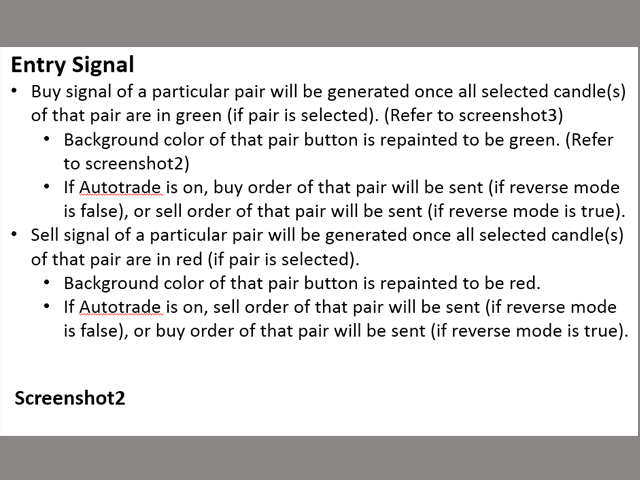
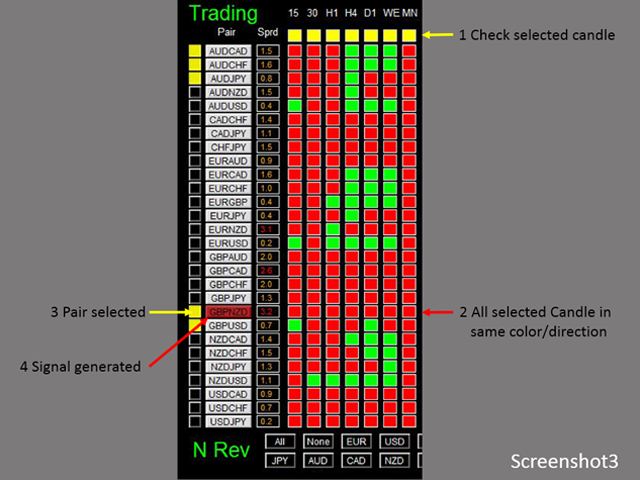
Entry Signal

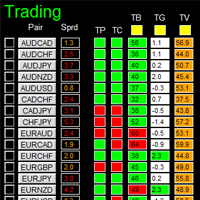
Refer to screenshot2


Input Parameters

  • Use Reverse Mode: Check explanation in Entry Signal section
  • Use AutoTrade:
    • Yes: buy/sell orders will be sent once signal is generated
    • No: no order will be sent even signal is generated
  • Single pair TP in pips: the take profit in pips for single pair.
  • Single pair SL in pips: the stop loss in pips for single pair
  • Candle selection for signal providing
    • Use M1/M5/M15/M30/H1/H4/D1/W1/MN Candle
  • Magic Number
  • Lot Size:
  • Basket TP in $:(see explanation in Note1)
  • Basket SL in $
  • Max Spread: once spread exceeds max spread, no order will be sent.
  • Trading Session: if time is out of session, no order will be sent
    • Close all trades after session(s)
      • Yes: all active (open) position(s) will be closed when session closed
      • No: no active (open) position(s) will be closed when session closed
    • Note that: starting and ending time is your computer/local time, not server time
    • Use Session1
      • Session1 Start Time
      • Session1 End Time
      • Session1comment: comment of each order
    • Use Session2
      • Session2 Start Time
      • Session2 End Time
      • Session2comment
    • Use Session3
      • Session3 Start Time
      • Session3 End Time
      • Session3comment
    • Non-stop session is active if Use Session 1, 2, and 3 are all selected as false.
  • TimeFrame of new chart
  • Suffix: suffix string of your symbol. i.e.: your symbol is ‘EURUSDx’ instead of ‘EURUSD’, input ‘x’ in suffix cell, leave prefix cell blank
  • Prefix: prefix string of your symbol


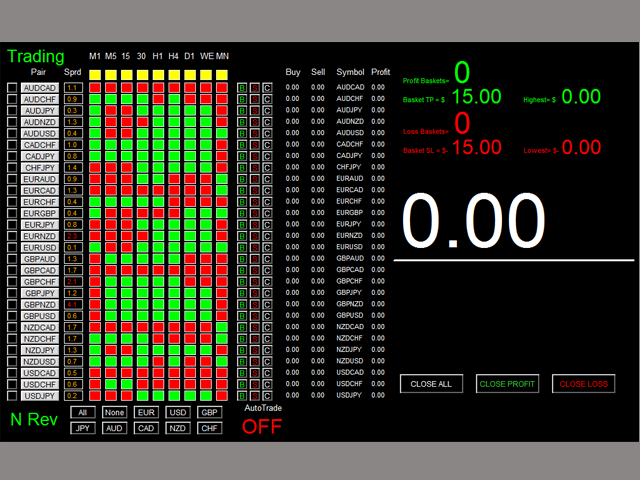
Dashboard Objects

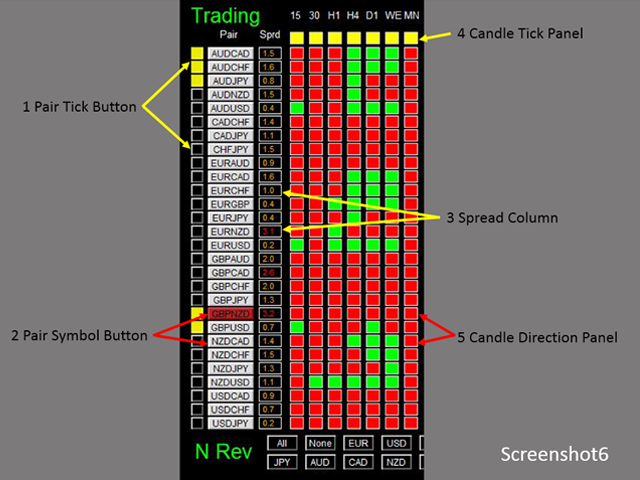
For objects 1-5, please refer to screenshot6.

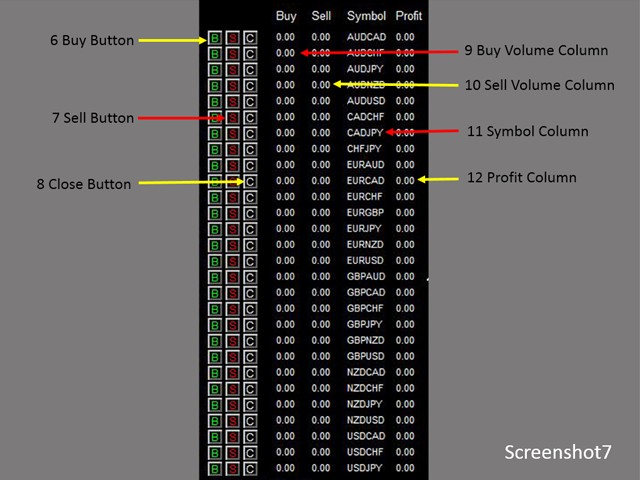
Objects 6-12: screenshot7.

Objects 13-22: screenshot8.

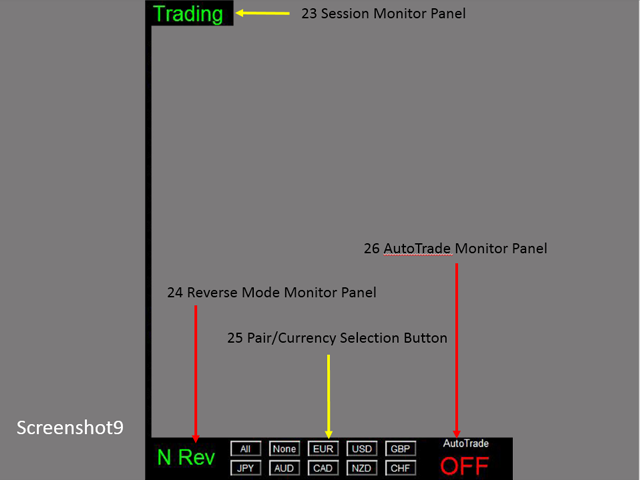
Objects 23-26: screenshot9.

  1. Pair Tick Button: Click once to active the corresponding pair for trading. Click once more to de-active.
  2. Pair Symbol Button:
    • Click on button to open a corresponding new window chart
  3. Spread column: show current spread of each pair.
  4. Candle Tick Panel: indicates which candle is selected to generate signal
  5. Candle Direction Panel
  6. Buy Button: (refer to note2)
  7. Sell Button
  8. Close Button: close all positions of corresponding pair
  9. Buy Volume Column
  10. Sell Volume Column
  11. Symbol:
  12. Profit Column
  13. Profit Baskets: calculate the number of baskets hitting TP
  14. Basket TP: Basket take profit
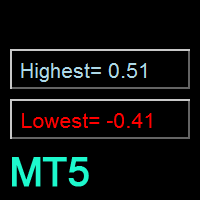
  15. Basket Highest: the maximum profit that current basket ever reach
  16. Loss Baskets: calculate the number of baskets hitting SL
  17. Basket SL: Basket stop loss
  18. Basket Lowest: the maximum loss that current basket ever reach
  19. Current Basket Profit: Current basket profit
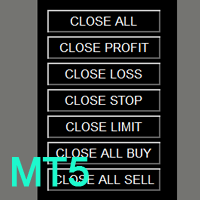
  20. Close All: close all positions
  21. Close Profit: close all positions in profit
  22. Close Loss: close all positions in loss
  23. Session Monitor Panel:
  24. Reverse Mode Monitor Panel:
  25. Pair/Currency Selection Button:
    • All: select all 28 pairs
    • None: clear all selected pairs
    • EUR: select all EUR pairs, like EURUSD, EURJPY…
    • Same rules applies to USD, GBP, JPY... buttons
  26. AutoTrade Monitor Panel:


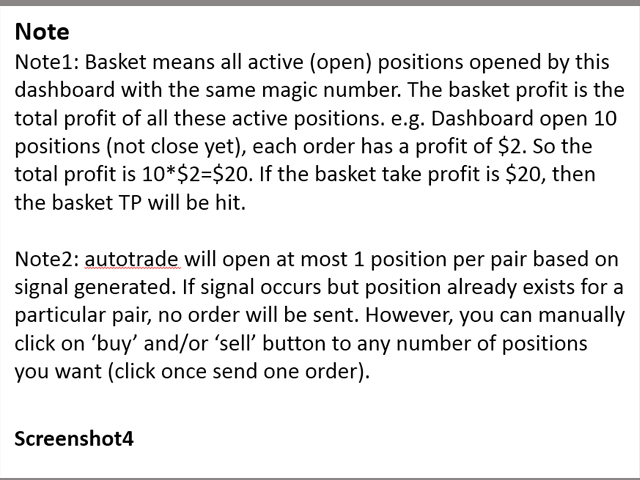
Note

Refer to screenshot4

Recensioni 2
fahmi20
1058
fahmi20 2016.06.28 14:01 
 

I have a suggestion

Selection mode direction each time period

Example

bullish minute (Down - bullish)

Five minutes bullish (bearish - bullish)

Fifteen minutes bullish (bearish - bullish)

Thirty minutes bullish (bearish - bullish)

One hour bearish (Down - bullish)

Four hours bearish (Down - bullish)

Day one bearish (Down - bullish)

One week bearish (Down - bullish)

One month bearish (Down - bullish)

Here it is opened the sale of strong levels

Options should be available in the settings

Prodotti consigliati
Exp Swing
Vladislav Andruschenko
4.49 (57)
Utilizza il modello di una famosa strategia chiamata Swinger (Pendulum, Cheburashka) - posizionamento alternativo di ordini pendenti con aumento del lotto. La strategia consiste nel piazzare due ordini pendenti opposti. Quando il prezzo si muove in una determinata direzione, viene attivato un ordine pendente, mentre la dimensione del lotto dell'altro ordine viene aumentata. L'EA prevede tre tipologie di apertura degli ordini pendenti (TypeofTrade) Apertura automatica dopo il posizionamento (Ape
FREE
Contact/message me if you encounter any issue using the product or need extra feature to add on the base version. There is a demo version of this panel Dashboard Trading Made Simple Demo in my product list, please try it out to get familiar with all functionalities free, LINK . This system basically utilizes TDI as the main indicator to generate trading signal mainly on H1 and H4 timeframes. The signal will be further filtered and trimmed. Stochastic; Heiken Ashi candle direction and candle siz
King Box Thor
Nguyen Cong Hoan
The product has a great combination of pending orders and trends to help investors manage capital effectively. The bot does not have a martingale, so it is always safe of capital. Run the D1 timeframe pairs. The main parameters can be installed: Lot -  Startot . Auto-Grid   -    ON/OFF AutoLot  - ON/OFF TP - Takeprofit   -pips. SL - StopLoss  - Pips. Magic -  Number magic. TralllingStop  - ON/OFF Comment  - KING Tralling - pips
Trading Pal MT4
Tan Bao Shen Chen
Why choose Trading Pal EA: This is a EA utility that auto-manage your   positions ' Stop-Loss (SL) and Take-Profits (TP) dynamically. When opening a single   position , it is easy to set the SL and TP manually. But when dealing with multiple   positions , it can be very tedious or   overwhelming   to fill in so many SL and TP values consistently, especially in a short span of time, like in scalping. Over time and after many such trades, trading itself can become a chore. That is where this EA c
This utility shows various types of information on chart, controlled by many filters and option for each of them. If you want any custom feature or want to remove something from this product for your personal use. Please send me a personal message, I'll be happy to do so for you. Inputs and features explained: BG Color   - Background color of the Dashboard Text Color   - Color of text info on the Dashboard Border Color   - Color of Border of the Dashboard Set Color on +/- Text   - True/False opt
MRKD Vector
Jay Benedict Alfaras
MRKD Vector — Smart Trade Management Utility MRKD Vector is a powerful and intuitive order execution tool designed for efficient manual trading in MetaTrader 5. Built with precision and speed in mind, MRKD Vector simplifies trade management by giving you full control over entries, stops, and targets — all from a sleek interface. Key Features: Quick Order Execution Place trades with ease using a clean, fast interface built for active traders. Intuitive SL, TP, and Lot Size Control Adjust sto
Title: Guardian Forex Trade Manager MT4 - Advanced Risk Management & One-Click Trading Panel Automate your trading safety, lock in profits early, and manage risk with precision. The Guardian Forex Trade Manager combines a one-click trading panel with powerful defensive algorithms, including a Daily Loss Limit Circuit Breaker and Smart Profit Taking. Full Description: Take control of your trading destiny with the Guardian Forex Trade Manager . This utility is not just a trade assistant; it is y
ProfRoboTrading Dashboard MultiSymbol   is   Expert Advisor  a lightweight on-chart control panel that provides a clear overview of your trading account and open positions across multiple symbols. The dashboard displays key account metrics, summarizes open BUY/SELL orders and lots per symbol, calculates profit for Day/Week/Month, and offers quick manual close actions directly from the table. Key features Multi-symbol table   (symbols list configurable). Account metrics panel:   Balance, Equity,
One Click MT4
MQL TOOLS SL
5 (2)
One Click Close MT4 is an EA which allows you close orders quickly. EA display on chart two buttons. The first button "Close All Positions" is using to close all opened orders. The second button "Close Profit Positions" is using to close only profitable orders. EA is closing orders for all available symbols, not only for chart symbol. In EA params you can set distance from upper chart frame (Y Offset) and from left chart frame (X Offset). For installation EA it is only need to copy One Click Clo
FREE
Stoploss Supporter
Ugur Oezcan
5 (1)
This tool monitors your current Expert Advisors and manages stop losses and take profits. You can customize which EAs and/or which currencies to monitor. It is primarily meant for EAs that you feel manage stop losses and/or take profits poorly. If you want this tool to be able to monitor manual trades, please use '0' (zero) as the magic number. Supports hidden stoploss and take profit Supports ATR-calculated dynamic stoploss Supports Breakeven for individual trades Supports Trailing stop Lower r
Modify Order SL TP
Konstantin Kulikov
The utility places stop loss and take profit for opened orders. It is necessary to allow automated trading in the terminal settings. Discuss the complexities of Forex trading here:  chat "Age of Expert Advisors" . Parameters magic - magic number. If less than 0, orders with any magic number are processed. Select_Symbol  - selection of symbols. Positions with selected symbols will be accompanied by. Take_Profit - take profit (TP). If the value is less than 0, then TP does not change. If the value
Canadian Taiga
Charbel Abboud
CANADIAN TAIGA is a professional portfolio EA using trend-following trading system based on principles of volatility breakout and breakouts of support/ resistance levels. It works on all Canadian Dollar pairs. The core principle of the Canadian Taiga is to capture trading opportunities on all CAD pairs, using a sophisticated hedging module. Download CANADIAN TAIGA and test it on all Canadian Dollar Pairs as recommended, and if it does not what it is intended to do as described, do not purchase i
Various Trailing Manager EA Various Trailing Manager EA is a professional trader's tool that provides protection of floating profit on open trades. This EA Utility allows you to manage (with advanced filtering) unlimited open orders (manual or EA) with trailing stops based on 7 methods: percent, ATR, Moving Average, Candle, Parabolic, Fractal. The trailing stop can be either real or virtual, and you can exit fully or with a partial close percent on touch or bar close. Visualize all orders and t
RainbowTrend
Sergey Rozhnov
4 (2)
Un indicatore visivo dell'andamento e della forza delle valute sotto forma di istogramma e tabella sul grafico principale, un grafico dei cambiamenti nelle tendenze valutarie e un blocco di analisi su una finestra aggiuntiva del grafico. Analizza 28 coppie di valute formate da 8 valute principali (EUR, USD, GBP, JPY, AUD, CAD, CHF, NZD). Caratteristiche dell'indicatore Determina la direzione e la forza dell'andamento di valute e simboli e costruisce su questa base istogrammi multicolori, tabell
The Arrow Scalper
Fawwaz Abdulmantaser Salim Albaker
1 (2)
Dear Friend..  I share with you this simple Expert Adviser .. it is full automatic  this Expert Adviser following the trend of the pair you install on or any stocks or indices , it is works like that: - when the trend on H4 chart show a start of up trend the expert will wait till the 15M & 1H charts show an up trend the EA will open a buy order directly , and do the same for down trend and open a sell order the buy or sell  order lot size and take profit and stop loss will measured manually  by
FREE
Hello Guys! I want to share with you a very useful tools. Anyone of us who has used MT4 for some time knows how impractical this platform can be for discretionary trading. That's why I created this graphical interface!  Interface is very simple, all the info that you need are in the video and in the screenshot. NB: Before to run the EA Interface, remember to copy the file in the comment in your MT4 folder "Controls". PATH: .../MQL4/INCLUDE/CONTROLS NB: unfortunately the interface can't be test
Signal Provider Utility Pro (Telegram & Discord) The Professional Solution for Signal Providers. Automated Broadcasting | Smart GUI Panel | Performance Reports Stop managing your signals manually.   Signal Provider Utility Pro   is the realiable bridge between your MetaTrader 4 terminal and your community on Telegram and Discord. Designed for high-performance signal services, this tool gives you instant control over your broadcasts without ever needing to open the settings window. From   real-ti
Discover our all-in-one monitoring and notifications EA for MetaTrader. Designed to ensure traders’ security and peace of mind, this unique EA offers a full range of advanced features that will allow you to stay informed and control your account activity, anytime and anywhere.       Key Features : Continuous server monitoring: real-time notification on server availability and performance (Cpu, Ram, disk), connectivity, latency and more Advanced account management: live tracking of margin calls,
FREE
Buy The Dip Util
Heiko Kendziorra
Buy The Dip Util is an  halfautomatic  expert advisor (EA), to   buy on dips (days lows) and sell on spikes (days highs). A profit can exceed a loss trade up to 10 times , so the user can have several loss trades and still make profit. Orders are opened at the change of the hour , if a button in the chart is pressed. The  Buy The Dip as EA  does this automaticly. The order stoploss is automaticly set right below the low of the former hour (buy) or right over the high (sell). The position size
Market Monitor
Rodrigo Rethka Goncalves
Market Monitor – Smart Asset Performance Dashboard for MT4 Turn your MetaTrader 4 into a professional trading intelligence center! Market Monitor is a powerful monitoring tool that displays, in real time, the most relevant performance metrics of each symbol being traded — helping you make faster, smarter, and more strategic decisions. What Does This Indicator Do? Market Monitor scans all open and historical orders, consolidates the data by symbol, and displays everything in visual pa
Un grafico. Controllo totale. Smetti di perdere tempo a gestire oggetti, colori e impostazioni su ogni grafico separatamente. Con       Chart Sync Manager   , puoi       sincronizza, copia e controlla tutti i tuoi grafici MetaTrader       all'istante, utilizzando un solo pannello e poche scorciatoie. Disegna una volta, aggiorna ovunque. Apri e chiudi i grafici con un solo clic. Mantieni pulito il tuo spazio di lavoro con       gestione degli oggetti basata sui simboli   . E non perdere mai detta
QuickClose: Instant Order Management Made Simple QuickClose   allows you to instantly close all orders with a single click. It operates at high speed, giving you the flexibility to close orders for a specific symbol or all symbols at once. This makes trade management significantly faster and more efficient. This   Expert Advisor can swiftly close all buy and sell orders either for a selected symbol or across all trades. The   SymbolButton is specifically designed for order closure, featuring bo
MT4 Alert to Telegram
Heka Maju Online Trading
MT4 Alert to Telegram   MT4 Alert to Telegram is tool, which sends selected trades to telegram channel. Tool sends trades when open and close with chart to telegram channel. Tool can send multiple charts and pairs from a single chart. Send information of all type of orders: Opened (including Pending Orders), and closed triggered. functions - user can custom self-sending message text even in their native language - user can send own advertisement text periodically - attach expert in one chart an
Introducing Spyder Equity Protection EA: Your Shield in Forex Trading In the dynamic world of forex trading, protecting your hard-earned capital is paramount. That's where Spyder Equity Protection EA steps in - your reliable partner in safeguarding your trading account. ️ Total Peace of Mind : Spyder Equity Protection EA is designed to provide traders with unparalleled peace of mind. With its advanced equity protection mechanisms, you can set predefined loss levels, ensuring that your account
FREE
Hello, boys and girls! Script allows you either to quickly save opened charts and then close all charts opened by visual tester mode or just faster close all charts. Feel free to take a look at video manual about how to use this script on my YouTube channel. Also, feel free to join my telegram channel , where time to time I publish some exclusive stuffs. Feel free to leave feedback and thoughts how to improve this script - I'd highly appreciate that. All the best.
MT4 Local Trade Copier A file-based trade copying system for MetaTrader 4 that synchronizes trades between Master and Client terminals on the same computer or network. Key Features Master/Client Architecture : One Master terminal broadcasts trades, multiple Client terminals can receive and replicate them File-Based Communication : Uses shared folder system for reliable inter-terminal communication Flexible Lot Management : Copy exact lot sizes or use fixed lot sizes on client accounts Customizab
Reverse copier is a tool that will open opposite buy/sell orders from your master account. It will help you with low profit EA's that lose consistenly and turn it to wins. Feel free to ask for new functions/features and I will add it. Now it's a simple MT5 to MT4 bridge with straightforward logic of one position open/close.  How to install: https://www.mql5.com/en/market/product/141604
FREE
Forex Fraus MAD DOG
Dmitriy Zaytsev
3.5 (2)
The Expert Advisor of the Forex Fraus is designed for scalping the EURUSD (for five-digit quotes) and adapted for the accounts with fast execution of orders. Operation Principle When a signal is received, the orders are opened by accumulation using tick data; The robot does not apply indicators and other analytical systems. The signals are calculated using H1 and M1 chart processing results; The EA has three operation modes; Normal : uses the filter for trend trading; Turbo : uses the filter th
FREE
TSim
Sergey Kruglov
Утилита  TSim   позволяет симулировать ручную торговлю в Тестере Стратегий MetaTrader 4. В панеле можно устанавливать размеры лота, тейпрофита и стоплосса. Панель имеет кнопки Sell   и Buy для выставления рыночных ордеров, а также кнопки CloseSell, CloseBuy и CloseAll для быстрого закрытия ордеров. Под панелью отображается список открытых ордеров. Внимание. Панель работает только в Визуальном режиме Тестера Стратегий MetaTrader 4.
FREE
Every trader is watching over his account over and over.... trying to anlayse every system he or she has. With this tool you are able to  export your complete history of every account export withdrawls / deposits / rebates to a separate file export account status with balance / equity / current drawdown recalculate micro to standard lots / profits ...  export decimal by "." or ","  combine a series of Magic Numbers to one unique Magic Number   filter to ignore OrderComments.
Gli utenti di questo prodotto hanno anche acquistato
Ultimate Extractor - Professional Trading Analytics for MT4 Ultimate Extractor transforms your MetaTrader 4 trading history into actionable insights with comprehensive analytics, interactive charts, and real-time performance tracking. Ability to combine multiple accounts and MT4 and MT5 into a single dashboard. What It Does Automatically analyzes your MT4 trading history across all Expert Advisors and generates detailed HTML reports with interactive visualizations. Tracks live performance metric
The product will copy all telegram signal to MT4   ( which you are member  ) , also it can work as remote copier.  Easy to set up, copy order instant, can work with almost signal formats, image signal, s upport to translate other language to English Work with all type of channel or group, even channel have "Restrict Saving Content", work with  multi channel, multi MT5 Work as remote copier: with signal have ticket number, it will copy exactly via ticket number. Support to backtest signal. How to
RedFox Copier Pro
Rui Manh Tien
4.7 (10)
Time saving and fast execution Whether you’re traveling or sleeping, always know that Telegram To Mt4 performs the trades for you. In other words, Our   Telegram MT4 Signal Trader  will analyze the trading signals you receive on your selected Telegram channels and execute them to your Telegram to MT4 account. Reduce The Risk Telegram To Mt4   defines the whole experience of copying signals from   Telegram signal copier to mt4 platforms. Users not only can follow all instructions from the signa


Custom Alerts AIO: Monitora tutti i mercati — senza alcuna configurazione Panoramica Custom Alerts AIO è una soluzione di monitoraggio dei mercati pronta all’uso che non richiede alcuna configurazione. Tutti gli indicatori necessari — FX Power, FX Volume, FX Dynamic, FX Levels, IX Power — sono integrati internamente. Non vengono mostrati grafici, rendendolo ideale per generare alert in tempo reale in modo discreto ed efficiente. Supporta tutte le classi di asset offerte dal tuo broker: Forex,
Discord To MT4 Receiver
Levi Dane Benjamin
5 (1)
Copia i segnali da qualsiasi canale di cui sei membro (   senza la necessità di un Token Bot o Permessi di Amministratore  direttamente nel tuo MT4. È stato progettato con l'utente in mente offrendo molte delle funzionalità di cui hai bisogno Questo prodotto è presentato in un'interfaccia grafica facile da usare e visivamente attraente. Personalizza le tue impostazioni e inizia ad utilizzare il prodotto in pochi minuti! Guida Utente + Demo  | Versione MT5 | Versione Telegram Se desideri provar
Telegram To MT4 Receiver
Levi Dane Benjamin
3.67 (6)
Copia i segnali da qualsiasi canale di cui sei membro (inclusi quelli privati e restrittivi) direttamente sul tuo MT4.  Questo strumento è stato progettato con l'utente in mente offrendo molte funzionalità necessarie per gestire e monitorare le negoziazioni. Questo prodotto è presentato in un'interfaccia grafica facile da usare e visivamente attraente. Personalizza le tue impostazioni e inizia a utilizzare il prodotto in pochi minuti! Guida dell'utente + Demo  | Versione MT5 | Versione Discord
EasyInsight AIO MT4
Alain Verleyen
4 (2)
EASY Insight AIO – La soluzione all-in-one per un trading intelligente e senza sforzo Panoramica Immagina di poter analizzare l’intero mercato — Forex, Oro, Cripto, Indici e persino Azioni — in pochi secondi, senza dover controllare manualmente i grafici, installare indicatori o affrontare configurazioni complicate. EASY Insight AIO è il tuo strumento definitivo di esportazione per il trading alimentato dall’IA, pronto all’uso. Offre una panoramica completa del mercato in un unico file CSV pul
The product will copy all  Discord  signal   to MT4   ( which you are member  ) , also it can work as remote copier.  Easy to set up. Work with almost signal formats, support to translate other language to English Work with multi channel, multi MT4. Work with Image signal. Copy order instant, auto detect symbol. Work as remote copier: with signal have ticket number, it will copy exactly via ticket number. How to setup and guide: Let read all details about setup and download Discord To MetaTrader
Crystal Trade Manager PRO – Sistema Avanzato di Gestione del Rischio e Controllo delle Operazioni per MT4 Versione Gratuita: https://www.mql5.com/en/market/product/150632 Panoramica Crystal Trade Manager PRO (CTM) è uno strumento professionale progettato per la gestione del rischio, il controllo delle operazioni e l’automazione avanzata su MetaTrader 4. È ideato per i trader che richiedono un'esecuzione disciplinata, una forte protezione del capitale e un sistema di controllo affidabile. Il sist
Remote Trade Copier   is an advanced tool designed for efficiently copying trades between accounts in both   local   and   remote   modes. It allows for lightning-fast order replication from a master account to a slave account. In local mode, trades are copied instantly, while in remote mode, the copying process takes a second.  In new version, in remote mode , the copy operation can be performed with a delay of milliseconds or zero . After purchase, ask how to activate it MT4 Version (Only Loc
Averaging Helper
Sergey Batudayev
5 (2)
Strumento di supporto al trading: questo tipo di strumento di supporto al trading ti aiuterà a calcolare la media delle tue posizioni precedentemente non redditizie utilizzando due tecniche: media standard copertura con successiva apertura di posizioni in base all'andamento L'utility permette   di gestire contemporaneamente diverse posizioni aperte in direzioni diverse, sia per l'acquisto che per la vendita. Ad esempio, se hai aperto una posizione per la vendita e la seconda per l'acquisto, entr
With this Expert Advisor, you can seamlessly integrate various channel, arrow, and reversal indicators. It offers the flexibility to use all popular channel trading strategies, while also providing powerful tools to customize your trading conditions and risk management system.   The Expert Advisor opens orders when the price crosses the channel boundaries. Multiple crossing conditions are available for customization: Price touches boundary on re-entry into the channel Price touches boundary on
Unlimited Trade Copier Pro
Vu Trung Kien
3.86 (7)
Unlimited Trade Copier Pro is a tool to copy trade remotely to multiple MT4, MT5 and cTrader accounts at different computers/locations over internet. This is an ideal solution for you if you are a signal provider and want to copy your trades to other receivers globally on your own rules. One provider can copy trades to multiple receivers and one receiver can get trade from multiple providers as well. The provider can even set the subscription expiry for each receiver, so that receiver will not b
ManHedger MT4
Peter Mueller
5 (1)
THIS EA IS A SEMI-AUTO EA, IT NEEDS USER INPUT. Manual & Test Version Please   DON'T BUY   this product before   TESTING  and watching my video about it. Contact me for user support or bug reports, or if you want the MT5 version! MT5 Version I do not guarantee any profits or financial success using this EA. With this Expert Advisor, you can: Implement your own   Zone Recovery   strategy to capitalize on trending markets. Create   Grid   trading strategies, to profit from ranging markets. Place
News Trapper EA
Noha Mohamed Fathy Younes Badr
4.85 (13)
Hi, all.  News trapper EA It is an expert for trading news very safe expert  Automated Trading on the news of the economic calendar. It shows stable trading during last 10  years. EA doesn't use dangerous technologies like martingale, grid. The Expert is very simple to use.      sale will end after 48 h how to install it     and set files     read the blog         after purchase contact me to add you to   VIP   channel  The program contains flexible settings for trading on the news of the econo
Trade Copier Pro
Vu Trung Kien
4.57 (14)
Trade Copier Pro is a tool to copy trade remotely to MT4, MT5 and cTrader accounts at different computers/locations over internet. This is an ideal solution for you if you are a signal provider and want to copy your trades to other receivers globally on your own rules. One provider can copy trades to multiple receivers and one receiver can get trade from multiple providers as well. The provider can even set the subscription expiry for each receiver, so that receiver will not be able to receive t
FiboPlusMultiTF
Sergey Malysh
5 (1)
A ready-made multitimeframe trading system based on automatic plotting and tracking of Fibonacci levels for buying and selling any symbol. Advantages Determines the trend direction based on a complex of 14 indicators ( Cx ), extremums of ZigZag ( Z ), RSI ( R ), Impulse ( I ) Displaying the values of 14 indicators comprising the trend direction ( Cx ) Plotting horizontal levels, support and resistance lines, channels View the plotting option of Fibonacci levels on any timeframe, with the abilit
LIMITED OFFER - JUST FOR 2 DAYS | 50% BLACK FRIDAY DISCOUNT $640 -> $320 Your Smart Trading Assistant for the Forex Market Introducing a powerful MetaTrader tool designed to revolutionize the way you trade. This intelligent assistant goes beyond traditional indicators to provide a comprehensive, AI-driven market analysis — so you can trade with clarity and confidence. What It Does This advanced tool continuously monitors and analyzes a wide range of market data to deliver high-quality trading
Online Accounts Manager MT4
Kyra Nickaline Watson-gordon
5 (1)
OneClick Online Account Manager is a powerful utility that helps you to manage all your accounts from a centralized panel. It is suitable for all single account traders and specially for multiple accounts traders. The utility help you to : Monitor status of all accounts on a private web page. Some information such as account connection status, account profit, DD, Balance, Equity, Margin Level, Number of positions and orders, Daily and Weekly profit/loss and also overall summation of all these p
This is an Expert Adviser use for manual trading as a background EA or combine with external EA to open orders. Loss Recovery Trading is one of your options to handle the lose positions instead of using stop loss by setting a zone recovery area and target to exit the turn rounds sequence. How It Work? If the market goes against your first positions direction at the specific of losing points, the EA will open an opposite direction position with calculated larger lot size and also keep the first
The advantage of using this EA This EA directly updates takeprofit and stop losses that are still empty in a manual order Parameters Multiplier: Multiplier value of the previous transaction Distance: Distance hedging from the previous order Takeprofit: take profit taken from the last price + the value of this column We recommend that you do not add more than one manual transaction in the same pair martingale hedging | manual hedging | hedging manual | hedging lot | best robot | best ea
This means now you can trade on multiple MetaTrader 4 accounts simultaneously, mirror the trades of any trading bot to your friends and family accounts (even if it is locked to your MT4 account number), create investment portfolios of many MT4 accounts, remove risk of unregulated Forex brokers, turn losing trading strategy into a winner and become an independent account manager immediately without the need to sign any contracts or opening expensive PAMM accounts with the broker. Reverse Trading
50% off. Original price: $375 Reward Multiplier is a semi-automatic trade manager based on pyramid trading that opens additional orders with the running profit of your trades to maximize return exponentially without increasing the risk. Unlike other similar EAs, this tool shows potential profit/loss and reward to risk ratio before even entering the first trade! Download Demo here  (starting lot is fixed at 0.01) Guide + tips here MT5 version   here You only open the first order. When your tr
The FFx Hidden Manager panel will help you to manage easily your orders directly on the chart. Below all features described: TP, SL and TrailingStop are hidden Each order has its own lines on chart Drag & Drop any line to change the TP/SL as per your need Option to move automatically the SL line at breakeven when TP #1 is reached Option to choose the TP/SL type (by pips or price) Option to choose the TrailingStop type (by pips, MA, Fractals, PSAR or ATR) Define which order(s) you want to manage
FFx Risk Calculator
Eric Venturi-Bloxs
FFx Risk Calculator panel will help you to calculate very easily your trades size, SL or the risk directly on the chart. All features are described below: Option to select which parameter to calculate: Risk, Stop Loss or Lot Size The panel will show if the lot size is allowed according to the current account free margin Button to maximize/minimize the panel Drag and Drop the panel anywhere on the chart How to use it? Select the parameter you want to be calculated. It will be based on the 2 other
News Trader Pro
Vu Trung Kien
4.38 (16)
News Trader Pro is a unique robot that allows you to trade the news by your predefined strategy. It loads every piece of news from several popular Forex websites. You can choose any news and preset the strategy to trade it, and then News Trader Pro will trade that news by selected strategy automatically when the news comes. News release gives opportunity to have pips since the price usually has big move at that time. Now, with this tool, trading news becomes easier, more flexible and more exciti
FFx Watcher PRO
Eric Venturi-Bloxs
The FFx Watcher PRO is a dashboard displaying on a single chart the current direction of up to 15 standard indicators and up to 9 timeframes. It has 2 different modes: 1. Watcher mode: Multi Indicators User is able to select up to 15 indicators to be displayed User is able to select up to 9 timeframes to be displayed 2. Watcher mode: Multi Pairs User is able to select any number of pairs/symbols User is able to select up to 9 timeframes to be displayed This mode uses one of the standard indicat
Transaction Repeater Full
Alexandr Bryzgalov
5 (4)
Copies transactions between MT4 terminals. Possibilities: quick copy start minimum processor load direct and reverse (reverse) copying. copying Take Profit and Stop Loss levels copying deferred and their changes copy transactions one to many copy trades many to one local copy only Attention: The product is designed for copying trades only within a single computer or VPS with access to the desktop. The product will not work on the built-in Virtual Hosting of the terminal. We will help you set up
The product combines a manual trade panel with the ability to perform actions automatically in a highly configurable way. Actions include capturing indicator values and then based on those values raising alerts, open/close or partially close trades, scale-in, setting up pending orders, adjusting stop loss, take profit and more. On-chart controls can be configured, such as tick boxes and buttons, so can be fully interactive. The EA also handles money management, news events, hidden stop loss, tak
Binary Options Copier Remote is an EA that allows to copy binary options trades between MT4 accounts at different computers. This is an ideal solution for signal provider, who want to share his trade with the others globally on his own rules. Provider can give free bonus license to 10 receivers. That means those 10 receivers can copy from provider by using Binary Options Receiver Free (no cost). From 11th one, receiver have to buy Binary Options Receiver Pro (paid version) in order to copy from
Altri dall’autore
Close Button
Wang Yu
4.76 (37)
如果产品有任何问题或者您需要在此产品上添加功能,请联系我 Contact/message me if you encounter any issue using the product or need extra feature to add on the base version. Close Button provides you an intuitive, effective, and handy way to close your orders based on their type. The utility provides seven close options: Close All: close all orders, including trading and pending ones. Close Profit: close all orders which are in profit. Close Loss: close all orders which are in loss. Close Stop: close all stop orders. Close L
FREE
Close Button MT5
Wang Yu
2.53 (19)
如果产品有任何问题或者您需要在此产品上添加功能,请联系我 Contact/message me if you encounter any issue using the product or need extra feature to add on the base version. You can get the free Close Button MT4 version at LINK . Close Button provides you an intuitive, effective, and handy way to close your orders and/or positions based on their type and their profit status. The tool provides seven close options: Close All: close all pending orders and positions. Close Profit: close all positions which are in profit. Close L
FREE
如果产品有任何问题或者您需要在此产品上添加功能,请联系我 Contact/message me if you encounter any issue using the product or need extra feature to add on the base version. PA Touching Alert is a tool to free you from watching price to touch certain critical price levels all day alone. With this tool, you can set two price levels: upper price and lower price, which should be greater than/less than the current price respectively. Then once price touches the upper price or lower price, alert and/or notification would be sent
FREE
如果产品有任何问题或者您需要在此产品上添加功能,请联系我 Contact/message me if you encounter any issue using the product or need extra feature to add on the base version. Floating Highest Lowest MT5 provides you an intuitive and user-friendly method to monitor the floating highest (profit) and lowest (loss) that all your trades together ever arrive. For example, I opened 3 orders, which arrived at $4.71 floating profit when trade following trend. Later when the trend is against me, these 3 orders arrive $30 in loss, and a
FREE
如果产品有任何问题或者您需要在此产品上添加功能,请联系我 Contact/message me if you encounter any issue using the product or need extra feature to add on the base version. Session TakeProfit StopLoss is basically helping to set the take profit and stop loss in dollar for the total open orders (session). Once the total profit is greater than session_tp or less than session_sl, the EA will help to close all open orders acting similarly to a take profit/stop loss for a single order. Inputs session_tp: session take profit ses
FREE
如果产品有任何问题或者您需要在此产品上添加功能,请联系我 Contact/message me if you encounter any issue using the product or need extra feature to add on the base version. Session TakeProfit StopLoss is basically helping to set the take profit and stop loss in dollar for the total open orders (session). Once the total profit is greater than session_tp or less than session_sl, the EA will help to close all open orders acting similarly to a take profit/stop loss for a single order. Inputs session_tp: session take profit ses
FREE
如果产品有任何问题或者您需要在此产品上添加功能,请联系我 Contact/message me if you encounter any issue using the product or need extra feature to add on the base version. Indicator Floating Highest Lowest provides you an intuitive, and user-friendly method to monitor the floating highest (profit) and lowest (loss) that all your trades together ever arrive. For example, I opened 3 orders, which arrived at $4.71 floating profit when trade following trend. Later when the trend is against me, these 3 orders arrive $30 in loss
FREE
如果产品有任何问题或者您需要在此产品上添加功能,请联系我 Contact/message me if you encounter any issue using the product or need extra feature to add on the base version. PA Touching Alert is a tool to free you from watching price to touch certain critical price level all day alone. With this tool, you can set two price levels: upper price and lower price, which should be greater than/ less than the current price respectively. Then once price touches the upper price or lower price, alert and/or notification would be sent
FREE
By applying this expert onto any char window, you are able to force download the historical data upon all time-frame (PERIOD_M1, PERIOD_M5, PERIOD_M15, PERIOD_M30, PERIOD_H1, PERIOD_H4, PERIOD_D1, PERIOD_W1, PERIOD_MN1) of 28 major pairs. The 28 major pairs are the combination of the 8 major currencies. 8 major currencies "USD", "EUR", "GBP", "JPY", "AUD", "NZD", "CAD", "CHF" 28 pairs "AUDCAD","AUDCHF","AUDJPY","AUDNZD","AUDUSD","CADCHF","CADJPY" "CHFJPY","EURAUD","EURCAD","EURCHF","EURGBP","E
FREE
如果产品有任何问题或者您需要在此产品上添加功能,请联系我 Contact/message me if you encounter any issue using the product or need extra feature to add on the base version. There is Demo version of this panel Dashboard Super MA RSI CCI Demo in my product list, pls try it out to get familiar with all functionalities free . Dashboard Super MA RSI CCI is an intuitive, and handy graphic tool to help you to: Have 28 pairs under control with one dashboard Monitor price movement, identify possible trend based on MA, RSI, and CCI i
如果产品有任何问题或者您需要在此产品上添加功能,请联系我 Contact/message me if you encounter any issue using the product or need extra feature to add on the base version. Critical Support and Resistance is an intuitive, and handy graphic tool to help you to monitor and manage critical support and resistance price point easily with one glance to know status of all important S&R. Price is likely to pullback or breakout at important support and/or resistance. This indicator is designed to help you monitor these critical supp
如果产品有任何问题或者您需要在此产品上添加功能,请联系我 Contact/message me if you encounter any issue using the product or need extra feature to add on the base version. Dashboard Super Currency Strength is an intuitive, and handy graphic tool to help you to: Have 28 pairs under control with one dashboard. Monitor price movement, identify possible trend based on currency strength gap of two currency on 3 timeframe. Provide trading signals based on the CSM (currency Strength Meter) selected. Manage order automatically onc
如果产品有任何问题或者您需要在此产品上添加功能,请联系我 Contact/message me if you encounter any issue using the product or need extra feature to add on the base version. To access the free demo version, please re-direct to this LINK . To access the single pair version, please re-direct to this LINK . Price is likely to pullback or breakout at important support and/or resistance. This dashboard is designed to help you monitor these critical support and resistance area. Once price moves close to these important support and
如果产品有任何问题或者您需要在此产品上添加功能,请联系我 Contact/message me if you encounter any issue using the product or need extra feature to add on the base version. Please re-direct to LINK for free demo version. There are two critical components in a profitable trading system, one is entry (place an order), and another one is exit (close an order). You can exit by time: closing order after London Close for example. You can also exit by position: closing an order when price reaches a certain support/resistance level
如果产品有任何问题或者您需要在此产品上添加功能,请联系我 Contact/message me if you encounter any issue using the product or need extra feature to add on the base version. There are two critical components in a profitable trading system. One is entry (placing an order) and another one is exit (closing an order). You can exit by time: closing order after London Close, for example. You can also exit by position: closing an order when price reaches a certain support/resistance level. Easy RR Monitor Panel is an intuitive, and
Contact/message me if you encounter any issue using the product or need extra feature to add on the base version. There is a demo version of this panel Dashboard Trading Made Simple Demo in my product list, please try it out to get familiar with all functionalities free, LINK . This system basically utilizes TDI as the main indicator to generate trading signal mainly on H1 and H4 timeframes. The signal will be further filtered and trimmed. Stochastic; Heiken Ashi candle direction and candle siz
如果产品有任何问题或者您需要在此产品上添加功能,请联系我 Contact/message me if you encounter any issue using the product or need extra feature to add on the base version. There is a Demo version of this panel Dashboard Currency Strength Meter AdvancedDemo in my product list, please try it out to get familiar with all functionalities free, LINK . The Dashboard Currency Strength Meter Advanced gives you a quick visual guide to which currencies are strong, and which ones are weak over the customized 4 time-frames and period.
如果产品有任何问题或者您需要在此产品上添加功能,请联系我 Contact/message me if you encounter any issue using the product or need extra feature to add on the base version. There is Demo version of this panel Dashboard Super Three MA Demo in my product list, please try it out to get familiar with all functionalities free, LINK . This system basically utilizes PA and three adjustable Moving Average as the main indicator set to generate trading signal. With the feature that all MA_timeframe, MA_period, MA_applied_price are ad
如果产品有任何问题或者您需要在此产品上添加功能,请联系我 Contact/message me if you encounter any issue using the product or need extra feature to add on the base version. There is Demo version of this panel Dashboard Timeframe 15 Demo in my product list, please try it out to get familiar with all functionalities free, LINK . This system basically utilizes TDI as the core indicator to generate trading signal mainly on time-frame M15. The signal will be further filtered and trimmed by 1) 200 EMA and Price; 2) 10 EMA and Hei
如果产品有任何问题或者您需要在此产品上添加功能,请联系我 Contact/message me if you encounter any issue using the product or need extra feature to add on the base version. There is Demo version of this panel Dashboard Genesis Matrix Trading Demo in my product list, please try it out to get familiar with all functionalities free, LINK . This system basically utilizes Genesis Indi Set (TVI, CCI, GannHilo, and T3) as the core indicators to generate trading signal mainly on time-frame M15. The signal will be further filtered a
如果产品有任何问题或者您需要在此产品上添加功能,请联系我 Contact/message me if you encounter any issue using the product or need extra feature to add on the base version. There is Demo version of this panel Dashboard Symphonie Trader System Demo in my product list, please try it out to get familiar with all functionalities free, LINK . This system basically utilizes Symphonie Indicator Set (Extreme, Emotion, Trend, and Sentiment) as the core indicators to generate trading signal mainly on time-frame M15. The signal will b
如果产品有任何问题或者您需要在此产品上添加功能,请联系我 Contact/message me if you encounter any issue using the product or need extra feature to add on the base version. There is Demo version of this panel Dashboard Extreme TMA System Demo in my product list, please try it out to get familiar with all functionalities free, LINK . This system basically utilizes 4 TMA (Triangular Moving Average) slope indicators on 4 time-frame and TMA Band as the core indicators to generate trading signal mainly on time-frame M15. The sig
如果产品有任何问题或者您需要在此产品上添加功能,请联系我 Contact/message me if you encounter any issue using the product or need extra feature to add on the base version. DIBS = Daily Inside Bar Setup This system basically utilizes the popular candle pattern Inside Bar to generate trading signal mainly on time-frame H1. To facilitate you to understand and trade this system quickly and effectively, the collection of PDF manuals and tips are provided in my latest comment of this product. For who cannot access Google Drive,
如果产品有任何问题或者您需要在此产品上添加功能,请联系我 Contact/message me if you encounter any issue using the product or need extra feature to add on the base version. This system basically utilizes two simple moving averages (10 SMA and 197 SMA) over 2 hours before Tokyo Open to generate trading signal mainly on timeframe H1. The signal will be further filtered by 1) M15 and M5 Fractals; 2) Stochastic To facilitate you to understand and trade this system quickly and effectively, the collection of PDF manuals and tips
如果产品有任何问题或者您需要在此产品上添加功能,请联系我 Contact/message me if you encounter any issue using the product or need extra feature to add on the base version. There is Demo version of this panel Dashboard Babon Scalping System Demo in my product list, please try it out to get familiar with all functionalities for free, LINK . This system basically utilizes TDI, Heiken Ashi Trend, Price Trend on H1 time-frame and TMA on H1&H4 time-frame to generate the trend (big picture). Then the system will zoom in to genera
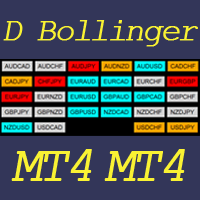
This indicator helps to visualize the Bollinger Band status of 28 pairs. With the feature of color panel, alert, and notification features, user can catch the potential Bollinger Bounce opportunities from 28 main pairs on one Dashboard quickly. Dashboard Bollinger Band is an intuitive and handy graphic tool to help you to monitor all 28 pairs and provide trading signals based on the Bollinger Bounce Rules (Overbought/Oversold and Bollinger Band Cross). COLOR LEGEND: clrOrange: price is above the
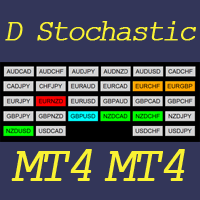
This indicator helps to visualize the Stochastic status of 28 pairs. With the feature of color panel, alert, and notification features, user can catch the potential buy and sell opportunities when the 28 main pairs cross the oversold/overbought area on one Dashboard quickly. Dashboard Stochastic is an intuitive and handy graphic tool to help you to monitor all 28 pairs and provide trading signals based on the Stochastic Classic Rules (Overbought/Oversold and Stochastic Cross). COLOR LEGEND: cl
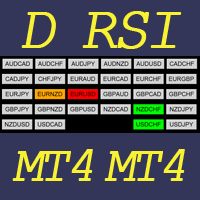
This indicator helps to visualize the RSI status of 28 pairs. With the feature of color panel, alert, and notification features, user can catch the potential buy and sell opportunities when the 28 main pairs cross the oversold/overbought area on one Dashboard quickly. Dashboard RSI is an intuitive and handy graphic tool to help you to monitor all 28 pairs and provide trading signals based on the RSI Rules (Overbought/Oversold and Stochastic Cross). COLOR LEGEND: clrOrange: RSI signal is above th
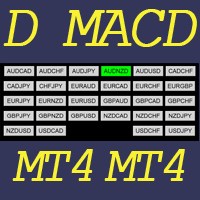
This indicator helps to visualize the MACD status of 28 pairs. With the feature of color panel, alert, and notification features, user can catch the potential buy and sell opportunities when the 28 main pairs’ fast EMA cross the slow EMA on one Dashboard quickly. Dashboard MACD is an intuitive and handy graphic tool to help you to monitor all 28 pairs and provide trading signals based on the MACD Rules (Fast EMA Cross Slow). COLOR LEGEND: clrRed: MACD fast EMA down cross MACD slow EAM and MACD f
This indicator helps to visualize the SAR status of 28 pairs. With the feature of color panel, alert, and notification features, user can catch the potential buy and sell opportunities when the 28 main pairs’ SAR dots are switching between the above/below of candles on one Dashboard quickly. Dashboard SAR is an intuitive and handy graphic tool to help you to monitor all 28 pairs and provide trading signals based on the SAR Rules (SAR dots are switching between the above/below of candles). COLOR
Filtro:
Michael Kirchmann
250
Michael Kirchmann 2017.07.21 13:30 
 

Nicht jeden Tag zu gebrauchen.

Schlecht, wenn wie am 3.7.2017, neuer Tag, erste Tag der Woche, erster Tag im Monat ist!

fahmi20
1058
fahmi20 2016.06.28 14:01 
 

I have a suggestion

Selection mode direction each time period

Example

bullish minute (Down - bullish)

Five minutes bullish (bearish - bullish)

Fifteen minutes bullish (bearish - bullish)

Thirty minutes bullish (bearish - bullish)

One hour bearish (Down - bullish)

Four hours bearish (Down - bullish)

Day one bearish (Down - bullish)

One week bearish (Down - bullish)

One month bearish (Down - bullish)

Here it is opened the sale of strong levels

Options should be available in the settings

Rispondi alla recensione