NotifyMe for MT4

5

Overview

The Expert Advisor sends notifications to a mobile phone, via e-mail or activates an audio alarm in case any changes are detected on the trading account: opening/closing positions, changing order parameters, balance or leverage. Also, the Expert Advisor can inform that Equity on the trading account has dropped below a specified value or Free Margin is small compared to Margin. The Expert does not trade, it only monitors your account.


Launching the Expert Advisor

For the Expert Advisor to work, place the file NotifyMe.ex4 in terminal_folder/experts (probably it will be placed there automatically). NotifyMe should appear in the Expert Advisors section of the Navigator window. If not, restart the MetaTrader 4 terminal.

For the Expert Advisor to work, allow using Expert Advisors in the setting of MetaTrader 4. To do it, go to Tools menu, then Options, and then select Expert Advisors tab. Enable the option Enable Expert Advisors (except the Custom Indicators and Scripts).

To launch the Expert Advisor, right-click its name in the Navigator window and select "Attach to chart" or drag and drop it on the chart by mouse. The windows of the Expert Advisor's parameters will appear. Set the desired parameters and click OK.

The Expert Advisor can be attached to the chart of any financial instrument Since the EA analyzes the trade account state at every tick coming, to decrease delays of notifications it is recommended to run the EA on a symbol, where ticks come most often (for example, one of Forex currency pairs:: EURUSD, GBPUSD, USDCHF or USDJPY). on any time frame.


Expert's Input Parameters

  • Push_Notify_Events - select what events you want to be notified of via your mobile terminal (0 - notifications disabled, 1 - notifying only of opening/closing positions, 2 - notifying of all events);
  • Push_Notify_Critical_Equity - critical value of (Equity) on the trade account (in deposit currency). When this value is reached, the notification is sent to the mobile terminal;
  • Push_Notify_Critical_Margin - critical value of Free Margin comparing to Margin in percentage terms. When this value is reached, the notification is sent to the mobile terminal;
  • Push_Repeat_Interval - minimum time interval (in seconds) between sending push notifications in case the critical level of free margin of equity is reached;
  • Push_Notify_Interval - minimum time interval (in seconds) between notifications sent to the mobile terminal;
  • Push_Length_Limit - maximum length of a message sent to the mobile terminal;
  • Mail_Notify_Events - select what events you want to be notified of via e-mail (0 - notifications disabled, 1 - notifying only of opening/closing positions, 2 - notifying of all events);
  • Mail_Notify_Critical_Equity - critical value of (Equity) on the trade account (in deposit currency). When this value is reached, the notification is sent via e-mail;
  • Mail_Notify_Critical_Margin - critical value of Free Margin comparing to Margin in percentage terms. When this value is reached, the notification is sent via e-mail;
  • Mail_Repeat_Interval - minimum time interval (in seconds) between sending e-mails in case the critical level of free margin of equity is reached;
  • Mail_Notify_Interval - minimum time interval (in seconds) between notifications sent via e-mail;
  • Sound_Notify_Events - select what events you want to be notified of via sound notifications (0 - notifications disabled, 1 - notifying only of opening/closing positions, 2 - notifying of all events);
  • Sound_Notify_Critical_Equity -critical value of (Equity) on the trade account (in deposit currency). When this value is reached, the sound notification is played;
  • Sound_Notify_Critical_Margin - critical value of Free Margin comparing to Margin in percentage terms. When this value is reached, the sound notification is played;
  • Sound_Repeat_Interval -minimum time interval (in seconds) between playing sound notifications in case the critical level of free margin of equity is reached;
  • Sound_Notify_Interval -  minimum time interval (in seconds) between sound alarm notifications;
  • Sound_File_Name - name of the sound file played activated an event occurs;
  • Use_Local_Time - time specified in messages sent to the mobile terminal or via email (false - trade server time, true - time of the PC the Expert Advisor is running at);
  • Show_Information -show (true) or hide (false) information about the server time, local time and the settings and conditions of triggering of notifications.


Calculating Free Margin Level

As mentioned earlier, the Expert Advisor can notify of decreasing Free Margin compared to Margin. Let's examine calculation of Free Margin level in more details. In most cases (including MetaTrader 4 trading terminal), Margin value is defined considering Leverage provided by a broker. But the broker can change the leverage value at any time, and the Margin value also changes subsequently. Most often, the leverage value is not so critical for trading (unless trading is conducted in a risky manner using the maximum possible position volume). Therefore, this Expert Advisor calculates the Margin value without regard to the leverage. Free Margin level is defined as a ratio of Free Margin to Margin in percentage value.

Let's consider the following example. Suppose that 1 lot equals to 100 000 units of the base currency. Position at EURUSD is opened having the volume of 0.10 lots at the price of 1.3 USD per 1 EUR. For buying or selling 0.10 * 100 000 = 10 000 EUR we will need 13 000 USD. This value is considered to be the Margin for the present Expert Advisor (though in most cases a leverage is applied to that value, for example, if leverage is 1:100, then we will have 130 USD of Margin). If the deposit is equal to 1000 USD, Free Margin will be equal to 1000 - 130 = 870 USD after opening a position, while the Margin level will be calculated as 870 / 13 000 = 0.0669 or 6.69 %. If we set the Margin limit, at which notification is delivered, to 5%, the notification will be sent in case of Free Margin being equal to 0.05 * 13 000 = 650 USD or Equity comprising 650 + 130 = 780 USD.

Despite the apparent complexity of defining the Free Margin level, this method provided the most informative results in actual practice.


Sending Notifications to the Mobile Terminal

First of all, you should have mobile version of MetaTrader 4 or MetaTrader 5 terminal installed on your Android or iOS powered device to receive notifications. You can download MetaTrader 4 or MetaTrader 5 mobile terminal for Android, as well as MetaTrader 4 or MetaTrader 5 mobile terminal for iOS for free.

You should also allow sending push notifications in MetaTrader 4 trading terminal, on which the EA is to be launched. To do this, enter Tools – Options – Notifications tab, turn "Enable Push Notifications" parameter on and specify MetaQuotes_ID that can be found on Messages tab of the mobile terminal.

"Push_Notify_Events" parameter allows you to indicate the types of events you will be notified about via the mobile terminal. If it is set 2, you will be notified about the following events: opening and closing positions, changing stop loss and take profit of an open position, changing parameters of a pending order (open price, stop loss or take profit), change of the account balance or leverage. Value 1 means that the notifications will be send only when a position is opened or closed. Value 0 means that notifications via the mobile terminal are disabled (this parameter doesn't affect notification about critical free margin or equity).

"Push_Notify_Critical_Equity" parameter allows defining a critical (minimal) value of equity (in deposit currency). When this value is reached, the notification is sent to the mobile terminal. If set to 0, notifications of equity decrease are not sent to your mobile terminal.

"Push_Notify_Critical_Margin" parameter allows defining a critical (minimum) free margin level (in percentage value). When this value is reached, the notification is sent to the mobile terminal. If set to 0, notifications of free margin level are not sent to your mobile terminal.

Information about events on a trading account, as well as about reaching critical Equity or Free Margin levels is added to the message sent to the mobile terminal under certain conditions.

"Push_Repeat_Interval" parameter allows you to set the time interval (in seconds), after which information about reaching critical Equity or Free Margin level is added to the push message prepared for delivery.

"Push_Notify_Interva" input parameter allows you to set the minimum time interval (in seconds) between notifications sent to the mobile terminal. The Expert Advisor will not send a new notification if less than specified time has passed since sending the previous one. It will save that notification instead. When the time specified in "Push_Notify_Interval" parameter passes since sending the previous notification, the Expert Advisor will send a message containing descriptions of all events accumulated by that time. There is a limitation (of push notifications service developed by MetaQuotes) on the number of sent messages per unit time: no more than two messages per second and no more than 10 messages per minute (if this limitation is violated, sending push notifications can be blocked by MetaQuotes). Therefore, it is not recommended to set very small values (especially in case of the events' high frequency on a trading account).

" Push_Length_Limit" parameter allows you to set the maximum number of symbols in a message sent to the mobile terminal. If a message is longer, it is truncated down to the length specified in the parameter. The maximum permissible length of a push message is 255 characters. A message consists of two parts: account number with account owner's name (generated automatically) and a text description of an event generated by an Expert Advisor (its length is limited by "Push_Length_Limit" parameter). In some cases, a message may become invisible in the mobile terminal if its length exceeds 255 characters. "Push_Length_Limit" parameter value should be selected based on the length of the automatically added part of the message (account number and owner's name).


Sending Notifications Via E-Mail

To receive notifications via e-mail, you should allow sending emails in the settings of MetaTrader 4 trading terminal, at which NotifyMe Free for MT4 is launched. To do this, enter Tools – Options – Email tab, turn Enable parameter on and specify your e-mail account and SMTP e-mail server parameters.

Messages sent by the Expert Advisor via e-mail have subject "Account account_number notification". 

"Mail_Notify_Events" parameter allows defining types of events followed by notifications via emails (similar to "Push_Notify_Level" parameter for notifications sent to the mobile terminal). If it is set 2, you will be notified about the following events: opening and closing positions, changing stop loss and take profit of an order, change of the account balance or leverage. Value 1 means that the notifications will be send only when a position is opened or closed. Value 0 means that notifications via e-mail are disabled (this parameter doesn't affect notifications about critical free margin or equity).

"Mail_Notify_Critical_Equity" parameter allows defining a critical (minimal) value of equity (in deposit currency). When this value is reached, the notification is sent via e-mail. If set to 0, notifications of equity decrease are not sent via e-mail.

"Mail_Notify_Critical_Margin" parameter allows defining a critical (minimum) free margin level (in percentage value). When this value is reached, the notification is sent via e-mail. If set to 0, notifications of margin decrease are not sent via e-mail.

Information about events on a trading account, as well as about reaching critical Equity or Free Margin levels is added to the message sent via e-mail under certain conditions.

"Mail_Repeat_Interval" parameter allows you to set the time interval (in seconds), after which information about reaching critical Equity or Free Margin level is added to the e-mail prepared for delivery.

"Mail_Notify_Interval" input parameter allows you to set the minimum time interval (in seconds) between notifications sent via e-mail. The Expert Advisor will not send a new notification if less than specified time has passed since sending the previous one. It will save that notification instead. When the time specified in "Mail_Notify_Interval" parameter passes since sending the previous notification, the Expert Advisor will send an e-mail containing descriptions of all events accumulated by that time. Some e-mail servers perceive frequent emails as harmful actions. Therefore, it is not recommended to set too small values for "Mail_Notify_Interval" parameter.


Audio Alarm Notifications

"Sound_Notify_Events" parameter allows you to define types of events followed by sound alarm notifications (similar to "Push_Notify_Events" parameter for notification sent to the mobile terminal and "Mail_Notify_Events" for notifications sent via e-mail). If it is set 2, you will be notified about all events (opening and closing positions, changing parameter of orders, change of the account balance or leverage). Value 1 means that the notifications will be send only when a position is opened or closed. Value 0 means that sound notifications are disabled (this parameter doesn't affect notifications about critical free margin or equity).

"Sound_Notify_Critical_Equity" input parameter allows you to define a critical (minimum) equity (in deposit currency) followed by sending sound alarm notifications. If set to 0, sound notifications of equity decrease are not triggered.

"Sound_Notify_Critical_Margin" input parameter allows you to define a critical (minimum) free margin level (in percentage terms) followed by sending sound alarm notifications. If set to 0, sound notifications of free margin decrease are not triggered.

" Sound_Repeat_Interval" parameter allows you to set the time interval (in seconds) between sound notifications about reaching critical Equity or Free Margin level.

"Sound_Notify_Interval" input parameter allows you to set the minimum time interval (in seconds) between sound notifications.

"Sound_File_Name" allows you to set the name of an audio file to be activated when a notification arrives. A file in .wav format should be located in terminal_folder/sounds or its subdirectory.


Displaying the Data on Screen

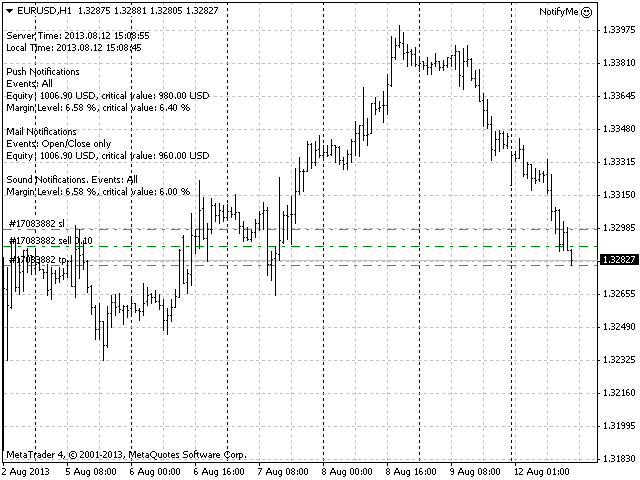
If Show_Information parameter is set to true, then the information about the server and local time will be displayed in the upper left corner of the chart as well as the settings and conditions of triggering of each notification type.

Examples of messages sent by the program

  • Placing a pending order: 2013.08.12 14:56:13 EURUSD Place Sell Limit 0.10 at 1.32920, SL: 1.33000, TP: 1.32820, Comment: Test order;
  • Changing pending order parameters: 2013.08.12 14:56:28 EURUSD Modify Sell Limit 0.10, Open: 1.32920 -> 1.32900, SL: 1.33000 -> 1.32980, TP: 1.32820 -> 1.32800;
  • Deleting a pending order: 2013.08.12 14:56:34 EURUSD Delete Sell Limit 0.10 at 1.32900;
  • Opening pending order: 2013.08.12 14.56.49 Sell Limit -> Sell at 1.32900, SL: 1.32980, TP: 1.32800, Comment: Test order;
  • Opening market position: 2013.08.12 14:56:52 EURUSD Sell 0.10 at 1.32900, SL: 1.32980, TP: 1.32800, Magic: 17;
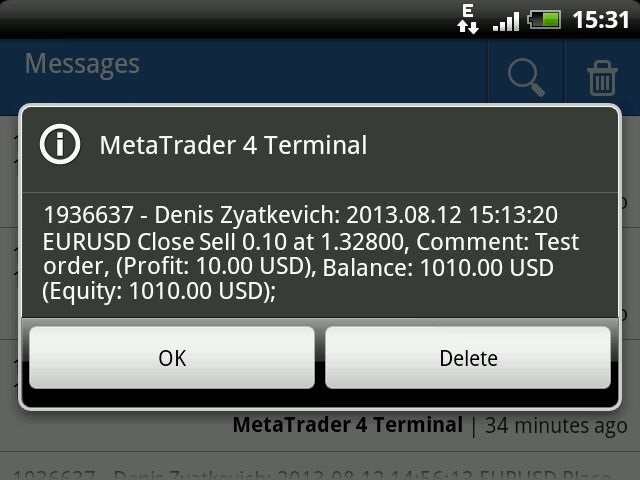
  • Closing position: 2013.08.12 15:13:20 EURUSD Close Sell 0.10 at 1.32800, Magic: 17, (Profit: 10.00 USD), Balance: 1010.00 USD (Equity: 1010.00 USD);
  • Reaching critical equity or free margin: 2013.08.12 15.32.16 Equity: 1004.30 USD, Free Margin: 868.47 USD;


Free Version and MetaTrader 5 Version

NotifyMe Free for MT4  - Free Version of the App Unlike the full version, it allows only sending notifications of position opening or closing. Also, full and free versions of the application with similar features are available for MetaTrader 5 trading terminal.


Warning

The developer of NotifyMe for MT4 is not responsible for possible modification or termination of the program's operation due to changes in MQL4 language implemented by the trading terminal and language developer - MetaQuotes company. The developer of NotifyMe for MT4 is not responsible for any loss, damage or missed profits caused by the use of the program, its work or malfunction.


Contact Information

If you have any questions about the application, comments on its operation or suggestions for future improvements, please send them by email or leave your personal messages via this web site. Let me know what products (Expert Advisors, indicators, scripts) you would like to see.
Recensioni 6
Johan Julien Aubry
919
Johan Julien Aubry 2021.06.06 10:00 
 

Works correctly. Please don't write directly to me about my review, I'll not answer.

PETER LUISI
1981
PETER LUISI 2021.01.18 12:03 
 

Just what I was looking for. Works very well.

Hatem Abou Ouf
5315
Hatem Abou Ouf 2017.09.21 22:19 
 

Excellent but I wish if He can add DrawDown% feature

Prodotti consigliati
Auto Fibo Pro m
DMITRII GRIDASOV
Indicatore "Auto FIBO Pro" Crypto_Forex: è un ottimo strumento ausiliario nel trading! - L'indicatore calcola e posiziona automaticamente sul grafico i livelli di Fibo e le linee di tendenza locali (colore rosso). - I livelli di Fibonacci indicano le aree chiave in cui il prezzo può invertirsi. - I livelli più importanti sono 23,6%, 38,2%, 50% e 61,8%. - Puoi usarlo per lo scalping di inversione o per il trading di zone grid. - Ci sono molte opportunità per migliorare il tuo sistema attuale us
Trend Ray
Andriy Sydoruk
The indicator shows the potential trend direction by cyclical-wave dependence. Thus, all the rays of the intersection will be optimal rays, in the direction of which the price is expected to move, taking into account the indicator period. Rays can be used as a direction for potential market movement. But we must not forget that the approach must be comprehensive, the indicator signals require additional information to enter the market.
Reverse copier is a tool that will open opposite buy/sell orders from your master account. It will help you with low profit EA's that lose consistenly and turn it to wins. Feel free to ask for new functions/features and I will add it. Now it's a simple MT5 to MT4 bridge with straightforward logic of one position open/close.  How to install: https://www.mql5.com/en/market/product/141604
FREE
Rainbow MT4
Jamal El Alama
Rainbow MT4 is a technical indicator based on Moving average with period 34 and very easy to use. When price crosses above MA and MA changes color to green, it’s a signal to buy. When price crosses below MA and MA changes color to red, it’s a signal to sell. The Expert advisor ( Rainbow EA MT4) based on Rainbow MT4 indicator, as you can see in the short video below is now available here .
FREE
Market Profile 3
Hussien Abdeltwab Hussien Ryad
3 (2)
Market Profile 3 MetaTrader 4 indicator  — is a classic Market Profile implementation that can show the price density over time, outlining the most important price levels, value area, and control value of a given trading session. This indicator can be attached to timeframes between M1 and D1 and will show the Market Profile for daily, weekly, monthly, or even intraday sessions. Lower timeframes offer higher precision. Higher timeframes are recommended for better visibility. It is also possible t
FREE
TSim
Sergey Kruglov
Утилита  TSim   позволяет симулировать ручную торговлю в Тестере Стратегий MetaTrader 4. В панеле можно устанавливать размеры лота, тейпрофита и стоплосса. Панель имеет кнопки Sell   и Buy для выставления рыночных ордеров, а также кнопки CloseSell, CloseBuy и CloseAll для быстрого закрытия ордеров. Под панелью отображается список открытых ордеров. Внимание. Панель работает только в Визуальном режиме Тестера Стратегий MetaTrader 4.
FREE
The Arrow Scalper
Fawwaz Abdulmantaser Salim Albaker
1 (2)
Dear Friend..  I share with you this simple Expert Adviser .. it is full automatic  this Expert Adviser following the trend of the pair you install on or any stocks or indices , it is works like that: - when the trend on H4 chart show a start of up trend the expert will wait till the 15M & 1H charts show an up trend the EA will open a buy order directly , and do the same for down trend and open a sell order the buy or sell  order lot size and take profit and stop loss will measured manually  by
FREE
КopirFIFO — копировщик нетто-позиций для терминалов МТ4. Копировщик копирует на счет-клиент чистую нетто-позицию со счёта-сервера по правилу FIFO, то есть всегда первой закрывается та сделка, которая была открыта раньше всего. При копировании так же полностью исключается хеджирование позиций. Если на счёте-сервере открываются хеджирующие сделки, то на счете-клиенте происходит закрытие позиций на величину хеджа. Данный копир идеально подходит для копирования вашей не нетто-торговли на сервисы то
FREE
High Low Open Close MT4
Alexandre Borela
4.81 (21)
Se ti piace questo progetto, lascia una recensione a 5 stelle. Questo indicatore disegna i prezzi aperti, alti, bassi e di chiusura per i specificati periodo e può essere regolato per un determinato fuso orario. Questi sono livelli importanti guardati da molti istituzionali e professionali commercianti e può essere utile per voi per conoscere i luoghi dove potrebbero essere più attivo. I periodi disponibili sono: Giorno precedente. Settimana precedente. Mese precedente. Precedente trimestre. A
FREE
Volume Compair
Thiago Pereira Pinho
Professional Cumulative Delta & Volume Median Indicator Track   real buying/selling pressure   with this powerful volume analysis tool. The   Volume Compare Indicator   combines   Cumulative Delta   and   Volume Medians   to help you identify institutional activity, imbalances, and potential reversals. Key Features: Cumulative Delta Histogram   – Visualizes net buying vs. selling volume in real-time. Buy/Sell Volume Medians   – Horizontal lines showing average buy & sell volume levels. Smart Vo
Harvest GOLD
Sayan Vandenhout
Harvest GOLD USES THE TREND WAVE INDICATOR AND IT CAN IDENTIFY THE BEGINNING AND THE END OF A NEW WAVE TREND MOVEMENT. AS AN OSCILLATOR, THE INDICATOR IDENTIFIES THE OVERBOUGHT AND OVERSOLD ZONES. IT WORKS GREAT TO CATCH THE SHORT TERM PRICE REVERSALS AND USES A MARTINGALE STRATEGY TO CLOSE ALL TRADES IN PROFIT. USE DEFAULT SETTINGS ON H1 OR HIGHER TIME FRAME ON ANY PAIR FOR MORE ACCURATE TRADES WHY THIS EA : Smart entries calculated by 3 great strategies The EA can be run on even a $30000
L'indicatore SMC Venom Model BPR è uno strumento professionale per i trader che operano nell'ambito del concetto di Smart Money (SMC). Identifica automaticamente due modelli chiave sul grafico dei prezzi: FVG   (Fair Value Gap) è una combinazione di tre candele, in cui c'è un gap tra la prima e la terza candela. Forma una zona tra livelli in cui non c'è supporto di volume, il che spesso porta a una correzione dei prezzi. BPR   (Balanced Price Range) è una combinazione di due modelli FVG che for
Exp Swing
Vladislav Andruschenko
4.49 (57)
Utilizza il modello di una famosa strategia chiamata Swinger (Pendulum, Cheburashka) - posizionamento alternativo di ordini pendenti con aumento del lotto. La strategia consiste nel piazzare due ordini pendenti opposti. Quando il prezzo si muove in una determinata direzione, viene attivato un ordine pendente, mentre la dimensione del lotto dell'altro ordine viene aumentata. L'EA prevede tre tipologie di apertura degli ordini pendenti (TypeofTrade) Apertura automatica dopo il posizionamento (Ape
FREE
Questo è un pannello comune che espone una rete di ordini di acquisto e vendita. Chiude questo consulente per l'ordine di profitto definito nelle impostazioni. Quindi, c'è un parametro e si chiama Ladder che include che la distanza tra gli ordini inizia ad aumentare di punti specificati dal parametro ladder (qui, nelle impostazioni principali è di 10 punti) significa un secondo ordine di 10 punti, un terzo ordine di 20 punti, un quarto ordine di 40 punti, ecc. Quindi, cosa c'è in questo consul
Free automatic Fibonacci is an indicator that automatically plots a Fibonacci retracement based on the number of bars you select on the BarsToScan setting in the indicator. The Fibonacci is automatically updated in real time as new highest and lowest values appears amongst the selected bars. You can select which level values to be displayed in the indicator settings. You can also select the color of the levels thus enabling the trader to be able to attach the indicator several times with differe
FREE
PatternVol EA
Alexandr Gribanov
4.5 (2)
The PatternVol EA is based on its own observations of the market and consists of patterns, candlestick analysis, analysis of candlestick volumes, and also, the EA does not contain indicators. At the moment, the advisor is a small constructor of my non-indicator strategies, you can disable and enable each strategy separately, or make an assembly from several strategies. The work on the advisor continues to this day, new strategies are added, algorithms are improved. In the future, it will be a l
FREE
Auto BE 2 Edition
Calvin Andile Mahlangu
Auto BE #2 Edition – Trade Exit and ADR Panel Utility (MT4) Overview Auto BE #2 Edition is a MetaTrader 4 utility that manages trade exits using automatic stop-loss placement, breakeven protection, and an optional partial-close mechanism. It also includes an ADR (Average Daily Range) panel that displays market range and volatility data directly on the chart. The tool helps traders maintain consistent, rules-based trade management whether trading manually or through Expert Advisors. Main Functio
FREE
EARLY REMINDER: The Starting price is 65 price will rise soon up to 365$ and then 750$ after first 10 copies of sales. Grab this offer now! Introduction Hello, traders! Welcome to the demonstration of the Forex Beast Indicator , a comprehensive tool designed to assist aspiring traders in navigating the complexities of the forex market. This indicator incorporates seven essential components to provide a well-rounded trading experience: Moving Averages Colored Zones Support and Resistance Levels
The indicator detects and displays Shark harmonic pattern (see the screenshot). The pattern is plotted by the extreme values of the ZigZag indicator (included in the resources, no need to install). After detecting the pattern, the indicator notifies of that by a pop-up window, a mobile notification and an email. The indicator highlights the process of the pattern formation and not just the complete pattern. In the former case, it is displayed in the contour triangles. After the pattern is comple
HMA Trend
Pavel Zamoshnikov
4.59 (69)
A trend indicator based on the Hull Moving Average (HMA) with two periods. The Hull Moving Average is an improved variant of the moving average, which shows the moment of trend reversal quite accurately. It is often used as a signal filter. Combination of two types of Hull Moving Averages makes a better use of these advantages: HMA with a slow period identifies the trend, while HMA with a fast period determines the short-term movements and signals in the trend direction. Features The movement d
FREE
Max LotSize
Luis Alberto Atuncar Sanchez
5 (2)
LotSize Indicator Discover the appropriate lot size to use in your trades based on the available margin. This indicator provides valuable information for risk management. If the indicator shows a value of 0, it means that your balance or available margin is insufficient for trading. It is important to maintain adequate margin levels for safe trading practices. This indicator is exclusively designed for the MT4 platform, a popular and reliable trading platform in the market. With the LotSize Indi
FREE
This indicator help to mark the high and low of the session Asian,London,Newyork , with custom hour setting This indicator is set to count from minute candle so it will move with the current market and stop at the designated hour and create a accurate line for the day. below is the customization that you can adjust : Input Descriptions EnableAsian Enables or disables the display of Asian session high and low levels. EnableLondon Enables or disables the display of London session high and
FREE
Indicatore Smart FVG MT4 – Rilevamento Avanzato del Fair Value Gap per MetaTrader 4 L'indicatore Smart FVG per MetaTrader 4 offre rilevamento, monitoraggio e avvisi professionali dei Fair Value Gap (FVG) direttamente sui tuoi grafici. Combina un filtro basato sull'ATR con una logica sensibile alla struttura per eliminare il rumore, adattarsi alla liquidità e mantenere solo gli squilibri più rilevanti per decisioni operative precise. Vantaggi principali Rilevamento accurato degli FVG: individua
FREE
EasyGRID MT4
Nina Yermolenko
5 (8)
The utility places a grid of pending orders. You can select the number of orders in the grid, the step between orders, multiplier for the order size, SL and TP levels and the magic number. If you use a   profit bucket , please note that it applies to all orders on the current currency pair with the current magic. If you want to use several grids with independent profit buckets at the same time, run several copies of the utility and specify different magics in the settings. MT5 version of the ut
FREE
Show Pips
Roman Podpora
4.26 (58)
Questo indicatore informativo sarà utile per coloro che vogliono essere sempre informati sulla situazione attuale del conto. L'indicatore mostra dati come profitto in punti, percentuale e valuta, nonché lo spread per la coppia corrente e il tempo fino alla chiusura della barra nell'intervallo di tempo corrente. VERSIONE MT5 -   Indicatori più utili Esistono diverse opzioni per posizionare la linea delle informazioni sulla carta: A destra del prezzo (corre dietro al prezzo); Come commento (nell'
FREE
Now, you have your very own   PROP FIRM AUTO-CLOSER   program! Once your account target or drawdown hits, all open orders will close automatically. ========================================== INPUTS: Account target (exact amount):   Put the exact account target. Once the equity hits your specied account balance target, all open orders will close. Make sure to add some buffer to consider slippage. Use fixed value or dynamic value:   Choose whether you will need a fixed value or dynamic value for
The indicator displays price distribution on a horizontal histogram. Horizontal histogram help find out key levels of price so that you can make good decision on setting point of take profit, stop loss... You can improve exist trading strategy or get new trading idea with the histogram of price. Outstanding features Support multiple time frame : you can choose to work with history data in any time frame you want. It does not depend on current display time frame. Support weighting by volume and/
FREE
NAS100 Auto Sl And TP
Moustapha Boulouz
5 (2)
Vi presentiamo NAS100 Auto SL e TP Maker per MT4: Non perdete mai più l'impostazione di StopLoss e TakeProfit con il nostro NAS100 Auto SL e TP Maker, un assistente indispensabile per i trader che navigano sul mercato del Nasdaq 100 su MetaTrader 4. Questo strumento è stato progettato per coloro che cercano una soluzione perfetta per automatizzare la gestione dei livelli di StopLoss e TakeProfit. Questo strumento è stato progettato per coloro che cercano una soluzione perfetta per automatizzare
FREE
Follow The Line
Oliver Gideon Amofa Appiah
3.94 (16)
FOLLOW THE LINE GET THE FULL VERSION HERE: https://www.mql5.com/en/market/product/36024 This indicator obeys the popular maxim that: "THE TREND IS YOUR FRIEND" It paints a GREEN line for BUY and also paints a RED line for SELL.  It gives alarms and alerts of all kinds. IT DOES NOT REPAINT and can be used for all currency pairs and timeframes. Yes, as easy and simple as that. Even a newbie can use it to make great and reliable trades. NB: For best results, get my other premium indicators for more
FREE
SMA Indicator
Nitu Brijesh Yadav
Arrow Indicator (Buy/Sell Alerts) – Simple Yet Powerful Tool!             Product Version: 1.01           Indicator Type: Trend Reversal Signals           Timeframes Supported: All (Recommended: H1, H4, D1)           Key Features: Buy Signal: Green upward arrow () appears below the candle  Sell Signal : Red downward arrow () appears above the candle Accurate Trend Reversal Detection – Based on tried and tested SMA strategy. ️ Clean Chart View – Minimalist, non-i
FREE
Gli utenti di questo prodotto hanno anche acquistato
Local Trade Copier EA MT4
Juvenille Emperor Limited
4.96 (105)
Sperimenta una copia di trading eccezionalmente veloce con il Local Trade Copier EA MT4 . Con la sua facile configurazione in 1 minuto, questo copiatore di trading ti consente di copiare i trades tra diversi terminali di MetaTrader sullo stesso computer Windows o su Windows VPS con velocità di copia ultra veloci inferiori a 0.5 secondi. Che tu sia un trader principiante o professionista, Local Trade Copier EA MT4 offre una vasta gamma di opzioni per personalizzarlo alle tue esigenze specifiche.
Trade Assistant MT4
Evgeniy Kravchenko
4.42 (192)
It helps to calculate the risk per trade, the easy installation of a new order, order management with partial closing functions, trailing stop of 7 types and other useful functions. Additional materials and instructions Installation instructions   -   Application instructions   -   Trial version of the application for a demo account Line function -   shows on the chart the Opening line, Stop Loss, Take Profit. With this function it is easy to set a new order and see its additional characteris
Forex Trade Manager MT4
InvestSoft
4.98 (425)
Benvenuto a Trade Manager EA, lo strumento definitivo per la gestione del rischio , progettato per rendere il trading più intuitivo, preciso ed efficiente. Non è solo uno strumento per l'esecuzione degli ordini, ma una soluzione completa per la pianificazione delle operazioni, la gestione delle posizioni e il controllo del rischio. Che tu sia un principiante, un trader avanzato o uno scalper che necessita di esecuzioni rapide, Trade Manager EA si adatta alle tue esigenze, offrendo flessibilità s
Unlimited Trade Copier Pro
Vu Trung Kien
3.86 (7)
Unlimited Trade Copier Pro is a tool to copy trade remotely to multiple MT4, MT5 and cTrader accounts at different computers/locations over internet. This is an ideal solution for you if you are a signal provider and want to copy your trades to other receivers globally on your own rules. One provider can copy trades to multiple receivers and one receiver can get trade from multiple providers as well. The provider can even set the subscription expiry for each receiver, so that receiver will not b
Trade copier MT4
Alfiya Fazylova
4.58 (33)
Trade Copier è un'utilità professionale progettata per copiare e sincronizzare le transazioni tra conti di trading. La copiatura avviene dal conto/terminale del fornitore al conto/terminale del destinatario, che sono installati sullo stesso computer o vps. Prima di acquistare, puoi testare la versione demo su un account demo. Versione demo qui . Istruzioni complete qui . Funzionalità e vantaggi principali: Supporta la copia degli ordini: MT4> MT4, MT4> MT5, MT5> MT4, inclusi i conti di compensaz
Il MT4 to Telegram Signal Provider è uno strumento facile da usare e completamente personalizzabile che consente l'invio di segnali a Telegram, trasformando il tuo account in un fornitore di segnali. Il formato dei messaggi è completamente personalizzabile! Tuttavia, per un uso semplice, puoi anche optare per un modello predefinito e abilitare o disabilitare parti specifiche del messaggio. [ Dimostrativo ]  [ Manuale ] [ Versione MT5 ] [ Versione Discord ] [ Canale Telegram ]  New: [ Telegram To
Exp COPYLOT CLIENT for MT4
Vladislav Andruschenko
4.69 (65)
Copiatore commerciale per MetaTrader 4.       Copia le operazioni, le posizioni e gli ordini forex da qualsiasi conto. È uno dei migliori copiatori commerciali       MT4 - MT4, MT5 - MT4       per il       COPYLOT MT4       versione (o       MT4 - MT5 MT5 - MT5       per il       COPYLOT MT5       versione). Versione MT5 Descrizione completa   +DEMO +PDF Come comprare Come installare     Come ottenere i file di registro     Come testare e ottimizzare     Tutti i prodotti di Expforex Versione
The product will copy all telegram signal to MT4   ( which you are member  ) , also it can work as remote copier.  Easy to set up, copy order instant, can work with almost signal formats, image signal, s upport to translate other language to English Work with all type of channel or group, even channel have "Restrict Saving Content", work with  multi channel, multi MT5 Work as remote copier: with signal have ticket number, it will copy exactly via ticket number. Support to backtest signal. How to
Strategy Builder offers an incredible amount of functionality. It combines a trade panel with configurable automation (covert indicators into an EA), real-time statistics (profit & draw down) plus automatic optimization of SL, TP/exit, trading hours, indicator inputs. Multiple indicators can be combined into an single alert/trade signal and can include custom indicators, even if just have ex4 file or purchased from Market. The system is easily configured via a CONFIG button and associated pop-up
TradePanel MT4
Alfiya Fazylova
4.84 (89)
Trade Panel è un assistente commerciale multifunzionale. L'applicazione contiene più di 50 funzioni di trading per il trading manuale e consente di automatizzare la maggior parte delle operazioni di trading. Attenzione, l'applicazione non funziona nel tester di strategia. Prima dell'acquisto, puoi testare la versione demo su un conto demo. Versione demo qui . Istruzioni complete qui . Commercio. Ti consente di eseguire operazioni di trading con un clic: Apri ordini e posizioni pendenti con calco
The News Filter
Leolouiski Gan
5 (25)
Questo prodotto filtra tutti gli esperti consulenti e i grafici manuali durante il periodo delle notizie, così non dovrai preoccuparti di improvvisi picchi di prezzo che potrebbero distruggere le tue impostazioni di trading manuali o le negoziazioni effettuate da altri esperti consulenti. Questo prodotto viene fornito anche con un sistema completo di gestione degli ordini che può gestire le tue posizioni aperte e gli ordini in sospeso prima della pubblicazione di qualsiasi notizia. Una volta che
Trade Dashboard MT4
Fatemeh Ameri
4.96 (53)
Tired of complex order placement and manual calculations? Trade Dashboard is your solution. With its user-friendly interface, placing orders becomes effortless, by a single click, you can open trades, set stop loss and take profit levels, manage trade lot size, and calculate risk to reward ratios, allowing you to only focus on your strategy. Say goodbye to manual calculations and streamline your trading experience with Trade Dashboard. Download  Demo Version  right now. You can find  Details of
VirtualTradePad mt4 Extra
Vladislav Andruschenko
4.86 (59)
Pannello di trading per il trading in 1 clic.   Lavorare con posizioni e ordini!   Trading dal grafico o dalla tastiera. Utilizzando il nostro pannello di trading, puoi fare trading con un clic dal grafico ed eseguire operazioni di trading 30 volte più velocemente rispetto al controllo MetaTrader standard. Calcoli automatici di parametri e funzioni che semplificano la vita di un trader e lo aiutano a condurre le proprie attività di trading in modo molto più rapido e conveniente. Suggerimenti gra
News Filter EA MT4
Rashed Samir
5 (9)
News Filter EA: Advanced Algo Trading Assistant News Filter EA is an advanced algo trading assistant designed to enhance your trading experience. By using the   News Filter EA , you can integrate a Forex economic news filter into your existing expert advisor, even if you do not have access to its source code. In addition to the news filter, you can also specify   trading days   and   hours   for your expert. The News Filter EA also includes   risk management   and   equity protection   features
Visualizza immediatamente la cronologia delle tue operazioni chiuse per giorno e settimana, le tue operazioni aperte correnti e l'esposizione forex su un grafico! Utilizza la mappa di calore per identificare le operazioni redditizie e dove si trova il tuo drawdown attuale all'interno del tuo portafoglio di trading. Pulsanti di chiusura rapida Utilizza i pulsanti di chiusura rapida per chiudere ogni operazione su un singolo simbolo, chiudere singole operazioni per intero o ottenere profitti o p
Copy Cat More Trade Copier MT4 (Copia Gatto MT4) non è solo un semplice copiatore locale di operazioni; è un quadro completo di gestione del rischio ed esecuzione, progettato per le sfide del trading moderno. Dai challenge delle prop firm alla gestione dei conti personali, si adatta a ogni situazione grazie a una combinazione di esecuzione robusta, protezione del capitale, configurazione flessibile e gestione avanzata delle operazioni. Il copiatore funziona sia in modalità Master (mittente) che
EchoTrade Telegram to MT4 Copier
Perpetual Chinemerem Vincent
5 (2)
EchoTrade Telegram to MT5 Copier Seamless, Instant, and Reliable Signal Copying - Direct from Telegram to MetaTrader 4! The product does not run in the strategy tester but you can get free trial version   here  for testing before purchase. Tired of manually executing trades from Telegram signals? EchoTrade automates the process, instantly copying trades from any Telegram channel or group directly into your MT5 account—accurately, efficiently, and without delay. Key Features: Universal Compatib
Grid Manual MT4
Alfiya Fazylova
4.71 (17)
Grid Manual è un pannello di trading per lavorare con una griglia di ordini. L'utilità è universale, ha impostazioni flessibili e un'interfaccia intuitiva. Funziona con una griglia di ordini non solo nella direzione delle perdite, ma anche nella direzione dell'aumento dei profitti. Il trader non ha bisogno di creare e mantenere una griglia di ordini, lo farà l'utilità. È sufficiente aprire un ordine e il manuale di Grid creerà automaticamente una griglia di ordini per esso e lo accompagnerà fino
Everything for chart Technical Analysis indicator MT4 in one tool Draw your supply demand zone with rectangle and support resistance with trendline and get alerts to mobile phone or email alert -  Risk reward indicator Video tutorials, manuals, DEMO download   here .  Find contacts on my   profile . 1.   Extended rectangles and trendlines Object will be extended to the right edge of the chart when price will draw new candles on chart. This is rectangle extender or trendline extender. 2. Price to
Ultimate Extractor - Professional Trading Analytics for MT4 Ultimate Extractor transforms your MetaTrader 4 trading history into actionable insights with comprehensive analytics, interactive charts, and real-time performance tracking. Ability to combine multiple accounts and MT4 and MT5 into a single dashboard. What It Does Automatically analyzes your MT4 trading history across all Expert Advisors and generates detailed HTML reports with interactive visualizations. Tracks live performance metric
Trading History MT4
Siarhei Vashchylka
5 (9)
Trading History - A program for trading and money management on the history of quotes in stratagy tester. It can work with pending and immediate orders, and is equipped with trailing stop, breakeven and take profit functions. Very good for training and testing different strategies. Manual (Be sure to read before purchasing) Advantages 1. Allows you to test any trading strategy in the shortest possible time 2. An excellent simulator for trading training. You can gain months of trading experience
CloseIfProfitorLoss with Trailing
Vladislav Andruschenko
4.87 (31)
Chiusura delle posizioni in MetaTrader 4 al raggiungimento del profitto/perdita totale con la funzione di trailing del profitto. Puoi abilitare le fermate virtuali (ordine separato) . Calcolo e chiusura per le posizioni ACQUISTA e VENDI separatamente (Separate BUY SELL) . Chiusura e calcolo di tutti i simboli o solo del simbolo corrente (Tutti i simboli) . Abilita il trailing per il profitto ( Trailing Profit ). Chiudi su profitti e perdite totali su valuta di deposito, punti, o percentuale del
Exp4 Duplicator
Vladislav Andruschenko
4.5 (22)
L'Expert Advisor   ripete   operazioni e posizioni un numero prestabilito di volte sul tuo conto   MetaTrader 4   . Copia tutte le operazioni aperte manualmente o da un altro Expert Advisor. Copia i segnali e aumenta il lotto dai segnali   ! Aumenta il numero di altri EA. Sono supportate le seguenti funzioni: lotto personalizzato per operazioni copiate, copia di Stop Loss, Take Profit, utilizzo di trailing stop. Versione MT5 Descrizione completa +DEMO +PDF Come comprare Come installare     C
Alert Msg to Market Order
Nguyen Quoc Hung
5 (3)
This EA is fully automated , it is built based on  the method of catching the pop-up Alert event and Open Market Orders (BUY/SELL) . Download trial version here:  https://www.mql5.com/en/blogs/post/751340 ***NOTE:   It is recommended to remove the available filter settings, only install the filter for your indicator. Parameters of the EA: -------- <EA Settings> -------- Magic Number:   The identifying (magic) number of the currently selected order. Allow Open trade:   Enable/ Disable Open Trade
Trade Reverse Copie4
Chukwuemeka Kingsley Anyanwu
Feel free to contact me for any extra features :) [SEE MT5 VERSION  https://www.mql5.com/en/market/product/128846 The Local Reverse Copier is an Expert Advisor designed to synchronize positions between a Master account and a Slave account with a twist: it reverses the trades. When a buy position is opened on the Master account, the EA opens a sell position on the Slave account, and vice versa. This allows for a unique form of trade copying where positions are mirrored in opposite directions bet
Seconds Chart — uno strumento unico per creare grafici in secondi su MetaTrader 4 . Con Seconds Chart , puoi generare grafici con timeframe definiti in secondi, ottenendo una flessibilità e una precisione d'analisi ideali, non disponibili nei grafici standard in minuti o ore. Ad esempio, il timeframe S15 indica un grafico con candele di 15 secondi. Puoi utilizzare qualsiasi indicatore, expert advisor e script. È facile utilizzarli proprio come nei grafici standard. A differenza degli strumenti s
Copiatrice->Interazione dell'interfaccia comoda e veloce, gli utenti possono utilizzarla subito       ->>>> Si consiglia di utilizzarlo su computer Windows o VPS Windows Caratteristiche: Impostazioni di copy trading diversificate e personalizzate: 1. È possibile impostare diverse modalità di lotto per diverse fonti di segnale 2. È possibile impostare diverse fonti di segnale per il copy trading forward e reverse 3. I segnali possono essere impostati con commenti 4. Se calibrare il lotto in base
Custom Alerts AIO: Monitora tutti i mercati — senza alcuna configurazione Panoramica Custom Alerts AIO è una soluzione di monitoraggio dei mercati pronta all’uso che non richiede alcuna configurazione. Tutti gli indicatori necessari — FX Power, FX Volume, FX Dynamic, FX Levels, IX Power — sono integrati internamente. Non vengono mostrati grafici, rendendolo ideale per generare alert in tempo reale in modo discreto ed efficiente. Supporta tutte le classi di asset offerte dal tuo broker: Forex,
EasyTrade MT4
Alain Verleyen
5 (1)
Easy Trade – Gestione Operativa Intelligente, Semplice e Potente Easy Trade è la soluzione tutto-in-uno per la gestione delle operazioni su MetaTrader, ideale per chi desidera mantenere il rischio sotto controllo e garantire un’esecuzione fluida. Progettato da zero con il feedback reale dei trader, Easy Trade rende semplice eseguire, monitorare e gestire operazioni su più simboli – senza complicare il tuo flusso di lavoro. Che tu faccia scalping manuale o gestisca un piccolo portafoglio di str
Simple Assistant for Trading Precise  Risk Management in each Automatic Money Management Visual Trading Open Position Management User friendly and practical during 15 years of  considerable experience in stock market, we have dealt with many professional traders who have been used profitable and unrivalled methods in this market but failed in the long term. The reason is undoubtedly the lack of standard in their manner during their trade. Standard means the accurate repetition of a process….
Altri dall’autore
Overview The Expert Advisor allows you to receive notifications to the mobile phone (or tablet PC), mailbox or play the sound alert when some events occured: opening or closing position (also closing all positions), placing or deleting pending order; changing open price, stop loss or take profit; the account balance, equity, margin level, free margin or drawdown has reached the user specified level. You can specify a notification interval, notification text template and audio file for sound aler
NotifyMe for MT5
Denis Zyatkevich
5 (4)
Overview The Expert Advisor sends notifications to a mobile phone, via e-mail or activates an audio alarm in case any changes are detected on the trading account: opening/closing positions, changing order and position parameters, balance or leverage. Also, the Expert Advisor can inform that Equity on the trading account has dropped below a specified value or Free Margin is small compared to Margin. The Expert Advisor does not trade, it only monitors your account and orders. Launching the Expert
NotifyMe Free for MT5
Denis Zyatkevich
5 (5)
Overview The Expert Advisor sends notifications to a mobile phone, via e-mail or activates an audio alarm in case any changes are detected on the trading account: opening/closing positions, changing order parameters, balance or leverage. Also, the Expert Advisor can inform that Equity on the trading account has dropped below a specified value or Free Margin is small compared to Margin. The Expert does not trade, it only monitors your account and orders. Launching the Expert Advisor You should a
FREE
Account Info Free for MT5
Denis Zyatkevich
5 (1)
Overview The script displays information about the trade account: Information about the trade account: Account - account number and type (Real, Contest or Demo); Name - name of the account owner; Company - name of a company that provide the access to trading; Server - trade server name; Connection State - connection state; Trade Allowed - shows whether trading is allowed on the account at the moment; Experts Allowed - shows whether it is allowed to trade using Expert Advisors; Balance - account
FREE
NotifyMe Free for MT4
Denis Zyatkevich
5 (4)
Overview The Expert Advisor sends notifications to a mobile phone, via e-mail or activates an audio alarm in case a position is opened or closed on the trading account. The Expert does not trade, it only monitors your account and orders. Launching the Expert Advisor For the Expert Advisor to work, place the file NotifyMe_free.ex4 in terminal_folder/experts (probably it will be placed there automatically). NotifyMe_free should appear in the Expert Advisors section of the Navigator window. If not
FREE
Overview The script displays information about the trade account: Account - account number and type (Real or Demo); Name - name of the account owner; Company - name of a company that provide the access to trading; Server - trade server name; Connection State - connection state; Trade Allowed - shows whether trading is allowed on the account at the moment; Balance - account balance; Equity - account equity; Credit - amount of credit; Profit - profit size; Free Margin - free margin on the account;
FREE
Overview The script displays information about the trade account and the current financial instrument. Information about the trade account: Account - account number and type (Real or Demo); Name - name of the account owner; Company - name of a company that provide the access to trading; Server - trade server name; Connection State - connection state; Trade Allowed - shows whether trading is allowed on the account at the moment; Balance - account balance; Equity - account equity; Credit - amount
Advanced NotifyMe
Denis Zyatkevich
Overview The Expert Advisor allows you to receive notifications to the mobile phone (or tablet PC), mailbox or play the sound alert when some events occured: opening or closing position, placing or deleting pending order; changing open price, stop loss or take profit; the account balance, equity, margin level, free margin or drawdown has reached the user specified level. You can specify a notification interval, notification text template and audio file for sound alerts. Expert Advisor saves the
Advanced NotifyMe Large
Denis Zyatkevich
5 (1)
This is Advanced NotifyMe version with large interface. Overview The Expert Advisor allows you to receive notifications to the mobile phone (or tablet PC), mailbox or play the sound alert when some events occured: opening or closing position, placing or deleting pending order; changing open price, stop loss or take profit; the account balance, equity, margin level, free margin or drawdown has reached the user specified level. You can specify a notification interval, notification text template an
Overview The Expert Advisor sends notifications to a mobile phone, via e-mail or plays a sound in case any changes are detected on the trading account: opening/closing positions, changing order parameters, balance or leverage. Also, the Expert Advisor can inform that Equity on the trading account has dropped below a specified value or Free Margin is small compared to Margin. The Expert does not trade, it only monitors your account. Launching the Expert Advisor For the Expert Advisor to work, pl
Overview The script displays information about the trade account and the current financial instrument. Information about the trade account: Account - account number and type (Real, Contest or Demo); Name - name of the account owner; Company - name of a company that provide the access to trading; Server - trade server name; Connection State - connection state; Trade Allowed - shows whether trading is allowed on the account at the moment; Experts Allowed - shows whether it is allowed to trade usin
This is Advanced NotifyMe version with large interface. Overview The Expert Advisor allows you to receive notifications to the mobile phone (or tablet PC), mailbox or play the sound alert when some events occured: opening or closing position (also closing all positions), placing or deleting pending order; changing open price, stop loss or take profit; the account balance, equity, margin level, free margin or drawdown has reached the user specified level. You can specify a notification interval,
Overview The Expert Advisor sends notifications to a mobile phone, via e-mail or plays a sound in case any changes are detected on the trading account: opening/closing positions, changing order or position parameters, balance or leverage. Also, the Expert Advisor can inform that Equity on the trading account has dropped below a specified value or Free Margin is small compared to Margin. The Expert Advisor does not trade, it only monitors your account. Launching the Expert Advisor You should all
Filtro:
Johan Julien Aubry
919
Johan Julien Aubry 2021.06.06 10:00 
 

Works correctly. Please don't write directly to me about my review, I'll not answer.

PETER LUISI
1981
PETER LUISI 2021.01.18 12:03 
 

Just what I was looking for. Works very well.

procorner
99
procorner 2018.03.26 08:10 
 

L'utente non ha lasciato alcun commento sulla valutazione.

Hatem Abou Ouf
5315
Hatem Abou Ouf 2017.09.21 22:19 
 

Excellent but I wish if He can add DrawDown% feature

project13et
173
project13et 2017.09.04 20:07 
 

Excellent product! A+++

Zack van Zyl
591
Zack van Zyl 2015.04.09 10:44 
 

Great Product!

Rispondi alla recensione