RRtoolBox
- Utilità
- Versione: 1.89
- Aggiornato: 18 marzo 2026
- Attivazioni: 6

RRtoolbox - Professional Tools: Risk:Reward Trading Tool (SL/TP Horizontals + Pending orders + Diagonals), Alerts set on trend lines (for alerts on diagonal levels), SelfManagement (BE, partials...), close/cancelling by time, Statistics, Info and trading on chart.
🎯 One-Click Trading with Visual Risk:Reward Management
RRtoolbox is a comprehensive trading panel that combines one-click order execution, statistics and powerful visual Risk:Reward tools, alerts set with trendlines, on chart buttons. Perfect for scalpers, day traders, and swing traders who need precise entry planning and automated position management. Continuous improvement on new versions, suggestions welcomed.
✨ KEY FEATURES
📊 Visual Risk:Reward Tools
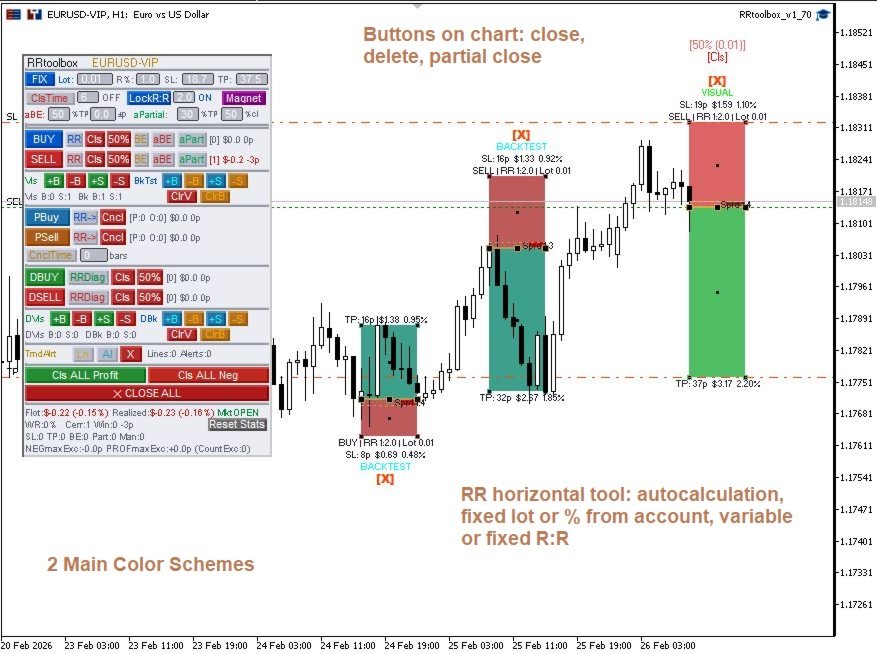
- Horizontal R:R Tool: Classic rectangle-based TP/SL visualization
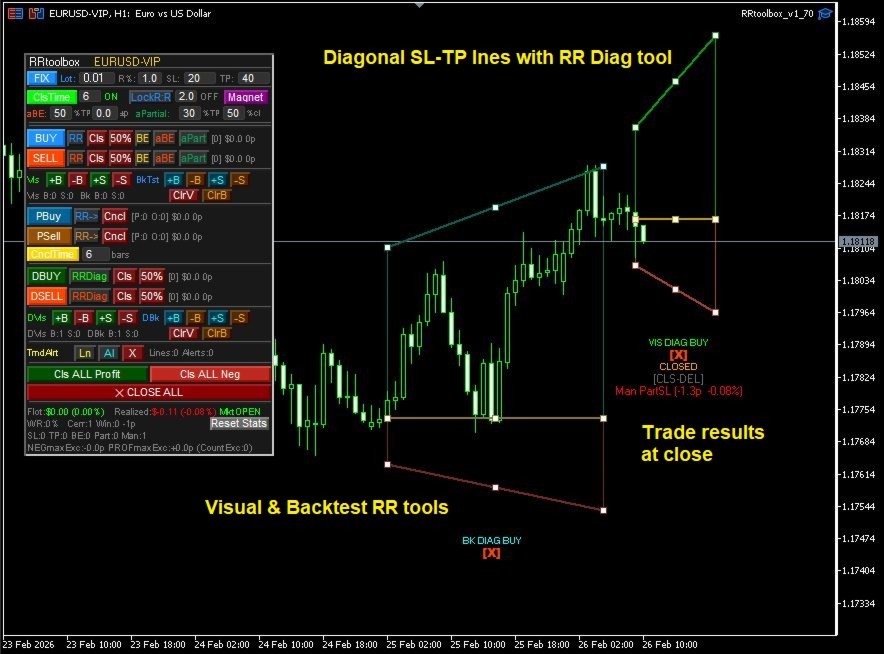
- Diagonal R:R Tool: Dynamic TP/SL that changes over time (unique feature!)
- Backtest Mode: Create visual copies to analyze past setups
- Lock Ratio: Maintain consistent R:R ratios automatically
- Total Close and partial close from chart
⚡ One-Click Execution
- Instant BUY/SELL with preset parameters
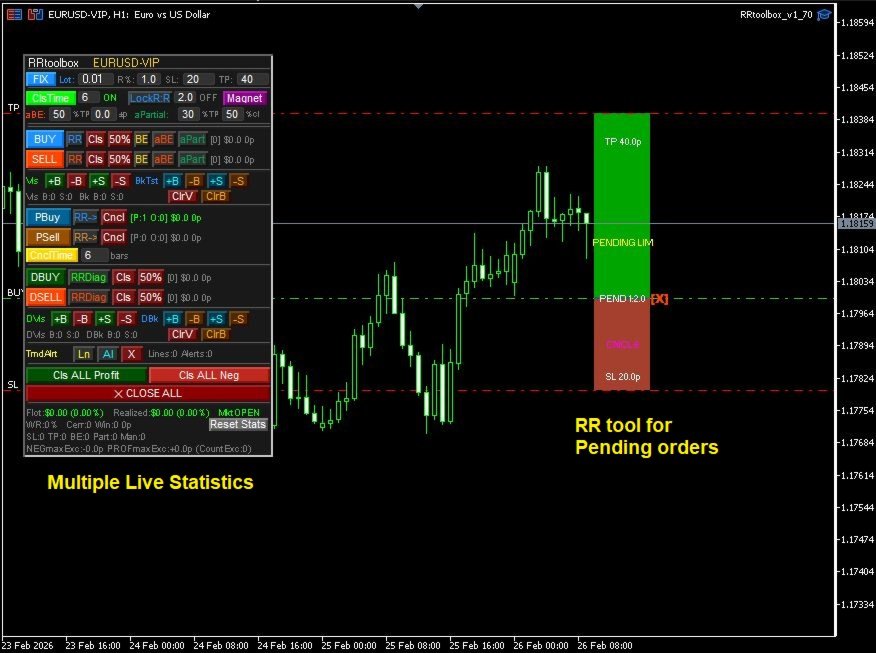
- Pending Orders (Limit/Stop) with dynamic button text
- 50% Partial Close buttons
- Break-Even with one click
🤖 Auto-Management System
- Auto Break-Even (aBE): Automatically move SL to entry when price reaches X% of TP
- Auto Partial Close (aPartial): Close X% of position at Y% of TP
- Works globally across all trade types (Horizontal, Diagonal, Pending)
- Fully configurable from panel
- Implemented robustness for opening and closing trades.
🔔 Advanced Features
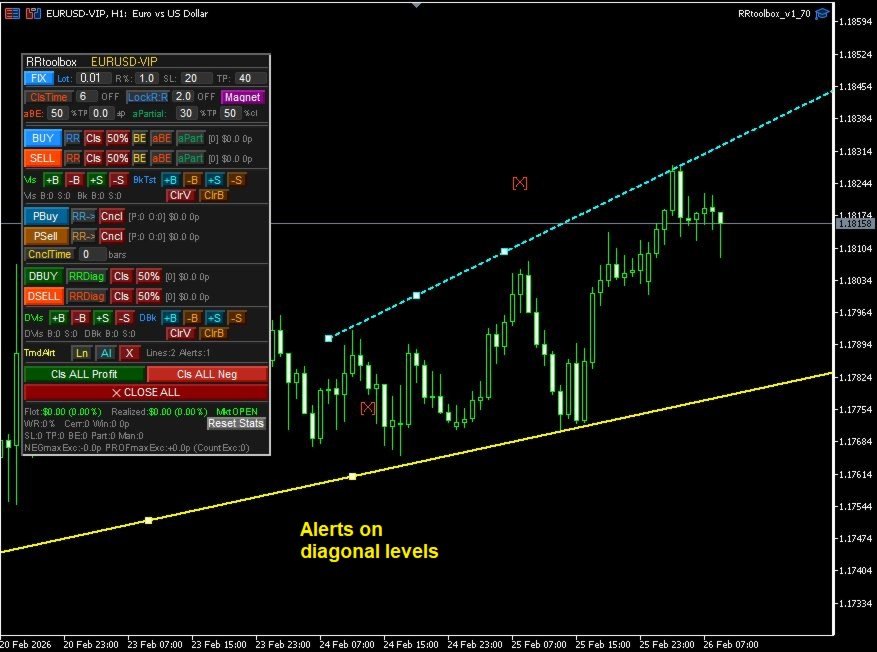
- Trend Line Alerts: Draw lines and get alerts when price touches
- Time-Based Close: Auto-close positions after X candles
- Magnet Mode: Snap tools to OHLC prices
- Spread Visualization: See real spread impact on entries
- Push Notifications: Mobile alerts for alerts
📈 Real-Time Statistics
- Separate stats for each trade type (Horizontal, Diagonal, Pending)
- Float and realized P/L tracking
- Win rate and pip counting
- Per-direction statistics (BUY/SELL)
- Maximum negative Excursion and Maximum Positive Escursion
🎓 HOW TO USE
Basic Trading
- Set your lot size or risk percentage
- Adjust SL/TP in pips
- Click BUY or SELL
Using R:R Tool
- Click "RR" button to show the visual tool
- Drag Entry, TP, or SL lines to desired levels
- Execute with BUY/SELL button
- Tool automatically calculates lot size in R:R mode
- Move the RR tool with the entry line to the desired level to set pending orders.
- Set closing timer (in candles) and/or cancelación timer (for pending orders).
Diagonal R:R (Unique Feature)
- Click "RRDiag" to show diagonal tool
- Drag endpoints to create time-based TP/SL levels
- Perfect for trend-following strategies
- TP/SL automatically adjust as time passes
Auto-Management
- Configure aBE: Set % of TP to trigger and margin
- Configure aPartial: Set % of TP and % to close
- Enable per-direction with aBE/aP buttons
- Works automatically on all positions
⚙️ INPUT PARAMETERS
Panel Settings
- Panel position (X, Y)
- Panel dimensions
- Color customization
Trading Defaults
- Default lot size
- Default risk percentage
- Default SL/TP in pips
Auto-Management
- aBE trigger percentage
- aBE margin (can be negative)
- aPartial trigger percentage
- aPartial close percentage
Visual Settings
- Rectangle colors (TP, SL, Spread)
- Line widths and styles
- Label positioning
💡 TIPS & BEST PRACTICES
- Use Lock Ratio when you want consistent R:R across multiple trades
- Diagonal Tool works best on trending markets with clear direction
- Combine aBE + aPartial for automated scaling out
- Backtest copies help you analyze setups before trading live
- Magnet mode ensures precise entries on key price levels
🔧 REQUIREMENTS
- MetaTrader 5
- Any broker, any symbol
- Recommended: VPS for auto-management features
⚠️ DISCLAIMER: This tool nor the autor are financial advisors. Past results don't warrant future results. The tools are heavily optimized and tested, and are allways being under continuous improvement. You MUST test any EA or Indicator on a DEMO account for at least 2-4 weeks before risking real money. Every trader and Prop Firm has different rules. Protect your capital first. By downloading and using these tools, you agree to take full responsibility for your own trading results.