Gumrai ORB VX
- Experts
- Version: 1.22
- Updated: 25 September 2026
- Activations: 5

Gumrai Orb Vx is a rule-based XAUUSD session-breakout Expert Advisor for MetaTrader 5.
The EA reads completed M1 and M15 market data internally to identify and manage structured trading opportunities during the Asia, London and New York sessions. It is designed primarily for XAUUSD and is intended to be attached to an XAUUSD M15 chart.
How the strategy works
When the internal setup is confirmed, the EA can open a MAIN position. If a separate set of conditions is later met, it can open one optional ADD 1 position. ADD 1 is a planned second entry, not an unlimited grid or a loss-recovery trade.
Every managed entry uses a System Stop Loss and a staged exit structure. Position volume is reduced progressively as price reaches the strategy milestones, while the remaining volume can continue as a Runner. The default protection mode moves protection to break-even after TP2. An alternative staged profit-lock mode is also available.
The EA does not use martingale, unlimited grid recovery or automatic lot multiplication after a loss.
Key features
- Designed primarily for XAUUSD on M15
- Internal M1 and M15 market analysis
- Asia, London and New York session controls
- MAIN position with one optional ADD 1 position
- System Stop Loss on managed trades
- Staged partial exits and a Runner position
- Break-even protection after TP2 by default
- Optional staged profit-lock protection
- Fixed-lot or equity-risk position sizing
- Hedging and netting account support
- Broker volume-step, margin and stop-level checks
- Fixed UTC and daylight-saving broker-time options
- Optional chart status panel and detailed journal logging
- No WebRequest, external API, external license server or account-number lock
Hedging and netting support
Gumrai Orb Vx supports both MT5 position-accounting modes. On a hedging account, managed entries can remain as separate positions. On a netting account, MetaTrader maintains one combined position per symbol, while the EA continues to track and manage its internal MAIN and ADD 1 structure.
Do not run another EA or manual strategy on the same symbol with the same Magic Number. On netting accounts, avoid mixing unrelated or opposite positions on the same symbol while Gumrai Orb Vx is active.
Position sizing and exposure
Two volume modes are available:
- Fixed lots per leg: uses the lot size selected by the user for each MAIN or ADD 1 leg.
- Risk percent per leg: calculates volume from account equity, symbol tick value and the System Stop Loss distance.
The selected risk percentage applies to each leg. Because MAIN and ADD 1 can be active at the same time, total account exposure can be greater than the risk assigned to one leg. Start conservatively and verify the resulting volume in Strategy Tester before live use.
Recommended setup
- Install the EA through the MetaTrader 5 Market.
- Open the broker's XAUUSD symbol, including its suffix if one is used.
- Use an M15 chart.
- Make sure M1 and M15 history is available.
- Verify the broker server-time setting.
- Select fixed-lot or risk-percent sizing and begin with conservative exposure.
- Backtest with Every tick based on real ticks and Random delay when the broker provides suitable tick history.
- Run the EA on a demo account before considering live trading.
A stable terminal or VPS connection is recommended when the EA is used continuously. AutoTrading must remain enabled for entries and position management to operate.
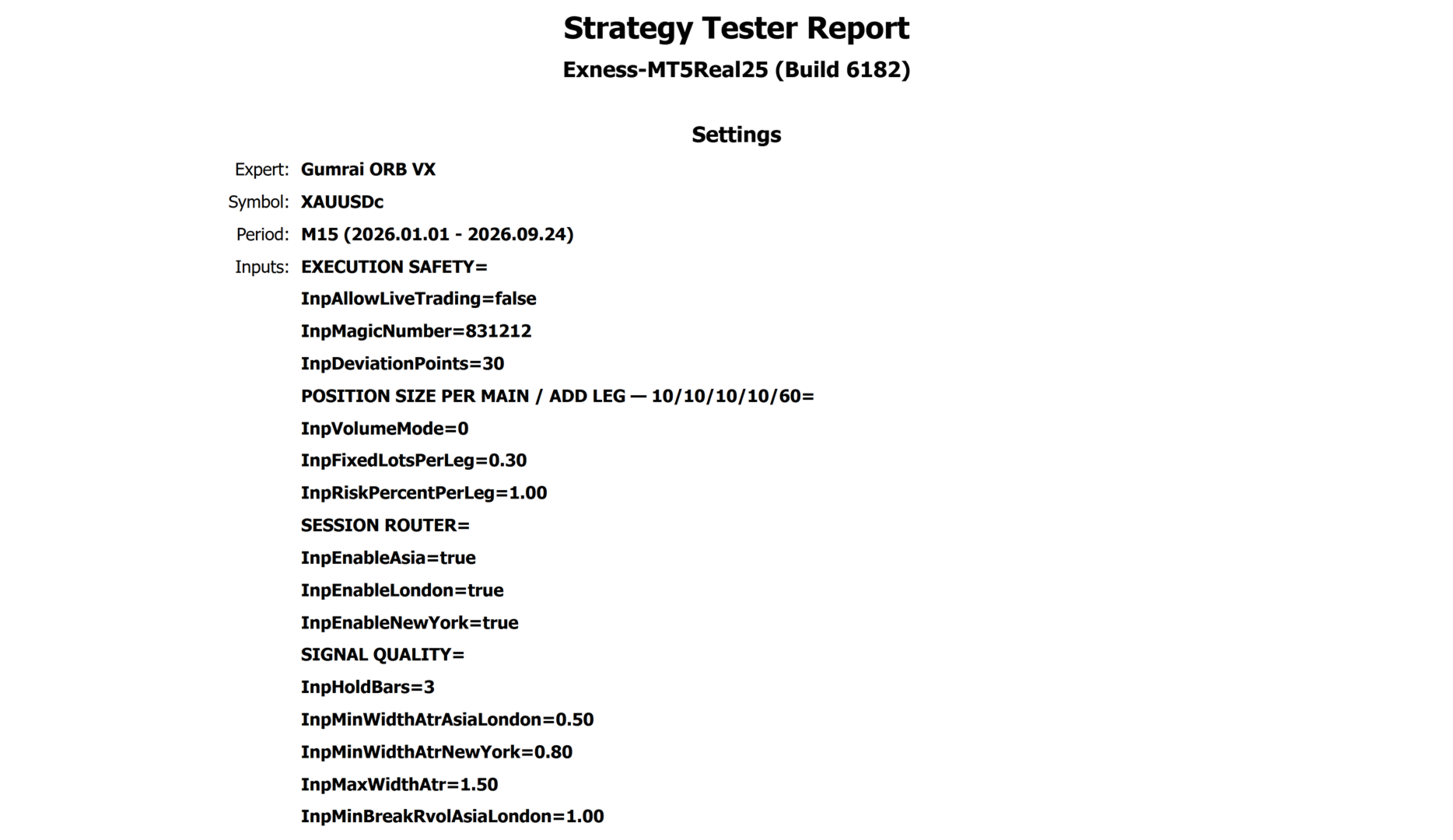
Historical Strategy Tester example
The following result is a historical MT5 Strategy Tester simulation. It is not a live-account statement and is not a forecast of future performance.
- EA version: 1.21
- Symbol: XAUUSDc
- Timeframe: M15
- Period: 1 January 2026 to 22 September 2026
- Model: Every tick based on real ticks
- Execution delay: Random delay
- Initial deposit: 10,000 USC
- Position size: 0.20 fixed lots per leg
- History quality: 100%
- Ticks: 72,346,072
- Total trades: 775
- Profit factor: 1.64
- Net profit: 33,262.56 USC
- Maximum equity drawdown: 40.05%
USC is a cent-denominated account currency and should not be compared directly with USD values. Results can change materially with historical data, broker time, symbol specification, spread, commission, slippage, execution delay, liquidity and input settings.
Input guide
- Allow live trading: permits order placement outside Strategy Tester. Enable only after completing your own backtest and demo validation.
- Magic number: identifies orders and positions managed by this EA.
- Deviation points: maximum permitted order-price deviation in broker points.
- Volume mode: selects fixed lots or risk-percent sizing.
- Fixed lots per leg: requested lot size for each MAIN or ADD 1 leg when fixed-lot mode is selected.
- Risk percent per leg: equity percentage used to calculate each leg when risk-percent mode is selected.
- Enable Asia, London and New York: enables or disables each session router.
- Protection mode: selects break-even after TP2 or staged profit locking.
- Model tick size: leave at zero to use the current symbol's trade tick size automatically. Override only when a broker's XAUUSD price scale requires it and after testing.
- Broker time mode: selects a fixed UTC offset or one of the supported daylight-saving conversions.
- Fixed broker UTC offset hours: broker-server offset used when fixed UTC mode is selected.
- Show chart status: displays the current EA state on the chart.
- Verbose journal: writes additional setup and management information to the Experts log.
Important notes
- This product is designed primarily for XAUUSD. Other symbols are not recommended unless independently tested.
- Broker suffixes can be used by attaching the EA directly to that broker's gold chart, but contract specifications must be checked.
- Different brokers can produce different entries, fills and trade counts because their ticks, spreads, server time and symbol specifications differ.
- A Stop Loss does not guarantee the final cash loss. Gaps, slippage, spread expansion, liquidity and broker execution can change the closing result.
- Past backtest results do not guarantee future or live results.
Frequently asked questions
Does the EA require an external set file?
The default inputs provide a starting configuration. Broker time, volume and price-scale settings must still be verified for the selected broker.
Does it support symbol suffixes such as XAUUSDc?
Yes. Attach the EA to the broker's actual gold symbol and test its contract specification, tick size and execution before live use.
Why can my trade count differ from a screenshot?
Historical data, broker server time, spread, commission, slippage, execution delay and symbol specifications can change both signals and fills.
Does it support both hedging and netting?
Yes. Version 1.21 includes separate position-management handling for both MT5 account modes.
Does the EA guarantee profit?
No. Gumrai Orb Vx is an automated execution tool. Trading involves risk and can result in partial or complete loss of trading capital.
Risk warning
Automated trading does not remove market risk. Test the EA with your broker's own history and symbol specification, use conservative exposure, and evaluate it on a demo account before live trading. You remain responsible for selecting the account, broker, volume, settings and risk level.