Position Sizing Inside Prop Firm Limits: Calculating the Largest Safe Lot in MQL5

Introduction
Ask a trader how they size positions and the answer is usually one of two: a fixed lot, or "1% of the balance per trade". Both work on an ordinary account. On a prop firm account they hide a trap.
A prop firm account has a hard daily loss limit and a hard maximum drawdown. What matters for the next trade is not the balance, but how much room is left before one of those limits is hit. At the start of a day the room is large and a 1% risk is harmless. After three losing trades the room may be smaller than 1%, and the same "safe" formula now produces a position whose stop loss breaks the rule. The trader did nothing reckless; the formula simply did not know about the limit.
In this article we build a sizing function that knows. It answers one question: what is the largest lot I can open with this stop loss without exceeding either my risk budget or the room left before a prop-firm limit? Along the way we deal with the details that make many lot calculators wrong on metals, indices and cross rates: tick values, currency conversion, commission, slippage and rounding.
Step 1. The real loss of one lot
Every sizing method starts from the same number: how much money one lot loses if the stop is hit. The classic formula is:
loss per lot = stop distance / tick size * tick value
It is correct, but it depends on SYMBOL_TRADE_TICK_VALUE being right for the direction and the moment, and on the account currency matching the profit currency. For an index quoted in JPY on a USD account, or gold on a EUR account, the tick value is a converted figure that changes with the exchange rate. It is easy to use the wrong property or a stale value.
MetaTrader 5 already has a function that does the whole calculation for us: OrderCalcProfit(). It returns the profit, in account currency, of a hypothetical trade of a given volume from one price to another. If we pass the entry price and the stop-loss price, the result is the exact loss, with contract size, tick value and currency conversion handled by the terminal.
double SafeLotLossPerLot(const SSafeLotInput &in)
  {
   double point=SymbolInfoDouble(in.symbol,SYMBOL_POINT);
   if(point<=0.0 || in.stop_points<=0.0)
      return(0.0);
   bool   buy  =(in.type==ORDER_TYPE_BUY);
   double entry=buy ? SymbolInfoDouble(in.symbol,SYMBOL_ASK) : SymbolInfoDouble(in.symbol,SYMBOL_BID);
   if(entry<=0.0)
      return(0.0);
   double distance=(in.stop_points+in.slippage_points)*point;
   double exit    =buy ? entry-distance : entry+distance;
   double profit  =0.0;
//--- OrderCalcProfit handles contract size, tick value and currency conversion
   if(!OrderCalcProfit(in.type,in.symbol,1.0,entry,exit,profit))
      return(0.0);
   return(-profit+in.commission_per_lot);
  }
Three details in this function matter:
- The entry price is the real one. A buy is opened at the Ask, a sell at the Bid. Using the Ask for a buy means the spread at entry is already inside the measured distance.
- Slippage is added to the stop distance. A stop loss is a market order once it triggers. On fast moves the fill is often a few points worse. A small allowance, five points on a major pair or more on gold and indices, keeps the estimate honest.
- Commission is added per lot. Raw-spread accounts charge a fixed amount per lot, usually quoted per side. The function expects the round-turn amount, because the trade is opened and closed. MQL5 has no reliable property that returns the commission in advance, so it is an input.
The data for the function is kept in a small structure, which makes calls readable and easy to extend:
struct SSafeLotInput
  {
   string            symbol;
   ENUM_ORDER_TYPE   type;              // ORDER_TYPE_BUY or ORDER_TYPE_SELL
   double            stop_points;       // stop-loss distance in points
   double            slippage_points;   // extra points assumed on the exit
   double            commission_per_lot;// round-turn commission per lot, account currency
   double            risk_money;        // risk budget for this trade
   double            room_money;        // remaining room before a prop limit (negative = ignore)
  };
Step 2. Rounding in the safe direction
Dividing a money amount by the loss per lot gives a volume such as 3.2051. Brokers accept only multiples of SYMBOL_VOLUME_STEP, so the value must be rounded. Many calculators use NormalizeDouble(lots, 2), which rounds to the nearest step. Half of the time that is upwards, and the position is slightly larger than the budget allows. On a normal account nobody notices. On an account with 300 of room left, rounding 0.965 up to 0.97 can be the difference between passing and failing.
We always round down:
double SafeLotRoundDown(const string symbol,const double volume)
  {
   double step=SymbolInfoDouble(symbol,SYMBOL_VOLUME_STEP);
   double vmax=SymbolInfoDouble(symbol,SYMBOL_VOLUME_MAX);
   if(step<=0.0)
      return(0.0);
//--- the small epsilon prevents 0.29999999 from becoming 0.28 on a 0.01 step
   double lots=MathFloor(volume/step+1e-8)*step;
   if(vmax>0.0 && lots>vmax)
      lots=vmax;
   int digits=(int)MathMax(0,MathCeil(-MathLog10(step)));
   return(NormalizeDouble(lots,digits));
  }
The tiny epsilon deals with floating-point representation: 0.3 / 0.01 may be stored as 29.999999999, and a plain MathFloor() would return 29 steps instead of 30. The number of decimal places is derived from the step, so the function works for steps of 0.01, 0.1 and 1 alike.
The same principle applies at the bottom. If the safe volume is below SYMBOL_VOLUME_MIN, a common shortcut is to open the minimum lot anyway. That is rounding up by another name. The correct answer is zero: the trade does not fit, so it is skipped.
Step 3. Two budgets, one answer
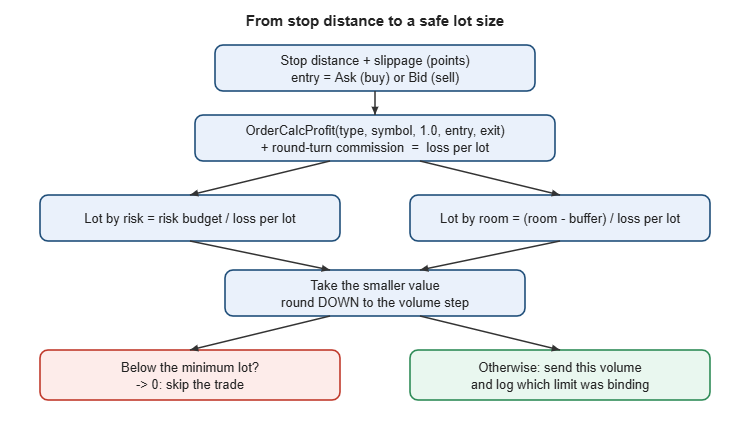
We now have two independent limits on the size of the next trade:
- The risk budget. The amount the trader is willing to lose on one trade, for example 1% of the balance.
- The remaining room. The distance from current equity to the nearer of the two prop-firm floors, minus a safety buffer.
Each one gives a maximum lot. The safe lot is the smaller of the two, and it is useful to know which limit was the binding one:
bool SafeLotCalculate(const SSafeLotInput &in,SSafeLotResult &out)
  {
   out.loss_per_lot=SafeLotLossPerLot(in);
   if(out.loss_per_lot<=0.0)
      return(false);

   out.lot_by_risk=SafeLotRoundDown(in.symbol,in.risk_money/out.loss_per_lot);
   out.lot_by_room=(in.room_money>=0.0) ?
                   SafeLotRoundDown(in.symbol,in.room_money/out.loss_per_lot) : out.lot_by_risk;

   if(out.lot_by_room<out.lot_by_risk)
     {
      out.lot=out.lot_by_room;
      out.limited_by="room";
     }
   else
     {
      out.lot=out.lot_by_risk;
      out.limited_by="risk";
     }
//--- never round UP to the minimum lot: that would exceed the budget
   double vmin=SymbolInfoDouble(in.symbol,SYMBOL_VOLUME_MIN);
   if(out.lot<vmin)
     {
      out.lot=0.0;
      out.limited_by="minimum lot";
     }
   return(true);
  }
The full flow is summarised in the figure below.
How the room is measured
The room comes from the prop-firm rules. With a daily limit of 5% of the day-start balance and a maximum drawdown of 10% of the initial balance:
double daily_limit=day*InpDailyPct/100.0;
double dd_limit   =initial*InpMaxDDPct/100.0;
double daily_room =equity-(day-daily_limit);
double dd_room    =equity-(initial-dd_limit);
//--- usable room: the nearer limit, minus its safety buffer
double room       =MathMax(0.0,MathMin(daily_room-daily_limit*InpBufferPct/100.0,
                                       dd_room-dd_limit*InpBufferPct/100.0));
Equity is used, not balance, because open positions already consume room. The buffer keeps a part of each limit unused, to absorb gaps and slippage on positions that are already open. If your firm measures the day from the higher of balance and equity, or uses a trailing drawdown, replace the two floors accordingly; the sizing function itself does not change.
A worked example through a losing day
Consider a 100,000 account with a 5% daily limit, a 10% maximum drawdown and a 10% buffer. The trader risks a fixed 1,000 per trade (1% of the starting balance) with a 300-point stop on a symbol where one lot moves 1 unit of account currency per point, a common contract specification for gold. With 5 points of slippage allowance and a round-turn commission of 7 per lot, the loss per lot is (300 + 5) x 1 + 7 = 312.
| Equity | Daily room | Usable room (minus 500 buffer) | Lot by 1% risk | Lot by room | Safe lot | Limited by |
|---|---|---|---|---|---|---|
| 100,000 | 5,000 | 4,500 | 3.20 | 14.42 | 3.20 | risk |
| 97,000 | 2,000 | 1,500 | 3.20 | 4.80 | 3.20 | risk |
| 96,500 | 1,500 | 1,000 | 3.20 | 3.20 | 3.20 | risk |
| 96,000 | 1,000 | 500 | 3.20 | 1.60 | 1.60 | room |
| 95,600 | 600 | 100 | 3.20 | 0.32 | 0.32 | room |
| 95,500 | 500 | 0 | 3.20 | 0.00 | 0.00 | no room: lot 0, trade skipped |
For most of the day the 1% budget is the tighter limit and the formula behaves exactly like the usual one. Once equity falls below about 96,500, the remaining room takes over and the lot size shrinks with every loss. A trader using the plain 1% formula would still open 3.20 lots at 95,600 equity; one stop-out would cost 998 and push equity to about 94,600, through the daily floor of 95,000. With the room cap, the same stop-out costs about 100 and the account stays inside the limit.
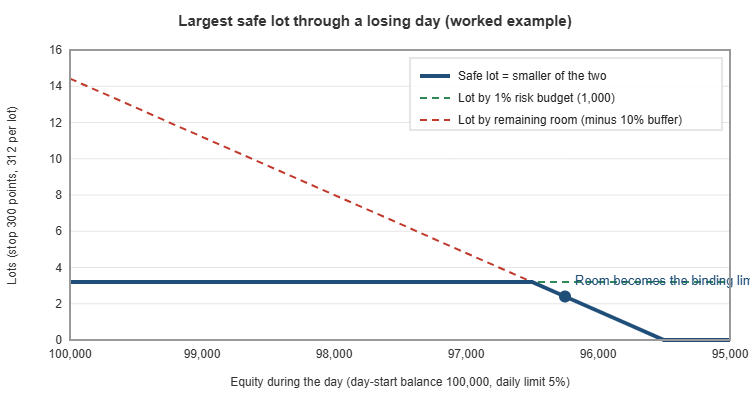
The same logic protects against the maximum drawdown. Late in a bad week the drawdown floor can be closer than the daily one even at the start of a day. Because the function always takes the smaller room, it handles both cases without any special code.
Putting it to work
Inside an Expert Advisor
The module is a single include file. An EA fills the input structure just before it sends an order and uses the result as the volume:
#include "SafeLot.mqh"

SSafeLotInput in;
in.symbol            =_Symbol;
in.type              =ORDER_TYPE_BUY;
in.stop_points       =300;
in.slippage_points   =5;
in.commission_per_lot=7.0;
in.risk_money        =AccountInfoDouble(ACCOUNT_BALANCE)*0.01;
in.room_money        =room;          // from your prop-rules logic

SSafeLotResult out;
if(SafeLotCalculate(in,out) && out.lot>0.0)
   trade.Buy(out.lot,_Symbol,0.0,sl,tp);
else
   PrintFormat("Trade skipped: %s",out.limited_by);
Logging limited_by is more useful than it looks. A journal full of "room" entries tells you that the strategy keeps trading after losses on days when it should stop; a journal of "minimum lot" entries tells you the stop is too wide for the account size.
As a quick check before a manual trade
The attached script SafeLotTable.mq5 prints a table of safe lot sizes for a range of stop distances on the current symbol. Attach it to a chart, enter the firm's limits and the day-start balance, and the Experts tab shows a line for every stop distance with the loss per lot, the two candidate lots, the final lot and the binding limit. The same table is shown on the chart with Comment(), so it can be read at a glance before a manual entry.
All calculations use live symbol properties, so run the script on the account and symbol you intend to trade. Contract sizes, tick values and volume steps differ between brokers, even for symbols with the same name.
Common mistakes this approach avoids
- Sizing from balance only. Balance ignores open positions; equity does not.
- Using the wrong tick value. OrderCalcProfit() removes the need to pick between loss and profit tick values or to convert currencies by hand.
- Forgetting costs. Commission and slippage are part of the loss if the stop is hit.
- Rounding up. Both normal rounding and "at least the minimum lot" can put the trade above the budget.
- Treating the daily limit as the only limit. The nearer of the daily and drawdown floors is the one that matters.
The third limit: free margin
Risk and room describe what the account can afford to lose. The broker also checks what the account can afford to hold. On a prop account with low leverage, typically 1:30 for forex and much less for indices and gold, a position that fits comfortably in the risk budget can still be rejected with "not enough money". The volume then has to be reduced to what the free margin allows.
The terminal provides OrderCalcMargin() for exactly this purpose. It returns the margin required for a given volume at a given price. Because margin is linear in volume, the margin of one lot is enough to find the maximum volume:
//--- largest volume the free margin can carry, with a reserve kept unused
double SafeLotByMargin(const string symbol,const ENUM_ORDER_TYPE type,const double reserve_pct)
  {
   double price=(type==ORDER_TYPE_BUY) ? SymbolInfoDouble(symbol,SYMBOL_ASK)
                                       : SymbolInfoDouble(symbol,SYMBOL_BID);
   double margin_per_lot=0.0;
   if(!OrderCalcMargin(type,symbol,1.0,price,margin_per_lot) || margin_per_lot<=0.0)
      return(0.0);
   double free=AccountInfoDouble(ACCOUNT_MARGIN_FREE)*(1.0-reserve_pct/100.0);
   return(SafeLotRoundDown(symbol,free/margin_per_lot));
  }
The reserve, for example 20%, keeps some free margin for the floating loss of the new position itself, so the margin level does not fall towards the stop-out level as soon as the trade moves against you. To include this third limit, take the smallest of the three lots: by risk, by room and by margin. On a typical prop account the margin limit only binds on wide-stop trades in high-leverage-cost instruments, but when it does, it is better to know it before the order is rejected.
Several open positions: sharing the room
The calculation so far sizes one new trade against the room that is left. If an EA opens several positions at once, for example one per symbol in a portfolio, each of them must not be sized against the whole room. If three positions are each allowed to lose the full remaining room, and all three stop out on the same news release, the account loses three times the room and the rule is broken.
Two practical approaches work well:
- Divide the room. If the EA can hold at most N positions, give each new trade room / N. This is simple and conservative.
- Subtract the open risk. For every open position with a stop loss, calculate its loss at the stop with OrderCalcProfit() from the current price, and subtract the sum from the room before sizing the new trade. This uses the room more efficiently and stays correct when positions are moved to breakeven, because their remaining risk drops to zero.
//--- total loss of all open positions if every stop is hit from the current price
double OpenRiskMoney(void)
  {
   double total=0.0;
   for(int i=PositionsTotal()-1; i>=0; i--)
     {
      if(PositionGetTicket(i)==0)
         continue;
      double sl=PositionGetDouble(POSITION_SL);
      if(sl<=0.0)
         continue;                    // no stop: the risk is unknown, handle separately
      string symbol=PositionGetString(POSITION_SYMBOL);
      double volume=PositionGetDouble(POSITION_VOLUME);
      double current=PositionGetDouble(POSITION_PRICE_CURRENT);
      ENUM_ORDER_TYPE type=(PositionGetInteger(POSITION_TYPE)==POSITION_TYPE_BUY) ? ORDER_TYPE_BUY : ORDER_TYPE_SELL;
      double profit=0.0;
      if(OrderCalcProfit(type,symbol,volume,current,sl,profit) && profit<0.0)
         total+=-profit;
     }
   return(total);
  }
The room passed to SafeLotCalculate() then becomes room - OpenRiskMoney(). Positions without a stop loss cannot be measured this way; an EA working on a funded account should not have any, and the guard from a prop-rules class can refuse to open them in the first place.
Stops that adapt to volatility
The examples above use a fixed stop of 300 points. Many strategies place the stop at a multiple of the Average True Range instead, so the stop is wide in volatile conditions and narrow in quiet ones. The sizing function does not need to change: it only needs the stop distance in points.
int    atr_handle=iATR(_Symbol,PERIOD_H1,14);
double atr[1];
if(CopyBuffer(atr_handle,0,1,1,atr)==1)
  {
   double point=SymbolInfoDouble(_Symbol,SYMBOL_POINT);
   in.stop_points=MathRound(1.5*atr[0]/point);   // stop at 1.5 x ATR(14)
  }
Combined with the room cap, this has a useful side effect. On a volatile day the ATR stop is wide, so the loss per lot is large and the lot is small. When the remaining room is also small, the safe lot can fall below the minimum volume and the function returns zero. That is the correct outcome: a wide stop on an account close to its limit is exactly the trade that breaks rules. The log entry "minimum lot" tells you why it was skipped.
Checking the results before trusting them
A sizing function is only as good as the symbol data it reads. Before using it on a new broker or a new symbol, run the attached script and check two things by hand.
- Loss per lot. Open the symbol specification (right-click the symbol in Market Watch, then Specification) and note the contract size. For a symbol quoted in the account currency, the loss of one lot over the stop is roughly stop distance in price x contract size. For gold with a contract of 100 ounces, 300 points of 0.01 are 3.00 in price, so the loss is about 300 per lot before costs. The script's figure should agree within the spread and commission.
- Rounding. Look at the volume step in the same specification. Every lot printed by the script must be a multiple of it, and never above the risk budget divided by the loss per lot.
Pay particular attention to three kinds of symbols, where the classic tick-value formula most often goes wrong and where OrderCalcProfit() earns its place:
- Cross rates such as EURGBP on a USD account, where the profit currency is neither side of the account currency.
- Indices quoted in a foreign currency, for example a Japanese index on a USD account, where the value of a point changes with USDJPY.
- Symbols with an unusual contract size, such as oil, silver or some crypto CFDs, where one lot may be 1, 10 or 1,000 units depending on the broker.
Conclusion
A position size is only safe relative to the limits it has to respect. On a prop firm account those limits move during the day, so the size has to move with them. The SafeLot.mqh module presented here:
- measures the loss of one lot at the stop with OrderCalcProfit(), including slippage and round-turn commission;
- rounds the volume down to the volume step and refuses to round up to the minimum lot;
- returns the smaller of the lot allowed by the risk budget and the lot allowed by the remaining prop-firm room, and reports which one was binding;
- extends naturally to free margin, to several open positions sharing the same room, and to volatility-based stops.
Combined with a guard that tracks the day base and the drawdown floor, it gives an Expert Advisor the two things it needs on a funded account: the right size for every trade, and a clear stop when there is no room left.
| File | Description |
|---|---|
| SafeLot.mqh | Sizing module: loss per lot, safe rounding and the combined risk/room calculation. |
| SafeLotTable.mq5 | Script that prints safe lot sizes for a range of stop distances on the current symbol. |
Source code and ready-made tools
The full source files (SafeLot.mqh and SafeLotTable.mq5) are attached to this post.
If you would rather use a finished tool than build your own, the same protection is available ready to use: Prop Firm Risk Calculator and PropGuardian Prop Firm Risk Guard.




