
No trading operations: why an EA fails MQL5 Market validation and how to fix it

Introduction
I build Expert Advisors for gold. When I uploaded one of them to the Market, the automatic check came back with a short and unhelpful message: there are no trading operations. On XAUUSD the same EA had traded thousands of positions in my tests without a single error.
The validator runs your EA on symbols and timeframes you probably never tested, often with a small deposit, and every order the trade server rejects counts against the product. My EA was fine on gold and broken on almost everything else.
There is already a good general checklist in the article The checks a trading robot must pass before publication in the Market, so I won't repeat it here. This is a case study of the three failures I actually hit. The first two are easy to miss:
- Stop loss and take profit written as a fixed amount of gold price. On EURUSD they produce negative prices, so every order is rejected and the EA never trades.
- A trailing stop and a time exit that keep sending orders while the trading session is closed. My gold EA logged 12,443 rejected requests in one test.
- Orders sent without checking the allowed volume and the free margin.
Two of the tools work with any EA: a script that counts the errors in the tester log, and a script that compares the deals of two test runs.
The code below comes from a small demo EA attached to this post. It has each bug and its fix, and one input, UseFixes, switches between them. I give the numbers for my real EA alongside.
1. Reproduce the validator on your own computer
My validation report listed two runs: EURUSD H1 and XAUUSD D1. Run the same two tests yourself in the Strategy Tester before uploading. I used the calendar year 2024, "1 minute OHLC" modelling, a 10,000 USD deposit and leverage 1:500.
A long test can write thousands of lines, so scrolling through the Journal tab won't tell you much. The full log is here:
%APPDATA%\MetaQuotes\Tester\<id>\Agent-127.0.0.1-3000\logs\YYYYMMDD.log
It is saved in UTF-16LE. Open it in a simple text tool or search it with grep and you get gaps between the characters and no search hits, so it has to be decoded first.
The attached script count_tester_errors.py decodes the newest agent log and splits it into runs at each "testing of ... started" line. For every run it prints the number of deals, the final balance and the error lines grouped by message:
BAD = re.compile(r"failed|invalid|\[market closed\]|not enough money|no trading operations|stop out|error",
                 re.I)

text = open(path, "rb").read().decode("utf-16-le", "ignore")
for line in text.splitlines():
    ...
    if "testing of" in msg and "started with inputs" in msg:
        # a new run starts here
    elif BAD.search(msg) and not any(s in msg for s in IGNORE):
        cur["bad"][re.sub(r"[\d.:#]+", "#", msg)[:100]] += 1   # digits removed, so equal messages group
Run it after your tests:
python count_tester_errors.py --since 19:30
You want zero error lines on every symbol the validator uses, and at least a few trades on each of them.
2. Failure 1: stops written in gold dollars
The symptom
With UseFixes=false, the demo EA on EURUSD H1 opened no trades at all in 2024. The log shows why:
2024.01.08 17:00:00   failed market buy 0.01 EURUSD sl: -38.90394 tp: 51.09606 [Invalid stops]
2024.01.09 17:00:00   failed market sell 0.01 EURUSD sl: 41.09466 tp: -48.90534 [Invalid stops]
The cause
The EA's stop loss is 40.00 and its take profit is 50.00, written as a distance in price:
input double         StopUsd      = 40.0;             // Stop loss, USD of gold price
input double         TargetUsd    = 50.0;             // Take profit, USD of gold price
On gold, at around 4,000, that is a 1% move. On EURUSD, at around 1.09, a buy gets a stop loss of 1.09 - 40 = -38.9 and a sell gets a take profit of -48.9. The server rejects a negative price, and the EA tries again at the next signal. Not one order went through all year, which is what the validator reports as "there are no trading operations".
My real EA was built the same way. On EURUSD H1 it logged 12,603 error lines and made 3 trades in a year.
Fix A: scale the distances to the symbol
My EA was already tuned on gold and I didn't want to change how it trades there. The smallest change was to scale every distance by the symbol's price relative to the gold price the values were tuned at. On gold the scale is 1, so the distances stay exactly as they were.
input double         GoldRefPrice = 4000.0;           // Gold price the USD distances were tuned at

bool SetDistances()
  {
   if(DistMode == DIST_SCALED_USD && !IsGold())
     {
      double bid = SymbolInfoDouble(_Symbol, SYMBOL_BID);
      if(bid <= 0) return(false);          // no price yet: try again on the next tick
      g_scale = bid / GoldRefPrice;
     }
   else
      g_scale = 1.0;
   g_distOk = true;
   return(true);
  }
In the tester the Bid price can still be zero inside OnInit, so the EA calls SetDistances() in OnInit and again at the start of OnTick until it succeeds. Until then it does nothing:
void OnTick()
  {
   if(UseFixes && !g_distOk && !SetDistances()) return;
   ...
Fix B: define distances relative to the market from the start
Fix A patches an EA that already exists. If you are starting a new one, set the distances relative to the market in the first place, for example as a multiple of ATR or a percentage of price. The demo has ATR as its second mode:
if(DistMode == DIST_ATR)
  {
   double atr[];
   if(CopyBuffer(g_atr, 0, 1, 1, atr) != 1 || atr[0] <= 0) return(false);
   sl = StopAtr * atr[0];
   tp = TargetAtr * atr[0];
   return(true);
  }
Check the stop level before sending
A sensible distance can still be closer than the broker allows. Before sending, the demo checks SYMBOL_TRADE_STOPS_LEVEL from the price the stop triggers on (Bid for a buy, Ask for a sell). If the stops are too close it skips the entry, because the server would refuse the order anyway:
bool StopsValid(const ENUM_ORDER_TYPE type, const double slPrice, const double tpPrice)
  {
   MqlTick tk;
   if(!SymbolInfoTick(_Symbol, tk)) return(false);
   double minDist = (double)SymbolInfoInteger(_Symbol, SYMBOL_TRADE_STOPS_LEVEL) * _Point;
   bool ok = (type == ORDER_TYPE_BUY)
             ? (tk.bid - slPrice > minDist && tpPrice - tk.bid > minDist && slPrice > 0)
             : (slPrice - tk.ask > minDist && tk.ask - tpPrice > minDist && tpPrice > 0);
   if(!ok)
      PrintFormat("Stops too close or invalid (SL %.5f, TP %.5f, stop level %.5f) - entry skipped.",
                  slPrice, tpPrice, minDist);
   return(ok);
  }
The result
On EURUSD H1, 2024: 0 trades and 264 error lines before, 69 trades and 0 error lines after. My real EA went from 12,603 error lines to 0, with 37 trades.
After the fix the EA lost a little money on EURUSD. I don't mind: the validator only checks that the EA can trade there without errors, and EURUSD was never its market.
3. Failure 2: orders while the market is closed
The symptom
With the stops fixed, I tested the gold EA on its own symbol again: XAUUSD M1, real ticks, April to October 2026. It traded exactly as before, and the counter found 12,443 error lines, all of them [Market closed]. Grouped by message:
| Rejected request | Error lines |
|---|---|
| Stop loss modification (trailing stop), buy and sell | 8,224 |
| Position close | 4,118 |
| Close messages from the EA itself | 16 |
Each rejected request shows up twice in the log, once from the terminal and once from CTrade, so that is about 4,100 rejected modifications and 2,060 rejected closes. Most of the noise came from the trailing stop.
The demo EA does the same thing on a bigger scale. With UseFixes=false, the same gold M1 test produced 93,376 error lines, like these:
2026.04.06 01:00:02   failed market buy 0.01 XAUUSD, close #30 sell 0.01 XAUUSD 4660.24 [Market closed]
2026.04.06 01:00:02   failed market buy 0.01 XAUUSD, close #30 sell 0.01 XAUUSD 4660.24 [Market closed]
2026.04.06 01:00:03   failed market buy 0.01 XAUUSD, close #30 sell 0.01 XAUUSD 4660.24 [Market closed]
The cause
A tick does not mean you can trade. On my broker, gold ticks start arriving a little before the trading session opens after the daily break and after the weekend. The EA's position management runs on every tick, moving the trailing stop or closing the position after 48 hours. While the session is closed the server rejects each of those requests, and the next tick sends the same request again.
The trades themselves come out the same, since the first request after the open goes through. The problem is that every rejection is logged, and the validator counts them.
The fix
Before sending anything, check whether the symbol can be traded right now:
bool TradingOpen()
  {
   long mode = SymbolInfoInteger(_Symbol, SYMBOL_TRADE_MODE);
   if(mode != SYMBOL_TRADE_MODE_FULL && mode != SYMBOL_TRADE_MODE_CLOSEONLY)
      return(false);

   MqlDateTime st;
   TimeToStruct(TimeTradeServer(), st);
   int secs = st.hour * 3600 + st.min * 60 + st.sec;
   datetime from, to;
   bool anySession = false;
   for(int i = 0; SymbolInfoSessionTrade(_Symbol, (ENUM_DAY_OF_WEEK)st.day_of_week, i, from, to); i++)
     {
      anySession = true;
      if(secs >= (int)from && secs < (int)to) return(true);
     }
   return(!anySession);                     // no session table published: let the server decide
  }
SymbolInfoSessionTrade gives the session start and end in seconds from the start of the day, so the current server time is converted the same way. A symbol can have several sessions in one day, and the loop checks all of them. Some brokers publish no session table at all; then the function returns true and leaves the decision to the server. If it returned false, the EA would never trade with that broker.
Position management now starts with one extra line:
void ManagePosition()
  {
   ulong ticket = OurPosition();
   if(ticket == 0) return;
   if(UseFixes && !TradingOpen()) return;   // without this, every tick of a closed session is a rejected order
   ...
The result
The demo on gold M1 went from 93,376 error lines to 0, and my real EA from 12,443 to 0. On XAUUSD D1, one of the validator's runs, my EA went from 102 error lines to 0.
4. How the session check lost a signal on D1
After adding the session check I re-ran all three tests, and the demo EA now made zero trades on XAUUSD D1. With UseFixes=false it had also made zero trades, but at least it had tried. Zero trades on a validator symbol brings back the very first failure.
It came down to the order of two lines. The original code marked a new bar as handled first, and the session was only checked later, inside the entry function:
datetime bar = iTime(_Symbol, _Period, 0);
if(bar == g_lastBar) return;
g_lastBar = bar;                 // the bar is now "done"
int sig = Signal();
if(sig != 0 && OurPosition() == 0) Open(sig);   // Open() returns early: session closed
A daily bar opens at 00:00 server time, before gold starts trading. On the first tick of the day the bar was marked as done, Open() found the session closed and returned, and the signal was gone until the next day. This EA had only one daily cross in 2024, so losing it left the test empty.
Checking the session before marking the bar as handled fixes it. The signal then waits for the first tick when trading is possible:
datetime bar = iTime(_Symbol, _Period, 0);
if(bar == g_lastBar) return;
// a bar that opens while the session is closed (D1 bars open at 00:00, before gold trades)
// keeps its signal for the first tick the session is open; consuming it here would lose it
if(UseFixes && !TradingOpen()) return;
g_lastBar = bar;
With this change the D1 test made its trade with 0 errors. So after each fix, re-run every validator symbol, including the ones the fix was not aimed at.
5. Failure 3: volume and margin
Article 2555 covers this in detail, so I'll keep it short. With UseFixes on, two functions run before every entry. The first rounds the volume to a value the symbol accepts:
double NormalizeLots(const double lots)
  {
   double vmin  = SymbolInfoDouble(_Symbol, SYMBOL_VOLUME_MIN);
   double vmax  = SymbolInfoDouble(_Symbol, SYMBOL_VOLUME_MAX);
   double vstep = SymbolInfoDouble(_Symbol, SYMBOL_VOLUME_STEP);
   if(vstep <= 0) return(0);
   double v = MathFloor(lots / vstep + 1e-9) * vstep;
   v = MathMax(vmin, MathMin(vmax, v));
   return(NormalizeDouble(v, 8));
  }
The second asks the terminal what the order would cost before sending it:
double margin = 0.0;
if(!OrderCalcMargin(type, _Symbol, lots, price, margin))
  {
   PrintFormat("Cannot price the margin for %.2f lots (error %d) - entry skipped.", lots, GetLastError());
   return(false);
  }
double freeMargin = AccountInfoDouble(ACCOUNT_MARGIN_FREE);
if(margin > freeMargin)
  {
   PrintFormat("Not enough free margin for %.2f lots: needs %.2f, free %.2f - entry skipped.",
               lots, margin, freeMargin);
   return(false);
  }
With enough money in the account neither function changes anything. They come into play when the deposit is small, and the validator tests that case too.
6. Checking that the trades did not change
The session, margin and volume checks should make no difference in normal trading. People pay for this EA, so I wanted to see that for myself.
Comparing the compiled files is no help, because MetaEditor produces a different .ex5 on every compile, even from identical source. I compared the trades instead. I ran the EA before and after the fixes on its own symbol with the same settings, then compared the deal tables of the two tester reports with the attached script compare_deals.py:
python compare_deals.py before.htm after.htm --money
870/870 deals identical (A has 870, B has 870)
The script compares the time, type, direction, volume and price of every deal, and with --money the profit and balance as well. At the first difference it stops and prints both versions of that deal, so you can see where the two runs split. The exit code is 0 only when the reports match, which makes it easy to call from another script.
What I got:
- Demo EA, XAUUSD M1, real ticks, April to October 2026: 870 of 870 deals identical with UseFixes false and true, profit included.
- My real EA, XAUUSD D1, 2024: 596 of 596 deals identical before and after the fixes.
- My real EA, XAUUSD M1, real ticks, April to October 2026: 1,545 of 1,545 deals identical.
The fix from section 4 is the exception, and on purpose: it keeps a signal that used to be lost. On EURUSD H1 it added one trade (68 became 69). On gold M1 it changed nothing, because none of the signals there fell on a closed session.
7. All results
All runs were made on the same day, on the same demo account, with a 10,000 USD deposit and leverage 1:500. Error lines are the lines counted by the attached script; most rejections appear twice, once from the terminal and once from CTrade.
Demo EA, attached to this post:
| Test | UseFixes = false | UseFixes = true |
|---|---|---|
| EURUSD H1, 2024, 1 minute OHLC | 0 trades, 264 error lines | 69 trades, 0 error lines |
| XAUUSD D1, 2024, 1 minute OHLC | 0 trades, 2 error lines | 1 trade, 0 error lines |
| XAUUSD M1, Apr-Oct 2026, real ticks | 435 trades, 93,376 error lines | 435 trades, 0 error lines, deals identical |
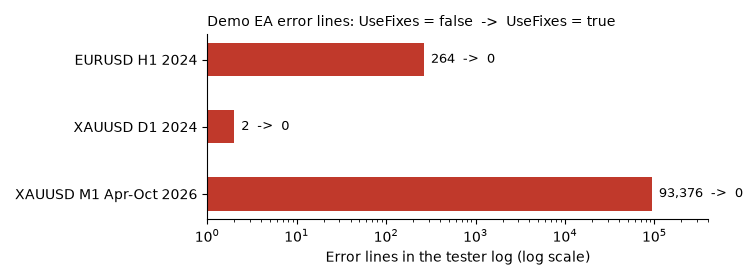
Figure 1. Error lines in the tester log for the demo EA, UseFixes = false, on a log scale. With UseFixes = true every test has 0.
The same demo with UseFixes = true and DistMode = DIST_ATR (stop 2 × ATR(14), target 2.2 × ATR(14), trailing gap the same fraction of the stop as in the USD mode):
| Test | Trades | Error lines |
|---|---|---|
| EURUSD H1, 2024, 1 minute OHLC | 111 | 0 |
| XAUUSD D1, 2024, 1 minute OHLC | 1 | 0 |
| XAUUSD M1, Apr-Oct 2026, real ticks | 3,821 | 0 |
ATR is measured on the chart timeframe, so on an M1 chart the stops get very tight and the EA trades much more often. Whether you want that depends on your strategy. For validation it makes no difference, since all three runs are free of errors.
My gold EA, the version that failed validation against the version that passed:
| Test | Failed version | Passed version |
|---|---|---|
| EURUSD H1, 2024 | 3 trades, 12,603 error lines | 37 trades, 0 error lines |
| XAUUSD D1, 2024 | 102 error lines | 0 error lines, 596/596 deals identical |
| XAUUSD M1, Apr-Oct 2026, real ticks | 12,443 error lines | 0 error lines, 1,545/1,545 deals identical |
| Market validation | failed | passed |
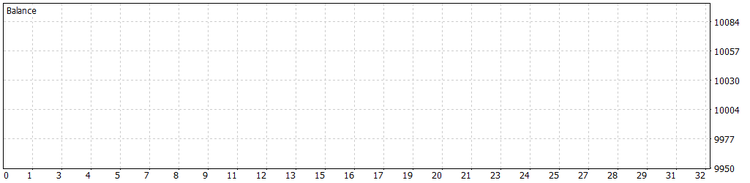
Figure 2. UseFixes=false on EURUSD H1, 2024: every order is rejected and the balance never moves.
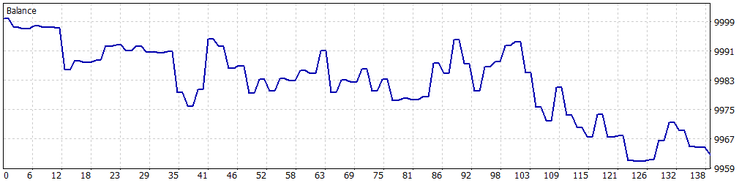
Figure 3. UseFixes=true on EURUSD H1, 2024: the same EA trades normally and loses a little on a symbol it was not built for.
Checklist before uploading
- Run your EA on EURUSD H1 and XAUUSD D1 (or whatever your validation report lists), with a small deposit as well as a normal one.
- Count the error lines in the agent log. The target is zero, with at least a few trades per run.
- Express stops and targets relative to the market (ATR or percentage of price), or scale them if the EA is already tuned on one symbol. Retry the calculation on the first ticks if there is no price in OnInit.
- Check the broker's stop level before every order.
- Send nothing while the session is closed: no entries, no closes, no stop modifications.
- Check the session before marking a bar as handled, so a signal is not lost.
- Normalize the volume and check the margin before every entry.
- After every fix, run all validator symbols again.
- Prove that the EA still trades the same way on its own symbol by comparing deals, not files.
Conclusion
My EA failed validation because I had only ever tested it in the one place it was built for. The validator put it on another symbol, on another timeframe and in the minutes when the market is closed, and I suspect every failure it found would have shown up on a buyer's account sooner or later.
The fixes themselves are short. Most of my time went into finding the causes and making sure the fixes left a working strategy alone. The two scripts speed up both jobs, and the demo EA shows each failure and its fix with one switch.
Attached files
| File | Description |
|---|---|
| ValidationDemo.mq5 | Demo EA: moving average cross with stops in USD of gold price, a trailing stop and a time exit. Input UseFixes switches all fixes on or off; DistMode selects scaled USD or ATR distances. |
| count_tester_errors.py | Reads the tester agent log (UTF-16LE) and prints deals, final balance and grouped error lines for every run. Python 3, no extra packages. |
| compare_deals.py | Compares the deal tables of two Strategy Tester HTML reports and reports the first difference. Exit code 0 when identical. Python 3, no extra packages. |