"SL updated" Is Not a Result: Logging the Broker's Answer to OrderModify() in MQL4

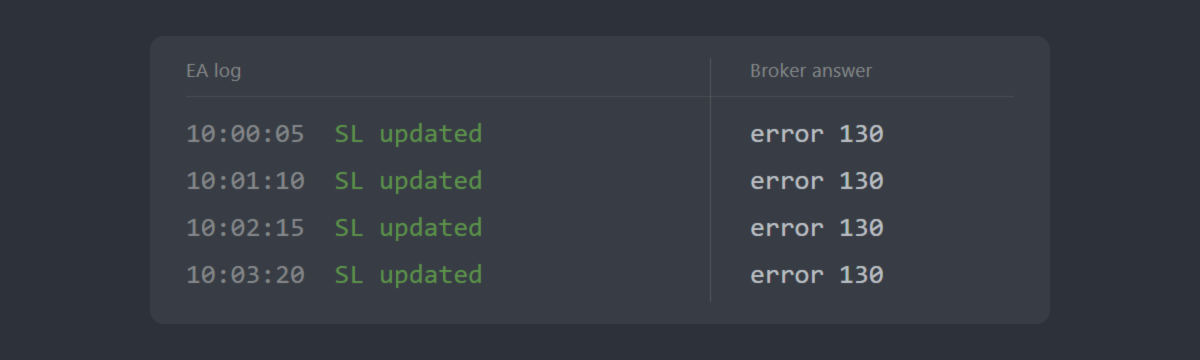
We fixed a trailing EA that printed "SL updated" for weeks while its stop loss never moved. Nothing in the code was exotic. The EA computed a new stop, called OrderModify(), updated its own record of the stop, and printed the line. It never read what the call returned. The broker had refused every one of those modifications with error 130.
The numbers were simple. The trail was 30 points (3 pips). The broker's stop level was 50 points (5 pips on a 5-digit broker). A stop that close to the market is not accepted, so every request failed, and the log kept saying the opposite.
The rule the broker applied
The MQL4 reference states it on the OrderSend() page: "StopLoss and TakeProfit levels cannot be too close to the market. The minimal distance of stop levels in points can be obtained using the MarketInfo() function with MODE_STOPLEVEL parameter. In the case of erroneous or unnormalized stop levels, the error 130 (ERR_INVALID_STOPS) will be generated."
The OrderModify() page states the other half: "If the function succeeds, it returns true, otherwise false. To get the detailed error information, call the GetLastError() function."
Put those two sentences together and the defect is visible. A trailing routine that moves the stop closer than MODE_STOPLEVEL will be refused, and the only place the refusal appears is the return value the EA chose not to read.
Two more details from the same pages matter for a trailing loop:
- A zero stop level is not always "no limit". The OrderSend() page says a zero MODE_STOPLEVEL "means either absence of any restrictions on the minimal distance for Stop Loss/Take Profit or the fact that a trade server utilizes some external mechanisms for dynamic level control", and that in the second case GetLastError() "can return error 130, because MODE_STOPLEVEL is actually 'floating'". Reading the stop level once at start-up and trusting it is not enough; the return value is the only reliable answer.
- Resending the same stop is an error too. The OrderModify() page: "If unchanged values are passed as the function parameters, the error 1 (ERR_NO_RESULT) will be generated." A trail that calls on every tick without checking whether the stop actually moves fills the log with error 1 and hides the error 130 you care about.
Intent lines and result lines
Read your EA's Experts log with one question per line: was this written before or after the broker answered?
- Intent line: printed right after the request is sent, or instead of checking it. It can only contain what the EA wanted: "SL updated", "trailing active", "SL moved to 1.08420".
- Result line: printed after the return value was read. It contains the answer: true or an error code, and ideally the stop the order now holds.
If your log has only intent lines, it cannot tell you whether a single stop ever moved. The quickest manual check is the Trade tab: compare its S/L column with the last stop the log claims. If they disagree, believe the Trade tab.
A trail that logs the answer
The fix has two parts, both visible in the snippet below: work out the stop the broker will accept before calling, and log the requested, effective and actual values after the call.
Three things in it are deliberate:
- requested and effective are both logged. When the broker's limit is wider than your trail, the line shows it at once: requested 30 points, effective 50. In the case above that single line would have exposed the problem on its first call.
- The failure line carries the error code and the stop level. "error=130 | stop level=50 pts" is a diagnosis. "SL updated" is a hope.
- The success line reads the stop back from the order. It reports what the order holds, not what the EA meant to send.
Why a wider trail is not the fix
Raising the trail input above the stop level would have made this particular refusal disappear. It would not have made the EA report the next one, whatever its cause. An input value cannot add a check that the code does not contain, so the fix has to live in the code.
If you only take one thing from this: grep your EA's source for every OrderModify(, OrderSend(, OrderClose( and OrderDelete( call, and make sure each one is followed by a check of its return value and a log line written after that check.
If you would rather have someone else do that review, this is the work we call EA Optimization: making an existing EA production-ready without touching its strategy logic, and reporting in writing what was wrong and what was changed.