COPYLATOR – MT5 Trade Copier: Copying From a Demo Account to a Live Account — What It Can and Cannot Do

Product link:
https://www.mql5.com/en/ market/product/191385
Copying from a demo account to a live account is a popular setup in copy trading, but it is also widely misunderstood. The idea is straightforward: use a demo account to generate trades and copy them to a live account to observe how the strategy performs under real execution conditions.
The appeal is clear, but there are important limitations to understand before relying on this configuration. COPYLATOR does not need to distinguish between demo and live accounts to copy trades. It reads trading activity from the sender terminal and replicates eligible orders and position changes on the receiver, subject to the configuration, symbol availability, and the receiving broker's execution conditions.
This is both the value and the risk of the setup.
What the Copier Actually Sees
A trade copier works with trading activity rather than using the account's demo or live status as the basis for copying. It processes supported operations such as opening positions, placing pending orders, modifying stop-loss and take-profit levels, and closing trades.
From the copier's perspective, a demo account and a live account can generate the same types of trading instructions. However, the resulting executions may differ because of spreads, available liquidity, commissions, slippage, order restrictions, and other broker-specific conditions.
If the trader intends to copy demo trades to a live account, this behavior is useful. If the wrong account is configured as the sender, however, the copier may replicate its trades as configured. Traders should verify the account number and operating mode on both terminals before allowing copying to begin.
The Configuration: Which Side Is the Sender?
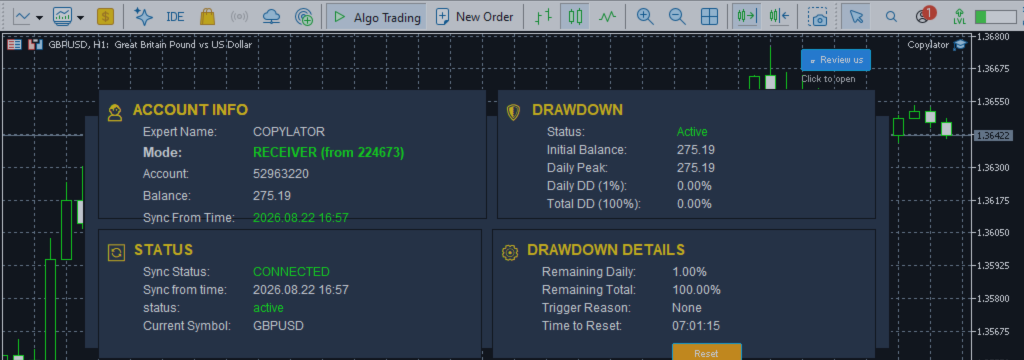
The most common configuration uses the demo account as the Sender and the live account as the Receiver.
- Run COPYLATOR in SENDER mode on the terminal connected to the demo account.
- Run COPYLATOR in RECEIVER mode on the terminal connected to the live account.
- Set SenderAccountNumber on the Receiver to the account number of the demo Sender.
- Verify that the correct account and operating mode are displayed on each terminal.
- Perform a controlled test to confirm that the intended trades are copied correctly.
When the demo strategy opens a position, COPYLATOR sends the corresponding trade instruction to the Receiver. The live broker executes the receiving order under its own market and account conditions. When the demo position is closed, the copier attempts to replicate that closing action on the Receiver.
The reverse configuration—live account as Sender and demo account as Receiver—is also possible. It can be useful for observing a live strategy on a demo account without placing additional trades on another live account.
The Critical Difference: Execution Quality
A demo account cannot fully reproduce the execution conditions of a live account. Depending on the broker and account type, demo trading may not accurately reflect live slippage, liquidity constraints, requotes, partial fills, order rejections, or execution delays.
For example, a demo Buy order might be filled at the requested price, while the corresponding live order is filled at a slightly different price. During volatile market conditions, the difference can be larger. The receiving trade is executed by the live broker, not at the demo account's historical fill price.
This is the fundamental limitation of demo-to-live copying: it can help evaluate how a strategy's signals translate into live trades, but it cannot guarantee that the live account will reproduce the demo account's results.
A strategy that appears profitable on demo may earn less on live, break even, or lose money once real trading costs and execution differences are taken into account. The size of this difference depends on the strategy, instruments, trading frequency, broker conditions, and market environment.
The Spread Difference
Demo and live spreads may be similar, but they are not guaranteed to match. The difference depends on the broker, account type, instrument, and market conditions.
A strategy that relies on small price movements can be especially sensitive to spread differences. Even a modest increase in trading costs can reduce its net results, particularly when it opens and closes many positions.
Before interpreting demo-to-live results, compare the spreads and trading costs for the instruments being traded. Include commissions and any other applicable fees, rather than comparing profit figures alone.
The Lot-Sizing Problem
The demo and live accounts may have substantially different balances. For example, the demo account might have $10,000 while the live account has $2,000. The chosen lot-sizing method determines how the receiving position sizes relate to the sender's positions.
- Balance-ratio sizing: Adjusts copied volume according to the configured relationship between sender and receiver balances.
- Fixed lot sizing: Uses a configured volume for copied trades, subject to broker volume requirements and applicable limits.
- Multiplier sizing: Applies a configured multiplier to the sender's volume.
- Maximum lot limit: Can restrict the copied volume when used with a compatible sizing configuration.
With balance-ratio sizing, a live account that has one fifth of the demo balance may receive approximately one fifth of the sender's volume, depending on the configured settings and any applicable limits.
Different position sizes affect both monetary results and risk. A smaller live account may experience a different percentage drawdown, margin pressure, or risk profile, even when the copied trade sequence is similar.
Fixed lot sizing does not automatically make the two accounts directly comparable. The chosen volume must still be appropriate for the live account's balance, available margin, instrument specifications, and risk tolerance.
There is no universal minimum account-size ratio that guarantees a meaningful comparison. Instead, choose position sizes that allow the live account to operate within an acceptable risk level and record the actual volumes used on both accounts.
The Psychological Difference
A demo account does not put real capital at risk, while a live account does. This can change how a trader responds to losing trades, drawdowns, and extended periods of poor performance.
A trader may allow the demo strategy to continue while manually closing live positions, changing lot sizes, disabling copying, or modifying risk settings on the live account. These interventions can cause the two accounts to diverge.
Manual intervention may sometimes be necessary to control risk. However, once the live account is managed differently from the demo account, the comparison no longer measures the effect of execution differences alone.
Before starting the test, define how risk limits and manual interventions will be handled. Record any intervention that changes the live account's exposure or trade sequence. Do not ignore risk controls simply to preserve the experiment.
The Purpose of the Setup
Copying from demo to live is useful for observing how a strategy behaves when its trading instructions are executed on a real account. It can reveal differences in entry prices, closing prices, trading costs, and order handling.
However, it is not a reliable way to forecast future profitability. A demo account cannot fully reproduce live execution, and a short monitoring period may not capture the range of market conditions that affect a strategy.
Nor is demo-to-live copying necessarily required to test the copier itself. A controlled test can verify that the sender and receiver are configured correctly, that eligible trades are copied, and that supported modifications and closures behave as expected.
The more useful question is: How closely does the strategy's intended trading activity translate into live execution under the conditions being tested?
That question can be investigated by comparing actual trades, execution prices, costs, and account results. Whether the strategy will remain profitable over time is a separate question that requires much more evidence.
The Transition to Live Capital
A demo-to-live setup can be one stage in a broader testing process. If the live account's results are acceptable over a sufficiently representative period, the trader may consider adjusting position sizes or evaluating a live Sender configuration.
Any increase in position size should be gradual and based on the live account's observed risk, drawdown, trading costs, and execution quality. A profitable monitoring period does not guarantee future performance, and increasing volume also increases potential losses.
If the live account's results are unsatisfactory, investigate the reasons before increasing exposure. Possible causes include spread differences, commissions, slippage, symbol specifications, lot sizing, rejected orders, or differences between the strategy's assumptions and live market conditions.
The value of the setup is that it provides practical evidence about live execution before the trader commits more capital. It is a testing method, not a profit guarantee.
Common Mistakes
- Treating demo profits as a forecast: Demo results do not guarantee comparable live performance.
- Ignoring trading costs: Spreads, commissions, swaps, and slippage can materially affect net results.
- Using unsuitable lot sizes: The copied volume must be appropriate for the live account's balance, margin, and risk limits.
- Assuming every order will execute identically: The live broker may fill, reject, or process an order differently from the demo environment.
- Intervening without recording changes: Manual changes can make the live results difficult to compare with the demo results.
- Assuming a short test proves reliability: A small number of trades may not represent performance across different market conditions.
- Failing to verify the account configuration: Confirm the sender account number, Receiver mode, symbol mapping, and lot-sizing settings before trading.
The Technical Setup
The basic technical configuration follows the same Sender–Receiver process used for other COPYLATOR setups.
- On the demo terminal, attach COPYLATOR and select SENDER mode.
- Confirm that the displayed account number matches the intended demo account.
- On the live terminal, attach COPYLATOR and select RECEIVER mode.
- Enter the demo account number in SenderAccountNumber.
- Confirm that both terminals are configured to communicate through the appropriate MT5 Common Folder environment. If separate terminals or computers are involved, verify that the communication setup is supported and configured correctly.
- Check symbol mapping, lot-sizing settings, and any applicable risk controls.
- Use a small, controlled test to confirm that a demo opening and closing action is reflected correctly on the live account.
Do not assume that successful configuration alone guarantees identical execution. Check the terminal logs and account history, and verify the receiving trades with the live broker's records.
The Monitoring Period
The monitoring period should include enough trades to make the comparison useful and, where possible, a range of market conditions. The required duration depends on the strategy's trading frequency and behavior. A month of frequent trading or several months of infrequent trading may provide an initial sample, but neither duration guarantees a statistically reliable conclusion.
Record at least the following:
- Demo account results, including the relevant trading costs shown by the platform.
- Live account results, including commissions, swaps, and other applicable costs.
- Differences between corresponding entry and exit prices.
- Trade volume on both accounts and any lot-sizing adjustments.
- Missing, rejected, or manually modified trades, along with relevant terminal logs.
- Any manual intervention or change to the copying configuration.
The difference between demo and live results is not necessarily the cost of execution alone. It can also reflect differences in spreads, commissions, swap charges, position sizes, rejected orders, manual intervention, and the timing or conditions of execution.
If the differences are small over a sufficiently representative sample, the strategy may be less sensitive to the tested execution conditions. If the differences are large, investigate which factors account for them before drawing conclusions.
Summary
Copying from a demo account to a live account is a practical way to observe how a strategy's trades behave under real execution conditions.
COPYLATOR copies supported trading activity according to its configuration; traders must verify which account is the Sender and which is the Receiver. The copier does not make demo and live execution equivalent.
Live trading can introduce different spreads, commissions, slippage, liquidity conditions, and order-handling outcomes. Lot sizing and manual intervention can also cause the results to diverge.
Use demo-to-live copying to gather evidence about execution and operational behavior, not as a guarantee of profitability. Compare actual trades and costs, monitor risk, and increase exposure only after careful evaluation.
Product link:
https://www.mql5.com/en/ market/product/191385




