
Your Expert Advisor is supposed to trade at a particular time. Yet the backtest enters an hour earlier than your demo account, even though the settings look identical. Before changing the strategy, check what its clock actually means.
An Expert Advisor, or EA, is an automated trading program. A time filter decides when that program may act. "Trade at 09:00" is incomplete unless you also specify the time zone, the date and the clock the program reads. This guide shows how to check those details without confusing a timing repair with evidence of profitability.
 Hypothetical offsets only. Confirm the broker’s timestamp convention for each date.
 Name the clock before choosing the hour
UTC is a common reference time used to compare clocks across locations. A broker's server can display a different hour. Your computer also has its own local clock. Treat these as separate labels, even when two happen to agree.
The official MQL5 TimeCurrent documentation explains that this function returns the last known server time. Inside an OnTick handler, which runs when a new tick is processed, it returns the time of that handled tick. In other handlers, it reflects the latest quote received for a symbol in Market Watch.
That distinction matters. A server timestamp attached to a quote is not a promise that your EA will receive a fresh tick at every second. It also does not become your local computer time simply because you change the computer's time-zone setting.
Work through a one-hour difference
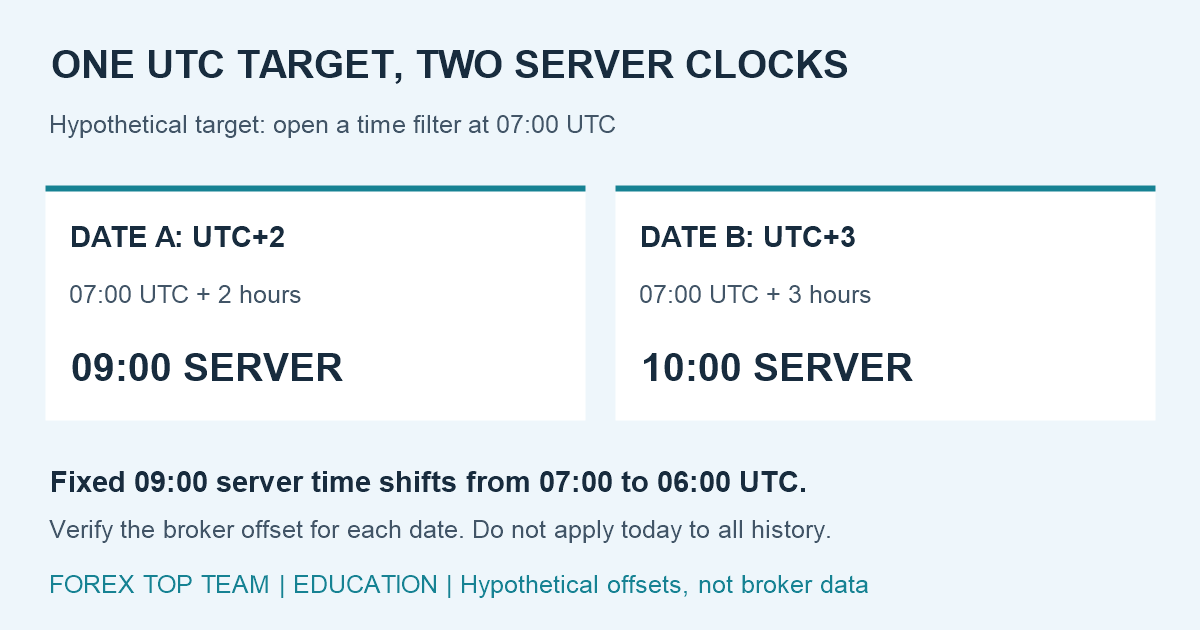
Suppose, purely as a hypothetical example, you want a filter to open at 07:00 UTC. On date A, assume the broker's server offset is UTC+2. On date B, assume it is UTC+3. These are invented offsets for illustration, not statements about any particular broker or its daylight-saving schedule.
- Date A: 07:00 UTC + 2 hours = 09:00 server time.
- Date B: 07:00 UTC + 3 hours = 10:00 server time.
If you leave a fixed 09:00 server setting on both dates, it corresponds to 07:00 UTC on date A but 06:00 UTC on date B. The rule has moved relative to UTC, even though the input has not changed.
First decide what you intend to preserve: a UTC hour, a broker-server hour, or a market's local session time. Those are different specifications. If you target a local session, obtain the relevant location's date-specific time-zone rules too. A fixed UTC target does not automatically preserve a local session hour through daylight-saving changes.
Do not reconstruct history from today's offset
It is tempting to subtract two clock readings today and apply that difference to every historical trade. That assumes the same relationship held throughout the test. Verify the broker's historical timestamp convention and any changes with dated documentation or support information before relying on that assumption.
There is another trap in the tester. The MQL5 TimeGMT reference states that, in the Strategy Tester, TimeGMT always equals TimeTradeServer, the simulated server time. Subtracting those functions there therefore does not recover a historical broker-to-UTC offset.
Outside testing, TimeGMT is calculated using the local computer's time, with daylight saving taken into account. A function name alone is not enough to establish that live execution and historical simulation are supplying the same information. Record the environment and validate the conversion on known dates.
Check the trigger as well as the conversion
A correct conversion still needs sensible event handling. Consider a hypothetical tick-driven rule that requires the timestamp to equal exactly 09:00:00. If the next handled tick is at 09:00:02, that equality condition will not be true. The intended opening can be missed.
Describe the intended behavior in plain English before implementing it: for example, allow one decision on the first eligible tick inside a defined window, with a rule for preventing repeated entries. That is a design example, not a recommended trading strategy. Specify what happens if no eligible tick arrives, if the terminal reconnects, or if a position is already open.
Day boundaries deserve attention too. Converting a timestamp can change its calendar date. A daily reset must use the same chosen clock as the trading window, or the program may count decisions under inconsistent days.
Keep calendar-event times consistent
The official MQL5 economic calendar reference states that calendar functions use trade-server time, including event times and the time inputs used for requests. Do not automatically treat those values as your local time or UTC.
If you import a separate UTC calendar, label it explicitly and convert it once into the clock your filter expects. Check a known event manually. Converting an already converted value again can quietly shift the exclusion window. This timing check does not establish that a particular news filter improves returns.
A practical clock audit
- Write down the target time zone, window and daily reset rule.
- Confirm broker timestamp conventions for each historical date range.
- Compare timestamps and decisions before and after any documented offset change.
- Test missing ticks, midnight, reconnection and duplicate-entry prevention.
- Save the EA version, settings, date-specific conversion rules and decision logs.
Freeze these rules before evaluating performance. Our guide to reading an EA forward test explains why repeatedly changing settings after inspecting reserved results weakens the independence of that check.
A clock audit can make the strategy's instructions clearer and its behavior easier to reproduce. It cannot repair missing costs, unrealistic execution assumptions or a weak trading idea. Next, compare the corrected, frozen rules on a reserved historical period and through monitored demo observation, keeping their limitations visible.




