


AureonNexus 1.10 — Updated Trading, Clearer Control
AureonNexus 1.10 is now available on the MQL5 Market. Designed for XAUUSD trading on MetaTrader 5, the EA combines three independently managed strategies with configurable position sizing, automated trade management and integrated chart panels.
The latest release updates Strategy 2 and refines Strategy 3’s trading patterns and settings. This overview explains the changes and provides a practical starting point for evaluating the EA on your broker.
What’s New in Version 1.10?
• Strategy 2 updated.
• Strategy 3 enhanced with three trading patterns, each using a separate magic number for trade identification and independent management.
• Unified lot-sizing settings across Strategy 3’s three patterns.
• New s3/a and s3/b inputs for configuring the additional magic numbers. The default Strategy 3 identifiers are 11003, 11004 and 11005.
• After-Loss Mode removed from Strategy 3, together with its related settings. After-loss options remain available for Strategies 1 and 2.
• Reported code warnings fixed.
Three Strategies in One Gold EA
With AureonNexus, users can select which strategies to enable and configure their position sizing. Separate trade identifiers help distinguish activity within the EA.
Strategy 3’s three patterns belong to Strategy 3; they are not presented as additional standalone strategies.
All enabled strategies share the account’s available margin. When choosing lot sizes, consider the combined exposure rather than evaluating each setting in isolation.

Inside the Displayed Backtest
The report below shows a historical test covering 1 January 2024 to 9 October 2026, using Every tick based on real ticks, with all three strategies enabled and a displayed fixed-lot setting of 0.01.
| Backtest metric | Displayed result |
|---|---|
| Profit factor | 9.14 |
| Total trades | 1,017 |
| Winning trades | 989 — 97.25% |
| Relative equity drawdown | 5.49% |
| Recovery factor | 33.47 |
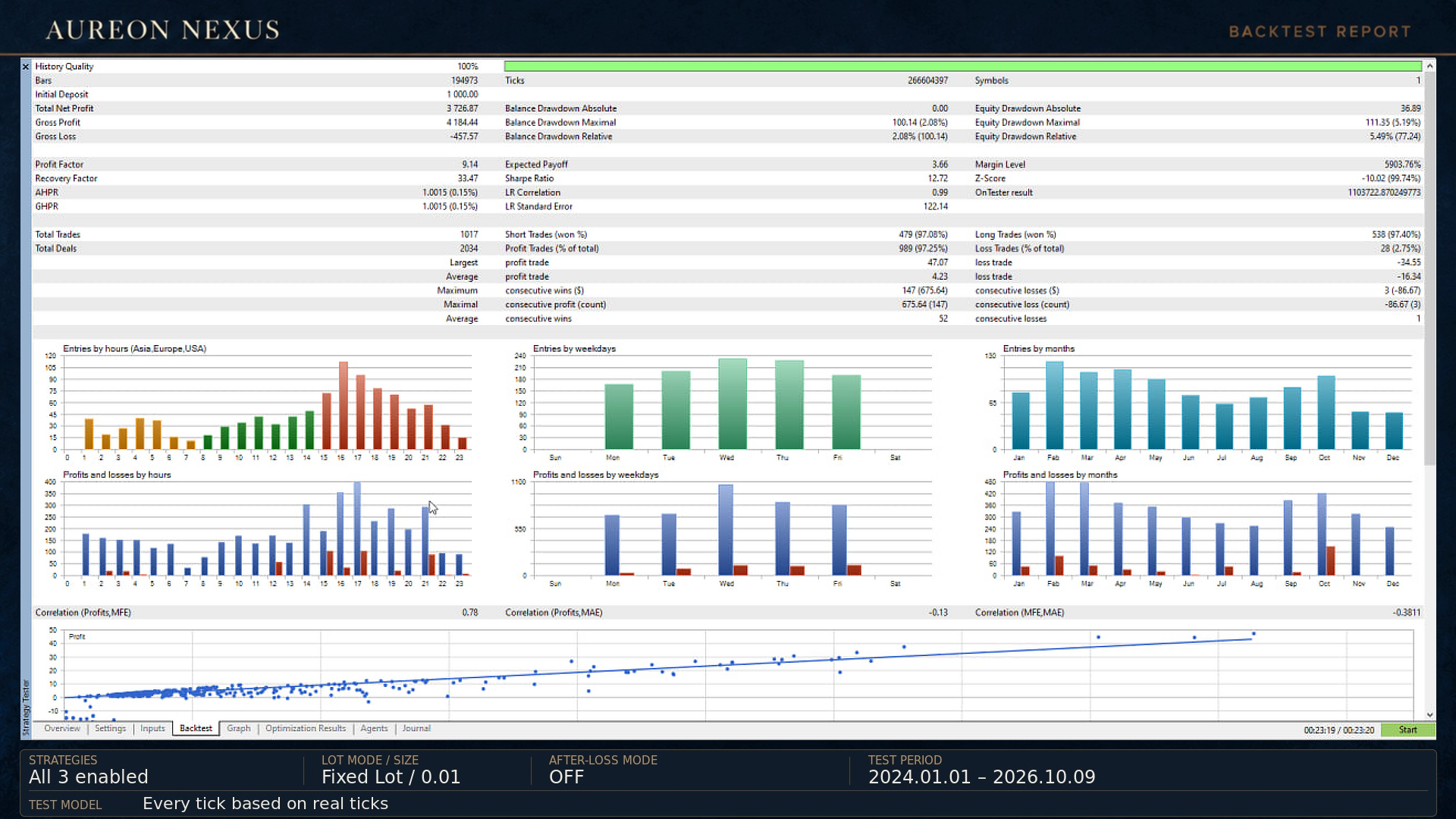
The complete screenshot provides the surrounding statistics and trade distribution. Review the winning percentage alongside drawdown, losing trades and the test configuration.
These are historical backtest figures, not a live-account statement. Your broker’s tick data, spreads, commissions and execution can produce different results.
Try the Demo on Your Own Broker
The demo is available from the MQL5 product page for evaluation in the MetaTrader 5 Strategy Tester.
• Select your broker’s corresponding Gold symbol.
• Use the published M5 chart and hedging-account setup.
• Check the enabled strategies and lot sizes before starting.
• Keep the settings consistent when comparing test results.
The live economic-news entry filter is disabled in the Strategy Tester, so the historical test does not reproduce its live news-blocking behaviour.
Explore AureonNexus 1.10
The product page includes the demo, version history, updated screenshots and a video walkthrough.
View AureonNexus on MQL5 and download the demo
For questions about setup or the update, use the product’s Comments section or MQL5 messaging. Include your version, broker and symbol so we can provide a relevant answer.




