Nakane USDJPY Gotobi (MT5): User Manual, Settings and Set Files

Nakane USDJPY Gotobi is an Expert Advisor for MetaTrader 5 that trades only on Japanese settlement mornings, the gotobi days. This manual explains how it works, how to install it, the chart panel, every input, ready-made set files, how to backtest it yourself and the questions buyers ask most. It applies to version 1.10.
What it does
- Gotobi days are the 5th, 10th, 15th, 20th, 25th and the last day of each month. When such a day falls on a weekend or a Japanese bank holiday, the previous business day is used.
- On those days the EA buys USDJPY at 07:30 JST and closes the buy at the Tokyo fixing, 09:55 JST. Then it sells and closes the sell at 10:30 JST. The sell can be turned off with TradeAfterFixing.
- On all other days it does nothing. That is about six mornings a month with two short trades each: the buy is held about 2 h 25 min and the sell about 35 min.
- Every trade has a stop-loss of 2.5 x ATR(H1). There is no take-profit: trades are closed by time. One position at a time. No grid, no martingale, no averaging.
- It uses no WebRequest, no DLL and no external service, so it runs in the Strategy Tester exactly as it runs live.
The usual explanation of the gotobi effect is that many dollar payments are settled on these days and the banks set the Tokyo fixing rate at 09:55 JST. In our tests the same trades on non-gotobi days had a profit factor of 0.81 (2015–2021), so the day matters.
Installation
- After you buy or rent the EA, install it in MetaTrader 5: Toolbox > Market > Purchased > Install. Updates are in the same place (Update).
- Open a USDJPY chart. Any timeframe works; the EA keeps its own Tokyo clock.
- Drag the EA from Navigator > Expert Advisors > Market onto the chart and allow Algo Trading in the Common tab.
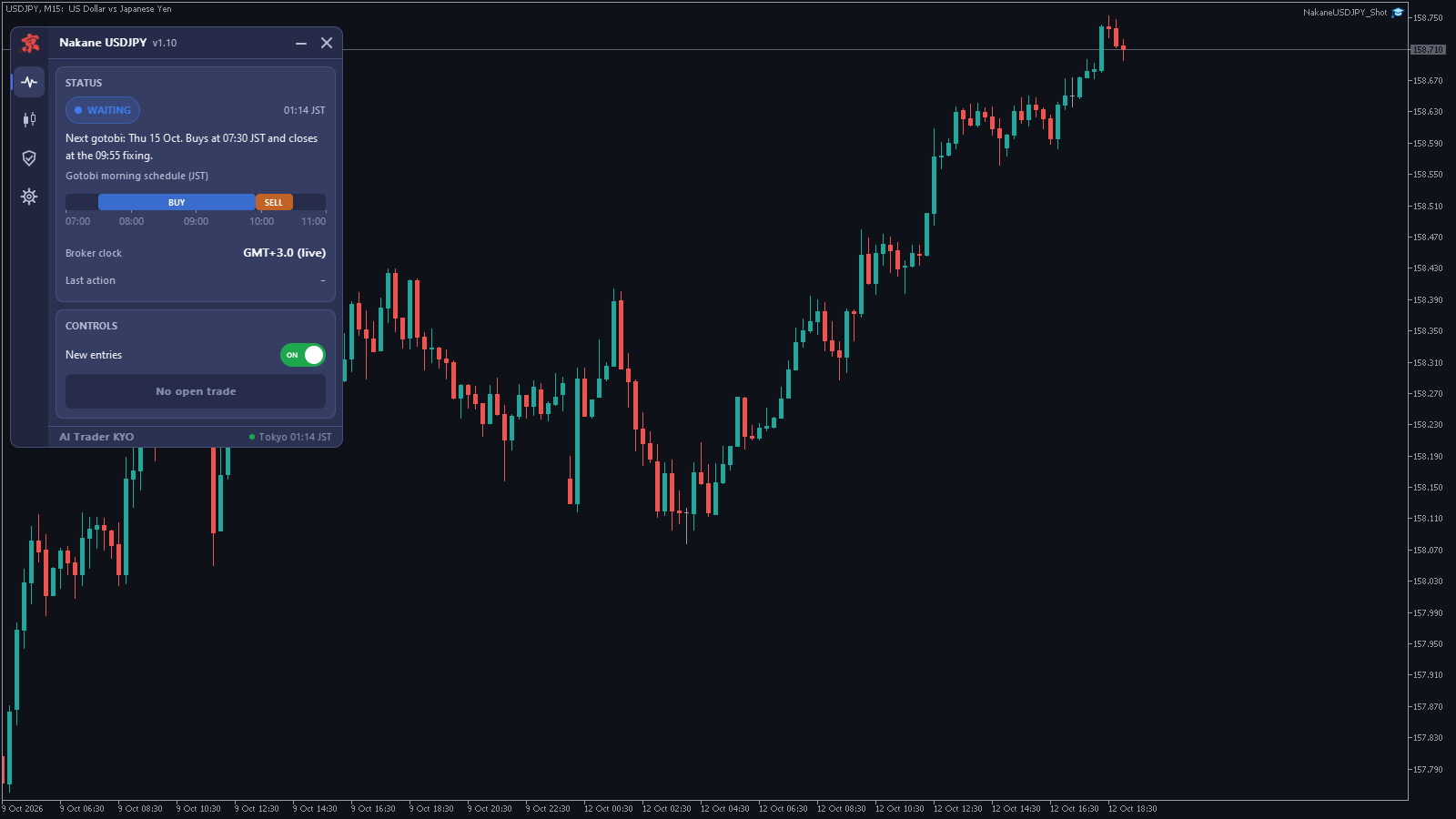
- Check that the Algo Trading button on the toolbar is on. The panel appears at the top left of the chart.
- Keep the terminal running. The trades take place between 07:30 and 10:30 JST, which is evening or night in Europe and America, so a VPS is recommended.
The chart panel
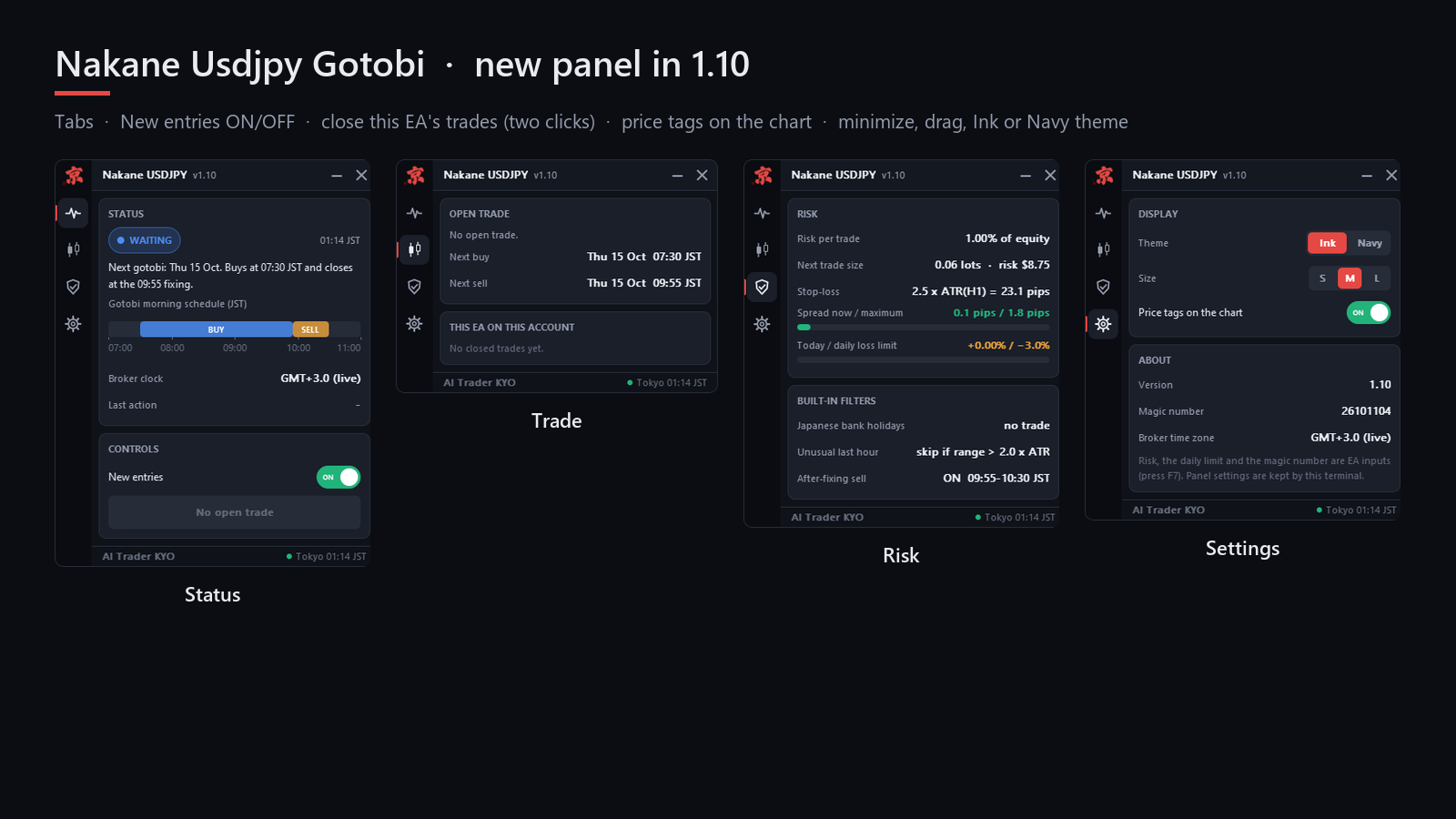
- Status: Tokyo time, the next gotobi day, the buy and sell windows on a time bar, the broker clock (the GMT offset in use) and the last action. When a morning is skipped, the reason is shown under Last action.
- Trade: the open trade, the next buy and sell times, and this EA's closed trades on this account.
- Risk: risk per trade, the next trade size, the stop-loss in pips, the spread against its limit, today's result against the daily loss limit, and the built-in filters.
- Settings: theme (Ink or Navy), size (S, M, L), price tags on the chart, and the version, magic number and broker time zone.
- New entries (Status tab): switches new trades off and on. An open trade is still managed. The switch is kept after a restart; while it is off the panel shows PAUSED.
- Close this EA's trades: closes only this EA's trade on this symbol. Click twice within a few seconds to confirm.
- You can minimize the panel (—), move it by dragging the title bar, or close it (×) to a small button at the top right of the chart. Click the button to show it again.
Inputs
| Input | Default | What it does |
|---|---|---|
| RiskPercent | 1.0 | Percent of equity at risk to the stop-loss. 0 = use FixedLot. |
| FixedLot | 0.0 | Fixed trade size, used only when RiskPercent is 0. |
| DailyLossLimit | 3.0 | No new trades for the rest of the day after this loss, in % of equity. 0 = off. |
| MagicNumber | 26101104 | Identifies this EA's trades. Use a different number on each chart. |
| GMTOffsetHours | -99 | The broker's GMT offset. -99 = automatic. |
| TradeAfterFixing | true | Also sell from 09:55 to 10:30 JST. |
Set files
Download a file, open the EA's settings (F7 on the chart), go to the Inputs tab, click Load and choose the file. Each file keeps the defaults except the values named here.
- Nakane_Standard_1pct.set: the defaults. 1% risk per trade, daily loss limit 3%, buy and sell.
- Nakane_Conservative_0.5pct.set: 0.5% risk per trade, daily loss limit 2%.
- Nakane_BuyOnly_1pct.set: 1% risk, only the buy before the fixing (TradeAfterFixing = false).
- Nakane_FixedLot_0.01.set: a fixed 0.01 lot (RiskPercent = 0) for a first test or a small account.
The trading rules are the same in every file; only the trade size and the after-fixing sell change. No setting makes the EA trade on other days.
Backtest it yourself
- Open the Strategy Tester (Ctrl+R) and choose the EA.
- Symbol USDJPY, any timeframe (for example H1), model "1 minute OHLC" or "Every tick based on real ticks".
- Dates: for example from 2022.01.01 to today. Deposit 10,000 USD.
- Leave GMTOffsetHours at -99. The tester cannot report the broker's time zone, so the EA estimates it from the last bar before each weekend (Friday 17:00 New York). If your broker uses an unusual server time, enter its offset instead.
- Start the test. Trades appear only on gotobi mornings.
For comparison, our backtest on IC Markets demo data (1% risk, 10,000 USD, 2015-01 to 2026-10) gave 1,524 trades, profit factor 1.24 and a maximum drawdown of 6.7% on closed trades. The rules were fixed on 2015–2021; 2022–2026 alone gave profit factor 1.28. Some years were negative (2015 and 2025). Your numbers will differ with your broker's data and costs, and a backtest is not a promise of future results.
Technical notes: holidays, time zones and filters
- Japanese public holidays, including substitute holidays and the special dates of 2019–2021, and the year-end bank holidays (31 December to 3 January) are calculated inside the EA. No calendar file and no internet connection are needed.
- Live, the broker's GMT offset is read from the terminal time and shown on the Status tab as Broker clock, for example "GMT+3.0 (live)".
- If the hour before entry was unusually volatile (a range of more than 2 x ATR(H1), for example during an intervention), the morning is skipped. A trade is also skipped when the spread is too wide, the market is closed or the daily loss limit was reached.
- Hedging and netting accounts both work. On a netting account do not run another EA or manual trades on USDJPY at the same time.
Questions buyers ask
- It does not trade. First check the Status tab: is today a gotobi day, and is it between 07:30 and 10:30 JST? Then check that Algo Trading is on and that the panel does not show PAUSED (if it does, switch New entries back on). Last action tells you why a morning was skipped.
- The broker clock looks wrong. Set GMTOffsetHours to your broker's current GMT offset.
- How much money do I need? About 300 USD or more for 1% risk with 0.01 lot. With less, the EA may skip trades whose minimum lot would risk more than 3% of equity.
- Can I run it on several charts? Yes, with a different MagicNumber on each chart. A purchase includes 10 activations.
- Can it trade other symbols or other days? No. It is built for USDJPY on gotobi mornings only.
Product page: Nakane USDJPY Gotobi. If something is unclear, send me a private message on MQL5 with a screenshot of the panel and the last lines of the Experts tab.