Ikioi Bitcoin Momentum (MT5): User Manual, Settings and Set Files

Ikioi Bitcoin Momentum is an Expert Advisor for MetaTrader 5 that holds BTCUSD only while its multi-week momentum is up. This manual explains how it works, how to install it, the chart panel, every input, ready-made set files, how to backtest it yourself and the questions buyers ask most. It applies to version 1.10.
What it does
- Once a day, on the closed daily bar, it compares the BTCUSD close with the close of 14 daily bars ago (2 weeks) and of 56 daily bars ago (8 weeks).
- When the close is higher than both, it buys and holds. When either comparison turns negative, it closes and waits.
- It is long only by default. AllowShort = true also sells when both moves are down; this mode was not used in our backtests.
- The first stop-loss is 3 x ATR(D1). The stop then trails the highest daily close at 4 x ATR(D1). After a stop-out the EA waits 3 days before it can buy again.
- One position at a time. No grid, no martingale, no averaging. No WebRequest, no DLL, no external service, so it runs in the Strategy Tester exactly as it runs live.
- It makes about 14 trades a year, is in the market roughly a third of the time and can stay flat for weeks. Many trades are small losses; most of the profit has come from a few long trends.
Installation
- After you buy or rent the EA, install it in MetaTrader 5: Toolbox > Market > Purchased > Install. Updates are in the same place (Update).
- Open a BTCUSD chart. Any timeframe works, because the logic always uses daily bars. The EA trades the symbol of its chart, so a name with a suffix (for example BTCUSD.raw) is fine.
- Drag the EA from Navigator > Expert Advisors > Market onto the chart and allow Algo Trading in the Common tab.
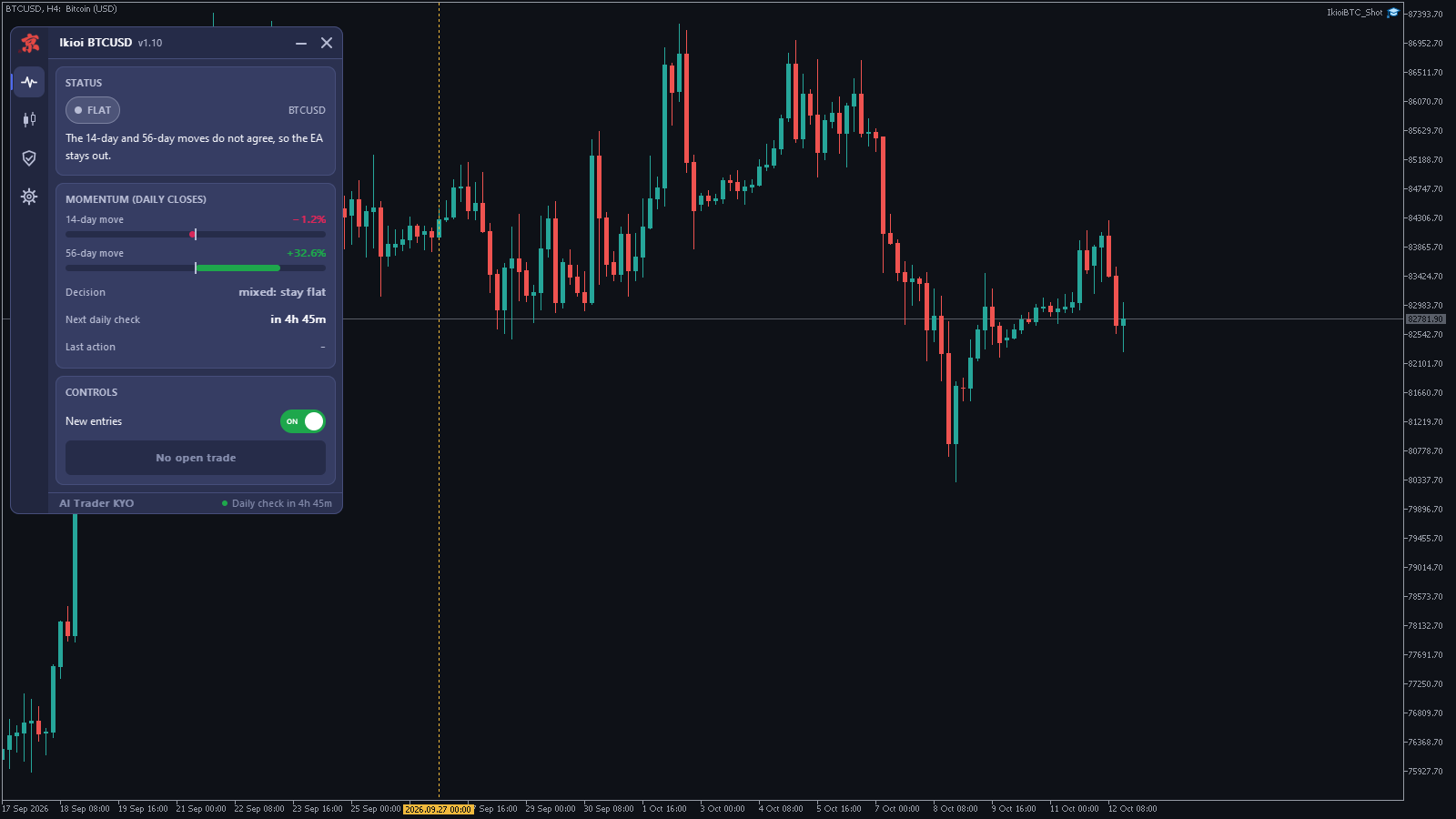
- Check that the Algo Trading button on the toolbar is on. The panel appears at the top left of the chart.
- Keep the terminal running; a VPS is recommended. If the market is closed when the daily decision is made, the exit or the stop update is retried automatically when trading resumes.
The chart panel
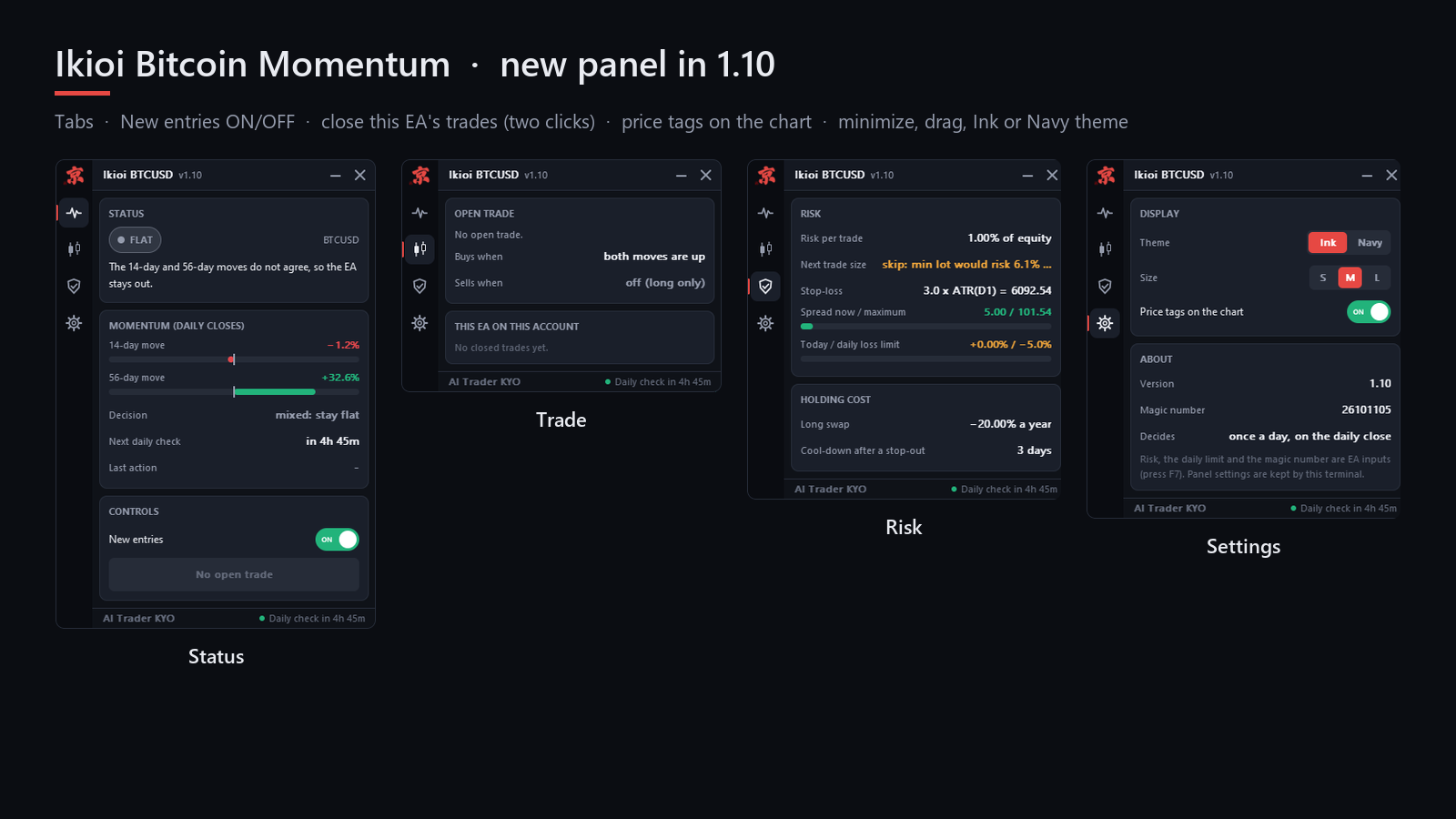
- Status: the 14-day and 56-day moves as bars, the decision (hold a long or stay flat), the time to the next daily check and the last action. FLAT, "the moves do not agree", is a normal state.
- Trade: the open trade, when the EA buys and sells, and this EA's closed trades on this account.
- Risk: risk per trade, the next trade size, the stop-loss, the spread against its limit, today's result against the daily loss limit, the broker's swap for a long position and the cool-down after a stop-out.
- Settings: theme (Ink or Navy), size (S, M, L), price tags on the chart, and the version and magic number.
- New entries (Status tab): switches new trades off and on. An open trade is still managed. The switch is kept after a restart; while it is off the panel shows PAUSED.
- Close this EA's trades: closes only this EA's trade on this symbol. Click twice within a few seconds to confirm.
- You can minimize the panel (—), move it by dragging the title bar, or close it (×) to a small button at the top right of the chart. Dotted lines on the chart mark 14 and 56 days back.
Inputs
| Input | Default | What it does |
|---|---|---|
| RiskPercent | 1.0 | Percent of equity at risk to the first stop-loss. 0 = use FixedLot. |
| FixedLot | 0.0 | Fixed trade size, used only when RiskPercent is 0. |
| DailyLossLimit | 5.0 | No new trades for the rest of the day after this loss, in % of equity. 0 = off. |
| MagicNumber | 26101105 | Identifies this EA's trades. Use a different number on each chart. |
| AllowShort | false | Also sell when both moves are down. Not used in our backtests. |
Set files
Download a file, open the EA's settings (F7 on the chart), go to the Inputs tab, click Load and choose the file. Each file keeps the defaults except the values named here.
- Ikioi_Standard_1pct.set: the defaults. 1% risk per trade, daily loss limit 5%, long only.
- Ikioi_Conservative_0.5pct.set: 0.5% risk per trade, long only.
- Ikioi_FixedLot_0.01.set: a fixed 0.01 lot (RiskPercent = 0), long only.
The trading rules are the same in every file; only the trade size changes.
Deposit, smaller accounts and swap
- On BTCUSD, 5,000 USD or more is recommended. At current prices the minimum lot of 0.01 risks about 75 USD to the first stop-loss, and the EA skips a trade when the minimum lot would risk more than 3% of equity.
- For a smaller account, ETHUSD can be used with the same settings: attach the EA to an ETHUSD chart. Our ETHUSD backtest for 2020–2026 gave a profit factor of 1.94.
- Positions are held for days to weeks, so swap matters. On our test account (IC Markets) a long BTCUSD position cost about 20% a year in swap; the backtest includes it. Check your broker's crypto swap; the Risk tab shows it.
Backtest it yourself
- Open the Strategy Tester (Ctrl+R) and choose the EA.
- Symbol BTCUSD (your broker's name), any timeframe (for example H1), model "1 minute OHLC".
- Dates: for example from 2018.01.01 to today. Deposit 10,000 USD.
- Start the test. There are long flat periods; that is how the rules work.
For comparison, our backtest on IC Markets demo data (1% risk, 10,000 USD, swap included, 2018-01 to 2026-10) gave 120 trades, profit factor 3.46, a net result of +49% of the starting balance (not compounded) and a maximum drawdown of 2.3% on closed trades, 4.1% including open positions. The rules were fixed on 2018–2022; 2023–2026 alone gave 69 trades and profit factor 3.94. 2018 and 2022 were slightly negative. Your numbers will differ with your broker's data, swap and costs, and a backtest is not a promise of future results.
Technical notes
- Two horizons, 2 weeks and 8 weeks, must agree before the EA buys. One rising horizon alone is not enough, which keeps the EA out of many short rebounds.
- The decision uses closed daily bars only, so the result of a day does not change while the day is still running.
- The trailing stop follows the highest daily close, not the intraday high.
Questions buyers ask
- It does not trade. Read the Status tab first. FLAT means the 2-week and 8-week moves do not agree, and the EA only buys when both are positive. Then check that Algo Trading is on, that the panel does not show PAUSED (if it does, switch New entries back on), the spread, and Last action for the reason of a skip.
- How often does it trade? About 14 trades a year. Weeks without a trade are normal.
- Should I turn on AllowShort? It was not part of our tests, so we cannot tell you how it behaves. Test it on a demo account first.
- Can I run it on several charts? Yes, with a different MagicNumber on each chart. A purchase includes 10 activations.
Product page: Ikioi Bitcoin Momentum. If something is unclear, send me a private message on MQL5 with a screenshot of the panel and the last lines of the Experts tab.