QRM PRO User Manual – Pre-Trade Risk Governance for MetaTrader 5

From position-sizing formulas to pre-trade risk governance for MetaTrader 5
A lot-size calculator answers an essential question:
What volume corresponds to the selected risk?
Risk governance must answer a broader one:
Is the proposed trade compatible with the symbol, the account, the portfolio and the current operating context?
That difference is the foundation of QRM PRO.
QRM PRO does not generate trading signals and does not attempt to forecast the market. It checks whether a trade proposal complies with the configured risk policy before execution may be attempted.
At a glance
A complete pre-trade assessment involves several different dimensions.
Monetary sizing
Estimated BUY and SELL loss/profit in the actual account currency, with an explicit pips or points display.
Broker and margin
Volume representability, Stop Loss constraints, margin requirements and operating specifications of the symbol.
Account limits
Daily Drawdown, Maximum Drawdown, Profit Target and remaining capacity under the configured policy.
Portfolio
Existing positions, Open Risk and currency exposure across the entire account.
Context
Validity after changes to symbol, timeframe, direction, setup, distance unit, price range or market availability.
Traceability
Outcome, reason code and key control metrics recorded in structured CSV outputs.
1. The limits of ordinary lot-size calculators
The combination of risk percentage + Stop Loss distance is a useful foundation, but it describes only part of the problem.
In practice, the theoretical volume may be unusable, the same numerical distance may have a different meaning across instruments, margin or policy capacity may be insufficient, and a decision that was valid moments ago may become obsolete.
Several practical issues have to be considered:
- The broker's minimum lot or volume step may make the requested risk impossible to represent without exceeding it.
- The same SL number does not have the same meaning on Forex, CFDs, indices or metals; point, tick and contract specifications matter.
- A trade may respect the single-trade Stop Loss budget while breaching margin, drawdown or portfolio limits.
- A change of symbol, timeframe, direction, setup or display unit requires a new control.
- Market conditions or execution permissions may change between validation and order submission.
- Without structured records, it can be difficult to reconstruct why a proposal was approved or blocked.
The conceptual step from position sizing to risk governance is therefore not simply to use a more complicated sizing formula.
It is to evaluate the proposal in its full operating context.
2. From sizing to pre-trade governance
The operating workflow separates proposal, control, authorization and execution.
Step 1
Define:
- Risk
- Stop Loss distance
- DistanceUnit: AUTO, PIPS or POINTS
- Risk/Reward ratio
Step 2
Run:
CHK B for a BUY proposal
or
CHK S for a SELL proposal.
Step 3
Read:
APPROVED
or
BLOCKED
together with the reason, monetary loss and operating metrics displayed on the panel.
Step 4
Enable execution deliberately only when the trade is intentional and all LIVE permissions are complete.
Step 5
After the order, verify the position, Open Risk, exposure and traceability in the output files.
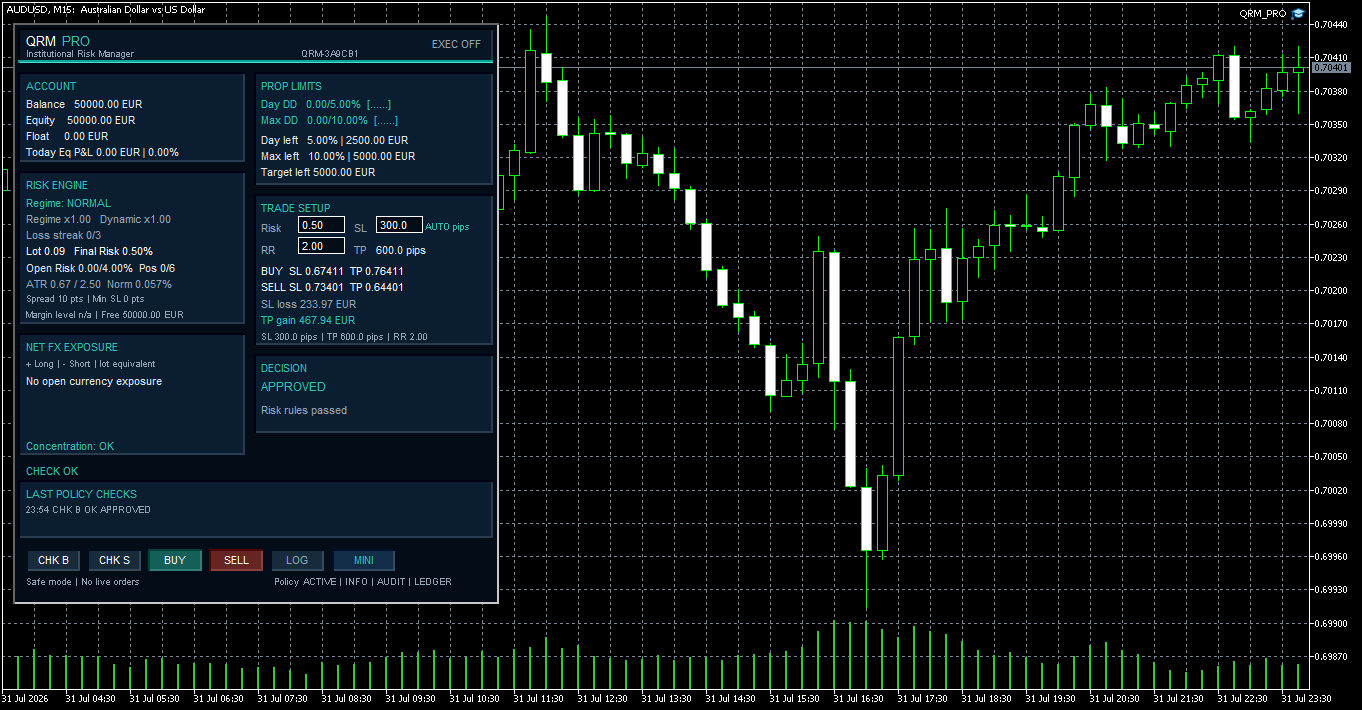
Fig. 2 - CHK B approved: the BUY proposal has passed the available pre-trade controls.
CHK does not open positions
Validation and execution remain separate operations.
This allows QRM PRO to be used as a pre-trade control while execution remains disabled.
3. Pips, points and representable risk
QRM PRO separates the user-facing distance unit from the canonical internal distance used for calculations.
In AUTO mode:
- Forex symbols are displayed in pips.
- Other instruments are displayed in MetaTrader 5 points.
Broker-facing calculations, validations and structured CSV records continue to use canonical MetaTrader 5 points.
On a typical five-digit Forex symbol:
SL 30.0 pips = 300 points
With:
RR = 2.00
the corresponding theoretical TP is:
60.0 pips
PIPS interprets the entered SL distance in pips and displays SL/TP distances in pips.
POINTS interprets the entered SL distance in MetaTrader 5 points and displays SL/TP distances in points.
AUTO selects the effective input and display unit according to the instrument, while QRM PRO maintains the canonical internal distance in MT5 points.
After a symbol change, the displayed distance may be converted, but the same price distance or monetary risk is not guaranteed. The previous CHK is therefore invalidated.
Volume, margin, stop level, freeze level, tick value and contract size remain independent broker constraints.
Why a demo test matters
Point size, tick value, contract size and margin specifications are supplied by the broker.
Before LIVE use on a new symbol or account, verify the displayed distance unit, monetary loss and order behaviour on a demo account.
4. Account, margin and portfolio limits
A valid standalone lot size does not automatically mean that the proposed trade is acceptable at account level.
QRM PRO evaluates the proposal in relation to the account and the existing portfolio.
Open Risk
Estimated aggregate risk of open positions on the account.
Max Positions
Existing positions plus the new proposal are checked against the configured maximum.
Portfolio Risk Cap
The proposed trade is evaluated together with existing account risk.
Net FX Exposure
QRM PRO evaluates net currency exposure across the open Forex portfolio.
Positions without Stop Loss
Positions whose risk cannot be determined reliably are handled conservatively.
Margin remains an independent constraint
A trade may satisfy its Stop Loss risk budget and still be incompatible with the required margin conditions.
QRM PRO uses an internal pre-trade margin projection based on current account margin and the estimated margin required for the proposed trade. The actual post-execution margin level remains subject to the broker's margin calculation rules and account conditions.
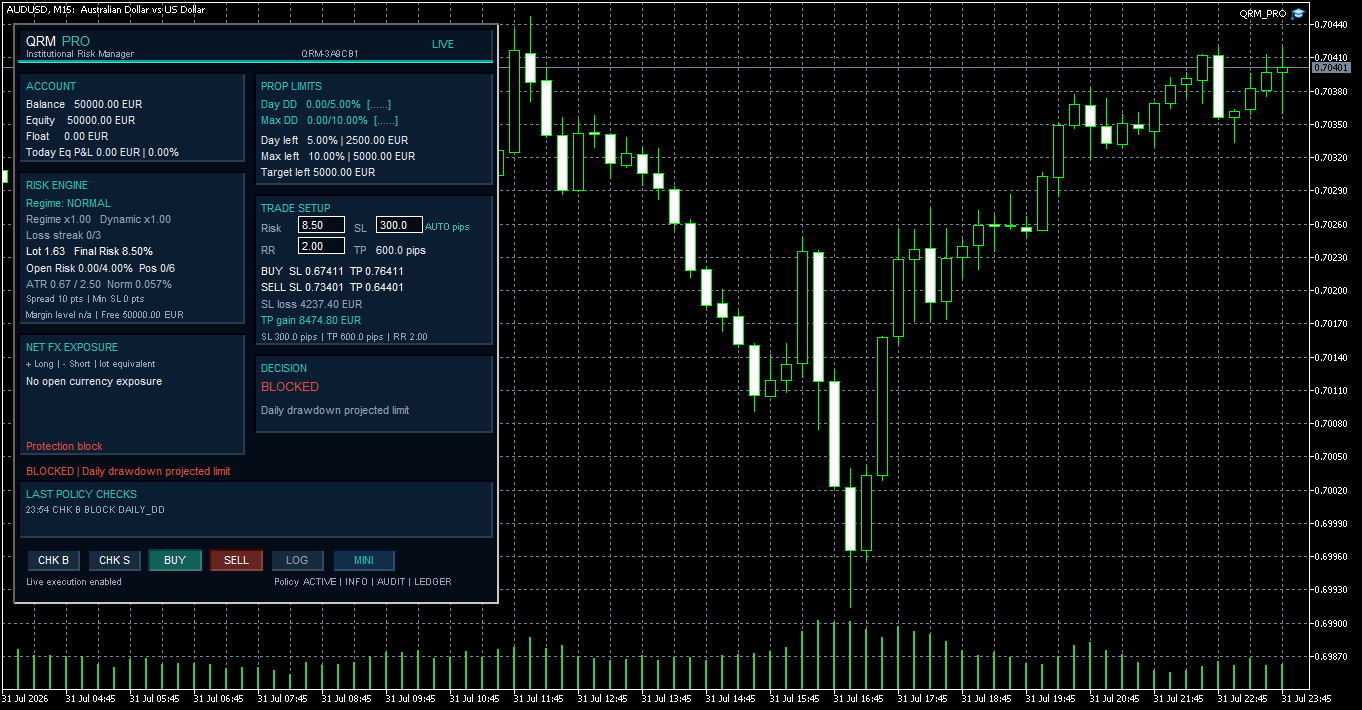
5. Drawdown limits are checked before execution
Single-trade risk is only one part of account protection.
QRM PRO provides a configurable prudential model for monitoring:
- Daily Drawdown
- Maximum Drawdown
- Profit Target
A new proposal can therefore be blocked because its projected monetary loss would breach the remaining Daily Drawdown capacity even when its standalone lot calculation is technically valid.
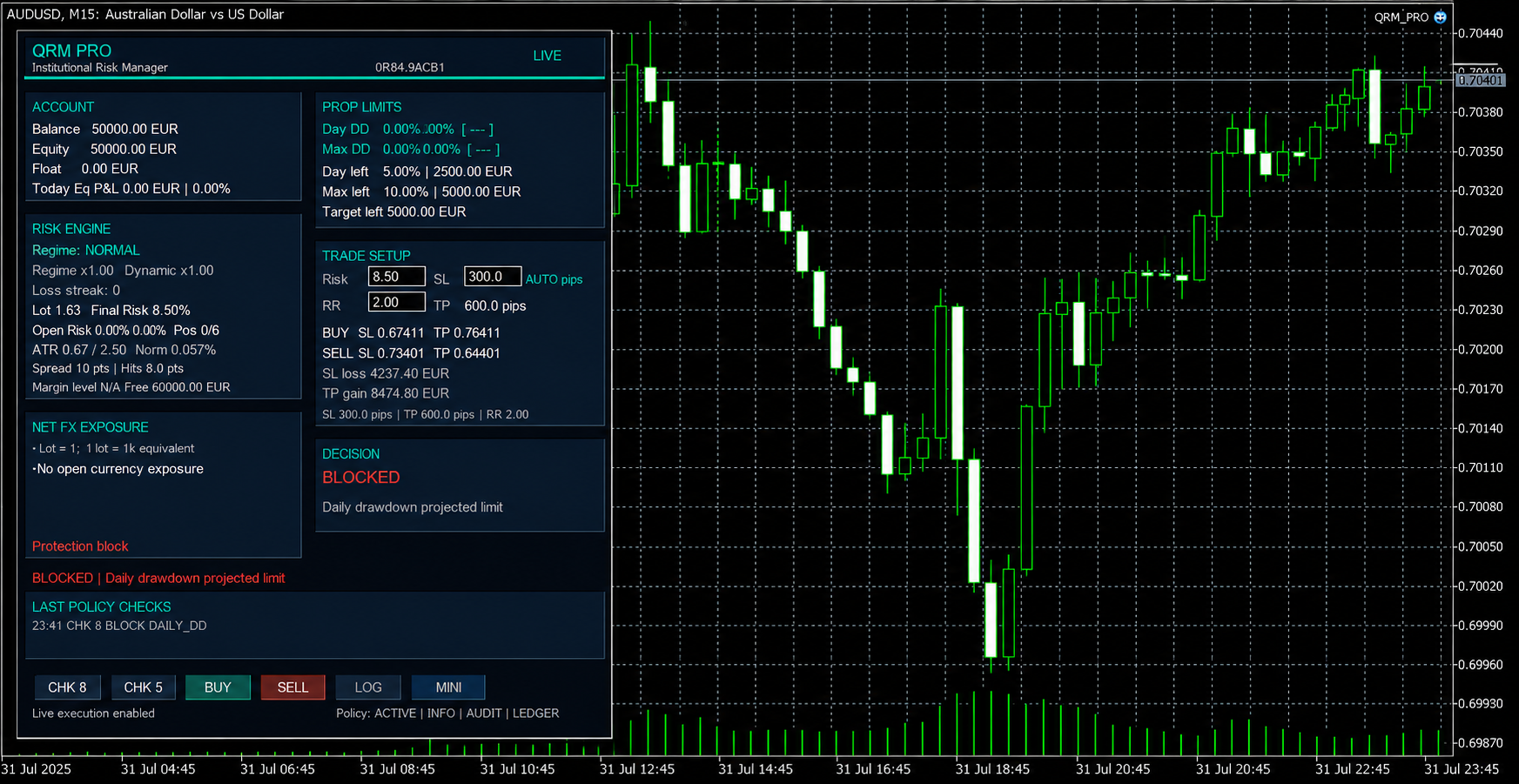
The status code makes the reason explicit:
DAILY_DD
This is an important distinction between position sizing and governance.
The question is no longer only:
“Can this position be sized?”
It is also:
“Can this account absorb the projected loss under the configured policy?”
Prop-firm rules are not imported automatically. The user must configure the relevant limits and verify them against the firm's official rules.
6. Context validity and explicit preview blocks
A pre-trade decision is valid only for the exact proposal and operating context in which it was calculated.
Relevant context includes:
- symbol
- timeframe
- account
- direction
- Risk
- SL
- distance unit
- RR
A relevant change invalidates the previous control and requires a new CHK.
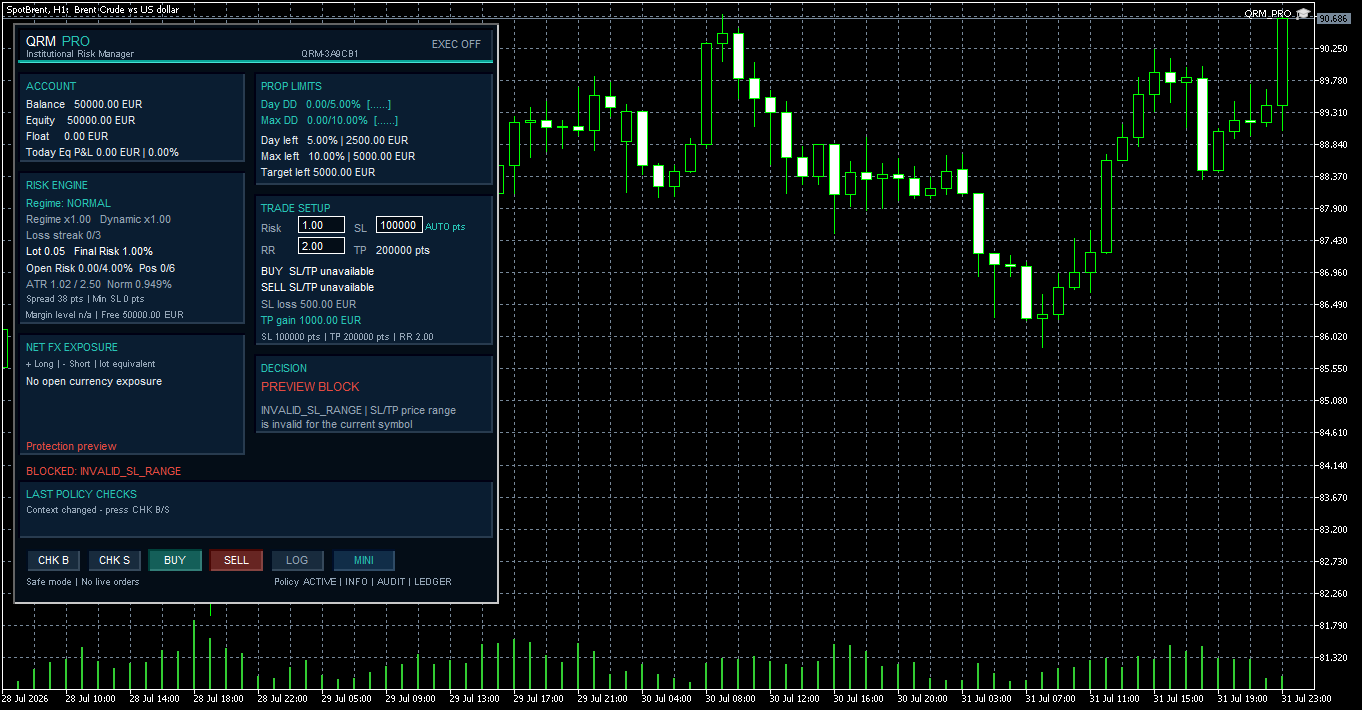
QRM PRO also blocks a proposal during preview when the calculated SL or TP price cannot be represented within the current symbol price range.
In this situation the panel exposes the explicit code:
INVALID_SL_RANGE
and replaces the general READY state with:
BLOCKED: INVALID_SL_RANGE
before execution can be attempted.
Operating rule
After a relevant change, verify the displayed unit, lot, monetary loss and SL/TP prices.
Do not reuse a previous CHK.
Wait until the panel is ready and run a new control in the required direction.
7. Deliberate execution
QRM PRO starts with execution disabled.
This is intentional.
Risk calculations and CHK controls remain available while the order-sending capability is disabled.
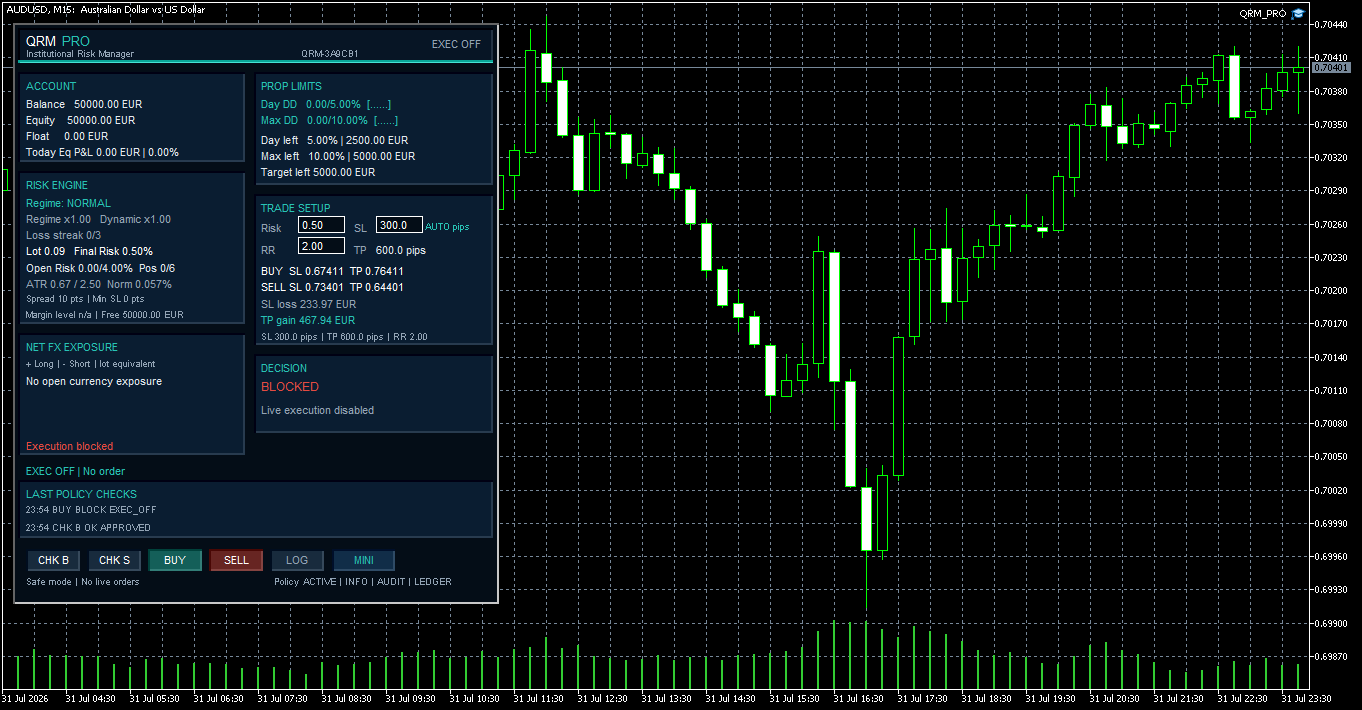
The LIVE badge represents only QRM PRO's internal authorization.
It does not replace the other permissions required by MetaTrader 5.
8. LIVE execution requires independent permissions
An order can be sent only when the required authorization levels are satisfied.
QRM PRO
AllowLiveTrading must be enabled in Inputs.
EA instance
Allow Algo Trading must be enabled for the individual EA instance.
MetaTrader 5 terminal
The global Algo Trading switch must be enabled.
Broker and market
The trading session must be open, the request must be valid and trading must be allowed at submission time.
One click is not enough
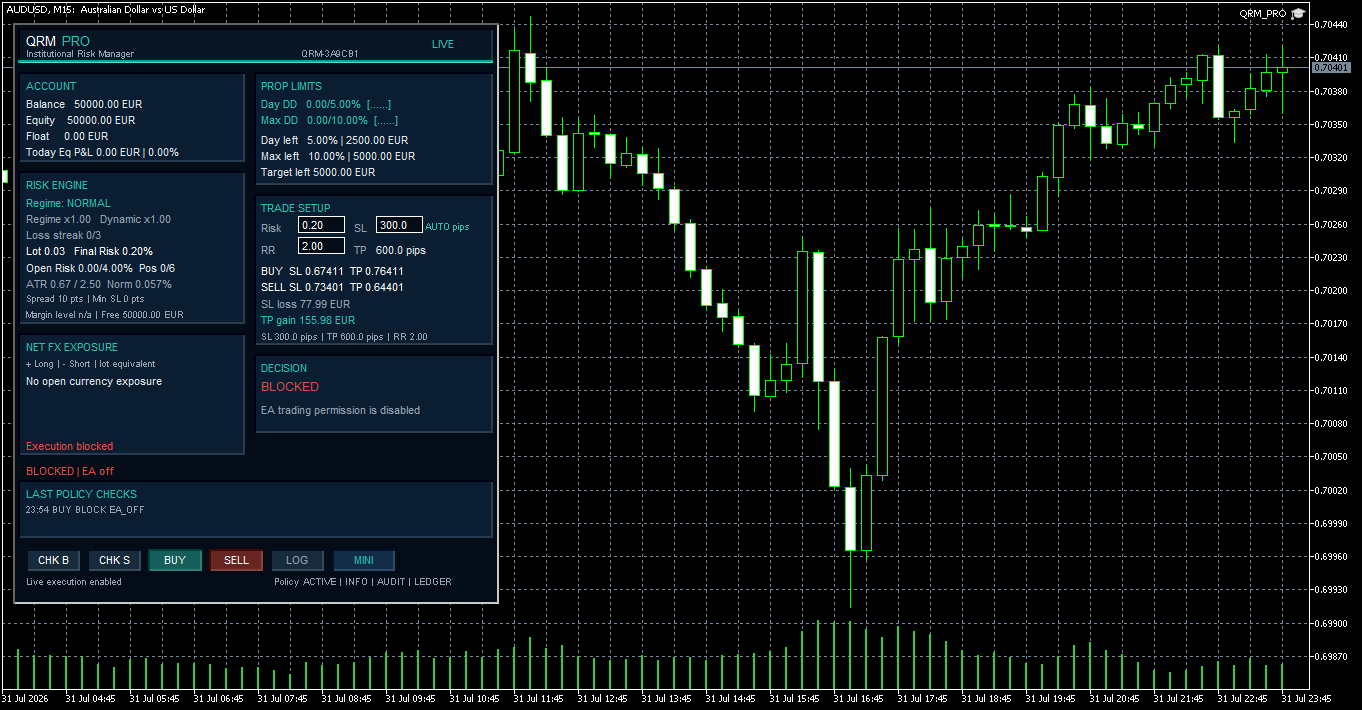
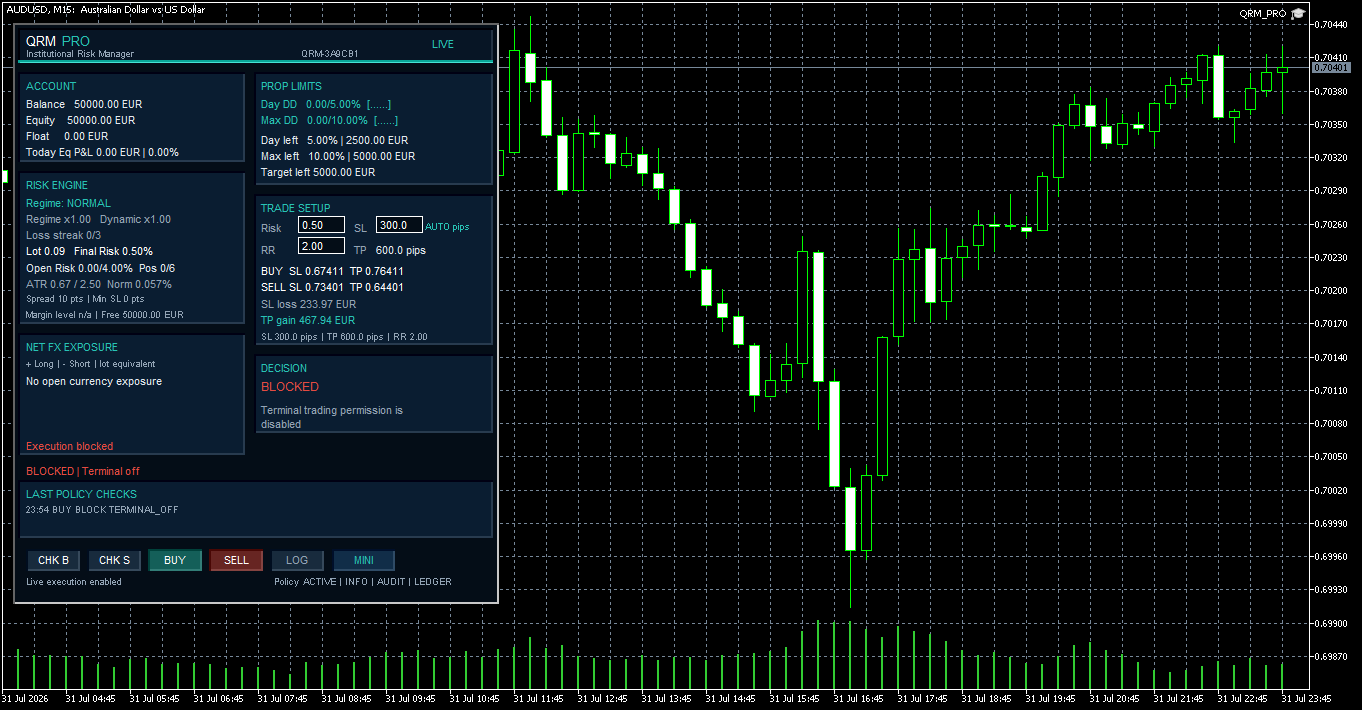
When a permission is missing, QRM PRO blocks execution and displays an explicit reason such as:
EXEC_OFF
EA_OFF
or
TERMINAL_OFF
No order is sent.
9. Market availability is also an execution condition
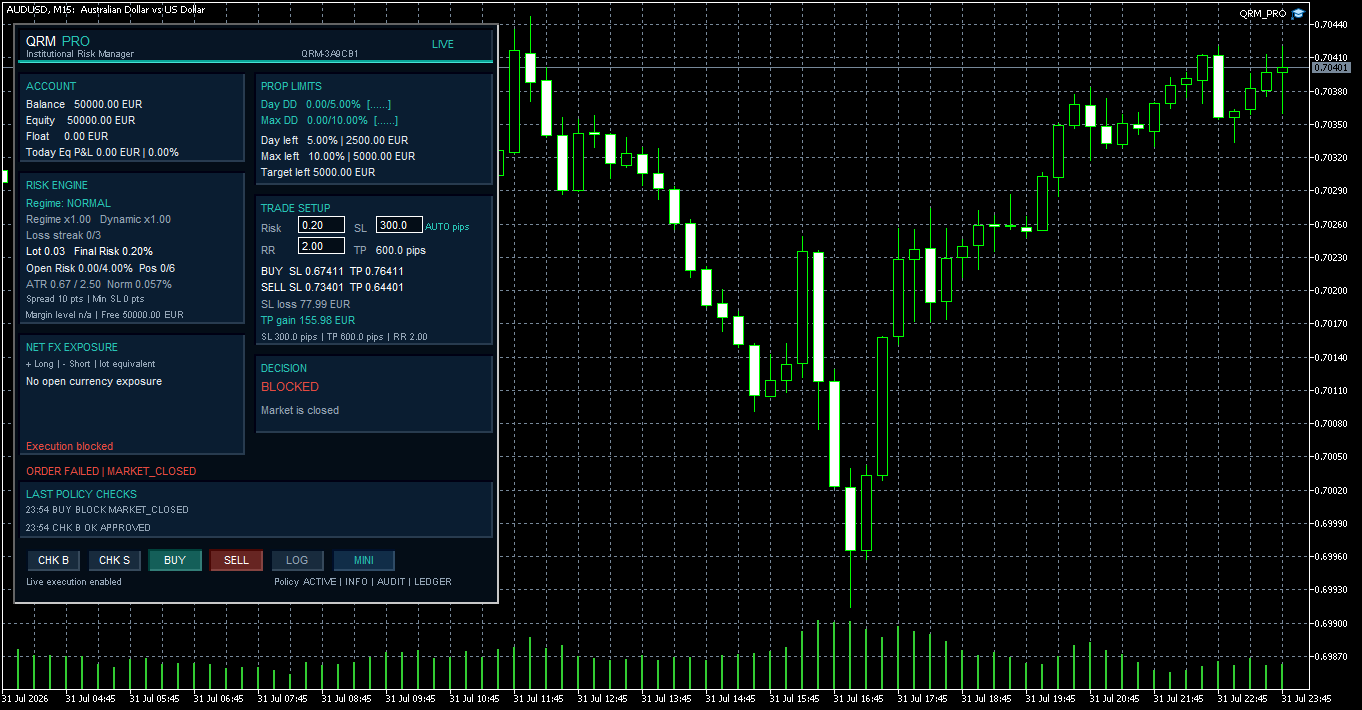
Even when the proposal has passed its risk checks and LIVE permissions are enabled, the broker and market must still accept the request.
A closed trading session is therefore an independent execution block.
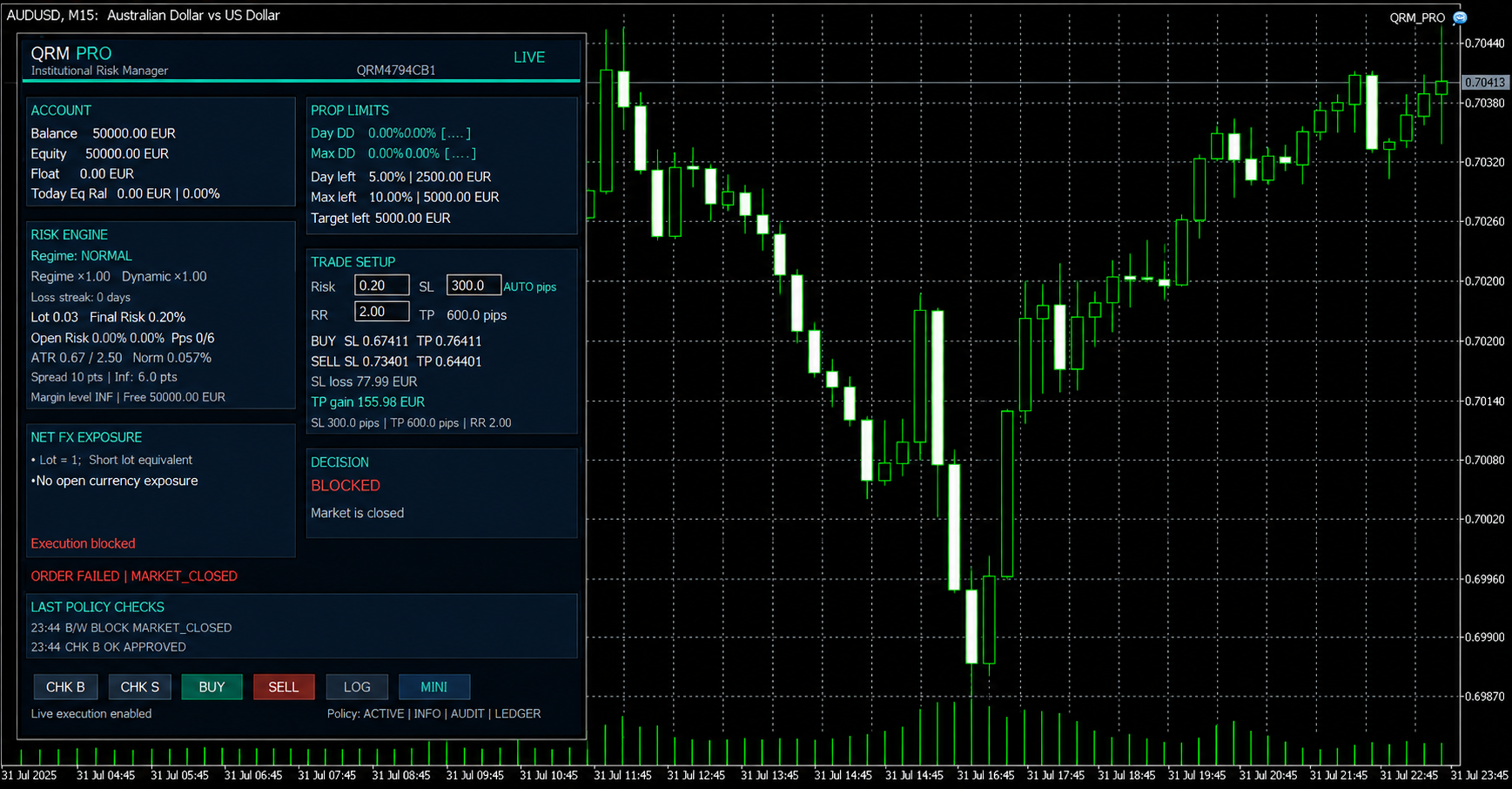
In this case the panel makes the operating distinction visible:
the previous CHK may have been approved, but execution remains unavailable when the trading session is closed.
This illustrates an important principle:
risk approval does not override broker or market conditions.
10. From approval to LIVE execution
When the proposal has been validated, the context remains coherent, all required permissions are active and the broker accepts the request, the user can deliberately submit the order.
QRM PRO does not decide that a trade should be taken.
The user remains responsible for the trading decision and for deliberately initiating execution.
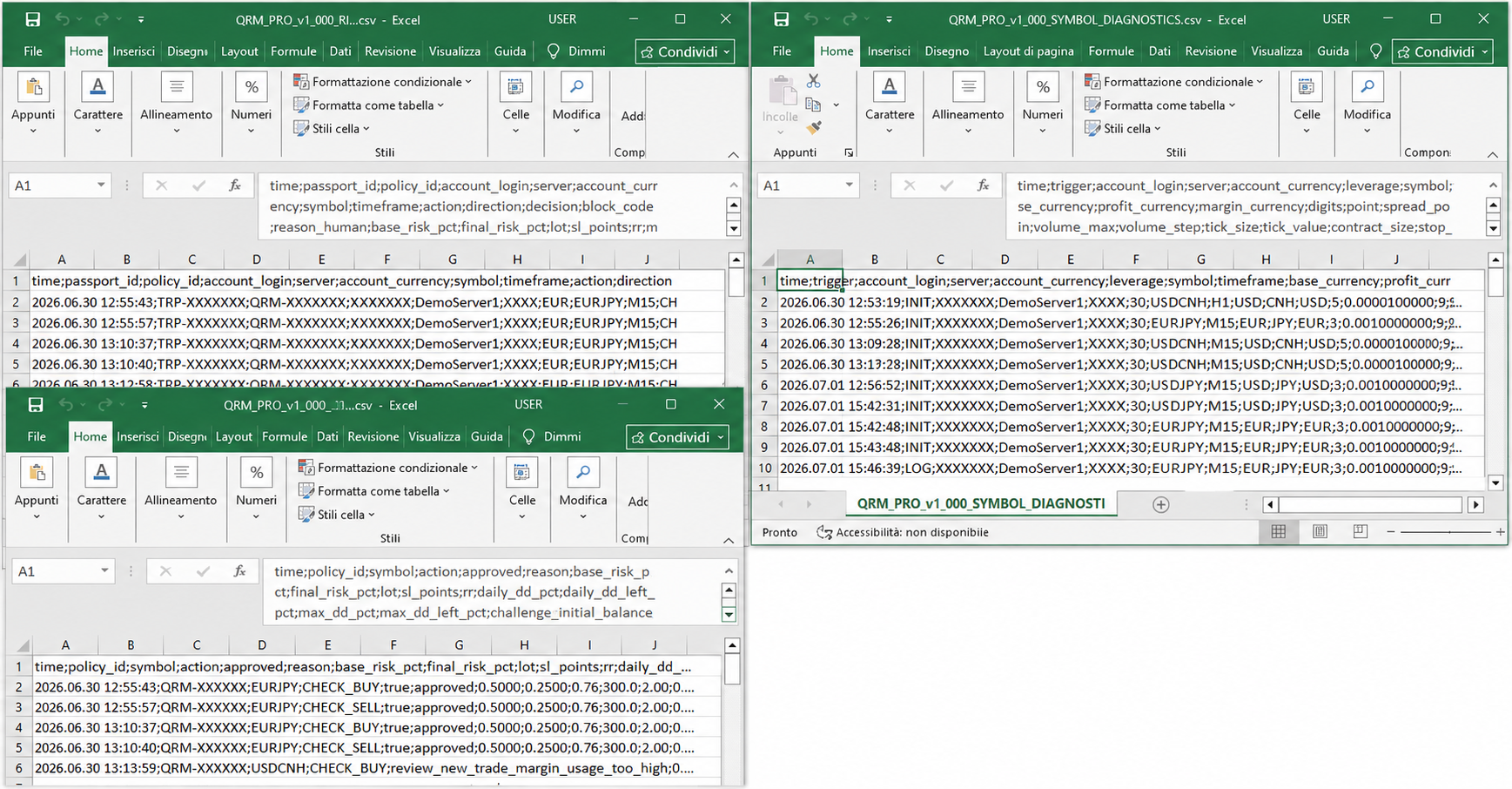
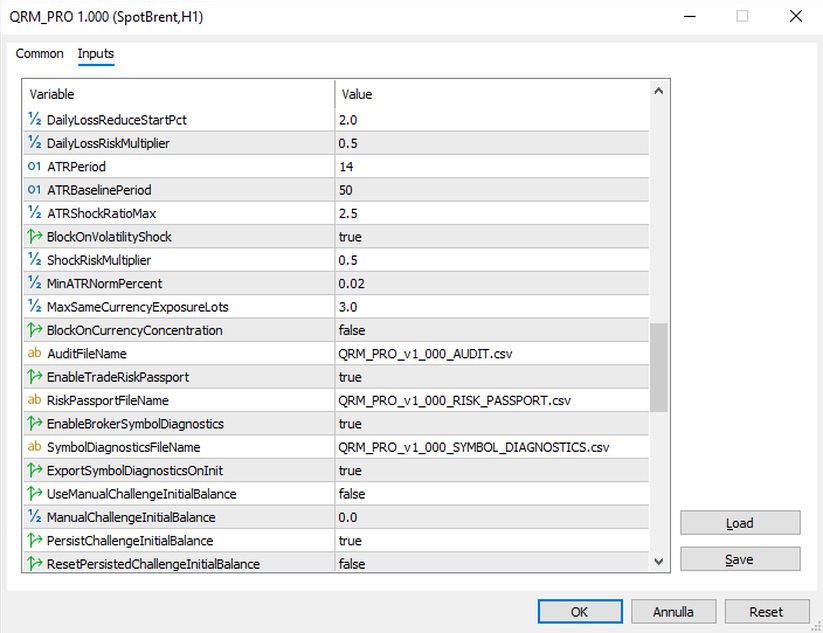
11. Audit, Risk Passport and Symbol Diagnostics
Risk governance becomes more useful when a decision can be reconstructed.
QRM PRO can generate three distinct structured CSV outputs in MetaTrader 5's shared Common\Files folder.
Distances are recorded canonically in the sl_points field even when the panel displays pips.
Audit Trail
Records control outcomes, reason codes and key operating metrics.
Trade Risk Passport
Provides a unique identifier linking the control, its context and any execution attempt.
Symbol Diagnostics
Collects symbol specifications and data used to assess broker compatibility.
The LOG button prepares the files and updates Symbol Diagnostics without sending orders.
12. FULL and MINI interfaces
QRM PRO provides two synchronized operating views.
FULL
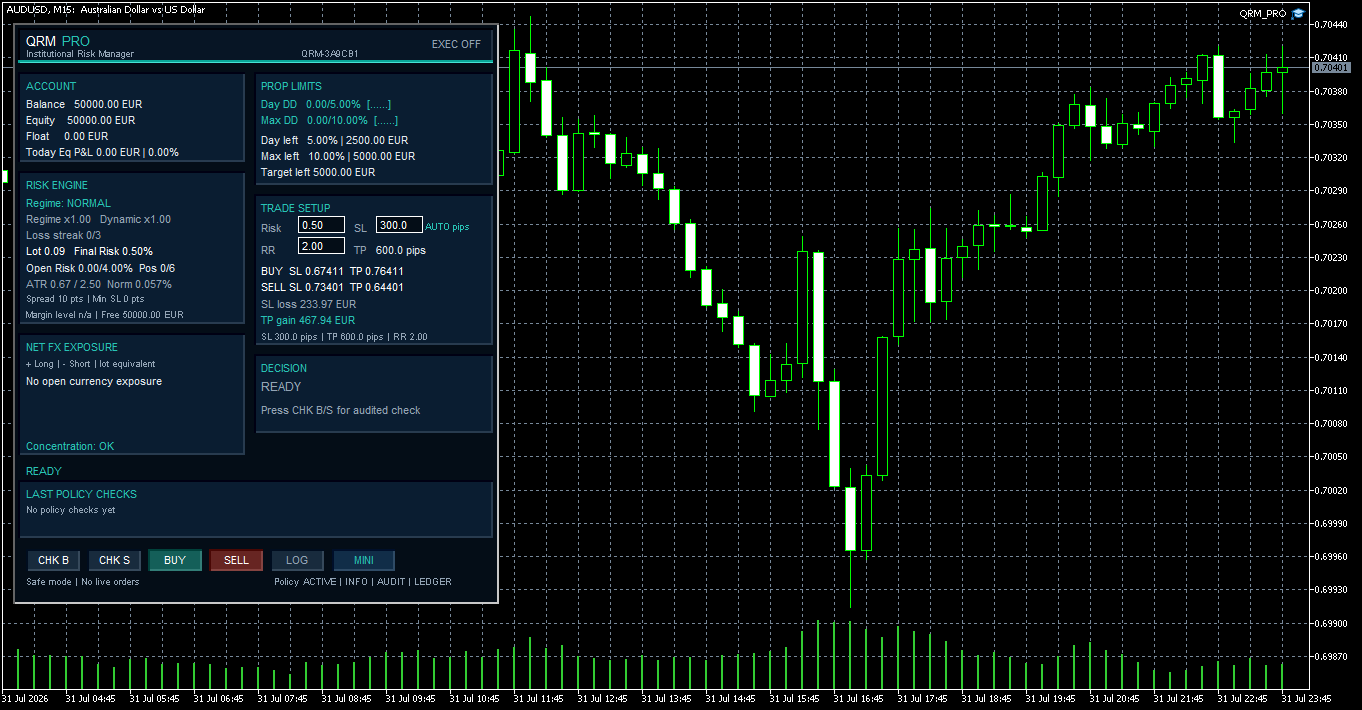
FULL mode brings together:
- account context
- prop limits
- remaining policy capacity
- Risk Engine
- complete trade setup
- exposure
- recent controls
- visual audit
- diagnostics
MINI
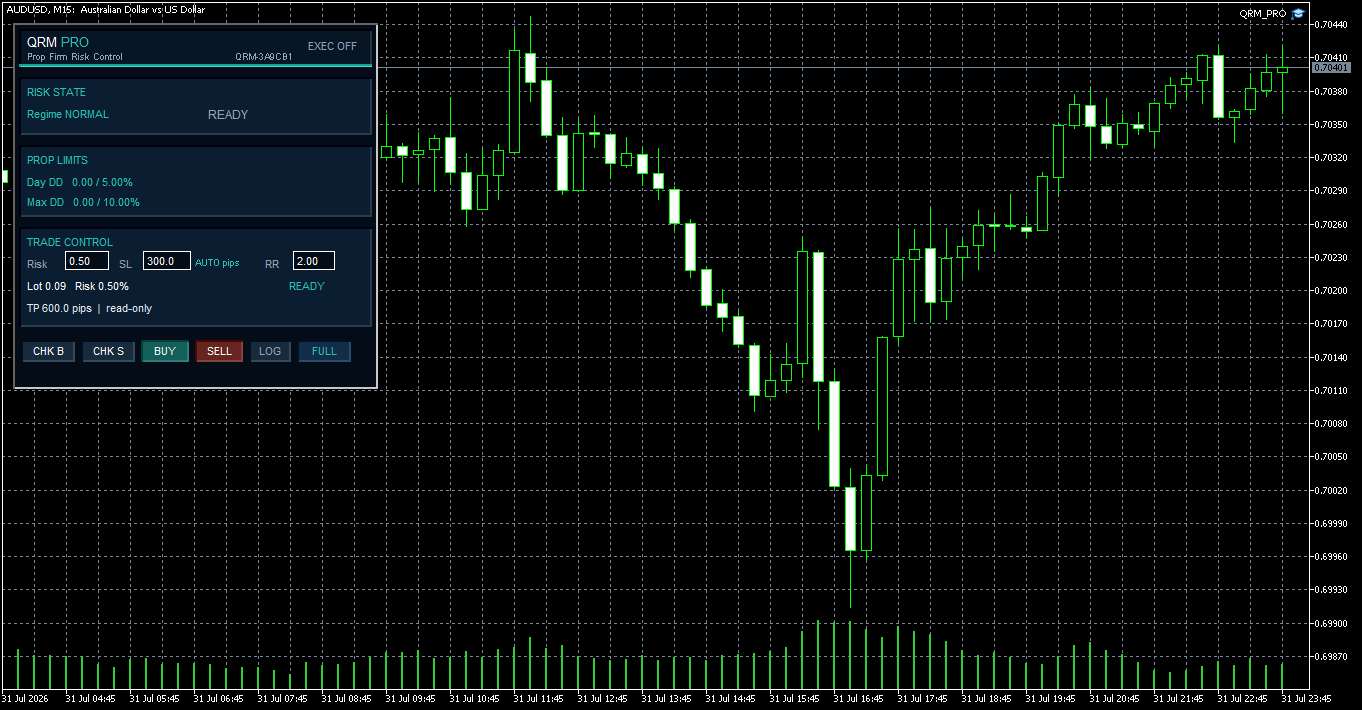
MINI mode retains the essential operational information while reducing the panel footprint on the chart.
It includes:
- Risk state and primary limits
- Risk
- SL
- RR
- volume
- status
- operating buttons
- compact workflow
Both interfaces use the same operational state.
Trade inputs can persist per chart, while the selected FULL/MINI mode can be remembered independently for each instance.
The FULL and MINI interfaces are shown in the first and third images of this article, so they do not need to be duplicated again here.
13. Configuration
The commercial release exposes the operating parameters used to define:
- initial risk
- Risk/Reward
- distance units
- drawdown and target limits
- portfolio controls
- margin controls
- execution authorization
- panel behaviour
- persistence
- structured reporting
Risk-related and execution-related settings should be changed only when their operational consequences are understood.
14. Optional QIF PRO market-context integration
Starting from version 1.001, QRM PRO can optionally read the closed-bar market context produced by QIF PRO – Market Regime Engine.
The integration is disabled by default. When it is disabled, QRM PRO continues to operate as a completely independent risk-governance utility.
To enable the connection:
- install QIF PRO from the MQL5 Market;
- set EnableQIFIntegration=true;
- keep the default indicator path:
Market\Qif Pro Market Regime Engine
QRM PRO reads the most recent completed candle, corresponding to shift 1, and can display:
- QIF State;
- QIF Risk;
- QIF Confidence;
- QIF Directional Bias.
Information mode
In information mode, the QIF context is displayed on the QRM PRO panel and included in the diagnostic information.
It does not modify the selected risk and does not affect the pre-trade decision.
Adaptive risk mode
In adaptive mode, QRM PRO can apply an additional QIF multiplier to the risk already calculated by its internal risk engine.
The integration is reduction-only.
QIF PRO can reduce the final risk, but it can never increase the risk configured by the user or override another QRM PRO protection.
The default multipliers are:
- High QIF Risk or low Confidence: x0.25
- NEUTRAL: x0.50
- CHARGE: x0.75
- RELEASE: x1.00
These values are configurable, but QRM PRO constrains the resulting multiplier to a maximum of x1.00.
QIF market Risk must not be confused with monetary or account risk. It describes relative market instability and is used only as contextual information for the optional reduction mechanism.
Safe fallback
If QIF PRO is missing, unavailable, still loading or its data are stale, QRM PRO automatically uses:
QIF multiplier = x1.00
QRM PRO therefore continues independently and the configured risk remains unchanged.
A symbol or timeframe change invalidates the previous QIF context and causes the connection to be initialized again for the new chart context.
The QIF integration does not generate BUY or SELL signals, approve trades, replace CHK B or CHK S, or bypass any account, portfolio, margin, broker or execution control already applied by QRM PRO.
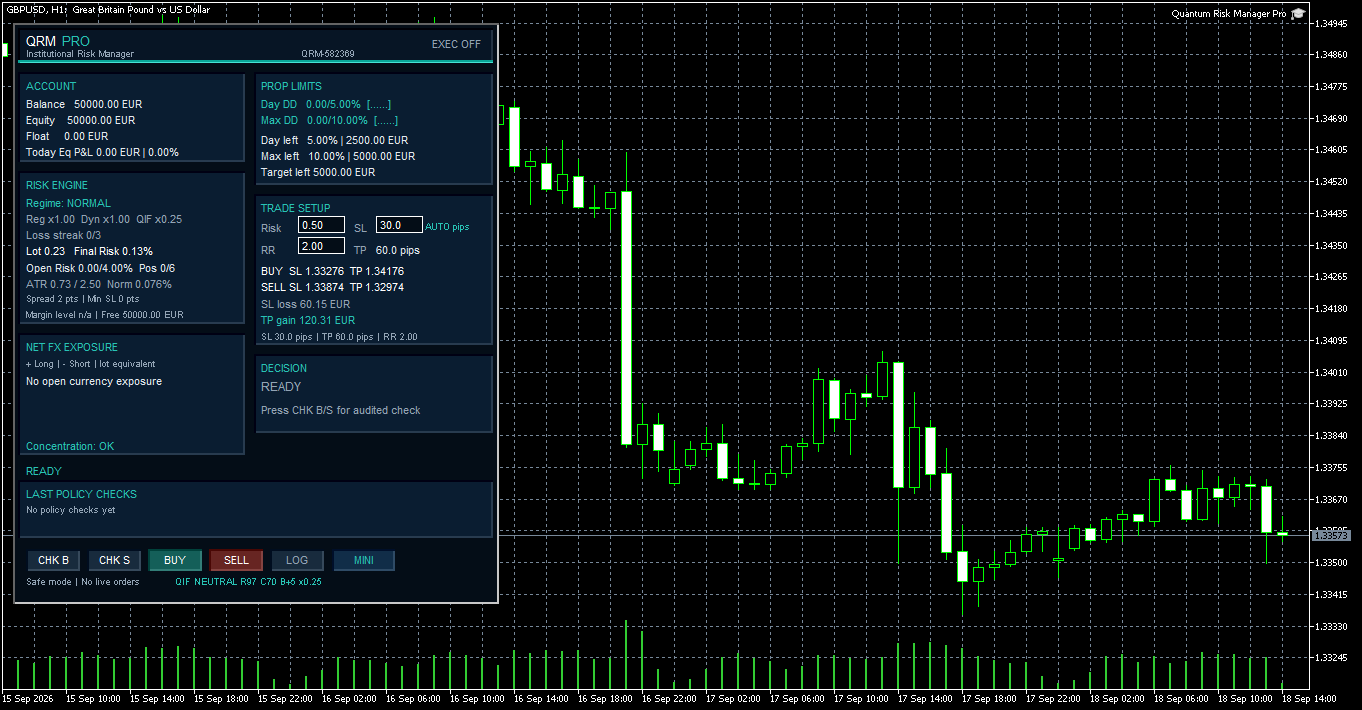
Fig. 14 - QRM PRO v1.001 in adaptive QIF mode. QIF market context reduces the configured risk from 0.50% to a final risk of 0.13% through a reduction-only multiplier of x0.25.
15. Prop-challenge model and declared boundaries
QRM PRO provides a configurable prudential model for monitoring:
- Daily Drawdown
- Maximum Drawdown
- Profit Target
using account data returned by MetaTrader 5.
It can block a new proposal based on its projected impact on the configured policy.
However, prop-firm rules are not imported automatically.
Static model, not trailing
The current release does not replicate:
- trailing drawdown
- high-watermark rules
- proprietary prop-firm formulas
The official rules and dashboard of the prop firm remain the binding reference.
What QRM PRO does not do
QRM PRO does not:
- generate BUY or SELL signals
- decide when to enter the market
- select a trading strategy
- predict market direction
- guarantee profits
- guarantee successful completion of a prop challenge
- import prop-firm rules automatically
- reproduce proprietary trailing-drawdown or high-watermark models
- close, move or automatically modify existing positions in the current release
- guarantee that a broker will accept an order
- guarantee universal compatibility with every broker, account currency or instrument
- remove trading risk
- replace the trader's independent judgment
These boundaries are deliberate.
QRM PRO is an operational-support and risk-control utility, not a forecasting system.
Conclusion
Lot sizing answers the question:
What volume corresponds to the selected risk?
Risk governance must also ask:
- Is the selected distance unit understood?
- Is that volume actually representable?
- Is margin capacity adequate?
- Is the configured drawdown capacity adequate?
- Can the existing portfolio absorb the proposed risk?
- Is the operating context still valid?
- Are the required execution permissions complete?
- Is the market currently available for execution?
QRM PRO was created to make that assessment explicit, repeatable and traceable.
It does not attempt to forecast the market.
Its purpose is to prevent an order from being submitted before its operating consequences, permissions and state are understood.
QRM PRO for MetaTrader 5
Commercial release v1.001
Public English User Manual: Edition 1.7
Product reference: Quantum Risk Manager Pro on MQL5 Market
Risk warning
Trading involves risk.
QRM PRO is an operational-support and risk-control tool.
It does not constitute financial advice and does not guarantee profits, automatic compliance with every prop-firm rule, successful completion of a challenge or the absence of losses.
Calculation accuracy and operating behaviour depend on data and trading conditions supplied by MetaTrader 5 and the broker.
Every trading decision and every order remain the responsibility of the user.
TRADE | GOVERN | PROTECT
Risk control. Decisions approved.




