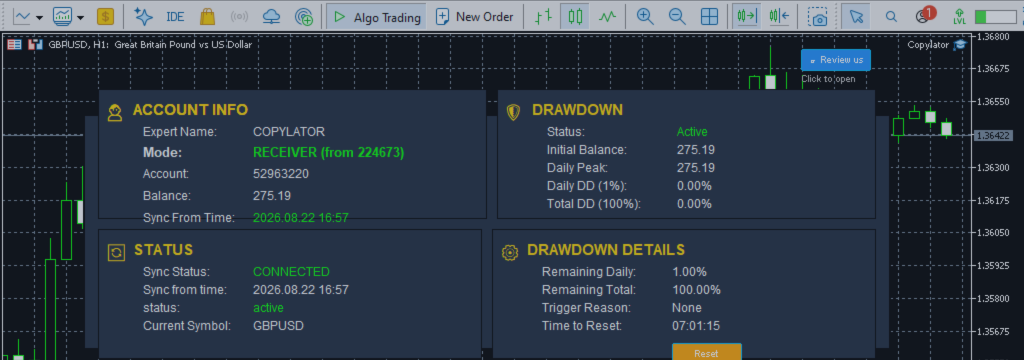
MT5 Trade Copier: Symbol Mapping and Auto-Detection for Multi-Broker Copy Trading

Product link:
https://www.mql5.com/en/ market/product/191385
One of the most common challenges when copying trades between different brokers is the difference in symbol names. The same financial instrument can have completely different names depending on the broker, account type, or trading environment.
For example, one broker may use XAUUSD for Gold, while another may use XAUUSDm, GOLD, XAUUSD.pro, or another variation.
This is where Symbol Mapping becomes an essential feature of a professional MT5 Trade Copier. It allows the copier to identify the correct instrument on the Receiver broker and replicate trades without requiring the trader to manually configure every symbol in advance.
Why Symbol Mapping Is Important
When two MT5 accounts use different brokers, their symbol naming conventions may not be identical. A trade copied using the original symbol name may fail if that symbol does not exist on the Receiver account.
For example:
| Sender Broker | Receiver Broker | Possible Mapping |
|---|---|---|
| XAUUSD | XAUUSDm | XAUUSD:XAUUSDm |
| EURUSD | EURUSD.pro | EURUSD:EURUSD.pro |
| GBPUSD | FX_GBPUSD | GBPUSD:FX_GBPUSD |
Without symbol mapping, the Receiver may not know which instrument corresponds to the Sender's symbol. This can result in failed trade execution or skipped trades.
Automatic Symbol Detection
COPYLATOR includes automatic symbol mapping designed to identify the corresponding symbol on the Receiver broker.
Instead of requiring the trader to manually create mappings for every instrument, the system searches the available symbols and attempts to find the correct match.
The automatic detection process can take common symbol naming variations into consideration, including:
- Different prefixes.
- Different suffixes.
- Broker-specific symbol variations.
- Alternative naming conventions.
- Standard Forex and CFD symbol structures.
This significantly simplifies the configuration process when multiple MT5 terminals from different brokers are being used.
Prefixes and Suffixes
Many brokers add prefixes or suffixes to their symbols depending on the account type or trading environment.
For example, a broker may use:
XAUUSD XAUUSDm XAUUSD.pro XAUUSD.ecn FX_XAUUSD
These symbols may represent the same underlying instrument but are technically different symbol names inside MetaTrader 5.
An intelligent mapping system helps identify these variations and select the appropriate Receiver symbol.
Manual Symbol Mapping
Although automatic detection can handle many common naming differences, traders may encounter brokers with unique symbol structures.
In these situations, COPYLATOR supports manual symbol mapping.
The mapping format is simple:
SenderSymbol:ReceiverSymbol
For example:
XAUUSD:XAUUSDm EURUSD:EURUSD.pro GBPUSD:FX_GBPUSD
This gives the trader complete control over how a particular Sender symbol should be translated on the Receiver account.
Automatic Detection + Manual Override
One of the advantages of combining automatic detection with manual mapping is flexibility.
The copier can first attempt to identify the correct symbol automatically. If the automatic process does not find a suitable match, the trader can provide a manual mapping for that specific instrument.
This approach minimizes configuration work while still allowing precise control when required.
What Happens When a Symbol Cannot Be Found?
A professional trade copier should not blindly execute a trade when the corresponding instrument cannot be identified.
If COPYLATOR cannot automatically find the required symbol and no manual mapping has been configured, the system provides a clear warning identifying the missing symbol.
The trader can then add the required mapping using the SymbolMappings setting.
If the symbol remains unmapped, the trade is skipped rather than being executed on an incorrect instrument.
This behavior is important because copying a trade to the wrong instrument could create completely different market exposure.
Real-Time Symbol Mapping
Symbol mapping is applied when trading activity is received from the Sender.
When a new trade arrives, the copier determines which Receiver symbol should be used before attempting to execute the trade.
Sender Trade
      ↓
Read Sender Symbol
      ↓
Automatic Symbol Detection
      ↓
Symbol Found?
   ↓ Yes       ↓ No
Use Symbol   Check Manual Mapping
                 ↓
             Mapping Found?
              ↓ Yes     ↓ No
           Use Mapping  Warning / Skip
This process helps ensure that every copied trade is associated with the correct instrument before execution.
Symbol Mapping and Multi-Broker Trading
Symbol mapping becomes especially important when managing multiple Receiver accounts across different brokers.
For example, one Receiver may use XAUUSD while another uses XAUUSDm. A third broker may use GOLD.
Instead of changing the Sender's trading strategy, the copier can adapt the symbol to each Receiver environment.
| Receiver | Broker Symbol | Mapping Requirement |
|---|---|---|
| Receiver 1 | XAUUSD | Automatic / None |
| Receiver 2 | XAUUSDm | XAUUSD:XAUUSDm |
| Receiver 3 | GOLD | XAUUSD:GOLD |
This makes symbol mapping particularly valuable for multi-account and multi-broker copy trading.
Symbol Mapping and Pending Orders
Symbol mapping is not limited to standard market Buy and Sell positions.
When pending orders are being copied, the correct Receiver symbol is equally important because the pending order must be created on the appropriate instrument.
COPYLATOR supports common pending order types such as:
- Buy Limit.
- Sell Limit.
- Buy Stop.
- Sell Stop.
The corresponding Receiver symbol must be identified correctly before the pending order can be replicated.
Symbol Mapping and SL/TP Synchronization
Correct symbol identification is also important when synchronizing Stop Loss and Take Profit.
If the Sender uses XAUUSD while the Receiver uses XAUUSDm, the copier must correctly associate both instruments so that subsequent SL/TP modifications are applied to the corresponding Receiver trade.
This becomes especially important when the Sender modifies SL or TP after the original trade has already been opened.
Symbol Mapping and Lot Management
Symbol mapping also works alongside the copier's lot management system.
Once the correct Receiver instrument has been identified, the copier can apply the configured volume management rules, such as:
- Fixed lot size.
- Lot multiplier.
- Balance-ratio scaling.
- Maximum lot limitation.
This allows symbol selection and risk-based volume calculation to operate as separate but complementary parts of the copying process.
Mapping Cache and Performance
Advanced trade copiers can improve efficiency by caching previously resolved symbol mappings.
Once a Sender symbol has been successfully matched with a Receiver symbol, the result can be reused for subsequent trades involving the same instrument.
This reduces unnecessary repeated symbol searches and helps maintain efficient processing when many trades and multiple instruments are being copied.
Caching can be particularly useful in larger multi-account configurations where the same symbols are frequently traded across multiple MT5 terminals.
Common Symbol Mapping Problems
Several issues can cause symbol mapping to fail:
- The Receiver broker uses a completely different symbol name.
- The instrument is not available on the Receiver account.
- The symbol exists but is hidden in Market Watch.
- A broker-specific prefix or suffix is not recognized automatically.
- The manual mapping contains an incorrect symbol name.
- The instrument is unavailable because of account or broker restrictions.
Clear warnings and manual mapping options help traders identify and resolve these problems before they result in repeated failed copying attempts.
Best Practices for Symbol Mapping
- Test all symbols on demo: Verify that every important instrument is mapped correctly before live trading.
- Check broker specifications: Confirm the exact symbol names available on each Receiver account.
- Use manual mappings when necessary: Do not rely exclusively on automatic detection for unusual broker naming conventions.
- Review mappings after adding a new broker: Different brokers may use completely different symbol structures.
- Monitor warnings: Resolve missing-symbol alerts promptly.
- Avoid incorrect mappings: Never map two unrelated instruments simply because their names look similar.
Configuration Parameters
| Parameter | Description |
|---|---|
| EnableSymbolMapping | Enables automatic symbol replacement and mapping. |
| SymbolMappings | Defines manual Sender-to-Receiver symbol mappings. |
| MaxSpread | Limits copying when the Receiver spread exceeds the configured value. |
Example: XAUUSD Mapping
Suppose the Sender broker uses:
XAUUSD
But the Receiver broker uses:
XAUUSDm
The manual mapping can be configured as:
XAUUSD:XAUUSDm
When a trade is received for XAUUSD, COPYLATOR can use XAUUSDm on the Receiver account.
This same principle can be applied to Forex pairs, indices, commodities, and other supported instruments where brokers use different symbol naming conventions.
Why Symbol Mapping Matters for Professional Copy Trading
For traders managing multiple MT5 accounts, manual symbol conversion can quickly become complicated.
Imagine managing ten or twenty Receiver accounts, each potentially using different symbol names. Manually configuring every trade would be impractical and would introduce unnecessary opportunities for human error.
Automatic symbol detection reduces this administrative workload while manual overrides provide additional control when required.
This makes Symbol Mapping an important component of a reliable MT5 Trade Copier.
Conclusion
Symbol Mapping and Auto-Detection solve one of the most common technical challenges in multi-broker copy trading: different brokers using different names for the same instruments.
By automatically searching for matching symbols, supporting prefixes and suffixes, providing manual overrides, and displaying clear warnings when a symbol cannot be found, COPYLATOR makes cross-broker trade replication significantly easier to configure and manage.
The ability to combine automatic detection with manual mapping gives traders both convenience and control. When used together with real-time SL/TP synchronization, flexible lot management, drawdown protection, and multi-sender/multi-receiver support, symbol mapping becomes an important part of a professional MT5 copy trading environment.
Before using any mapping configuration with real funds, traders should verify the symbols and execution behavior on a demo account and confirm that each mapped instrument represents the intended market.
Product link:
https://www.mql5.com/en/ market/product/191385


