
Product link:
https://www.mql5.com/en/ market/product/191385
Day and Time Filters are essential risk management tools in a professional MT5 Trade Copier. They allow traders to control exactly when trades are copied from one MT5 account to another.
Instead of copying every trade regardless of when it occurs, traders can define specific trading days and daily time windows. This provides greater control over market exposure and allows the copying system to operate according to a predefined trading schedule.
By restricting copying to selected days and hours, traders can avoid periods with low liquidity, unfavorable spreads, excessive volatility, or trading conditions that do not match their strategy.
What Are Day and Time Filters?
Day and Time Filters determine when the trade copier is allowed to replicate trades.
The Day Filter controls which weekdays are enabled for copying, while the Time Filter defines the permitted trading window during each day.
For example, a trader may allow copying from Monday to Friday but restrict the actual trading window to a specific GMT session.
| Filter | Purpose |
|---|---|
| Day Filter | Controls which weekdays are allowed. |
| Time Filter | Controls the permitted daily GMT trading window. |
| Auto-Close | Optionally closes copied positions when the time window ends. |
Day Filter
The Day Filter allows traders to individually enable or disable copying for each weekday from Monday through Friday.
This provides more control than simply enabling or disabling the copier globally. Each day can have its own permission, allowing traders to create a schedule that matches their strategy.
For example, a trader may choose to copy trades on Monday, Tuesday, Wednesday, and Thursday while disabling copying on Friday.
Example Weekly Configuration
| Day | Copying |
|---|---|
| Monday | Enabled |
| Tuesday | Enabled |
| Wednesday | Enabled |
| Thursday | Enabled |
| Friday | Disabled |
This type of configuration can be useful for traders who prefer to reduce exposure toward the end of the trading week.
Time Filter
The Time Filter allows traders to define a specific GMT time window during which new trades can be copied.
For example, a trader could configure a daily copying window such as:
StartHourGMT = 08:00 EndHourGMT = 16:00
Trades received during the permitted window can be copied, while trades received outside the configured window are skipped.
This makes it possible to build session-based copy trading strategies without requiring the trader to manually enable or disable the copier throughout the day.
Why Use a Time Filter?
Financial markets behave differently throughout the trading day. Liquidity, spreads, volatility, and trading activity can vary significantly between sessions.
A trader may therefore prefer to copy trades only during the hours that historically provide the most suitable conditions for their strategy.
- Focus on preferred trading sessions.
- Avoid periods of reduced liquidity.
- Reduce exposure during unfavorable market hours.
- Limit copying during periods of potentially wider spreads.
- Maintain a consistent trading schedule.
- Automate trading-hour restrictions.
Session-Based Copy Trading
One of the most useful applications of a Time Filter is session-based trading.
Forex traders may prefer to focus on periods when major markets are active and liquidity is generally higher. A trader can therefore configure the copier to operate only during the preferred session or sessions.
This can help eliminate trades generated outside the trader's selected operating period.
Auto-Close at the End of the Trading Window
One of the most useful options is CloseOrdersAtEnd.
When enabled, the copier can automatically close copied positions when the configured trading window ends.
This is particularly useful for traders who do not want to keep copied positions open outside their designated trading session.
Example
StartHourGMT = 08:00
EndHourGMT   = 16:00
CloseOrdersAtEnd = true
With this configuration, copying is permitted during the selected window. When the window ends, the configured auto-close function can close the copied positions on the Receiver account.
Reducing Overnight Exposure
Some traders prefer not to hold positions overnight because market conditions can change significantly outside their normal trading hours.
Using a Time Filter together with the optional Auto-Close feature can help automate this process.
Instead of manually checking every open position before the end of the trading session, the system can apply the configured schedule automatically.
Weekend Risk Management
Day Filters can also be useful for traders who want to reduce exposure around the end of the trading week.
Although the standard Forex trading week generally runs from Monday through Friday, market conditions can become different toward the weekend. Traders may prefer to disable new copying on Friday or use Auto-Close to avoid carrying positions beyond their preferred trading period.
The exact configuration should always be based on the trader's strategy, broker conditions, and risk management plan.
How the Filter Works in Real Time
The filters are evaluated when trading activity is received by the Receiver.
If a new trade arrives during an allowed day and within the configured time window, the copier can process it according to the other configured settings.
If the trade arrives on a disabled day or outside the permitted time window, the trade is skipped.
Trade received ↓ Check Day Filter ↓ Allowed? ↓ Yes ↓ No Check Time Skip Trade Filter ↓ Within Window? ↓ Yes ↓ No Copy Trade Skip Trade
This allows the copier to continuously monitor incoming trading activity while automatically applying the user's schedule.
Day and Time Filters with Lot Management
Day and Time Filters can be combined with the flexible lot management features of an MT5 Trade Copier.
For example, a Receiver can use balance-ratio scaling during its permitted trading hours while simultaneously applying a maximum lot limitation.
- Day filtering.
- Time filtering.
- Fixed lot sizing.
- Lot multiplier.
- Balance-ratio scaling.
- Maximum lot limitation.
Combining these controls allows traders to define not only when trades are copied, but also how much exposure each copied trade should create.
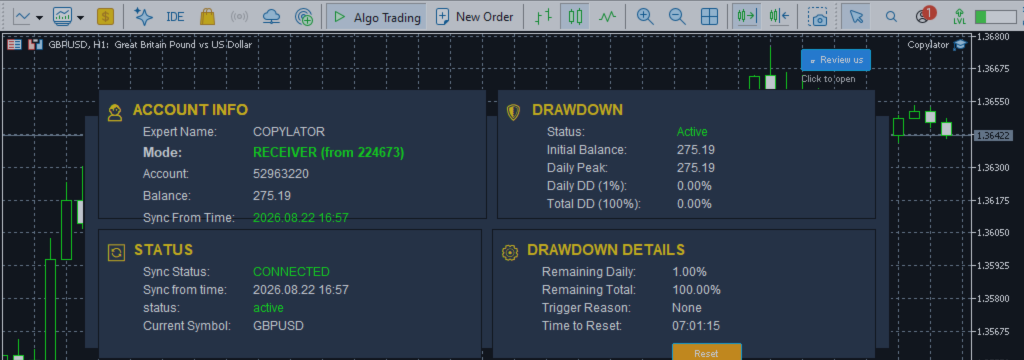
Day and Time Filters with Drawdown Protection
Another powerful combination is the use of Time Filters with Drawdown Protection.
The Time Filter controls the trading schedule, while Drawdown Protection controls the maximum permitted loss.
For example, a Receiver may be configured to:
- Copy trades only during specific GMT hours.
- Stop copying when the daily drawdown limit is reached.
- Stop copying when the total drawdown limit is exceeded.
- Close positions at the end of the trading window.
This creates multiple layers of automated risk control around the copying process.
Configuration Parameters
| Parameter | Description |
|---|---|
| AllowMonday | Enable or disable copying on Monday. |
| AllowTuesday | Enable or disable copying on Tuesday. |
| AllowWednesday | Enable or disable copying on Wednesday. |
| AllowThursday | Enable or disable copying on Thursday. |
| AllowFriday | Enable or disable copying on Friday. |
| EnableTimeFilter | Enables or disables the daily time restriction. |
| StartHourGMT / StartMinuteGMT | Defines the beginning of the permitted GMT window. |
| EndHourGMT / EndMinuteGMT | Defines the end of the permitted GMT window. |
| CloseOrdersAtEnd | Automatically closes copied positions when the time window ends. |
Practical Configuration Example
Consider a trader who wants to copy trades from Monday through Thursday and operate only during a defined GMT session.
AllowMonday    = true
AllowTuesday   = true
AllowWednesday = true
AllowThursday  = true
AllowFriday    = false

EnableTimeFilter = true

StartHourGMT   = 08:00
EndHourGMT     = 16:00

CloseOrdersAtEnd = true
With this configuration, trades arriving on Monday through Thursday during the selected time window can be copied. Friday copying is disabled, and positions can be automatically closed when the daily window ends if the Auto-Close option is enabled.
Benefits for Part-Time Traders
Day and Time Filters can be particularly useful for traders who cannot monitor their MT5 accounts continuously.
Instead of manually turning copying on and off, traders can define their preferred schedule in advance.
This provides a more disciplined approach to automated trade replication and reduces the need for constant manual intervention.
Important Considerations
- Confirm that the configured time zone is appropriate for your trading plan.
- Use the GMT settings consistently when defining the daily window.
- Consider broker trading hours and instrument-specific market schedules.
- Be aware that market holidays can affect liquidity and execution.
- Consider major news events when defining trading windows.
- Test the configuration on a demo account before using it with real funds.
- If using Auto-Close, make sure its behavior matches your overall trading strategy.
Best Practices
- Define your trading session: Identify the hours that best match your strategy.
- Use individual day controls: Disable days when you do not want new trades copied.
- Test different windows: Compare results before selecting a permanent schedule.
- Combine with risk controls: Use drawdown protection and appropriate lot sizing.
- Use a reliable VPS: Continuous terminal operation is important for automated copying.
- Test Auto-Close: Verify its behavior on demo accounts before live deployment.
Conclusion
Day and Time Filters transform an MT5 Trade Copier from a simple signal replication system into a more disciplined, schedule-based trading tool.
By controlling both the days of operation and the daily GMT trading window, traders can determine exactly when new trades are allowed to be copied.
The optional CloseOrdersAtEnd feature adds another layer of automation by allowing copied positions to be closed when the configured trading session ends.
When combined with flexible lot management, drawdown protection, real-time SL/TP synchronization, symbol mapping, and other copier features, Day and Time Filters provide a comprehensive framework for controlling when and how trades are replicated across MT5 accounts.
For traders who prefer session-based strategies, reduced market exposure, or a more automated approach to account management, these filters can be an important part of a professional copy trading configuration.
Product link:
https://www.mql5.com/en/ market/product/191385


