
TradeMantra Gold EA — Installation, Settings and Strategy Tester Guide

TradeMantra Gold EA — Installation, Settings and Strategy Tester Guide
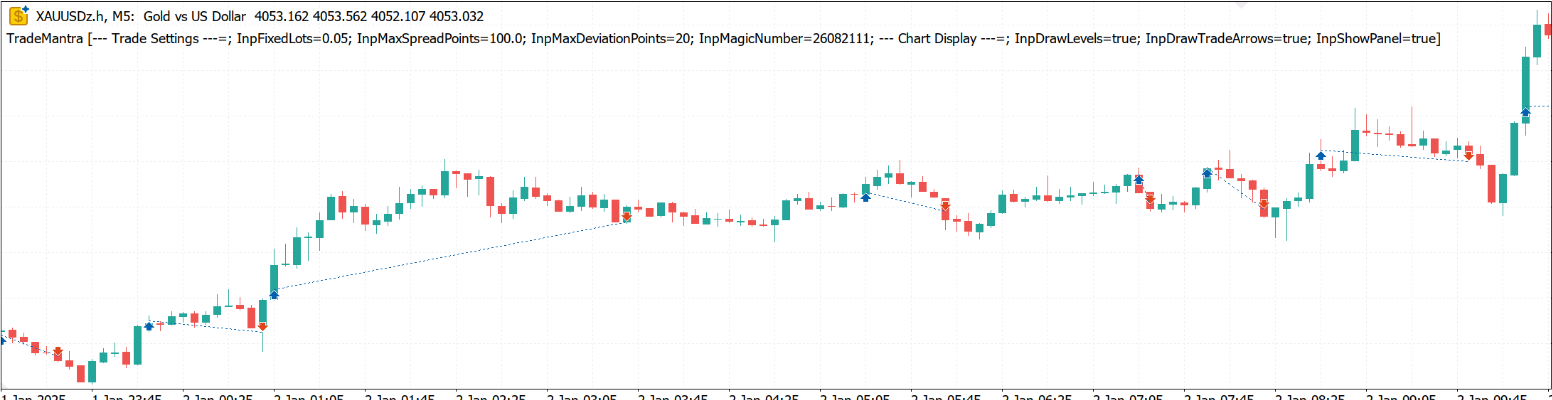
TradeMantra Gold is a long-only trend-following Expert Advisor developed for XAUUSD on MetaTrader 5. It uses M5 market structure for trade execution together with an H1 trend filter.
The EA is designed around transparent, rule-based trading. It does not use martingale, grid trading, averaging down, recovery sequences or lot multiplication.
TradeMantra Gold EA Strategy
TradeMantra Gold monitors a 20-period price channel on M5. A possible long entry is detected when the live Bid price crosses the upper channel level.
Before opening a position, the EA checks several conditions:
• The XAUUSD price must be above the 200-period EMA calculated on H1.
• The spread must remain within the configured maximum.
• The price must not move too far beyond the original breakout level.
• The broker’s trading session must be open.
• The account must have sufficient free margin.
• No conflicting position may already exist on the same symbol.
The current version is long-only. Sell entries are disabled.
Trade Management and Protection
Every TradeMantra Gold position is opened with an initial protective stop loss calculated using ATR 20 multiplied by 2.5.
A long position is normally closed when the price crosses the 10-period M5 exit channel. The initial protective stop remains active as an additional risk-control mechanism.
The EA does not use a fixed take-profit target. Its channel-based exit allows a position to remain open while the trend continues.
TradeMantra Gold manages one of its own positions on the selected symbol at a time. It does not attempt to manage manual trades or positions opened by another Expert Advisor.
Main Features
• Designed for XAUUSD on MetaTrader 5
• M5 live-tick breakout execution
• H1 EMA 200 trend filter
• 20-period entry channel
• 10-period exit channel
• ATR-based initial protective stop loss
• Fixed-lot trading with 0.05 as the default
• Spread protection
• Entry-distance protection
• Broker-session validation
• Free-margin verification before sending an order
• Automatic broker lot-step normalization
• On-chart channel levels, trade arrows and information panel
• No martingale
• No grid
• No averaging down
• No recovery sequence
• No lot multiplication
How to Install TradeMantra Gold EA
-
Open MetaTrader 5.
-
Sign in to your MQL5 account from the platform.
-
Open the Market section and locate TradeMantra Gold.
-
Download the Free Demo for Strategy Tester evaluation, or install the rented version after purchase.
-
Open the Navigator window in MetaTrader 5.
-
Locate TradeMantra Gold under Expert Advisors.
-
Open an XAUUSD chart. Broker symbols may include suffixes such as XAUUSDm, XAUUSD.a or XAUUSDz. Attach the EA directly to your broker’s corresponding gold symbol.
-
Use an M5 chart for the clearest visual representation of the strategy.
-
Drag TradeMantra Gold onto the chart.
-
Enable “Allow Algo Trading” in the EA settings and activate the Algo Trading button in MetaTrader 5.
-
Confirm that the TradeMantra information panel and channel levels appear on the chart.
TradeMantra Gold EA Inputs
Fixed lot size — 0.05
This is the trading volume used for each position by default. It is not automatically adjusted according to account balance.
The appropriate lot size depends on account equity, leverage, broker contract specifications and personal risk tolerance. Test a suitable lot size before using the EA on a live account.
Maximum spread — 100 broker points
The EA will not open a new position when the current spread exceeds this value.
Broker points are not always equivalent to pips or fixed price units. The monetary meaning of 100 points can differ between brokers because XAUUSD pricing and symbol specifications vary.
Maximum deviation — 20 broker points
This controls the maximum permitted price deviation when the EA sends or closes an order. It does not guarantee execution at the requested price.
Magic number — 26082111
This identifies positions opened by TradeMantra Gold. Use a different magic number if running another independent instance that should be identified separately.
Draw Channel Levels — true
Displays the entry and exit channel levels on the chart.
Draw Trade Arrows — true
Displays entry and exit markers produced by the EA.
Show Information Panel — true
Displays the current strategy state and relevant information on the chart.
Recommended Initial Configuration
Symbol: XAUUSD or your broker’s equivalent gold symbol
Chart timeframe: M5
Fixed lot: Choose according to your own testing; default is 0.05
Algo Trading: Enabled
VPS: Recommended if continuous operation is required
Do not assume that the default 0.05 lot is suitable for every account. A smaller account, different leverage or a broker with different gold contract specifications may require a smaller volume.
How to Backtest TradeMantra Gold EA
-
Open the MetaTrader 5 Strategy Tester.
-
Select TradeMantra Gold as the Expert Advisor.
-
Select your broker’s XAUUSD symbol.
-
Select M5 as the testing timeframe.
-
Choose “Every tick based on real ticks” whenever complete real-tick history is available.
-
Select the required testing period.
-
Set Forward testing to “No” for a normal historical test.
-
Disable optimization for a single backtest.
-
Enter the deposit, currency and leverage you want to evaluate.
-
Check the Inputs tab and choose a fixed lot appropriate for the test deposit.
-
Press Start.
-
After completion, review the Backtest and Graph tabs. Pay particular attention to equity drawdown, balance drawdown, profit factor, recovery factor, number of trades and losing periods—not only total net profit.
Example Backtest Configuration Used in the Published Screenshots

Expert Advisor: TradeMantra Gold
Symbol: XAUUSD
Timeframe: M5
Modelling: Every tick based on real ticks
Initial deposit: 5,000 USD
Leverage: 1:200
Optimization: Disabled
Fixed lot: 0.05

One published long-term test covers January 2020 through August 2026 using custom XAUUSD tick data with 98% reported history quality.
The published screenshots also include shorter tests using real-tick data and different broker environments. These tests are provided to demonstrate historical behaviour, not to guarantee future profitability.
Testing Across Different Brokers
XAUUSD can differ considerably between brokers. Differences may include:
• Symbol name and suffix
• Number of digits
• Contract size
• Tick size and tick value
• Minimum trading volume
• Volume step
• Spread
• Commission
• Swap
• Trading sessions
• Stop and freeze levels
• Available historical tick data
• Slippage and execution quality

For this reason, buyers should test TradeMantra Gold using their intended broker’s own XAUUSD data and account specifications.
A result obtained from one broker should not be assumed to reproduce identically on another broker.
Understanding Backtest Limitations
Historical testing cannot reproduce every live-trading condition. Zero-latency testing may not include realistic network delay, slippage, requotes or sudden spread expansion.
A professional evaluation should include:
• Long-term testing across different market conditions
• Recent-period testing
• Tests using the intended broker’s real-tick data
• Tests with realistic execution delays
• Tests with wider spreads
• Forward testing on a demo account
• Conservative lot sizing
Strong historical growth can still include extended losing periods and meaningful drawdowns. Examine the complete equity curve rather than judging an EA only by its final balance.
Important Operating Notes
• TradeMantra Gold requires MetaTrader 5.
• The strategy is designed for XAUUSD.
• M5 is the official execution timeframe.
• The current release opens long positions only.
• Continuous operation requires MetaTrader 5 and Algo Trading to remain active.
• A VPS may be useful when the trading terminal cannot remain continuously connected.
• Avoid changing the symbol or removing the EA while it is managing an open position.
• Manual or third-party positions on the same symbol may prevent a new TradeMantra entry.
• Always confirm that the broker permits automated trading.
Risk Warning
Trading gold with leverage involves substantial risk. Losses can exceed expectations during volatile market conditions, price gaps, spread expansion or execution delays.
Backtests, screenshots and historical statistics do not guarantee future performance. TradeMantra Gold cannot eliminate market risk or broker-execution risk.
Use the Free Demo in the MetaTrader 5 Strategy Tester before considering a rental. Begin with a demo account and select a fixed lot that matches your account size and risk tolerance.
TradeMantra Gold EA on MQL5 Market
Free Demo and rental options are available here:
https://www.mql5.com/en/market/product/192212



![[iVISTscalp5]: XAUUSD. Forecast First. Market Reaction Afterwards](https://c.mql5.com/6/1035/splash-preview-777232.png "[iVISTscalp5]: XAUUSD. Forecast First. Market Reaction Afterwards")
