
PRODUCT ACCESS LINK ON MQL5 MARKET:
- Copier MT5 To MT5
https://www.mql5.com/en/ market/product/191385
Managing multiple MetaTrader 5 accounts can become increasingly complex when different brokers, account types, symbols, and trading conditions are involved.
A professional trade copier must do more than simply send Buy and Sell commands from one terminal to another. It must understand how MetaTrader 5 manages positions and orders on each account and then use the appropriate synchronization method.
This is particularly important when working with Hedging and Netting accounts.
COPYLATOR is a local MT5 trade copier designed to synchronize trades between multiple MetaTrader 5 terminals running on the same computer or VPS. One of its important capabilities is automatic detection of the broker's account type.
COPYLATOR automatically detects whether the account operates in Hedging or Netting mode and applies the appropriate synchronization logic.
No manual Hedging/Netting configuration is required.
This makes the system easier to configure while also reducing the possibility of using an incorrect synchronization method for the account structure.
Why Hedging and Netting Matter in MT5 Trade Copying
Understanding the difference between Hedging and Netting is essential when operating a trade copier.
Although both account types allow traders to trade the same financial instruments, they manage positions differently.
In a Hedging account, multiple independent positions can exist on the same symbol.
For example, a trader can have:
- Buy 1.00 lot EURUSD
- Buy 0.50 lot EURUSD
- Sell 0.30 lot EURUSD
Each position remains an individual position with its own ticket.
A Netting account works differently. Instead of maintaining multiple independent positions on the same symbol, MT5 maintains one net position per symbol.
For example:
- Buy 1.00 lot EURUSD
- Sell 0.30 lot EURUSD
The resulting net position becomes:
Buy 0.70 lot EURUSD
This fundamental difference means that a trade copier cannot always use the same synchronization logic for both account types.
COPYLATOR automatically handles this distinction.
Hedging Account Support
On Hedging accounts, multiple positions can exist simultaneously on the same symbol.
COPYLATOR synchronizes these positions individually using ticket-based mapping between the Master and Slave terminals.
When a Master position is opened, COPYLATOR creates the corresponding Slave position and maintains the relationship between the two trades.
This ticket-based approach is particularly useful when several trades are opened on the same symbol.
For example, imagine the Master account opens:
- Buy EURUSD 1.00 lot
- Buy EURUSD 0.50 lot
- Sell EURUSD 0.20 lot
On a Hedging account, these are three separate positions.
COPYLATOR can maintain the individual relationship between the Master positions and their corresponding Slave positions.
This makes it possible to synchronize operations such as:
- Opening positions
- Closing positions
- Modifying Stop Loss
- Modifying Take Profit
- Adding SL after entry
- Adding TP after entry
- Managing multiple positions independently
The individual ticket relationship is particularly important for strategies that open multiple positions on the same symbol.
Netting Account Support
Netting accounts use a fundamentally different position structure.
MT5 maintains one net position per symbol rather than multiple independent positions.
COPYLATOR automatically adapts to this structure.
Instead of attempting to reproduce every Master ticket independently, the EA reads the Master's net position and determines what net exposure should exist on the Slave.
For example, if the Master has:
Buy 2.00 lots EURUSD
and the Slave currently has:
Buy 1.00 lot EURUSD
COPYLATOR can determine that the Slave requires an additional 1.00 lot of Buy exposure.
Similarly, if the Master changes from a Buy position to a smaller net Buy position, the Slave position can be adjusted accordingly.
This approach is necessary because a Netting account does not treat every transaction as an independent open position.
The copier therefore needs to synchronize the resulting net exposure, rather than simply attempting to reproduce individual tickets.
Automatic Account-Type Detection
One of the most convenient features of COPYLATOR is automatic account-type detection.
The trader does not need to manually select:
Hedging
or
Netting
Instead, COPYLATOR detects the account structure automatically and applies the appropriate synchronization method.
This removes an additional configuration step and helps reduce setup mistakes.
It is especially useful when managing multiple terminals from different brokers because one broker may provide a Hedging account while another account may operate in Netting mode.
COPYLATOR can adapt to the actual MT5 account structure without requiring the user to maintain separate copier configurations simply because of the account type.
Master and Slave Accounts with Different Account Types
A particularly important advantage of automatic detection becomes apparent when Master and Slave terminals do not use the same account structure.
For example:
Master: Hedging account
Slave: Netting account
The copier cannot simply assume that the Slave can reproduce every individual Master ticket.
Instead, the Master side can provide the relevant trading information while the Slave side applies its own account-specific position management rules.
Similarly, the opposite configuration can also occur:
Master: Netting account
Slave: Hedging account
In this situation, the Slave has the ability to maintain individual positions, while the Master provides a net position structure.
The synchronization engine must therefore understand the account model on each side.
This is one of the reasons automatic account-type detection is an important feature in a professional MT5 trade copier.
Real-Time Stop Loss and Take Profit Synchronization
Trade copying does not end when an order is initially opened.
In real trading environments, traders frequently modify Stop Loss and Take Profit after entering a position.
COPYLATOR supports real-time SL/TP synchronization.
If the Master modifies the Stop Loss or Take Profit after the trade has already been opened, the change can be automatically detected and synchronized with the corresponding Slave trade.
This includes adding protection to a trade that originally had no Stop Loss or Take Profit.
For example:
The Master opens:
Buy EURUSD 1.00 lot
with:
No Stop Loss
Several seconds later, the trader adds:
Stop Loss = 1.08000
COPYLATOR can detect this modification and apply the corresponding Stop Loss to the matching Slave trade.
The same principle applies to Take Profit modifications.
This provides greater flexibility for traders who prefer to define their protective levels after the initial entry.
SL/TP Synchronization Across Hedging and Netting Accounts
The synchronization method automatically adapts to the account structure.
On Hedging accounts, COPYLATOR can manage SL and TP for individual positions according to their ticket mapping.
On Netting accounts, the EA manages SL and TP for the net position associated with the symbol.
This distinction is important because the same symbol can represent multiple independent positions on a Hedging account but only one net position on a Netting account.
COPYLATOR is designed to account for this difference automatically.
SL/TP synchronization also applies to supported pending orders.
Pending Order Synchronization
COPYLATOR is not limited to market Buy and Sell positions.
The system also supports pending orders, including:
- Buy Limit
- Sell Limit
- Buy Stop
- Sell Stop
Pending orders can be copied according to the configured settings.
This is important for strategies that rely on breakout entries, retracement entries, support and resistance levels, or predefined entry zones.
COPYLATOR can also synchronize Stop Loss and Take Profit information associated with supported pending orders.
This allows the Slave environment to maintain not only the intended entry level but also the associated risk-management parameters.
Advanced Symbol Mapping for Multi-Broker Copying
Another challenge in multi-account trade copying is that brokers may use different symbol names.
For example:
Master: XAUUSD
Slave: XAUUSDm
Or:
Master: EURUSD
Slave: EURUSD.a
The underlying instrument may be equivalent, but the symbol names are different.
COPYLATOR includes Advanced Symbol Mapping designed to handle these situations.
The EA can automatically search for the appropriate symbol on the Slave broker.
If a suitable symbol cannot be found, COPYLATOR provides a clear warning so the trader knows which symbol is missing.
The user can also define a manual mapping when necessary.
For example:
XAUUSD:XAUUSDm
This provides additional control when working with brokers that use unusual prefixes, suffixes, or custom symbol names.
Symbol mapping becomes particularly important when combining Hedging/Netting detection with multi-broker trade replication.
Flexible Lot Management
Account type is only one part of successful trade replication.
Account balances can also differ significantly between Master and Slave accounts.
COPYLATOR therefore provides flexible lot-management options.
The system supports:
- Fixed Lot Size
- Lot Multiplier
- Balance-Ratio Scaling
- Maximum Lot Limitation
These methods can be used independently or combined according to the desired configuration.
For example, the Slave can use the Master volume as the starting point, apply a multiplier, and then adjust the result according to the balance ratio.
If FixedLotSize is greater than zero, the fixed lot setting takes priority.
The final calculated volume is also limited by MaxLotSize and the broker's own volume restrictions.
This allows traders to adapt the same Master strategy to accounts with different balances and risk requirements.
Reverse Trade Mode
COPYLATOR also supports Reverse Trade Mode.
When enabled, Buy trades can be copied as Sell trades and Sell trades can be copied as Buy trades.
The system also adjusts Stop Loss and Take Profit levels according to the reversed trade direction.
This can be useful when traders intentionally want to use a Master strategy in the opposite direction on a Slave account.
Because the reversal affects both trade direction and associated price levels, automatic adjustment is important for maintaining logical risk-management parameters.
Drawdown Protection
COPYLATOR includes an advanced Drawdown Protection system designed to provide an additional layer of account protection.
The system can monitor daily and total drawdown based on either:
- Equity
- Balance
When a configured drawdown limit is reached, the system can be configured to close trades, block new trades, delete pending orders when closing is enabled, or use a combination of these actions.
A cooldown timer can also prevent new trades from being copied immediately after a drawdown event.
For example, a Slave account can be configured with:
Maximum Daily Drawdown = 5%
Maximum Total Drawdown = 10%
Cooldown = 60 minutes
This provides an additional safety mechanism for traders managing funded accounts, personal accounts, or copied strategies.
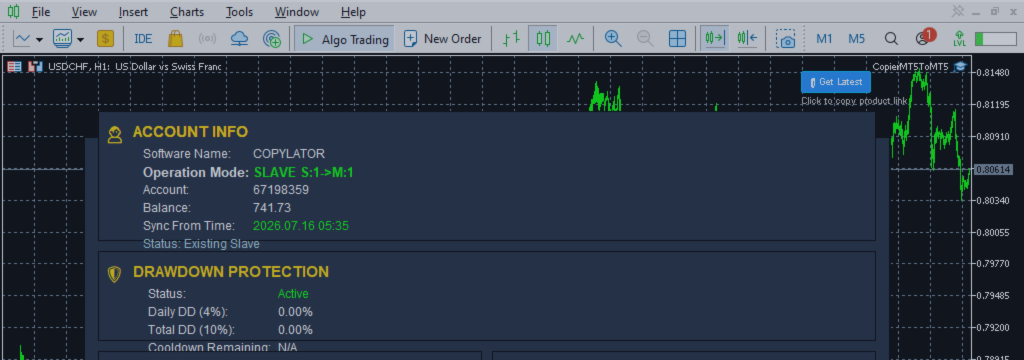
The system also provides a dedicated Drawdown Protection panel in the graphical dashboard for Slave mode.
Real-Time Slave Monitoring
When managing multiple Slave terminals, knowing whether each terminal is online is extremely important.
COPYLATOR provides real-time Slave monitoring from Master mode.
The dashboard can display information such as:
- Connection status
- Offline duration
- Synchronization status
- Latency
When a Slave becomes unavailable, the system can notify the trader.
The trader can choose to ignore a temporary issue or disable the Slave if it is expected to remain offline for an extended period.
Disabled Slaves can be automatically re-enabled when they return online.
This helps prevent unnecessary copy attempts while maintaining centralized visibility over the account network.
Graphical On-Chart Dashboard
COPYLATOR includes a graphical dashboard directly on the MT5 chart.
The dashboard provides information about:
- Account information
- Terminal information
- Operating mode
- Synchronization status
- Latency
- Slave connection status
- Drawdown Protection status
This makes it easier to monitor the copier without constantly checking terminal logs.
For multi-account environments, a visual monitoring interface can significantly improve operational awareness.
No DLL or External Dependencies
COPYLATOR is designed as a native MetaTrader 5 solution.
It does not require DLL files or external libraries.
The EA operates directly inside MT5 and uses a simple installation structure with one chart per terminal.
This makes deployment on VPS environments easier and reduces dependency-related installation problems.
Only one chart per terminal is required for normal operation.
Multiple Master and Slave Support
COPYLATOR supports multiple Master and Slave terminals concurrently.
This makes it possible to create larger account networks where different Masters can distribute trades to different groups of Slaves.
Unique MasterID and SlaveID settings help distinguish individual copier instances and maintain the correct relationships between terminals.
All terminals involved in synchronization must remain running for continuous copying.
For 24/7 operation, a stable VPS environment is recommended.
Why Automatic Hedging and Netting Detection Matters
Without automatic account-type detection, traders may need to manually determine the account structure of every MT5 terminal and configure the copier accordingly.
This becomes increasingly inconvenient when managing multiple brokers and accounts.
Automatic detection simplifies the process.
COPYLATOR determines the actual MT5 account structure and applies the appropriate synchronization logic.
This is particularly valuable when the trading network includes a mixture of:
- Retail broker accounts
- Prop firm accounts
- Personal accounts
- Different brokers
- Hedging accounts
- Netting accounts
The result is a more flexible trade-copying environment with fewer manual configuration requirements.
Complete Feature Overview
COPYLATOR combines automatic account-type detection with a broad range of trade-copying and risk-management capabilities.
Key features include:
- Automatic Hedging/Netting detection
- Hedging ticket-based synchronization
- Netting position-based synchronization
- Real-time SL/TP synchronization
- Adding SL/TP after trade entry
- Pending order copying
- Buy Limit support
- Sell Limit support
- Buy Stop support
- Sell Stop support
- Advanced automatic symbol mapping
- Manual symbol mapping
- Fixed lot sizing
- Balance-ratio scaling
- Lot multiplier
- Maximum lot limitation
- Reverse Trade Mode
- Buy-only filtering
- Sell-only filtering
- Day filters
- Time filters
- Advanced drawdown protection
- Drawdown cooldown
- Real-time Slave monitoring
- Graphical on-chart dashboard
- Multiple Master and Slave support
- No DLL
- No external dependencies
Conclusion
Hedging and Netting are fundamental differences in the way MetaTrader 5 manages positions, and a professional trade copier must understand these differences to synchronize accounts correctly.
COPYLATOR removes much of this complexity through automatic Hedging and Netting detection.
On Hedging accounts, the system can synchronize individual positions using ticket-based mapping.
On Netting accounts, COPYLATOR adapts to the net-position model and synchronizes the required exposure per symbol.
The system also extends beyond basic trade copying with real-time SL/TP synchronization, pending order replication, advanced symbol mapping, flexible lot management, drawdown protection, Slave monitoring, and a graphical dashboard.
This combination allows COPYLATOR to operate across a wide range of MT5 trading environments while reducing the amount of manual configuration required from the trader.
For traders managing multiple accounts, the objective is not simply to copy a Buy or Sell command. The real objective is to maintain the intended trading structure, position size, protective levels, and risk controls across every connected account.
By automatically adapting to Hedging and Netting account structures, COPYLATOR provides a more flexible and practical foundation for multi-account MT5 trade replication.
As always, traders should test the copier thoroughly on demo accounts before deploying it on live accounts, particularly when using different brokers, account types, lot-management settings, and drawdown-protection configurations.
PRODUCT ACCESS LINK ON MQL5 MARKET:
- Copier MT5 To MT5
https://www.mql5.com/en/ market/product/191385