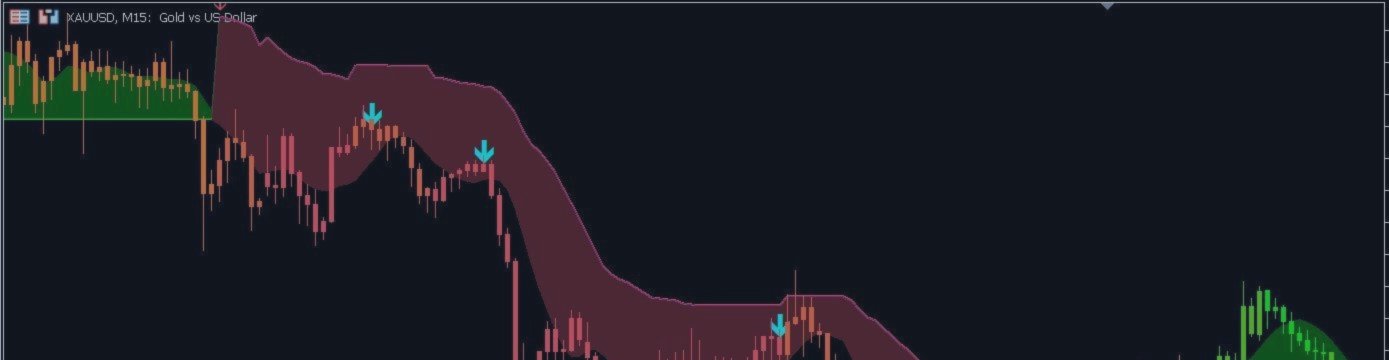


A professional-grade trend detection system that combines five SuperTrend layers into one powerful consensus-based indicator. Filter out market noise and trade only high-probability setups with clear visual signals and real-time alerts.
https://www.mql5.com/en/market/product/173802
🎯 What You Get
Visual Features
- Multi-Layer Trend Lines: Green line for uptrends, red line for downtrends - represents consensus of 5 SuperTrend calculations
- Cloud Fill Areas: Visual zones showing trend strength and potential support/resistance regions
- Major Signal Arrows: Yellow arrows for major long signals, cyan arrows for major short signals
- Base Flip Dots: Small dots marking individual SuperTrend layer changes for detailed analysis
- Dynamic Color Candles: Optional trend-colored candles for instant market direction recognition
- Cluster Labels: Text labels showing trend status at key points
Signal Features
- Consensus-Based Signals: Only generates alerts when multiple SuperTrend layers agree
- Stochastic Filter: Optional overbought/oversold filtering to avoid poor entries
- Non-Repainting: Signals are fixed once the bar closes - no disappearing arrows
- Multi-Channel Alerts: Popup, sound, email, and push notifications
🎨 Visual Elements Guide
Understanding the Display
| Element | Appearance | Meaning |
|---|---|---|
| Up Trend Line | Green solid line | Consensus uptrend - majority of SuperTrend layers are bullish |
| Down Trend Line | Red solid line | Consensus downtrend - majority of SuperTrend layers are bearish |
| Bull Cloud | Green shaded area | Support zone during uptrends - potential buying areas |
| Bear Cloud | Red shaded area | Resistance zone during downtrends - potential selling areas |
| Major Long Arrow | Yellow arrow (▲) | Strong buy signal - multiple layers aligned bullish |
| Major Short Arrow | Cyan arrow (▼) | Strong sell signal - multiple layers aligned bearish |
| Base Long Dot | Small green dot | Individual layer flipped bullish - early warning |
| Base Short Dot | Small red dot | Individual layer flipped bearish - early warning |
Color Customization
Personalize all visual elements to match your chart theme:
- Bull Color: Default Lime - customize to any color
- Bear Color: Default Red tone - customize to any color
- Neutral Color: Default Orange - shown when consensus is unclear
- Cloud Transparency: Adjustable 0-95 opacity for preferred visibility
📈 How to Use for Trading
Basic Trend Following Strategy
Look at the main trend line color. Green = uptrend, Red = downtrend. Only trade in the direction of the dominant trend line.
Yellow arrows (▲) indicate strong long entry points. Cyan arrows (▼) indicate strong short entry points. These appear when the cluster consensus shifts.
Hold positions until a major arrow appears in the opposite direction, or use the trend line color change as your exit trigger.
Cloud Bounce Strategy
This high-probability setup uses the cloud areas as dynamic support/resistance:
- Price pulls back to the cloud area during an established trend
- Wait for price to touch or slightly penetrate the cloud
- Look for a major arrow confirming the trend continuation
- Enter in the direction of the main trend
- Place stop loss on the opposite side of the cloud
Multi-Timeframe Approach
For best results, use multiple timeframes to confirm signals:
- Higher TF (H1, H4, D1): Identify major trend direction using trend lines
- Entry TF (M15, M30): Wait for major arrows aligned with higher TF trend
- Precision TF (M5): Fine-tune entry within the cloud area
Stochastic Filter Application
When enabled, the stochastic filter helps avoid poor entries:
- For Longs: Only take yellow arrows when stochastic is below overbought (not in extreme high territory)
- For Shorts: Only take cyan arrows when stochastic is above oversold (not in extreme low territory)
- Avoid: Taking long signals in overbought zones or short signals in oversold zones
🔔 Alert Configuration
The indicator can notify you through multiple channels when major signals occur:
| Alert Type | When It Fires | Best Use Case |
|---|---|---|
| Popup | On major arrow signal | Active trading at your desk |
| Sound | On major arrow signal | Multi-chart monitoring without screen-watching |
| Push Notification | On major arrow signal | Mobile monitoring when away from computer |
| On major arrow signal | Remote monitoring and record keeping |
⚙️ Trading Style Settings
Recommended Configurations
| Trading Style | Consensus Threshold | Base Index | Cloud Length | Result |
|---|---|---|---|---|
| Scalping (M1-M5) | 0.50-0.60 | 2-3 | 5-8 | More signals, faster response |
| Day Trading (M15-H1) | 0.60-0.70 | 3 | 8-12 | Balanced signals with reliability |
| Swing Trading (H4-D1) | 0.70-0.80 | 3-4 | 12-20 | Fewer but higher quality signals |
| Position Trading (W1+) | 0.80+ | 4-5 | 20+ | Only strongest trend changes |
Visual Preferences
- Dynamic Bar Coloring: Turn on for instant trend recognition across all candles
- Cluster Labels: Enable for text annotations at signal points
- Base Flip Dots: Show for detailed analysis of individual layer changes
- Cloud Fill: Toggle cloud visibility based on your chart preference
🎯 Recommended Trading Setups
Setup 1: Conservative Trend Following
- Timeframe: H1 or H4
- Threshold: 0.70 or higher
- Entry: Major arrow aligned with trend line color
- Exit: Opposite major arrow
- Goal: Capture medium-term trends with high reliability
Setup 2: Cloud Scalping
- Timeframe: M15 or M30
- Threshold: 0.60
- Entry: Price touches cloud + major arrow confirms
- Exit: Cloud boundary or 1:2 risk-reward
- Goal: Quick profits from cloud bounces
Setup 3: Breakout Momentum
- Timeframe: M30 or H1
- Threshold: 0.65
- Entry: Major arrow after price breaks cloud
- Exit: Trail stop using trend line
- Goal: Ride strong momentum moves
📊 Best Markets to Trade
This indicator performs best on markets with:
- Trending behavior: Forex majors, indices, commodities with clear directional moves
- Sufficient volatility: Enough price movement to generate meaningful signals
- Liquidity: Major trading sessions for your chosen instrument
Recommended Instruments
| Category | Best Instruments | Recommended TF |
|---|---|---|
| Forex Majors | EURUSD, GBPUSD, USDJPY | M15 - H1 |
| Crosses | GBPJPY, EURJPY, AUDJPY | M30 - H4 |
| Metals | XAUUSD (Gold), XAGUSD (Silver) | M15 - H1 |
| Indices | US30, SPX500, NAS100, GER40 | M30 - H4 |
| Crypto | BTCUSD, ETHUSD | H1 - D1 |
✅ Quick Start Checklist
- Attach to Chart: Add indicator to your preferred symbol and timeframe
- Set Threshold: Match to your trading style (higher = fewer but better signals)
- Choose Base Index: 2-3 for scalping, 3-4 for swing trading
- Configure Cloud: Set length based on timeframe (shorter for scalping)
- Enable Alerts: Turn on your preferred notification method
- Test Stochastic Filter: Enable and adjust levels if desired
- Demo Practice: Observe 20-30 signals before trading live
- Go Live: Start with small positions to build confidence
💡 Success Tips
- Trade with the trend line color, not against it
- Use cloud areas as dynamic support/resistance for entries
- Combine multiple timeframes - only take signals aligned with higher TF trend
- Higher consensus threshold = fewer signals but higher quality
- Enable alerts to catch opportunities without constant screen-watching
- Keep a trading journal - track which threshold settings work best for your style
Trade with Confidence
The MT5 SuperTrend combines multiple analysis layers into clear, actionable signals. Let the consensus guide your trades.
See the trend. Trust the cluster. Capture the move.
MT5 SuperTrend | Multi-Layer Trend Detection | Version 2.10
https://www.mql5.com/en/market/product/173802




