From a 2018 Idea to a Full-Featured Backtest Analyzer — The Story Behind FX Monitor

The idea of building a proper backtest analysis tool goes back to 2018–2019. At the time, the go-to solution for anyone serious about strategy analysis was QuantAnalyzer 4 — and while it was a solid product, it had real limitations. Filtering was rigid, portfolio composition was tedious, and there was no way to combine live account monitoring with backtest research in one place. The gap was obvious, but the solution wasn't simple.
Building a reliable MT4/MT5 report parser, handling FIFO trade pairing correctly, computing accurate drawdown and Sharpe figures, and doing all of this inside a web application — these were non-trivial engineering problems. The idea sat on the shelf for a few years while the technical pieces slowly came together.
What eventually became FX Monitor started as an answer to one question: what would a proper trading analytics platform look like if you built it from scratch today?
What FX Monitor Has Become
The backtest analyzer was always the core vision. But to get there, we built a lot of infrastructure along the way — and that infrastructure turned into a platform in its own right.
Today FX Monitor is:
A live account monitoring system connected directly to your MetaTrader terminals via a lightweight EA. No manual exports, no delays. Your trades, balance, equity, and open positions update in real time across all your accounts simultaneously — something platforms like myfxbook simply don't offer in the same way.
A multi-account dashboard that lets you see every account you run — live, demo, or contest — in one place. Switch between them, compare performance, spot correlations across portfolios.
A portfolio analyzer that groups your live accounts into portfolios, computes aggregated statistics, Pearson correlation between strategies, and runs Monte Carlo simulations on your actual live trading history.
An AI Agent connected to your live data — ask it about drawdown patterns, weak periods, strategy correlations, or get a full portfolio health report. It reads your actual equity curves, trade history, and statistics before responding.
A Telegram bot and mobile PWA with push notifications — so you're always aware of what's happening on your accounts, wherever you are.
A design that doesn't look like it was built in 2009. Dark theme, clean typography, responsive layout. We care about how it looks because you're going to be staring at it for hours.
And now — the feature we set out to build six years ago.
Backtest Analysis — The Feature We've Been Building Toward
Upload and Go
Export your backtest report from MetaTrader 4 or MetaTrader 5 as an HTML file and upload it to FX Monitor. That's it. The system parses the report automatically — detecting encoding, pairing deals into completed trades using FIFO logic, computing the full statistics set — and caches everything for instant access every time you open the dashboard.
Multi-file upload is supported so you can build a library of all your tested strategies in one place.
The Backtest Dashboard
The main dashboard gives you everything you need to evaluate a strategy honestly:
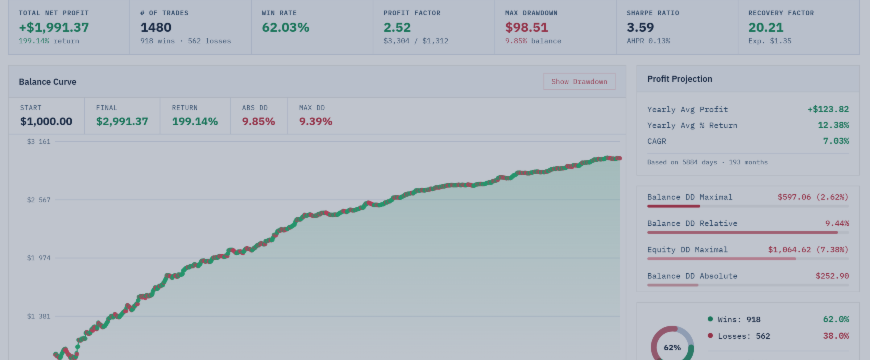
Hero metrics — Net Profit, Total Trades, Win Rate, Profit Factor, Max Drawdown, Sharpe Ratio, and Recovery Factor are front and center. No hunting through tables for the numbers that matter.
Balance Curve with Drawdown — the equity curve is plotted alongside absolute and relative drawdown bars. Toggle the drawdown overlay on or off. You can immediately see not just how a strategy grew, but when and how hard it fell.
Profit Projection — based on historical distribution of returns, the system projects forward equity paths so you can set realistic expectations before going live.
Monthly Performance — a month-by-month breakdown showing profit, trade count, and win rate for each calendar month across the entire backtest history. Quickly spot seasonal weaknesses or structural deterioration over time.
Distribution by Hour and Weekday — see when your strategy actually makes its money. Some strategies look great on paper but generate 80% of profits in a two-hour London window — useful to know before deploying on a different broker or account type.
Trade List — the full trade history with pagination, column picker, and filters. Sortable, searchable, exportable. Useful for spotting outliers, reviewing the biggest losers, or verifying the strategy behaves as expected.
Advanced Filters — Analyze Any Slice
This is where the backtest dashboard goes beyond what most tools offer.
You can filter the entire analysis — statistics, charts, trade list, everything — by:
- Time of day — focus on a specific trading session
- Day of week — exclude weekends, or test if Monday performance drags down the overall results
- Date range — isolate a specific market regime (COVID crash, 2022 dollar rally, etc.) and see how your strategy held up
- Symbol — critical for multi-symbol strategies and portfolios tested in a single run
- Strategy / Comment — if your EA runs multiple internal strategies and tags trades by comment, you can isolate and analyze each sub-strategy independently
All statistics, balance curves, and distributions recalculate instantly based on your selection. This level of granularity is what makes the difference between knowing a strategy has a good Sharpe ratio and understanding why.
Lot Normalization
One of the trickiest problems when comparing backtests is lot sizing inconsistency.
If you ran Strategy A on a $10,000 account with fixed 0.1 lot and Strategy B on a $50,000 account with 0.5 lot, the raw profit numbers are meaningless for comparison. Worse, if either test used compounding — where lot size grew with the balance — the equity curve is distorted. A strategy might look like it has a 3% max drawdown, but that's only because the lots were tiny in the early months and exploded at the end.
FX Monitor solves this with two normalization modes:
Balance-based normalization — rescales all trade results to what they would have been at a consistent percentage of starting balance. Eliminates compounding distortion and makes any two backtests directly comparable.
Fixed lot — strips out all lot variation and recalculates every trade at a uniform size. Useful for understanding the pure edge of a strategy, independent of position sizing mechanics.
Backtest Portfolios
Individual strategy analysis is valuable. Portfolio analysis is where real decisions get made.
The portfolio module lets you:
- Combine multiple backtests into a single portfolio with one click
- Set multipliers per strategy — scale each strategy up or down relative to others
- Include or exclude individual strategies without deleting them from the portfolio
- View aggregated statistics — combined equity curve, net profit, drawdown, Sharpe, and Recovery Factor for the portfolio as a whole
- Correlation matrix — Pearson correlation between every pair of strategies in the portfolio, calculated from their monthly return series. Low correlation between profitable strategies is the foundation of good portfolio construction
- Monte Carlo simulation for the entire portfolio — see the distribution of possible outcomes, not just the single historical path
Monte Carlo Simulation
Available for both individual backtests and portfolios, in two modes:
Bootstrap — resamples actual historical trades randomly to generate thousands of alternative equity paths. Respects the real distribution of your trade outcomes.
Parametric — fits a statistical model to your returns and samples from it. Useful when you want smoother confidence bands or are working with a small trade sample.
The output includes a fan chart showing the distribution of possible equity curves, histograms of final equity and maximum drawdown across all simulated runs, and probability of ruin — the percentage of simulated paths that hit a defined drawdown threshold. This is the number that tells you whether your risk management is realistic.
AI Agent for Backtests
The AI Agent reads your actual backtest data — equity curve, monthly breakdown, by-symbol statistics, full stats object — and answers questions in plain language.
Individual strategy analysis:
- Where are the weak points in this strategy?
- Which months are consistently unprofitable?
- Is the Sharpe Ratio high because of genuine edge or just low trade frequency?
- Does the performance deteriorate in the second half of the test — a sign of overfitting?
- How should I interpret the Recovery Factor given this drawdown profile?
Portfolio analysis:
- Which strategies are dragging down portfolio performance?
- Are my strategies actually diversified, or do they all lose during the same market conditions?
- Should I reduce the multiplier on Strategy C given its correlation with Strategy A?
Portfolio composition — the most powerful mode:
Select a pool of backtests. The agent receives the full statistics and correlation matrix for all of them, then proposes an optimal combination — which strategies to include, which to leave out, and what multipliers to assign — with the goal of maximizing Sharpe and Recovery Factor while minimizing inter-strategy correlation. Once you agree with the proposal, the portfolio is created in one click via API.
Six Years in the Making
The version of this tool we shipped is not the version we imagined in 2019. It's better — because we had years of live trading, real user feedback, and hard-won experience with what actually matters when evaluating a strategy.
QuantAnalyzer was the gap that started this. FX Monitor is the answer we wanted to build back then and finally can.
If you run EAs, test strategies, or manage multiple accounts — everything is at fx-monitor.com. Free plan available, no credit card required.