Introducing BuildInfo in KnitPkg v1.0.0 – Real Compile‑Time Constants for MQL5

One of the biggest features in KnitPkg v1.0.0 is something I think many serious EA/indicator developers have always wanted in MQL5, but never really had: build‑time configuration, very similar to compile‑time directives in C/C++.
Note: if you're not yet familiar about what KnitPkg is, take a look at this article or the documentation page.
What is BuildInfo.mqh?
When you run from the CLI:
kp compile
# or
kp build
and your manifest knitpkg.yaml has a defines section, KnitPkg automatically generates a header at:
knitpkg/build/BuildInfo.mqh
This header contains a bunch of #define directives that you can use anywhere in your MQL5 code:
#include "../knitpkg/build/BuildInfo.mqh"
The cool part is that these constants come from:
- Your manifest fields ( version , description , author , etc.)
- Extra constants you define in the manifest
- Command‑line flags passed via ` kp compile -D ...`
All of that gets turned into pure MQL #define s at compile time – no runtime parsing, no string juggling, no JSON/INI reading hacks.
It’s essentially a lightweight build system for MQL, powered by compile‑time constants.
Why this looks like C-style compile-time directives
If you’re used to C/C++ or other compiled languages, this will feel very familiar:
- You declare constants once in a central place (the manifest).
- KnitPkg turns them into #defines in BuildInfo.mqh.
- You use #ifdef, #else, #endif and string/number constants in your MQL5 code.
- You can inject or override constants from the CLI just like you’d pass -D flags to a C compiler.
defines:
  from_manifest:
    MANIFEST_VERSION: version
    MANIFEST_ORG: organization
    MANIFEST_AUTHOR: author
    MANIFEST_DESCRIPTION: description
  extra:
    MQL_STORE_VERSION: '2.1'
    MAX_BARS: 500
    FEATURE_X_ENABLED: true
Generates something like:
#define MANIFEST_VERSION "2.0.1"
#define MANIFEST_ORG "douglasrechia"
#define MANIFEST_AUTHOR "Douglas Rechia"
#define MANIFEST_DESCRIPTION "KnitPkg for Metatrader - Expert Demo"
#define MQL_STORE_VERSION "2.1"
#define MAX_BARS 500
#define FEATURE_X_ENABLED true
If you’ve ever used -D flags in gcc/clang, this will feel right at home.
Key use cases where BuildInfo really helps
#include "../knitpkg/build/BuildInfo.mqh"

#property copyright "Copyright © 2026 " + MANIFEST_AUTHOR + ". All rights reserved."
#property link      "https://knitpkg.dev"
#property version   (string)MQL_STORE_VERSION

#property description ""
#property description "Version: "       + MANIFEST_VERSION
#property description ""
#property description "Description: "   + MANIFEST_DESCRIPTION
#property description "Organization: "  + MANIFEST_ORG
#property description "Author: "        + MANIFEST_AUTHOR
#property description ""
#property description "Powered by KnitPkg for MetaTrader"
#property description "https://knitpkg.dev"
Change version or description in knitpkg.yaml, run kp compile, and the EA “Common” tab is automatically updated. No manual sync, no forgotten version bumps.
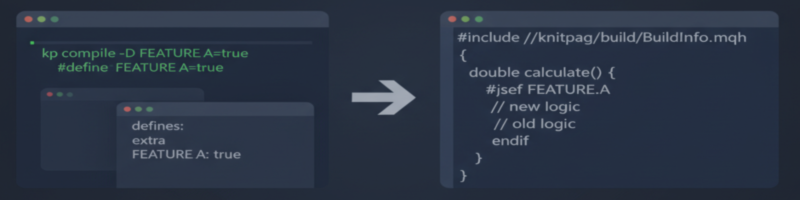
2. Feature flags at compile time (turn features on/off without touching code). You can gate parts of your code behind feature flags that are controlled purely by build configuration.
From the CLI:
kp compile -D FEATURE_RISK_MODEL_V2
In your EA:
#include "../knitpkg/build/BuildInfo.mqh"

double CalculateRisk()
{
#ifdef FEATURE_RISK_MODEL_V2
   return NewRiskModel();
#else
   return LegacyRiskModel();
#endif
}
Want to ship an experimental risk model only in “beta” builds? Just add or remove the -D flag; the code stays the same.
3. Different builds for brokers / environments / channels. You can produce multiple flavors of the same EA from the same codebase: debug vs store, internal vs production, broker‑specific variants, etc.
For example:
# Beta build
kp compile -D BUILD_CHANNEL=beta

# Production build
kp compile -D BUILD_CHANNEL=production
In code:
#include "../knitpkg/build/BuildInfo.mqh"

void OnInit()
{
#ifdef BUILD_CHANNEL
   Print("Build channel: ", BUILD_CHANNEL);
#endif
}
Or even environment/broker‑specific parameters:
kp compile -D ENV=prod -D BROKER_CODE=ICMARKETS
kp compile -D ENV=staging -D BROKER_CODE=OANDA
In EA:
#include "../knitpkg/build/BuildInfo.mqh"

void OnInit()
{
   Print("Environment: ", ENV);
   Print("Broker code: ", BROKER_CODE);

#ifdef ENV
   if (ENV == "prod")
   {
      // Production settings
   }
   else
   {
      // Staging / sandbox settings
   }
#endif
}
4. Debug vs store builds (logging, assertions, extra checks). You can add classic “debug” vs “release/store” behavior by toggling flags at compile time.
Compile:
# Debug build
kp compile -D DEBUG_BUILD
EA code:
#include "../knitpkg/build/BuildInfo.mqh"

#ifdef DEBUG_BUILD
   #define LOG_LEVEL 3
#else
   #define LOG_LEVEL 1
#endif
How to start using BuildInfo
1.Initialize your project with KnitPkg. If you’re starting from scratch, kp init already sets up a sensible default configuration for you: it creates the manifest with a defines section and generates an EA/indicator/utility skeleton that is wired to BuildInfo.mqh, including the #property directives for the “Common” tab (version, description, author, etc.). In many cases you can just run kp init, open the generated .mq5, and see BuildInfo in action without doing anything else.
2. Configure defines in the manifest.
- Use from_manifest to expose project metadata (version, author, description, organization, etc.).
- Use extra for arbitrary constants like MQL_STORE_VERSION, MAX_BARS, or feature flags.
3. Compile with KnitPkg CLI. Run:
kp compile
# or
kp build
KnitPkg will generate knitpkg/build/BuildInfo.mqh automatically.
4. Include BuildInfo.mqh in your MQL5 code.
#include "../knitpkg/build/BuildInfo.mqh"
5. Optionally add per‑build flags. Use kp compile -D NAME or kp compile -D NAME=value in your local workflow or CI to produce different variants (debug, store, nightly, broker‑specific, etc.) from the same codebase.
If you’re building serious EAs or indicators and you miss the level of build control you get in C/C++ projects, BuildInfo in KnitPkg v1.0.0 brings that experience much closer to MQL5 – with centralized metadata, compile‑time feature flags, and clean, reproducible build variants from a single codebase.
If you’re curious about the details or want more examples, the full docs are available in the KnitPkg documentation under the “Build Info” concept and user guide sections.