Crystal Algo Pro EA — Complete Step-by-Step User Guide for MetaTrader 5

Section |
| ||||
|---|---|---|---|---|---|
| - ON = Full AI logic + Recovery active (Required) - OFF = no recovery, small lots | ||||
| - Momentum (Trend Mode): Follows main trend, strong profit in trending phases - Reversal (Range Mode): Works in sideways markets, trades reversals | ||||
|
| ||||
|
| ||||
| - Live trading requires min. $5,000 balance - Testing requires $25,000 (1:500 leverage) or $5,000 (1:1000 leverage) - EA shows chart warning if balance is too low | ||||
|
| ||||
| 1. Download from MQL5 Market 2. Attach EA to chart (XAUUSD ) 3. Enable AutoTrading 4. Set AI Access = ON 5. Check balance requirements | ||||
|
| ||||
|
|
Crystal Algo Pro v7.5 — Installation Guide
- Step 1: Download & Install
-
Log in to your MQL5 account inside MetaTrader 5.
-
Go to Market → Purchased.
-
Find Crystal Algo Pro v7.5 and click Install.
-
The EA will appear under Navigator → Expert Advisors → Market.
- Step 2: Attach to Chart
-
Open the trading pair and timeframe (recommended: XAUUSD M1 or M15).
-
Drag Crystal Algo Pro v7.5 from Navigator onto the chart.
-
A settings window will open automatically.
Step 3: Enable Trading Permissions
-
Check that AutoTrading button (top bar) in MT5 is green (ON).
-
In the EA settings, make sure:
-
Allow Algo Trading = Enabled.
-
DLL Imports = Disabled (not required).
-
-
Click OK to confirm.
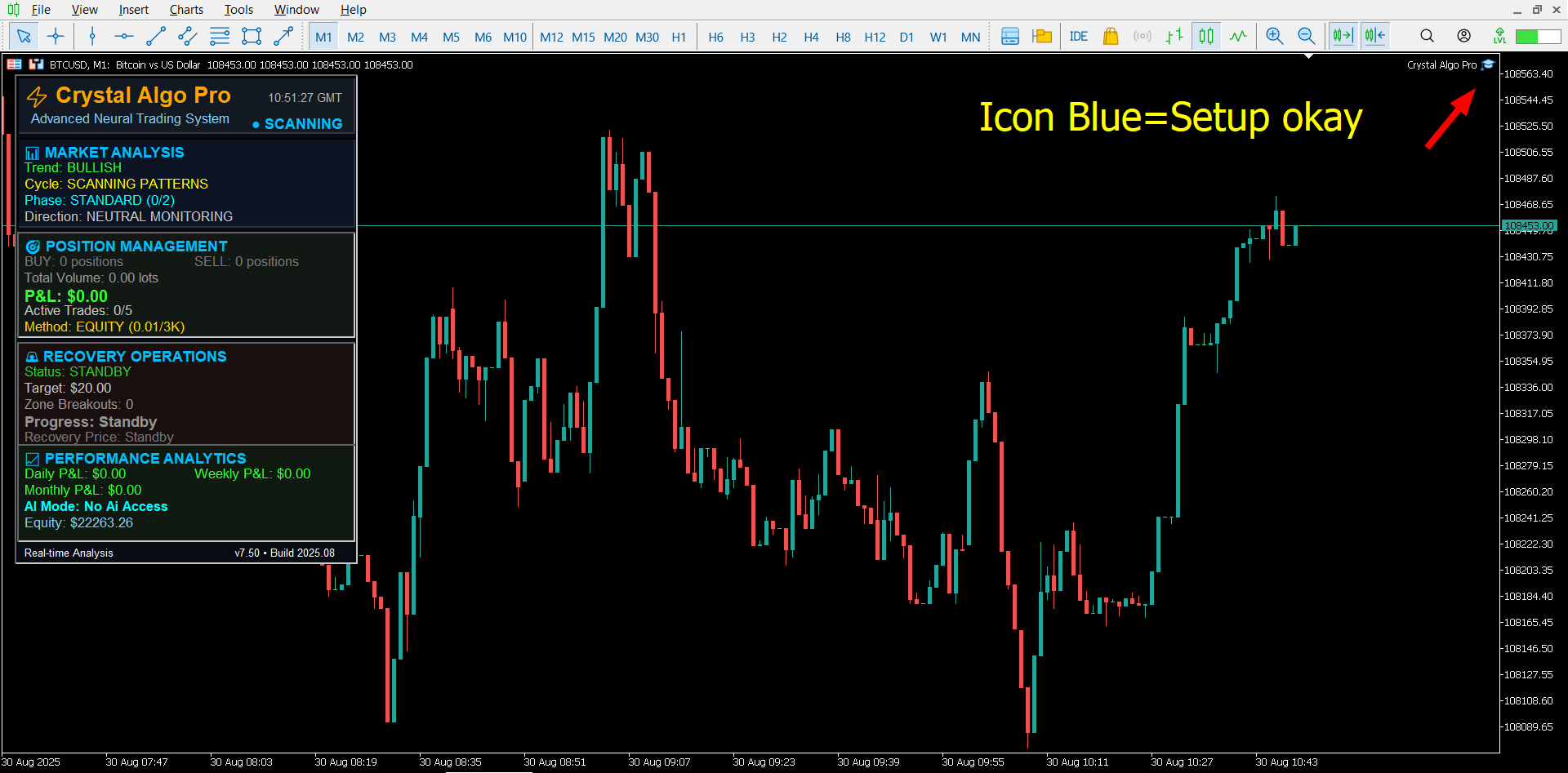
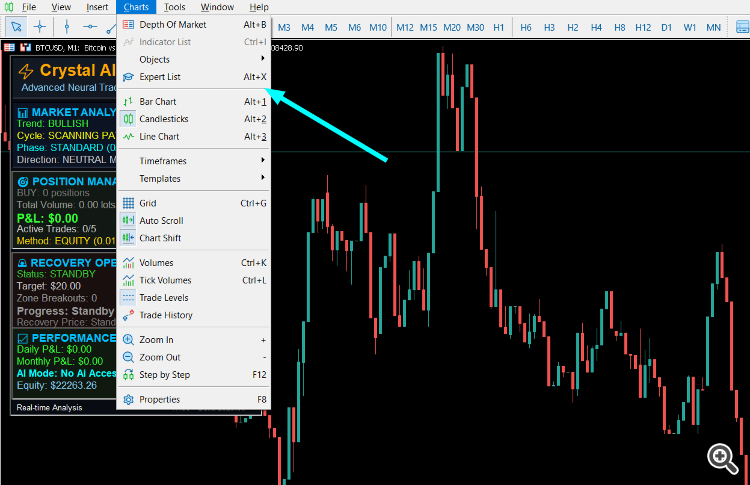
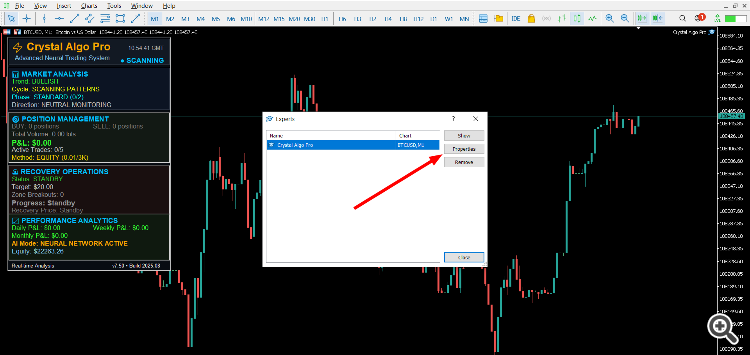
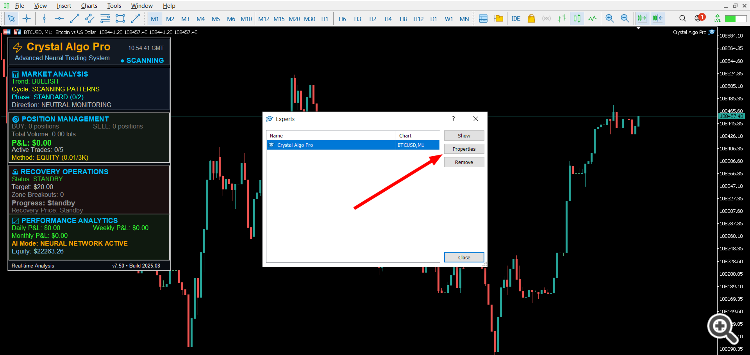
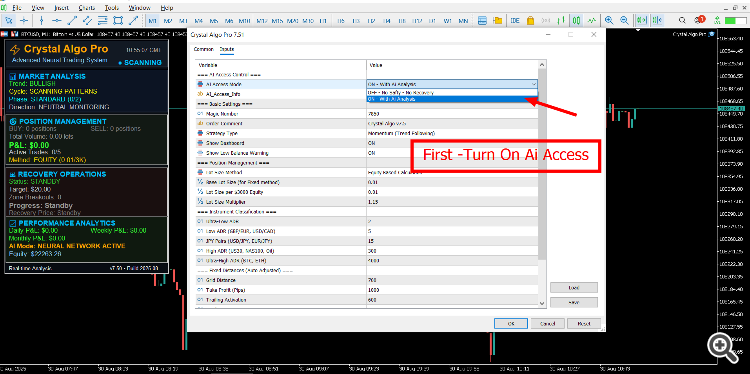
AI Access Mode is the main safety switch of the EA.
-
AI Access OFF
-
No advanced analysis.
-
No recovery system.
-
Trades with small lots only.
-
-
AI Access ON
-
Full AI logic is active.
-
Enables recovery system.
-
Handles trend changes and cycles automatically.
-
Required for real trading and proper testing.
-
Always turn ON AI Access Mode before live or demo testing.
If you forget to turn it ON, the EA will not work with full features.
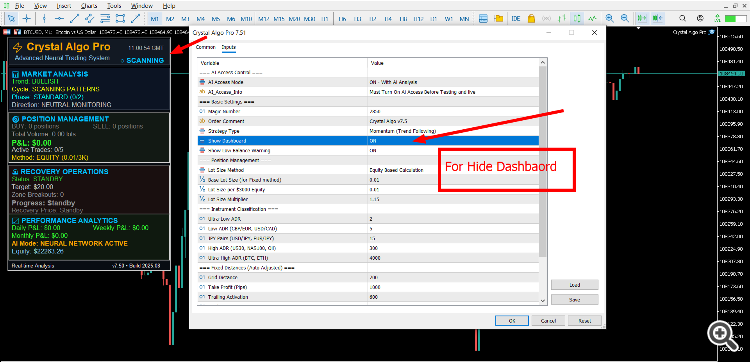
- Basic Settings
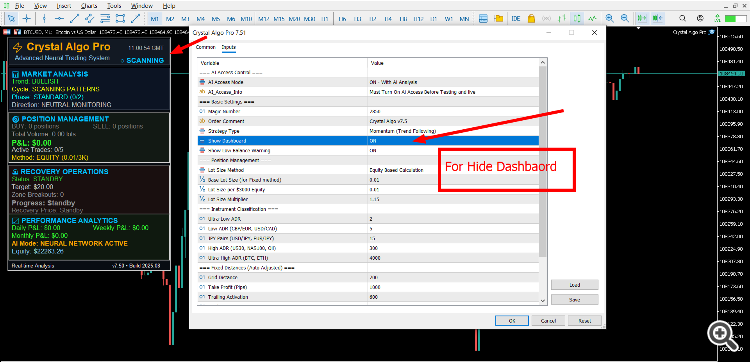
- Trading Modes
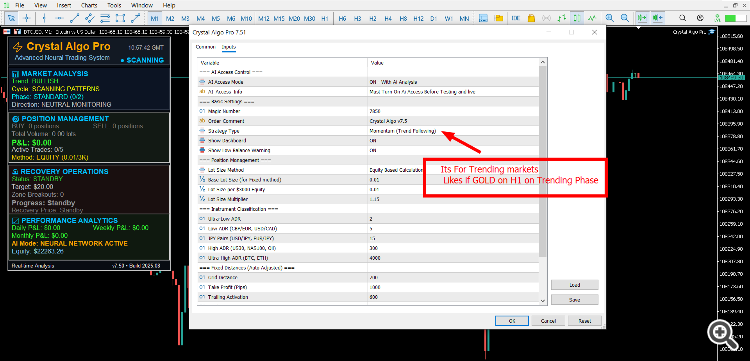
Momentum Mode (Trend Mode)
-
Follows the main trend.
-
Captures strong moves.
-
Best for trending markets.
-
Creates good profit during long market phases.
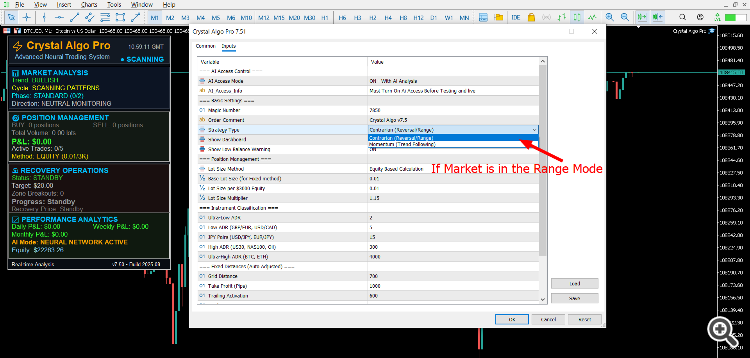
- Reversal Mode (Range Mode)
-
Works in sideways or ranging markets.
-
Takes reversal entries against short-term spikes.
-
Closes trades when price returns to balance.
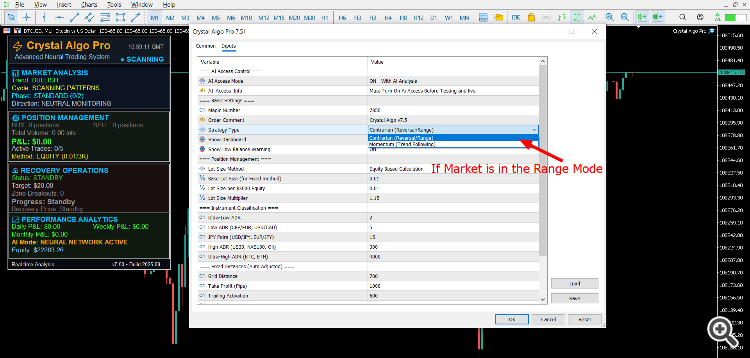
If you do not change the mode, the EA can still manage trades automatically with its built-in logic.
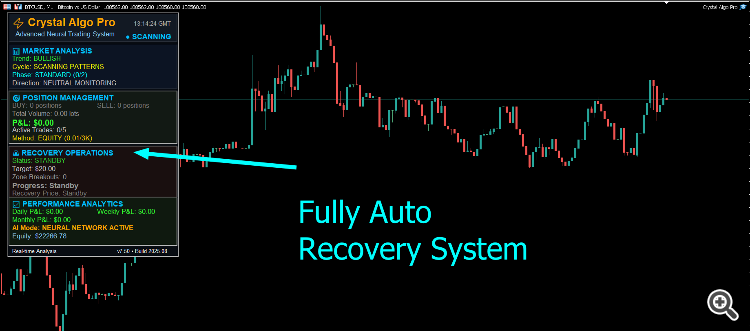
- Recovery System
The recovery engine is the heart of Crystal Algo Pro.
-
If the market goes against the first trades, the EA activates recovery.
-
During recovery, it may open bigger lot trades or hedge trades.
-
This is completely normal and part of the system’s strategy.
-
Do not panic. Do not close any trades manually.
-
The EA will continue recovery until all trades are closed in profit.
⚠️ Special Note: If you close trades by hand, the system will break. Always let the EA finish recovery on its own.
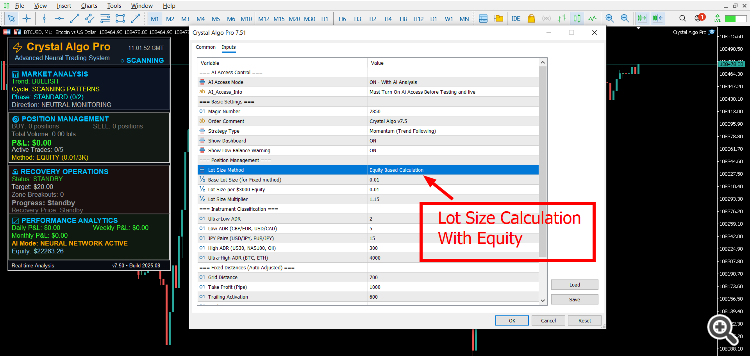
Position Management
-
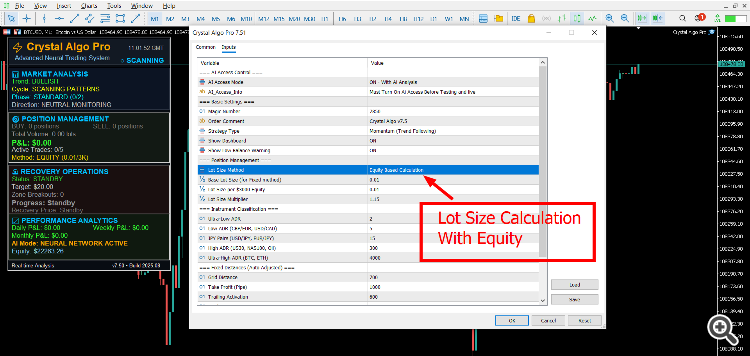
Default mode = Equity-Based Lot Size
-
Example: With $3,000 equity → 0.01 lot.
-
Lot size grows automatically as your equity grows.
-
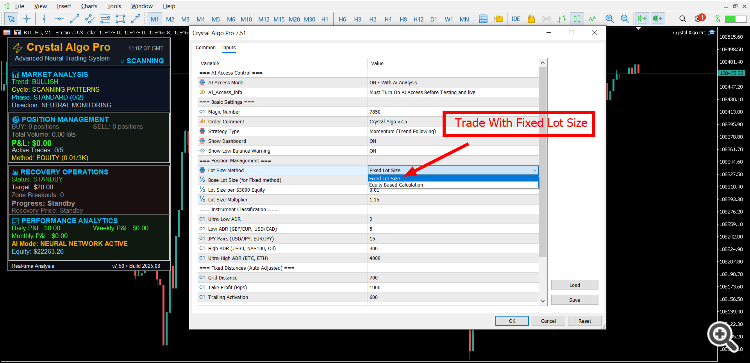
Fixed Lot Mode
-
Use only on high ADR pairs (BTC, NAS100, US30).
-
Always keep lot size very small for safety.
-
Recommended:
-
For equity above $10,000, you can trade up to 3 pairs.
-
For high volatility pairs, run with fixed small lot only.
-
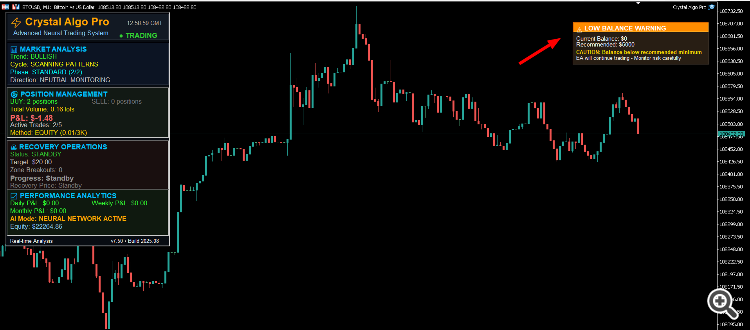
Low Balance Warning
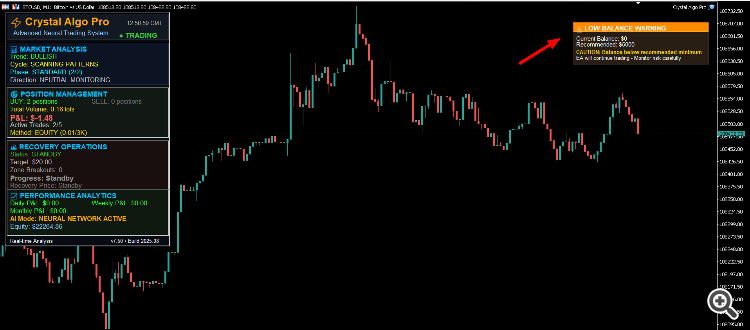
Crystal Algo Pro has a built-in Low Balance Warning system.
-
If your balance is too small, a warning message appears on the chart.
-
This is for user safety because the EA cannot manage recovery with very low balance.
-
Minimum recommended: $5,000 for live trading.
-
Safe Deposit For 2,3 Pair on Single Account $10,000 balance (1:1000 leverage).
For testing: $25,000 balance (1:500 leverage) or $5,000 balance (1:1000 leverage).
Please read the requirements carefully before renting or buying.
Running this EA on too small equity will not allow risk management.
Instrument Classifications
Crystal Algo Pro v7.5 is designed to work on many Forex pairs, Gold, Indices, and even Crypto. The EA automatically adjusts its internal parameters based on the type of instrument. This keeps trading safe and balanced.
Categories of instruments:
-
Ultra-Low ADR pairs
-
Examples: AUDNZD, EURCHF
-
Small daily range, EA uses wider safety settings.
-
-
Low ADR pairs
-
Examples: EURUSD, GBPUSD, USDCAD
-
Normal daily volatility, EA trades with balanced grid and TP.
-
-
JPY pairs
-
Example: USDJPY, EURJPY
-
JPY pairs have their own volatility style, EA auto-adjusts pip distances.
-
-
Standard ADR instruments
-
Examples: XAUUSD (Gold), XAGUSD (Silver)
-
Precious metals with medium–high movement.
-
-
High ADR instruments
-
Examples: Indices (NAS100, US30, GER40), Oil
-
Big daily moves, EA reduces lot size and uses flexible trailing.
-
-
Ultra-High ADR instruments
-
Examples: BTCUSD, ETHUSD
-
Very high volatility, must be run with Fixed Small Lot Mode only.
-
This classification system allows the EA to adapt automatically so you don’t need to manually set different distances for each pair.
Grid Distance, Take Profit & Trailing
Crystal Algo Pro uses fixed base values which are auto-adjusted depending on the instrument type.
-
Grid Distance = 700 points
-
Distance between recovery orders.
-
On high ADR instruments, the system automatically expands this distance.
-
-
Take Profit = 1000 points
-
Portfolio TP is set in points.
-
Adjusts depending on the volatility of the instrument.
-
-
Trailing Activation = 600 points
-
When a trade is +600 points in profit, trailing stop starts.
-
This locks in profit while still letting the trade run.
-
-
Trailing Gap = 300 points
-
The minimum distance between price and trailing stop.
-
Prevents early stop-outs during strong trends.
-
Why These Settings Are Important
-
Grid and TP are not fixed for all pairs — they are dynamically adjusted by the EA according to ADR classification.
-
This ensures that trades on Gold and BTC are not managed the same way as EURUSD.
-
You do not need to change these numbers; the EA calculates internally.
-
The system is optimized for safety: wider grid = fewer trades, but higher stability.
Long-Term Profitability
-
Crystal Algo Pro is not a quick-profit gambling EA.
-
It is built for steady, consistent growth.
-
Profits come over time, not in one night.
-
By following balance requirements and letting the EA run, you will get long-term stability.
Best Practices
-
Always turn ON AI Access Mode before testing or live trading.
-
Use Equity-Based Lot Mode for normal Forex pairs and Gold.
-
Use Fixed Small Lots only for BTC, NAS100, US30.
-
Do not close trades manually — let recovery finish.
-
Run the EA on a VPS for 24/7 trading.
-
Use minimum $10,000 balance for live safety.
Run on Normal PC
-
You can run Crystal Algo Pro v7.5 on any normal computer or laptop.
-
No need for a powerful gaming PC or fast graphics card.
-
The EA does not use heavy CPU or GPU — it only needs MT5 to run smoothly.
-
As long as your PC has:
-
Stable internet connection,
-
Uninterrupted power supply,
the EA will work fine.
-
Internet & Power
-
A stable internet connection is the most important factor.
-
If your internet disconnects or your PC turns off, the EA will stop trading.
-
For safe trading, make sure:
-
Your internet does not drop often.
-
Your computer stays on during trading hours.
-
-
If you cannot guarantee this, then use a VPS.
VPS Option (Recommended for 24/7)
-
VPS is not required but highly recommended.
-
It allows the EA to run 24/7 without interruptions.
-
Even if your PC or internet is off, the VPS keeps the EA active.
-
Best choice for funded accounts or professional use.
Important Trading Guidelines for Crystal Algo Pro Users
When you start using Crystal Algo Pro, it is very important to understand how the system thinks and works. This EA is not like a simple indicator or a one-click robot. It is a complete automated trading strategy with its own money management, recovery process, and long-term design.
Many new traders make the mistake of interfering with the EA while it is working. They see big lot sizes or multiple trades and they panic. Some even try to manually close positions because they feel afraid. This is the fastest way to break the EA.
Let us go step by step and make it very clear:
1. Never Cut Trades Manually
Crystal Algo Pro has a smart recovery engine. This means that if the market moves against the first trade, the EA will automatically start a recovery cycle.
-
It may open bigger lots or hedging trades.
-
This is normal and part of the design.
-
Do not try to close any of these trades by hand.
If you interfere and close positions manually, you break the chain of recovery. The EA will lose its ability to bring the cycle back to profit. The best practice is: trust the system and let it finish what it started.
Think of it like a chess game. If you stop the computer in the middle of the match and remove some of its pieces, how can it win for you? The EA works the same way. It needs to play the full strategy, not half of it.
2. Use Proper Leverage
High volatility pairs like Gold, NAS100, US30, BTCUSD need more margin for recovery cycles. If you run the EA with very low leverage, you will face margin problems.
-
Always use the maximum leverage available from your broker (1:500 or 1:1000 if possible).
-
This does not mean you are taking more risk.
-
It only means the EA has enough space to breathe and to manage positions properly.
Low leverage accounts are dangerous because the recovery cannot open its hedge trades. This is why leverage is very important for this type of algorithm.
3. Always Test Before Going Live
Do not rush. Before running on a live account, always:
-
Test the EA in Strategy Tester for at least 1 year of data.
-
Run it on a demo account for a few weeks.
-
Watch how it opens trades, how recovery works, and how cycles close.
This will give you confidence. You will see that when the system opens larger lot sizes during recovery, it still manages everything and closes in profit. By testing first, you remove the fear when you finally go live.
4. Trust the Algorithm
Once you move to a live account, you must trust the algorithm completely. Do not sit on the screen with fear. Do not panic when you see a larger lot size. Do not close trades. Just let the EA work.
Remember:
-
Lot sizes are not random, they are calculated by the recovery system.
-
The EA does not need your help to exit trades, it does it automatically.
-
If you panic and interfere, you destroy the system.
So the rule is very simple:
Do not interfere, do not cut, do not change — just enjoy the algo fights with the market.
5. The Mindset for Success
Crystal Algo Pro is not a get-rich-fast tool. It is a long-term consistent profit machine. The people who succeed with it are those who:
-
Respect the balance requirements,
-
Use proper leverage,
-
Do not interfere with trades,
-
Allow the EA to work for months, not just days.
If you treat it like a partner, it will reward you with stable results. If you treat it like a toy and interfere all the time, it will not perform as designed.
6. Enjoy the Journey
Trading with Crystal Algo Pro should not be stressful. The whole point of an EA is to remove emotions from trading. Instead of worrying about every tick, let the robot do the work. Watch how it plays against the market like a fighter.
Sometimes you will see the EA building a position, hedging, and adjusting lot sizes. This is like watching a strategy game. It is smart, it is logical, and it is designed to win over the long term.
So instead of panic, you should enjoy the process:
-
Enjoy the way it opens positions,
-
Enjoy how it fights back in recovery,
-
Enjoy how it finally closes cycles in profit.
This is the true beauty of algorithmic trading.
⚠ Risk Disclaimer
Trading financial markets involves risk. Past performance does not guarantee future results. Crystal Algo Pro v7.5 is a professional trading tool, but it cannot remove market risk completely.
-
The EA uses advanced money management and recovery logic, but losses are still possible.
-
Using too small a balance or low leverage may increase the chance of account failure.
-
Do not expect instant profits — this system is designed for long-term growth.
-
Never invest money that you cannot afford to lose.
-
Always test on a demo account before going live.
By using this product, you confirm that you understand the risks of algorithmic trading and that the developer is not responsible for financial losses on your trading account.





