

On this page, you will find all the necessary information on how to configure the Bomber Corporation EA, as well as other materials related to using this expert advisor.
Video manual: How to use Bomber Corporation EA
Set-files for automatic configuration
M15 👉 Set files for configuring the "Bomber M15 Channel" portfolio: download
Automatic money management
To adjust automatic money management:
1 - use the "Deposit amount for aytolot calculation" variable. Set this variable to a value between "300" and "2500". For example, if you set the value to 500, it means the advisor will use a lot size of 0.01 for every 500 units of deposit. If you set it to 2500, the advisor will use a lot size of 0.01 for every 2500 units of deposit.
2 - Set the value "1" for the Auto_lot variable.
This will activate the automatic lot calculation feature. Please note that this feature is enabled by default. 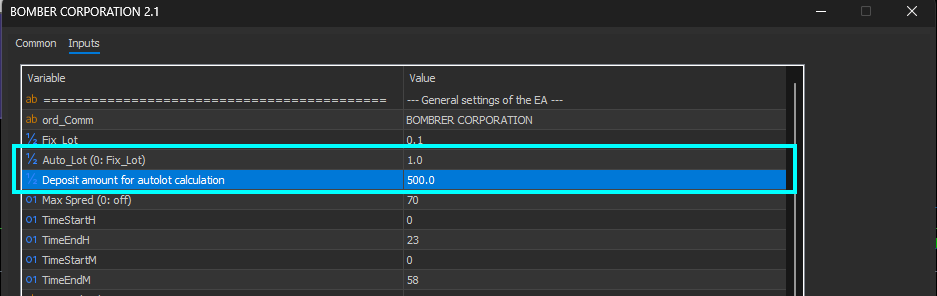
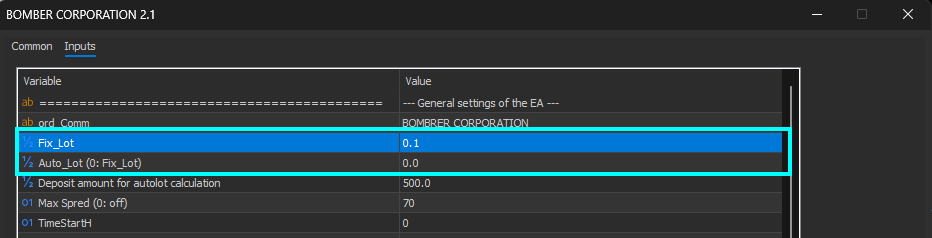
How to Set a Fixed Trading Lot Size
To set a fixed lot size:
1 - enter your desired lot size into the "Fix_lot" variable
2 - Set the value of the "Auto_lot" variable to 0.0.

My Telegram group - link

My Youtube channel - link


