

Leak-Free Multi-Timeframe Engine with Closed-Bar Reads in MQL5
 2 726
2 726
 0
0

The first time you write a multi-timeframe Expert Advisor, everything seems simple enough. You connect a few indicators from higher timeframes, read their buffers, and the strategy works.
But after some time, strange things start to happen. An EA that behaved perfectly in the tester begins consuming more and more memory after running for several days. Signals suddenly “move” after a candle closes. Timeframes fall out of sync. And sometimes the terminal becomes unstable for no obvious reason.
The problem is that most MTF implementations in MQL5 contain two hidden issues:
- indicator instances are created but never fully released;
- calculations rely on data from the current unfinished bar.
During short tests, these problems are almost invisible. But in long-running systems, small mistakes gradually turn into real stability issues. This is exactly why the Unified MTF Engine was created — a lightweight library that handles all the repetitive and error-prone parts of multi-timeframe logic.
It automatically:
- creates and synchronizes indicators;
- checks whether higher-timeframe data is ready;
- safely reads indicator buffers;
- and properly releases all resources when the EA stops.
As a result, the trading code becomes much simpler, while the overall system becomes far more stable and predictable
// Quick Start Example
#include <MTFEngine.mqh>
int slot_fast_ma;

int OnInit()
  {
   slot_fast_ma = AddMA(_Symbol, PERIOD_H4, 20);
   return(INIT_SUCCEEDED);
  }

void OnTick()
  {
   if(!IsReady()) return; // Wait for HTF data
   double ma_val = ReadBuffer(slot_fast_ma, 0);
  }
Introduction
Writing multi-timeframe (MTF) logic in MQL5 is simple in theory: create indicator handles in OnInit(), read values from the last closed bar (shift = 1), and release handles in OnDeinit(). In practice these rules live only “in the developer's head.” A single iMA() call inside OnTick() or a CopyBuffer(…,0,…) typed by habit is enough to introduce two silent but dangerous failures: unreleased indicator instances that gradually exhausted terminal resources, and “phantom” signals that fire on still‑forming bar values and vanish after the bar closes. The symptoms are subtle — growing mt5.exe memory, Journal lines like "IndicatorCreate failed", or a strategy that produces more signals in live trading than it did in a closed‑bar backtest — so many authors miss the cause.
This article presents a structural fix: MTFEngine.mqh. Rather than rely on developer discipline, the engine makes correct behavior the default. All indicator handles are created only during initialization and managed internally; ReadBuffer() defaults to bar_shift = 1 and offers safe array reads for crossover checks; IsReady() checks both buffer contents and HTF bar timestamps to avoid stale HTF reads; and a single ReleaseAll() cleans up every handle. The result is a small, explicit API that prevents the two common failure modes before they can appear.
Section 1: How MetaTrader 5 Indicator Handles Work
What a Handle Actually Is
When you call iMA(), iRSI(), or any other built-in indicator function in MQL5, the call does not immediately calculate anything. What it does is send a request to the MetaTrader 5 data server asking it to create and maintain a running instance of that indicator with the specified parameters. The server returns an integer, ‘the handle,’ which is a reference to that running instance.
The handle system is designed to be efficient. If you call iMA() twice with exactly the same parameters on the same symbol and timeframe, the server recognizes that both requests point to the same indicator configuration and returns the same handle both times. The data is calculated once and shared. This is the caching behavior that makes handles fast.
In MQL5, the terminal is designed to return an existing handle if the parameters passed to an indicator function are identical. However, the danger of calling functions like iMA() or iCustom() within OnTick() remains significant. Developers often unknowingly introduce minor variations, such as a dynamic shift value, a varying symbol string, or different input parameters for a custom indicator, each of which instantly generates a unique, new handle. More importantly, calling these functions inside the high-frequency OnTick() handler makes the lifecycle of these resources impossible to manage. Instead of a controlled initialization, the EA enters a state of 'resource chaos,' where it relies blindly on the terminal's internal cache. If these handles are not explicitly tracked and freed with IndicatorRelease(), it can lead to memory exhaustion and a functionally unresponsive EA.
The Resource Leak / Handle Leak (Unreleased Indicator Instances) in Practice
The comparison below shows the two patterns side by side. On the left is what some developers write intuitively, while on the right is the correct approach. The difference is where the indicator function is called and whether the handle is ever released.
| WRONG — creates a new handle on every tick | RIGHT — creates the handle once in OnInit() |
|---|---|
void OnTick() { //--- BAD: iMA called on every tick. //--- Each call with fresh parameters creates a NEW handle //--- if the terminal cannot match the cache. //--- After thousands of ticks, the terminal runs out of handle slots. int handle = iMA(_Symbol,PERIOD_D1,200,0,MODE_EMA,PRICE_CLOSE); double buffer[1]; if(CopyBuffer(handle,0,1,1,buffer) > 0) { //--- Use the data double ma_value = buffer[0]; } //--- Handle is never released using IndicatorRelease()! } | int g_handle_200_d1 = INVALID_HANDLE; //+------------------------------------------------------------------+ //| Expert initialization function | //+------------------------------------------------------------------+ int OnInit() { //--- GOOD: create handle once during initialization g_handle_200_d1 = iMA(_Symbol,PERIOD_D1,200,0,MODE_EMA,PRICE_CLOSE); return(INIT_SUCCEEDED); } //+------------------------------------------------------------------+ //| Expert tick function | //+------------------------------------------------------------------+ void OnTick() { double buffer[1]; //--- Reuse the same handle every tick if(CopyBuffer(g_handle_200_d1,0,1,1,buffer) < 0) { return; } } //+------------------------------------------------------------------+ //| Expert deinitialization function | //+------------------------------------------------------------------+ void OnDeinit(const int reason) { //--- Properly release the handle to free memory resources if(g_handle_200_d1 != INVALID_HANDLE) { IndicatorRelease(g_handle_200_d1); } } |
Table 1: The wrong and right patterns for indicator handle management. The critical difference is that iMA() belongs in OnInit(), not OnTick(). The handle created in OnInit() is stored globally, reused on every tick, and released in OnDeinit().
In practice, most EAs written with the wrong pattern do not crash immediately. The terminal can hold a large number of handles, and during development and testing the EA rarely runs long enough to exhaust them. The failure typically surfaces in live trading after several hours of continuous operation, or during a Strategy Tester run covering many months of data. At that point the symptoms are confusing: indicators may appear to stop working without an obvious cause.
How to Check for a Handle Leak
In MetaTrader 5, open the Terminal window (Ctrl+T), select the Journal tab, and watch for lines containing 'IndicatorCreate failed' or 'handle allocation failed' after extended operation. Alternatively, open Task Manager and monitor the mt5.exe process memory footprint over several hours. A steady upward drift in memory alongside declining signal output is a reliable sign that handles are not being released.IndicatorRelease() and Why It Gets Forgotten
IndicatorRelease() accepts a handle integer and tells the terminal that the calling program no longer needs that indicator instance. If no other program holds a reference to the same handle, the terminal can free the resources. In practice, most developers remember to create handles in OnInit() but forget to release them in OnDeinit().
The omission is easy to understand. OnDeinit() is written last, often quickly, and the handle variables declared at the top of the file are easy to overlook. The MTFEngine include file built in this article removes the problem entirely by managing handles internally and exposing a single ReleaseAll() function that the EA calls once in OnDeinit(). There is nothing to forget.
Section 2: The Bar-Index Problem
Index 0 Is Never Safe for Signal Logic
In MetaTrader 5, price and indicator data are accessed as a time series, where Index 0 represents the current, still-forming bar and higher indices refer to older historical data. When you use CopyBuffer(), you are pulling data from this 'reverse-indexed' list. Index 0 is the current, still-forming bar. Index 1 is the last bar that has fully closed. Index 2 is the one before that, and so on.
For any signal based on a complete bar, a crossover, a level break, or a pattern, the correct reference is index 1. The last closed bar has a final OHLC and a final indicator value that will not change no matter how many more ticks arrive. Index 0 changes on every single tick as the current bar forms, which means a crossover detected at index 0 may no longer exist by the time the next tick arrives.
| Index | Bar | State | Use for |
|---|---|---|---|
| 0 | Current forming bar | Incomplete — price is still moving inside it | Do NOT use for signal decision |
| 1 | Last closed bar | Complete — OHLC is final and will not change | Correct index for all signal logic |
| 2 | Bar before last | Complete — used for crossover comparison | Previous bar comparison (e.g. crossover) |
| 0 (H1 from D1 EA) | Current D1 bar | Incomplete on H1 chart — misleading mid-bar value | Always use index 1 on the HTF reference |
Table 2: Bar index reference guide. Index 1 is the correct choice for all signal-reading in EAs that act on completed bars. Index 0 should never be used for signal decisions on the trading timeframe, and never for higher-timeframe references.
The bar-index issue is particularly pronounced in multi-timeframe setups. Suppose an H1 EA reads a Daily EMA to establish the trend direction. At bar index 0 on the Daily timeframe, the value represents today's developing EMA — it might be above the price at 09:00 and below it by 16:00, depending on how the session moves. An EA that reads the D1 EMA at index 0 and checks whether price is above or below it will produce inconsistent results throughout the day. Reading at index 1 gives the EMA value at the prior daily close, which is stable and definitive.
The Problem in Practice
The bar-index mistake does not produce a compile error or a runtime warning. It produces an EA that appears to work — handles load, signals fire, positions open — but the signals it acts on are not always confirmed by completed price data. The experiment below makes this measurable.
Both EAs below use identical indicator parameters and identical crossover logic. The only difference is a single digit in the CopyBuffer() call: Index0MTF.mq5 passes 0 as the starting bar index, reading from the currently forming bar. Index1MTF.mq5 passes 1, reading from the last fully closed bar. Run both on the same symbol, period, and date range and the signal counts will diverge.
Index0MTF.mq5 — reads from bar index 0 (forming bar):
//+------------------------------------------------------------------+
//|                                                   Index0MTF.mq5  |
//| Reads indicator values from bar index 0 (current forming bar).   |
//| Demonstrates unstable signal timing at bar boundaries.           |
//| Run in Strategy Tester only — for comparison purposes.           |
//+------------------------------------------------------------------+
#property strict
#property description "Index 0 EA — reads from forming bar (incorrect)"

//--- Global variables
int      g_h_fast     = INVALID_HANDLE;
int      g_h_slow     = INVALID_HANDLE;
int      g_bar_count  = 0;
int      g_sig_count  = 0;
datetime g_last_bar   = 0;

//+------------------------------------------------------------------+
//| Expert initialization function                                   |
//+------------------------------------------------------------------+
int OnInit()
  {
   g_h_fast = iMA(_Symbol,PERIOD_CURRENT,20,0,MODE_EMA,PRICE_CLOSE);
   g_h_slow = iMA(_Symbol,PERIOD_CURRENT,50,0,MODE_EMA,PRICE_CLOSE);

   if(g_h_fast == INVALID_HANDLE || g_h_slow == INVALID_HANDLE)
     {
      Print("Index0MTF: Handle creation failed.");
      return(INIT_FAILED);
     }

   return(INIT_SUCCEEDED);
  }

//+------------------------------------------------------------------+
//| Expert deinitialization function                                 |
//+------------------------------------------------------------------+
void OnDeinit(const int reason)
  {
   IndicatorRelease(g_h_fast);
   IndicatorRelease(g_h_slow);

   PrintFormat("Index0MTF: Complete. Bars: %d | Crossover signals: %d",
               g_bar_count,g_sig_count);
  }

//+------------------------------------------------------------------+
//| Expert tick function                                             |
//+------------------------------------------------------------------+
void OnTick()
  {
//--- New bar gate
   datetime current_bar = iTime(_Symbol,PERIOD_CURRENT,0);
   if(current_bar == g_last_bar)
     {
      return;
     }
   g_last_bar = current_bar;
   g_bar_count++;

   double fast_buf[1];
   double slow_buf[1];

//--- INDEX 0: reads from the currently forming bar.
//--- Value changes on every tick until the bar closes.
   if(CopyBuffer(g_h_fast,0,0,1,fast_buf) < 1)
     {
      return;
     }
   if(CopyBuffer(g_h_slow,0,0,1,slow_buf) < 1)
     {
      return;
     }

   static double prev_fast = 0.0;
   static double prev_slow = 0.0;

   if(prev_fast != 0.0)
     {
      bool cross_up   = (prev_fast <= prev_slow && fast_buf[0] > slow_buf[0]);
      bool cross_down = (prev_fast >= prev_slow && fast_buf[0] < slow_buf[0]);

      if(cross_up || cross_down)
        {
         g_sig_count++;
         PrintFormat("Index0MTF: Signal #%d on bar %d | Fast=%.5f Slow=%.5f",
                     g_sig_count,g_bar_count,fast_buf[0],slow_buf[0]);
        }
     }

   prev_fast = fast_buf[0];
   prev_slow = slow_buf[0];
  }
//+------------------------------------------------------------------+
Index1MTF.mq5 — reads from bar index 1 (last closed bar):
//+------------------------------------------------------------------+
//|                                                   Index1MTF.mq5  |
//| Reads indicator values from bar index 1 (last closed bar).       |
//| Demonstrates stable, confirmed signal timing.                    |
//| Run on the same symbol, period and dates as Index0MTF.mq5.       |
//+------------------------------------------------------------------+
#property strict
#property description "Index 1 EA — reads from closed bar (correct)"

//--- Global variables
int      g_h_fast     = INVALID_HANDLE;
int      g_h_slow     = INVALID_HANDLE;
int      g_bar_count  = 0;
int      g_sig_count  = 0;
datetime g_last_bar   = 0;

//+------------------------------------------------------------------+
//| Expert initialization function                                   |
//+------------------------------------------------------------------+
int OnInit()
  {
   g_h_fast = iMA(_Symbol,PERIOD_CURRENT,20,0,MODE_EMA,PRICE_CLOSE);
   g_h_slow = iMA(_Symbol,PERIOD_CURRENT,50,0,MODE_EMA,PRICE_CLOSE);

   if(g_h_fast == INVALID_HANDLE || g_h_slow == INVALID_HANDLE)
     {
      Print("Index1MTF: Handle creation failed.");
      return(INIT_FAILED);
     }

   return(INIT_SUCCEEDED);
  }

//+------------------------------------------------------------------+
//| Expert deinitialization function                                 |
//+------------------------------------------------------------------+
void OnDeinit(const int reason)
  {
   IndicatorRelease(g_h_fast);
   IndicatorRelease(g_h_slow);

   PrintFormat("Index1MTF: Complete. Bars: %d | Crossover signals: %d",
               g_bar_count,g_sig_count);
  }

//+------------------------------------------------------------------+
//| Expert tick function                                             |
//+------------------------------------------------------------------+
void OnTick()
  {
//--- New bar gate
   datetime current_bar = iTime(_Symbol,PERIOD_CURRENT,0);
   if(current_bar == g_last_bar)
     {
      return;
     }
   g_last_bar = current_bar;
   g_bar_count++;

   double fast_buf[1];
   double slow_buf[1];

//--- INDEX 1: reads from the last fully closed bar.
//--- Value is final and stable for the entire duration of the current bar.
   if(CopyBuffer(g_h_fast,0,1,1,fast_buf) < 1)
     {
      return;
     }
   if(CopyBuffer(g_h_slow,0,1,1,slow_buf) < 1)
     {
      return;
     }

   static double prev_fast = 0.0;
   static double prev_slow = 0.0;

   if(prev_fast != 0.0)
     {
      bool cross_up   = (prev_fast <= prev_slow && fast_buf[0] > slow_buf[0]);
      bool cross_down = (prev_fast >= prev_slow && fast_buf[0] < slow_buf[0]);

      if(cross_up || cross_down)
        {
         g_sig_count++;
         PrintFormat("Index1MTF: Signal #%d on bar %d | Fast=%.5f Slow=%.5f",
                     g_sig_count,g_bar_count,fast_buf[0],slow_buf[0]);
        }
     }

   prev_fast = fast_buf[0];
   prev_slow = slow_buf[0];
  }
//+------------------------------------------------------------------+
How to Run the Experiment
Compile both EAs and run two separate Strategy Tester backtests with identical settings, changing only the EA between runs. Use Every Tick Based on Real Ticks mode — this is the critical setting. OHLC on M1 processes a single tick per bar, making the index 0 and index 1 values identical at that one tick. Every Tick replays the full tick sequence inside each bar, which is the only way the mid-bar instability of index 0 becomes visible.
| Setting | Value |
|---|---|
| Symbol | EURUSD |
| Period | H1 |
| Start | 2022.01.01 |
| End | 2023.06.01 |
| Mode | Every Tick Based on Real Ticks |
Table 3: Strategy Tester settings for verifying bar-index problem. Use the same settings for both EAs
Journal Output
To provide empirical evidence of the impact of bar-indexing, a comparative backtest was executed over an 18-month period on the EURUSD H1 timeframe. The signal logic is implemented in two versions: one reads the forming bar (index 0), the other reads the last closed bar (index 1). This isolates intra-bar volatility and makes the discrepancy measurable. The following journal outputs demonstrate the volume of "phantom signals" that occur when a strategy relies on unconfirmed, fluctuating data versus the stable, repeatable results produced by the Engine.
| Journal Output for both EAs |
|---|
| Index0MTF: Complete. Bars: 8799 | Crossover signals: 223 |
| Index1MTF: Complete. Bars: 8799 | Crossover signals: 171 |
Table 4: Journal output for both EAs
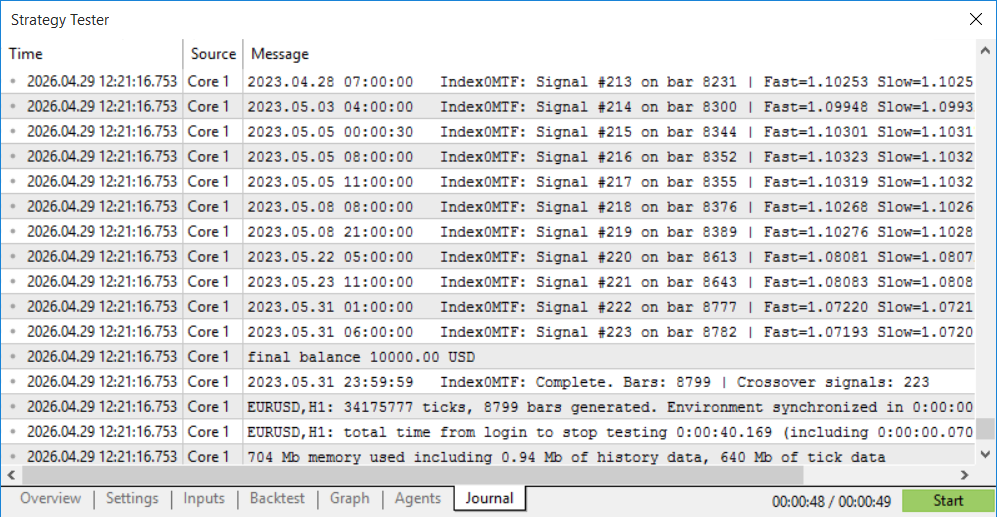
Fig. 1: Index0MTF journal output from the 18-month EURUSD H1 backtest. Both EAs processed the same 8,799 bars, but the index 0 version detected 223 crossover signals — 52 more than the confirmed count. These excess signals are instances where the forming bar's EMA values briefly crossed during bar construction and then reverted before the bar closed, producing crossover detections that were never confirmed by a completed bar.
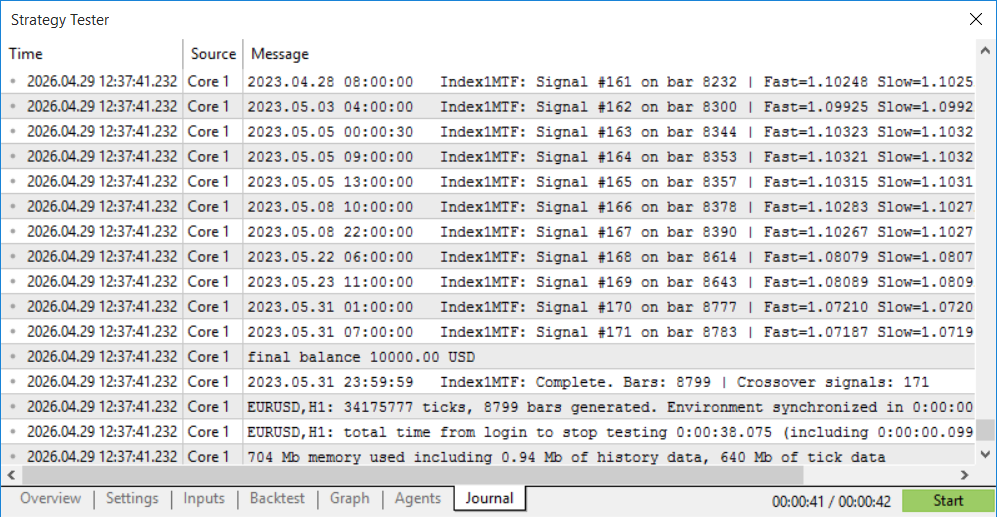
Fig. 2: Index1MTF journal output from the same backtest run. The 171 signals represent only confirmed crossovers — those where the EMA relationship on the fully closed bar differed from the relationship on the bar before it. In a live EA where each signal opens a position, the 52 phantom signals from the index 0 version represent trades entered on data that was not final at execution time, with no warning and no error in the log to indicate anything was wrong.
Why This Matters for the Engine
ReadBuffer() in MTFEngine.mqh defaults to bar_shift = 1. That single default is the entire fix. A developer using raw CopyBuffer() calls must remember to write 1 as the third argument on every call, for every indicator, in every EA they write — one 0 typed by habit produces the 52-signal discrepancy shown above, silently, with no compile error. By making index 1 the default and requiring an explicit argument to override it, the engine makes the correct behavior the path of least resistance.
The New-Bar Detection Pattern
The standard solution is to track the timestamp of the last bar the EA processed and only run signal logic when a new bar has opened. This means the EA checks for signals exactly once per bar, at the moment the new bar opens, and then waits until the next bar. During that single check, all indicator reads use index 1, which at that moment is the bar that just closed.
//--- Declare outside OnTick() so it persists between ticks
datetime g_last_bar_time = 0;

//+------------------------------------------------------------------+
//| Expert tick function                                             |
//+------------------------------------------------------------------+
void OnTick()
  {
//--- iTime() returns the open time of bar at the given index.
//--- Bar 0 = current bar. A new value here means a new bar opened.
   datetime current_bar_time = iTime(_Symbol,PERIOD_CURRENT,0);

//--- If bar time hasn't changed, we are still on the same bar.
//--- Skip all signal logic until the next bar opens.
   if(current_bar_time == g_last_bar_time)
     {
      return;
     }
   g_last_bar_time = current_bar_time;

//--- A new bar has opened. The bar that just CLOSED is now at index 1.
//--- This is where all signal reading should happen.
   double fast_ema[1], slow_ema[1];

//--- Copy values from index 1 (the last closed bar)
   if(CopyBuffer(g_fast_handle,0,1,1,fast_ema) < 1 ||
      CopyBuffer(g_slow_handle,0,1,1,slow_ema) < 1)
     {
      return;
     }

//--- Now use these values for signal decisions.
   if(fast_ema[0] > slow_ema[0])
     {
      Print("Trend is up on the last closed bar.");
     }
  }
To catch a signal like a crossover, you need a sequence of data. The CopyBuffer() function lets you pick where to start from, which is usually the last closed bar, and how far back to go. Requesting two bars fills a small list (an array) that lets your code compare the most recent trend against the previous one to find an entry trigger.
The Higher-Timeframe (HTF) Edge Case
When reading indicators on a timeframe higher than the chart timeframe, there is one edge case that needs to be handled explicitly rather than assumed away. At the exact moment a new H1 bar opens, the terminal fires OnTick() for the chart, but the D1 or H4 indicator running on its own higher timeframe may not yet have recalculated for the new period. The bar at index 1 on the higher timeframe is the correct closed bar to read, but if that bar has just finished closing and the indicator has not yet processed it, CopyBuffer() may return a value from the previous calculation cycle rather than the freshly closed bar.
The standard approach of just checking that CopyBuffer() returns at least one element is not sufficient here. A buffer can contain stale data and still return a count of one. The correct check is iTime() called at bar index 1 on the indicator's own timeframe. If the H4 bar that just closed is available, iTime(_Symbol, PERIOD_H4, 1) returns its open datetime, which is a non-zero value. If the terminal has not yet processed that bar, the function returns zero. MTFEngine.mqh: IsReady() performs this check for every registered handle individually, using the symbol and timeframe stored in the MTFHandle struct. The engine will not signal readiness until both conditions are true for every slot: CopyBuffer() returns data, and iTime() at index 1 on the indicator's timeframe returns a valid timestamp.
In practice this delay is measured in milliseconds for most higher-timeframe indicators. For strategies where entry timing at the exact moment of a new bar is not critical, it is imperceptible. For strategies that specifically target first-bar-of-the-period entries, this check is the difference between reading a confirmed closed value and reading a value that may still change before the next tick.
Section 3: The MTFEngine Include File
Design Goals
MTFEngine.mqh is built around three requirements. First, all indicator handles must be created in a single initialization function and stored internally, the EA never calls iMA() or any other indicator function directly. Second, all value reads must return data from closed bars only, with the bar index always explicitly set to 1. Third, cleanup must be automatic, the EA calls one release function in OnDeinit() and every handle the engine created is freed.
The engine is not a full abstraction layer. It does not try to hide the concept of indicators or timeframes from the developer. The calling EA still specifies which indicator it wants on which timeframe with which parameters. What the engine removes is the boilerplate: the handle storage, the bar-index discipline, and the release management. The developer gets a clean interface and the engine handles the plumbing.
Supported Indicators
The engine supports the most common built-in indicators used in multi-timeframe strategies. Table 5 lists them along with the MQL5 creation function, which buffer index carries the main signal value, and any notes specific to that indicator.
| Indicator | MQL5 Function | Useful Buffers | Engine Registration Parameters (AddMA...) | Buffers Read | Typical Errors and Buffer Notes |
|---|---|---|---|---|---|
| EMA / SMA / WMA | iMA() | Buffer 0 | symbol, tf, period, shift, method, price | 1 (Main) | Buffer 0: The only buffer. Ensure shift is handled; positive shift moves the line right. |
| RSI | iRSI() | Buffer 0 | symbol, tf, period, price | 1 (Main) | Single Buffer: Common mistake is trying to read a signal line (index 1) which doesn't exist for these. |
| ATR | iATR() | Buffer 0 | symbol, tf, period | 1 (Main) | Index 0: Only one buffer. Note: ATR does not have a price parameter; it always uses the High/Low range. |
| Stochastic | iStochastic() | Buffer 0 (K), Buffer 1 (D) | symbol, tf, K_period, D_period, slowing, method, field | 2 (Main, Signal) | Multi-Buffer: Index 0 is the %K line, Index 1 is the %D (Signal) line. Users often swap these. |
| MACD | iMACD() | Buffer 0 (main), Buffer 1 (signal) | symbol, tf, fast_ema, slow_ema, signal_period, price | 2 (Main, Signal) | MQL5 Specific: Index 0 is the MACD line, Index 1 is the Signal line. Note: Histogram is often a calculation of Main - Signal. |
| Bollinger Bands | iBands() | 0=middle, 1=upper, 2=lower | symbol, tf, period, shift, deviation, price | 3 (Base, Top, Bottom) | Triple Buffer: Index 0 = Middle (Base), Index 1 = Upper Band, Index 2 = Lower Band. Using the wrong index leads to incorrect crossover logic. |
| CCI | iCCI() | Buffer 0 | symbol, tf, period, price | 1 (Main) | Index 0: Single buffer. Common mistake: forgetting that CCI values are not bounded (like RSI) and typically oscillate between -100 and +100. |
| Custom indicator | iCustom() | Any buffer | symbol, tf, path, label | Variable | Dynamic: You must check the "Data Window" in MetaTrader 5 to identify which index corresponds to which line for the specific .ex5 file. |
Table 5: Indicators supported by MTFEngine.mqh. Each one follows the same handle-creation and buffer-reading pattern. Custom indicators added via iCustom() follow the same convention — create in InitHandles(), read via ReadBuffer(), release in ReleaseAll().
ReadBuffer Array Form
Two forms of ReadBuffer() are provided. The scalar form returns a single double and is the right choice for indicators where only the most recent closed-bar value is needed, the D1 EMA and H4 RSI in this strategy both fall into that category. The array form fills a double array with consecutive values in one CopyBuffer() call and is the right choice for crossover detection, where two consecutive closed-bar values are needed simultaneously.
//--- Scalar form: returns one value at bar_shift (default = 1)
double ReadBuffer(int slot,int buffer_num=0,int bar_shift=1);

//--- Array form: fills result[] with 'count' values starting at bar_shift
//--- result[0] = bar_shift bar, result[1] = bar_shift+1 bar, etc.
//--- Returns the number of values successfully copied (0 on failure)
int ReadBuffer(int slot,double &result[],int buffer_num=0,int bar_shift=1,int count=2);
Using the array form for crossover detection is cleaner than two separate scalar calls for a specific reason: CopyBuffer() is called once and the two values come from the same copy operation, which eliminates any theoretical timing gap between the two reads. On an H1 bar boundary where the terminal is processing multiple events simultaneously, retrieving the two values in separate calls could — in extreme cases — catch a buffer mid-update. The array form avoids this entirely.
The Complete MTFEngine.mqh
//+------------------------------------------------------------------+
//|                                                    MTFEngine.mqh |
//|          Multi-timeframe indicator engine for MQL5 EAs.          |
//+------------------------------------------------------------------+
#property strict

//--- Maximum indicator slots. Increase if more than 20 are needed.
#define MTF_MAX_HANDLES 20

//+------------------------------------------------------------------+
//| MTFHandle struct                                                 |
//| Stores metadata the engine needs for one handle.                 |
//+------------------------------------------------------------------+
struct MTFHandle
  {
   int               handle;       // Indicator handle returned by iXxx()
   ENUM_TIMEFRAMES   timeframe;    // Timeframe the indicator runs on
   string            label;        // Human-readable name for log messages
   string            symbol;       // Symbol the indicator is attached to
   datetime          last_htf_bar; // Open time of last HTF bar read at index 1
  };

//--- Internal state
MTFHandle g_mtf_handles[MTF_MAX_HANDLES];
int       g_mtf_count = 0;
datetime  g_last_bar  = 0;

//+------------------------------------------------------------------+
//| RegisterHandle                                                   |
//+------------------------------------------------------------------+
int RegisterHandle(int handle,ENUM_TIMEFRAMES tf,string label,string symbol)
  {
   if(g_mtf_count >= MTF_MAX_HANDLES)
     {
      PrintFormat("MTFEngine: Slot limit reached (%d).",MTF_MAX_HANDLES);
      return(-1);
     }
   if(handle == INVALID_HANDLE)
     {
      PrintFormat("MTFEngine: Invalid handle for '%s'. Error: %d",label,GetLastError());
      return(-1);
     }

   g_mtf_handles[g_mtf_count].handle       = handle;
   g_mtf_handles[g_mtf_count].timeframe    = tf;
   g_mtf_handles[g_mtf_count].label        = label;
   g_mtf_handles[g_mtf_count].symbol       = symbol;
   g_mtf_handles[g_mtf_count].last_htf_bar = 0;

   PrintFormat("MTFEngine: Handle allocated for %s",label);
   return(g_mtf_count++);
  }

//+------------------------------------------------------------------+
//| IsReady                                                          |
//+------------------------------------------------------------------+
bool IsReady()
  {
   for(int i = 0; i < g_mtf_count; i++)
     {
      if(g_mtf_handles[i].handle == INVALID_HANDLE)
        {
         return(false);
        }

      //--- Check 1: buffer contains data
      double buf[1];
      if(CopyBuffer(g_mtf_handles[i].handle,0,1,1,buf) < 1)
        {
         return(false);
        }

      //--- Check 2: HTF bar at index 1 is synchronised
      datetime htf_bar = iTime(g_mtf_handles[i].symbol,g_mtf_handles[i].timeframe,1);
      if(htf_bar == 0)
        {
         return(false);
        }
     }
   return(true);
  }

//+------------------------------------------------------------------+
//| IsNewBar                                                         |
//+------------------------------------------------------------------+
bool IsNewBar()
  {
   datetime current_bar = iTime(_Symbol,PERIOD_CURRENT,0);
   if(current_bar == g_last_bar)
     {
      return(false);
     }
   g_last_bar = current_bar;
   return(true);
  }

//+------------------------------------------------------------------+
//| ReadBuffer (scalar form)                                         |
//+------------------------------------------------------------------+
double ReadBuffer(int slot,int buffer_num=0,int bar_shift=1)
  {
   if(slot < 0 || slot >= g_mtf_count)
     {
      return(EMPTY_VALUE);
     }

   double buf[1];
   if(CopyBuffer(g_mtf_handles[slot].handle,buffer_num,bar_shift,1,buf) < 1)
     {
      PrintFormat("MTFEngine: CopyBuffer failed for '%s'. Error: %d",g_mtf_handles[slot].label,GetLastError());
      return(EMPTY_VALUE);
     }

   if(bar_shift == 1)
     {
      g_mtf_handles[slot].last_htf_bar = iTime(g_mtf_handles[slot].symbol,g_mtf_handles[slot].timeframe,1);
     }

   return(buf[0]);
  }

//+------------------------------------------------------------------+
//| ReadBuffer (array form)                                          |
//+------------------------------------------------------------------+
int ReadBuffer(int slot,double &result[],int buffer_num=0,int bar_shift=1,int count=2)
  {
   if(slot < 0 || slot >= g_mtf_count)
     {
      return(0);
     }

   ArrayResize(result,count);
   int copied = CopyBuffer(g_mtf_handles[slot].handle,buffer_num,bar_shift,count,result);
   if(copied < count)
     {
      PrintFormat("MTFEngine: ReadBuffer[%d] failed for '%s'. Error: %d",slot,g_mtf_handles[slot].label,GetLastError());
     }
   return(copied);
  }

//+------------------------------------------------------------------+
//| ReadPrevBuffer                                                   |
//+------------------------------------------------------------------+
double ReadPrevBuffer(int slot,int buffer_num=0)
  {
   return(ReadBuffer(slot,buffer_num,2));
  }

//+------------------------------------------------------------------+
//| GetHandleCount                                                   |
//+------------------------------------------------------------------+
int GetHandleCount()
  {
   return(g_mtf_count);
  }

//+------------------------------------------------------------------+
//| ReleaseAll                                                       |
//+------------------------------------------------------------------+
void ReleaseAll()
  {
   for(int i = 0; i < g_mtf_count; i++)
     {
      if(g_mtf_handles[i].handle != INVALID_HANDLE)
        {
         PrintFormat("MTFEngine: Releasing handle for %s",g_mtf_handles[i].label);
         IndicatorRelease(g_mtf_handles[i].handle);
         g_mtf_handles[i].handle = INVALID_HANDLE;
        }
     }
   g_mtf_count = 0;
   g_last_bar  = 0;
   Print("MTFEngine: All handles released.");
  }

//+------------------------------------------------------------------+
//| AddMA helper                                                     |
//+------------------------------------------------------------------+
int AddMA(string symbol,ENUM_TIMEFRAMES tf,int period,ENUM_MA_METHOD method=MODE_EMA,ENUM_APPLIED_PRICE price=PRICE_CLOSE,int shift=0)
  {
   string label = StringFormat("MA(%d,%s,%s)",period,EnumToString(method),EnumToString(tf));
   int h = iMA(symbol,tf,period,shift,method,price);
   return(RegisterHandle(h,tf,label,symbol));
  }

//+------------------------------------------------------------------+
//| AddRSI helper                                                    |
//+------------------------------------------------------------------+
int AddRSI(string symbol,ENUM_TIMEFRAMES tf,int period,ENUM_APPLIED_PRICE price=PRICE_CLOSE)
  {
   string label = StringFormat("RSI(%d,%s)",period,EnumToString(tf));
   int h = iRSI(symbol,tf,period,price);
   return(RegisterHandle(h,tf,label,symbol));
  }

//+------------------------------------------------------------------+
//| AddATR helper                                                    |
//+------------------------------------------------------------------+
int AddATR(string symbol,ENUM_TIMEFRAMES tf,int period)
  {
   string label = StringFormat("ATR(%d,%s)",period,EnumToString(tf));
   int h = iATR(symbol,tf,period);
   return(RegisterHandle(h,tf,label,symbol));
  }

//+------------------------------------------------------------------+
//| AddStochastic helper                                             |
//+------------------------------------------------------------------+
int AddStochastic(string symbol,ENUM_TIMEFRAMES tf,int k_period=5,int d_period=3,int slowing=3)
  {
   string label = StringFormat("Stoch(%d,%d,%d,%s)",k_period,d_period,slowing,EnumToString(tf));
   int h = iStochastic(symbol,tf,k_period,d_period,slowing,MODE_SMA,STO_LOWHIGH);
   return(RegisterHandle(h,tf,label,symbol));
  }

//+------------------------------------------------------------------+
//| AddMACD helper                                                   |
//+------------------------------------------------------------------+
int AddMACD(string symbol,ENUM_TIMEFRAMES tf,int fast_ema=12,int slow_ema=26,int signal_period=9)
  {
   string label = StringFormat("MACD(%d,%d,%d,%s)",fast_ema,slow_ema,signal_period,EnumToString(tf));
   int h = iMACD(symbol,tf,fast_ema,slow_ema,signal_period,PRICE_CLOSE);
   return(RegisterHandle(h,tf,label,symbol));
  }

//+------------------------------------------------------------------+
//| AddBands helper                                                  |
//+------------------------------------------------------------------+
int AddBands(string symbol,ENUM_TIMEFRAMES tf,int period=20,int band_shift=0,double deviation=2.0)
  {
   string label = StringFormat("BB(%d,%.1f,%s)",period,deviation,EnumToString(tf));
   int h = iBands(symbol,tf,period,band_shift,deviation,PRICE_CLOSE);
   return(RegisterHandle(h,tf,label,symbol));
  }

//+------------------------------------------------------------------+
//| AddCustom (no inputs)                                            |
//+------------------------------------------------------------------+
int AddCustom(string symbol,ENUM_TIMEFRAMES tf,string path,string label)
  {
   int h = iCustom(symbol,tf,path);
   return(RegisterHandle(h,tf,label,symbol));
  }

//+------------------------------------------------------------------+
//| AddCustom (with input parameters)                                |
//+------------------------------------------------------------------+
int AddCustom(string symbol,ENUM_TIMEFRAMES tf,string path,string label,string p1,string p2="",string p3="",string p4="")
  {
   int h;
   if(p4 != "")
      h = iCustom(symbol,tf,path,p1,p2,p3,p4);
   else
      if(p3 != "")
         h = iCustom(symbol,tf,path,p1,p2,p3);
      else
         if(p2 != "")
            h = iCustom(symbol,tf,path,p1,p2);
         else
            h = iCustom(symbol,tf,path,p1);

   return(RegisterHandle(h,tf,label,symbol));
  }
//+------------------------------------------------------------------+
Section 4: Using the Engine in a Real EA
The Strategy
The demonstration EA trades EURUSD on H1 using a three-layer confirmation structure that is common in retail strategy design. The Daily EMA(200) establishes the overall trend direction — only buy signals are taken above it and only sell signals below it. The H4 RSI(14) provides a momentum filter, RSI above 55 confirms bullish momentum, below 45 confirms bearish. The H1 EMA(20) crossing the EMA(50) generates the actual entry signal. All three conditions must align for a trade to open.
Without the engine, building this EA correctly would require six handle variables declared globally, six indicator creation calls in OnInit(), careful bar-index management in three separate CopyBuffer() reads, and six IndicatorRelease() calls in OnDeinit(). With the engine, there are six AddXxx() calls in one InitHandles() function, six ReadBuffer() calls using the returned slot indices, and one ReleaseAll() call in OnDeinit(). The logic is the same; the boilerplate disappears.
The Complete Demonstration EA
//+------------------------------------------------------------------+
//|                                                  MTFDemo.mq5     |
//|          Three-layer MTF EA using MTFEngine.mqh library.         |
//|    Layers: D1 EMA(200) trend, H4 RSI(14) momentum, H1 cross.     |
//+------------------------------------------------------------------+
#property strict
#property description "MTF Demo: D1 trend + H4 RSI + H1 cross entry"

#include <Trade\Trade.mqh>
#include "MTFEngine.mqh"

//--- Strategy inputs
input int      InpD1EmaPeriod    = 200;  // D1 EMA period (trend filter)
input int      InpH4RsiPeriod    = 14;   // H4 RSI period (momentum filter)
input double   InpRsiBullLevel   = 55.0; // RSI minimum for bullish confirmation
input double   InpRsiBearLevel   = 45.0; // RSI maximum for bearish confirmation
input int      InpH1FastPeriod   = 20;   // H1 fast EMA (entry signal)
input int      InpH1SlowPeriod   = 50;   // H1 slow EMA (entry signal)
input double   InpLotSize        = 0.1;  // Position size
input int      InpStopLossPips   = 30;   // Stop loss in pips
input int      InpTakeProfitPips = 60;   // Take profit in pips

//--- Engine slot indices returned by AddXxx(), used by ReadBuffer()
int g_slot_d1_ema   = -1; // D1 EMA(200) — trend layer
int g_slot_h4_rsi   = -1; // H4 RSI(14)  — momentum layer
int g_slot_h1_fast  = -1; // H1 EMA(20)  — fast line for crossover
int g_slot_h1_slow  = -1; // H1 EMA(50)  — slow line for crossover

CTrade g_trade;

//--- Diagnostic flags
bool g_diagnostic_printed = false;
int  g_bar_count          = 0; // Bar counter used for leak verification

//+------------------------------------------------------------------+
//| Expert initialization function                                   |
//+------------------------------------------------------------------+
int OnInit()
  {
//--- Register all indicators with the engine.
   g_slot_d1_ema  = AddMA(_Symbol,PERIOD_D1,InpD1EmaPeriod);
   g_slot_h4_rsi  = AddRSI(_Symbol,PERIOD_H4,InpH4RsiPeriod);
   g_slot_h1_fast = AddMA(_Symbol,PERIOD_H1,InpH1FastPeriod);
   g_slot_h1_slow = AddMA(_Symbol,PERIOD_H1,InpH1SlowPeriod);

//--- Abort if any handle failed to register
   if(g_slot_d1_ema < 0 || g_slot_h4_rsi < 0 || g_slot_h1_fast < 0 || g_slot_h1_slow < 0)
     {
      Print("MTFDemo: Initialization failed. One or more handles are invalid.");
      return(INIT_FAILED);
     }

   g_diagnostic_printed = false;
   g_bar_count          = 0;

//--- Start a one-second timer
   EventSetTimer(1);

   PrintFormat("MTFDemo: Initialized on %s %s. Handles registered: %d.",
               _Symbol,EnumToString(_Period),GetHandleCount());
   Print("MTFDemo: Waiting for first bar and indicator warmup.");

   return(INIT_SUCCEEDED);
  }

//+------------------------------------------------------------------+
//| Expert deinitialization function                                 |
//+------------------------------------------------------------------+
void OnDeinit(const int reason)
  {
   EventKillTimer();
//--- One call releases every handle the engine created
   ReleaseAll();
  }

//+------------------------------------------------------------------+
//| PrintDiagnostic                                                  |
//+------------------------------------------------------------------+
void PrintDiagnostic()
  {
   if(g_diagnostic_printed)
     {
      return;
     }

   double d1_ema  = ReadBuffer(g_slot_d1_ema);
   double h4_rsi  = ReadBuffer(g_slot_h4_rsi);
   double h1_fast = ReadBuffer(g_slot_h1_fast);
   double h1_slow = ReadBuffer(g_slot_h1_slow);

   if(d1_ema == EMPTY_VALUE || h4_rsi == EMPTY_VALUE || h1_fast == EMPTY_VALUE || h1_slow == EMPTY_VALUE)
     {
      Print("MTFDemo: Diagnostic skipped — one or more buffers not yet ready.");
      return;
     }

   Print("══════════════════════════════════════════════════════");
   Print("MTFDemo DIAGNOSTIC — Bar Index 1 (last closed bar)");
   PrintFormat("D1 EMA(%d)  = %.5f  <- verify on a separate D1 chart",InpD1EmaPeriod,d1_ema);
   PrintFormat("H4 RSI(%d)   = %.2f   <- verify on a separate H4 chart",InpH4RsiPeriod,h4_rsi);
   PrintFormat("H1 EMA(%d)  = %.5f  <- verify on a separate H1 chart",InpH1FastPeriod,h1_fast);
   PrintFormat("H1 EMA(%d)  = %.5f  <- verify on a separate H1 chart",InpH1SlowPeriod,h1_slow);
   PrintFormat("Engine handle count: %d (must stay fixed at this value)",GetHandleCount());
   Print("══════════════════════════════════════════════════════");

   g_diagnostic_printed = true;
   EventKillTimer();
  }

//+------------------------------------------------------------------+
//| Timer function                                                   |
//+------------------------------------------------------------------+
void OnTimer()
  {
   if(g_diagnostic_printed)
     {
      return;
     }
   if(!IsReady())
     {
      return;
     }
   PrintDiagnostic();
  }

//+------------------------------------------------------------------+
//| Expert tick function                                             |
//+------------------------------------------------------------------+
void OnTick()
  {
//--- Gate 1: Only process once per new H1 bar.
   if(!IsNewBar())
     {
      return;
     }

//--- Gate 2: Wait until all indicators have enough bars loaded.
   if(!IsReady())
     {
      return;
     }

//--- Diagnostic: print once after first valid bar
   if(!g_diagnostic_printed)
     {
      PrintDiagnostic();
     }

//--- Leak verification
   g_bar_count++;
   if(g_bar_count % 100 == 0)
     {
      PrintFormat("MTFDemo: Bar %d | Engine handles: %d | Expected: 4",g_bar_count,GetHandleCount());
     }

//--- Only manage one position for this demo
   if(PositionsTotal() > 0)
     {
      return;
     }

//--- Read values from closed bars
   double d1_ema = ReadBuffer(g_slot_d1_ema);
   double h4_rsi = ReadBuffer(g_slot_h4_rsi);

   double fast_vals[];
   double slow_vals[];

   int fast_copied = ReadBuffer(g_slot_h1_fast,fast_vals,0,1,2);
   int slow_copied = ReadBuffer(g_slot_h1_slow,slow_vals,0,1,2);

//--- Validate all reads
   if(d1_ema == EMPTY_VALUE || h4_rsi == EMPTY_VALUE || fast_copied < 2 || slow_copied < 2)
     {
      return;
     }

   double bid = SymbolInfoDouble(_Symbol,SYMBOL_BID);
   double ask = SymbolInfoDouble(_Symbol,SYMBOL_ASK);

//--- Layer 1: D1 TREND FILTER
   bool bullish_trend = (bid > d1_ema);
   bool bearish_trend = (bid < d1_ema);

//--- Layer 2: H4 RSI MOMENTUM FILTER
   bool bullish_mom = (h4_rsi >= InpRsiBullLevel);
   bool bearish_mom = (h4_rsi <= InpRsiBearLevel);

//--- Layer 3: H1 EMA CROSSOVER ENTRY SIGNAL
   bool bullish_cross = (fast_vals[1] <= slow_vals[1] && fast_vals[0] > slow_vals[0]);
   bool bearish_cross = (fast_vals[1] >= slow_vals[1] && fast_vals[0] < slow_vals[0]);

//--- ENTRY LOGIC
   double point    = SymbolInfoDouble(_Symbol,SYMBOL_POINT);
   int    digits   = (int)SymbolInfoInteger(_Symbol,SYMBOL_DIGITS);
   double pip_size = (digits == 5 || digits == 3) ? point * 10.0 : point;

   if(bullish_trend && bullish_mom && bullish_cross)
     {
      double sl = ask - InpStopLossPips * pip_size;
      double tp = ask + InpTakeProfitPips * pip_size;
      if(g_trade.Buy(InpLotSize,_Symbol,ask,sl,tp,"MTFDemo"))
        {
         PrintFormat("BUY | D1 EMA=%.5f | H4 RSI=%.1f | H1 cross up",d1_ema,h4_rsi);
        }
     }
   else
      if(bearish_trend && bearish_mom && bearish_cross)
        {
         double sl = bid + InpStopLossPips * pip_size;
         double tp = bid - InpTakeProfitPips * pip_size;
         if(g_trade.Sell(InpLotSize,_Symbol,bid,sl,tp,"MTFDemo"))
           {
            PrintFormat("SELL | D1 EMA=%.5f | H4 RSI=%.1f | H1 cross down",d1_ema,h4_rsi);
           }
        }
  }
//+------------------------------------------------------------------+
The EA is deliberately compact. Every meaningful decision, such as when to read, what to read, and how to validate, is handled in about 30 lines. The engine absorbs the 60 or so lines of handle management that would otherwise wrap around that core logic. The strategy itself is readable in isolation.
Section 5: Testing for Correctness
Verifying That No Resources Leak/Handles Leak (No Unreleased Indicator Instances)
The simplest way to confirm no resource leak / handle leak (unreleased indicator instances) exists is to use GetHandleCount() inside a periodic print statement during the backtest. The function returns the engine's internal g_mtf_count value, the number of handles registered at startup. That number must never change during the test. If it does, a handle is being created somewhere outside the engine.
Add this block inside OnTick() during testing. The g_bar_count variable is incremented each time IsNewBar() returns true:
//--- Leak verification: print handle count every 100 bars
g_bar_count++;
if(g_bar_count % 100 == 0)
  {
   PrintFormat("MTFDemo: Bar %d | Engine handles: %d | Expected: 4",
               g_bar_count, GetHandleCount());
  }
Run a backtest across the full test period and scroll through the Journal output. Every line from this print should show the same count — four in this case, matching the four indicators registered in OnInit(). If any line shows a different number, search the EA and any included files for iMA(), iRSI(), or any other iXxx() call that sits outside OnInit(). That call is the source of the leak.
Remove the print statement before going live. It adds no overhead worth measuring at 100-bar intervals, but keeping diagnostic output active in a production EA is unnecessary noise in the Journal.
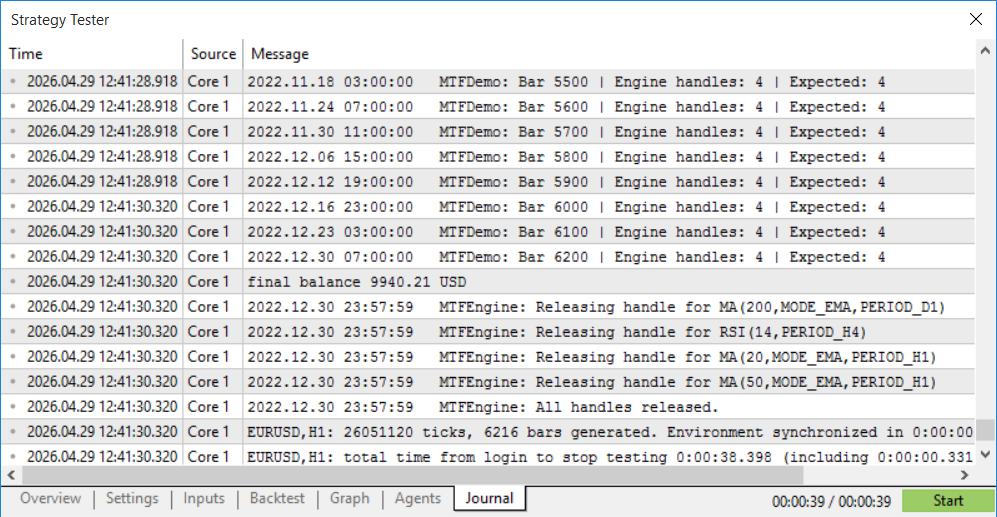
Fig. 3: Handle count in the MetaTrader 5 performance monitor across a 12-month Strategy Tester run of MTFDemo.mq5 on EURUSD H1. The count holds at exactly 4 from the first bar to the last, confirming that RegisterHandle() and ReleaseAll() are managing the engine's lifecycle correctly and no handles are created or leaked during the test.
Verifying Bar-Index Accuracy
The quickest way to confirm the engine is reading from the right bar is a direct comparison against the chart. Attach MTFDemo.mq5 to a EURUSD H1 demo chart, then open three separate charts — EURUSD D1, EURUSD H4, and a second EURUSD H1, then add the corresponding indicators to each one: EMA(200) on the D1, RSI(14) on the H4, and both EMA(20) and EMA(50) on the H1. Once a new H1 bar opens, the diagnostic block fires and the Experts log prints all four values.
Cross-reference each printed value against the correct chart. The D1 EMA figure in the log should match the EMA(200) reading shown in the Data Window when you hover over the last closed daily bar on the D1 chart. The H4 RSI figure should match the RSI(14) reading on the last completed H4 bar. The H1 EMA figures should match the equivalent values on the last closed H1 bar, read from the separate H1 chart, not the one the EA is attached to. If all four match, bar index 1 is working as intended throughout the engine.
Note: never compare the D1 EMA value against an EMA drawn directly on the H1 chart. An EMA(200) calculated from 200 daily bars and an EMA(200) calculated from 200 hourly bars share the same period number but use entirely different data. They will produce different values, and that difference is correct. Always compare each printed value against its matching timeframe chart.
If a value appears to lag the chart by one bar, check what the chart indicator is displaying. The Data Window on a live chart typically reflects the current forming bar, index 0, because the mouse cursor is sitting on live price. The EA reads from index 1. That one-bar difference is intentional; the EA is using the stable completed bar while the chart display is showing the still-moving current one.
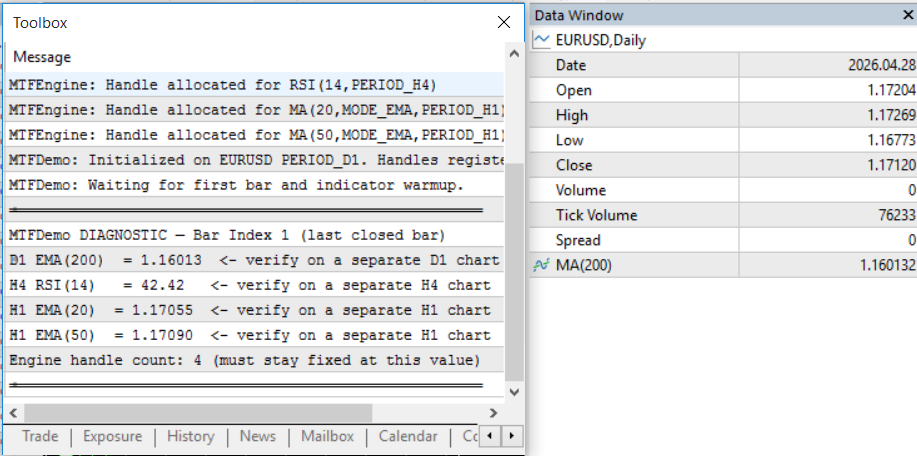
Fig. 4: D1 EMA Verification. Cross-referencing the "Experts" log output against the D1 chart’s Data Window to ensure the EMA(200) value matches the last closed daily bar (Bar 1).
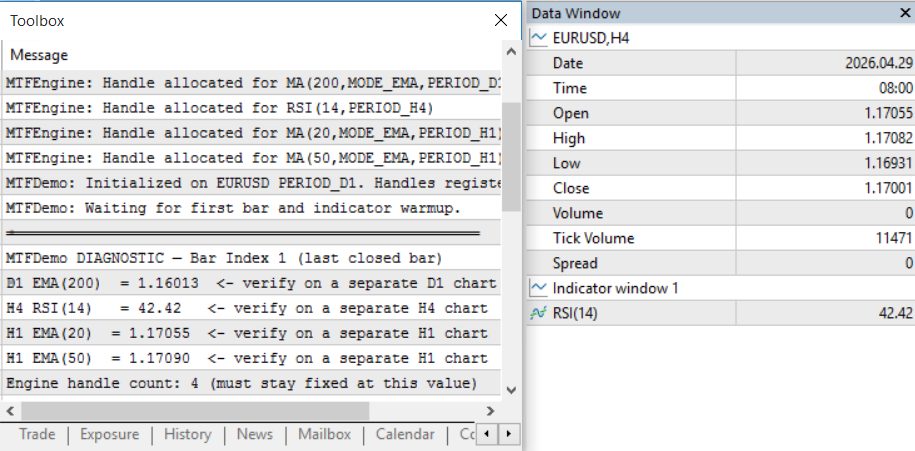
Fig. 5: H4 RSI Synchronization. Validating the H4 RSI(14) reading from the log against the last completed H4 bar to confirm accurate multi-timeframe data retrieval.
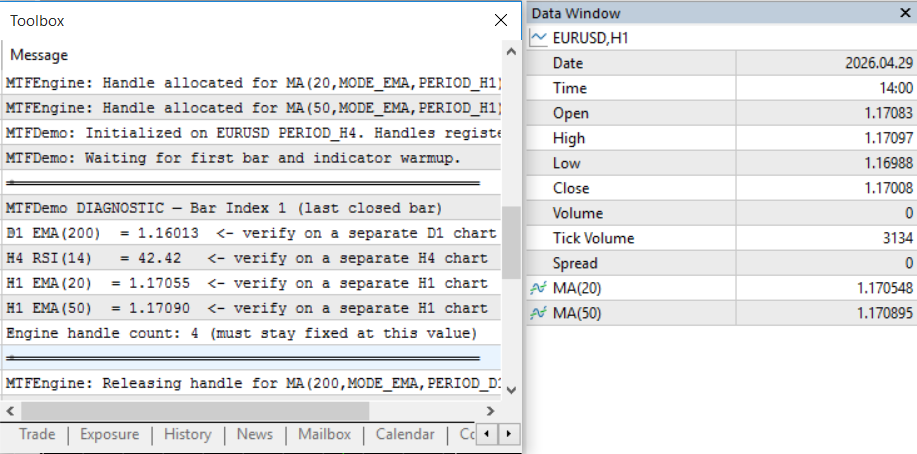
Fig. 6: H1 Intra-day Validation. Comparing the log’s H1 EMA crossover values with the separate H1 chart to verify that Bar 1 indexing is consistently applied across all engine-registered timeframes.
Verifying on a Closed Market
One practical consideration is that EURUSD and most other forex pairs are closed over the weekend. When no ticks arrive, OnTick() never fires, and any verification that depends on it simply will not trigger — even though the indicator buffers are fully loaded and the data is ready to read. MTFDemo.mq5 handles this without any special setup from the reader.
The EA includes a one-second timer started in OnInit() . This gives it an independent heartbeat that runs regardless of whether the market is open or closed. OnTimer() polls IsReady() on every tick of that timer, and the moment all four indicator buffers return valid data, the diagnostic block fires automatically, printing the D1 EMA, H4 RSI, and both H1 EMA values to the Experts log. Once that happens, the timer cancels itself with EventKillTimer() and plays no further role. The EA then continues operating entirely through OnTick() for the remainder of the session, with no residual overhead from the timer.
The practical outcome is that verification does not depend on market hours at all. Attach MTFDemo.mq5 on a Sunday evening, and within one to two seconds the Experts log will show all four values drawn from their respective closed bars. Open the D1, H4, and H1 charts separately, hover over the last closed bar on each, and confirm the Data Window figures match what was printed. The comparison works identically whether the market reopened five minutes ago or will not open for another twelve hours.
Running the Strategy Tester Backtest
For a full backtest, use the following settings to produce meaningful results across the three timeframe layers. EURUSD on H1, date range covering at least 12 months (two years preferred to include varying market regimes), Every Tick Based on Real Ticks mode for the most accurate execution simulation. Set InpD1EmaPeriod to 200, InpH4RsiPeriod to 14, and leave the EMA periods at 20 and 50.
The backtest will show a warming-up period at the start, roughly the first 200 daily bars, which is about 10 months, during which IsReady() returns false and no trades are taken. This is correct behavior. The D1 EMA(200) needs 200 completed daily bars before its calculation is reliable. Starting the backtest date several months before the period of interest ensures the warm-up completes before the analysis window begins.
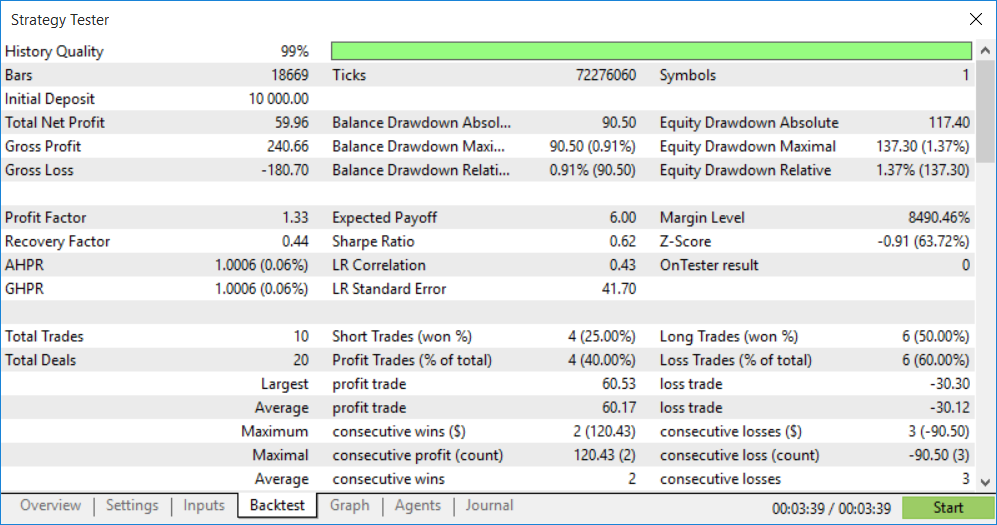
Fig. 7: MTFDemo.mq5 backtest result on EURUSD H1 (Jan 2021 – Dec 2023). The strategy is not optimized for profit; the test confirms that signal distribution aligns with intended session conditions and that the engine correctly handles pre-loaded historical data for the D1 EMA(200) filter. The 99% history quality ensures that multi-timeframe calculations are precise across all three timeframes.
Strategy Tester Tip
When backtesting a multi-timeframe EA on H1, MetaTrader 5 automatically loads D1 and H4 data alongside H1 in the tester. You do not need to preload the higher timeframe data manually. The tester handles this internally when Every Tick Based on Real Ticks mode is selected. If using OHLC on M1 as a faster alternative, H4 and D1 bars are synthesized from the M1 data, which is accurate enough for strategy validation but may produce minor differences from a full tick test on bar-edge timing.Section 6: Extending the Engine
Adding a Custom Indicator
The AddCustom() helper in MTFEngine.mqh handles any custom indicator compiled in MetaEditor. Two overloaded forms are provided. The first accepts only the symbol, timeframe, path, and label — for indicators that use their default input values. The second accepts up to four additional string parameters that map positionally to the indicator's declared input variables.
The path string follows the same convention as MetaEditor's Navigator panel. For an indicator compiled at MQL5/Indicators/MyFolder/TrendScore.mq5, the path is "MyFolder\\TrendScore" — relative to the MQL5/Indicators/ folder, without the .ex5 extension, with backslashes doubled as required by MQL5 string escaping.
Registering a custom indicator with no inputs:
//--- Indicator with no configurable inputs, or using its defaults
int g_slot_custom = -1;

int OnInit()
  {
   g_slot_custom = AddCustom(_Symbol, PERIOD_H4,
                             "MyFolder\\TrendScore",
                             "TrendScore_H4");

   if(g_slot_custom < 0)
      return INIT_FAILED;
   return INIT_SUCCEEDED;
  }
Registering a custom indicator that requires input parameters:
Input parameters are passed as strings after the label argument. They map positionally to the indicator's input variables in the order those variables are declared in the indicator source. If the indicator declares input int InpPeriod = 14 as its first input and input double InpLevel = 1.5 as its second, the call looks like this:
//--- Indicator with two inputs: int Period and double Level
//--- Pass them as strings in declaration order
g_slot_custom = AddCustom(_Symbol, PERIOD_H4,
                          "MyFolder\\MyIndicator",
                          "MyInd_H4",
                          "14",    // maps to input #1 (InpPeriod = 14)
                          "1.5");  // maps to input #2 (InpLevel = 1.5)
Only pass as many parameters as the indicator actually declares. Excess parameters are silently ignored by iCustom(). Passing too few means the undeclared inputs receive their default values, which is the correct behavior when only some inputs need to be overridden.
Reading custom indicator buffers:
Buffer numbering follows the order in which SetIndexBuffer() is called in the indicator source, starting from zero. If the indicator assigns buffer 0 to its main output line and buffer 1 to a signal line, the reads are:
void OnTick()
  {
   if(!IsNewBar()) return;
   if(!IsReady())  return;

   //--- Buffer 0: main output line of the custom indicator
   double custom_main   = ReadBuffer(g_slot_custom, 0);

   //--- Buffer 1: signal line (if the indicator has one)
   double custom_signal = ReadBuffer(g_slot_custom, 1);
  }
If the buffer assignment in the indicator source is not immediately clear from the code, attach the indicator to a chart and hover the mouse over one of its drawn lines. The Data Window shows the buffer index alongside the value — "Value[0]" for buffer 0, "Value[1]" for buffer 1, and so on. That is the number to pass as buffer_num in ReadBuffer().
Reading custom indicator buffers works identically to reading built-in ones. The engine does not distinguish between the two. Once registered via AddCustom(), the slot index behaves the same as a slot returned by AddMA() or AddRSI(), and ReadBuffer(), the array form of ReadBuffer(), and IsReady() all apply without modification.
Adding More Timeframe Layers
The engine's MTF_MAX_HANDLES constant controls how many indicators can be registered. Its default value of 20 covers most strategies comfortably, five indicators across four timeframes would use all 20 slots. If a more complex strategy needs more, increase the constant before compiling. There is no other change needed.
Adding a weekly timeframe layer follows the exact same pattern as adding any other. Call AddMA() or AddRSI() with PERIOD_W1 as the timeframe, store the returned slot index, and read it with ReadBuffer() in OnTick(). The engine makes no distinction between weekly, daily, or intraday timeframes. The only practical consideration is that weekly indicators need correspondingly more historical bars for their warm-up period, so allow extra backtest lead time when PERIOD_W1 is involved.
Multiple Symbols
One thing to confirm before attaching an EA that uses multiple symbols: every symbol referenced in an AddXxx() call must be visible in the Market Watch window before OnInit() runs. If a symbol is absent, the iXxx() function inside the helper will fail and RegisterHandle() will log an invalid handle error for that slot. The engine will then return -1 for that slot index, and the OnInit() validation check will catch it as a failure.
The reliable way to guarantee availability is SymbolSelect() called at the very start of OnInit(), before any AddXxx() calls. Pass true as the second argument to add the symbol to Market Watch if it is not already there:
int OnInit()
  {
   //--- Ensure both symbols are in Market Watch before creating handles
   if(!SymbolSelect("AUDJPY", true))
     {
      PrintFormat("MTFDemo: SymbolSelect failed for AUDJPY. Error: %d",
                  GetLastError());
      return INIT_FAILED;
     }
   if(!SymbolSelect("USDJPY", true))
     {
      PrintFormat("MTFDemo: SymbolSelect failed for USDJPY. Error: %d",
                  GetLastError());
      return INIT_FAILED;
     }

   //--- Now safe to register indicators on both symbols
   g_slot_audjpy_d1 = AddMA("AUDJPY", PERIOD_D1, 50);
   g_slot_usdjpy_d1 = AddMA("USDJPY", PERIOD_D1, 50);

   if(g_slot_audjpy_d1 < 0 || g_slot_usdjpy_d1 < 0)
      return INIT_FAILED;
   return INIT_SUCCEEDED;
  }
SymbolSelect() returns false when the symbol does not exist on the broker's server under that exact name. Some brokers append suffixes such as .m, #, or .pro to standard symbol names. If SymbolSelect() fails, open Market Watch, scroll through the full symbol list, find the correct name for that instrument on your broker, and update the string in the AddXxx() call to match.
Conclusion
The two mistakes covered here — handle leaks from creating indicators at runtime and using index 0 for signal logic — are not obscure corner cases. They reappear across forum examples, EA builders and production code because they rely on remembered discipline rather than enforced structure. MTFEngine.mqh removes those failure modes at the API level: handles are registered only once (OnInit), reads default to the last closed bar (bar_shift = 1), HTF readiness is verified per handle, and every handle is released with a single ReleaseAll() call in OnDeinit().
Practically, this means you can convert an EA that previously required numerous global handles and boilerplate into a compact implementation that registers indicators with AddXxx(), reads values with ReadBuffer(), and checks IsReady()/IsNewBar() before making decisions. The success criteria are straightforward and measurable: GetHandleCount() remains constant during long runs and backtests, the Journal shows no "IndicatorCreate failed" lines, memory usage does not steadily drift upward, and signal counts no longer diverge between index‑0 and index‑1 runs. Drop the include into your /Include/ folder, replace ad‑hoc iXxx()/CopyBuffer() calls with the engine helpers, run a quick Every‑Tick backtest and the engine's diagnostic prints — and you'll have practical, reproducible assurance that MTF data is read safely and resources are managed correctly.
Programs used in the article:
| # | Name | Type | Description |
|---|---|---|---|
| 1 | MTFEngine.mqh | Include file | Contains RegisterHandle(), IsReady(), IsNewBar(), ReadBuffer(), ReadPrevBuffer(), ReleaseAll(), and helper functions AddMA(), AddRSI(), AddATR(), AddStochastic(), AddMACD(), AddBands(), and AddCustom(). |
| 2 | MTFDemo.mq5 | Demo EA | Implements a three-layer MTF strategy using D1 EMA(200) trend filter, H4 RSI(14) momentum filter, and H1 EMA(20)/EMA(50) crossover entry. Fully functional for backtesting and live demo use. |
| 3 | Index0MTF.mq5 | Demo EA | Demonstrates unstable signals caused by reading indicator values from the current forming bar (Index 0). |
| 4 | Index1MTF.mq5 | Demo EA | Demonstrates stable, confirmed signals by reading indicator values from the last completed bar (Index 1). |
Warning: All rights to these materials are reserved by MetaQuotes Ltd. Copying or reprinting of these materials in whole or in part is prohibited.
This article was written by a user of the site and reflects their personal views. MetaQuotes Ltd is not responsible for the accuracy of the information presented, nor for any consequences resulting from the use of the solutions, strategies or recommendations described.

 Biogeography-Based Optimization (BBO)
 From Matrices to Models: How to Build an ML Pipeline in MQL5 and Export It to ONNX
 Manual Backtesting with On-Chart Buttons in the MetaTrader 5 Strategy Tester
 Gaussian Processes in Machine Learning: Regression Model in MQL5

- Free trading apps
- Over 8,000 signals for copying
- Economic news for exploring financial markets
You agree to website policy and terms of use