

MQL5 Wizard Techniques You should know (Part 86): Speeding Up Data Access with a Sparse Table for a Custom Trailing Class
 3 310
3 310
 0
0

Contents
- Introduction: Data-First Paradigm
- The Computational Bottleneck: Why O(1) Matters
- The Sparse Table Algorithm
- The Polars to SQLite Pipeline
- Measuring Market Excursion
- MQL5 Implementation
- Empirical Results and Analysis
- Conclusion
Introduction: Data-First Paradigm
Many Expert Advisors with custom trailing stops run into a practical performance and data‑quality bottleneck: on each bar or even on every tick they scan long historical windows (typically 500–5,000+ bars) to locate highs/lows, which makes the EA's processing time grow linearly and causes hidden execution drift on VPSs or in live trading. At the same time, relying on MetaTrader's built‑in history access can expose the EA to gaps and inconsistencies that change behavior between the tester and live runs.
This article reframes the problem more narrowly:
- (1) when a trailing routine recalculates range extrema repeatedly across large lookback windows and high update frequency, O(N) queries become a measurable cause of latency and delayed exits;
- and (2) an EA needs a reproducible, cleaned price feed instead of ad‑hoc terminal reads.
To address these two, we build an O(1) Range Minimum/Maximum Query (Sparse Table) for constant‑time extreme lookups and pair it with a Python (Polars) → SQLite pipeline that cleans, interpolates and timestamps ticks/bars so the EA reads deterministic data.
The Computational Bottleneck: Why O(1) Matters
If we take a leaf from structural engineering, whenever an engineer is tasked with calculating the load bearing capacity of a structural beam, say whenever someone walks on it, he would rely on pre-calculated tables and established constants to come up with a reasonable estimate. In developing an Expert Advisor though, it is easy for one to fall into a ‘redundancy’ where, say, trailing stop logic keeps querying by starting from the current bar and looking back 500 bars to get the lowest price on each new price bar sometimes on every tick!
Mathematically this is anO(N) operation (Big O of N). The ‘N’ represents how much a calculation scales linearly in proportion to the input data size. So typically, in a scenario where the trailing window is 500 the CPU would be performing 500 x N comparisons, several times in a day (where N represents the number of comparisons made over a different horizon, at each bar). If you run an Expert Advisor locally, this may be feasible depending on query frequency. On a VPS—especially one with time-based compute credits—this can be a major constraint that needs to be properly factored in before deployment.
It can be, effectively, a ‘silent killer’ of many Expert Advisors. There is obviously an ongoing debate on why manual traders are more successful than those who automate; given that if you can describe a trade system you should be able to codify it. I would argue this issue could be one of the factors that many coders of EAs tend to overlook. It is sometimes referred to as ‘execution drift’.
The solution to this could be to shift the retrieval of history prices from a linear complexity O(N) to a constant complexity O(1). By using a Sparse Table, we do the bulk of the search operations once when initializing or at a periodic interval. This pre-processing has a reduced complexity of O(N log N) as it builds the table. Once the table is built, finding the maximum or minimum price across any range whether it is 10 bars or 10k, will require a single lookup, hence the complexity O(1).
With a Sparse Table, we no longer search for data; we index it. Arguably though, this is beneficial when performing multiple queries in a short span as is the case in our implementation. A single offhand query, even though it is per bar, may not be feasible as more compute resources could get consumed than is necessary. We initialize this data structure and build/re-build it, in MQL5, as follows:
//+------------------------------------------------------------------+
//|                                                                  |
//+------------------------------------------------------------------+
bool CTrailingSparseTable::InitIndicators(CIndicators *indicators)
{  if(!CExpertTrailing::InitIndicators(indicators)) return false;
   // 1. Initialize ATR for the Geometric Gatekeeper
   if(!m_atr.Create(m_symbol.Name(), m_period, m_window_size)) return false;
   // 2. Pre-compute Log2 table for O(1) bitwise speed
   ArrayResize(m_log_table, 30001);
   m_log_table[1] = 0;
   for(int i = 2; i <= 30000; i++)
      m_log_table[i] = m_log_table[i / 2] + 1;
   // 3. Pre-load Historical Cleaned Data from SQLite
   MqlRates rates[];
   // Load 3x the window size to allow for multi-term query depth
   int initial_size = 3 * m_window_size;
   int count = m_db.GetCleanedRates(m_symbol.Name(), TimeCurrent() - (PeriodSeconds() * initial_size), initial_size, rates);
   if(count >= initial_size)
   {  // Build the initial table so the first tick is O(1)
      BuildTable(rates, true);
      printf("Sparse Table pre-initialized with %d bars from SQLite.", count);
   }
   return true;
}
Build the table://+------------------------------------------------------------------+
//| Build Sparse Table from price array: O(N log N) |
//+------------------------------------------------------------------+
bool CTrailingSparseTable::BuildTable(MqlRates &R[], bool is_min)
{ int n = int(R.Size());
if(n <= 0) return false;
n = fmin(n,30000);
int max_j = m_log_table[n] + 1;
m_st.Resize(n, max_j);
// Base case: intervals of length 1
for(int i = 0; i < n; i++)
{ if(is_min)
{ m_st[i][0] = R[i].low;
}
else
{ m_st[i][0] = R[i].high;
}
}
// Compute intervals of length 2^j
for(int j = 1; j < max_j; j++)
{ for(int i = 0; i + (1 << j) <= n; i++)
{ if(is_min)
{ // Storing min values for Long positions;
m_st[i][j] = MathMin(m_st[i][j - 1], m_st[i + (1 << (j - 1))][j - 1]);
}
else
{ // Storing max values for Short positions;
m_st[i][j] = MathMax(m_st[i][j - 1], m_st[i + (1 << (j - 1))][j - 1]);
}
}
}
return true;
} The Sparse Table Algorithm
To achieve O(1) query time, the Sparse Table trades additional memory and setup time for precomputed highs/lows over selected intervals. The reason for its efficiency comes from using the power-of-2 principle. Rather than keeping the minimum or maximum in every possible range, we only log these values for ranges whose size is a power of 2 i.e. 1, 2, 4, 8, etc.
The Data Structure
In setting up this table, we define a matrix m_st, accessed as a 2D array m_st[i][j] where:
- i is the starting index of the input price array
- j represents the power of two that we use in defining the various interval lengths (2^j)
- The value stored at m_st[i][j] is thus the extreme minimum or maximum of a range that starts at i with a length equal to 2^j; this would be in the range [i, i + 2^(j - 1)]
The Recursive Build
Our table is constructed using a dynamic programming approach. The base case which occurs when j = 0, is simple. A range of length 2^0 will equal 1 meaning we only have the value at the index i itself.
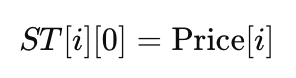
Where:
- ST[i][0]: Is min (or max, depending on the query type) value for an interval of length 2^0 = 1 starting at index i
- i: Is starting index of an element within the price array
- 0: Is exponent j, where j=0 defines the base level of the Sparse Table covering exactly 1 element
- Price[i]: Is raw price value at index i, which acts as an initial foundation for all subsequent range queries. By filling the first column of the Sparse Table with individual prices, one establishes the baseline from which larger, power-of-2 overlapping intervals are recursively worked out.
For all columns that are subsequent, where j > 0, we work out the value by splitting the interval into two equal halves. Both these halves would have been precomputed in the prior column (j-1). In summary therefore for a range of length 2^j, the first half is the range beginning at i with the length 2^(j-1), and the second half starts at i + 2^(j-1) with a similar length. The recursive formula for finding a range minimum is:

Where:
- ST[i][j]: Is min value in the interval starting at index i with a length of 2^j
- i: Is starting index of the interval within the price array
- j: Represents the exponent representing the power of 2 that defines the interval length ( 2^j)
- min(...): Is function used to compare the two halves of the interval to determine the overall minimum
- ST[i][j - 1]: Is min value for the first half of the interval, covering length 2^(j-1) starting at i
- ST[i + 2^(j - 1)][j - 1]: Is min value for the second half of the interval, covering length 2^(j-1) starting at the midpoint i + 2^(j-1)
This pre-processing could take O(N log N) time where N is the total number of bars being processed. Within MQL5 this takes place in the BuildTable function as indicated in the second code listing above. This function also gets called whenever we query a fresh batch of data.
Significance of O(1) Querying
The main reason the Sparse Table is arguably better than other data structures such as Segment-Trees comes down to its performance in the query phase. Since the MathMin() and MathMax() will give the same value when the two compared values are the same, we can overlap intervals without changing the result.
So to illustrate this, to get the minimum in a range [L, R] we would start by calculating the largest power of 2 that fits within L and R.

- k: The largest exponent such that 2^k is less than or equal to the total length of the query range
- log2: The base-2 logarithm function used to determine the power of 2
- R: The rightmost index of the query range
- L: The leftmost index of the query range
- R - L + 1: The total number of elements (length) in the query range
If this value is k, as shown in our formula above, we would then choose 2 overlapping intervals of length 2^k. For these intervals, one would start at L and the other would end at R. Between these two blocks, the entire range [L, R] would be catered for and any overlap in the middle would not be significant to the final sought extreme value. The final query formula is thus as follows:

Where:
- RMQ(L, R): The final result of the Range Minimum Query for the range [L, R]
- min(...): Takes the minimum of two overlapping pre-computed power-of-2 intervals to cover the entire range [L, R]
- ST[L][k]: The pre-computed minimum for the interval of length 2^k starting at the left boundary L
- ST[R - 2^k + 1][k]: The pre-computed minimum for the interval of length 2^k ending exactly at the right boundary R
We implement this in MQL5 as follows:
//+------------------------------------------------------------------+
//| O(1) Range Query                                                 |
//+------------------------------------------------------------------+
double CTrailingSparseTable::QueryRMQ(int L, int R, bool is_min)
{  int length = R - L + 1;
   int k = m_log_table[length];
   if(is_min)
      return MathMin(m_st[L][k], m_st[R - (1 << k) + 1][k]);
   else
      return MathMax(m_st[L][k], m_st[R - (1 << k) + 1][k]);
}
Impact on Trailing Stops
When continuously re-evaluating trailing stop prices the range that is considered is aka the lookback window from the current bar index, i. Indexing, value i, is significant because we are relaying prices from an SQLite bridge. Traditionally as price bars get updated, the EA would manually scan a required X range of bars however with the Sparse Table approach we calculate the k value mentioned above via bitwise or a pre-worked out log table and then perform a single index look up.
The Polars to SQLite Pipeline
As mentioned in the intro, a data first paradigm is a mindset that most traders looking to automate their strategies should pay attention to. The presumptuous mindset all price data is homogenous and always available even from built in functions can be treacherous when going live. Therefore for this article we go over some simple pre-emptive steps in checking our data quality with Python-Polars, and also ensuring it is available when queried with SQLite-Bridge.
Polars Pre-Processing
Python language has fast established itself as the primary standard for data science but even then, the choice of used libraries can make a difference in efficiency and overall effectiveness when evaluating data for gaps and inconsistencies. Polars’ is a module that supports multi-threading, lazy execution engine, and is built in Rust. This off the bat, allows it to process millions of rows of price bar data across all available CPU cores simultaneously.
In our pipeline that reads a broker’s price feed via the mt5 python module, we also apply the Hampel Filter to spot outliers in price, before we commit these prices to our SQLite database. This filter simply applies a Median Absolute Deviation by calculating a rolling median of the log price changes over a preset window. With this, if any price change deviates more than 3 sigmas from this deviation, it gets replaced with an interpolated value. Also missing price data points, which can be more common than some might think, do get interpolated. This is handled in python as follows:
# Copyright 2026, MetaQuotes Ltd.
# https://www.mql5.com

# ... (Previous get_mt5_data and apply_hampel_filter code) ...
import MetaTrader5 as mt5
import polars as pl
import numpy as np
import sqlite3
from datetime import datetime


mt5.initialize()

#
# --- CONFIGURATION ---
SYMBOL = "EURUSD"
TIMEFRAME = mt5.TIMEFRAME_H1
COUNT = 2000
DB_PATH = "C:/Users/ADMIN P/AppData/Roaming/MetaQuotes/Terminal/Common/Files/market_data.sqlite"

def get_mt5_data(symbol, timeframe, count):
    """Initializes MT5 and retrieves raw rates."""
    if not mt5.initialize():
        print(f"MT5 Initialize failed, error code: {mt5.last_error()}")
        return None

    rates = mt5.copy_rates_from_pos(symbol, timeframe, 0, count)
    mt5.shutdown()

    if rates is None:
        return None

    # Convert to Polars DataFrame immediately for O(N) performance [cite: 4]
    return pl.from_numpy(rates)

def apply_hampel_filter(df, window_size=10, n_sigmas=3):
    """
    Identifies outliers using the Hampel Filter (Median Absolute Deviation).
    Formula: |x_i - median| > 3 * MAD
    """
    # Calculate rolling median and MAD using Polars expressions
    df = df.with_columns([
        pl.col("close").rolling_median(window_size=window_size).alias("median"),
    ])

    # Calculate MAD: Median(|x_i - median|)
    df = df.with_columns([
        (pl.col("close") - pl.col("median")).abs().rolling_median(window_size=window_size).alias("mad")
    ])

    # Define Outlier Mask [cite: 21]
    # Standard deviation constant for MAD is ~1.4826
    df = df.with_columns([
        pl.when((pl.col("close") - pl.col("median")).abs() > (n_sigmas * 1.4826 * pl.col("mad")))
        .then(pl.lit(None))
        .otherwise(pl.col("close"))
        .alias("cleaned_close")
    ])

    # Interpolate missing values (outliers and gaps)
    return df.with_columns(pl.col("cleaned_close").interpolate())


def validate_stationarity(df):
    """
    Implements Log-Return Validation to ensure data quality.
    Formula: r_t = ln(P_t / P_{t-1})
    """
    # 1. Calculate Log Returns
    df = df.with_columns([
        (pl.col("cleaned_close") / pl.col("cleaned_close").shift(1)).ln().alias("log_return")
    ])

    # 2. Validation Check: Ensure no infinite values or extreme outliers remain
    # In a production "Data-First" pipeline, we check for 'stationarity'
    # by ensuring the mean of returns is near zero.
    mean_return = df["log_return"].mean()

    if mean_return is not None and abs(mean_return) > 0.01:
        print(f"Warning: Data may be non-stationary. Mean log-return: {mean_return}")

    return df

def upload_to_sqlite(df, db_path):
    """Bulk imports the refined and validated Polars output."""
    conn = sqlite3.connect(db_path)

    # We now include the log_return column for potential use in the RMQ Gatekeeper
    data_to_save = df.select([
        pl.col("time"),
        pl.col("open"),
        pl.col("high"),
        pl.col("low"),
        pl.col("cleaned_close").alias("close"),
        pl.col("log_return").fill_null(0) # Ensure no NULLs enter the SQLite bridge
    ]).to_dicts()

    cursor = conn.cursor()
    cursor.execute("DROP TABLE IF EXISTS MarketData")
    cursor.execute("""
        CREATE TABLE MarketData (
            time INTEGER PRIMARY KEY,
            open REAL,
            high REAL,
            low REAL,
            close REAL,
            log_return REAL
        )
    """)

    cursor.executemany("""
        INSERT INTO MarketData (time, open, high, low, close, log_return)
        VALUES (:time, :open, :high, :low, :close, :log_return)
    """, data_to_save)

    conn.commit()
    conn.close()

if __name__ == "__main__":
    raw_df = get_mt5_data(SYMBOL, TIMEFRAME, COUNT)
    if raw_df is not None:
        # Step 1: Cleaning
        refined_df = apply_hampel_filter(raw_df)
        # Step 2: Log-Return Validation (The missing piece)
        validated_df = validate_stationarity(refined_df)
        # Step 3: Upload
        upload_to_sqlite(validated_df, DB_PATH)

mt5.shutdown()
Stationarity with Log Returns
In order to ensure that the data we feed into our SQLite bridge is dependable we use a Log-Return Validation. This is important because of the ‘non-stationarity’ of price, which makes relying on indicators that take raw input price values, problematic. We work out the log return of a price series as follows:
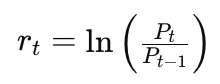
Where:
- r_t: Is calculated log-return at time t, that ensures price data stored in SQLite is statistically stationary
- ln: Is natural logarithm function applied to the ratio of price changes
- P_t: Is price at the current time t
- P_{t-1}: Represents price at the previous time step t-1
This transformation of data into a statistically stationary format, acts as a ‘geometric-gatekeeper’ to wild outliers. We are doing 2 custom trailing class implementations, one geting a raw mean on implied stoploss level based on the mean over three different history periods and the other taking these recommendations and applying a validation filter.
This validation filter is based on the readings of the ATR indicator. We check for excursion thresholds to see if the new suggested stoploss meets or exceeds this threshold before moving it. The upstream normalization of prices from python to SQLite by log-returns above tends to better ‘regulate’ the price movements so that decisions are made less on outliers and more on the ‘clean’ price moves.
The SQLite Bridge
The connection between Python-cleaned data and MQL5 is implemented via SQLite. I want to keep this as a ‘standard’ for all other future articles where we’ll look at different approaches in not just using trailing stops but also in position sizing. In principle, besides cleaning the broker feed, the database can serve as a source of truth with more dependable uptime. This last remark is obviously subjective, depending on one’s broker however if the data cleaning and storage setup is done diligently it can serve this purpose reasonably well. We implement this database SQLite bridge in MQL5 via the ‘MarketDatabase.mqh’. This is listed below:
//+------------------------------------------------------------------+
//|                                                           db.mqh |
//|                                  Copyright 2026, MetaQuotes Ltd. |
//|                                             https://www.mql5.com |
//+------------------------------------------------------------------+
#property copyright "Copyright 2026, MetaQuotes Ltd."
#property link      "https://www.mql5.com"
///+------------------------------------------------------------------+
//|                                                                  |
//+------------------------------------------------------------------+
class CMarketDatabase
{
protected:
   int               m_db_handle;
   string            m_filename;

public:
   CMarketDatabase(string filename = "MarketData.sqlite") :
      m_filename(filename), m_db_handle(INVALID_HANDLE) {}
   ~CMarketDatabase()
   {  Close();
   }

   // 1. Open the connection using the COMMON flag
   bool Open()
   {  // DATABASE_OPEN_COMMON is critical: it points to the same folder Python used
      m_db_handle = DatabaseOpen(m_filename, DATABASE_OPEN_READONLY | DATABASE_OPEN_COMMON);
      if(m_db_handle == INVALID_HANDLE)
      {  Print("DB: Failed to open ", m_filename, ". Error: ", GetLastError());
         return false;
      }
      return true;
   }

   void Close()
   {  if(m_db_handle != INVALID_HANDLE) DatabaseClose(m_db_handle);
   }

   // 2. Fetch data into the MqlRates structure for the Sparse Table
   int GetCleanedRates(string symbol, datetime start, int count, MqlRates &rates[])
   {  if(m_db_handle == INVALID_HANDLE && !Open()) return 0;
      // SQL Query: Selecting the cleaned OHLC data
      string query = StringFormat(
                        "SELECT Timestamp, open, high, low, close, spread FROM %s "
                        "WHERE Timestamp >= %lld ORDER BY Timestamp ASC LIMIT %d",
                        symbol, (long)start, count);
      int request = DatabasePrepare(m_db_handle, query);
      if(request == INVALID_HANDLE)
      {  Print("DB: Query Prep Failed: ", GetLastError());
         return 0;
      }
      int i = 0;
      ArrayFree(rates);
      while(DatabaseRead(request))
      {  ArrayResize(rates, i + 1);
         long ts;
         DatabaseColumnLong(request, 0, ts);
         rates[i].time = (datetime)ts;
         DatabaseColumnDouble(request, 1, rates[i].open);
         DatabaseColumnDouble(request, 2, rates[i].high);
         DatabaseColumnDouble(request, 3, rates[i].low);
         DatabaseColumnDouble(request, 4, rates[i].close);
         DatabaseColumnInteger(request, 5, rates[i].spread);
         i++;
      }
      DatabaseFinalize(request);
      return i;
   }
};
//+------------------------------------------------------------------+
Time stamping of all the prices avoids potential risks of look-ahead bias, that are not present in the strategy tester environment but could be introduced since we are now using prices off of a database.
The implementation of the database access in the custom trailing classes is as follows. Below in par. 6, are the expected long stop and short stop functions in a typical custom trailing class. The yellow highlights mark the database access from the above defined database listing.
The final stage of the pipeline runs optimized SQL queries that provide input for the Sparse Table during Expert initialization. During the EA’s init we do not simply dump the database prices into RAM. Rather, we run specific SELECT statements that only fetch cleaned price extremes as well as pre-calculated volatility constants required for our RMQ logic.
This targeted retrieval allows the custom trailing class to build its internal matrix in a single pass. This sets the stage for the bitwise efficiency of O(1). At the time the first tick is received the data is already cleaned, stationary, and is structured for maximum execution. This pipeline, given the querying for various periods for highs/ lows is running relatively quickly, speeding the decision-making and certainly mathematically better than the usual iterative approach.
Measuring Market Excursion
Our first custom trailing class simply computes the next stoploss level from averaging over various periods. The second iteration of this idea adds a validator or ‘geometric gatekeeper’ that ensures we only adjust the stoploss if and only if the price has moved by a sufficient amount. How much is sufficient? Well this is where we use an excursion metric.
Excursion Principle: Trend vs Noise
The challenge in adjusting trailing stops, arguably, is spotting a genuine trend expansion as opposed to a regular mean reversion spike. This geometric validator quantifies the relative strength of the movement, where:
- For buy stops, we track the downward excursion. So in a situation where the sparse table identifies the price floor, we only readjust the stoploss if the price rises by the excursion threshold
- For sell stops it would be the reverse where we track the up excursion. We as above work out the structural ceiling via RMQ and ensure that the market has had enough time to ‘breathe’ downward before we move the stoploss lower.
Normalizing the ‘Safety Buffer’
The excursion threshold is based on the prices we read from the database. Using prices only or raw price changes could make this threshold less robust. That's why we normalize the price changes by dividing the absolute gap from the RMQ stoploss to get a floating point value. This value can be insightful/meaningful across assets with different price structures. While this geometric method uses a static threshold.
Scaling towards Reinforcement Learning
This approach of using a geometric threshold is based on a static threshold. This works towards establishing a ‘state-vector’ that can work into a reinforcement learning setup. If we explore this in the next article, then tentatively,
- The current state would be the the ratio of purity to volatility as implemented in our static threshold above. This is what we refer to as the excursion in the long and short trailing stop functions.
- In the future RL article we’ll replace this static gate of purity to volatility with a reinforcement learning agent. This agent will learn via a dll that is like the ZeroMQ bridge. Our overall objective with this would be to find a dynamic way of tightening the stoploss threshold in high ‘purity’ trends while still being able to loosen it in volatility regimes.
The MFI Input
Another extra data point to our agent could be the Money Flow Index. This could be accretive since, in theory at least, we are measuring the volume weighted excursion which could mean that the moves we consider are backed by market commitment and not just slippage.
MQL5 Implementation
The overall implementation of the main interface of the custom trailing class is presented below:
//+------------------------------------------------------------------+
//| Class CTrailingSparseTableEx.                                    |
//| Purpose: $O(1)$ Trailing stop using Range Minimum/Maximum Queries|
//+------------------------------------------------------------------+
class CTrailingSparseTableEx : public CExpertTrailing
{
protected:
   matrix            m_st;             // Sparse Table for storage
   int               m_window_size;    // Trailing lookback window
   int               m_log_table[];    // Pre-computed Log2 table
   CMarketDatabase   m_db;             // Database accessor
   string            m_db_name;
   //
   double            m_excursion;
   CiATR             m_atr;

public:
   CTrailingSparseTableEx(void);
   ~CTrailingSparseTableEx(void);

   //--- Setters for Wizard parameters
   void              WindowSize(int size)
   {  m_window_size = size;
   }
   void              DbName(string name)
   {  m_db_name = name;
   }
   void              Excursion(double excursion)
   {  m_excursion = excursion;
   }

   virtual bool      InitIndicators(CIndicators *indicators);
   virtual bool      CheckTrailingStopLong(CPositionInfo *position, double &sl, double &tp);
   virtual bool      CheckTrailingStopShort(CPositionInfo *position, double &sl, double &tp);

   bool              BuildTable(MqlRates &R[], bool is_min);
   double            QueryRMQ(int L, int R, bool is_min);
};
The O(1) Query Logic
The class gets to manage precomputed Sparse Table matrix as well as the database handle to the cleaned data. Unlike regular trailing classes that say use indicators like the MA, this one needs a significant computation in the oninit that besides building the sparse matrix, we we also need to build the log2 table in advance. Below are the two primary functions of this class that inherits from CTrailingSparseTable.
//+------------------------------------------------------------------+
//| Check Long: Uses SQLite data to find Lowest price in window      |
//+------------------------------------------------------------------+
bool CTrailingSparseTableEx::CheckTrailingStopLong(CPositionInfo *position, double &sl, double &tp)
{  if(position == NULL) return false;
   static datetime last_bar_time = 0;
   datetime current_bar_time = iTime(m_symbol.Name(), m_period, 0);
   // Only rebuild the table if a new bar has formed
   if(current_bar_time != last_bar_time)
   {  MqlRates rates[];
      int size = 3 * m_window_size;
      int count = m_db.GetCleanedRates(m_symbol.CurrencyMargin() + m_symbol.CurrencyProfit(), TimeCurrent() - (PeriodSeconds() * size), size, rates);
      if(count >= size)
      {  BuildTable(rates, true); // O(N log N) happens once per bar
         last_bar_time = current_bar_time;
      }
   }
   // --- O(1) CONSTANT TIME QUERIES ---
   // This section executes every tick without iterative overhead
   int total_elements = int(m_st.Rows());
   if(total_elements > 1)
   {  double short_term = QueryRMQ(total_elements - m_window_size, total_elements - 1, true);
      double long_term  = QueryRMQ(0, total_elements - 1, true);
      double new_sl = (short_term + long_term) / 2.0;
      // Apply Geometric Excursion Validation
      sl = EMPTY_VALUE;
      tp = EMPTY_VALUE;
      double current_sl = position.StopLoss();
      double limit = m_symbol.Bid() - m_symbol.StopsLevel() * m_symbol.Point();
      if(( new_sl > current_sl || current_sl == 0.0) && new_sl < limit)
      {  m_atr.Refresh(-1);
         double excursion = fabs(m_symbol.Bid() - new_sl) / m_atr.Main(StartIndex());
         if(excursion >= m_excursion)
         {  sl = NormalizeDouble(new_sl, m_symbol.Digits());
            return true;
         }
      }
   }
   return false;
}
//+------------------------------------------------------------------+
//| Check Short: Uses SQLite data to find Highest price in window    |
//+------------------------------------------------------------------+
bool CTrailingSparseTableEx::CheckTrailingStopShort(CPositionInfo *position, double &sl, double &tp)
{  if(position == NULL) return false;
   static datetime last_bar_time = 0;
   datetime current_bar_time = iTime(m_symbol.Name(), m_period, 0);
   // Only rebuild the table if a new bar has formed
   if(current_bar_time != last_bar_time)
   {  MqlRates rates[];
      int size = 3 * m_window_size;
      int count = m_db.GetCleanedRates(m_symbol.CurrencyMargin() + m_symbol.CurrencyProfit(), TimeCurrent() - (PeriodSeconds() * size), size, rates);
      if(count >= size)
      {  BuildTable(rates, true); // O(N log N) happens once per bar
         last_bar_time = current_bar_time;
      }
   }
   // --- O(1) CONSTANT TIME QUERIES ---
   // This section executes every tick without iterative overhead
   int total_elements = int(m_st.Rows());
   if(total_elements > 1)
   {  double short_term = QueryRMQ(total_elements - m_window_size, total_elements - 1, true);
      double long_term  = QueryRMQ(0, total_elements - 1, true);
      double new_sl = (short_term + long_term) / 2.0;
      // Apply Geometric Excursion Validation
      sl = EMPTY_VALUE;
      tp = EMPTY_VALUE;
      double current_sl = position.StopLoss();
      double limit = m_symbol.Bid() - m_symbol.StopsLevel() * m_symbol.Point();
      if(( new_sl > current_sl || current_sl == 0.0) && new_sl > limit)
      {  m_atr.Refresh(-1);
         double excursion = fabs(m_symbol.Ask() - new_sl) / m_atr.Main(StartIndex());
         if(excursion >= m_excursion)
         {  sl = NormalizeDouble(new_sl, m_symbol.Digits());
            return true;
         }
      }
   }
   return false;
}
//+------------------------------------------------------------------+
They are part of a class CTrailingSparseTableEx that inherits from CExpertTrailing class in order to ensure it is completely compatible with MQL5’s wizard modular architecture. What is unique in our trailing setup above, as already mentioned above, is the integration of the O(1) query power of a sparse table with an ‘always-on’ SQLite datasource.
Memory Management
In order to realize key performance targets the m_log_table is filled during the constructor in order to avoid calling MathLog when in live trading. On paper this means that even with high frequency data of more than a million ticks, the execution time would remain relatively low.
Empirical Results and Analysis
The shift from O(N) to O(1) is most evident when our look-back period is significant. We perform tests for comparison purposes with a look-back window of 1000 bars on the 1 hour time frame. This amounts to a little over 8 weeks, or about 2 months and if one is interested in tracking drawdowns at an even smaller time frame such as 30 min or 15 minutes the required bar count for this can easily scale up to the 4k bar region. Therefore, handling large history windows across multiple test periods should not be dismissed. Below is a tabulation side by side of how the Sparse Table compares against a raw iteration:
| metric | lookback period | processing time |
|---|---|---|
| Iterative O(N) | 1000 | 0:18:49.145 |
| Sparse Table O(1) | 1000 | 0:11:23.441 |
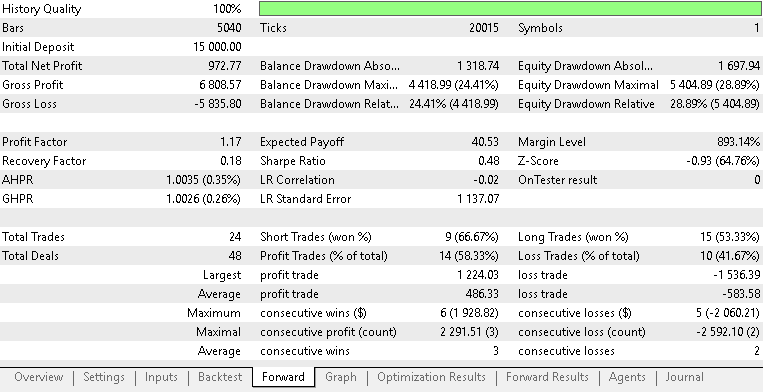
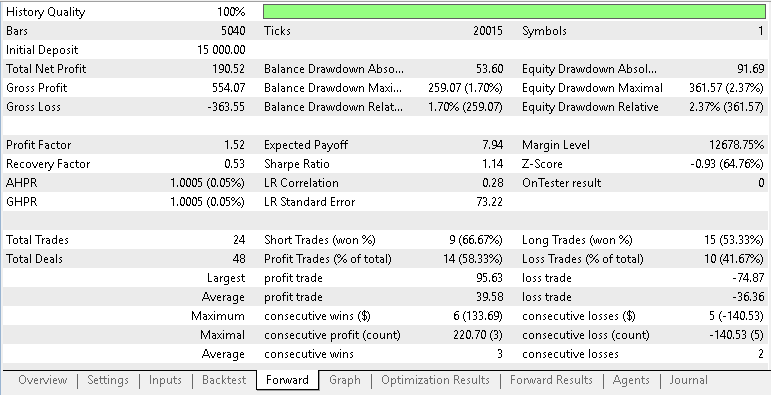
Arguably in our stress test above, the Sparse Table, over a 1000 bar lookback window, demonstrates a reduction in execution time compared to standard iterative methods. Besides performance comparisons on execution speed, as traders what would be more pertinent would be trade performance from using this trailing stop method. The entry signal used is simple as it uses two built in signals of the envelopes and the RSI. If we run test comparisons over our two custom trailing classes; one using the raw average stoploss over 5 periods while the other uses this with a validation check that compares trends to ATR as illustrated above, we get the following reports, respectively. Testing was with EURUSD on the 1-hour time frame from 2023.01.01 to 2026.03.30.
Below are the typical inputs applied across both Expert Advisors.
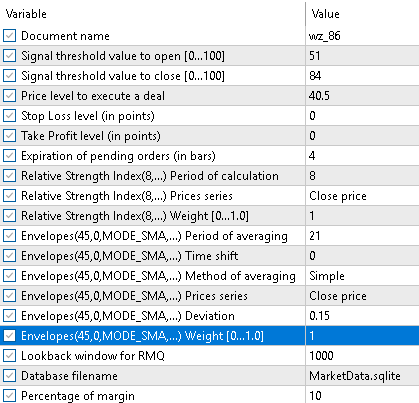
It appears from these two reports that the extra caution exercised in adjusting the stoploss has not been rewarded materially, however other factors could be in play as well.
Conclusion
We close the loop on both performance and data reproducibility. Concretely, the article delivers a repeatable pipeline and code artifacts that let you replace per‑tick linear scans with constant‑time RMQ lookups and run the same trailing logic against a cleaned, timestamped SQLite feed:
Algorithmic outcome: a Sparse Table that provides O(1) min/max queries for any bar range after an O(N log N) build step performed once per new bar—so per‑tick work is a constant‑time lookup, eliminating the linear scan bottleneck for long lookbacks.
Data pipeline: Polars‑based cleaning (Hampel filter, interpolation, log‑returns validation) → SQLite export with timestamps so MQL5 reads deterministic MqlRates independent of terminal quirks.
Integrations: a Wizard‑compatible trailing class that builds the Sparse Table at init/new‑bar, the SQLite bridge to fetch cleaned rates by timestamp, and an ATR‑based excursion validator that prevents SL changes on noise.
Success is measured and reproducible: timing comparisons (init, per‑bar build, per‑tick query) should show large reductions in processing time for large lookbacks, and functional tests should confirm identical behavior between tester and live when using the SQLite feed. This approach narrows the article's claim from a general “data-first mindset” to a concrete, verifiable engineering solution for lower latency and more reliable exits; future work can extend the same pipeline to adaptive excursion policies or learning agents, but the immediate payoff is practical and measurable.
Attachments:
| name | description |
|---|---|
| Trailing Iteration.mqh | Custom trailing Class that does not use Sparse Table, added as a control |
| TrailingSparseTable.mqh | Custom triailing Class that uses a basic Sparse Table |
| TrailingSparseTableEx.mqh | Custom trailing Class that uses a Sparse Table and an Excursion Threshold Validator |
| MarketDatabase.mqh | Custom Class for handling data access via SQLite Bridge |
| polars.py | Python code for cleaning and exporting data to SQLite |
| wz_86.mq5 | Wizards assembled Expert Advisor for basic Sparse Table |
| wz_86_b.mq5 | Wizard Assembled Expert Advisor for Sparse Table with validator |
| wz_86_c.mq5 | Wizard Assembled Expert Advisor for Control EA without Sparse Table |
The attached files are meant to be used by the MQL5 Wizard to assemble testable Expert Advisors. New readers can look here for guidance on how this is done.
Warning: All rights to these materials are reserved by MetaQuotes Ltd. Copying or reprinting of these materials in whole or in part is prohibited.
This article was written by a user of the site and reflects their personal views. MetaQuotes Ltd is not responsible for the accuracy of the information presented, nor for any consequences resulting from the use of the solutions, strategies or recommendations described.

 Fractal-Based Algorithm (FBA)
 GoertzelBrain: Adaptive Spectral Cycle Detection with Neural Network Ensemble in MQL5
 Applying L1 Trend Filtering in MetaTrader 5
 Feature Engineering for ML (Part 1): Fractional Differentiation — Stationarity Without Memory Loss

- Free trading apps
- Over 8,000 signals for copying
- Economic news for exploring financial markets
You agree to website policy and terms of use