

Cross Recurrence Quantification Analysis (CRQA) in MQL5: Building a Complete Analysis Library
 1 272
1 272
 0
0

Contents
- Introduction
- CRQA on a Chart
- From RQA to Cross-Recurrence
- The Cross-Recurrence Matrix
- CRQA Metrics
- Epsilon for Two Series
- Library Architecture
- CCRQAMatrix: Building the Cross-Recurrence Matrix
- CCRQAMetrics: Quantifying Cross-Structure
- GPU Acceleration with OpenCL
- CCRQAWindow: Rolling Cross-Analysis
- CCRQA: The Facade
- The CRQA Indicator
- What's Next
- Conclusion
Introduction
In the previous article, we built a complete RQA library for MQL5. That library takes a single time series, embeds it in phase space, constructs a recurrence matrix, and extracts twelve metrics that describe the system's internal structure. It answers the question: how does this series relate to its own past?
This article asks a different question: how do two series relate to each other? That is the domain of Cross-Recurrence Quantification Analysis (CRQA). Instead of comparing a series against itself, CRQA compares the phase-space trajectories of two separate series. The result is a cross-recurrence matrix where each cell records whether the state of series X at time i is close to the state of series Y at time j. The line structures in this matrix reveal shared dynamics, synchronization, and coupling between the two systems.
For traders, this opens up questions that single-series RQA cannot answer. Are EURUSD and GBPUSD moving through similar dynamical states? Has the coupling between gold and the dollar weakened? Is an indicator's phase-space trajectory synchronized with the price trajectory it claims to track? CRQA provides a principled, nonlinear framework for answering these questions.
This article extends the RQA library with four new modules: CCRQAMatrix, CCRQAMetrics, CCRQAWindow, and the CCRQA facade. The rolling-window module uses OpenCL to compute cross-recurrence matrices in parallel batches. If no GPU is available, it falls back to a CPU implementation. We also provide an indicator that plots cross-recurrence metrics between two symbols in real time. It includes timestamp alignment and built-in normalization. The library structure mirrors what we built in the previous article, so if you followed that implementation, the patterns here will be familiar. The mathematics, however, has important differences that we will cover in detail.
CRQA on a Chart
The image below shows the CRQA indicator comparing two symbols on a live chart. In the separate window beneath the price chart, four metrics are plotted: Cross-Recurrence Rate (CRR), Cross-Determinism (CDET), Cross-Laminarity (CLAM), and Cross-Entropy (CENTR). Each one is computed over a rolling window.
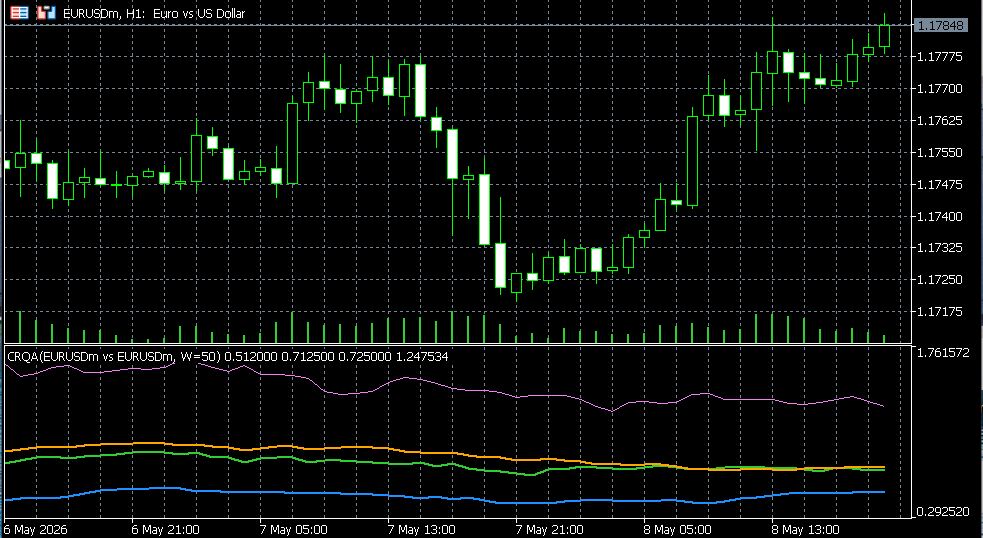
Fig. 1. The CRQA indicator in a separate window, plotting CRR, CDET, CLAM, and CENTR between two symbols in real time
When CRR is high, the two series are visiting similar states frequently. When CDET is high, they are not only visiting similar states but doing so in similar sequences, meaning their trajectories evolve in parallel. When CLAM spikes, one or both series are stuck near a shared state. These metrics change over time, and it is the evolution of those changes that reveals when coupling strengthens, weakens, or breaks down entirely.
That is what the library produces. The rest of this article explains how it works and how it is built.
From RQA to Cross-Recurrence
Standard RQA compares a single series against itself. The recurrence matrix R is square and symmetric: R(i, j) = R(j, i), because the distance from state i to state j is the same as the distance from j to i. The main diagonal is always filled with ones, because every state is identical to itself. Diagonal lines in the upper and lower triangles mirror each other.
Cross-recurrence changes all of this. We now have two series, X and Y, which may have different lengths. We embed each one separately into phase space using the same embedding dimension and delay. Then we compute the distance between every vector from X and every vector from Y. The result is an N x M matrix, where N is the number of embedded vectors from X and M is the number from Y.
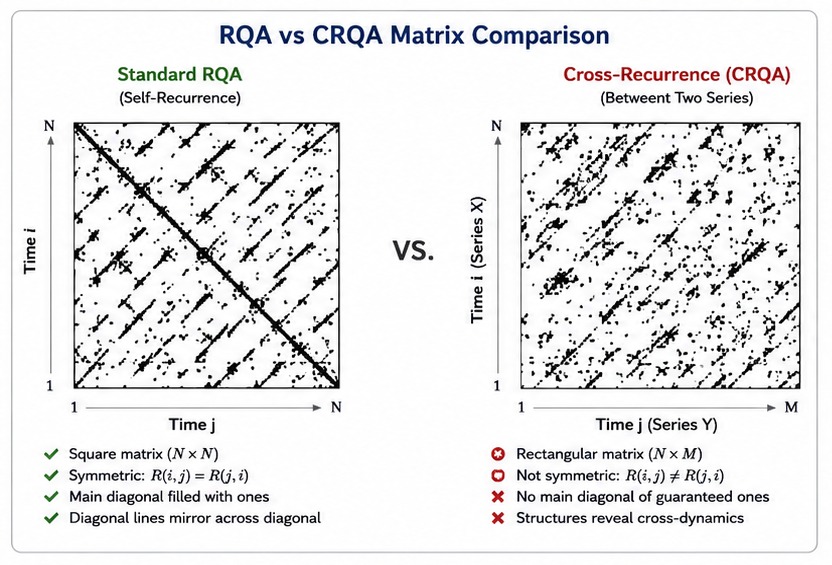
Fig. 2. Standard RQA produces a square symmetric matrix (left); CRQA produces a rectangular non-symmetric N x M matrix (right)
This matrix is not symmetric. CR(i, j) asks: is the state of X at time i close to the state of Y at time j? There is no reason this should equal CR(j, i), which asks the reverse. There is no main diagonal of guaranteed ones either, because there is no guarantee that X and Y are in the same state at the same time. In fact, the most interesting cases are when they are not.
The metric definitions also change. In standard RQA, the recurrence rate excludes the main diagonal from the count (because self-recurrence is trivial). In CRQA, there is no self-recurrence to exclude. Every cell in the N x M matrix is a legitimate comparison, so the cross-recurrence rate divides the total number of recurrent points by N * M, not N^2 - N.
The diagonal structure also changes. In a square self-recurrence matrix, diagonals run from (i, i+k) for a fixed offset k. In a rectangular cross-recurrence matrix, diagonals remain parallel to the i = j line, but their offsets and lengths depend on N and M: offsets span from -(N-1) to +(M-1), and each diagonal can have a different length. The counting logic must handle this correctly.
Vertical lines work the same way conceptually but operate on an N x M grid instead of N x N. A vertical line at column j means that multiple consecutive states of X are all close to the state of Y at time j. This indicates that X was trapped near a state that Y visited at a particular moment.
The Cross-Recurrence Matrix
The construction of the cross-recurrence matrix follows the same three steps as the standard recurrence matrix: embed, compute distances, threshold. The difference is that embedding and distance computation happen between two separate series rather than within one.
Step 1: Embed both series
Given series X of length Lx and series Y of length Ly, we embed each one independently using the same embedding dimension m and delay tau. This produces N = Lx - (m-1)*tau embedded vectors from X and M = Ly - (m-1)*tau embedded vectors from Y. The embedding parameters must be identical for both series. Using different dimensions or delays would make the distance computation meaningless, because you would be comparing vectors from different-dimensional spaces.
Step 2: Compute pairwise distances
For every pair (i, j) where i indexes an X-vector and j indexes a Y-vector, we compute the distance using the selected norm (Euclidean, Maximum, or Manhattan). This produces an N x M distance matrix. When N = M, this looks like the standard distance matrix but without the guaranteed zero diagonal. When N and M differ, the matrix is rectangular.
Step 3: Apply the threshold
CR(i, j) = 1 if distance(x_i, y_j) <= epsilon, else 0
The threshold epsilon determines what counts as "close enough" for two states from different series to be considered recurrent. This is the same concept as in standard RQA, but the choice of epsilon is more nuanced when the two series have different scales. We address this below.
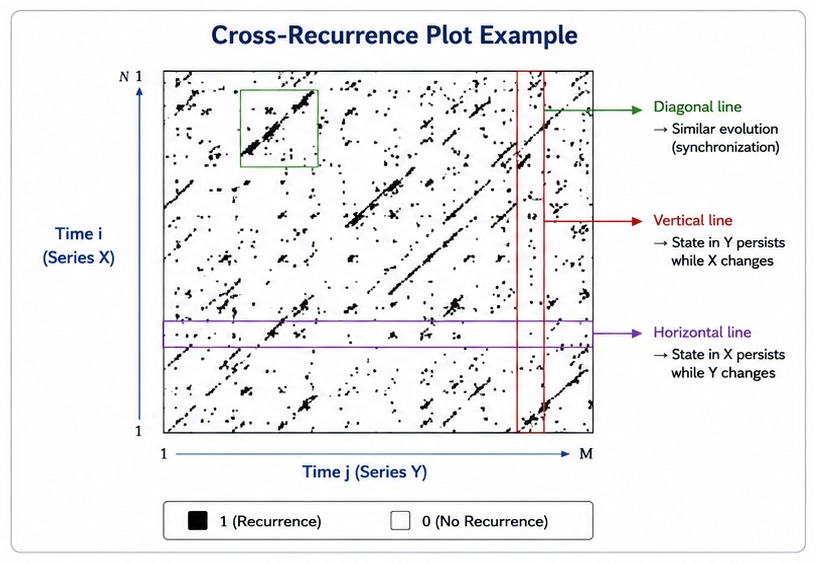
Fig. 3. A cross-recurrence plot showing the N x M binary matrix between two financial time series; diagonal structures indicate shared dynamics
CRQA Metrics
CRQA produces ten metrics. The core concepts are the same as in standard RQA (diagonal lines measure determinism, vertical lines measure laminarity), but the formulas are adapted for the non-square, non-symmetric cross-recurrence matrix. There is no TREND metric in CRQA because the trend computation relies on the symmetric diagonal structure of a self-recurrence matrix. There is also no COMPLEXITY composite.
| Metric | Symbol | Formula | What It Measures |
|---|---|---|---|
| Cross-Recurrence Rate | CRR | (recurrent points) / (N * M) | How often states from X are close to states from Y. Higher CRR means more shared state-space territory. |
| Cross-Determinism | CDET | (points on diagonal lines >= lmin) / (all recurrent points) | Fraction of cross-recurrences forming diagonal lines. High CDET means the two series evolve through similar sequences of states. |
| Cross-Laminarity | CLAM | (points on vertical lines >= vmin) / (all recurrent points) | Fraction of cross-recurrences forming vertical lines. High CLAM means X gets trapped near states that Y visited. |
| Cross-Trapping Time | CTT | Average length of vertical lines | Average duration that X remains near a state of Y. |
| Avg Cross-Diagonal | CL | Average length of diagonal lines >= lmin | Average duration of synchronized evolution between the two series. |
| Max Cross-Diagonal | CLmax | Longest diagonal line | Longest stretch where both series evolved in parallel. |
| Max Vertical Line | CVmax | Longest vertical line | Longest period X stayed trapped near a single state of Y. |
| Cross-Entropy | CENTR | -sum(p(l) * ln(p(l))) | Complexity of the cross-diagonal line distribution. |
| Cross-Divergence | CDIV | 1 / CLmax | Inverse of the longest cross-diagonal. How quickly synchronized segments break down. |
| Cross-Ratio | CRATIO | CDET / CRR | Determinism normalized by recurrence rate. Filters out the effect of overall cross-recurrence density. |
The most important metrics for understanding inter-series relationships are CRR, CDET, and CLAM.
CRR tells you how much overlap exists between the two series in state space. Two instruments that trade in the same range and move through similar price levels will have high CRR. Two instruments at different scales (e.g. EURUSD at 1.08 and USDJPY at 155) will have near-zero CRR unless you normalize the data first or choose epsilon carefully.
CDET goes deeper. High CRR with low CDET means the two series visit similar states but not in similar sequences. They overlap in space but not in time. High CRR with high CDET means they are synchronized: not only are they in similar states, but they move through those states in the same order and at similar speeds. This is the strongest form of coupling.
CLAM captures asymmetric trapping. A high CLAM value means that series X frequently gets stuck near states that Y passes through. In trading terms, this might indicate that one instrument consolidates while the other trends through the same price zone.
Epsilon for Two Series
Choosing epsilon is harder in CRQA than in standard RQA. When analyzing a single series, the data has one scale and one distribution. When comparing two series, you may have two very different scales. EURUSD trades around 1.08 while GBPUSD trades around 1.27. The raw distance between their close prices is dominated by the level difference, not by the dynamics you care about.
There are several approaches to handling this, and the library supports all of them:
- Normalize both series before computing CRQA. The indicator implements two normalization modes. Z-Score normalization subtracts the mean and divides by the standard deviation, putting both series on a zero-mean, unit-variance scale. Log Returns normalization converts prices to log returns (which are naturally scale-independent) and then applies z-score normalization on top. In either case, epsilon becomes interpretable in standard-deviation units: an epsilon of 0.5 means "within half a standard deviation."
- Use raw prices with a carefully chosen epsilon. When comparing two instruments on the same quote currency with similar price levels (e.g. two EUR crosses), you can skip normalization and use a fixed epsilon scaled to the instruments' typical tick size. This preserves absolute level information but requires manual tuning.
- Set epsilon empirically. Run a few test computations and observe how CRR changes with epsilon. A reasonable starting point for normalized data is 0.3 to 0.8 (in standard deviation units). For raw forex pairs on the same quote currency, 0.0005 to 0.001 is typical.
The library takes epsilon as a fixed input for CRQA. It does not include automatic epsilon selection for the cross-recurrence case (unlike the standard RQA module, which offers bisection search targeting a specific RR). The reason is that the "right" CRR target depends heavily on what the two series are, how they are normalized, and what you are looking for.
In the indicator, the default configuration uses log-returns normalization with z-score on top, and an epsilon of 0.5. This means: two states are considered recurrent if their normalized distance is within half a standard deviation. This works well across different currency pairs without manual tuning. For raw price comparisons (e.g. two forex pairs on the same quote currency without normalization), an epsilon of 0.0005 is a reasonable starting point.
Library Architecture
The CRQA extension adds four new components to the library, plus an OpenCL dependency for GPU-accelerated windowed computation. They mirror the standard RQA modules in structure but are adapted for the two-series case. All CRQA modules are included automatically when you include RQA.mqh.
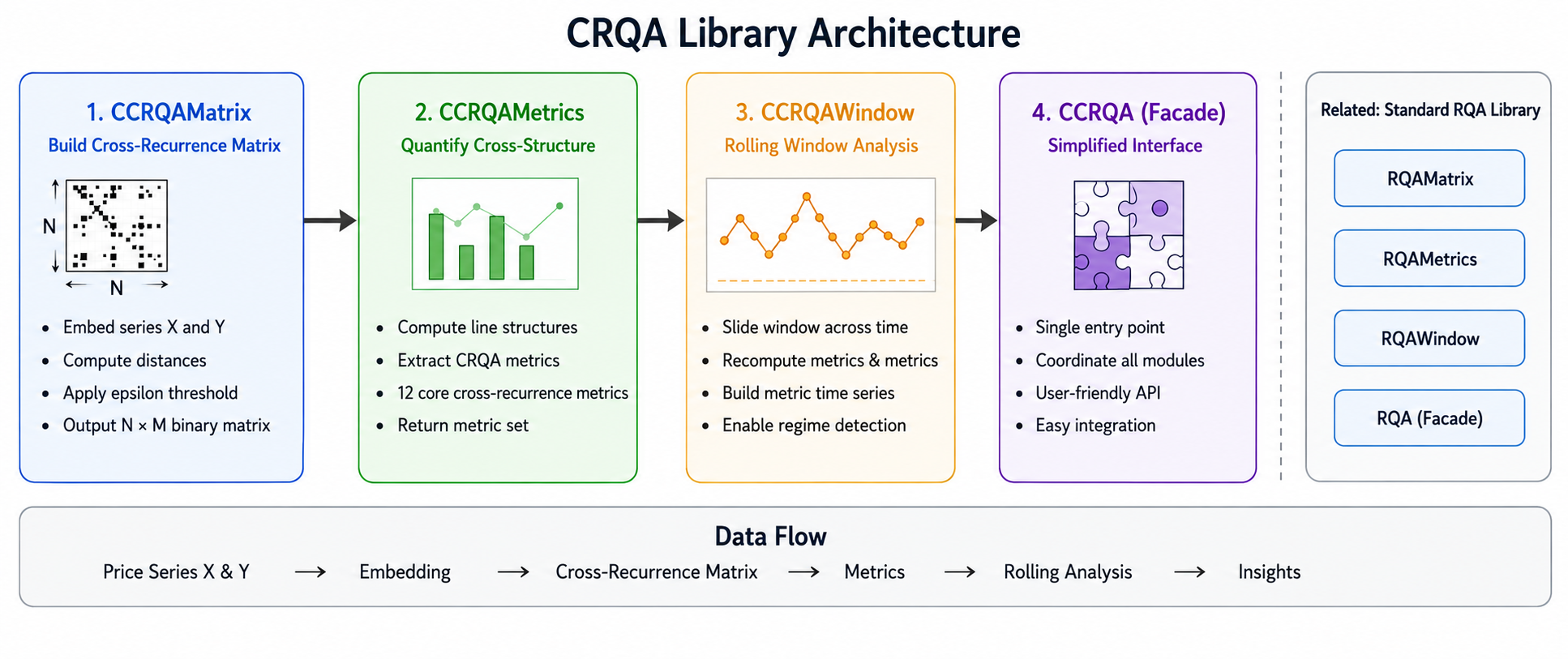
Fig. 4. CRQA library architecture: CCRQAMatrix at the base feeds CCRQAMetrics, which feeds CCRQAWindow (with OpenCL acceleration) and the CCRQA facade at the top
| File | Class | Responsibility |
|---|---|---|
| CRQAMatrix.mqh | CCRQAMatrix | Embeds two series independently, computes pairwise distances between them, and builds the N x M binary cross-recurrence matrix. |
| CRQAMetrics.mqh | CCRQAMetrics | Counts diagonal and vertical lines in the non-square matrix. Computes all ten CRQA metrics and fills the SCRQAResult struct. |
| CRQAWindow.mqh | CCRQAWindow | Applies CRQA over a rolling window on two parallel series. Uses OpenCL GPU acceleration with batched kernel execution, falling back to a fused CPU path when no GPU is available. Includes static extractors for individual metrics. |
| RQA.mqh | CCRQA | High-level facade. Configures and chains CCRQAMatrix and CCRQAMetrics into a single Compute() call that takes two series. |
The CCRQA facade and CCRQAWindow are defined in their respective files. All standard RQA classes (CRQAMatrix, CRQAMetrics, CRQAEpsilon, CRQAWindow, CRQA) remain unchanged and fully backward-compatible. The single include line remains the same:
#include <RQA\RQA.mqh> This now gives you access to both the standard RQA classes and the cross-RQA classes. The naming convention is consistent: standard classes use C + RQA prefix (CRQAMatrix), cross classes use CC + RQA prefix (CCRQAMatrix). Standard result structs start with S + RQA, cross result structs start with S + CRQA.
The CRQAWindow module depends on MQL5's built-in OpenCL support via the standard COpenCL wrapper class from OpenCL/OpenCL.mqh. This is part of MetaTrader 5's standard library and requires no external installation. If the user's system has no OpenCL-capable GPU (or if the OpenCL runtime is unavailable), the module falls back automatically to a CPU-only computation path.
CCRQAMatrix: Building the Cross-Recurrence Matrix
CCRQAMatrix is the cross-recurrence counterpart of CRQAMatrix. It takes two series, embeds each one into phase space, and constructs an N x M binary matrix by comparing every X-vector against every Y-vector.
Class Structure
The class stores separate embedded arrays for each series (m_embX and m_embY) and separate size counters (m_N for X, m_M for Y). The boolean matrix m_R is flattened in row-major order with stride m_M: element (i, j) maps to index i * m_M + j.
//+------------------------------------------------------------------+
//| CCRQAMatrix — NxM cross-recurrence matrix for two series         |
//|                                                                  |
//|  R[i,j] = 1  iff  ||x_i - y_j|| <= epsilon                       |
//|  where x_i = embedded vector from series X at time i             |
//|        y_j = embedded vector from series Y at time j             |
//+------------------------------------------------------------------+

class CCRQAMatrix
  {
private:
   int               m_N;          // embedded vectors from series X
   int               m_M;          // embedded vectors from series Y
   int               m_embDim;     // shared embedding dimension
   int               m_delay;      // shared time delay (tau)
   double            m_epsilon;    // threshold
   ENUM_RQA_NORM     m_norm;       // distance norm

   bool              m_R[];        // flattened N x M boolean matrix
   double            m_embX[];     // embedded X  [N x embDim]
   double            m_embY[];     // embedded Y  [M x embDim]

   //--- helpers
   void              Embed(const double &series[], int seriesLen,
                           double &embedded[], int &numVec);
   double            Distance(int i, int j) const;

public:
                     CCRQAMatrix();
                    ~CCRQAMatrix() {}

   //--- Build N x M cross-recurrence matrix
   bool              Build(const double &seriesX[], int lenX,
                           const double &seriesY[], int lenY,
                           double epsilon,
                           int embDim         = 1,
                           int delay          = 1,
                           ENUM_RQA_NORM norm = RQA_NORM_EUCLIDEAN);

   //--- Accessors
   bool              Get(int i, int j) const;
   int               SizeN()   const { return m_N; }      // rows (X)
   int               SizeM()   const { return m_M; }      // cols (Y)
   double            Epsilon() const { return m_epsilon; }
   int               EmbDim()  const { return m_embDim; }
   int               Delay()   const { return m_delay; }
   ENUM_RQA_NORM     Norm()    const { return m_norm; }
  };
Embedding Two Series
The Embed() method is reused for both series. It takes any series and produces the flattened embedded vectors. The same method is called twice: once for X and once for Y.
//+------------------------------------------------------------------+
//| Embed a single series into delay-coordinate vectors              |
//+------------------------------------------------------------------+
void CCRQAMatrix::Embed(const double &series[], int seriesLen,
                       double &embedded[], int &numVec)
  {
   numVec = seriesLen - (m_embDim - 1) * m_delay;
   if(numVec <= 0) { numVec = 0; return; }
   ArrayResize(embedded, numVec * m_embDim);
   for(int i = 0; i < numVec; i++)
      for(int d = 0; d < m_embDim; d++)
         embedded[i * m_embDim + d] = series[i + d * m_delay];
  }
Compare this to the CRQAMatrix::Embed() from the previous article. The logic is identical, but the signature is different: here the embedded output array and vector count are passed by reference as parameters, rather than stored as class members directly. This is because CCRQAMatrix needs to embed two series into two separate arrays (m_embX and m_embY), so the method must be generic.
Cross-Distance Computation
The Distance() method computes the distance between vector i from X and vector j from Y. It reads from m_embX for the first operand and m_embY for the second.
//+------------------------------------------------------------------+
//| Distance between x_i and y_j                                     |
//+------------------------------------------------------------------+
double CCRQAMatrix::Distance(int i, int j) const
  {
   double dist = 0.0;
   for(int d = 0; d < m_embDim; d++)
     {
      double diff = m_embX[i * m_embDim + d]
                 - m_embY[j * m_embDim + d];
      switch(m_norm)
        {
         case RQA_NORM_MAX:
            dist = MathMax(dist, MathAbs(diff));
            break;
         case RQA_NORM_MANHATTAN:
            dist += MathAbs(diff);
            break;
         case RQA_NORM_EUCLIDEAN:
         default:
            dist += diff * diff;
            break;
        }
     }
   if(m_norm == RQA_NORM_EUCLIDEAN)
      dist = MathSqrt(dist);
   return dist;
  }
This is the key structural difference from the standard RQA distance computation. In CRQAMatrix::Distance(), both operands index into the same m_embedded array. Here, the first operand indexes into m_embX and the second into m_embY. The norm logic itself is unchanged.
Building the Matrix
//+------------------------------------------------------------------+
//| Build the full N x M cross-recurrence matrix                     |
//+------------------------------------------------------------------+
bool CCRQAMatrix::Build(const double &seriesX[], int lenX,
                       const double &seriesY[], int lenY,
                       double epsilon,
                       int embDim,
                       int delay,
                       ENUM_RQA_NORM norm)
  {
   if(lenX < 2 || lenY < 2 || epsilon <= 0.0
     || embDim < 1 || delay < 1)
     {
      Print("CCRQAMatrix::Build - invalid parameters");
      return false;
     }
   m_epsilon = epsilon;
   m_embDim  = embDim;
   m_delay   = delay;
   m_norm    = norm;
   //--- Embed both series
   Embed(seriesX, lenX, m_embX, m_N);
   Embed(seriesY, lenY, m_embY, m_M);
   if(m_N <= 0 || m_M <= 0)
     {
      Print("CCRQAMatrix::Build - series too short");
      return false;
     }
   //--- Fill N x M boolean matrix
   ArrayResize(m_R, m_N * m_M);
   for(int i = 0; i < m_N; i++)
      for(int j = 0; j < m_M; j++)
         m_R[i * m_M + j] = (Distance(i, j) <= m_epsilon);
   return true;
  }
The Build() method validates both series lengths, embeds both series, and fills the boolean matrix. The matrix stride is m_M (the number of Y-vectors), not m_N. This is because each row corresponds to one X-vector, and each column to one Y-vector. The total matrix size is m_N * m_M cells. For two 100-bar series with embedding dimension 1, that is 10,000 distance calls, the same cost as the standard RQA case. For two series of different lengths, say 80 and 120, the cost is 80 * 120 = 9,600.
CCRQAMetrics: Quantifying Cross-Structure
CCRQAMetrics extracts ten metrics from the cross-recurrence matrix. The overall structure mirrors CRQAMetrics from the previous article: count diagonal lines, count vertical lines, compute entropy, derive aggregates. The key differences are in how diagonals are enumerated in a non-square matrix, and in the absence of the TREND and COMPLEXITY metrics.
Diagonal Counting in a Non-Square Matrix
In a square N x N matrix, diagonals are indexed by offset k from -(N-1) to +(N-1), and each diagonal has length N - |k|. In an N x M matrix, the offset k = j - i ranges from -(N-1) to +(M-1), and each diagonal has a different length depending on both N and M.
//+------------------------------------------------------------------+
//| Count diagonal lines in an NxM (possibly non-square) matrix      |
//|  Diagonals run parallel to the main diagonal (j - i = k)         |
//|  k ranges from -(N-1) to +(M-1)                                  |
//+------------------------------------------------------------------+
void CCRQAMetrics::CountDiagonals(const CCRQAMatrix &mat,
                                 int &lineLengths[]) const
  {
   int N = mat.SizeN();
   int M = mat.SizeM();
   int maxLen = MathMax(N, M);
   ArrayResize(lineLengths, maxLen + 1);
   ArrayInitialize(lineLengths, 0);
   //--- k = j - i, offset ranges from -(N-1) to +(M-1)
   for(int k = -(N - 1); k <= (M - 1); k++)
     {
      int len = 0;
      int iStart = MathMax(0, -k);
      int iEnd   = MathMin(N - 1, M - 1 - k);
      for(int i = iStart; i <= iEnd; i++)
        {
         int j = i + k;
         if(mat.Get(i, j))
            len++;
         else
           {
            if(len >= m_minDiagLine)
               lineLengths[MathMin(len, maxLen)]++;
            len = 0;
           }
        }
      if(len >= m_minDiagLine)
         lineLengths[MathMin(len, maxLen)]++;
     }
  }
There are two important differences from the standard RQA diagonal counter. First, the offset range is asymmetric: it goes from -(N-1) to +(M-1) instead of -(N-1) to +(N-1). When N and M differ, one side has more diagonals than the other. Second, there is no "skip k=0" condition. In standard RQA, the main diagonal (k=0) is excluded because it represents trivial self-recurrence. In CRQA, the k=0 diagonal compares x_i with y_i, and there is nothing trivial about that. Two different series being in the same state at the same time is a genuine finding. The line length is capped at maxLen = max(N, M) and stored in the histogram via MathMin to prevent array overflows.
Vertical Line Counting
//+------------------------------------------------------------------+
//| Count vertical lines (fixed column j, vary row i)                |
//+------------------------------------------------------------------+
void CCRQAMetrics::CountVerticals(const CCRQAMatrix &mat,
                                 int &lineLengths[]) const
  {
   int N = mat.SizeN();
   int M = mat.SizeM();
   ArrayResize(lineLengths, N + 1);
   ArrayInitialize(lineLengths, 0);
   for(int j = 0; j < M; j++)
     {
      int len = 0;
      for(int i = 0; i < N; i++)
        {
         if(mat.Get(i, j))
            len++;
         else
           {
            if(len >= m_minVertLine)
               lineLengths[MathMin(len, N)]++;
            len = 0;
           }
        }
      if(len >= m_minVertLine)
         lineLengths[MathMin(len, N)]++;
     }
  }
Vertical lines scan down each column j (iterating over all rows i). The outer loop runs over M columns (Y-indices), and the inner loop runs over N rows (X-indices). The maximum possible vertical line length is N, so the histogram is sized to N + 1. A vertical line at column j means that multiple consecutive X-states were all close to the single Y-state at time j.
The Compute Method
//+------------------------------------------------------------------+
//| Main computation — fills SCRQAResult                             |
//+------------------------------------------------------------------+
bool CCRQAMetrics::Compute(const CCRQAMatrix &mat,
                          SCRQAResult &result) const
  {
   result.Reset();
   int N = mat.SizeN();
   int M = mat.SizeM();
   if(N < 2 || M < 2) return false;
   //--- 1. Cross Recurrence Rate
   long recCount = 0;
   long total    = (long)N * M;
   for(int i = 0; i < N; i++)
      for(int j = 0; j < M; j++)
         if(mat.Get(i, j))
            recCount++;
   result.CRR = (total > 0)
               ? (double)recCount / total : 0.0;
   //--- 2. Diagonal metrics
   int diagLengths[];
   CountDiagonals(mat, diagLengths);
   long  diagPoints = 0, totalDiagLines = 0;
   int   lmax = 0;
   int   sz = ArraySize(diagLengths);
   for(int l = m_minDiagLine; l < sz; l++)
     {
      if(diagLengths[l] > 0)
        {
         diagPoints     += (long)l * diagLengths[l];
         totalDiagLines += diagLengths[l];
         if(l > lmax) lmax = l;
        }
     }
   result.CLmax = (double)lmax;
   result.CDIV  = (lmax > 0) ? 1.0 / lmax : 0.0;
   result.CDET  = (recCount > 0)
                 ? (double)diagPoints / recCount : 0.0;
   result.CL    = (totalDiagLines > 0)
                 ? (double)diagPoints / totalDiagLines : 0.0;
   result.CENTR = ShannonEntropy(diagLengths,
                               (int)totalDiagLines);
   //--- 3. Vertical metrics
   int vertLengths[];
   CountVerticals(mat, vertLengths);
   long vertPoints = 0, totalVertLines = 0;
   int  vmax = 0;
   int  vsz = ArraySize(vertLengths);
   for(int l = m_minVertLine; l < vsz; l++)
     {
      if(vertLengths[l] > 0)
        {
         vertPoints     += (long)l * vertLengths[l];
         totalVertLines += vertLengths[l];
         if(l > vmax) vmax = l;
        }
     }
   result.CVmax = (double)vmax;
   result.CLAM  = (recCount > 0)
                 ? (double)vertPoints / recCount : 0.0;
   result.CTT   = (totalVertLines > 0)
                 ? (double)vertPoints / totalVertLines : 0.0;
   //--- 4. Derived
   result.CRATIO = (result.CRR > 1e-12)
                  ? result.CDET / result.CRR : 0.0;
   return true;
  }
The CRR denominator is N * M (all cells), not N^2 - N. There is no main diagonal to exclude. The rest of the logic follows the same pattern as the standard RQA Compute() method: accumulate diagonal and vertical line statistics from the histograms, then derive the aggregate metrics.
GPU Acceleration with OpenCL
Rolling CRQA is computationally expensive. For a window of size W with embedding dimension 1, each window produces an N x N matrix (where N = W) requiring N^2 distance comparisons. With hundreds or thousands of overlapping windows, the total cost becomes numWindows * N^2 operations. For a 500-bar series with window size 50 and step 1, that is 451 windows times 2,500 comparisons each, over one million distance calculations. GPU parallelism is a natural fit for this workload because every cell in the recurrence matrix is independent: the distance between vectors i and j does not depend on any other cell.
MQL5 provides first-class OpenCL support through the COpenCL wrapper class in the standard library. This gives us access to any OpenCL-capable GPU (or even multi-core CPU backends) without leaving the MQL5 environment. The CCRQAWindow module uses this to offload the distance computation and thresholding to the GPU, while keeping the line-counting (diagonal and vertical scans) on the CPU where sequential logic is more natural.
The OpenCL Kernel
The kernel is embedded as a string constant in CRQAWindow.mqh. It computes one cell of the cross-recurrence matrix per work-item, using a 3D global work space: dimensions (i, j, w) where i and j index the matrix cell and w indexes the window within a batch.
//+------------------------------------------------------------------+
//| OpenCL kernel source — embedded as string constant               |
//+------------------------------------------------------------------+
const string cl_crqa_source =
   "__kernel void crqa_recurrence(                              \r\n"
   "   __global const float *seriesX,                           \r\n"
   "   __global const float *seriesY,                           \r\n"
   "   __global int         *outR,                              \r\n"
   "   const int             N,                                 \r\n"
   "   const int             embDim,                            \r\n"
   "   const int             tau,                               \r\n"
   "   const int             norm,                              \r\n"
   "   const float           epsilon,                           \r\n"
   "   const int             step,                              \r\n"
   "   const int             baseWin)                           \r\n"
   "{                                                           \r\n"
   "   int i = get_global_id(0);                                \r\n"
   "   int j = get_global_id(1);                                \r\n"
   "   int w = get_global_id(2);                                \r\n"
   "   if(i >= N || j >= N) return;                             \r\n"
   "   int winStart = (baseWin + w) * step;                     \r\n"
   "   float dist = 0.0f;                                       \r\n"
   "   if(embDim == 1) {                                        \r\n"
   "      float diff = seriesX[winStart + i]                    \r\n"
   "                 - seriesY[winStart + j];                   \r\n"
   "      dist = (norm == 1) ? diff * diff : fabs(diff);        \r\n"
   "   } else {                                                 \r\n"
   "      for(int d = 0; d < embDim; d++) {                     \r\n"
   "         float diff = seriesX[winStart + i + d * tau]        \r\n"
   "                    - seriesY[winStart + j + d * tau];      \r\n"
   "         if(norm == 0)      dist = fmax(dist, fabs(diff));  \r\n"
   "         else if(norm == 1) dist += diff * diff;            \r\n"
   "         else               dist += fabs(diff);             \r\n"
   "      }                                                     \r\n"
   "   }                                                        \r\n"
   "   float threshold = (norm == 1)                            \r\n"
   "                   ? epsilon * epsilon : epsilon;           \r\n"
   "   outR[(w * N + i) * N + j] = (dist <= threshold) ? 1 : 0;\r\n"
   "}                                                           \r\n";
Several design decisions in this kernel are worth noting. First, the kernel handles all three distance norms through the integer norm parameter: 0 for Maximum (Chebyshev), 1 for Euclidean, and 2 for Manhattan. These values correspond to the ENUM_RQA_NORM enumeration. Second, for the Euclidean norm, the kernel compares the squared distance against epsilon squared (the threshold line computes epsilon * epsilon when norm == 1). This avoids an expensive square root in the inner loop of every work-item. Third, the kernel has a fast path for embDim == 1 that skips the embedding loop entirely, since this is the most common configuration for financial data. Fourth, the output index formula (w * N + i) * N + j packs all windows' matrices contiguously: window 0 occupies indices 0 to N^2-1, window 1 occupies N^2 to 2*N^2-1, and so on.
Batched Execution
RunGPU() processes windows in batches. The full series (both X and Y) are uploaded to the GPU once as float buffers. Each batch computes multiple windows in a single kernel dispatch.
//--- Batch sizing: cap output buffer at ~64 MB
long cellsPerWin = (long)N * N;
int  maxBatch = (int)MathMin((long)numWindows,
                            64L * 1024 * 1024 / (cellsPerWin * (long)sizeof(int)));
if(maxBatch < 1) maxBatch = 1;
The batch size is capped so that the output buffer (which holds batchSize * N * N integers) does not exceed 64 megabytes. This prevents out-of-memory errors on GPUs with limited VRAM while still maximizing throughput. For a typical window size of 50 (N = 50 with embDim = 1), each window produces 2,500 integers (10 KB), so a single 64 MB batch can hold over 6,000 windows. In practice, this means most computations complete in a single kernel dispatch.
The execution flow for each batch is: allocate the output buffer on the GPU, set the baseWin argument to tell the kernel which batch of windows to compute, dispatch the kernel with a 3D work size of (N, N, batchSize), read back the integer results, and then scan each window's N x N sub-array on the CPU to extract diagonal and vertical line metrics.
uint gOff[3]  = {0, 0, 0};
uint gWork[3] = {(uint)N, (uint)N, (uint)batchSize};
if(!ocl.Execute(0, 3, gOff, gWork))
  { ok = false; break; }
CPU Metric Scanning
After the GPU produces the boolean matrices (as integer arrays of 0s and 1s), the CPU scans them for line structures using the ScanMetrics() method. This method takes a flat integer array, the matrix dimension N, and a base index into the array, then computes all ten CRQA metrics for that window. The logic mirrors CCRQAMetrics::Compute() but operates on a flat int[] rather than a CCRQAMatrix object. The diagonal scan iterates over offsets k from -(N-1) to +(N-1), and the vertical scan iterates column by column. Both accumulate histograms and derive the aggregate metrics.
Why Split GPU and CPU?
The distance computation and thresholding (step 2 and 3 of matrix construction) are embarrassingly parallel: each cell is independent. The GPU excels here. But the line counting (diagonals and verticals) is inherently sequential along each line, with conditional state (tracking current line length). While it is possible to implement this on the GPU, the added complexity and synchronization overhead make it not worthwhile for the matrix sizes we work with (typically 50x50 or at most a few hundred by a few hundred). The hybrid approach gets the best of both: the GPU handles the O(numWindows * N^2) bulk work, and the CPU handles the O(numWindows * N) sequential scans.
CCRQAWindow: Rolling Cross-Analysis
CCRQAWindow applies CRQA over a rolling window on two parallel series. Both series are windowed with the same window size and step. At each step, the method slices the same range from both X and Y, builds the cross-recurrence matrix for that pair of slices, and stores the metrics. The class tries the GPU path first. If OpenCL initialization fails (no GPU available, driver not installed), it falls back automatically to a CPU-only path.
The Run() Entry Point
//+------------------------------------------------------------------+
//| Main entry — tries GPU, falls back to CPU                        |
//+------------------------------------------------------------------+
bool CCRQAWindow::Run(const double &seriesX[], int lenX,
                     const double &seriesY[], int lenY,
                     SCRQAWindowResult &results[])
  {
   int minLen = MathMin(lenX, lenY);
   if(minLen < m_windowSize)
     {
      Print("CCRQAWindow::Run - series shorter than window");
      return false;
     }
   int numWindows = (minLen - m_windowSize) / m_step + 1;
   if(RunGPU(seriesX, seriesY, minLen, numWindows, results))
      return true;
   Print("CRQA: OpenCL unavailable, using CPU fallback");
   ArrayResize(results, numWindows);
   for(int idx = 0; idx < numWindows; idx++)
     {
      int start = idx * m_step;
      results[idx].barIndex = start;
      ComputeFusedCPU(seriesX, start,
                      seriesY, start,
                      results[idx].metrics);
     }
   return true;
  }
The method uses MathMin(lenX, lenY) as the effective length. Both series must be time-aligned before being passed in. If series X has 500 bars and series Y has 480, only the first 480 bars are used. The number of windows is computed as (minLen - windowSize) / step + 1.
The Fused CPU Fallback
When the GPU is unavailable, ComputeFusedCPU() handles each window. Unlike the naive approach of calling CCRQAMatrix::Build() followed by CCRQAMetrics::Compute(), this method fuses the matrix construction and metric extraction into a single pass. It never allocates an explicit boolean matrix. Instead, it computes the distance inline and immediately updates the diagonal and vertical histograms.
//+------------------------------------------------------------------+
//| CPU fallback — single window fused compute                       |
//+------------------------------------------------------------------+
void CCRQAWindow::ComputeFusedCPU(const double &sX[], int offX,
                                 const double &sY[], int offY,
                                 SCRQAResult &result)
  {
   result.Reset();
   int N = m_windowSize - (m_embDim - 1) * m_delay;
   if(N <= 1) return;
   long NM = (long)N * N;
   double epsSq = m_epsilon * m_epsilon;
   int diagHist[], vertHist[];
   ArrayResize(diagHist, N + 1);
   ArrayResize(vertHist, N + 1);
   ArrayInitialize(diagHist, 0);
   ArrayInitialize(vertHist, 0);
   long recCount = 0;
   //--- Fast path: embDim==1, Euclidean
   if(m_embDim == 1 && m_norm == RQA_NORM_EUCLIDEAN)
     {
      //--- Diagonal scan
      for(int k = -(N - 1); k <= (N - 1); k++)
        {
         int iS = (k < 0) ? -k : 0;
         int iE = (k < 0) ? N - 1 : N - 1 - k;
         int len = 0;
         for(int i = iS; i <= iE; i++)
           {
            double diff = sX[offX + i] - sY[offY + i + k];
            if(diff * diff <= epsSq)
              { len++; recCount++; }
            else
              { if(len >= m_minDiagLine) diagHist[len]++; len = 0; }
           }
         if(len >= m_minDiagLine) diagHist[len]++;
        }
      //--- Vertical scan
      for(int j = 0; j < N; j++)
        {
         int len = 0;
         double yj = sY[offY + j];
         for(int i = 0; i < N; i++)
           {
            double diff = sX[offX + i] - yj;
            if(diff * diff <= epsSq) len++;
            else { if(len >= m_minVertLine) vertHist[len]++; len = 0; }
           }
         if(len >= m_minVertLine) vertHist[len]++;
        }
     }
   //--- ... general case handles embDim > 1 and other norms
  }
The fused approach has two important optimizations. First, it uses squared epsilon comparison (diff * diff <= epsSq) for the Euclidean norm, avoiding an expensive MathSqrt() on every cell. Second, for the common case of embDim == 1, it directly accesses the series values with an offset instead of building embedded vectors, eliminating all embedding overhead. The recurrence count is accumulated during the diagonal scan, so the vertical scan only needs to update its own histogram. After both scans complete, the method derives all ten metrics from the histograms in the same way as CCRQAMetrics::Compute().
Static Extractors
Static extractors follow the same pattern as in the standard RQA window module. There is one extractor for each commonly used metric: ExtractCRR, ExtractCDET, ExtractCLAM, ExtractCTT, ExtractCENTR, and ExtractCLmax. Each takes the results array and produces a simple double array for that metric.
void CCRQAWindow::ExtractCRR(const SCRQAWindowResult &r[],
                            double &out[])
  {
   int n = ArraySize(r);
   ArrayResize(out, n);
   for(int i = 0; i < n; i++)
      out[i] = r[i].metrics.CRR;
  }
CCRQA: The Facade
The CCRQA facade wraps CCRQAMatrix and CCRQAMetrics into a single object with one Compute() call. Unlike the RQA facade from the previous article, there is no automatic epsilon selection. You set epsilon directly with SetEpsilon().
CCRQA crqa;
crqa.SetEpsilon(0.0005);
crqa.SetEmbedding(2, 1);
crqa.SetNorm(RQA_NORM_EUCLIDEAN);
if(crqa.Compute(closeX, lenX, closeY, lenY))
   crqa.PrintSummary();
The Compute() method takes two series with their respective lengths. They can differ in length. Internally, it builds the cross-recurrence matrix and computes all ten metrics.
//+------------------------------------------------------------------+
//| Build cross-recurrence matrix and compute all CRQA metrics       |
//+------------------------------------------------------------------+
bool CCRQA::Compute(const double &seriesX[], int lenX,
                    const double &seriesY[], int lenY)
  {
   m_computed = false;
   m_result.Reset();
   if(lenX < 4 || lenY < 4)
     {
      Print("CCRQA::Compute - series too short");
      return false;
     }
   if(!m_matrix.Build(seriesX, lenX, seriesY, lenY,
                      m_epsilon, m_embDim, m_delay, m_norm))
      return false;
   if(!m_metrics.Compute(m_matrix, m_result))
      return false;
   m_computed = true;
   return true;
  }
After Compute() returns true, you can access individual metrics through the named accessors (CRR(), CDET(), CLAM(), etc.) or retrieve the full SCRQAResult struct via GetResult(). The PrintSummary() method outputs all ten metrics to the Experts log, including the matrix dimensions and epsilon value.
The CRQA Indicator
The CRQA_Indicator.mq5 file turns the library into a live comparison tool. It compares the current chart symbol against a user-specified second symbol and plots four metrics in a separate window: CRR, CDET, CLAM, and CENTR. Unlike a naive implementation that would simply fetch both symbols' close prices and compare them directly, this indicator implements proper timestamp alignment, built-in normalization, and incremental computation to work reliably in live trading.
Buffer and Plot Setup
#property indicator_separate_window
#property indicator_buffers 4
#property indicator_plots   4
#property indicator_label1  "CRR"
#property indicator_type1   DRAW_LINE
#property indicator_color1  clrDodgerBlue
#property indicator_width1  2
#property indicator_label2  "CDET"
#property indicator_type2   DRAW_LINE
#property indicator_color2  clrLimeGreen
#property indicator_width2  2
#property indicator_label3  "CLAM"
#property indicator_type3   DRAW_LINE
#property indicator_color3  clrOrange
#property indicator_width3  2
#property indicator_label4  "CENTR"
#property indicator_type4   DRAW_LINE
#property indicator_color4  clrViolet
#property indicator_width4  1
Four buffers, matching the standard RQA indicator's color scheme for shared metric types. The CRQA indicator drops the TREND line because CRQA does not compute a trend metric.
Input Parameters and Normalization
#include <RQA\RQA.mqh>

enum ENUM_CRQA_NORMALIZE
  {
   CRQA_NORM_NONE    = 0,   // None (raw prices)
   CRQA_NORM_ZSCORE  = 1,   // Z-Score (recommended for cross-symbol)
   CRQA_NORM_RETURNS = 2    // Log Returns
  };

input string InpSymbolY      = "GBPUSD";
input int    InpWindowSize   = 50;
input int    InpStep         = 1;
input int    InpEmbDim       = 1;
input int    InpDelay        = 1;
input double InpEpsilon      = 0.5;
input ENUM_RQA_NORM InpNorm  = RQA_NORM_EUCLIDEAN;
input int    InpMinDiag      = 2;
input int    InpMinVert      = 2;
input ENUM_CRQA_NORMALIZE InpNormalize = CRQA_NORM_RETURNS;
The normalization enum is defined locally in the indicator file. It controls how the two price series are preprocessed before CRQA computation. The default mode, CRQA_NORM_RETURNS, converts prices to log returns and then z-scores the result. This makes the epsilon parameter interpretable in standard-deviation units regardless of the instruments' price levels. An epsilon of 0.5 means "within half a standard deviation of the normalized series," which works well for comparing any two currency pairs or instruments without manual tuning.
The z-score mode (CRQA_NORM_ZSCORE) normalizes raw prices to zero mean and unit variance. This is useful when you want to compare the level dynamics directly (not returns) but still need scale independence. The "None" mode passes raw close prices through, which only makes sense when comparing instruments at similar price levels.
Timestamp Alignment
A critical challenge when comparing two symbols is that they may not have bars at the same timestamps. One symbol might have gaps where the other does not (different trading sessions, holidays, or simply missing ticks). The indicator solves this with a merge-join on datetime arrays.
//+------------------------------------------------------------------+
//| Bulk-align second symbol's close prices to chart bars            |
//| Uses CopyTime + CopyClose in bulk, then merge-joins by datetime  |
//+------------------------------------------------------------------+
bool AlignPrices(const datetime &timeX[], const double &closeX[],
                 int rates_total)
  {
   datetime timeY[];
   double   closeY[];
   int copiedT = CopyTime(InpSymbolY, _Period, 0, rates_total, timeY);
   if(copiedT <= 0) return false;
   int copiedC = CopyClose(InpSymbolY, _Period, 0, rates_total, closeY);
   if(copiedC != copiedT) return false;
   //--- Merge-join both arrays by datetime
   int jj = 0;
   g_validCount = 0;
   for(int ix = 0; ix < rates_total; ix++)
     {
      while(jj < copiedT && timeY[jj] < timeX[ix])
         jj++;
      if(jj < copiedT && timeY[jj] == timeX[ix])
        {
         g_pricesX[g_validCount] = closeX[ix];
         g_pricesY[g_validCount] = closeY[jj];
         g_barMap[g_validCount]  = ix;
         g_validCount++;
        }
     }
   return g_validCount >= InpWindowSize;
  }
The alignment works by fetching the second symbol's timestamps and close prices using CopyTime and CopyClose, then walking through both arrays in chronological order. Only bars where both symbols have data at the exact same timestamp are included. The g_barMap array records the original chart bar index for each aligned pair, so that results can be mapped back to the correct buffer positions for plotting.
This approach is linear in complexity (one pass through each array) and handles all edge cases: different trading hours, missing bars on either side, and symbols with different history depths.
Normalization Pipeline
After alignment, the indicator normalizes both series according to InpNormalize. The log-returns mode (the default) implements a two-stage pipeline: first convert aligned prices to log returns, then z-score the returns.
if(InpNormalize == CRQA_NORM_RETURNS)
  {
   int newLenX = ToLogReturns(g_pricesX, g_validCount);
   int newLenY = ToLogReturns(g_pricesY, g_validCount);
   //--- Shift barMap forward (returns[i] corresponds to bar[i+1])
   for(int i = 0; i < newLenX; i++)
      g_barMap[i] = g_barMap[i + 1];
   g_validCount = MathMin(newLenX, newLenY);
   //--- Z-score the returns for scale-invariant epsilon
   NormalizeZScore(g_pricesX, g_validCount);
   NormalizeZScore(g_pricesY, g_validCount);
  }
Log returns eliminate the price level entirely: MathLog(price[i+1] / price[i]) produces a series centered near zero regardless of whether the underlying price is 1.08 or 155.0. The subsequent z-score normalization ensures both return series have mean 0 and standard deviation 1. This makes the epsilon parameter universal: an epsilon of 0.5 means "within half a standard deviation" for any pair of instruments, on any timeframe. Note that converting to returns shrinks the array by one element, and the barMap must be shifted forward since return[i] corresponds to the bar at position i+1.
The OnCalculate Logic
The indicator uses an incremental computation strategy. On a full recalculation (first load or when the bar count changes significantly), it aligns the entire history, normalizes, runs the full CRQA windowed computation, and fills all buffers. On subsequent ticks where only new bars have appeared, it realigns, renormalizes, and recomputes only the windows that touch the new bars.
//+------------------------------------------------------------------+
//| Main calculation: align series, normalize, run CRQA windows      |
//+------------------------------------------------------------------+
int OnCalculate(const int rates_total,
               const int prev_calculated, ...)
  {
   if(rates_total < InpWindowSize + 10) return 0;
   if(prev_calculated == rates_total) return rates_total;
   bool fullRecalc = (prev_calculated == 0
                    || g_lastAligned != prev_calculated);
   if(fullRecalc)
     {
      //--- Full alignment + normalization + CRQA on all windows
      if(!AlignPrices(time, close, rates_total)) return 0;
      //--- Normalize, clear buffers, run CCRQAWindow
      CCRQAWindow win;
      win.SetWindow(InpWindowSize, InpStep);
      win.SetEpsilon(InpEpsilon);
      win.SetEmbedding(InpEmbDim, InpDelay);
      win.SetNorm(InpNorm);
      win.SetMinLines(InpMinDiag, InpMinVert);
      SCRQAWindowResult results[];
      win.Run(g_pricesX, g_validCount,
              g_pricesY, g_validCount, results);
      //--- Map results back to chart bars via g_barMap
      for(int k = 0; k < ArraySize(results); k++)
        {
         int lastValid = results[k].barIndex + InpWindowSize - 1;
         if(lastValid < g_validCount)
           {
            int bar = g_barMap[lastValid];
            BufferCRR[bar]   = results[k].metrics.CRR;
            BufferCDET[bar]  = results[k].metrics.CDET;
            BufferCLAM[bar]  = results[k].metrics.CLAM;
            BufferCENTR[bar] = results[k].metrics.CENTR;
           }
        }
     }
   else
     {
      //--- Incremental: realign, renormalize, compute only tail windows
     }
   return rates_total;
  }
Results are assigned to the last bar of each window (barIndex + InpWindowSize - 1), and the g_barMap translates the aligned index back to the actual chart bar position. This ensures that indicator values appear at the correct bar even when some bars were skipped during alignment.
The incremental path (the else branch) realigns the entire history (because normalization depends on global statistics), but then only computes the CRQA windows covering the tail of the data. This reduces computation when new bars arrive one at a time during live trading.
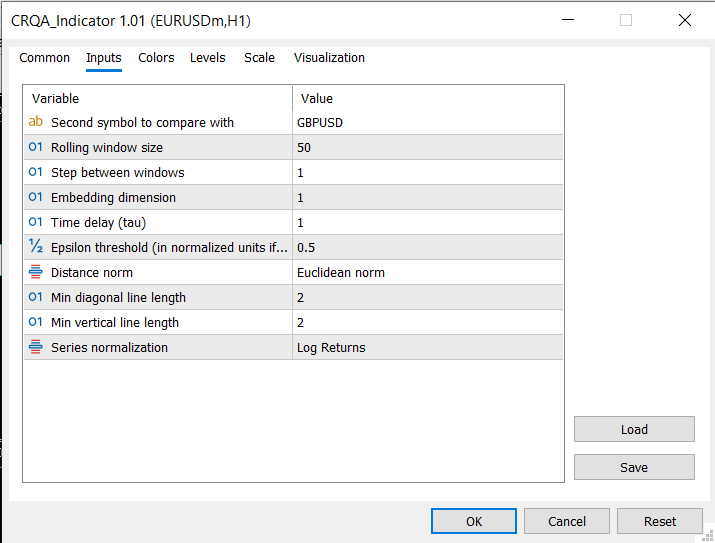
Fig. 5. The CRQA indicator settings dialog showing the second symbol, epsilon, window size, normalization mode, and other inputs
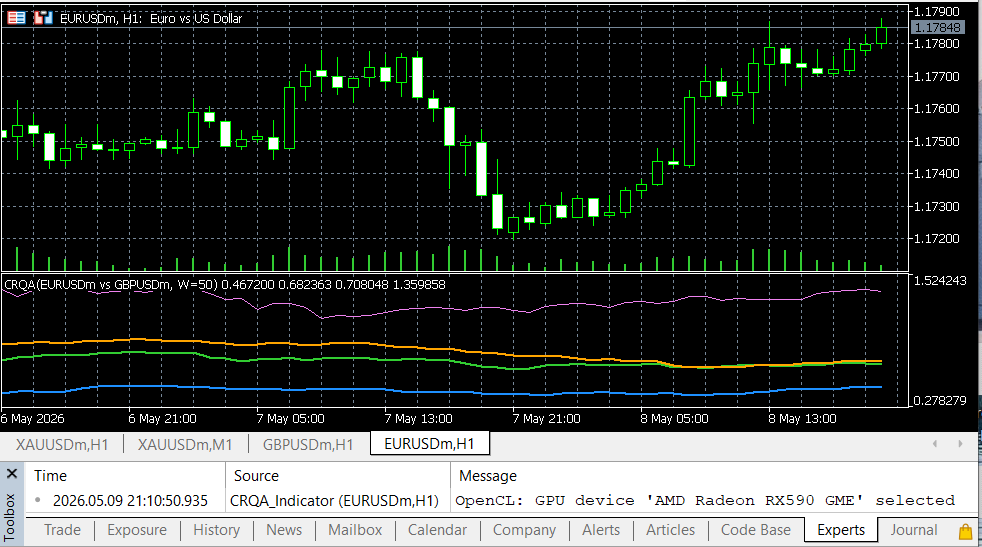
Fig. 6. The CRQA indicator comparing GBPUSD with EURUSD using log-returns normalization, with CRR, CDET, CLAM, and CENTR plotted in the separate indicator window
What's Next
With both the standard RQA and cross-RQA modules in place, the library now covers single-series analysis and two-series comparison. The natural next step is to put these tools to work in a trading context. Possible directions include:
- Using rolling CRQA between correlated pairs (e.g. EURUSD and GBPUSD) to detect when their coupling breaks down, which may signal divergence trades.
- Combining standard RQA metrics from one series with CRQA metrics between that series and a benchmark to build a composite regime indicator.
- Feeding RQA and CRQA metrics as features into a machine learning model for regime classification or trade signal generation.
- Applying CRQA between price and an indicator (e.g. RSI or a moving average) to measure whether the indicator is genuinely synchronized with the dynamics it claims to track.
The library was designed for extensibility. Adding new metric types, alternative normalization schemes, or adapting the OpenCL kernel for different hardware configurations would build on the existing class hierarchy without breaking backward compatibility.
Conclusion
Cross-Recurrence Quantification Analysis extends RQA from a single-series tool to a two-series comparison framework. By comparing the phase-space trajectories of two time series, CRQA reveals shared dynamics, synchronization, and coupling that standard correlation measures cannot detect. This article presented a complete MQL5 implementation consisting of four new modules:
- CCRQAMatrix embeds two series independently and constructs the N x M binary cross-recurrence matrix using three distance norms.
- CCRQAMetrics extracts ten metrics from the cross-recurrence matrix, covering diagonal structure (CDET, CL, CLmax, CENTR, CDIV), vertical structure (CLAM, CTT, CVmax), and aggregates (CRR, CRATIO).
- CCRQAWindow applies CRQA over a rolling window using GPU-accelerated matrix construction via OpenCL, with an automatic CPU fallback for systems without GPU support.
- CCRQA provides a high-level facade for the most common use case: computing all metrics between two series in a single call.
The accompanying indicator plots CRR, CDET, CLAM, and CENTR between the chart symbol and any second symbol in real time, with proper timestamp alignment, built-in normalization (log returns with z-score), and incremental computation for live trading.
All modules are backward-compatible with the standard RQA library from the previous article. A single include of RQA.mqh gives access to everything.
| # | File name | Type | Description |
|---|---|---|---|
| 1 | RQA.mqh | Include | Updated main include file with both CRQA and CCRQA facades |
| 2 | RQAMatrix.mqh | Include | CRQAMatrix class: standard single-series recurrence matrix (unchanged) |
| 3 | RQAMetrics.mqh | Include | CRQAMetrics class and SRQAResult struct (unchanged) |
| 4 | RQAEpsilon.mqh | Include | CRQAEpsilon class: automatic epsilon selection (unchanged) |
| 5 | RQAWindow.mqh | Include | CRQAWindow class: standard rolling window analysis (unchanged) |
| 6 | CRQAMatrix.mqh | Include | CCRQAMatrix class: N x M cross-recurrence matrix construction |
| 7 | CRQAMetrics.mqh | Include | CCRQAMetrics class and SCRQAResult struct: all ten CRQA metrics |
| 8 | CRQAWindow.mqh | Include | CCRQAWindow class: GPU-accelerated rolling cross-recurrence with CPU fallback |
| 9 | RQA_Example.mq5 | Script | Example script for standard RQA (from previous article) |
| 10 | RQA_Indicator.mq5 | Indicator | Standard RQA indicator (from previous article) |
| 11 | CRQA_Indicator.mq5 | Indicator | Cross-RQA indicator with GPU acceleration, timestamp alignment, and normalization |
Warning: All rights to these materials are reserved by MetaQuotes Ltd. Copying or reprinting of these materials in whole or in part is prohibited.
This article was written by a user of the site and reflects their personal views. MetaQuotes Ltd is not responsible for the accuracy of the information presented, nor for any consequences resulting from the use of the solutions, strategies or recommendations described.

 Building an Object-Oriented ONNX Inference Engine in MQL5
 Integrating MQL5 with Data Processing Packages (Part 9): Entropy-Based Adaptive Volatility
 RiskGate: Centralized Risk Management for Multiple EAs
 MQL5 Wizard Techniques you should know (Part 89): Using Bitwise Vectorization with Perceptron Classifiers

- Free trading apps
- Over 8,000 signals for copying
- Economic news for exploring financial markets
You agree to website policy and terms of use