Vladislav Andruschenko
- i love my job in https//expforex.com/
- Ukraine
- 312645
|
14+ Jahre
Erfahrung
|
44
Produkte
|
2342
Demoversionen
|
|
93
Jobs
|
0
Signale
|
0
Abonnenten
|
👋 Willkommen bei Expforex
Ich bin Vladislav, professioneller MQL4/MQL5-Entwickler. Seit 2007 entwickle ich Tools für MetaTrader.
Expforex entwickelt praktische Trading-Lösungen für MetaTrader 4 und MetaTrader 5:
Expert Advisors, Trading-Panels, Trade-Copier, Tools zur Risikokontrolle, Kontoauswertungen, Testwerkzeuge und Automatisierungssysteme.
✅ MetaTrader-Entwicklung seit 2007
✅ Tools für MT4 und MT5
✅ Dokumentation, Videoanleitungen und Produktsupport
✅ Professionelle Werkzeuge für Trader, Entwickler und Account-Manager
━━━━━━━━━━━━━━━━━━━━
⭐ VirtualTradePad PRO SE — Premium-Trading-Arbeitsbereich für MetaTrader
Professionelles manuelles Trading-Panel für MT4 und MT5 mit chartbasierter Steuerung, Positionsverwaltung, Order-Tools, Teilschließung, Averaging, Signal-Arbeitsbereich, Testvorbereitung und erweiterten Trading-Modulen.
https://expforex.com/de/vtpprosehero/
━━━━━━━━━━━━━━━━━━━━
🌐 Offizielle Expforex-Website https://www.expforex.com/de/
🚀 Vollständiger Expforex-Produkthub https://www.mql5.com/de/blogs/post/760825
🛒 Alle Produkte im MQL5 Market https://www.mql5.com/de/users/vladon/seller#products
📘 Alle MQL5-Anleitungen https://www.mql5.com/de/users/vladon/blog
━━━━━━━━━━━━━━━━━━━━
💬 Fragen, Ideen oder benötigen Sie Hilfe?
Ich empfehle immer, zuerst mit der vollständigen Anleitung und der Produktdokumentation zu beginnen. Die meisten Antworten, Einstellungsbeispiele und wichtigen Details sind dort bereits erklärt.
Wenn Sie persönliche Hilfe zu einem Produkt benötigen, schreiben Sie Ihre Frage bitte im Bereich Comments auf der genauen Produktseite, die Sie verwenden. So lassen sich Produktversion, Einstellungen, Screenshots und Logs leichter prüfen, und ich kann eine präzisere Antwort geben.
Ihr Feedback, Ihre Ideen und Ihre realen Trading-Szenarien helfen auch dabei, Expforex-Produkte weiter zu verbessern.
━━━━━━━━━━━━━━━━━━━━
🔗 Soziale Links
📢 MQL5 Channel https://www.mql5.com/de/channels/expforex
▶️ YouTube https://www.youtube.com/Expforex
📘 Facebook https://www.facebook.com/ExpForex/
𝕏 X / Twitter https://x.com/expforex
📱 Telegram https://t.me/Expforex
🎵 TikTok https://www.tiktok.com/@expforex
📧 Contact https://expforex.com/de/contacts/
Ich bin Vladislav, professioneller MQL4/MQL5-Entwickler. Seit 2007 entwickle ich Tools für MetaTrader.
Expforex entwickelt praktische Trading-Lösungen für MetaTrader 4 und MetaTrader 5:
Expert Advisors, Trading-Panels, Trade-Copier, Tools zur Risikokontrolle, Kontoauswertungen, Testwerkzeuge und Automatisierungssysteme.
✅ MetaTrader-Entwicklung seit 2007
✅ Tools für MT4 und MT5
✅ Dokumentation, Videoanleitungen und Produktsupport
✅ Professionelle Werkzeuge für Trader, Entwickler und Account-Manager
━━━━━━━━━━━━━━━━━━━━
⭐ VirtualTradePad PRO SE — Premium-Trading-Arbeitsbereich für MetaTrader
Professionelles manuelles Trading-Panel für MT4 und MT5 mit chartbasierter Steuerung, Positionsverwaltung, Order-Tools, Teilschließung, Averaging, Signal-Arbeitsbereich, Testvorbereitung und erweiterten Trading-Modulen.
https://expforex.com/de/vtpprosehero/
━━━━━━━━━━━━━━━━━━━━
🌐 Offizielle Expforex-Website https://www.expforex.com/de/
🚀 Vollständiger Expforex-Produkthub https://www.mql5.com/de/blogs/post/760825
🛒 Alle Produkte im MQL5 Market https://www.mql5.com/de/users/vladon/seller#products
📘 Alle MQL5-Anleitungen https://www.mql5.com/de/users/vladon/blog
━━━━━━━━━━━━━━━━━━━━
💬 Fragen, Ideen oder benötigen Sie Hilfe?
Ich empfehle immer, zuerst mit der vollständigen Anleitung und der Produktdokumentation zu beginnen. Die meisten Antworten, Einstellungsbeispiele und wichtigen Details sind dort bereits erklärt.
Wenn Sie persönliche Hilfe zu einem Produkt benötigen, schreiben Sie Ihre Frage bitte im Bereich Comments auf der genauen Produktseite, die Sie verwenden. So lassen sich Produktversion, Einstellungen, Screenshots und Logs leichter prüfen, und ich kann eine präzisere Antwort geben.
Ihr Feedback, Ihre Ideen und Ihre realen Trading-Szenarien helfen auch dabei, Expforex-Produkte weiter zu verbessern.
━━━━━━━━━━━━━━━━━━━━
🔗 Soziale Links
📢 MQL5 Channel https://www.mql5.com/de/channels/expforex
▶️ YouTube https://www.youtube.com/Expforex
📘 Facebook https://www.facebook.com/ExpForex/
𝕏 X / Twitter https://x.com/expforex
📱 Telegram https://t.me/Expforex
🎵 TikTok https://www.tiktok.com/@expforex
📧 Contact https://expforex.com/de/contacts/



Vladislav Andruschenko


·
1
Chua Wee Kiat
2021.05.10
Hi, I can pay to create a version to hide the ticket number in the comment area?
Vladislav Andruschenko


·
2
Alle Kommentare anzeigen (6)
Denilson Menezes
2021.07.28
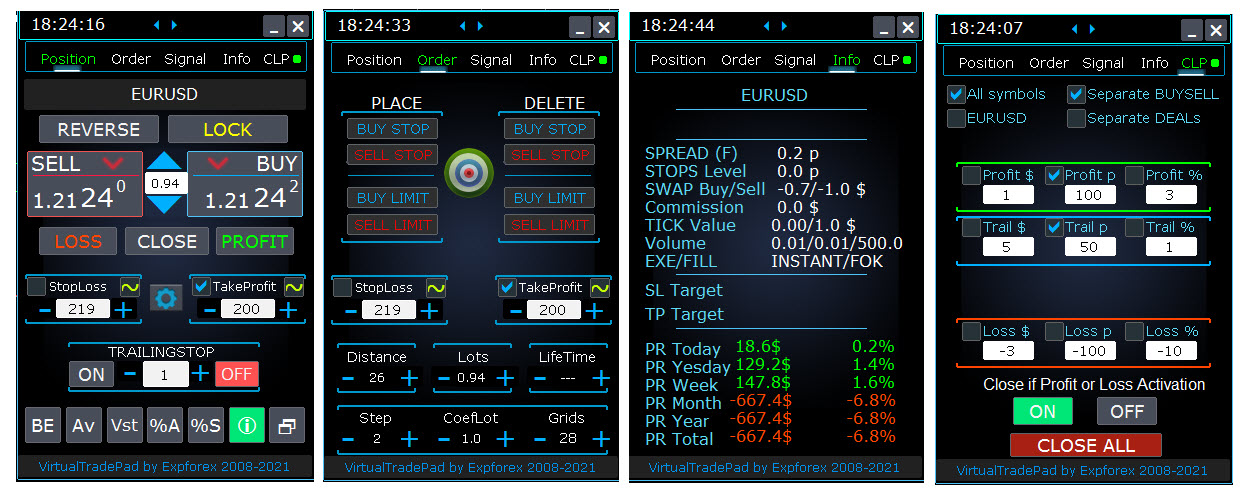
Hello, I believe I have found the error. my platform is Metatrader 5 and I made the purchase of the Virtual trade pad, however, I am not able to cancel to make a new purchase. What is the orientation in this case?
Vladislav Andruschenko


·
2
637
Vahid Bigdeli
2021.03.11
Hi How can I contact you regarding Exp5 The xCustomEA for MT5 ? I need small modifications because my indicator does not have arrows and just have normal buffers like bollinger band .


Vladislav Andruschenko
·
1
srazi65
2021.02.22
I am fan of this EA. However, will buy the day, when Pending Sell/Buy Trades are also added in EA to be handled Virtually. Independent from Server / Broker distances.
srazi65
2021.02.23
Thanks for response. Is it possible if i buy for 3 months "Exp 5 - Virtual trade Pad EXTRA" by paying 30 USD and before expiration of the period if i pay 30 USD more, its all mine for life time. Think of it !!!
Vladislav Andruschenko
2021.02.24
Thank. Unfortunately, this cannot be done. There is no such option in the market. But you can write to me and I will make a discount.
Vladislav Andruschenko

·
3
Vladislav Andruschenko
2021.01.29
Конечно. Скидки есть всегда. Но максимальные скидки только пару раз в год!