 MetaTrader 5
 Expert Advisors
 Indikatoren
 Skripte
 Bibliotheken
 Speicher
und werden Sie Mitglied unserer Fangruppe
Veröffentliche einen Link auf das Skript, damit die anderen ihn auch nutzen können
Bewerten Sie es im Terminal MetaTrader 5

RSI Dashboard - Multi-Timeframe (M15/H1/H4/D1) + Progress Bars - Indikator für den MetaTrader 5

- Ansichten:
- 435
- Rating:
- Veröffentlicht:
- Aktualisiert:
-
 Sie verpassen Handelsmöglichkeiten:
- Freie Handelsapplikationen
- Über 8.000 Signale zum Kopieren
- Wirtschaftsnachrichten für die Lage an den Finanzmärkte
Registrierung EinloggenSie stimmen der Website-Richtlinie und den Nutzungsbedingungen zu.
Wenn Sie kein Benutzerkonto haben, registrieren Sie sich -
 Benötigen Sie einen Roboter oder Indikator, der auf diesem Code basiert? Bestellen Sie ihn im Freelance-Bereich
Zum Freelance
Benötigen Sie einen Roboter oder Indikator, der auf diesem Code basiert? Bestellen Sie ihn im Freelance-Bereich
Zum Freelance
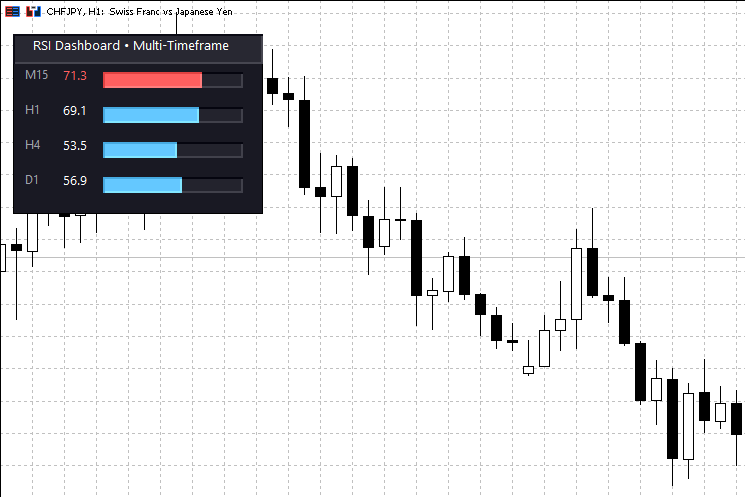
Introduction and Idea
The Multi-Timeframe RSI Dashboard is a lightweight and modern trading utility designed to streamline your workflow. Instead of constantly switching between chart timeframes to check the Relative Strength Index (RSI), this indicator displays the current RSI values for M15, H1, H4, and D1 simultaneously on a single chart. This allows for a comprehensive view of the market momentum across short-term and long-term perspectives.
The core idea behind this tool is to provide immediate visual feedback on overbought and oversold conditions. By visualizing the data with color-coded progress bars and dynamic text, traders can instantly identify potential reversal points or trend continuations without the noise of multiple open windows. The panel is fully interactive and can be dragged anywhere on the chart to avoid obscuring price action.
Interpreting the Values
The dashboard uses a classic interpretation of the Relative Strength Index but enhances it with modern visual cues. The default period is set to 14, but this can be customized to fit your specific strategy. The progress bars provide a quick visual estimation of the trend strength relative to the maximum range.
-
Overbought Zone: When the RSI exceeds the defined upper level (default is 70), the value and progress bar turn Red. This typically suggests that the asset may be overvalued and a price correction or reversal could occur.
-
Oversold Zone: When the RSI drops below the defined lower level (default is 30), the display turns Green. This suggests the asset may be undervalued, presenting a potential buying opportunity.
-
Neutral Zone: Between levels 30 and 70, the text remains white and the bar is light blue, indicating normal market conditions without extreme momentum.
Key Features
-
Multi-Timeframe Monitoring: Automatically tracks M15, H1, H4, and Daily timeframes.
-
Draggable Interface: The panel can be moved freely around the chart using the mouse.
-
Real-Time Updates: Values are updated every second to ensure data accuracy without lagging.
-
Modern UI: Features a dark-themed, flat design with "Segoe UI" fonts for high readability.
Input Parameters
The indicator is highly customizable. You can adjust the calculation logic as well as the visual appearance of the panel to match your chart template.
| Parameter | Description | Default Value |
|---|---|---|
| InpRSIPeriod | The averaging period for the RSI calculation. | 14 |
| InpOverboughtLevel | Level above which the signal turns Red (Overbought). | 70 |
| InpOversoldLevel | Level below which the signal turns Green (Oversold). | 30 |
| InpPanelX / Y | The starting X and Y coordinates of the dashboard. | 20 / 20 |
| InpPanelBgColor | The background color of the main panel. | Dark Blue-Grey |
| InpOverboughtColor | Color used for values > 70. | Modern Red |
| InpOversoldColor | Color used for values < 30. | Modern Green |
Installation and Usage
Download the file and place it in your MQL5/Indicators folder. After compiling, drag the indicator onto any chart. The dashboard will appear in the top-left corner by default. To move the panel, simply click and hold anywhere on the dashboard background and drag it to your desired location.
 Modern Dark-Mode Trade Panel – One-Click Execution
A professional, dark-themed trading panel for fast execution. Features one-click Buy/Sell buttons, automatic pip calculation, and persistent settings memory for every symbol.
Candlestick Body, High Low and Wick Range
Klicken Sie auf die Kerze, um ihren Körperbereich, den Hoch-Tief-Bereich, den oberen Dochtbereich und den unteren Dochtbereich anzuzeigen.
Professional Close All Positions Panel
Professionelles Panel zum Schließen von Positionen mit 6 intelligenten Filtern. Schließen Sie alle, nach Typ, nach Symbol oder nach Gewinn/Verlust. P&L-Anzeige in Echtzeit. Perfekt für Notausstiege und Risikomanagement. Inklusive Sicherheitsbestätigungen.
Candle Time Count Down
Aktuelle Kerze Zu schließen in x Zeit