 MetaTrader 5
 Expert Advisors
 Indikatoren
 Skripte
 Bibliotheken
 Speicher
und werden Sie Mitglied unserer Fangruppe
Veröffentliche einen Link auf das Skript, damit die anderen ihn auch nutzen können
Bewerten Sie es im Terminal MetaTrader 5

Modern Dark-Mode Trade Panel – One-Click Execution - Experte für den MetaTrader 5

- Ansichten:
- 454
- Rating:
- Veröffentlicht:
- Aktualisiert:
-
 Sie verpassen Handelsmöglichkeiten:
- Freie Handelsapplikationen
- Über 8.000 Signale zum Kopieren
- Wirtschaftsnachrichten für die Lage an den Finanzmärkte
Registrierung EinloggenSie stimmen der Website-Richtlinie und den Nutzungsbedingungen zu.
Wenn Sie kein Benutzerkonto haben, registrieren Sie sich -
 Benötigen Sie einen Roboter oder Indikator, der auf diesem Code basiert? Bestellen Sie ihn im Freelance-Bereich
Zum Freelance
Benötigen Sie einen Roboter oder Indikator, der auf diesem Code basiert? Bestellen Sie ihn im Freelance-Bereich
Zum Freelance
Full Description
Modern Dark-Mode Trade Panel – One-Click Execution
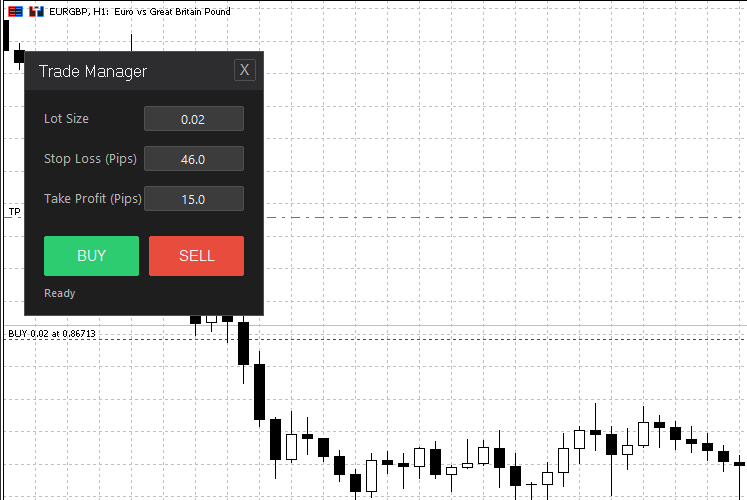
This Expert Advisor provides a professional graphical interface (GUI) for manual trading, designed to speed up your workflow while simplifying risk management. Unlike standard scripts, this panel remains active on the chart and features a modern "Dark Mode" design inspired by professional development environments.
The main idea behind this tool is to reduce clicks and calculation errors. Instead of manually recalculating lot sizes and stop-loss levels for every order, the panel allows you to input fixed values that are automatically applied to the next trade. This is particularly useful for scalpers and day traders who need to react quickly in volatile markets.
Key Features
-
One-Click Execution: Dedicated BUY and SELL buttons allow for instant market orders without delay.
-
Integrated Risk Management: Input Stop Loss and Take Profit directly in "Pips". The EA automatically calculates the correct price levels, regardless of whether you are using a 3-digit or 5-digit broker.
-
Smart Memory: The panel remembers your last used settings for each symbol separately. When you restart MetaTrader 5 or switch charts, your preferred risk parameters are automatically restored.
-
Error Protection: While interacting with the panel, chart scrolling is disabled to prevent accidental inputs or shifting of the chart view.
-
Status Feedback: An integrated label informs you in real-time about the status of your order (e.g., "Order Executed" or error messages for invalid parameters).
Input Parameters and Usage
The panel does not require complex set files, as all inputs are made directly via the graphical interface. The internal calculations are based on the standard CTrade library, ensuring robust and fast execution.
| Parameter Field | Description | Function |
|---|---|---|
| Lots | Trading Volume | Defines the position size in lots (e.g., 0.01 or 1.0). |
| SL (Pips) | Stop Loss Distance | Distance to the entry price in pips. If 0, no SL is set. |
| TP (Pips) | Take Profit Distance | Distance to the entry price in pips. If 0, no TP is set. |
Installation and Application
Load the file into your MQL5\Experts folder and compile it. Then, drag the EA onto any chart. The timeframe does not affect functionality, as the panel operates independently of the symbol.
To remove the panel, simply use the small "X" button in the upper right corner of the interface. This removes the EA cleanly from the chart and releases all resources.
 Candlestick Body, High Low and Wick Range
Klicken Sie auf die Kerze, um ihren Körperbereich, den Hoch-Tief-Bereich, den oberen Dochtbereich und den unteren Dochtbereich anzuzeigen.
Aklamavo Quarters Theory
Dieser Indikator setzt die "Quartals-Theorie" um - ein Konzept der technischen Analyse, das die Kursbewegung in vier Quartale um ein zentrales Basisniveau unterteilt. Der Indikator kann mit mehreren Anlagetypen (Devisen, Aktien, Rohstoffe usw.) verwendet werden und bietet visuelle Quartalebenen auf dem Diagramm.
RSI Dashboard - Multi-Timeframe (M15/H1/H4/D1) + Progress Bars
A modern, draggable dashboard that displays real-time RSI values for M15, H1, H4, and D1 timeframes simultaneously. Features color-coded progress bars to instantly identify overbought and oversold conditions across multiple periods without switching charts.
Professional Close All Positions Panel
Professionelles Panel zum Schließen von Positionen mit 6 intelligenten Filtern. Schließen Sie alle, nach Typ, nach Symbol oder nach Gewinn/Verlust. P&L-Anzeige in Echtzeit. Perfekt für Notausstiege und Risikomanagement. Inklusive Sicherheitsbestätigungen.