Ultimate Trade Manager plus Mobile MT5 RunwiseFX

5

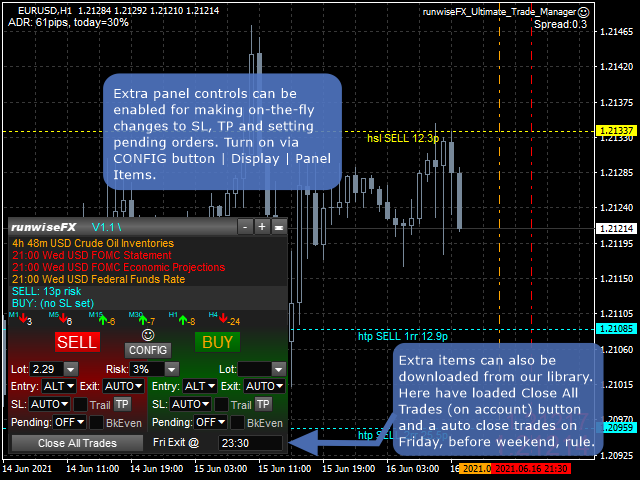
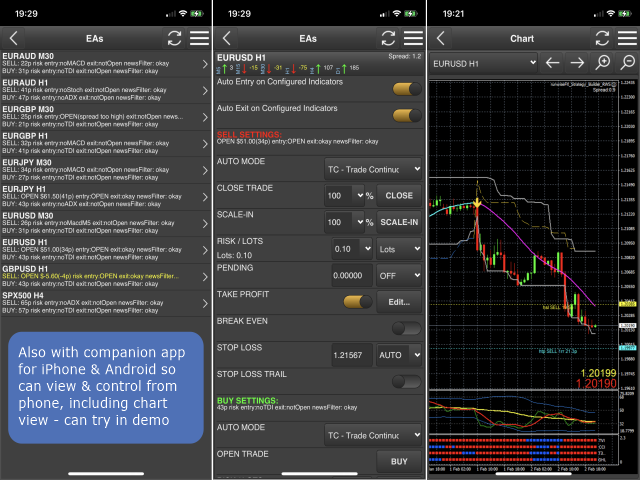
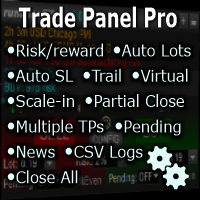
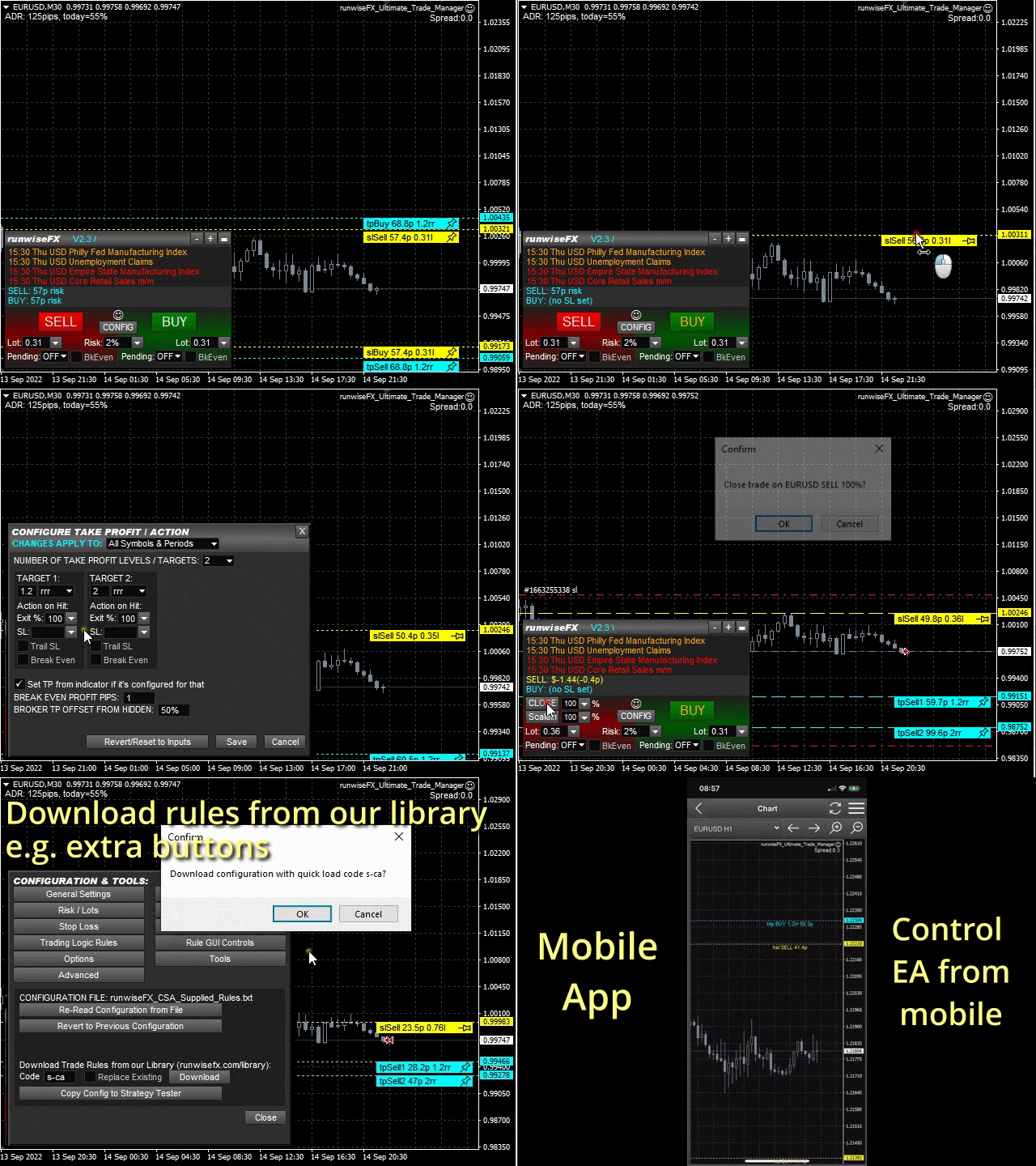
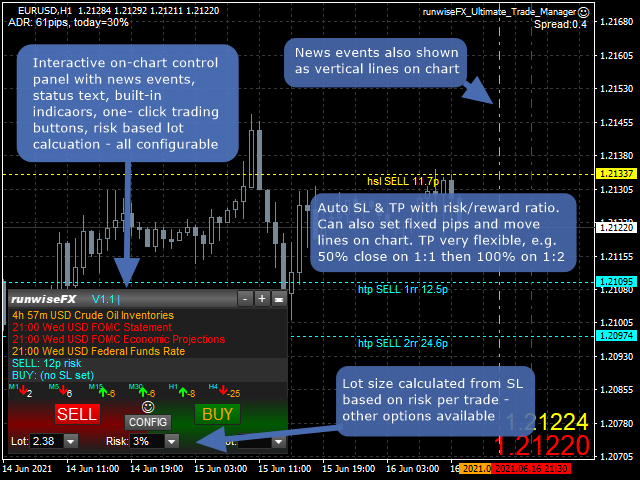
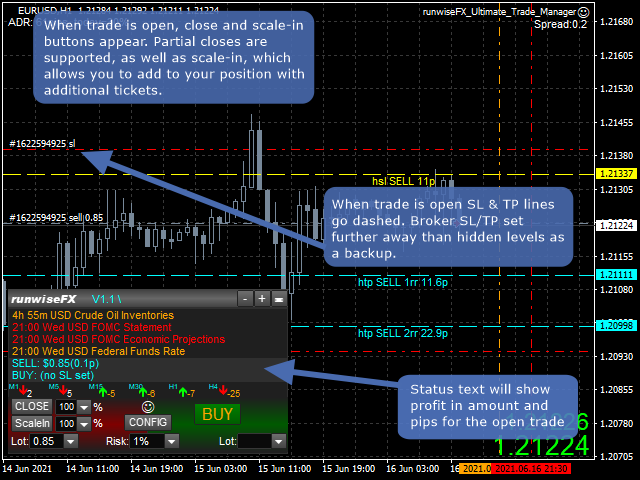
Comprehensive on chart trade panel with the unique ability to be controllable from mobile as well. Plus has a library of downloadable configuration, e.g. exit rules, extra panel buttons, pending order setup and more. Please see our product video. Works with all symbols not just currency pairs.

Features

  • On chart panel plus controllable from free app for Windows, iPhone and Android
  • Built-in script engine with library of downloadable configuration, e.g. add 'Close All Trades in Profit' button, exit before high impact news, etc.
  • Lot size calculation - based on % of account to risk, fixed amount to risk, dynamic or fixed lots
  • Hidden (virtual/stealth) stop loss, take profit and pending orders - highly recommend for live trading - keep intentions hidden from broker
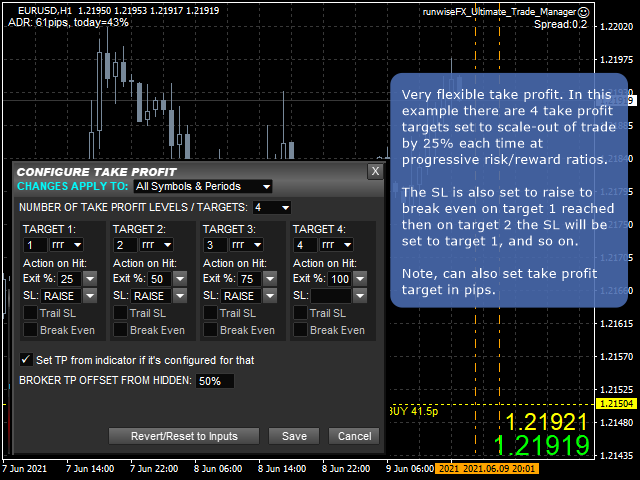
  • Partial closes (scale-out)
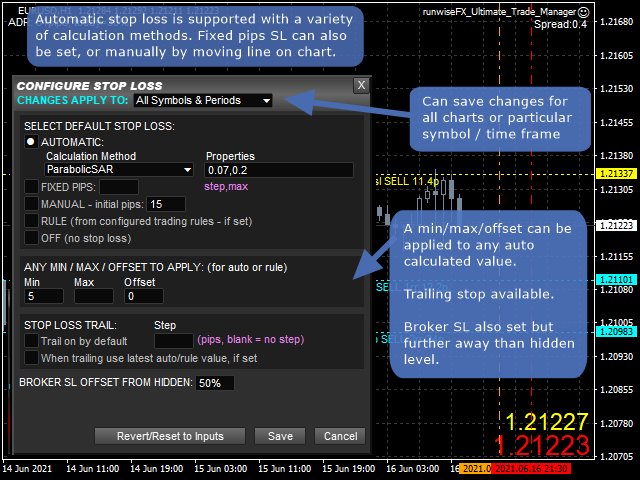
  • Easy to use configuration pop-up forms via CONFIG button
  • Stop loss, take profit lines can be positioned manually on the chart
  • Automatic stop loss - variety of calculation methods can be selected
  • Automatic take profit based on risk reward ratios or pips
  • Trailing stop loss and break even, which can be triggered when target reached
  • Sets broker SL/TP as backup but further away than hidden level
  • Hidden pending lines can be set to alert or trade, based on market price or candle close. Can be set with expiry and auto One Cancels Other (OCO).
  • Scale in (open additional tickets), plus automatic scale-in when target reached
  • News events (both text and vertical lines)
  • Optional multi-trade mode for multiple trades / pending orders on the same chart/symbol, all with separate SL/TP
  • Multi account trade copying where trade button presses can be sent to other accounts via MetaTrader instances on the same machine (master/slave(s))
  • Can be configured on a per symbol and/or timeframe basis, e.g. have different SL for different symbols or timeframes
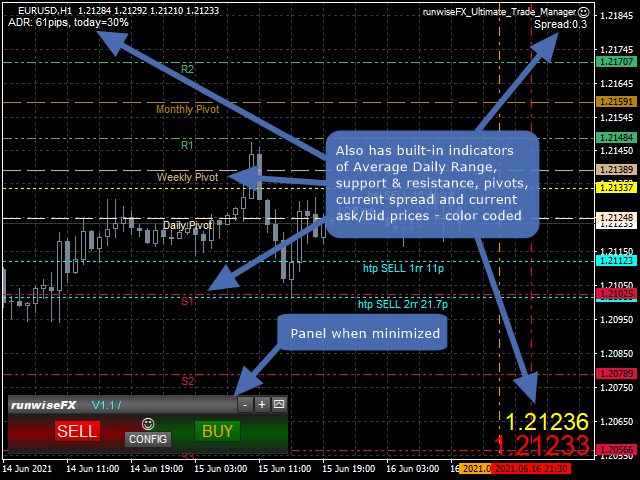
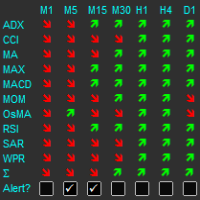
  • Includes indicators providing multiple timeframe trend, support/resistance, pivots, average daily range, current spread and ask/bid prices
  • Logs trades including execution time, slippage and profit, in a spreadsheet CSV file - keep an eye on your broker
  • Robust error handling
  • Underlying code base has been in live use since 2015


Using in Strategy Tester / Demo Version

Works reasonably well in Tester / demo version - just run in visual mode with play back speed around normal live market. You can even test the mobile app - see video. However, downloading from our library is not possible due to a limitation in the Tester. Note, tying in edit boxes doesn't in the Strategy Tester in MT5.

Usage

Please see our product manual in pdf format.


EA Inputs

The system is configured via the panel's CONFIG button rather than relying on inputs. However, here are a few inputs you may wish to change:

  • Main_confirmTradeClose - set to false to turn off confirmation on trade close click
  • Important_brokerSLTPSetOnOrderSend - set to true if broker requires SL to be set on Order Send
  • Gen_forcePointToPipDivider - set to 100 if trading indices so 1 pip is 1 basis point for most brokers
  • Gen_askBidPricesShow - turn on/off big ask/bid price 


Automating Indicators

Fully compatible with our Indicator Combine product, which allows indicators to be captured and auto traded when in agreement. Includes both standard indicators and custom indicators. Also provides real-time statistics and auto optimization. See video.
评分 7
waleouk
87
waleouk 2026.03.02 21:07 
 

Been using this for over a year and absolutely love it. Using the manual system application and the mobile. Highly recommended.

paulxluap
149
paulxluap 2023.09.21 17:16 
 

I really can't fault this EA - it's worth every penny, especially when one considers the amount of thinking and development that has clearly gone into it. It does pretty much everything that you could ever need, especially when combined with either of the two matrix products that RunwiseFX offer that integrate with the EA, allowing you to mix and match almost any external indicators to trigger a trade. It takes a little while (at least a day or two) to work through the extensive and clear documentation (which is excellent) and you'll need to be prepared for some trial & error tweaking and testing the comprehensive array of settings that are built in. There's also a huge library of plug-in settings that allow extra behaviours to be added in. But if you run into any issues setting it all up, RunwiseFX's support service is excellent as well. And the icing on the cake is the mobile add-on which means that you can keep an eye on things when away from your desk.

Melanio Aganus
77
Melanio Aganus 2023.04.02 09:58 
 

This software is Amazing will bring you to the new level of trading ! I ignore in the beginning but once you understand it will unlock your interest & knowledge! imagine you can review the probability or statistic of your trade base of your chosen indicators in combinations with one you like. one more thing I like is that they are a lot of script that use base on your personality. Its Truly Amazing …More power to the developers & the team

推荐产品
Общие сведения Данная торговая панель предназначена для быстрой и удобной торговли в один клик. Создавался продукт для частичной автоматизации своей личной ручной торговли  https://www.mql5.com/ru/signals/1040299?source=Site+Profile+Seller Советник имеет ряд возможностей, а именно: Открытие BUY или SELL ордеров. SL выставляется ниже (выше)  минимальной (максимальной) цены, задаваемых в параметрах количества свечей. Размер TP рассчитывается в соотношении от размера SL (по умолчанию 0.618). Выстав
Bneu Performance Mastery System — AI Trading Coach and Behavior Analysis Premium on-chart performance analysis utility with 4 dashboard tabs. AI Coach analyzes your closed trade history and provides personalized coaching with actionable advice in real-time. 5 behavior detectors catch overtrading, revenge trading, and tilt. Pattern analysis finds your best and worst days, sessions, and pairs. Achievement system rewards discipline and consistency milestones. Telegram reports deliver daily and we
Ultimate MT5 to Telegram (UMT) sends controlled trades (via symbol, magic, comment) to your telegram channel. It sends open and closed trades, including pending orders and TP/SL modifications, along with chart screenshots, to any telegram channel. Additionally, you can send trade reports of open trades and summary profit/pip reports for day, week, or month. You can customize the design of the trade actions or reports with variables and emoticons.  A beautiful panel allows you to visualize all t
PropGuard Pro v1.0 — Prop Firm 风控面板 Prop Firm 交易者的一体化风控解决方案 一键保护你的资金账户 PropGuard Pro 是专为 Prop Firm 交易者设计的专业风控面板。无论你是在挑战 FTMO、评估 5ers、还是交易资金账户——PropGuard Pro 自动确保你遵守公司规则。 核心功能 A. Prop Firm 规则预设 — 零配置开箱即用 FTMO :5%日亏损 / 10%总回撤(净值高点追踪) 5ers :4%日亏损 / 6%总回撤 MyForexFunds :5%日亏损 / 12%总回撤 自定义 :设置你自己的限制 面板上一键切换预设 B. 实时回撤监控 日亏损进度条,颜色编码(绿→黄→红) 总回撤进度条,可视化警告 触达限制时自动平仓 限制触达后禁止交易(每日重置或手动重新启用) 15%缓冲区,应对滑点 C. 一键交易管理 全部平仓 仅平盈利单 仅平亏损单 删除所有挂单 部分平仓(50% / 75% / 自定义) 平当前品种仓位 D. 时段控制 定义允许交易的时间(如 08:00-2
跟单->方便快捷的界面交互,用户上手即用       ->>>> 推荐在windows电脑,或者VPS Windows上使用 特色功能: 多样化个性跟单设置: 1.对不同的信号源可以设置不同的手数模式 2.不同的信号源分别设置正向反向跟单 3.信号分别设置注释 4.是否根据合约手数校准手数 多样化个性跟单设置2: 1.对不同的品种可以设置不同的手数模式 2.不同的品种分别设置正向反向跟单 3.信号分别设置注释 4.是否根据合约手数校准手数 注释过滤,MAGIC过滤,信号手数过滤,本地品种过滤 净持仓模式(该模式下手数计算仅支持倍率) 工作时间设置 反向同步接收端的平仓 订单绑定功能:任意订单可以绑定到设置信号源订单上( 双击表格更改) 账户风险控制 基本功能: 跟单正常交互速度0.5s以下 自动检测信号源,并显示信号源账号列表 自动匹配品种,不同平台常用交易品种(后缀不同等特殊情况)95%自动匹配,基本无需手动设置,品种映射表可随意双击更改对应品种.(映射表具有快速搜索品种功能) 4种手数计算模式(1.倍率 2.固定手数 3.自适应资金风险 4.源账户资金比例风险) 特殊手数模式:
Grid Masters Grid Matrix Pro MT5 — Dual-Sided Grid System Grid Masters Grid Matrix Pro MT5 is a professional Expert Advisor built on a double‑sided grid framework. It automatically identifies equilibrium zones and deploys buy and sell grids with dynamic risk management. Traders can choose between full automation or manual supervision using on‑chart controls. Overview The EA combines automatic zone detection with symmetrical grid logic. It offers configurable spacing, stop loss, take profit, and
Remote Trade Copier is an advanced tool designed for efficiently copying trades between accounts in both local and remote modes. It allows for lightning-fast order replication from a master account to a slave account. In local mode, trades are copied instantly, while in remote mode, the copying process takes less than 1 second. MT4 Version (Only Local) MT5 Version (Only Local) MT4 Full Version (Local & Remote) Local mode refers to both MetaTrader platforms being installed on the same system,
Hello, boys and girls! Script allows you either to quickly save opened charts and then close all charts opened by visual tester mode or just faster close all charts. Feel free to take a look at video manual about how to use this script on my YouTube channel. Also, feel free to join my telegram channel , where time to time I publish some exclusive stuffs. Feel free to leave feedback and thoughts how to improve this script - I'd highly appreciate that. All the best.
Trade Panel HotKey – MT5 Scalping Utility Fast Trade Panel HotKey is a lightweight MT5 trading utility designed for traders who need to open, manage, and close positions as quickly as possible . The main purpose of this tool is to reduce the time between a trading decision and execution. Instead of moving the mouse, opening order windows, or manually modifying multiple positions, most important actions can be performed instantly through customizable keyboard hotkeys or directly from the compact
Mt5 To InterativeBrokers Copier allows you to copy deals from MT5 account to Interactive Brokers. With this, you can run your EA strategy on a MT5 Demo/Real Account, then copy all the deals to Interactive Brokers account real time. Features: 1. Copy or Invert-Copy deals Realtime from MT5 to IB Account. 2. Synchronizing positions of both accounts periodicaly, in case any missing copying. 3. You can choose only Buy position or Sell position. Symbols Setup: General Format:  {MT Symbol} -> {IB S
Time saving and fast execution Whether you’re traveling or sleeping, always know that Telegram To MT5 performs the trades for you. In other words, Our   Telegram MT5 Signal Trader  will analyze the trading signals you receive on your selected Telegram channels and execute them to your Telegram to MT5 account. Reduce The Risk Telegram To Mt5   defines the whole experience of copying signals from   Telegram signal copier to MT5 platforms. Users not only can follow all instructions from the signal
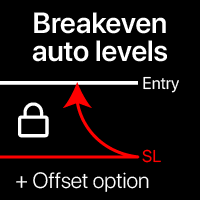
自动盈亏平衡水平 使用此工具,您可以在交易达到预期利润时激活自动止损移动。 对短期交易者尤为重要。偏移选项也可用:可以保护部分利润。 多功能工具 : 66+功能,包括此工具 | 联系我 如有任何问题 | MT4版本 激活自动盈亏平衡功能的过程: 1. 选择货币对或交易 将为其激活自动BE功能: 当前 [Symbol] / 所有 [ALL] 交易 / 或特定交易 [Ticket] 。 除了[Symbol]或[ALL]规则外 - 您可以为特定交易设置单独规则,通过其订单号:[Ticket]规则将优先。 2. 选择您要激活自动BE的 交易类型 : [ALL]: 所有活跃交易; [Longs]: 仅Buy交易; [Shorts]: 仅Sell交易; 3. [When profit] : 仅当 交易达到指定利润金额 时才会移动SL。 4. [+ Offset] : 您可以设置 额外的SL偏移 ,朝向TP水平方向。因此,SL不仅可以移动到盈亏平衡点,还可以移动到盈利水平。 5. 点击 [Activate Auto BE] 激活自动盈亏平衡功能。 底部部分显示自动BE功能的 当前状态 。 如果自动
Open Trade MT5
Frank William Jr Colbert
A basic entry and position management EA that opens trades on multiple currency pairs at specific times. It includes its own internal trailing stop and take-profit logic, as well as integrated "end-of-day" and "Friday" profit-close features from the other scripts. Features: Opens trades on user-defined `PairsSet1` through `Set6` at specific `TradeTime` inputs. Configurable position sizing (`Lots`), Stop Loss, and Take Profit. Includes its own `TrailOrders` function that trails both SL and TP b
Backtest Reality Check 以 EA 的形式挂在 MetaTrader 5 图表上,但它本身不做交易。它读取策略测试器保存的报告,从成交记录里算出各项数值;再用同一套函数去测同一个 EA 在真实账户上已经做过的成交,最后把两边的数值并列在一起。实盘成交还不到 30 笔时,差值仍然显示,但工具不会把它当成已经成立的差距,而是注明还差多少笔。它不下单、不改单、不平仓,源码中不包含任何交易函数调用。 标记的含义 带阈值的那几行,标记只说明这个数值越过了该行写明的阈值,并不评价 EA 的优劣。至于数值为何会是这样,工具也给不出原因:过拟合、行情变化、经纪商差异、偶然波动,这几种原因在数据上留下的样子几乎一样。 报告和实盘并排(Live vs Report 页) Manual (0) Link Unlink Report: GridBot_EURUSD_M15.htm                          Report Live Diff Trades 28 140 - Win rate 67.86% 41.43% -26.4 pt Profit f
这是一个通过发送邮件警报,让您能够及时了解到交易账号的实时动态的工具,同时支持Nedge 和Netting 模式。 警报功能如下: 1.浮动盈亏警报,一旦达到您所设置的盈利和亏损金额条件,EA会自动发送详细警报内容邮件给您; 2.订单开仓和平仓警报,一旦您的账号有开仓和平仓,   EA会自动发送详细警报内容邮件给您; 3.多个商品报价涨跌警报,一旦达到您所设置的价格涨跌条件,    EA会自动发送详细警报内容邮件给您; 以上都可以自定义警报次数。 使用方法: 1.在MT5客户端--工具--选项--电邮 中 完成电邮设置并启用; 2.   在MT5客户端 加载EA 并启用自动交易即可。 EA 参数设置说明 : 盈亏警报参数介绍: 1.参数TP 设置盈利金额,SL 设置亏损金额,这里的金额指的是所有在仓单的盈亏总额。若不启用,设置TP、SL为-1即可。 2.参数   INMintes 设置警报间隔时间,时间单位为分钟,这里的时间是指在 到达设置的盈亏值发送邮件后,再次检查并发送警报邮件的间隔时间。 若间隔时间后条件成立就再次发送警报邮件,否则就不再发送。 TPSLComment=Send
该智能交易顾问(EA)会在 MetaTrader 5 中监控所有交易品种上的所有持仓。一旦在任意持仓上 手动设置或调整 了止损(SL)或止盈(TP),EA 会将该值 自动应用于其他所有未平仓头寸 ,无论是买单还是卖单、哪个交易品种。这确保整个账户的 SL 和 TP 水平始终保持同步。 非常适合通过平板或智能手机进行移动交易!    ......................................................................................................................................................
Exit strategy
Samuel Njenga Nganga
Introducing Exit strategy EA – Smart Trade Manager for MT5, designed to save you screen time and manage your open trades. Set your own TP levels. SL adjustments. Lot size percentages. How It Works: Set up to 2 Take Profits for each trade (TP1,TP2). I can add more TP levels  At each target hit: 1. Automatically close a customizable percentage of your position e.g 50% close on TP1 2. Instantly adjust your Stop Loss to a predefined level e.g Move stop loss to breakeven at TP1 hit. Why Y
MT5 to Telegram: Professional Signal Provider Bridge Take your MetaTrader 5 trading to the next level. MT5 to Telegram is a high-performance utility designed specifically for traders who want to broadcast their market execution to Telegram Channels, Groups, or Private Chats instantly. Whether you are scaling a Signal Service business or simply want to track your own trades remotely on your mobile device, this tool provides the most reliable and professional-looking bridge for the MT5 platform.
Automatic Trade Journal Proo
Mohammadebrahimijahromi Khodabandehjahromi
Automatic Trade Journal Proo —— 您的自动化交易日记 别再忘记当初为何进行某笔交易了。Trade Journal PRO 能将您账户中的每一笔持仓自动转化为完整且可检索的记录,无需任何人工操作。 它能为您做什么: 自动图表截图 —— 每当您开仓时,EA 就会捕捉当时的图表画面,并标示出入场点、止损位和止盈位——让您能精准重现决策时刻所看到的市场状况。 ️ 语音备注 —— 一键即可录制语音,记录交易设置、决策逻辑或当时的心情。这是回顾交易心态的绝佳方式——事后回听自己的思考过程,效果无与伦比。 文字备注 —— 直接在日记中为任意交易添加详细备注——记录策略细节、失误、经验教训或市场背景。 完整绩效分析 —— 涵盖胜率、盈亏比(Profit Factor)、回撤幅度、最佳/最差交易日与时段、各交易品种的绩效明细等——所有数据均自动计算并实时更新,让您清楚了解自己的优势所在(以及不足之处)。 为何交易者对它爱不释手: • 完全在后台运行 —— 您只需照常交易,其余工作全由 EA 完成 • 所有截图、文字备注和语音备忘录都井井有条,并与对应的
Prop Guardian Risk Manager MT5 – Drawdown, Risk & Hedge Protection for Prop Firm and Managed Accounts Prop Guardian Risk Manager is a professional risk-control utility for MetaTrader 5, designed for prop firm traders, money managers and anyone who wants strict account-level risk protection. It does not generate trading signals, strategy entries or trading decisions. Instead, it runs in the background, monitors your account risk and can automatically block new exposure, close managed positions or
Wolseley Panel MT5 FREE
Walter Wolseley Pessoa Batista De Lima
WOLSELEY's Trading Panel - BASIC - - Feel free to contact me at instagram   @walter_robos  or whatsapp/telegram +5592981173937 View your history in a structured and detailed manner, with efficiency rate and profit rate separated by day, week, month and total, as well as asset details, server time and positions&orders in progress. This panel was created looking on HEDGE-type accounts, but it can be used on NETTING-type accounts without any problems. In the PREMIUM version of this Panel you have
EA SB8 Panel Trade
Juan Manuel Bernal Martin
SB-8 – Manual Trading Panel with Fixed Risk & TradingView-Style Visualization for MT5 SB-8 is an advanced manual trading panel for MetaTrader 5 , designed to execute trades visually, quickly and without calculations . It is especially built for traders coming from TradingView , who often find MT5 confusing when it comes to risk management and trade visualization. With SB-8, you don’t calculate lot size, percentages or risk . You simply move the Stop Loss line , and the panel handles everything a
justEnter is a semi-automatic trade management utility for MetaTrader 5. You choose the entry; the utility calculates position size, places the stop loss, and manages the position through breakeven, partial closes and trailing until exit. For traders following signals If you take your entries from a signal service, a mentor, or your own alerts, the entry decision is already made by the time you open the terminal. What remains is execution: sizing the position correctly, placing the stop, moving
Take Control of Risk with Smart Trailing Stop Manager for MetaTrader 5 Looking for MetaTrader 4 version? I t is available separately in the Market:   Smart Trailing Stop Manager MT4 Full User Guide    –  Public channel:   CLICK HERE Tired of missed profits or manual stop loss adjustments? Smart Trailing Stop Manager is a powerful utility for MetaTrader 5 designed to automate your trailing stop, breakeven, partial close, and SL management. Whether you're a discretionary trader, signal follower, o
The Comeback Kid Manger is half EA and half trade manager. It's capable of keeping the trader profitable on complete auto-pilot. You can also use the onscreen buttons to intervene with the EA to achieve a creative manual/algo collaboration. It's also capable of recovering losing trades by managing them into a small profit or break even. The user has a lot of control on how and when they would like to increase profit on good trades and recovery bad or losing trades.  Highlights  Includes one of
One Click Trader  is a tool designed for MetaTrader 4 platform, which enables you to take your trading to the next level. It enables you to open, manage and close your trades in simple an efficient way by just one click of your mouse button. "-"   ,  "+"  change OCT window size  Up arrow minimizes the OCT panel Down arrow maximizes the OCT panel Right arrow displays the next panel with additional features Left arrow hides the panel with additional features Red  SELL  button enables you to open s
PLUTUS GOLDEN-VAULT MECH AI  Single-Shot Probability Engine & Safe Recovery Protocol Plutus Golden-Vault Mech  is an ultra-secure, highly precise Expert Advisor designed for traders and Prop Firm candidates who despise Grid and Martingale systems. Inspired by Plutus, the Greek God of Wealth and protector of the golden vault, this EA is built on the philosophy of "Quality over Quantity". If you are tired of EAs that open 20 trades at once and hold your account hostage in deep drawdown, Plutus
各位交易员好!我是您的交易助手。话不多说,让我来告诉你我的专长: 1. 我擅长管理您的持仓,不论你在哪一端下单,我都能第一时间帮你加上合理的止损线以及移动止损。 2. 我能帮你规避追涨杀跌,从根源根除守不住原则的人性弱点。 3. 我会在最佳点位给你发出通知消息到您移动端的MT5客户端,供您参考,当然,您需要将您移动设备内 MetaTrader 5 APP里 的  MetaQuotes ID 注册到  MetaTrader 5 客户端-->选项-->通知--> MetaQuotes ID的编辑框内并勾选开启通知点确定 。 4. 我很好地支持在策略测试中进行手动模拟操盘练习。 5. 联系我您还能获得一个配套的附加AI辅助客户端超级助理程序。 备注:本 项目不承诺您一定能盈利,它只是交易助理工具。 消息通知的效果展示请参阅截图效果。 期待您选择我成为您的助理,让我们共同奔赴财务自由!!!
EA Manage Emotion
Hua Nguyen Nguyen Tran
EA Emotion   is not a traditional Expert Advisor that places trades automatically – instead, it’s a psychological checkpoint that helps you manage   trading discipline and emotional control . Designed especially for discretionary traders, prop firm challengers, and anyone serious about improving consistency,   EA Emotion   asks a series of custom questions   right after you open a trade , such as: Did you follow your trading plan? Are you in the right mental state? Is this trade part of your set
PortfolioLab Pro
Antonello Belgrano
在单个 MT5 账户上管理多个 Expert Advisor(EA)比看起来要困难得多。每个 EA 单独运行时表现良好,但放在一起时,它们可能会悄无声息地集中风险、在回撤期间高度相关,并且实际表现与单个回测结果大相径庭。 PortfolioLab Pro 为您提供完整的投资组合分析视图,直接在 MetaTrader 5 内部运行。无需外部工具、无需导出数据、无需手动计算。一切都会随着您的 EA 交易实时更新。 功能介绍 相关性热力图 使用每日收益率计算每对魔术号(magic number)之间的皮尔逊相关系数。立即显示哪些 EA 同步移动(风险集中),哪些 EA 自然对冲。三种视图:适合小 portfolios 的矩阵、大 portfolios 的直方图,以及可排序的详细统计表格。 蒙特卡洛模拟 将您的历史交易序列随机重排数千次,以绘制未来结果的概率分布。输出包括:盈利概率、破产风险、中位数/5th/95th 百分位余额、平均与最差回撤、95% VaR、Calmar 比率、凯利准则、Z-score 和 Sharpe MC。系统会自动对负期望值、过度杠杆、高回撤和低分散化发出警告。 雷
该产品的买家也购买
Trade Assistant MT5
Evgeniy Kravchenko
4.41 (216)
它有助于计算每笔交易的风险,容易安装新的订单,具有部分关闭功能的订单管理, 7 种类型的追踪止损和其他有用的功能。   附加材料和说明 安装说明   -   应用程序说明   -   模拟账户应用程序的试用版 线条功能  - 在图表上显示开仓线、止损线、止盈线。 有了这个功能,就可以很容易地设置一个新的订单,并在开仓前看到它的附加特性。   风险管理  - 风险计算功能在考虑到设定的风险和止损单的大小的情况下,计算新订单的成交量。它允许你设置任何大小的止损,同时观察设定的风险。 批量计算按钮 - 启用 / 禁用风险计算。 在 " 风险 " 一栏中设置必要的风险值,从 0 到 100 的百分比或存款的货币。 在 " 设置 " 选项卡上选择风险计算的变量: $ 货币, % 余额, % 资产, % 自由保证金, % 自定义, %AB 前一天, %AB 前一周, %AB 前一个月。   R/TP 和 R/SL - 设置止盈和止损的关系。 这允许你设置相对于损失的利润大小。 例如, 1 : 1 - 这决定了 TP = SL 的大小。 2 : 1 - 这意味着 TP 是 SL 的两倍。 RR -
TradePanel MT5
Alfiya Fazylova
4.88 (167)
交易面板是一款多功能交易助手。该应用包含超过50种手动交易功能,并允许您自动执行大多数交易任务。 在购买之前,您可以在演示账户上测试演示版本。下载用于演示账户的试用版应用程序: https://www.mql5.com/zh/blogs/post/762579 。 完整说明 这里 。 贸易. 只需单击一下即可执行交易操作: 打開掛單和頭寸,並自動計算風險。 一鍵打開多個訂單和頭寸。 打開訂單網格。 按組別關閉掛單和頭寸。 反轉頭寸方向(關閉買入>打開賣出,關閉賣出>打開買入)。 鎖定頭寸(通過開啟缺少的頭寸,使買入和賣出頭寸的數量相等)。 一鍵部分關閉所有頭寸。 將所有頭寸的止盈和止損設置在同一價格水平。 將所有頭寸的止損設置在盈虧平衡水平。 開倉時,可使用以下功能: 在多個訂單或倉位之間分配計算出的數量(在單擊一次時開啟多個訂單和倉位)。 在開啟訂單前在圖表上可視化交易水平。 僅在當前點差不超過設定值時才開啟倉位。 止盈和止損之間的自動比例。 虛擬止損和止盈。 自動將止損和止盈的大小增加為當前點差的大小。 基於ATR指標讀數計算止盈和止損。 設置掛單的到期日期。 為掛單設置追蹤(掛單
Astro Trade MT5
Indra Maulana
5 (2)
AstroTrade Trading Assistant AstroTrade is a comprehensive multi-functional trading utility developed for the MetaTrader 5 platform. It integrates essential tools for trade execution, risk management, and technical monitoring into a single unified interface. The application is designed to assist traders in managing their daily operations through a visual and structured environment. Visual Trade Execution and Risk Management The application includes a specialized trading panel that assists in c
================================================================================ POC BREAKOUT - V20.72. Full Professional Grade Toolkit ================================================================================ POC Breakout is a full MetaTrader 5 trading dashboard for discretionary traders who want breakout signals, Point of Control (POC) context, volume profiles, order flow, market structure, news, alerts, and advanced trade planning in one professional workspace. Attached directly to you
Premium Trade Manager - 内置交易导师的图表面板 Premium Trade Manager 将一位交易导师嵌入您的图表,并在其下搭载完整的执行引擎。像往常一样建立交易,然后让您的 AI 交易导师 Max 读取这笔具体的交易,结合您的实时账户给出直接判断,再由您决定是否下单:止损是否符合纪律化交易的要求、风险规模是否合理、高影响新闻事件是否即将发布、您是否接近资金盘限额。其下是完整的执行引擎,负责点击之后的一切:一键按风险下单、您在图表上拖动规划且交易进行中仍可随时调整的计划、最多四个分批止盈级别、七种移动止损方式、实时资金盘合规检查、新闻屏蔽保护,以及对自身成本进行评级的点差功能。决策由您做出。Max 给出第二次审视。面板负责此后的一切。 购买前先亲手体验。 直接在浏览器中点击实时面板,这是在购买前感受其工作方式的最快途径。 stein.investments/products/premium-trade-manager Max 是您的一对一 AI 交易导师,他直接内置于面板之中。  他了解您的账户、您的设置和您的规则,用您自己的语言回答,并在每笔交易下单前进
Footprint Chart Pro — Professional OrderFlow EA for MetaTrader 5 Version 6.34 | Professional tool for real traders | Institutional-Grade Visualization DEMO USERS - PLEASE SELECT EVERY TICK / REAL TICK WHEN TESTING AND YOU HAVE DOWNLOADED HISTORICAL DATA. IF YOU SEE A WAITING SCREEN AND IT IS NOT DOWNLOADING, IT MEANS YOU HAVE LOW HISTORICAL DATA. TRY 1 MIN AND 5 MIN FIRST ON 1 DAY DATA. ONE DAY DATA SHOULD BE THE NEWEST AND MOST CURRENT DATE. PLEASE WAIT UNTIL THE MARKET HAS ROLLED OVER PERIOD.
Farmed Hedge Yield Farming | All Markets (Manual - Hybrid - Semi/Automated EA) VERIFIED TRADING RESULTS - Farmed Hedge Yield Axi Copy:  https://www.mql5.com/en/signals/2356376 - Farmed Hedge Yield Exn Copy:   https://www.mql5.com/en/signals/2356404 - Farmed Hedge Yield V Copy:  https://www.mql5.com/en/signals/2357156 * Before purchasing, please feel free to send me a message if you have any questions about the product or setup. ** After purchase,  Contact me via private message to receive t
Global Investing FX Terminal
Santiago Nicolas Pla Casuriaga
Global Investing FX Terminal 是一款面向 MetaTrader 5 的一体化外汇仪表盘——涵盖央行政策利率、CFTC COT 持仓、利差排名、经济意外指数、期权偏斜、散户情绪与相关性,共十三个分析面板——以单一无闪烁画布呈现,每 10 秒从单个挂载 EA 刷新一次,无需任何外部软件。 专业外汇分析需要同时调取通常分散在不同平台的数据:利率衍生品、政府数据门户、券商掉期规格、期权台。此 EA 将所有这些整合到交易终端内的单一界面中,在您执行决策的地方完成分析。 仪表盘上显示的内容 市场概览 外汇对列表 — 所有 28 个 G10 货币对,加上当券商 Market Watch 中存在 NOK/SEK 交叉盘时显示的交叉盘——最多共 36 个货币对——的实时买卖价。每行显示点差、日度与周度变化、以点数表示的绝对区间,以及 ADR%——当前交易时段区间占 14 日平均日区间的百分比。ADR 达到 95% 的货币对已消耗其统计日内延伸空间;伦敦盘中场 ADR 仅 25% 的货币对仍有运行余地。颜色逐 Tick 实时更新。 货币对详情 — 点击列表中的任意行,即可打开该
Trading Chaos Expert
Gennadiy Stanilevych
5 (11)
世界上没有本软件的同等产品,它代表一个覆盖交易信号的通用交易 "控制台",自动入场,设置止损和止盈,还有在单一窗口里同时进行多交易尾随终止。EA 的 "三次点击" 直观控制,确保在不同计算机上全方位使用所有功能,包括平板电脑。 与附加的信号指标交互来标记图标,给出实际市场的全貌,EA 令您做出正确的选择,以及在大多数情况下成为胜者一方。内置资金管理算法, 还有自动计算手数, 虚拟订单交易, 以及一些其它从崩溃账户里挽救交易者的 "诀窍"。它不是一个 "黑盒子"。而是一个深思熟虑的交易员的不可或缺的助理, 至少要尝试一次它的动作。 注,在面板上形成的 EA 不能在策略测试员中测试。可以在您的模拟账户里以实时模式检查它, 您可以下载本 EA 的免费版 - 混沌交易 EA 演示 。 EA 表现为一个面板,带有内置功能的交易机器人的,自动基于交易者可直观检查的交易信号入场,完全按照比尔·威廉姆斯的策略“混沌交易:第二版”和“新贸易维度”。在单独的窗口里,EA 识别价格走势的导向,用于指定品种和时间帧的全自动交易模式,也可以多品种并发。 它同时分析 MetaTrader 5“市场观察”窗口中显示
Power Candles 策略扫描器——自优化多符号设置查找器 Power Candles策略扫描器 采用与Power Candles指标相同的自优化引擎,可同时扫描您“市场观察”中的所有交易品种。一个面板即可显示当前哪些品种在统计上具备交易价值、每种策略的最佳应用方向、最优止损/止盈组合,并在新信号触发时立即向您发送提醒。 本工具是 Stein Investments 生态系统的一部分 - 18+ 款工具,加上 Max,您的一对一 AI 交易导师。  随时在线,深入了解每一款指标,在您需要梳理思路的那一刻就在那里。  立即认识他: https://stein.investments 您的全面市场监控。每个交易品种超过3,000次自动优化。2种警报类型。一键切换图表并采取行动。 为何您需要此工具 大多数多标的扫描器仅展示价格 波动 。每只股票的波动率、百分比变化、RSI。您仍需自行摸索正确的策略、合适的止损位以及理想的入场阈值。Power Candles策略扫描器针对每只股票自动解答这些问题,仅在数学验证过的交易设置中触发实际入场信号时才会向您发出提示。这就是全部卖点。 自动
Custom Alerts AIO:多市场智能监控,一键启动,无需设置 概述 Custom Alerts AIO 是一款“开箱即用”的高级市场扫描工具,无需额外安装任何其他指标或进行复杂设置。它内置了 Stein Investments 的所有核心指标(FX Power、FX Volume、FX Dynamic、FX Levels 和 IX Power),可帮助您轻松监控所有主要资产类别,如外汇、黄金、指数和加密货币。如果您的经纪商支持股票,您也可以手动添加个股进行监控。 1. 为什么选择 Custom Alerts AIO? 无需额外购买任何指标 • 所有关键指标均已内置,开箱即用。 • 专注于实时预警,不包含任何图形元素,性能高效,界面简洁。 全面覆盖所有主要市场 • 支持监控外汇、金属、加密货币和指数市场。 • 无需手动输入任何交易品种,只需在设置中勾选资产类别即可启用。 • 股票并不属于默认类别,如有需要可手动通过参数输入添加。 高效、专业、便捷 • 无需图表模板和手动加载,适合自动化或远程交易环境。 • 非常适合 VPS 上长期运行,或作为后台市场预警工具使用。 2
Welcome to ENTRY IN THE ZONE WITH SMC MULTI TIMEFRAME Entry In The Zone and SMC Multi Timeframe is a real-time market analysis tool based on Smart Money Concepts (SMC), designed to analyze market structure, price direction, and key trading zones. It supports both Single-Timeframe Analysis and Multi-Timeframe Analysis, providing a clearer view of the overall market structure across multiple timeframes, with real-time BUY / SELL signals that do not repaint. It is designed to help filter trading op
VirtualTradePad PRO SE MT5 — MetaTrader 5 专业交易控制中心 VirtualTradePad PRO SE 是一款基于图表的高级交易面板,也是适用于 MetaTrader 5 的交易管理工作区。它专为希望获得更快执行、更清晰持仓控制、结构化交易管理、可视化价位规划,以及直接在图表上完成专业交易流程的交易者而设计。 这不仅仅是一个 BUY / SELL 面板。PRO SE 将手动交易、挂单、持仓管理、部分平仓、篮子利润/亏损控制、加仓均价层级、ATM 规则、信号监控、实时市场信息、策略测试器 (Strategy Tester) 流程以及面向 VPS 的运行方式整合到一个互相关联的界面中。 MT4 版本 | 完整说明和截图 | 如何购买 | 如何安装 | 如何获取日志文件 | 如何测试与优化 | Expforex 的所有产品 为什么交易者会选择这套面板 图表一键交易 ,并支持键盘快速操作 快速完成开仓、平仓、修改、反转、锁仓与部分平仓 深度控制仓位、挂单、总利润与风控逻辑 自动参数计算,减少手动输入与重复劳动 为什么 PRO SE 比标准手动交易更高
YuClusters
Yury Kulikov
4.93 (43)
Attention: You can view the program operation in the free version  YuClusters DEMO .  YuClusters is a professional market analysis system. The trader has unique opportunities to analyze the flow of orders, trade volumes, price movements using various charts, profiles, indicators, and graphical objects. YuClusters operates on data based on Time&Sales or ticks information, depending on what is available in the quotes of a financial instrument. YuClusters allows you to build graphs by combining da
Quant AI Agents
Ho Tuan Thang
5 (1)
Quant AI Agents are independent trading Expert Advisors. Instead of trading using a fixed strategy like other conventional EAs, Quant AI Agents   is a   multi-agent AI trading framework   that turns natural-language strategy prompts into live.  WANT THE SAME RESULTS AS MY LIVE SIGNAL?   Use the exact same brokers I do:   IC MARKETS , IC TRADING   .  Unlike the centralized stock market, Forex has no single, unified price feed.  Every broker sources liquidity from different providers, creating un
The product will copy all telegram signal to MT5 ( which you are member) , also it can work as remote copier.  Easy to set up, copy order instant, can work with almost signal formats, image signal,  s upport to translate other language to English Work with all type of channel or group, even channel have "Restrict Saving Content", work with  multi channel, multi MT5 Work as remote copier: with signal have ticket number, it will copy exactly via ticket number. Support to backtest signal. How to s
EasyInsight AIO MT5
Alain Verleyen
4.92 (12)
EASY Insight AIO – 全能智能交易一站式解决方案 概述 想象一下,您可以在几秒钟内扫描整个市场——外汇、黄金、加密货币、指数,甚至股票——无需手动筛选图表、繁琐安装或配置指标。 EASY Insight AIO 是您专为 AI 交易打造的即装即用数据导出工具。它将整个市场快照一次性输出为简洁的 CSV 文件,直接支持 ChatGPT、Claude、Gemini、Perplexity 等各类 AI 平台的即时分析。 无需窗口切换,无需图表叠加,也没有任何杂乱。只需纯净、结构化的数据自动导出,让您专注于基于数据的高效决策,无需再盯盘耗时。 为什么选择 EASY Insight AIO? 真正的一体化 • 无需设置,无需安装指标,无图表叠加。只需安装、运行并导出——就是这么简单。 多资产全覆盖 • 扫描分析外汇、金属、加密货币、指数、股票——您的券商所能提供的一切市场。 AI 专属数据导出 • 高度结构化、针对 AI 优化的 CSV 文件,直接适配主流智能工具和平台。 完整导出内容: • 三个可选周期的货币强度分析 • 净多头头寸变化体现市场情绪 • 成交量变化、
AI Agent Supervisor is NOT an Expert Advisor. AI Agent Supervisor   is a   multi-agent AI risk & portfolio supervisor   that watches every EA on your account and intervenes in real time.  WANT AN AI PORTFOLIO MANAGER WATCHING YOUR FLEET 24/7?   Run your fleet on the same brokers I do:   IC MARKETS , IC TRADING   .  Unlike the centralized stock market, Forex has no single, unified price feed.  Every broker sources liquidity from different providers, creating unique data streams. The Supervisor r
Trade Copier Pro MT5
Vu Trung Kien
3.67 (3)
Trade Copier Pro MT5 is a tool to copy trade remotely to multiple MT4, MT5 and cTradfer accounts at different computers/locations over internet. This is an ideal solution for you if you are a signal provider and want to copy your trades to other receivers globally on your own rules. One provider can copy trades to multiple receivers and one receiver can get trade from multiple providers as well. The provider can even set the subscription expiry for each receiver, so that receiver will not be abl
Custom Timeframe Manager Pro:MetaTrader 5 中的无限时间周期 终端的默认设置通常会隐藏价格变动的重要细节。如果仅将分析局限于经典周期,交易者可能会错失趋势形成的时刻和真实的波动水平。 Custom Timeframe Manager Pro 是一款扩展 MetaTrader 5 边界的专业工具。您可以创建任何自定义周期(包括分数和稀有周期),并像操作终端原生图表一样使用它们。 可选周期类型: 秒级 :任何数值(例如 S1、S5、S15、S30)。 分数级 :用于精细化分析的非标准间隔(例如 M1.5、H1.5、D1.2)。 自定义 :用于战略分析的多日和多周大周期。 您将获得: 全功能图表 :创建的周期像 MT5 原生图表一样工作——您可以在其上应用任何指标、震荡指标、模板和 EA。这不是“覆盖层”,也不是视觉模拟。 即时更新 :行情实时传输,无明显延迟。您的市场观察速度与标准图表一致。 指标稳定运行 :专有技术确保 RSI、MACD 等震荡指标运行流畅,无伪影、无跳动、无重置。实时 K 线更新无需重新计算全部历史数据。 自动恢复 :断网后,工
The product will copy all  Discord  signal   to MT5   ( which you are member  ) , also it can work as remote copier.  Easy to set up. Work with almost signal formats, support to translate other language to English Work with multi channel, multi MT5. Work with Image signal. Copy order instant, auto detect symbol. Work as remote copier: with signal have ticket number, it will copy exactly via ticket number. How to setup and guide: Let read all details about setup and download Discord To MetaTrader
Unlimited Trade Copier Pro MT5 is a tool to copy trade remotely to multiple MT4, MT5 and cTrader accounts at different computers/locations over internet. This is an ideal solution for you if you are a signal provider and want to copy your trades to other receivers globally on your own rules. One provider can copy trades to multiple receivers and one receiver can get trade from multiple providers as well. The provider can even set the subscription expiry for each receiver, so that receiver will n
Adam FTMO MT5
Vyacheslav Izvarin
5 (2)
ADAM EA Special Version for FTMO Please use ShowInfo= false for backtesting ! Our 1st EA created using ChatGPT technology Trade only GOOD and checked PROP FIRMS  Default parameters for Challenge $100,000 Tested on EURUSD and GBPUSD only  Use 15MIN Time Frame Close all deals and Auto-trading  before Weekend at 12:00 GMT+3  Friday For Prop Firms MUST use special Protector  https://www.mql5.com/en/market/product/94362 --------------------------------------------------------------------------------
ManHedger MT5
Peter Mueller
4.83 (6)
THIS EA IS A SEMI-AUTO EA, IT NEEDS USER INPUT. Manual & Test Version Please TEST this product before BUYING  and watch my video about it. The price of the ManHedger will increase to 250$ after 20 copies sold. Contact me for user support or bug reports or if you want the MT4 version! MT4 Version  I do not guarantee any profits or financial success using this EA. With this Expert Advisor, you can: Implement your own Zone Recovery strategy to capitalize on trending markets. Create Grid trading s
Check EA performance  https://www.mql5.com/en/signals/2376164?source=Site +Profile+Seller Spot vs Future Arbitrage EA for MT5 Spot vs Future Arbitrage EA is an automated Expert Advisor designed for MetaTrader 5 that operates using price differences between Gold spot and Gold futures instruments. The strategy opens positions on both instruments simultaneously to take advantage of temporary differences between spot and futures prices. Requirements The trading account must provide both Gold spot
FUTURES ORDERFLOW FOOTPRINT CHART Professional OrderFlow EA for MetaTrader 5 Version 1.01| Professional tool for real traders | Institutional-Grade Visualization STRATEGY TESTER USERS - PLEASE SELECT EVERY REAL TICK WHEN TESTING AND YOU HAVE DOWNLOADED HISTORICAL DATA. IF YOU SEE A WAITING SCREEN AND IT IS NOT DOWNLOADING, IT MEANS YOU HAVE LOW HISTORICAL DATA. TRY 1 MIN AND 5 MIN FIRST ON 1 DAY DATA. ONE DAY DATA SHOULD BE THE NEWEST AND MOST CURRENT DATE. PLEASE WAIT UNTIL THE MARKET HAS ROL
Indicator Automator EA: The Ultimate Indicator Automation Tool Tired of being chained to your desk, waiting for signals from your favorite indicator? Do you want to eliminate emotional trading and unlock the true potential of your manual strategy? Indicator Automator EA is a powerful and highly versatile Expert Advisor for MetaTrader 5 designed to automate any trading indicator that provides clear Buy and Sell signals through its indicator buffers. You don't need to be a programmer. If you have
Crystal Trade Manager – Advanced MT5 Risk and Trade Control Utility Overview Crystal Trade Manager (CTM) is a professional MetaTrader 5 utility designed for risk management, trade automation, and instant execution control. It provides traders with an integrated system for protecting equity, managing daily drawdowns, controlling lot sizes, and applying automation features such as automatic SL/TP, break-even, and trailing stop. The tool is suitable for manual traders, prop-firm challenge particip
Features   With MT5 to Interactive Brokers(IB) Trader, you can: 1. Load chart data from IB to MT5, and Analyze with all standard or customer Indicators. 2. Place Orders to IB Account Directly in MT5. 3. Make your Own EAs upon IB Securities by only making minus changes of the trading function. Usage 1) Installation Copy the "Mt5ToIBTraderEn.ex4" and sample files to [MT5 Data Folder]->MQL5->Experts.  2)  MT5 Settings Add the IP Address to the MT5 Allowed URLs in 'Tools->Options->Expert Adviso
HINN Lazy Trader
ALGOFLOW OÜ
5 (1)
LIMITED SUMMER SALE -40% ! ONLY $470 insead of $790!  Maximum real discount! ONLY UNTIL 08/22 The core idea: using the user interface, you configure the parameters the chart must meet before entering a position (or positions), choose which entry models to use, and set the rules for when trading and planning should end. Lazy Trader  handles the rest: it  takes over all the routine chart watching and execution! full description  :: 3 key videos [1] ->  [2]   ->  [3] What can it do? - Understand
作者的更多信息
Fully functional manual trade panel with lot size calculation, one-click trading, hidden (virtual) stop loss/take profit and pending orders, scale in and out of trades (partial close), auto SL/TP and more. Works with all symbols not just currency pairs. Brings an incredible amount of functionality to MetaTrader for free and for both demo and live accounts. Features Lot size calculation - based on % of account to risk, fixed amount or dynamic lots Automatic take profit based on risk reward ratio
FREE
Strategy Builder offers an incredible amount of functionality. It combines a trade panel with configurable automation (covert indicators into an EA), real-time statistics (profit & draw down) plus automatic optimization of SL, TP/exit, trading hours, indicator inputs. Multiple indicators can be combined into an single alert/trade signal and can include custom indicators, even if just have ex4 file or purchased from Market. The system is easily configured via a CONFIG button and associated pop-up
Fully functional manual trade panel with risk/reward, auto SL, lot size calculation, one-click trading, hidden (virtual) stop loss/take profit and pending orders, scale in and out of trades (partial close), news events and more. Works with all symbols not just currency pairs. Brings an incredible amount of functionality to MetaTrader for free and for both demo and live accounts. Features Lot size calculation - based on % of account to risk, fixed amount or dynamic lots Automatic take profit base
FREE
Description Shows Heikin-Ashi candles (often misspelled Heiken-Ashi) on the chart and can alert when candles change color. The alert is useful for both entry and exit. The number of candles of the new color before an alert is raised can be set. The alert can be controlled interactively, directly from the chart. Also includes bonus indicators of current spread and ask/bid prices in large text, color coded as price changes. Usage Heikin-Ashi candles give a much better insight to the underlying tre
Description The product draws lines on the chart to show daily support, resistance and pivot plus weekly and monthly pivot. An alert can be set when the price reaches one of the lines or the price closes above/below it. This can be useful for both entry and exit. The alerts can be controlled interactively directly from the chart. The product also includes bonus indicators of Average Daily Range (or Average True Range - configurable), current spread and ask/bid prices in large text, color coded a
Description Shows whether market is trending or not, to what extent, which direction, and if the trend is increasing. The indicator is very useful for trend following strategies. The indicator can also alert when the market transitions from being flat to trending, which can serve as a great entry point. The alert is controllable directly from the chart, with an on-chart tick box to enable the alert. Also includes bonus indicators of current spread and ask/bid prices in large text, color coded as
Provides the simplicity of binary options but addresses the shortcomings of regular binary options, namely: Poor risk reward ratio, fixed duration trades, poor broker choice, poor indicators/alerts, no hidden (stealth) stop loss/take profit, etc. Features 1 to 1 risk reward ratio, calculated automatically (configurable) Manual (with alert) or automatic trade entry (on alert conditions) Lot size calculation (money management) - based on % of account to risk or fixed amount Compact interactive on
The product combines a manual trade panel with the ability to perform actions automatically in a highly configurable way. Actions include capturing indicator values and then based on those values raising alerts, open/close or partially close trades, scale-in, setting up pending orders, adjusting stop loss, take profit and more. On-chart controls can be configured, such as tick boxes and buttons, so can be fully interactive. The EA also handles money management, news events, hidden stop loss, tak
Allows symbols/currency pairs to be ordered based on a configured indicator, with the best performing symbols shown at the top. This helps you to select the symbol with better prospects from a given list of symbols. Can optionally alert when a symbol moves into the top two (configurable). Also shown is the number of pips that the symbol has moved in its current direction, allowing you to tell if you've 'missed the boat'. Further, a graph is shown, per symbol, of the indicator value over time all
The indicator displays trend strength, including showing the transition from buy to sell and visa versa. It is ideal for trend following strategies and also highlights possible reversals/flattening trend with a yellow X on the indicator window. By default, the indicator does not repaint/flicker, however, there is an option to calculate on the live candle but even then the indicator will not repaint unduly. The indicator can also be used for exit. Usage Enter long/buy trade when the indicator tr
The indicator displays a matrix of indicators across multiple timeframes with a sum total and optional alert. Custom indicators can also be added to the matrix, in a highly configurable way. The alert threshold can be set to say what percentage of indicators need to be in agreement for an alert to happen. The alerts can turned on/off via on chart tick boxes and can be set to notify to mobile or sent to email, in addition to pop-up. The product offers a great way to create an alert when multiple
Allows multiple indicators to be combined into a single indicator, both visually and in terms of an alert. Indicators can include standard indicators, e.g. RSI, CCI, etc., and also Custom Indicators, even those purchased through Market, or where just have the ex4 file. An early alert is provided, say when 4 out 5 indicators have lined up, and a confirmed alert when all are in agreement. A‌lso features a statistics panel reporting the success of the combined indicator by examining the current cha
Displays multiple indicators, across multiple timeframes and symbols to give a comprehensive overview of the market. Uniquely, the indicators are configurable and can include custom indicators, even those where you just have the ex4 file or those purchased from Market. Standard indicators can also be selected, the default being ADX, CCI, market price above/below Moving Average (MA), Moving Average Cross (MAX), MACD, Momentum (MOM), OsMA, RSI, Parabolic SAR, William's Percentage Range (WPR). Use
Comprehensive on chart trade panel with the unique ability to be controllable from mobile as well. Plus has a library of downloadable configuration, e.g. exit rules, extra panel buttons, pending order setup and more. Please see our product video. Works with all symbols not just currency pairs. Features On chart panel plus controllable from free app for Windows, iPhone and Android Built-in script engine with library of downloadable configuration, e.g. add 'Close All Trades in Profit' button, exit
The first currency based indicator to draw a distinction between map and strength. The map shows the currencies in terms of oversold/overbought levels and gives the direction of travel. The currency strength calculates and shows the strength of that move. Alerts are included for changes in currency direction on the map (confirmed over two bars) and also when the strength reached the appropriate level.  The currency map is useful for finding currency pairs to trade and in which direction. Look fo
The product combines a manual trade panel with the ability to perform actions automatically in a highly configurable way. Actions include capturing indicator values and then based on those values raising alerts, open/close or partially close trades, scale-in, setting up pending orders, adjusting stop loss, take profit and more. On-chart controls can be configured, such as tick boxes and buttons, so can be fully interactive. The EA also handles money management, news events, hidden stop loss, tak
The indicator displays a matrix of indicators across multiple timeframes with a sum total and optional alert. Custom indicators can also be added to the matrix, in a highly configurable way. The alert threshold can be set to say what percentage of indicators need to be in agreement for an alert to happen. The alerts can turned on/off via on chart tick boxes and can be set to notify to mobile or sent to email, in addition to pop-up. The product offers a great way to create an alert when multiple
Shows whether market is trending or not, to what extent, which direction, and if the trend is increasing. The indicator is very useful for trend following strategies, where it can filter out flat/choppy markets. The indicator can also alert when the market transitions from being flat to trending, which can serve as a great trade entry point. The alert is controllable directly from the chart, via a tick box. Also, the product includes bonus indicators of the current spread and ask/bid prices in l
Allows multiple indicators to be combined into a single indicator, both visually and in terms of an alert. Indicators can include standard indicators, e.g. RSI, CCI, etc., and also Custom Indicators, even those purchased through Market, or where just have the ex4 file. An early alert is provided, say when 4 out 5 indicators have lined up, and a confirmed alert when all are in agreement. A‌lso features a statistics panel reporting the success of the combined indicator by examining the current cha
Displays multiple indicators, across multiple timeframes and symbols to give a comprehensive overview of the market. Uniquely, the indicators are configurable and can include custom indicators, even those where you just have the ex4 file or those purchased from Market. Standard indicators can also be selected, the default being ADX, CCI, market price above/below Moving Average (MA), Moving Average Cross (MAX), MACD, Momentum (MOM), OsMA, RSI, Parabolic SAR, William's Percentage Range (WPR). Use
Strategy Builder offers an incredible amount of functionality. It combines a trade panel with configurable automation (covert indicators into an EA), real-time statistics (profit & draw down) plus automatic optimization of SL, TP/exit, trading hours, indicator inputs. Multiple indicators can be combined into an single alert/trade signal and can include custom indicators, even if just have ex4 file or purchased from Market. The system is easily configured via a CONFIG button and associated pop-u
The first currency based indicator to draw a distinction between map and strength. The map shows the currencies in terms of oversold/overbought levels and gives the direction of travel. The currency strength calculates and shows the strength of that move. Alerts are included for changes in currency direction on the map (confirmed over two bars) and also when the strength reached the appropriate level.  The currency map is useful for finding currency pairs to trade and in which direction. Look fo
筛选:
waleouk
87
waleouk 2026.03.02 21:07 
 

Been using this for over a year and absolutely love it. Using the manual system application and the mobile. Highly recommended.

paulxluap
149
paulxluap 2023.09.21 17:16 
 

I really can't fault this EA - it's worth every penny, especially when one considers the amount of thinking and development that has clearly gone into it. It does pretty much everything that you could ever need, especially when combined with either of the two matrix products that RunwiseFX offer that integrate with the EA, allowing you to mix and match almost any external indicators to trigger a trade. It takes a little while (at least a day or two) to work through the extensive and clear documentation (which is excellent) and you'll need to be prepared for some trial & error tweaking and testing the comprehensive array of settings that are built in. There's also a huge library of plug-in settings that allow extra behaviours to be added in. But if you run into any issues setting it all up, RunwiseFX's support service is excellent as well. And the icing on the cake is the mobile add-on which means that you can keep an eye on things when away from your desk.

Melanio Aganus
77
Melanio Aganus 2023.04.02 09:58 
 

This software is Amazing will bring you to the new level of trading ! I ignore in the beginning but once you understand it will unlock your interest & knowledge! imagine you can review the probability or statistic of your trade base of your chosen indicators in combinations with one you like. one more thing I like is that they are a lot of script that use base on your personality. Its Truly Amazing …More power to the developers & the team

stevekimamo
31
stevekimamo 2022.10.07 18:38 
 

用户没有留下任何评级信息

homeincome
19
homeincome 2022.09.13 11:26 
 

Great tool, especially being able to access it from my phone, Great Job...Cheers

Runwise Limited
70351
来自开发人员的回复 Mark Mather 2022.09.13 11:52
Many thanks. The mobile access was an extraordinary amount of work to add.
Raju Das
27
Raju Das 2022.08.26 21:03 
 

Very nice working... Thank You.

Tyler Beckley
103
Tyler Beckley 2022.08.04 06:45 
 

Game Changing

回复评论